Solved Programs and features details missing.

VHZEIN

New member
Local time
8:39 AM
Messages
12
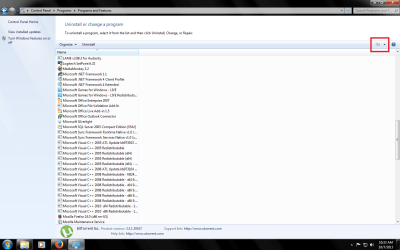
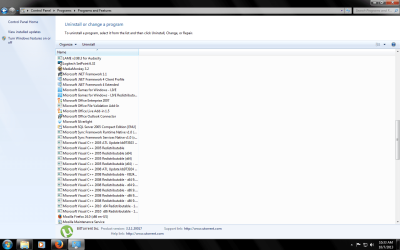
Hello, my programs and features screen (uninstall or change a program), is missing the details (publisher, installed on, size, version) after I uninstalled itunes from my second hard drive. What can I do to fix it?

I have attached a picture to further explain the issue, thank you.
 

Attachments
  • Programs and Features screen.png
    Programs and Features screen.png
    58.7 KB · Views: 9

My Computer

Computer type
PC/Desktop
Computer Manufacturer/Model Number
custom build
OS
Windows 7 Ultimate x64
CPU
AMD Athlon II X3 425
Motherboard
ASUS M4N68T-M
Memory
Kingston HyperX Blu 2GB 240-Pin DDR3 SDRAM DDR3 1333
Graphics Card(s)
Galaxy 64TGF8HX6FTZ GeForce GT 640
Hard Drives
Samsung 500 GB SATA II Hard Drive HD502HJ
PSU
LEPA N Series N500-SA 500W ATX12V Power Supply
Antivirus
none
Browser
none
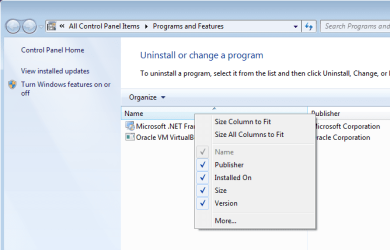
Try right clicking on the column named Name...
...and selecting the other columns of interest from the context menu:

columns.png
 

My Computer

Computer type
Laptop
Computer Manufacturer/Model Number
Employer provided Dell Latitude
OS
W7 Pro SP1 64bit
CPU
i7
Memory
8GB
Graphics Card(s)
Intel HD Graphics
Hard Drives
crappy SSD
Antivirus
Employer mandated Symantec Endpoint Protection
Browser
Pale Moon 64bit, IE11 64bit & Chrome 64bit
Have you tried clicking on the dropdown on the upper right and changing the view to "Details"?
 

Attachments

  • Programs%20and%20Features%20screen.png
    Programs%20and%20Features%20screen.png
    51.3 KB · Views: 1

My Computer

Computer type
PC/Desktop
Computer Manufacturer/Model Number
Self Built
OS
Win 10 Pro x64
CPU
Intel I5-2500K @3.3GHz
Motherboard
Asrock P67 Extreme4
Memory
16GB G.Skill Ripjaws X (4x4GB)
Graphics Card(s)
EVGA GeForce 750 Ti SC 2GB
Sound Card
ASUS Xonar DG 5.1 Channels 24-bit 96KHz PCI Interface Sound
Monitor(s) Displays
auria eq2367
Screen Resolution
1920 x 1080
Hard Drives
250GB Samsung 850 EVO SSD
1TB WD Blue
1TB Hitachi
PSU
SeaSonic X 650W 80 Plus Gold
Case
Corsair Obsidian 750D
Cooling
Corsair H60, Three 140mm case fans
Keyboard
Logitech Wireless Keyboard K520
Mouse
Logitech Wireless Mouse M310
Internet Speed
Wave Broadband ~ 100 dn 5 up
Antivirus
Windows Defender, Malwarebytes Premium
Browser
Edge, IE11, Chrome
Other Info
Laptop specs: HP g7-1365dx /
CPU: AMD A6-3420M APU with Radeon(tm) HD Graphics /
RAM: Crucial 8Gb (2x4Gb) /
SSD: Crucial M4-CT128M4SSD2 ATA Device/ FW 000F /
GFX: AMD Radeon HD 6520G /
OS: Windows 10 Pro x64
Yes, right clicking on the column named Name... solved it, but why did it deselect everything on its own?
 

My Computer

Computer type
PC/Desktop
Computer Manufacturer/Model Number
custom build
OS
Windows 7 Ultimate x64
CPU
AMD Athlon II X3 425
Motherboard
ASUS M4N68T-M
Memory
Kingston HyperX Blu 2GB 240-Pin DDR3 SDRAM DDR3 1333
Graphics Card(s)
Galaxy 64TGF8HX6FTZ GeForce GT 640
Hard Drives
Samsung 500 GB SATA II Hard Drive HD502HJ
PSU
LEPA N Series N500-SA 500W ATX12V Power Supply
Antivirus
none
Browser
none
W7 did not deselect everything on its own...
...it had help from a crappy Apple software install.

If you ever uninstall iTunes, you may find that your optical drive (CD/DVD) is missing.

edit: I usually only see this upon uninstalling iTunes.
The link mentions the issue happening after installing iTunes.
Perhaps I'm wrong, but I blame Apple's poorly written installer for this issue.
 
Last edited:

My Computer

Computer type
Laptop
Computer Manufacturer/Model Number
Employer provided Dell Latitude
OS
W7 Pro SP1 64bit
CPU
i7
Memory
8GB
Graphics Card(s)
Intel HD Graphics
Hard Drives
crappy SSD
Antivirus
Employer mandated Symantec Endpoint Protection
Browser
Pale Moon 64bit, IE11 64bit & Chrome 64bit
Yes my optical drive is missing, what can I do?
 

My Computer

Computer type
PC/Desktop
Computer Manufacturer/Model Number
custom build
OS
Windows 7 Ultimate x64
CPU
AMD Athlon II X3 425
Motherboard
ASUS M4N68T-M
Memory
Kingston HyperX Blu 2GB 240-Pin DDR3 SDRAM DDR3 1333
Graphics Card(s)
Galaxy 64TGF8HX6FTZ GeForce GT 640
Hard Drives
Samsung 500 GB SATA II Hard Drive HD502HJ
PSU
LEPA N Series N500-SA 500W ATX12V Power Supply
Antivirus
none
Browser
none

My Computer

Computer type
Laptop
Computer Manufacturer/Model Number
Employer provided Dell Latitude
OS
W7 Pro SP1 64bit
CPU
i7
Memory
8GB
Graphics Card(s)
Intel HD Graphics
Hard Drives
crappy SSD
Antivirus
Employer mandated Symantec Endpoint Protection
Browser
Pale Moon 64bit, IE11 64bit & Chrome 64bit
I went to the registry and deleted UpperFilters. It is fixed now, thank you very much.
 

My Computer

Computer type
PC/Desktop
Computer Manufacturer/Model Number
custom build
OS
Windows 7 Ultimate x64
CPU
AMD Athlon II X3 425
Motherboard
ASUS M4N68T-M
Memory
Kingston HyperX Blu 2GB 240-Pin DDR3 SDRAM DDR3 1333
Graphics Card(s)
Galaxy 64TGF8HX6FTZ GeForce GT 640
Hard Drives
Samsung 500 GB SATA II Hard Drive HD502HJ
PSU
LEPA N Series N500-SA 500W ATX12V Power Supply
Antivirus
none
Browser
none
You are welcome.

The drive may disappear again if iTunes updates or if you uninstall iTunes :-(
 

My Computer

Computer type
Laptop
Computer Manufacturer/Model Number
Employer provided Dell Latitude
OS
W7 Pro SP1 64bit
CPU
i7
Memory
8GB
Graphics Card(s)
Intel HD Graphics
Hard Drives
crappy SSD
Antivirus
Employer mandated Symantec Endpoint Protection
Browser
Pale Moon 64bit, IE11 64bit & Chrome 64bit
So, I had iTunes installed on my secondary hard drive and it never hard conflicts with the optical drive when it updated, but it made windows slower at start up for some reason. So I have moved iTunes to my main hard drive and now it can cause issues with the optical drive again when it updates?. So should I have kept it in the secondary hard drive?
 

My Computer

Computer type
PC/Desktop
Computer Manufacturer/Model Number
custom build
OS
Windows 7 Ultimate x64
CPU
AMD Athlon II X3 425
Motherboard
ASUS M4N68T-M
Memory
Kingston HyperX Blu 2GB 240-Pin DDR3 SDRAM DDR3 1333
Graphics Card(s)
Galaxy 64TGF8HX6FTZ GeForce GT 640
Hard Drives
Samsung 500 GB SATA II Hard Drive HD502HJ
PSU
LEPA N Series N500-SA 500W ATX12V Power Supply
Antivirus
none
Browser
none
I'm not sure what triggers the updates to make the optical drive go away. I just get calls to fix it when it happens. I think that some updates were major and amounted to an uninstall and re-install... but again, I'm not positive because I don't use iTunes.
 

My Computer

Computer type
Laptop
Computer Manufacturer/Model Number
Employer provided Dell Latitude
OS
W7 Pro SP1 64bit
CPU
i7
Memory
8GB
Graphics Card(s)
Intel HD Graphics
Hard Drives
crappy SSD
Antivirus
Employer mandated Symantec Endpoint Protection
Browser
Pale Moon 64bit, IE11 64bit & Chrome 64bit
Yes, I going to keep iTunes installed on my second hard drive, and prevent it from loading on start-up after every update. That seems to be the most functional setting so far.
 

My Computer

Computer type
PC/Desktop
Computer Manufacturer/Model Number
custom build
OS
Windows 7 Ultimate x64
CPU
AMD Athlon II X3 425
Motherboard
ASUS M4N68T-M
Memory
Kingston HyperX Blu 2GB 240-Pin DDR3 SDRAM DDR3 1333
Graphics Card(s)
Galaxy 64TGF8HX6FTZ GeForce GT 640
Hard Drives
Samsung 500 GB SATA II Hard Drive HD502HJ
PSU
LEPA N Series N500-SA 500W ATX12V Power Supply
Antivirus
none
Browser
none
Back
Top