Solved Programs being deleted from C:\Program Files (x86)

Roman5

New member
Member
VIP
Local time
11:44 PM
Messages
111
Location
London UK
But not by me!

A whole bunch of my programs,....

ie,

3D Mark 11, 06, Vantage
Photoshop Elements 6
Camtasia
Cool Edit Pro 2
Defraggler
dxtory
GIF movie gear
Furmark
MSI Afterburner
Firefox
Origin
Nero Burning ROM
Microsoft Autoroute 2007
AMD Catalyst Control Centre

...have disappeared, leaving my shortcuts looking like I uninstalled them. All deleted programs are still showing in control panel/programs and features, but with default windows icons next to the titles. I re-downloaded malwarebytes yesterday and installed to C:\Program Files (x86) again and did a quick scan and it came up with nothing. Spybot yesterday also only showed 'IWinGames' which I fixed. I re-installed photoshop yesterday as well to C:\Program Files (x86). Spybot today shows nothing.

Today, photoshop has gone again, likewise, malwarebytes again, and also some other programs: kies backup and restore, pinnacle studio, driver sweeper and tridef 3D software.

It occurred to me that every single one of the deleted programs were installed to C:\Program Files (x86), and nothing has been deleted that is installed to C:\Program Files, my E drive or my F drive. None of my other spyware programs and microsoft security essentials are installed to C:\Program Files (x86), so they have not been deleted.

Which begs the question, why are programs disappearing from C:\Program Files (x86) and C:\Program Files (x86) only?

As I type, I'm currently doing a full scan with malwarebytes on just my C drive and so far it's showing 3 objects detected. I'll report back with whatever they are in a while.

Just did a quick scan with microsoft security essentials and it's just quarantined Exploit:Java/Blacole.ES Alert Level: Severe

Encyclopedia entry: Exploit:Java/Blacole.ES - Learn more about malware - Microsoft Malware Protection Center

Could that be the issue?
 

My Computer

Computer type
PC/Desktop
OS
Windows 7 HP x64 SP1
CPU
Phenom II x2 550BE @3.1Ghz
Motherboard
GA-MA770-UD3 rev 2.0
Memory
Patriot Viper 2x2GB DDR2 6400
Graphics Card(s)
Sapphire HD5850 Extreme 1GB
Sound Card
Onboard Realtek
Monitor(s) Displays
Samsung 23" S23A700D * 120Hz * 3D * 2ms response
Screen Resolution
1920x1080
Hard Drives
SSD Samsung 830 128GB/Seagate 2TB (2 x single platter)/ WD 1TB Cav Black/ WD RE3 1TB /WD 320GB IDE/IBM 120GB IDE
PSU
XFX Pro 650w Core Edition
Case
Coolermaster CM690 Dominator
Cooling
TRUE Rev.C + Arctic Cooling MX-2 + various 12cm fans
Keyboard
Razer Lycosa
Mouse
Logitech MX518
Internet Speed
Fibre Optic 100MB Down * 6MB Up
The Exploit:Java/Blacole.ES certainly may be part of the issues. Below my sig is a link to Super AntiSpayware, dowload, update it and do a full scan with it too.
Check for updates to your Java install. Better is not to have Java installed. Also check for updates to Adobe Flash and Shockwave if you have those.
 

My Computer

Computer type
PC/Desktop
Computer Manufacturer/Model Number
Home Built Desktop By DataTech
OS
Windows 7 Ultimate X64 SP1
CPU
Intel i5-2550K, Differing ~4.4-4.8GHz No built in GPU
Motherboard
ASUS P8Z68-V PRO/GEN3
Memory
16GB G.Skill Sniper 1866MHz @ 2133MHz 2x8GB
Graphics Card(s)
ASUS GTX650TIB-DC2OC-2GD5, (650TI Boost)
Sound Card
Onboard Realtek 5-1
Monitor(s) Displays
Samsung P2570HD
Screen Resolution
1920x1080
Hard Drives
Samsung 840 Pro 256GB SSD for OS, 500GB Seagate Constellation (Enterprise drive) for Data
PSU
Corsair HX650W
Case
Inwin Dragon Rider
Cooling
Hyper 212 EVO w/two Noctua fans, push-pull, @1300 RPM
Keyboard
E-Z Eyes, bright yellow keys with large characters
Mouse
steelseries SENSEI Laser Pro Gaming
Internet Speed
48-51Mbs Mbs down, 11 Mbs up Xfinity Cable
Antivirus
Norton Internet Security 2013
Browser
IE 10, Opera, Pale Moon if needed
Other Info
4 case fans, LG BluRay-RE, ASUS DVD-RW, Mr. Fusion power supply, 1.21 gigawatts.
Thanks Britton, will do. Superantispyware is better than malwarebytes I take it?

I've removed the quarantined exploit using malwarebytes to do it.
 

My Computer

Computer type
PC/Desktop
OS
Windows 7 HP x64 SP1
CPU
Phenom II x2 550BE @3.1Ghz
Motherboard
GA-MA770-UD3 rev 2.0
Memory
Patriot Viper 2x2GB DDR2 6400
Graphics Card(s)
Sapphire HD5850 Extreme 1GB
Sound Card
Onboard Realtek
Monitor(s) Displays
Samsung 23" S23A700D * 120Hz * 3D * 2ms response
Screen Resolution
1920x1080
Hard Drives
SSD Samsung 830 128GB/Seagate 2TB (2 x single platter)/ WD 1TB Cav Black/ WD RE3 1TB /WD 320GB IDE/IBM 120GB IDE
PSU
XFX Pro 650w Core Edition
Case
Coolermaster CM690 Dominator
Cooling
TRUE Rev.C + Arctic Cooling MX-2 + various 12cm fans
Keyboard
Razer Lycosa
Mouse
Logitech MX518
Internet Speed
Fibre Optic 100MB Down * 6MB Up
Superantispyware and Malwarebytes are both great programs. They're similar but not exactly alike. No antimalware program is 100% effective 100% of the time. (If there was such a thing we'd all be using it.) So using multiple free on-demand scanners just add another layer of protection to a computer. Some other free products are: Hitman Pro | HouseCall | ESET | Comodo Cleaning Essentials | Windows Defender Offline (not to be confused with Windows Defender. This is another example of Microsoft's ability to make completely different products sound alike.)
 

My Computer

Computer type
Laptop
Computer Manufacturer/Model Number
Sony Vaio VPCEB47GM Laptop
OS
Win 7 Pro 64-bit
CPU
Intel i5 2.4 Ghz
Memory
8GB DDR3
Graphics Card(s)
Intel HD 3000
Sound Card
IDT High Definition
Monitor(s) Displays
15.6 WGXA Anti-Glare LED
Screen Resolution
1280x800
Hard Drives
640Gb 7200rpm
Antivirus
MSE
Browser
Opera (primary) with IE9 backup
yes, the Windows Defender Offline is a good choice, thanks marsmimar. It runs befors Windows boots and can be more effective.
 

My Computer

Computer type
PC/Desktop
Computer Manufacturer/Model Number
Home Built Desktop By DataTech
OS
Windows 7 Ultimate X64 SP1
CPU
Intel i5-2550K, Differing ~4.4-4.8GHz No built in GPU
Motherboard
ASUS P8Z68-V PRO/GEN3
Memory
16GB G.Skill Sniper 1866MHz @ 2133MHz 2x8GB
Graphics Card(s)
ASUS GTX650TIB-DC2OC-2GD5, (650TI Boost)
Sound Card
Onboard Realtek 5-1
Monitor(s) Displays
Samsung P2570HD
Screen Resolution
1920x1080
Hard Drives
Samsung 840 Pro 256GB SSD for OS, 500GB Seagate Constellation (Enterprise drive) for Data
PSU
Corsair HX650W
Case
Inwin Dragon Rider
Cooling
Hyper 212 EVO w/two Noctua fans, push-pull, @1300 RPM
Keyboard
E-Z Eyes, bright yellow keys with large characters
Mouse
steelseries SENSEI Laser Pro Gaming
Internet Speed
48-51Mbs Mbs down, 11 Mbs up Xfinity Cable
Antivirus
Norton Internet Security 2013
Browser
IE 10, Opera, Pale Moon if needed
Other Info
4 case fans, LG BluRay-RE, ASUS DVD-RW, Mr. Fusion power supply, 1.21 gigawatts.
Thanks, will try windows defender offline too.

Well, wouldn't you know it, windows live mail has been deleted too. :(

I've managed to locate my .eml files in a 345mb folder in C:\Users\me\AppData\Local\Microsoft\Windows Live Mail, so I'm assuming they're all intact, although I can't find my archive of 1999 to 2009 emails that I imported from XP outlook express (I think they were .dbx files) to win7 when I installed win7 in 2009. In windows live mail, those archived emails were in a separate imported folder further down the left column. Any idea where I can locate them and would imported .dbx files still be called .dbx or changed to .eml or something else? And how do I import the emails I've found?

I'm going to reinstall windows live mail, but not to program files (x86). Need to ask, are my emails safe in C:\Users\Lee\AppData\Local\Microsoft\Windows Live Mail or will they get overwritten when I install windows live mail and do I need to back them up or put them in some other folder for now?
 

My Computer

Computer type
PC/Desktop
OS
Windows 7 HP x64 SP1
CPU
Phenom II x2 550BE @3.1Ghz
Motherboard
GA-MA770-UD3 rev 2.0
Memory
Patriot Viper 2x2GB DDR2 6400
Graphics Card(s)
Sapphire HD5850 Extreme 1GB
Sound Card
Onboard Realtek
Monitor(s) Displays
Samsung 23" S23A700D * 120Hz * 3D * 2ms response
Screen Resolution
1920x1080
Hard Drives
SSD Samsung 830 128GB/Seagate 2TB (2 x single platter)/ WD 1TB Cav Black/ WD RE3 1TB /WD 320GB IDE/IBM 120GB IDE
PSU
XFX Pro 650w Core Edition
Case
Coolermaster CM690 Dominator
Cooling
TRUE Rev.C + Arctic Cooling MX-2 + various 12cm fans
Keyboard
Razer Lycosa
Mouse
Logitech MX518
Internet Speed
Fibre Optic 100MB Down * 6MB Up
I'm no WLM expert but as a safeguard until we find out what's wrong, put them on something else, such as a DVD or USB stick for safe keeping.
 

My Computer

Computer type
PC/Desktop
Computer Manufacturer/Model Number
Home Built Desktop By DataTech
OS
Windows 7 Ultimate X64 SP1
CPU
Intel i5-2550K, Differing ~4.4-4.8GHz No built in GPU
Motherboard
ASUS P8Z68-V PRO/GEN3
Memory
16GB G.Skill Sniper 1866MHz @ 2133MHz 2x8GB
Graphics Card(s)
ASUS GTX650TIB-DC2OC-2GD5, (650TI Boost)
Sound Card
Onboard Realtek 5-1
Monitor(s) Displays
Samsung P2570HD
Screen Resolution
1920x1080
Hard Drives
Samsung 840 Pro 256GB SSD for OS, 500GB Seagate Constellation (Enterprise drive) for Data
PSU
Corsair HX650W
Case
Inwin Dragon Rider
Cooling
Hyper 212 EVO w/two Noctua fans, push-pull, @1300 RPM
Keyboard
E-Z Eyes, bright yellow keys with large characters
Mouse
steelseries SENSEI Laser Pro Gaming
Internet Speed
48-51Mbs Mbs down, 11 Mbs up Xfinity Cable
Antivirus
Norton Internet Security 2013
Browser
IE 10, Opera, Pale Moon if needed
Other Info
4 case fans, LG BluRay-RE, ASUS DVD-RW, Mr. Fusion power supply, 1.21 gigawatts.
I would back up every essential file you have and then reinstall Windows. This is a particularly nasty virus you've contracted, and I wouldn't ever consider my computer fixed without nuking the current install and doing a fresh install.
 

My Computer

Computer Manufacturer/Model Number
Dell XPS 15 L502x
OS
Windows 7 Ultimate x64 SP1
CPU
Core i7-2670QM
Memory
8GB DDR3 PC3-10600
Graphics Card(s)
Intel HD Graphics 3000 + GeForce GT 540M
Screen Resolution
1920x1080
Hard Drives
1TB 5400RPM Seagate
Reinstalling Windows would be the most thorough option. If I remember correctly, it doesn't actually matter whether a 32-bit program is installed to C:\Program Files (x86) or C:\Program Files. You could try installing Malwarebytes to C:\Program Files just to see if it stays there. That way you can see if the virus removes programs based on whether they are 32-bit or 64-bit, or where they are stored, and it might keep you from having to keep reinstalling some program while you are trying to fix the computer.
 

My Computer

Computer type
Laptop
Computer Manufacturer/Model Number
Toshiba P775-S7100
OS
Windows 7 Professional SP1 64-bit
CPU
Intel Core i5-2450M @2.5 GHz
Memory
6 GB DDR3 1333MHz
Graphics Card(s)
Intel HD 3000
Monitor(s) Displays
Built-in 17.3" LED; 22" Insignia NS-L22Q-10A
Screen Resolution
1600x900; 1360x768
Hard Drives
750 GB Hitachi
1TB Seagate FreeAgent External
Internet Speed
Verizon DSL Speed(Down/Up): 3360 Kbps / 800 Kbps
Antivirus
MSE and MBAM Pro
Browser
IE10
Hi Roman

As an additional observation,
open folder option. Try to uncheck hidden files, folders, and drives. Also uncheck hide protected operating system files, and seek for any strange hidden files in any drives and folder.
Some nasty viruses leave files attributed as hidden and system files.
But ignore this if you've done so.

Kevin
 

My Computers

System One System Two

  • Computer type
    PC/Desktop
    Computer Manufacturer/Model Number
    MSI
    OS
    Windows 11 Prerelease
    CPU
    CORE i5 10400
    Motherboard
    MSI H510M Pro
    Memory
    16GB
    Graphics Card(s)
    GTX 750Ti
    Sound Card
    Realtek HD Integrated
    Monitor(s) Displays
    Samsung Curved 24"; Samsung TV 50"
    Screen Resolution
    1920 x 1080
    Hard Drives
    Vi-Gen NVMe 256GB
    WD 3 TB
    Seagate 2 TB
    Seagate 4TB
    PSU
    Power Striker
    Case
    VBR
    Cooling
    Conventional
    Keyboard
    Logitech Wireless
    Mouse
    Logitech Wireless
    Internet Speed
    2MBPs
  • Computer type
    Laptop
    System Manufacturer/Model Number
    Apple MacBook
    OS
    BigSur
    CPU
    Core i5
    Memory
    8 GB
    Monitor(s) Displays
    13 "
    Screen Resolution
    1366 x 768
    Hard Drives
    SSD 256 GB
Thanks for the fantastic advice guys. I've decided to go with kegobeer and do some damage limitation.

Mail and live movie maker have disappeared and windows live essentials says they're installed. I installed mail again but it's not installed. I can't install any windows live programs now, it lists them all with big green ticks saying they're installed and just a close button. If I try to delete the live mail folders showing up in program files x86 and program files, it says you require permission from trustedinstaller to make changes to this folder. I'm getting that on a few programs where it says trusted installed or SYSTEM need permissions. I tried to lock a folder the other day with windows permissions but then couldn't unlock it OR delete it, not even in safe mode, don't know if that had any bearing on these other things. There's so many messed up things now I think my only choice is to format and do a complete Windows 7 reinstall. It's been a long time coming anyway, it's just a right bloody PITA to go through the backing up and reinstalling stuff. Still, I'll take my time noting what I need to save, I'll do a ghetto backup and manually transfer important stuff to my laptop and nuke this infested C drive and reinstall windows.


I found thousands of .eml files in app data, so it looks like my emails are intact. So I presume I can import them into windows live mail on the new windows install.
 

My Computer

Computer type
PC/Desktop
OS
Windows 7 HP x64 SP1
CPU
Phenom II x2 550BE @3.1Ghz
Motherboard
GA-MA770-UD3 rev 2.0
Memory
Patriot Viper 2x2GB DDR2 6400
Graphics Card(s)
Sapphire HD5850 Extreme 1GB
Sound Card
Onboard Realtek
Monitor(s) Displays
Samsung 23" S23A700D * 120Hz * 3D * 2ms response
Screen Resolution
1920x1080
Hard Drives
SSD Samsung 830 128GB/Seagate 2TB (2 x single platter)/ WD 1TB Cav Black/ WD RE3 1TB /WD 320GB IDE/IBM 120GB IDE
PSU
XFX Pro 650w Core Edition
Case
Coolermaster CM690 Dominator
Cooling
TRUE Rev.C + Arctic Cooling MX-2 + various 12cm fans
Keyboard
Razer Lycosa
Mouse
Logitech MX518
Internet Speed
Fibre Optic 100MB Down * 6MB Up
Roman,

Right now, before you lose anything more:
Run WDO, Windows Defender Offline.

This program runs without your Win 7 ever booting up. Consequently, WDO can rid you of the most evil types of malware plus the normal menagerie of evil animals.

The proper link for WDO is in my signature.
You will find complete instructions there.

If you prefer, we have a tutorial on WDO.

I'm including the procedure which I use:

HOW TO USE WINDOWS DEFENDER OFFLINE ON A USB STICK
Windows Defender Offline
· is a free standalone, bootable malware and virus remover from Microsoft.
· performs an offline scan of an infected PC to remove viruses, rootkits and other advanced malware.

Download Windows Defender Offline (about 764 kB)

You will have the choice of downloading the 32bit version (x86) or the 64 bit version (x64).
The link will help you determine whether you are running a 32 bit version or 64 bit version of Windows

NOTE!! You can download and prepare a 32 bit version using a 64 bit version of Windows
NOTE!! You can download and prepare a 64 bit version using a 32bit version of Windows.

You run the 32 bit version on a 32 bit version of Windows.
You run the 64 bit version on a 64 bit version of Windows.

The 32 bit download file name is: mssstool32.exe
The 64 bit download file name is: mssstool64.exe

For the curious, this program was originally name Microsoft Standalone System Sweeper.


INSTALLATION:
You will need an Internet Connection.
Insert 512 mB (Microsoft’s 256 mB is no longer accurate) or larger USB stick into a usb port.
Run the downloaded program--mssstool64.exe or mssstool32.exe
NEXT button
Choose the option On a USB flash drive that is not password protected
NEXT button
NEXT button
.
The install program will format the usb stick using the NTFS format.
The install program will download about 210 mB.
The install program will name the USB stick WDO_Media32 or WDO_Media64
The WDO_Media32 usb stick will have used space of 255 mB (268,140,544 bytes)
The WDO_Media64 usb stick will have used space of 282 mB (296,165,376 bytes)
You can expect the number of mB to increase as more malware appears.

UPDATE Windows Defender Offline USB stick:
· reinsert the usb stick
· run the installation program, mssstool64.exe or mssstool32.exe, again.
· the update will download about 66 mB (mssstool32.exe) and 68 mB (mssstool64.exe).

Since the malware database is sometimes updated several times in a day, always update before running.

PERFORM AN OFFLINE SCAN
Bootup your computer from the USB stick
Windows Defender Offline will automatically perform a quick scan.
After the quick scan finishes, Choose Full Scan
Select all of your drives

The initial, full scan can easily take several hours, but
Remember, your computer is being very thoroughly checked for all types of malware.


RESULTS OF THE SCAN
The results will be in 4 log files in:
\Windows\Microsoft Antimalware\Support

Upload the four log files please.
===========================================
 

My Computer

Computer Manufacturer/Model Number
Toshiba Satellite S875D-S7239 laptop
OS
MS Windows 7 Ultimate SP1 64-bit
CPU
AMD A10-4600M
Motherboard
AMD Pumori (Socket FT1)
Memory
6.00 GB Dual-Channel DDR3 @ 798MHz (11-11-12-28)
Graphics Card(s)
AMD Radeon HD 7660G
Sound Card
High Definition Audio Device
Monitor(s) Displays
Generic PnP Monitor (1600x900@60Hz)
Screen Resolution
1600x900@60Hz
Hard Drives
SSD 119GB Corsair CSSD-V128GB2 ATA Device
Keyboard
Standard PS/2 Keyboard
Mouse
HP Wireless Optical Mobile Mouse Model FHA-3410
Internet Speed
What the local pub, local coffee shop offers.
Other Info
Optical Drive:MATSHITA BD-CMB UJ160B ATA Device


Also have an Asus ha1002xp netbook with Win 7 Ultimate installed.
Thanks karlsnooks, I will do that in a bit. The news get worse though. My laptop is infected. Malarebytes went missing from my laptops program files (x86) folder too, but so far nothing else has gone. Security Essentials found and quarantined the same Blacole.ES exploit, along with

Exploit: Java/CVE-2012-0507.R
Exploit: Java/CVE-2012-0507.D!ldr
Exploit: Java/CVE-2012-0507.AQ

When transferring files from my desktop to laptop just now, network connectivity had been turned off on both machines. Had to turn them both back on again.
 

My Computer

Computer type
PC/Desktop
OS
Windows 7 HP x64 SP1
CPU
Phenom II x2 550BE @3.1Ghz
Motherboard
GA-MA770-UD3 rev 2.0
Memory
Patriot Viper 2x2GB DDR2 6400
Graphics Card(s)
Sapphire HD5850 Extreme 1GB
Sound Card
Onboard Realtek
Monitor(s) Displays
Samsung 23" S23A700D * 120Hz * 3D * 2ms response
Screen Resolution
1920x1080
Hard Drives
SSD Samsung 830 128GB/Seagate 2TB (2 x single platter)/ WD 1TB Cav Black/ WD RE3 1TB /WD 320GB IDE/IBM 120GB IDE
PSU
XFX Pro 650w Core Edition
Case
Coolermaster CM690 Dominator
Cooling
TRUE Rev.C + Arctic Cooling MX-2 + various 12cm fans
Keyboard
Razer Lycosa
Mouse
Logitech MX518
Internet Speed
Fibre Optic 100MB Down * 6MB Up
Roman,
You have the wrong sequence!

Running WDO is your highest priority!.
 

My Computer

Computer Manufacturer/Model Number
Toshiba Satellite S875D-S7239 laptop
OS
MS Windows 7 Ultimate SP1 64-bit
CPU
AMD A10-4600M
Motherboard
AMD Pumori (Socket FT1)
Memory
6.00 GB Dual-Channel DDR3 @ 798MHz (11-11-12-28)
Graphics Card(s)
AMD Radeon HD 7660G
Sound Card
High Definition Audio Device
Monitor(s) Displays
Generic PnP Monitor (1600x900@60Hz)
Screen Resolution
1600x900@60Hz
Hard Drives
SSD 119GB Corsair CSSD-V128GB2 ATA Device
Keyboard
Standard PS/2 Keyboard
Mouse
HP Wireless Optical Mobile Mouse Model FHA-3410
Internet Speed
What the local pub, local coffee shop offers.
Other Info
Optical Drive:MATSHITA BD-CMB UJ160B ATA Device


Also have an Asus ha1002xp netbook with Win 7 Ultimate installed.
Roman,
You have the wrong sequence!

Running WDO is your highest priority!.

You're right sir, I've just been panicking a little, transferring a few essentials from desktop to laptop.

I found my 2GB pendrive and am going to follow your instructions. I have win7 64 so assume I will need mssstool64.exe. Do I need to change my boot options in bios to bootup from the USB stick?
 

My Computer

Computer type
PC/Desktop
OS
Windows 7 HP x64 SP1
CPU
Phenom II x2 550BE @3.1Ghz
Motherboard
GA-MA770-UD3 rev 2.0
Memory
Patriot Viper 2x2GB DDR2 6400
Graphics Card(s)
Sapphire HD5850 Extreme 1GB
Sound Card
Onboard Realtek
Monitor(s) Displays
Samsung 23" S23A700D * 120Hz * 3D * 2ms response
Screen Resolution
1920x1080
Hard Drives
SSD Samsung 830 128GB/Seagate 2TB (2 x single platter)/ WD 1TB Cav Black/ WD RE3 1TB /WD 320GB IDE/IBM 120GB IDE
PSU
XFX Pro 650w Core Edition
Case
Coolermaster CM690 Dominator
Cooling
TRUE Rev.C + Arctic Cooling MX-2 + various 12cm fans
Keyboard
Razer Lycosa
Mouse
Logitech MX518
Internet Speed
Fibre Optic 100MB Down * 6MB Up
consult the manual for your computer.
There should be instructions on performing a one-time change without having to change the bios.

For example, on my Toshiba if as soon as power is turned on then i start tapping the F12 key, a menu giving me the choice of a one time boot from USB appears.

Your other question is answered in the instructions I gave.
 

My Computer

Computer Manufacturer/Model Number
Toshiba Satellite S875D-S7239 laptop
OS
MS Windows 7 Ultimate SP1 64-bit
CPU
AMD A10-4600M
Motherboard
AMD Pumori (Socket FT1)
Memory
6.00 GB Dual-Channel DDR3 @ 798MHz (11-11-12-28)
Graphics Card(s)
AMD Radeon HD 7660G
Sound Card
High Definition Audio Device
Monitor(s) Displays
Generic PnP Monitor (1600x900@60Hz)
Screen Resolution
1600x900@60Hz
Hard Drives
SSD 119GB Corsair CSSD-V128GB2 ATA Device
Keyboard
Standard PS/2 Keyboard
Mouse
HP Wireless Optical Mobile Mouse Model FHA-3410
Internet Speed
What the local pub, local coffee shop offers.
Other Info
Optical Drive:MATSHITA BD-CMB UJ160B ATA Device


Also have an Asus ha1002xp netbook with Win 7 Ultimate installed.
How do you know if that crippled, virus-laden machine isn't infecting your other machine?

I think I would shut them both down to limit damage and run WDO as Karl suggests on both machines.

Don't bother running the OS on the hard drive of an infected machine. Save your files off of it by booting from CD/DVD or flash drive loaded with something like Lucid Puppy: Download latest Puppy Linux release. You can use it as your temporary OS while you get things cleaned up or wiped and reloaded.
 

My Computer

OS
Windows 7 Ultimate x64
Yep, I couldn't believe it when he said that he had connected his infected machine to another machine. Not wise.

You are correct than now WDO will need to be run on both machines.
 

My Computer

Computer Manufacturer/Model Number
Toshiba Satellite S875D-S7239 laptop
OS
MS Windows 7 Ultimate SP1 64-bit
CPU
AMD A10-4600M
Motherboard
AMD Pumori (Socket FT1)
Memory
6.00 GB Dual-Channel DDR3 @ 798MHz (11-11-12-28)
Graphics Card(s)
AMD Radeon HD 7660G
Sound Card
High Definition Audio Device
Monitor(s) Displays
Generic PnP Monitor (1600x900@60Hz)
Screen Resolution
1600x900@60Hz
Hard Drives
SSD 119GB Corsair CSSD-V128GB2 ATA Device
Keyboard
Standard PS/2 Keyboard
Mouse
HP Wireless Optical Mobile Mouse Model FHA-3410
Internet Speed
What the local pub, local coffee shop offers.
Other Info
Optical Drive:MATSHITA BD-CMB UJ160B ATA Device


Also have an Asus ha1002xp netbook with Win 7 Ultimate installed.
Ok, mssstool64.exe downloaded, pendrive formatted, files added and updated. You're right karlsnooks, I have an F12 boot menu option for a one time only boot choice. Now about to boot with pendrive and do a quick scan then full scan. Thanks for all your help so far, much appreciated. Then I guess I'll have to do the same with my laptop. I hope the full scans don't take TOO long, but as you say, they probably will take several hours :)
 

My Computer

Computer type
PC/Desktop
OS
Windows 7 HP x64 SP1
CPU
Phenom II x2 550BE @3.1Ghz
Motherboard
GA-MA770-UD3 rev 2.0
Memory
Patriot Viper 2x2GB DDR2 6400
Graphics Card(s)
Sapphire HD5850 Extreme 1GB
Sound Card
Onboard Realtek
Monitor(s) Displays
Samsung 23" S23A700D * 120Hz * 3D * 2ms response
Screen Resolution
1920x1080
Hard Drives
SSD Samsung 830 128GB/Seagate 2TB (2 x single platter)/ WD 1TB Cav Black/ WD RE3 1TB /WD 320GB IDE/IBM 120GB IDE
PSU
XFX Pro 650w Core Edition
Case
Coolermaster CM690 Dominator
Cooling
TRUE Rev.C + Arctic Cooling MX-2 + various 12cm fans
Keyboard
Razer Lycosa
Mouse
Logitech MX518
Internet Speed
Fibre Optic 100MB Down * 6MB Up
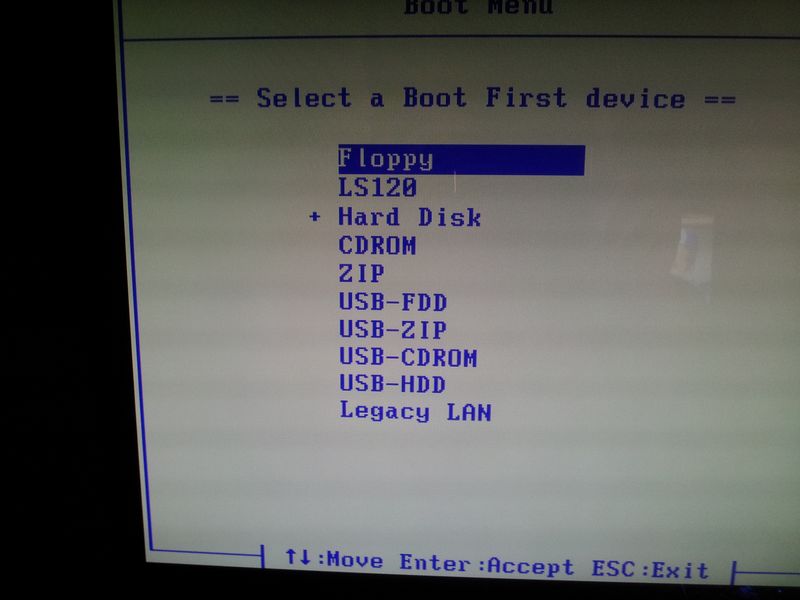
Hmm, the pendrive is still inserted into the USB, but I can't get it to boot. I've tried USB-FDD, USB-HDD USB-ZIP and ZIP from the F12 key, and then I tried them all again from setting them as first priority boot within bios. Whatever I try, it just boots into windows and my desktop.

Pendrive inserted is labelled WDO_Media64, has 278mb of data, and has a boot folder and various boot files. Maybe I should reformat the pendrive and try again? I have to say, the first time I went through the 4 step process of downloading, processing, formatting and adding the files, it quit saying there was an error, but it completed the second attempt.

This is my screen of choices after pressing F12.

09YpM.jpg
 

My Computer

Computer type
PC/Desktop
OS
Windows 7 HP x64 SP1
CPU
Phenom II x2 550BE @3.1Ghz
Motherboard
GA-MA770-UD3 rev 2.0
Memory
Patriot Viper 2x2GB DDR2 6400
Graphics Card(s)
Sapphire HD5850 Extreme 1GB
Sound Card
Onboard Realtek
Monitor(s) Displays
Samsung 23" S23A700D * 120Hz * 3D * 2ms response
Screen Resolution
1920x1080
Hard Drives
SSD Samsung 830 128GB/Seagate 2TB (2 x single platter)/ WD 1TB Cav Black/ WD RE3 1TB /WD 320GB IDE/IBM 120GB IDE
PSU
XFX Pro 650w Core Edition
Case
Coolermaster CM690 Dominator
Cooling
TRUE Rev.C + Arctic Cooling MX-2 + various 12cm fans
Keyboard
Razer Lycosa
Mouse
Logitech MX518
Internet Speed
Fibre Optic 100MB Down * 6MB Up
Back
Top