Solved Programs won't open, video's won't play, no virus detected

CamsPC

New member
Local time
7:45 PM
Messages
3
Location
Australia, NSW
G'day, so basically, to start off I'm not a genius with computer's, but recently I've been having some ridiculous PC problems. My programs won't load, animation's and videos and the window's bootup sound won't play, basically it's a sheer disaster. Ever since I went over to my Nan's house to test whether her modem was working using my PC, and returning home, my PC has literally been almost-completely ineffective. I can't play games, can't open MOST programs, it's terrible. I've done a full system scan with BitDefender Plus and haven't found ANY viruses. A good thing to note too is my skype has been hacked and random links have been sent to all of my contacts. Not sure if this has triggered a virus. Whenever I shut down the computer, it waits on explorer.exe to close, which takes literally forever, before hitting the BSOD and shutting down itself. I'm almost certain this is a software issue/virus. It may have been some devices I installed at my Nan's house, such as her printer, keyboard, etc, or it could potentially be a hardware issue, hence no flash files want to play, Discord animation, frozen, etc. I started the computer in safe mode, where it didn't open programs as well, only until, I closed explorer.exe from Task Manager and then it worked! Maybe a possible explorer virus?
If I could get some help on this one, I'd greatly appreciate it. Cheers
- Cam
 

My Computer My Computer

At a glance

Windows 7FX 835016.0GBNVIDIA Geforce GTX 680
Computer type
PC/Desktop
Computer Manufacturer/Model Number
Gigabyte
OS
Windows 7
CPU
FX 8350
Motherboard
GA-78LMT-USB3
Memory
16.0GB
Graphics Card(s)
NVIDIA Geforce GTX 680
Hard Drives
2.0TB
Antivirus
Bitdefender Plus 2017
Browser
Google Chrome
Welcome to the forum

PCHF SCANS
System Scans
Copyright © 2014 • All Rights reserved • E-Mail: [email protected]
Please download Adware cleaner from the link below.
Downloading AdwCleaner
Save it to your desktop.
Right click run as admin.
Hit the scan button.
Allow completion.
Make sure all items are ticked.
Hit the clean button.
Even if no items are displayed to be ticked hit the clean button anyway.
The machine will reboot this is normal.
Post the log in your next reply.


Please download MINITOOLBOX and run it.
Downloading MiniToolBox
Checkmark following boxes:

Flush DNS
Reset FF proxy Settings
Reset Ie Proxy Settings
Report IE Proxy Settings
Report FF Proxy Settings
List content of Hosts
List IP configuration
List Winsock Entries
List last 10 Event Viewer log
List Installed Programs
List Users, Partitions and Memory size
List Devices (problems only)
Click Go and post the result.


Please download the wireless test tool from

http://www.crewetown.co.uk/wireless.exe

Very important you right click and choose run as admin post results

Please download and save FRST 64bit or FRST 32 bit to your Desktop.

http://download.bleepingcomputer.com/farbar/FRST.exe

http://download.bleepingcomputer.com/farbar/FRST64.exe

Right click to run as administrator (XP users click run after receipt of Windows Security Warning - Open File). When the tool opens click Yes to disclaimer.

Make sure that Addition option is checked.
Press Scan button.
It will produce a log called FRST.txt in the same directory the tool is run from.
Please copy and paste log back .
The first time the tool is run it generates another log (Addition.txt - also located in the same directory as FRST.exe/FRST64.exe).


Disable your antivirus prior to the scan!!
Download z o e k . e x e version 5.0.0.0
Save the file to your desktop.
Right click Zoek.exe and run as administrator.
Copy and the items below and paste them into Zoek.


createsrpoint;
emptyfolderscheck;delete
emptyclsid;
emptyalltemp;
ipconfig /flushdns;b
ResetHosts;
iedefaults;
autoclean;
chrdefaults;
ffdefaults;
reset chrome;
resetieproxy;

Now hit the run script button.
The log will appear after a reboot, a
lso you can find it on the C: drive.
Post the log in your next reply.
Download the eScanAV Anti-Virus Toolkit (MWAV)
http://www.escanav.com/english/conte...dwn&type=alter
Save the file to your desktop.
Right click run as administrator.
A new icon will appear on your desktop.
Right click run as administrator on new icon.
Click on the update tab.
Pt0EV52.png

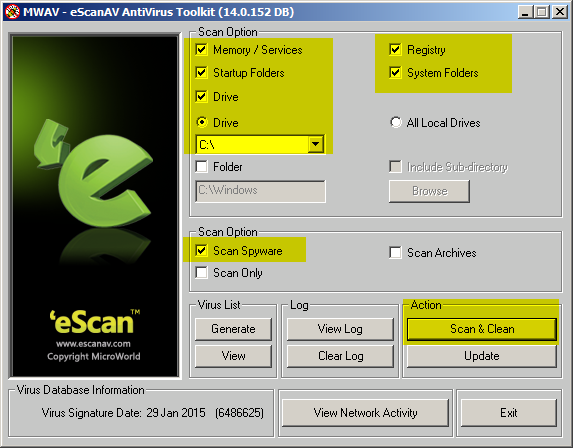
Once you have updated the program, make sure the settings are the same as the picture below.
RDgdRoi.png

Once you have made sure the settings match the picture, hit the Scan & Clean button.
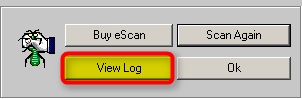
Upon scan completion, click View Log.
yqItTC5.png

Copy and paste entire log into your next reply.
Note: Reboot if needed to remove infections.


Step 4: Adware Removal Tool.

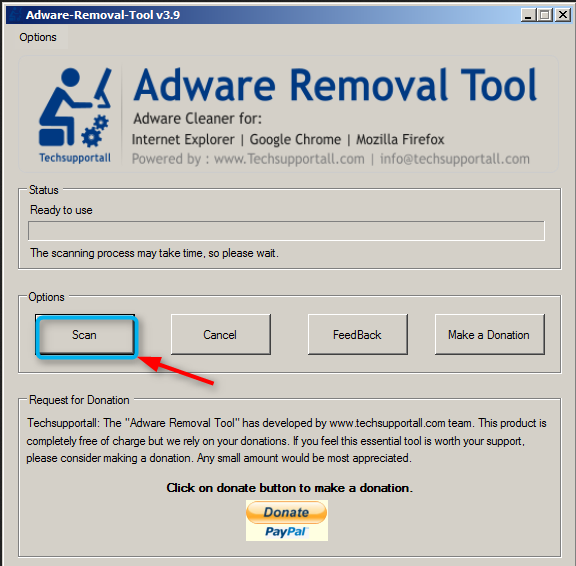
Download Adware removal tool to your desktop, right click the icon and select Run as Administrator.

LOr0Gd7.png


Hit Ok.

sYFsqHx.png


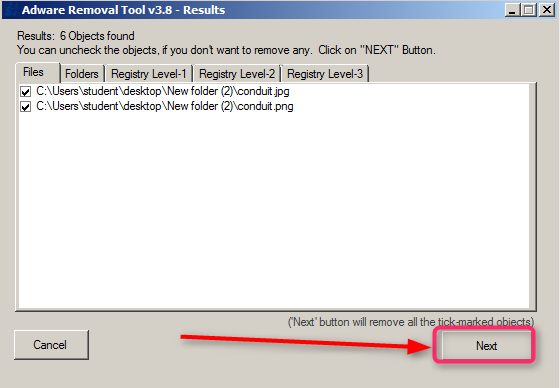
Hit next make sure to leave all items checked, for removal.

8NcZjGc.png


The Program will close all open programs to complete the removal, so save any work and hit OK. Then hit OK after the removal process is complete, then OK again to finish up. Post log generated by tool.


My Computer My Computer

At a glance

win 8 32 bit
Computer type
PC/Desktop
OS
win 8 32 bit
If you suspect a virus, running just one anti-virus wont do.
Try running Ad-Aware, Malwarebytes and an online virus scanner.
 

My Computer My Computer

At a glance

Windows 7 Professional 64bitIntel i7-5960X64GB Corsair Dominator 2400MHz3 EVGA GTX980's
Computer type
PC/Desktop
Computer Manufacturer/Model Number
custom build
OS
Windows 7 Professional 64bit
CPU
Intel i7-5960X
Motherboard
EVGA X99 Classified
Memory
64GB Corsair Dominator 2400MHz
Graphics Card(s)
3 EVGA GTX980's
Sound Card
on board
Monitor(s) Displays
3 Dell E2715H 27"
Screen Resolution
1920x1080 (5760x1080)
Hard Drives
Samsung 950 Pro 1TB M.2 SSD,
Western Digital Black 2TB HDD's x5
Western Digital Black 1TB HDD's x3
PSU
Corsair AX1200i
Case
Corsair 750D
Cooling
Corsair H110i GT
Keyboard
Corsair K70
Mouse
Corsair M45
Internet Speed
250 down/10 up
Antivirus
Microsoft Security Essentials
Browser
IE 11, Google Chrome
Here are the logs for the programs I used, one thing to note is the eScanAV Anti-Virus Toolkit (MWAV) didn't have a Scan Spyware option, but managed to Scan & Clean... Thank you for your time!
 

Attachments

My Computer My Computer

At a glance

Windows 7FX 835016.0GBNVIDIA Geforce GTX 680
Computer type
PC/Desktop
Computer Manufacturer/Model Number
Gigabyte
OS
Windows 7
CPU
FX 8350
Motherboard
GA-78LMT-USB3
Memory
16.0GB
Graphics Card(s)
NVIDIA Geforce GTX 680
Hard Drives
2.0TB
Antivirus
Bitdefender Plus 2017
Browser
Google Chrome
Also, another thing to note is the other day my computer was randomly shutting down in the middle of gaming. It did this twice. I checked whether I was accidentally fiddling with the power connections under my desk, re-plugged some of the cables, secured them and it didn't do anything since. However, when I went to actually have a look, I swear I couldn't actually see any loose plugs. It seemed like it was actually just switching off on its own... Is my computer royally F'd?
 

My Computer My Computer

At a glance

Windows 7FX 835016.0GBNVIDIA Geforce GTX 680
Computer type
PC/Desktop
Computer Manufacturer/Model Number
Gigabyte
OS
Windows 7
CPU
FX 8350
Motherboard
GA-78LMT-USB3
Memory
16.0GB
Graphics Card(s)
NVIDIA Geforce GTX 680
Hard Drives
2.0TB
Antivirus
Bitdefender Plus 2017
Browser
Google Chrome
It will take some time to check the logs but they do show a lot of malware removed and the HD controller is showing problems did you check all the connections?
 

My Computer My Computer

At a glance

win 8 32 bit
Computer type
PC/Desktop
OS
win 8 32 bit
Back
Top