Project: The Ultimate Computer Desk

That pic

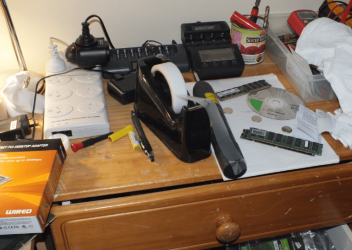
Hiyya ultimate just been flat out mate with repairing - that pic of the invisible tape I said I'd send. (Errrr sorry re the clutter lol!!)

Oh and I was thinking what someone had said about the heat within the unit - how does a large solid aluminium back to the desk sound - perhaps with a few cooling fins along the length of the unit on the outside and inside. Maybe set some fans into it?:geek:
 

Attachments

  • CaptureTAPE.PNG
    CaptureTAPE.PNG
    201.4 KB · Views: 17

My Computer My Computer

Computer type
PC/Desktop
Computer Manufacturer/Model Number
Own build (new) Desk1 / Asus ROG Win 7 / Desk2 1st build
OS
Desk1 7 Home Prem / Desk2 10 Pro / Main lap Asus ROG 10 Pro 2 laptop Toshiba 7 Pro Asus P2520 7 & 10
CPU
Desk1 i5 3750K / Laptop i7 GTX 860M / Desk2 i5 2500
Motherboard
Desk1 Asus P877-V / Desk2 Gigabyte H67 UD3H / Laptop ?
Memory
Desk1 8GB (1866) / Desk2 16GB (1333) / Laptop 8Gb DDR3
Graphics Card(s)
Desk 1& 2NVidia GTX 650 & Laptops on board Intel
Sound Card
Desk 1 & 2 -XONAR DG Realtek High Def audio Laptop
Monitor(s) Displays
Desk 1 Benq HD 2450 / Desk2 Philips 24" / Laptop 17.5"
Screen Resolution
1920x1080 D1 & D2 & Laptop 1
Hard Drives
Desk1 Samsung 120GB 830 SSD
Asus ROG 256GB 850 Pro SSD
Desk2 Samsung 840 256 SSD
Toshiba 120GB EVO
PSU
Desk 1 Corsair HX 1050/ Laptop ? / Desk 2 Corsair HX 650
Case
Desk 1 Cooler HAF XM ? Toshiba laptop / Desk2 Coolermaster
Cooling
Fans on all Desk1 -2 Desk2 - all Coolermasters 5 Laptop ?
Keyboard
Desk 1 MS Sidewinder X6 Desk 2 MS Sidewinder X 4
Mouse
Desk 1&2 - Gigabyte MS 900 gamer - laptop - Logitec wireless
Internet Speed
ADSL2+
Other Info
One other Desktop (tester) and spare Toshba laptop both with SSD's
Running Kaspersky 2016 ISS on all machines config'd identically
Logitec audio stereo systems on each machine (x3)
Canon MG5250MFC
Router/modem TP-Link running WPA2SK
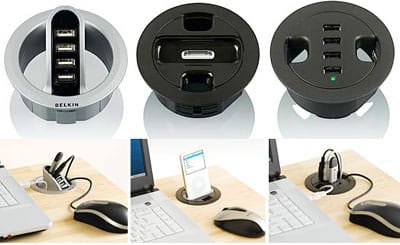
USB goodies for your desk: Belkin Grommet Hole

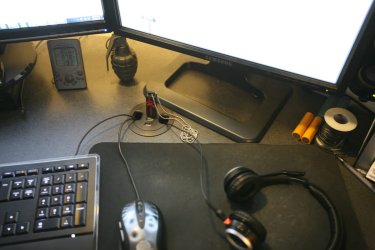
This could be useful to your project
 

Attachments

  • desk-usb.jpg
    desk-usb.jpg
    81 KB · Views: 24
  • belkingrometgear.jpg
    belkingrometgear.jpg
    17.4 KB · Views: 32

My Computer My Computer

Computer Manufacturer/Model Number
Self Built
OS
Windows 7 Pro 64 Bit
CPU
I7 920
Motherboard
EVGA Classfied 760
Memory
12GB DDR3
Graphics Card(s)
2X GTX 295
Sound Card
Onboard Realtek
Monitor(s) Displays
3X 20.1 Inch 1X 24 inch
Hard Drives
3X 1TB WD RE3 RAID 0 + 2X 2TB Green Drive 2X 1TB USB 2.0 external
PSU
Antec 1000 Watt
Case
Cooler Master Haf-X
Cooling
Zalman 9900 Max
A New Face Plate

It's awesome the amount of sponsorships this beast of a project has obtained. I'm sure some other major companies may contribute as well, what major company wouldn't want their tech in there?

Sucks the Dual XEON had to come out, but one must sacrifice to gain, with the ATX you should have more room for the tech to plan to put in there, I also like the idea of the layout of the buttons, LEDs, and USB ports you will be putting in the front there. And good luck on Cable Management, that is always one of the hardest parts of big builds.
Thanks PwnFrnzy, the sponsorship has been a really interesting treat, and I am extremely humbled by the fact that so many companies have signed on a testament to how neat this project is. Cable management.. yes.. it will be very interesting!

Just looking at the fan setup yeah this is where I would be putting those filters (if they are on the outer surface) and seeing it's a reasonably thin sheet it's on - how about some of those silicone "frames" to go between the fan and sheet I know they are not that noisy but given there are a few for the extra few cents - worth it I reckon.:cool:

Nearly forgot the tape is called "invisible" out here maybe some different where you are - I'll send a pic - go to dash for the workhouse!!
Those silicone frames may be worthwhile looking in to. I will wait and see how it turns out when I turn it on!

i love this idea! well done.
Thanks toetag!

Hiyya ultimate just been flat out mate with repairing - that pic of the invisible tape I said I'd send. (Errrr sorry re the clutter lol!!)

Oh and I was thinking what someone had said about the heat within the unit - how does a large solid aluminium back to the desk sound - perhaps with a few cooling fins along the length of the unit on the outside and inside. Maybe set some fans into it?:geek:
Aha! I think... that would cost a lot lolol!

This could be useful to your project
Yes, some very cool stuff - I am considering the possibilities!

I guess it's been a while eh!

Well, you'll be glad to know, that I'm actually almost done. There've been a few changes to the original plan, etc, etc, but I've still been goign full steam ahead, just not a lot of time to post updates lately.

Here you go, some photo bombardment!

First off, my awful cutting job. Notice how the masking tape ripped off some of the polyurethane? Looks pretty great eh.. (NOT!)

img6467al.jpg


Fitting my original faceplate design

img6470rr.jpg


I thought it didn't look too bad, but the USB ports were difficult to secure, and there were no audio jacks, so I went about and redesigned a new face plate

img6473m.jpg


Did some work with the band saw, scroll saw, and some sanding, and voila!

img6474n.jpg


img6486li.jpg


Looks not terrible eh? That's a nice unit from Silverstone that I picked up from my local computer store. Everything fits real nice and tight

img6492f.jpg


Holes for the power switch and LEDs look good

img6495w.jpg


And a quick test fit

img6507l.jpg


Wonderful! I cut the hole for the card reader / usb with a jigsaw, but neglected to take photos...

Anyways - after a couple coats of black spray paint, I think it looks pretty cool.

img6516d.jpg
 

My Computer My Computer

OS
Windows 7 Home Premium 64-Bit
Older i5

With the faceplate out of the way, and hopefully, the last of the drilling / sawing / making sawdust portion over, for the right-hand cabinet, it meant I had the all clear to install more hardware.

Here are the two hard-drive trays with the actual HDD trays removed.

img6508h.jpg


Gave them a nice coat of black spray paint and they mounted them inside the cabinet. I think they look pretty groovy.

img6513n.jpg


Even groovier loaded up with hard drives.. (Two missing in this pic, 7TB total, however!)

img6515g.jpg


Now, before we get to the next pic... another boon happened recently - traded some of those Core 2 Duo systems + some cash and picked up a really cool previous generation Core i5!

Here's the power supply - a Corsair 650TX, a very quality unit. All that could be better is some modular action. Ah well!

img6517b.jpg


And another beautiful Gigabyte motherboard - a GA-P55-USB3 with 4 GB of G.Skill RAM

img6520f.jpg


img6521p.jpg


Here's the sweet mother. A quad core 2.8Ghz. Wow, talk about moving on up the CPU chain!

img6531gs.jpg


I picked up an older version of the Coolermaster Hyper 212 (Not the Plus version) and mounted a pair of Scythe fans to it

img6533a.jpg


Oooh, it's getting so close to boot time!

img6538j.jpg
 

My Computer My Computer

OS
Windows 7 Home Premium 64-Bit
Looking really good. I like the faceplate with the start button and stuff.

~Lordbob
 

My Computer My Computer

Computer Manufacturer/Model Number
Hera
OS
Windows 7 Ultimate x64, Mint 9
CPU
Intel i5-2500k
Motherboard
ASUS P8P67 Pro
Memory
2x 4Gb Corsair VENGEANCE DDR3-1600
Graphics Card(s)
NVidia GeForce N260GTX Twin Frozr
Sound Card
Realtek HD OnBoard Audio
Monitor(s) Displays
ASUS 24" Monitor
Screen Resolution
1920x1080
Hard Drives
G.SKILL Phoenix Series 60GB SATA II MLC Internal Solid State Drive (SSD)
SAMSUNG Spinpoint F3R 1TB 7200 RPM 32MB Cache SATA II
PSU
Cooler Master Real Power Pro 750W
Case
Cooler Master Haf 932
Cooling
Fans
Keyboard
Razer Tarantula
Mouse
Razer Lachesis
Internet Speed
not fast enough
Wicked Sick!

Anyways - after a couple coats of black spray paint, I think it looks pretty cool.

img6516d.jpg

I must first say, i've been following this thread for some time and I'm really impressed with your work and the ammount of detail going into this!

That really looks good but you could take the facia's off the optical drive and card reader, prime them up and spray them with the same spray used on the surround for a colour match?

Unless you wanted to keep the logo's and lables...
 

My Computer My Computer

Computer type
PC/Desktop
Computer Manufacturer/Model Number
Self Build
OS
Windows 7 Ultimate x64
CPU
Intel Core2 Quad Q8300 2.5Ghz
Motherboard
Asus P5QD Turbo
Memory
Kingston HyperX 4x1GB DDR2 1066Mhz
Graphics Card(s)
Asus/Nvidia 9500GT 1GB
Sound Card
On-Board HD
Monitor(s) Displays
22" Widescreen TFT
Screen Resolution
1920x1080
Hard Drives
2x 320Gb Seagate SATAII RAID 0
2x 80Gb Seagate SATAII RAID 0
1x 1tb hybrid (8gb ssd)
PSU
650w
Case
ATX
Cooling
140mm front, 120mm Rear, 80mm Chipset + stock CPU and GPU
Keyboard
Plastic one
Mouse
Plastic one
Internet Speed
4Mbps
Other Info
Laptop: HP Elitebook 2560p
i5 @2.7Ghz 4GB DDR3
Gettin better

Hey ulti getting better and better and looking at the drives looks like my metal back maybe an option. Have you tried costing some checkerplate from say a box trailer manufacturer? I'll go back and have a look at the dimensions and price it out here - that might bring me back to Earth perhaps - any mates in crash repair places that may be able to help you out?

Now I am trying to dream up something to do with a cooling system from an old fridge hmmmmm:geek:
 

My Computer My Computer

Computer type
PC/Desktop
Computer Manufacturer/Model Number
Own build (new) Desk1 / Asus ROG Win 7 / Desk2 1st build
OS
Desk1 7 Home Prem / Desk2 10 Pro / Main lap Asus ROG 10 Pro 2 laptop Toshiba 7 Pro Asus P2520 7 & 10
CPU
Desk1 i5 3750K / Laptop i7 GTX 860M / Desk2 i5 2500
Motherboard
Desk1 Asus P877-V / Desk2 Gigabyte H67 UD3H / Laptop ?
Memory
Desk1 8GB (1866) / Desk2 16GB (1333) / Laptop 8Gb DDR3
Graphics Card(s)
Desk 1& 2NVidia GTX 650 & Laptops on board Intel
Sound Card
Desk 1 & 2 -XONAR DG Realtek High Def audio Laptop
Monitor(s) Displays
Desk 1 Benq HD 2450 / Desk2 Philips 24" / Laptop 17.5"
Screen Resolution
1920x1080 D1 & D2 & Laptop 1
Hard Drives
Desk1 Samsung 120GB 830 SSD
Asus ROG 256GB 850 Pro SSD
Desk2 Samsung 840 256 SSD
Toshiba 120GB EVO
PSU
Desk 1 Corsair HX 1050/ Laptop ? / Desk 2 Corsair HX 650
Case
Desk 1 Cooler HAF XM ? Toshiba laptop / Desk2 Coolermaster
Cooling
Fans on all Desk1 -2 Desk2 - all Coolermasters 5 Laptop ?
Keyboard
Desk 1 MS Sidewinder X6 Desk 2 MS Sidewinder X 4
Mouse
Desk 1&2 - Gigabyte MS 900 gamer - laptop - Logitec wireless
Internet Speed
ADSL2+
Other Info
One other Desktop (tester) and spare Toshba laptop both with SSD's
Running Kaspersky 2016 ISS on all machines config'd identically
Logitec audio stereo systems on each machine (x3)
Canon MG5250MFC
Router/modem TP-Link running WPA2SK
Looking really good. I like the faceplate with the start button and stuff.

~Lordbob
Thanks Lordbob75!

Anyways - after a couple coats of black spray paint, I think it looks pretty cool.

I must first say, i've been following this thread for some time and I'm really impressed with your work and the ammount of detail going into this!

That really looks good but you could take the facia's off the optical drive and card reader, prime them up and spray them with the same spray used on the surround for a colour match?

Unless you wanted to keep the logo's and lables...
Thanks, that's a cool idea and I may consider that!

Hey ulti getting better and better and looking at the drives looks like my metal back maybe an option. Have you tried costing some checkerplate from say a box trailer manufacturer? I'll go back and have a look at the dimensions and price it out here - that might bring me back to Earth perhaps - any mates in crash repair places that may be able to help you out?

Now I am trying to dream up something to do with a cooling system from an old fridge hmmmmm:geek:
Ooh, another great idea! Thanks! I think what you're talking about is a phase change cooling system?

Wow, with all those SATA cables there, it sure messes things up, no?

img6540x.jpg


img6541y.jpg


I went ahead and threw in my current video card (Radeon HD5770, which kicks some pretty decent butt still). I'm sure I'll see an improvement from my P4 3.2!!!

img6542m.jpg


And here's the magical moment. It looks like it's already been tweaked around a bit. Running at 3.2Ghz instead of 2.8Ghz, RAM speed up to 1600Mhz... Hey - nice temps! That's only a few degrees over ambient! (It's chilly in the basement)

img6547z.jpg


Only one major problem with this setup... Can you see what it might be? (Well, ok, there's more than one thing not "ideal")

img6549yt.jpg


That might cause an issue. I also don't like the way the heatsink exhausts all of its hot air directly onto the back of the video card, so off to the local computer shop!

This should do the trick:

img6550n.jpg


Much better. Fits almost like it was meant to be.

img6551y.jpg


Looks real good there actually. I think the wide fin spacing will be an advantage as well, since there is going to be a lot of general air flow throughout the cabinet.

img6552t.jpg
 

My Computer My Computer

OS
Windows 7 Home Premium 64-Bit

My Computer My Computer

Computer type
PC/Desktop
Computer Manufacturer/Model Number
A blend of brains, brawn and dumb luck.
OS
Windows 7 Ultimate 64
CPU
i7 3770k OC'd 4.6 @ 1.17v, also FX 8120 & i5 miniITX
Motherboard
MSI P67A-GD80 b3
Memory
32 gb G.Skill Sniper DDR3 10-12-12-31 @ 2133
Graphics Card(s)
XFX Radeon 7870 2GB DDR5
Sound Card
Sound Blaster Z Series Card
Monitor(s) Displays
(2) LG LED 23" 1920 x 1080 2ms Monitors via mini d-port
Screen Resolution
1680 X 1050 p
Hard Drives
Samsung 256 gb 830 SSD sata III
(1) 1 tb WD Black
(2) 1 tb Hitachi deskmates/sata II
(2) 1 tb WD green/sata II
(2) 3 tb Seagate Barracuda
(1) 120 gb OCZ Vertex SS
(1) Drobo 5N w/5 Seagate 3tb
PSU
EVGA modular 1000G2 80% gold rating & APC 1200 RS
Case
CoolerMaster Storm Styker
Cooling
7 case fans 140mm & 120mm, NZXT Kraken X60
Keyboard
(2) Logitech Illuminated Keyboards (1) usb (1) wireless
Mouse
Logitech G700 & T-BC21 - nano nx for the laptop
Internet Speed
Basic 120mbps down
Antivirus
Trend Micro Titanium Max Security & Malwarebytes Premium
Browser
Chrome and IE 10
Other Info
5 Noctua case fans + 3 Noctua in p/p on NZXT cooler
Integrated hot swap drive bays for 2.5" Drives
(2) Lite-on dvd/cd/Blu Ray optical 22X
Integrated fan controller and led on/off
HP Officejet Pro 8630 all-n-one
Hot-swappable 3.5" hard drive bay
Netgear Nighthawk router
Asus USB 3 & sata 6 PCIe card
Vantec IDE to sata adptr./Ultra sata adptr
Lenovo L420 i5 lappy with m sata
Drobo 5N advanced NAS
OOOOh!

Looking really good. I like the faceplate with the start button and stuff.

~Lordbob
Thanks Lordbob75!

I must first say, i've been following this thread for some time and I'm really impressed with your work and the ammount of detail going into this!

That really looks good but you could take the facia's off the optical drive and card reader, prime them up and spray them with the same spray used on the surround for a colour match?

Unless you wanted to keep the logo's and lables...
Thanks, that's a cool idea and I may consider that!

Hey ulti getting better and better and looking at the drives looks like my metal back maybe an option. Have you tried costing some checkerplate from say a box trailer manufacturer? I'll go back and have a look at the dimensions and price it out here - that might bring me back to Earth perhaps - any mates in crash repair places that may be able to help you out?

Now I am trying to dream up something to do with a cooling system from an old fridge hmmmmm:geek:
Ooh, another great idea! Thanks! I think what you're talking about is a phase change cooling system?

Wow, with all those SATA cables there, it sure messes things up, no?


I went ahead and threw in my current video card (Radeon HD5770, which kicks some pretty decent butt still). I'm sure I'll see an improvement from my P4 3.2!!!


And here's the magical moment. It looks like it's already been tweaked around a bit. Running at 3.2Ghz instead of 2.8Ghz, RAM speed up to 1600Mhz... Hey - nice temps! That's only a few degrees over ambient! (It's chilly in the basement)


Only one major problem with this setup... Can you see what it might be? (Well, ok, there's more than one thing not "ideal")


That might cause an issue. I also don't like the way the heatsink exhausts all of its hot air directly onto the back of the video card, so off to the local computer shop!

This should do the trick:


Much better. Fits almost like it was meant to be.


Looks real good there actually. I think the wide fin spacing will be an advantage as well, since there is going to be a lot of general air flow throughout the cabinet.

Well I was only thinking now it's getting a bit more shape to it I an see the difficulties of my cooling ideas would encounter. Plus what I was thinking of was more akin to a split level air con job from out of a car - wouldn't be so much to run but the space is going to be the critical part eh? The only space that I personally would be game to put the inner unit would be at the top alongside the PSU. The outer just mounted on the back of the cabinet but again I suppose you have to look at power consumption albeit an auto unit (and the nose level of the outer exchanger unit.

Perhaps next time eh?:geek:

Hey but one hell of a build it's been a pleasure following this one.
 

My Computer My Computer

Computer type
PC/Desktop
Computer Manufacturer/Model Number
Own build (new) Desk1 / Asus ROG Win 7 / Desk2 1st build
OS
Desk1 7 Home Prem / Desk2 10 Pro / Main lap Asus ROG 10 Pro 2 laptop Toshiba 7 Pro Asus P2520 7 & 10
CPU
Desk1 i5 3750K / Laptop i7 GTX 860M / Desk2 i5 2500
Motherboard
Desk1 Asus P877-V / Desk2 Gigabyte H67 UD3H / Laptop ?
Memory
Desk1 8GB (1866) / Desk2 16GB (1333) / Laptop 8Gb DDR3
Graphics Card(s)
Desk 1& 2NVidia GTX 650 & Laptops on board Intel
Sound Card
Desk 1 & 2 -XONAR DG Realtek High Def audio Laptop
Monitor(s) Displays
Desk 1 Benq HD 2450 / Desk2 Philips 24" / Laptop 17.5"
Screen Resolution
1920x1080 D1 & D2 & Laptop 1
Hard Drives
Desk1 Samsung 120GB 830 SSD
Asus ROG 256GB 850 Pro SSD
Desk2 Samsung 840 256 SSD
Toshiba 120GB EVO
PSU
Desk 1 Corsair HX 1050/ Laptop ? / Desk 2 Corsair HX 650
Case
Desk 1 Cooler HAF XM ? Toshiba laptop / Desk2 Coolermaster
Cooling
Fans on all Desk1 -2 Desk2 - all Coolermasters 5 Laptop ?
Keyboard
Desk 1 MS Sidewinder X6 Desk 2 MS Sidewinder X 4
Mouse
Desk 1&2 - Gigabyte MS 900 gamer - laptop - Logitec wireless
Internet Speed
ADSL2+
Other Info
One other Desktop (tester) and spare Toshba laptop both with SSD's
Running Kaspersky 2016 ISS on all machines config'd identically
Logitec audio stereo systems on each machine (x3)
Canon MG5250MFC
Router/modem TP-Link running WPA2SK
Whoa, a barrage of updates!
Coming together very well, and I never realized how big those heatsinks actually were! Holy-moly!
I like the faceplate design as well, looks great, and that's a lot of hard drives running on that modular there, the build looks sweet! that's also a great looking ATI card you are running there too. Looks to be a pretty cool snake pit in there too, but due to how much space is in the general area, cable management shouldn't be an issue of cooling improvement like our small cases.
I also thought there was going to be an SSD somewhere in that mess of hard drives too.
 

My Computer My Computer

Computer type
PC/Desktop
Computer Manufacturer/Model Number
Frankenstein PC
OS
Windows 7 Home Premium 64-bit SP1
CPU
Intel core i7 920 @ 2.67Ghz; Bloomfield 45nm Technology
Motherboard
Intel Corporation DX58SO (J1PR)
Memory
16GB Dual-Channel DDR3 @ 540MHz (7-7-7-19)
Graphics Card(s)
4095MB NVIDIA GeForce GTX 960 (EVGA)
Sound Card
N/A Integrated Audio
Monitor(s) Displays
Acer S231HLbid LED Monitor 23"
Screen Resolution
1920x1080 1080p 60Hz
Hard Drives
BOOT: 59GB ADATA SP900 (SSD)
STORAGE 1: 977GB Hitachi HDS721010CLA (SATA) @7200RPM;
STORAGE 2: 465GB Western Digital WDC WD5000AAKS-65YGA0 (SATA) @ 7200RPM;
PSU
EVGA SuperNOVA 750 G1 80+ Gold (120-G1-0750-XR)
Case
Cooler Master Elite Gaming Case Black 430
Cooling
Cooler Master Hyper 212 Heatsink. Front and rear 120mm fan
Keyboard
Rosewill RIKB-11003
Mouse
James Donkey 112S
Internet Speed
200/40
Antivirus
Avast! Antivirus Free
Browser
Cyberfox x64 / FireFox / PaleMoon x64; kept up-to-date
Other Info
Windows Installed on March 21, 2014
Thanks for the links, lennemeyerhere - I'm going to try and get both systems setup and running, and then I'm going to look into some custom cables. Due to budget and time, the need-to-haves are going to come first at this point!

Well I was only thinking now it's getting a bit more shape to it I an see the difficulties of my cooling ideas would encounter. Plus what I was thinking of was more akin to a split level air con job from out of a car - wouldn't be so much to run but the space is going to be the critical part eh? The only space that I personally would be game to put the inner unit would be at the top alongside the PSU. The outer just mounted on the back of the cabinet but again I suppose you have to look at power consumption albeit an auto unit (and the nose level of the outer exchanger unit.

Perhaps next time eh?:geek:

Hey but one hell of a build it's been a pleasure following this one.
Thanks, ICit2lol - I've been tempted to do some fun/crazy stuff before, but I think those are best done as exercises in "Can that be done?!?!" - whereas this project, even with the dual xeon motherboard, I realized "Yes, this can be done... but I will save that for something else made for it". An air con job would be a real fun thing to do, but I don't know if you'd ever build one for your everyday computer!

Whoa, a barrage of updates!
Coming together very well, and I never realized how big those heatsinks actually were! Holy-moly!
I like the faceplate design as well, looks great, and that's a lot of hard drives running on that modular there, the build looks sweet! that's also a great looking ATI card you are running there too. Looks to be a pretty cool snake pit in there too, but due to how much space is in the general area, cable management shouldn't be an issue of cooling improvement like our small cases.
I also thought there was going to be an SSD somewhere in that mess of hard drives too.
Thanks PwnFrnzy - they are huge, aren't they! It's amazing when you think about the weight coming over the motherboard too. That Rasetsu heatsink actually uses the annoying 775 push pins as well - no back plate!

Things are going along - you'll see below that cable management is getting a little better. You'll see the SSD soon - on the power system!

So, now that the hardware has been installed, I can proceed to managing those cables a little. I first cut a quick piece out of 1/4" hardboard with a few strategic holes

img6553k.jpg


Already much more to my liking. Time to place the new fans with their new mounting system

img6556r.jpg


Ok - with both "plates" in place, I can cut the appropriate holes in the door and go ahead and install!

img6560ve.jpg


img6563ux.jpg


Woohoo, that blue furnace filter sure looks out of place eh? Everything fits, it's nice, snug, and square, so I went ahead and added a bunch of closed cell foam

img6564k.jpg


Another view of the almost finished right-hand cabinet old i5 system

img6566x.jpg


img6567kh.jpg


*Testing*

I've been using this cabinet setup for a little while now, and I'm happy to report that the temperatures are really quite nice. Because I've "sealed" the air intake portion, all of the intake air is coming through the blue furnace filter. You can literally feel suction if you place your hand in front of the filter. There is a massive amount of air coming out of the CPU hole, as well as the open PCI slots, power supply exhaust, and the half inch of space between the door and the "non-intake-area". (You can see in the previous photos, I did not put foam around the entire door perimeter).

So far it has been idling at ambient (23-25) and at maximum, just under 50 degrees Celcius.

I can hear the fans running - they are louder than all of the hard drives spinning up. I am going to get a small fan controller and get them down to the minimum speed while maintaining these current temperatures (There is a very large amount of air running through the case).

*To Do*

I have clearly got to find something to either replace the blue furnace filter, or cover it up with something a little more visually appealing.

Also, I need something to cover the CPU exhaust area. It will need to match whatever I do for the furnace filter area.

'Til next time!
 

My Computer My Computer

OS
Windows 7 Home Premium 64-Bit
I've looked in on this thread many times but never commented. Great project and it's been very interesting to watch it unfold from the original plans to almost being completed. Congrats, I know it's been a long road to get here.

I just wanted to throw out one suggestion for what might replace the blue furnace filter. Don't know if this would work for you but worth a look, Custom Speaker Grills. You can get them in many heights, widths, and colors.
 

My Computer My Computer

Computer type
PC/Desktop
Computer Manufacturer/Model Number
Wordsworth 5000
OS
Windows 10 Pro 64 bit
CPU
Core i7 6700K Skylake 4.0GHz
Motherboard
Asus Z170 Pro
Memory
Corsair Vengeance LPX DDR4 32GB 3000MHz
Graphics Card(s)
Asus Radeon RX480 Strix 8GB
Sound Card
Asus Xonar DSX
Monitor(s) Displays
HP 2709m
Screen Resolution
1920x1080
Hard Drives
Intel 600p M.2 PCIe NVMe SSD 512GB; Intel 335 SSD 240GB ;Western Digital Caviar Black 1TB
PSU
Thermaltake Toughpower Grand Platinum 850W
Case
Lian Li PC-B70
Cooling
CPU-Noctua NH D15, GPU-Stock, Case-Noctua 2x140, 2x120
Keyboard
Microsoft Natural Ergo 4000
Mouse
Microsoft Wireless Optical 1000
Internet Speed
Cable
Other Info
HP bd 340,
HP bd 240,
Klipsch Promedia 5.1 THX
I love the work you have done....but that blue filter and open cooler hole. Kind of kill the great look of the desk! Get some Black Mesh or some plastic louvers vents to finish it off.

Ether way Great Job you have done!!
 

My Computer My Computer

Computer type
PC/Desktop
Computer Manufacturer/Model Number
Jeepmann/Custom Built
OS
Windows 7 Ultimate 64bit
CPU
Intel Core i7-2600K Sandy Bridge 3.4GHz (@[email protected])
Motherboard
Asus Maximus IV Extreme LGA 1155 Intel P67
Memory
G.SKILL Ripjaws X Series 16GB 1600Mhz (4 x 4GB) (Stock)
Graphics Card(s)
x2 EVGA GeForce GTX 760's w/ACXCoolers in SLI Surround
Sound Card
On-Board
Monitor(s) Displays
3x Acer 24" HDMI Widescreen LCD Monitor
Screen Resolution
3@ 1920x1080 (5760x1080 In Surround)
Hard Drives
Samsung 830 128gb ssd
Western Digital Caviar Black 640GB 7200 RPM
Western Digital Caviar Black 500GB 7200 RPM
Seagate 2tb 7200 RPM
PSU
COOLER MASTER Silent Pro 1000W
Case
COOLER MASTER HAF X Black
Cooling
CORSAIR Hydro H70
Keyboard
Logitech G510
Mouse
Zalman M300
Internet Speed
100mbps-ish Down & 5mbps-ish Up
Other Info
I installed the stock 140mm case fan outside of case then installed the H70+ 1 of its 120mm fans inside case. Used the 2nd 120mm from the H70 to go in the Gpu tunnel.
230mm Front,200mm side,200mm top,120mm Gpu tunnel,120mm&140mm on H70.
I've looked in on this thread many times but never commented. Great project and it's been very interesting to watch it unfold from the original plans to almost being completed. Congrats, I know it's been a long road to get here.

I just wanted to throw out one suggestion for what might replace the blue furnace filter. Don't know if this would work for you but worth a look, Custom Speaker Grills. You can get them in many heights, widths, and colors.
Thanks for the Link, Worsworth, and the positive comments! The speaker grills look like a great idea. I think for the first search however, I'll be looking for a brass or black metal wire mesh of some kind.. hopefully!

I love the work you have done....but that blue filter and open cooler hole. Kind of kill the great look of the desk! Get some Black Mesh or some plastic louvers vents to finish it off.

Ether way Great Job you have done!!
Thanks jeepman4x4! Don't you worry - those holes will be fixed up soon enough!

On the other end of the desk, things have been progressing along nicely as well - had this beauty cut for me

img6569ft.jpg


Placing it in the hole, it sits just a little bit too large. The original square I cut out was about a millimetre smaller on one end than the other

img6570i.jpg


So I took out the trusty chisel and did a bit of shaving!

img6573d.jpg


img6575c.jpg


There we go!

img6579y.jpg


img6580p.jpg


Mm, starting to look so awesome!

img6581o.jpg


img6582c.jpg


The foam fan-holder will have to say bye-bye on this side, just like the one in the right-hand cabinet. Doesn't quite look right.
 

My Computer My Computer

OS
Windows 7 Home Premium 64-Bit
Nice!!!

What's under that side? open space, drawer? First thing when I seen these pics was, Drill down though it for cables and bring them back up where needed.
 

My Computer My Computer

Computer type
PC/Desktop
Computer Manufacturer/Model Number
Jeepmann/Custom Built
OS
Windows 7 Ultimate 64bit
CPU
Intel Core i7-2600K Sandy Bridge 3.4GHz (@[email protected])
Motherboard
Asus Maximus IV Extreme LGA 1155 Intel P67
Memory
G.SKILL Ripjaws X Series 16GB 1600Mhz (4 x 4GB) (Stock)
Graphics Card(s)
x2 EVGA GeForce GTX 760's w/ACXCoolers in SLI Surround
Sound Card
On-Board
Monitor(s) Displays
3x Acer 24" HDMI Widescreen LCD Monitor
Screen Resolution
3@ 1920x1080 (5760x1080 In Surround)
Hard Drives
Samsung 830 128gb ssd
Western Digital Caviar Black 640GB 7200 RPM
Western Digital Caviar Black 500GB 7200 RPM
Seagate 2tb 7200 RPM
PSU
COOLER MASTER Silent Pro 1000W
Case
COOLER MASTER HAF X Black
Cooling
CORSAIR Hydro H70
Keyboard
Logitech G510
Mouse
Zalman M300
Internet Speed
100mbps-ish Down & 5mbps-ish Up
Other Info
I installed the stock 140mm case fan outside of case then installed the H70+ 1 of its 120mm fans inside case. Used the 2nd 120mm from the H70 to go in the Gpu tunnel.
230mm Front,200mm side,200mm top,120mm Gpu tunnel,120mm&140mm on H70.
This is amazing and inspiring. I wish to do something as awesome as this one day soon :)
 

My Computer My Computer

Computer Manufacturer/Model Number
Cosmos II Gaming Rig
OS
Windows 7 64 Home Premium
CPU
Intel Core I5 2500k Overclocked to 4.5ghz.
Motherboard
ASUS z68 pro gen3 1155
Memory
G.Skill 8gb 2x4 1600mhz sniper CL9 1.25w
Graphics Card(s)
2x Gigabyte GTX560 OC TI 1G 900Mhz GDDR5 PCIE HDMI DVI sli
Sound Card
Realtek HD audio
Monitor(s) Displays
Samsung S27A950 27inch 3D LED
Screen Resolution
1920x1080
Hard Drives
Samsung 2TB Spinpoint F3/4EG EcoGreen HDD 32M
OCZ Agility 3 120gb
PSU
CoolerMaster 1000W Silent Pro Gold Modular
Case
Coolermaster Cosmos II
Cooling
6x 120mm 1x200m, Noctua D14.
Keyboard
G19 Logitech Keyboard
Mouse
Razer Naga mouse
Other Info
Logitech G930 Wireless 7.1 Headset
Razer Vespula speed mat
Logitech Z906 5.1 surround sound system
Razer Nostromo
Orange Led lighting kit
DUDE!!!!!!!!!!!! I just read through all 5 pages and checked out all the pictures! This is BADASS!!!!!!!!!! :party:

Subscribed Subscribed Subscribed! Hell Yeah!! :)
 

My Computer My Computer

Computer Manufacturer/Model Number
Custom
OS
Windows 7 Professional x64
CPU
AMD Phenom™ II X4
Motherboard
Biostar TA790GXE 128M
Memory
4GB Corsair Dominator Series DDR2 1066 (8500)
Graphics Card(s)
2GB MSi Radeon HD 6950 PE/OC
Monitor(s) Displays
24" Samsung T240 Monitor 1920x1600
Screen Resolution
1920x1200
Hard Drives
250GB Western Digital SATA
PSU
OCZ 700W Modular
Case
Antec Nine Hundred
Keyboard
Basic Dell
Mouse
Logitech MX518
Internet Speed
Cable
Hiyya

Hiyya Doc (I know you call yourself ultimate but I know Who you really are:geek:) looking pretty bloody smick mate though I (personally) am still thinking of the heat dissipation seeing that you have so much wood in the construction .

Mate I am not trying to take the wind out of you sails by saying that, and as I have done a fair bit of cabinet making over the years and know the heat retention properties of timber especially that MDF stuff. Which brings me to the point did you use that only and / or a mix of timber materials. Plus I am thoroughly impressed with the finish - just the heat issue. Pity you can't get something like a small split level air con job like you have in your home - like I mentioned before a system out of a small car perhaps?? would mena that you also keep the humidity down too with that much electronics packed it there - might be worth a thought too. I do like the glass top thats a real nice touch and you didn't go spray painting it some god awful colour like I guess some would have.

Anyway I think anyone else has gonna have to go a very long way to top your effort if thats possible.

Oh and by the way when your ready to travel into the next dimension can I book my seat now - more to the point are there any left:roflmao:
 
Last edited:

My Computer My Computer

Computer type
PC/Desktop
Computer Manufacturer/Model Number
Own build (new) Desk1 / Asus ROG Win 7 / Desk2 1st build
OS
Desk1 7 Home Prem / Desk2 10 Pro / Main lap Asus ROG 10 Pro 2 laptop Toshiba 7 Pro Asus P2520 7 & 10
CPU
Desk1 i5 3750K / Laptop i7 GTX 860M / Desk2 i5 2500
Motherboard
Desk1 Asus P877-V / Desk2 Gigabyte H67 UD3H / Laptop ?
Memory
Desk1 8GB (1866) / Desk2 16GB (1333) / Laptop 8Gb DDR3
Graphics Card(s)
Desk 1& 2NVidia GTX 650 & Laptops on board Intel
Sound Card
Desk 1 & 2 -XONAR DG Realtek High Def audio Laptop
Monitor(s) Displays
Desk 1 Benq HD 2450 / Desk2 Philips 24" / Laptop 17.5"
Screen Resolution
1920x1080 D1 & D2 & Laptop 1
Hard Drives
Desk1 Samsung 120GB 830 SSD
Asus ROG 256GB 850 Pro SSD
Desk2 Samsung 840 256 SSD
Toshiba 120GB EVO
PSU
Desk 1 Corsair HX 1050/ Laptop ? / Desk 2 Corsair HX 650
Case
Desk 1 Cooler HAF XM ? Toshiba laptop / Desk2 Coolermaster
Cooling
Fans on all Desk1 -2 Desk2 - all Coolermasters 5 Laptop ?
Keyboard
Desk 1 MS Sidewinder X6 Desk 2 MS Sidewinder X 4
Mouse
Desk 1&2 - Gigabyte MS 900 gamer - laptop - Logitec wireless
Internet Speed
ADSL2+
Other Info
One other Desktop (tester) and spare Toshba laptop both with SSD's
Running Kaspersky 2016 ISS on all machines config'd identically
Logitec audio stereo systems on each machine (x3)
Canon MG5250MFC
Router/modem TP-Link running WPA2SK
The last update was a month ago, I wounder why he hasn't been updating lately. . .
 

My Computer My Computer

Computer type
PC/Desktop
Computer Manufacturer/Model Number
Frankenstein PC
OS
Windows 7 Home Premium 64-bit SP1
CPU
Intel core i7 920 @ 2.67Ghz; Bloomfield 45nm Technology
Motherboard
Intel Corporation DX58SO (J1PR)
Memory
16GB Dual-Channel DDR3 @ 540MHz (7-7-7-19)
Graphics Card(s)
4095MB NVIDIA GeForce GTX 960 (EVGA)
Sound Card
N/A Integrated Audio
Monitor(s) Displays
Acer S231HLbid LED Monitor 23"
Screen Resolution
1920x1080 1080p 60Hz
Hard Drives
BOOT: 59GB ADATA SP900 (SSD)
STORAGE 1: 977GB Hitachi HDS721010CLA (SATA) @7200RPM;
STORAGE 2: 465GB Western Digital WDC WD5000AAKS-65YGA0 (SATA) @ 7200RPM;
PSU
EVGA SuperNOVA 750 G1 80+ Gold (120-G1-0750-XR)
Case
Cooler Master Elite Gaming Case Black 430
Cooling
Cooler Master Hyper 212 Heatsink. Front and rear 120mm fan
Keyboard
Rosewill RIKB-11003
Mouse
James Donkey 112S
Internet Speed
200/40
Antivirus
Avast! Antivirus Free
Browser
Cyberfox x64 / FireFox / PaleMoon x64; kept up-to-date
Other Info
Windows Installed on March 21, 2014
Back
Top