Prolific USB-To-Serial Driver

pattont

New member
Local time
10:06 AM
Messages
15
Hardware ID = USB\VID_067B&PID_2303


I have been all over the internet looking for a driver that works with this device. I am running Windows 7 Ultimate RTM 64-Bit. Every driver that I have found that will "work" absolutely does not work. Any ideas on a working driver?
 

My Computer

Computer Manufacturer/Model Number
Sony VGN-FZ290
OS
Windows 7 Ultimate 64-Bit
CPU
Intel Core 2 Duo T7800 2.6GHZ
Memory
4GB DDR2
Graphics Card(s)
Nvidia Geforce 8400GT
Screen Resolution
1280x800
Hard Drives
WD Black 3200GB 7200RPM
Internet Speed
20Meg.
Maybe you shouldn't have looked all over the internet, but just on prolific website:

Welcome to Prolific
 

My Computer

Computer Manufacturer/Model Number
HP Compaq nx6325
OS
Windows 7 Ultimate x64
CPU
AMD Turion X2 TL-68
Memory
2 GB DDR2 Dual Channel 667 MHz
Graphics Card(s)
ATI Radeon Xpress Series
Hard Drives
250 GB S-ATA
Do you happen to have the original disc that came with the adapter? If you do, use the supplied Vista driver and it will work perfectly. I had a devil of a time getting any driver to install from the Prolific website, and was pleasantly surprised when the supplied drivers worked. However, I've found at least one application that uses the serial adapter (ie: ProntoEdit 4) but doesn't work like it should under x64, so I've had to work from inside an XP virtual machine instead.

If you don't have it, send me a PM and I'll see if I can upload the file somewhere for you.
 

My Computer

Computer Manufacturer/Model Number
Dell XPS 15 L502x
OS
Windows 7 Ultimate x64 SP1
CPU
Core i7-2670QM
Memory
8GB DDR3 PC3-10600
Graphics Card(s)
Intel HD Graphics 3000 + GeForce GT 540M
Screen Resolution
1920x1080
Hard Drives
1TB 5400RPM Seagate
Maybe before posting a comment like that SillyMan you would assume that I would have tried that. The site says that it supports Windows 7 64-Bit, but I can assure you that it doesn't. I wouldn't have posted here, had the OEM driver worked.

As for the supplied CD. I have tried to install and force install the driver from the cd. I have even tried universal extracting the .exe to get the .inf out of .exe and try that, but it doesn't work. All of the drivers I have found either say invalid driver, or they say they aren't signed. Now on that note I have even tried a program that supposedly enters Windows 7 into "Test Mode" and sign the drivers, but that doesn't work either.

Any suggestions?
 

My Computer

Computer Manufacturer/Model Number
Sony VGN-FZ290
OS
Windows 7 Ultimate 64-Bit
CPU
Intel Core 2 Duo T7800 2.6GHZ
Memory
4GB DDR2
Graphics Card(s)
Nvidia Geforce 8400GT
Screen Resolution
1280x800
Hard Drives
WD Black 3200GB 7200RPM
Internet Speed
20Meg.
I didn't have any problems installing the PL-2303 drivers from the disc supplied with my USB-DB9 adapter. The version I have has a modified date of 12/24/2007, and is called the PL-2303 Vista Driver Installer. Is this the same one you have?
 

My Computer

Computer Manufacturer/Model Number
Dell XPS 15 L502x
OS
Windows 7 Ultimate x64 SP1
CPU
Core i7-2670QM
Memory
8GB DDR3 PC3-10600
Graphics Card(s)
Intel HD Graphics 3000 + GeForce GT 540M
Screen Resolution
1920x1080
Hard Drives
1TB 5400RPM Seagate
No, this isn't the same one that I have. I have tried the one from 2009 as well as the one from July 2007.

Here is the message I am getting in Device Manager:

2rn7py9.png


Here is the driver that came with my device:

rrjl1w.png


If your driver is working keg, could you post it to rapidshare or megaupload? It would be worth a shot to me if you have the time. I would greatly appreciate it.
 

My Computer

Computer Manufacturer/Model Number
Sony VGN-FZ290
OS
Windows 7 Ultimate 64-Bit
CPU
Intel Core 2 Duo T7800 2.6GHZ
Memory
4GB DDR2
Graphics Card(s)
Nvidia Geforce 8400GT
Screen Resolution
1280x800
Hard Drives
WD Black 3200GB 7200RPM
Internet Speed
20Meg.
PM sent.
 

My Computer

Computer Manufacturer/Model Number
Dell XPS 15 L502x
OS
Windows 7 Ultimate x64 SP1
CPU
Core i7-2670QM
Memory
8GB DDR3 PC3-10600
Graphics Card(s)
Intel HD Graphics 3000 + GeForce GT 540M
Screen Resolution
1920x1080
Hard Drives
1TB 5400RPM Seagate
Well, I tried both.. Here is what I got...

2qmn9xf.png


eisf1i.png


Still not working. Any ideas?
 

My Computer

Computer Manufacturer/Model Number
Sony VGN-FZ290
OS
Windows 7 Ultimate 64-Bit
CPU
Intel Core 2 Duo T7800 2.6GHZ
Memory
4GB DDR2
Graphics Card(s)
Nvidia Geforce 8400GT
Screen Resolution
1280x800
Hard Drives
WD Black 3200GB 7200RPM
Internet Speed
20Meg.
Uninstall everything. Reboot. Right click on the Vista driver and run in Vista compatibility mode.
 

My Computer

Computer Manufacturer/Model Number
Dell XPS 15 L502x
OS
Windows 7 Ultimate x64 SP1
CPU
Core i7-2670QM
Memory
8GB DDR3 PC3-10600
Graphics Card(s)
Intel HD Graphics 3000 + GeForce GT 540M
Screen Resolution
1920x1080
Hard Drives
1TB 5400RPM Seagate
Alright, I did that.. I uninstalled all drivers I had installed then rebooted. I then installed the driver in vista compatibility mode and rebooted.

I plugged in the device and got this:

59x280.png


ughhh!! Any ideas?
 

My Computer

Computer Manufacturer/Model Number
Sony VGN-FZ290
OS
Windows 7 Ultimate 64-Bit
CPU
Intel Core 2 Duo T7800 2.6GHZ
Memory
4GB DDR2
Graphics Card(s)
Nvidia Geforce 8400GT
Screen Resolution
1280x800
Hard Drives
WD Black 3200GB 7200RPM
Internet Speed
20Meg.
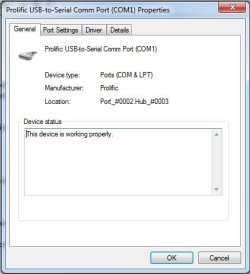
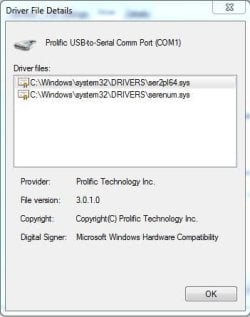
Which one did you install? Did you install the PL-2303 Vista Driver Installer? I'm wondering if you have the same hardware that I have - my device shows up as Prolific USB-to-Serial Comm Port.
 

Attachments

  • Capture.JPG
    Capture.JPG
    34.9 KB · Views: 195
  • Capture2.JPG
    Capture2.JPG
    28.2 KB · Views: 166
  • capture3.JPG
    capture3.JPG
    24.2 KB · Views: 310

My Computer

Computer Manufacturer/Model Number
Dell XPS 15 L502x
OS
Windows 7 Ultimate x64 SP1
CPU
Core i7-2670QM
Memory
8GB DDR3 PC3-10600
Graphics Card(s)
Intel HD Graphics 3000 + GeForce GT 540M
Screen Resolution
1920x1080
Hard Drives
1TB 5400RPM Seagate
I guess you could uninstall again, reboot, and install in XP SP3 compatibility mode. It's worth a shot. I did so much installing/uninstalling that I honestly don't remember exactly how I got it working. But I do know that it was the driver I gave you and not one I downloaded.
 

My Computer

Computer Manufacturer/Model Number
Dell XPS 15 L502x
OS
Windows 7 Ultimate x64 SP1
CPU
Core i7-2670QM
Memory
8GB DDR3 PC3-10600
Graphics Card(s)
Intel HD Graphics 3000 + GeForce GT 540M
Screen Resolution
1920x1080
Hard Drives
1TB 5400RPM Seagate
What is your hardware id?
 

My Computer

Computer Manufacturer/Model Number
Sony VGN-FZ290
OS
Windows 7 Ultimate 64-Bit
CPU
Intel Core 2 Duo T7800 2.6GHZ
Memory
4GB DDR2
Graphics Card(s)
Nvidia Geforce 8400GT
Screen Resolution
1280x800
Hard Drives
WD Black 3200GB 7200RPM
Internet Speed
20Meg.
The same as yours.
 

My Computer

Computer Manufacturer/Model Number
Dell XPS 15 L502x
OS
Windows 7 Ultimate x64 SP1
CPU
Core i7-2670QM
Memory
8GB DDR3 PC3-10600
Graphics Card(s)
Intel HD Graphics 3000 + GeForce GT 540M
Screen Resolution
1920x1080
Hard Drives
1TB 5400RPM Seagate
Here is what I have...

2djqi55.png
 

My Computer

Computer Manufacturer/Model Number
Sony VGN-FZ290
OS
Windows 7 Ultimate 64-Bit
CPU
Intel Core 2 Duo T7800 2.6GHZ
Memory
4GB DDR2
Graphics Card(s)
Nvidia Geforce 8400GT
Screen Resolution
1280x800
Hard Drives
WD Black 3200GB 7200RPM
Internet Speed
20Meg.
Looks the same to me. Maybe your virtual serial ports are preventing the USB-DB9 driver from functioning. But first - uninstall and try it in XP SP3 compatibility mode. If that doesn't work, can you uninstall the virtual serial ports to see if that helps?

Also - update your system specs (lower left corner of your post).

http://www.sevenforums.com/general-discussion/23726-how-system-specs.html
 

My Computer

Computer Manufacturer/Model Number
Dell XPS 15 L502x
OS
Windows 7 Ultimate x64 SP1
CPU
Core i7-2670QM
Memory
8GB DDR3 PC3-10600
Graphics Card(s)
Intel HD Graphics 3000 + GeForce GT 540M
Screen Resolution
1920x1080
Hard Drives
1TB 5400RPM Seagate
Ok I tried to do the XP Sp3 compatibility thing, but the driver itself stopped me from doing that. It said it was only vista compatible. One driver that I tried to install with this device gave me the Prolific usb-to-serial name, but I don't know which driver that was. Seems like this isn't going to work :-(
 

My Computer

Computer Manufacturer/Model Number
Sony VGN-FZ290
OS
Windows 7 Ultimate 64-Bit
CPU
Intel Core 2 Duo T7800 2.6GHZ
Memory
4GB DDR2
Graphics Card(s)
Nvidia Geforce 8400GT
Screen Resolution
1280x800
Hard Drives
WD Black 3200GB 7200RPM
Internet Speed
20Meg.
Do you want to uninstall your virtual serial ports and then try installing in Vista mode?
 

My Computer

Computer Manufacturer/Model Number
Dell XPS 15 L502x
OS
Windows 7 Ultimate x64 SP1
CPU
Core i7-2670QM
Memory
8GB DDR3 PC3-10600
Graphics Card(s)
Intel HD Graphics 3000 + GeForce GT 540M
Screen Resolution
1920x1080
Hard Drives
1TB 5400RPM Seagate
Yea, I tried that as well.. I removed both the RIM virtual serial ports for my blackberry and still nothing. I don't want to give up on this because I need it working before Tuesday.
 

My Computer

Computer Manufacturer/Model Number
Sony VGN-FZ290
OS
Windows 7 Ultimate 64-Bit
CPU
Intel Core 2 Duo T7800 2.6GHZ
Memory
4GB DDR2
Graphics Card(s)
Nvidia Geforce 8400GT
Screen Resolution
1280x800
Hard Drives
WD Black 3200GB 7200RPM
Internet Speed
20Meg.
If you uninstall the driver, reboot, and then plug in the adapter, does it install or does it report missing drivers?
 

My Computer

Computer Manufacturer/Model Number
Dell XPS 15 L502x
OS
Windows 7 Ultimate x64 SP1
CPU
Core i7-2670QM
Memory
8GB DDR3 PC3-10600
Graphics Card(s)
Intel HD Graphics 3000 + GeForce GT 540M
Screen Resolution
1920x1080
Hard Drives
1TB 5400RPM Seagate
Back
Top