

- Local time
- 11:25 AM
- Messages
- 140
"Property Loss" message when transferring images to flash drive?
I've been transferring picture files over to my flash drive, and about a minute or so into every transfer I make, I randomly come across this message in the middle of the transfer:
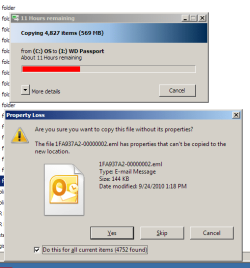
(example image not mine--pretend this is an image file, not an email)
Not all images contain Properties data, so I am assuming this is why I hit the above message halfway into the transfer.
Does hitting 'Yes' actually cause images to degrade during the transfer, or is the transfer only stripping away the Properties/EXIF data contained inside the image? I am hoping to retain full image quality and dimensions while moving these files to and fro, but I need reassurance.
I've been transferring picture files over to my flash drive, and about a minute or so into every transfer I make, I randomly come across this message in the middle of the transfer:
(example image not mine--pretend this is an image file, not an email)
Not all images contain Properties data, so I am assuming this is why I hit the above message halfway into the transfer.
Does hitting 'Yes' actually cause images to degrade during the transfer, or is the transfer only stripping away the Properties/EXIF data contained inside the image? I am hoping to retain full image quality and dimensions while moving these files to and fro, but I need reassurance.
My Computer
At a glance
Windows 10 Home 64-bitIntel Core i5 430M @2.27GHz6.00GB Dual-Channel DDR3 @532MHz512MB NVIDIA GeForce G105M
- Computer type
- Laptop
- Computer Manufacturer/Model Number
- HP Pavilion dv7-3188cl
- OS
- Windows 10 Home 64-bit
- CPU
- Intel Core i5 430M @2.27GHz
- Motherboard
- Hewlett-Packard 365C
- Memory
- 6.00GB Dual-Channel DDR3 @532MHz
- Graphics Card(s)
- 512MB NVIDIA GeForce G105M
- Sound Card
- IDT High Definition Audio CODEC
- Monitor(s) Displays
- Generic PnP Monitor
- Screen Resolution
- 1600x900 @60Hz
- Hard Drives
- 298GB Hitachi
- PSU
- AC 100-240V~1.6A 50-60Hz, DC 19V 4.7A
- Mouse
- Razer DeathAdder Left-Hander
- Antivirus
- Avast Free
- Browser
- Google Chrome
- Other Info
- Malwarebytes Pro, Malwarebytes Anti-Exploit, uBlock Origin

