Solved Proposed new build

mannyrd

New member
Local time
7:43 AM
Messages
16
Time to replace my old PC after reading reviews have decided on these components as value for money and a decent performance.
Don't do games just usual family PC use.

Intel Core i5-4460 3.2GHz Quad-Core Processor
Asus Z97-K/ ATX LGA1150 Motherboard
Crucial 8GB (2 x 4GB) DDR3-1600 Memory
Samsung 850 EVO-Series 250GB 2.5" Solid State Drive
Corsair 100R Silent ATX Mid Tower Case
Price £347

Trying to keep price below £400 by using these parts I already have
Corsair 500 bronze semi modular ps
Western Digital blue 1gb HD

please any advice welcome
 

My Computer

Computer type
PC/Desktop
Computer Manufacturer/Model Number
custom build
OS
Windows 7 pro 64 bit
CPU
Intel Core i5 4460
Motherboard
ASUS Z97-K
Memory
Corsair Vengeance 8GB (2x4GB) DDR3 1600 M
Graphics Card(s)
EVGA GeForce GT 720 2GB
Sound Card
Realtek High Definition Audio
Monitor(s) Displays
Samsung SyncMaster 2032BW
Screen Resolution
1680x1050@60Hz
Hard Drives
Samsung SSD 850 EVO 250GB
Western Digital blue 1tb
Samsung S2 Portable USB (SATA) 750
PSU
Corsair builder series 430 bronze semi modular
Case
Corsair Carbide 100r silent
Cooling
stock Intel cooler , Corsair 120 exaust front & rear fan
Keyboard
Logitech K200
Mouse
Logitech N251 wired
Internet Speed
Virgin media cable 150mb
Antivirus
MSE
Browser
firefox 42 or up to date version
Other Info
Never play games mainly browsing , online TV , Videos , and a large flac music collection.
That looks like a nice build for home use. What are you going to use for a graphics card?
 

My Computer

Computer type
PC/Desktop
Computer Manufacturer/Model Number
Mellon Labs (custom build)
OS
Win 7 Pro x64/Win 10 Pro x64 dual boot
CPU
AMD FX 8350 Vishera @ 4200
Motherboard
ASUS M5A97 R2.0
Memory
16 GB Mushkin Blackline DDR3-2400 @ 1866 (9-10-10-10-31)
Graphics Card(s)
XFX Radeon R9 280 Double D Black Edition
Sound Card
Realtek HD Audio on MB. Sounds great.
Monitor(s) Displays
Acer 24", Acer 22"
Screen Resolution
3840 x 1080
Hard Drives
1 x Mushkin Chronos 120 GB SSD (Win 10)
1 x Samsung 850 EVO 250 GB SSD (Win 7)
1 x WD 1TB SATA Blue
1 x WD 1TB SATA Green
PSU
Corsair TX-750
Case
CoolerMaster HAF 912+
Cooling
Coolermaster Seidon 240M Liquid AIO. 6 case fans
Keyboard
Logitech G710+
Mouse
Logitech G500s
Internet Speed
Much better since I got fiber, but still way overpriced.
Antivirus
MSE, Malware Bytes for scanning
Browser
Firefox
Other Info
Corsair VOID USB headphones.

A Mellon Labs X-1 - LCD Smartie driven system status display.

Brought to you by the letter E
Have a EVGA GeForce GT 720 2GBin from my existing build, would this be suitable.
 

My Computer

Computer type
PC/Desktop
Computer Manufacturer/Model Number
custom build
OS
Windows 7 pro 64 bit
CPU
Intel Core i5 4460
Motherboard
ASUS Z97-K
Memory
Corsair Vengeance 8GB (2x4GB) DDR3 1600 M
Graphics Card(s)
EVGA GeForce GT 720 2GB
Sound Card
Realtek High Definition Audio
Monitor(s) Displays
Samsung SyncMaster 2032BW
Screen Resolution
1680x1050@60Hz
Hard Drives
Samsung SSD 850 EVO 250GB
Western Digital blue 1tb
Samsung S2 Portable USB (SATA) 750
PSU
Corsair builder series 430 bronze semi modular
Case
Corsair Carbide 100r silent
Cooling
stock Intel cooler , Corsair 120 exaust front & rear fan
Keyboard
Logitech K200
Mouse
Logitech N251 wired
Internet Speed
Virgin media cable 150mb
Antivirus
MSE
Browser
firefox 42 or up to date version
Other Info
Never play games mainly browsing , online TV , Videos , and a large flac music collection.

My Computer

Computer type
PC/Desktop
Computer Manufacturer/Model Number
Skylake Special #666
OS
Windows 10 Pro x64
CPU
Intel Core i7 6700K
Motherboard
Asus Sabertooth Z170 Mark 1
Memory
GSkill TridentZ RGB 16GB 3600 16-16-16-36
Graphics Card(s)
EVGA GTX 980 Ti SC x2
Sound Card
Realtek High Definition
Monitor(s) Displays
AOC G2460PG
Screen Resolution
1920 x 1080 144Hz
Hard Drives
Samsung 860 Pro 256GB, Seagate Barracuda 4TB x2
PSU
EVGA 1000 P2, EVGA White Custom Braided Cables
Case
Corsair Vengeance C70 Gunmetal Black
Cooling
Corsair H100i v2, Corsair ML120 x2, Thermal Grizzly Kryonaut
Keyboard
Logitech G910 Orion Spectrum
Mouse
Logitech G700s
Internet Speed
Verizon Fios Quantum Gateway 75/75
Antivirus
Windows Defender, Malwarebytes Free 3.8.3
Browser
Chrome
Other Info
Corsair SP120 x4, LG Blu-ray Drive, Durabrand HT-395 100 Watt Dolby Digital Amp, Corsair H2100 Wireless 7.1 Headset
If games isn't a high priority ("Don't do games just usual family PC use") then your system looks good to me.
 

My Computer

Computer type
PC/Desktop
Computer Manufacturer/Model Number
Own build
OS
Windows 7x64 Home Premium SP1
CPU
Intel i7 2600k
Motherboard
ASUS P8Z68 Deluxe
Memory
G.Skill Ripjaws (DDR3-1600) 2x4GB
Graphics Card(s)
Nvidia GeForce GTS 450; Intel HD Graphics 3000(GT2+)
Monitor(s) Displays
Dell Ultrasharp IPS panel U2311H, Samsung SyncMaster P2350
Screen Resolution
1920x1080
Hard Drives
Samsung 850 Pro SSD 256GB, Samsung SSD 840 120GB, Seagates 1TB Barracuda ST31000528AS x2
PSU
Seasonic M12II 520W
Case
Lian Li Lancool PC-K60
Cooling
Case: 1x120mm, 3x140mm CPU: Hyper 212+
Keyboard
Logitech MK520 (wireless)
Mouse
Logitech MK520
Internet Speed
6-7 Mbps
Antivirus
Norton Security Premium, Malwarebytes on 2 (MSE on 3rd PC)
Browser
FireFox
Other Info
Audio: Logitech Z523 2.1
Thanks for reply's sorry for late response been on holiday
this is my first build and would please like a few tips on these items.

which drivers to install and in which sequence obviously chip set first but Asus site is very vague about the other drivers.
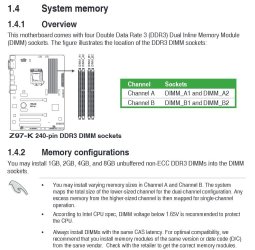
which slots to install in dual channel mode is there a preference.
Corsair case has two sata powered fans and a fan controller, is it best to use this or the fan expert software will using both create a problem.
Which Asus software utilities are needed or are they bloatware.

components on order as above any advice much appreciated.
 

My Computer

Computer type
PC/Desktop
Computer Manufacturer/Model Number
custom build
OS
Windows 7 pro 64 bit
CPU
Intel Core i5 4460
Motherboard
ASUS Z97-K
Memory
Corsair Vengeance 8GB (2x4GB) DDR3 1600 M
Graphics Card(s)
EVGA GeForce GT 720 2GB
Sound Card
Realtek High Definition Audio
Monitor(s) Displays
Samsung SyncMaster 2032BW
Screen Resolution
1680x1050@60Hz
Hard Drives
Samsung SSD 850 EVO 250GB
Western Digital blue 1tb
Samsung S2 Portable USB (SATA) 750
PSU
Corsair builder series 430 bronze semi modular
Case
Corsair Carbide 100r silent
Cooling
stock Intel cooler , Corsair 120 exaust front & rear fan
Keyboard
Logitech K200
Mouse
Logitech N251 wired
Internet Speed
Virgin media cable 150mb
Antivirus
MSE
Browser
firefox 42 or up to date version
Other Info
Never play games mainly browsing , online TV , Videos , and a large flac music collection.
which drivers to install and in which sequence obviously chip set first but Asus site is very vague about the other drivers.

Install Windows and run all rounds of updates until no more are offered. This should see you driver complete as long as you're connected to the internet. Once done check Device Manager, if there are no :warn: showing you should be good to go. If you have any issues during this process let us know.

You may have to install the chipset and USB 3.0 drivers from the support page, may as well as it won't hurt either way.

which slots to install in dual channel mode is there a preference.

From the manual for that board you will need to populate Channel A with both sticks.
Capture.JPG
Corsair case has two sata powered fans and a fan controller, is it best to use this or the fan expert software will using both create a problem.

If you want to use Fan Expert you'll need to connect the fans to the motherboard headers.

Which Asus software utilities are needed or are they bloatware.

AI Suite is OK, I use it myself on both my ASUS boards. Do not install Network iControl though, it's bloody awful.
 

My Computer

Computer type
PC/Desktop
Computer Manufacturer/Model Number
Custom Build
OS
W7 Pro x64 SP1 | W10 Pro IP x64 | W8.1 Pro x64 VM | Linux Mint VM
CPU
i7-4790k @ 4GHz (4.4GHz Boost)
Motherboard
ASUS Sabertooth Z87 (BIOS Rev 2004)
Memory
16GB DDR3 Kingston HyperX Fury @ 1600MHz CL 9-9-9-27
Graphics Card(s)
EVGA GTX 980 Classified
Sound Card
Realtek Onboard
Monitor(s) Displays
Samsung S27D390
Screen Resolution
1920 x 1080
Hard Drives
240GB Intel 520 Series SSD |
Samsung 850 EVO 120GB SSD |
2TB WD Caviar Black |
2TB WD Caviar Green
PSU
Corsair HX850-80 Gold Modular
Case
Cooler Master Silencio 650
Cooling
Corsair H80i w/2 x Corsair SP120 | 2 x 120mm Noctua NF-S12B
Keyboard
Microsoft Sidewinder X4
Mouse
Gigabyte M6900 optical
Internet Speed
152mb
Antivirus
F-Secure
Browser
Firefox 38.0
Other Info
Backup Rig: Win 7 Pro 64-bit | AMD A10-5800k | ASUS F2A85-V Pro | 8GB Samsung DDR3 @1600MHz | 120GB Toshiba SDD | 2TB Seagate HDD | Cooler Master Silencio 550
Hi,
ai suite 2 or 3 and there's another one from Intel
http://www.sevenforums.com/benchmarks/383341-intel-extreme-tuning-utility-benchmark.html#post3160305

Problem I see with these utilities is the real possibility of bios malware getting through the back doors they use to access the bios from the os.

Your mother board may have an auto over clocking feature inside the bios already mine does and is what I prefer to use

If an oc goes bad from the os installed utility it might be tough to correct.
 

My Computer

Computer type
PC/Desktop
Computer Manufacturer/Model Number
Custom assembled by me :}
OS
Win-7-Pro64bit 7-H-Prem-64bit
CPU
i7-5930K 2nd i9-9940x both water blocked VRM's too
Motherboard
ASUS SABERTOOTH X99 2nd ASUS x299 Apex
Memory
Trident-z 3200C14 2nd Trident-z 3600C16
Graphics Card(s)
EVGA 1080ti ftw3 2nd Titan Xp both water blocked
Sound Card
Built-in Realtek
Monitor(s) Displays
1-AOC G2460PG 24"G-Sync 144Hz/ 2nd 1-ASUS VG248QE 24" 144Hz
Screen Resolution
1920 x 1080 144Hz
Hard Drives
2-Samsung M.2 Evo & Evo Plus
2-Samsung 850 EVO 500GB SSD's/ 3-2.5 W.D. Black 1tb-&3-1tb/3-3.5 WD Black 1tb hdd's
PSU
EVGA SuperNOVA 1000-P2 2nd 1200-P2
Case
2-Corsair Obsidian Series 450D Black ATX Mid Tower
Cooling
Custom water loops
Keyboard
Logitech G710+/ 2nd Logitech G910
Mouse
2-RedDragon M901 Perdition 16400 dpi Gaming mouse = wired
Internet Speed
Comcast Ping 19ms 89.31mbps download speed 6.12mbps upload
Antivirus
Malwarebytes Pro/ Superantispyware Pro
Browser
FireFox & Pale moon
Other Info
2nd ASUS X299 Apex/Intel i9-9940x with Custom water loop/7H-Prem-x64/Corsair 450D case/Ram Trident-z 3600C16 4x8gb / Samsung970Evo plus 500gb SSD/Dual ssd EZ swap evo/PSU EVGA SuperNova 1200w-P2 80+Platinum/GPU Titan Xp /8-ML-140 on push-pull on 2-280GTX rads
Thanks everyone for the info
Not a gamer don't intend to overclock so will just use the basic drivers

chipset, audio, VGA, LAN, and SATA drivers: Z97-A | Motherboards | ASUS Global...

waiting on amazon to deliver case came today but no components, due Saturday.
 
Last edited:

My Computer

Computer type
PC/Desktop
Computer Manufacturer/Model Number
custom build
OS
Windows 7 pro 64 bit
CPU
Intel Core i5 4460
Motherboard
ASUS Z97-K
Memory
Corsair Vengeance 8GB (2x4GB) DDR3 1600 M
Graphics Card(s)
EVGA GeForce GT 720 2GB
Sound Card
Realtek High Definition Audio
Monitor(s) Displays
Samsung SyncMaster 2032BW
Screen Resolution
1680x1050@60Hz
Hard Drives
Samsung SSD 850 EVO 250GB
Western Digital blue 1tb
Samsung S2 Portable USB (SATA) 750
PSU
Corsair builder series 430 bronze semi modular
Case
Corsair Carbide 100r silent
Cooling
stock Intel cooler , Corsair 120 exaust front & rear fan
Keyboard
Logitech K200
Mouse
Logitech N251 wired
Internet Speed
Virgin media cable 150mb
Antivirus
MSE
Browser
firefox 42 or up to date version
Other Info
Never play games mainly browsing , online TV , Videos , and a large flac music collection.
Good policy even if you do want to switch to a different performance mode use the bios to do it,
There should be a few to choose from
Power saver/ Normal and Performance these are the quickies and only take 1 click and save and exit ;)
So as you see you don't need a utility for that :D
 

My Computer

Computer type
PC/Desktop
Computer Manufacturer/Model Number
Custom assembled by me :}
OS
Win-7-Pro64bit 7-H-Prem-64bit
CPU
i7-5930K 2nd i9-9940x both water blocked VRM's too
Motherboard
ASUS SABERTOOTH X99 2nd ASUS x299 Apex
Memory
Trident-z 3200C14 2nd Trident-z 3600C16
Graphics Card(s)
EVGA 1080ti ftw3 2nd Titan Xp both water blocked
Sound Card
Built-in Realtek
Monitor(s) Displays
1-AOC G2460PG 24"G-Sync 144Hz/ 2nd 1-ASUS VG248QE 24" 144Hz
Screen Resolution
1920 x 1080 144Hz
Hard Drives
2-Samsung M.2 Evo & Evo Plus
2-Samsung 850 EVO 500GB SSD's/ 3-2.5 W.D. Black 1tb-&3-1tb/3-3.5 WD Black 1tb hdd's
PSU
EVGA SuperNOVA 1000-P2 2nd 1200-P2
Case
2-Corsair Obsidian Series 450D Black ATX Mid Tower
Cooling
Custom water loops
Keyboard
Logitech G710+/ 2nd Logitech G910
Mouse
2-RedDragon M901 Perdition 16400 dpi Gaming mouse = wired
Internet Speed
Comcast Ping 19ms 89.31mbps download speed 6.12mbps upload
Antivirus
Malwarebytes Pro/ Superantispyware Pro
Browser
FireFox & Pale moon
Other Info
2nd ASUS X299 Apex/Intel i9-9940x with Custom water loop/7H-Prem-x64/Corsair 450D case/Ram Trident-z 3600C16 4x8gb / Samsung970Evo plus 500gb SSD/Dual ssd EZ swap evo/PSU EVGA SuperNova 1200w-P2 80+Platinum/GPU Titan Xp /8-ML-140 on push-pull on 2-280GTX rads
Asus AI Suite's have done nothing for me except create problems.

For me all over clocking is done in the bios by me.
It takes doing a little homework and trial and error.
In time I find the sweat spot and just leave it alone.
 

My Computer

Computer type
PC/Desktop
Computer Manufacturer/Model Number
Home made Desktop
OS
Windows 10 Pro. 64/ version 1709 Windows 7 Pro/64
CPU
Intel i7-6800K @ 4.3
Motherboard
ASUS X-99 Deluxe II
Memory
Corsair Platinum 16 gig @2400
Graphics Card(s)
EVGA GTX 1070 OC
Monitor(s) Displays
Asus 27" LED LCD/VE278Q
Screen Resolution
1920-1080 or 1280-720 HDMI
Hard Drives
INTEL SSD 730-240 Gb Sata 3.0/
PSU
EVGA Platium 1200W
Case
Phanteks Luxe Tempered Glass 8 fans/ one radiator
Cooling
XSPC/ Water Cooled CPU
Keyboard
Das 4 Professional
Mouse
Logitech M705/MX Anywhere 2-S
Internet Speed
100 mbits
Antivirus
Microsoft Security Essentials/ Malwarebytes Premium 3.0/ SAS
Browser
I.E. 11 default/Firefox/ ISP Time Warner Cable/Spectrum
Other Info
LG BluRay Burner/
Sound system-KLipsch-THX/
Icy Dock ssd Hot Swap bays.
On the flip side Jack I've run a select couple of components of AI Suite on my last two rigs and never had a problem. I'm not saying it's problem free as it obviously isn't, but it certainly isn't in the Gigabyte utility realms of BSOD hell.
 

My Computer

Computer type
PC/Desktop
Computer Manufacturer/Model Number
Custom Build
OS
W7 Pro x64 SP1 | W10 Pro IP x64 | W8.1 Pro x64 VM | Linux Mint VM
CPU
i7-4790k @ 4GHz (4.4GHz Boost)
Motherboard
ASUS Sabertooth Z87 (BIOS Rev 2004)
Memory
16GB DDR3 Kingston HyperX Fury @ 1600MHz CL 9-9-9-27
Graphics Card(s)
EVGA GTX 980 Classified
Sound Card
Realtek Onboard
Monitor(s) Displays
Samsung S27D390
Screen Resolution
1920 x 1080
Hard Drives
240GB Intel 520 Series SSD |
Samsung 850 EVO 120GB SSD |
2TB WD Caviar Black |
2TB WD Caviar Green
PSU
Corsair HX850-80 Gold Modular
Case
Cooler Master Silencio 650
Cooling
Corsair H80i w/2 x Corsair SP120 | 2 x 120mm Noctua NF-S12B
Keyboard
Microsoft Sidewinder X4
Mouse
Gigabyte M6900 optical
Internet Speed
152mb
Antivirus
F-Secure
Browser
Firefox 38.0
Other Info
Backup Rig: Win 7 Pro 64-bit | AMD A10-5800k | ASUS F2A85-V Pro | 8GB Samsung DDR3 @1600MHz | 120GB Toshiba SDD | 2TB Seagate HDD | Cooler Master Silencio 550
I used ai suite 2 or 3 briefly
I ended up with a failed oc although I wasn't ocing anything really only modified some of the fans mode in bios and I believe had the machine on a performance plan.

But none the less found out these tweaking utilities can be problematic
If you've ever had a failed oc
You know the machine will pretty much make you enter setup with F2 and then you can make adjustments/ restore default..
Using a program in the oc depending on how crazy you get might be tough to undo the oc if you get into a failed oc loop :/

I prefer to just oc the gpu modestly "if" needed which not to mention a lot easier but for the most part not needed either unless running benchmarks which I'm done with them.
 

My Computer

Computer type
PC/Desktop
Computer Manufacturer/Model Number
Custom assembled by me :}
OS
Win-7-Pro64bit 7-H-Prem-64bit
CPU
i7-5930K 2nd i9-9940x both water blocked VRM's too
Motherboard
ASUS SABERTOOTH X99 2nd ASUS x299 Apex
Memory
Trident-z 3200C14 2nd Trident-z 3600C16
Graphics Card(s)
EVGA 1080ti ftw3 2nd Titan Xp both water blocked
Sound Card
Built-in Realtek
Monitor(s) Displays
1-AOC G2460PG 24"G-Sync 144Hz/ 2nd 1-ASUS VG248QE 24" 144Hz
Screen Resolution
1920 x 1080 144Hz
Hard Drives
2-Samsung M.2 Evo & Evo Plus
2-Samsung 850 EVO 500GB SSD's/ 3-2.5 W.D. Black 1tb-&3-1tb/3-3.5 WD Black 1tb hdd's
PSU
EVGA SuperNOVA 1000-P2 2nd 1200-P2
Case
2-Corsair Obsidian Series 450D Black ATX Mid Tower
Cooling
Custom water loops
Keyboard
Logitech G710+/ 2nd Logitech G910
Mouse
2-RedDragon M901 Perdition 16400 dpi Gaming mouse = wired
Internet Speed
Comcast Ping 19ms 89.31mbps download speed 6.12mbps upload
Antivirus
Malwarebytes Pro/ Superantispyware Pro
Browser
FireFox & Pale moon
Other Info
2nd ASUS X299 Apex/Intel i9-9940x with Custom water loop/7H-Prem-x64/Corsair 450D case/Ram Trident-z 3600C16 4x8gb / Samsung970Evo plus 500gb SSD/Dual ssd EZ swap evo/PSU EVGA SuperNova 1200w-P2 80+Platinum/GPU Titan Xp /8-ML-140 on push-pull on 2-280GTX rads
I ended up with a failed oc although I wasn't ocing anything.

That's a known false positive across ASUS boards, I had that issue on my old M2A-VM board years ago when nothing was overclocked. A quick Google will bring up thousands of results.
 

My Computer

Computer type
PC/Desktop
Computer Manufacturer/Model Number
Custom Build
OS
W7 Pro x64 SP1 | W10 Pro IP x64 | W8.1 Pro x64 VM | Linux Mint VM
CPU
i7-4790k @ 4GHz (4.4GHz Boost)
Motherboard
ASUS Sabertooth Z87 (BIOS Rev 2004)
Memory
16GB DDR3 Kingston HyperX Fury @ 1600MHz CL 9-9-9-27
Graphics Card(s)
EVGA GTX 980 Classified
Sound Card
Realtek Onboard
Monitor(s) Displays
Samsung S27D390
Screen Resolution
1920 x 1080
Hard Drives
240GB Intel 520 Series SSD |
Samsung 850 EVO 120GB SSD |
2TB WD Caviar Black |
2TB WD Caviar Green
PSU
Corsair HX850-80 Gold Modular
Case
Cooler Master Silencio 650
Cooling
Corsair H80i w/2 x Corsair SP120 | 2 x 120mm Noctua NF-S12B
Keyboard
Microsoft Sidewinder X4
Mouse
Gigabyte M6900 optical
Internet Speed
152mb
Antivirus
F-Secure
Browser
Firefox 38.0
Other Info
Backup Rig: Win 7 Pro 64-bit | AMD A10-5800k | ASUS F2A85-V Pro | 8GB Samsung DDR3 @1600MHz | 120GB Toshiba SDD | 2TB Seagate HDD | Cooler Master Silencio 550
Thanks I had never seen that doing any benchmarks and I did quite a few :/
Either way ai suite 2 or 3 triggered it from just the slight contradict in bios settings
So really what I gathered from it was use one or the other not both :p

Bios and gpu tweak is fine to me :)

I believe Steve warned me about these types of ocing utilities ;)
 

My Computer

Computer type
PC/Desktop
Computer Manufacturer/Model Number
Custom assembled by me :}
OS
Win-7-Pro64bit 7-H-Prem-64bit
CPU
i7-5930K 2nd i9-9940x both water blocked VRM's too
Motherboard
ASUS SABERTOOTH X99 2nd ASUS x299 Apex
Memory
Trident-z 3200C14 2nd Trident-z 3600C16
Graphics Card(s)
EVGA 1080ti ftw3 2nd Titan Xp both water blocked
Sound Card
Built-in Realtek
Monitor(s) Displays
1-AOC G2460PG 24"G-Sync 144Hz/ 2nd 1-ASUS VG248QE 24" 144Hz
Screen Resolution
1920 x 1080 144Hz
Hard Drives
2-Samsung M.2 Evo & Evo Plus
2-Samsung 850 EVO 500GB SSD's/ 3-2.5 W.D. Black 1tb-&3-1tb/3-3.5 WD Black 1tb hdd's
PSU
EVGA SuperNOVA 1000-P2 2nd 1200-P2
Case
2-Corsair Obsidian Series 450D Black ATX Mid Tower
Cooling
Custom water loops
Keyboard
Logitech G710+/ 2nd Logitech G910
Mouse
2-RedDragon M901 Perdition 16400 dpi Gaming mouse = wired
Internet Speed
Comcast Ping 19ms 89.31mbps download speed 6.12mbps upload
Antivirus
Malwarebytes Pro/ Superantispyware Pro
Browser
FireFox & Pale moon
Other Info
2nd ASUS X299 Apex/Intel i9-9940x with Custom water loop/7H-Prem-x64/Corsair 450D case/Ram Trident-z 3600C16 4x8gb / Samsung970Evo plus 500gb SSD/Dual ssd EZ swap evo/PSU EVGA SuperNova 1200w-P2 80+Platinum/GPU Titan Xp /8-ML-140 on push-pull on 2-280GTX rads
I've still got AI Suite II installed on my personal PC (a good gen 2 system). I haven't had any significant problems. I've used it for fan control but could live without it.
I use HW Monitor when I'm running the CPU flat out for some time (eg. video encoding) to monitor fans and temperatures. I close AI Suite because it appears to conflict with HW Monitor and produce false Probe II errors.
 

My Computer

Computer type
PC/Desktop
Computer Manufacturer/Model Number
Own build
OS
Windows 7x64 Home Premium SP1
CPU
Intel i7 2600k
Motherboard
ASUS P8Z68 Deluxe
Memory
G.Skill Ripjaws (DDR3-1600) 2x4GB
Graphics Card(s)
Nvidia GeForce GTS 450; Intel HD Graphics 3000(GT2+)
Monitor(s) Displays
Dell Ultrasharp IPS panel U2311H, Samsung SyncMaster P2350
Screen Resolution
1920x1080
Hard Drives
Samsung 850 Pro SSD 256GB, Samsung SSD 840 120GB, Seagates 1TB Barracuda ST31000528AS x2
PSU
Seasonic M12II 520W
Case
Lian Li Lancool PC-K60
Cooling
Case: 1x120mm, 3x140mm CPU: Hyper 212+
Keyboard
Logitech MK520 (wireless)
Mouse
Logitech MK520
Internet Speed
6-7 Mbps
Antivirus
Norton Security Premium, Malwarebytes on 2 (MSE on 3rd PC)
Browser
FireFox
Other Info
Audio: Logitech Z523 2.1

My Computer

Computer type
PC/Desktop
Computer Manufacturer/Model Number
Custom assembled by me :}
OS
Win-7-Pro64bit 7-H-Prem-64bit
CPU
i7-5930K 2nd i9-9940x both water blocked VRM's too
Motherboard
ASUS SABERTOOTH X99 2nd ASUS x299 Apex
Memory
Trident-z 3200C14 2nd Trident-z 3600C16
Graphics Card(s)
EVGA 1080ti ftw3 2nd Titan Xp both water blocked
Sound Card
Built-in Realtek
Monitor(s) Displays
1-AOC G2460PG 24"G-Sync 144Hz/ 2nd 1-ASUS VG248QE 24" 144Hz
Screen Resolution
1920 x 1080 144Hz
Hard Drives
2-Samsung M.2 Evo & Evo Plus
2-Samsung 850 EVO 500GB SSD's/ 3-2.5 W.D. Black 1tb-&3-1tb/3-3.5 WD Black 1tb hdd's
PSU
EVGA SuperNOVA 1000-P2 2nd 1200-P2
Case
2-Corsair Obsidian Series 450D Black ATX Mid Tower
Cooling
Custom water loops
Keyboard
Logitech G710+/ 2nd Logitech G910
Mouse
2-RedDragon M901 Perdition 16400 dpi Gaming mouse = wired
Internet Speed
Comcast Ping 19ms 89.31mbps download speed 6.12mbps upload
Antivirus
Malwarebytes Pro/ Superantispyware Pro
Browser
FireFox & Pale moon
Other Info
2nd ASUS X299 Apex/Intel i9-9940x with Custom water loop/7H-Prem-x64/Corsair 450D case/Ram Trident-z 3600C16 4x8gb / Samsung970Evo plus 500gb SSD/Dual ssd EZ swap evo/PSU EVGA SuperNova 1200w-P2 80+Platinum/GPU Titan Xp /8-ML-140 on push-pull on 2-280GTX rads
Completed new PC build this weekend happy to report everything works perfect no problems.
Must admit was a bit apprehensive at the first boot.

Have just one problem my hardrive from old PC has a failed W7 install due to a faulty DVD drive and needs formatting to full capacity and expanding the system reserved partition.
Theirs plenty of info regarding this but am confused which method to use.

Retired builder but first time PC builder :)
 

My Computer

Computer type
PC/Desktop
Computer Manufacturer/Model Number
custom build
OS
Windows 7 pro 64 bit
CPU
Intel Core i5 4460
Motherboard
ASUS Z97-K
Memory
Corsair Vengeance 8GB (2x4GB) DDR3 1600 M
Graphics Card(s)
EVGA GeForce GT 720 2GB
Sound Card
Realtek High Definition Audio
Monitor(s) Displays
Samsung SyncMaster 2032BW
Screen Resolution
1680x1050@60Hz
Hard Drives
Samsung SSD 850 EVO 250GB
Western Digital blue 1tb
Samsung S2 Portable USB (SATA) 750
PSU
Corsair builder series 430 bronze semi modular
Case
Corsair Carbide 100r silent
Cooling
stock Intel cooler , Corsair 120 exaust front & rear fan
Keyboard
Logitech K200
Mouse
Logitech N251 wired
Internet Speed
Virgin media cable 150mb
Antivirus
MSE
Browser
firefox 42 or up to date version
Other Info
Never play games mainly browsing , online TV , Videos , and a large flac music collection.
Have just one problem my hardrive from old PC has a failed W7 install due to a faulty DVD drive and needs formatting to full capacity and expanding the system reserved partition.
Theirs plenty of info regarding this but am confused which method to use.

You want to do a clean install to this drive on the old PC?

You don't need System Reserved at all.

What "methods" are you referring to?

Why can't you format it to full capacity? What happens when you try?

What makes you think System Reserved (if you want to use it at all) isn't large enough.

More details needed.
 

My Computer

Computer type
PC/Desktop
Computer Manufacturer/Model Number
Ignatz Special; 4 speed manual gearbox; factory air conditioning; one of one
OS
Windows 7 Home Premium SP1, 64-bit
CPU
Intel Skylake i5-6600K, not overclocked
Motherboard
AsRock Z170M Extreme 4, micro ATX
Memory
8 GB HyperX DDR4-2666 (2 x 4 GB)
Graphics Card(s)
none; graphics are integrated on CPU
Sound Card
onboard: Realtek ALC1150; external: USB Behringer UF0-202
Monitor(s) Displays
Dell S2340M 23 inch IPS
Screen Resolution
1600 x 900
Hard Drives
System: Crucial MX100 series SSD, 128 GB;
Data: Samsung Spinpoint 103SJ, 1 TB;
Backup: WD Caviar Green WD30EZRX-00D8PB0, 3 TB
PSU
Rosewill SilentNight 500 watt fanless, semi-modular
Case
Antec Solo II
Cooling
Noctua NH-U12S; Noctua F12 intake, Noctua S12A exhaust
Keyboard
Microsoft 200 6JH-00001 USB
Mouse
Dell or Microsoft optical wired; USB
Antivirus
Microsoft Security Essentials and Malwarebytes Premium
Browser
Pale Moon
Other Info
All fans PWM; speeds at idle: CPU circa 500 rpm; intake circa 600 rpm; exhaust circa 600 rpm; CPU temps 27 idle and 47 C load in a warm room (27 C/81 F) when running Intel Extreme Tuning Utility stress test.

sorry forgot to mention I want to use this has data drive on new PC.
 

My Computer

Computer type
PC/Desktop
Computer Manufacturer/Model Number
custom build
OS
Windows 7 pro 64 bit
CPU
Intel Core i5 4460
Motherboard
ASUS Z97-K
Memory
Corsair Vengeance 8GB (2x4GB) DDR3 1600 M
Graphics Card(s)
EVGA GeForce GT 720 2GB
Sound Card
Realtek High Definition Audio
Monitor(s) Displays
Samsung SyncMaster 2032BW
Screen Resolution
1680x1050@60Hz
Hard Drives
Samsung SSD 850 EVO 250GB
Western Digital blue 1tb
Samsung S2 Portable USB (SATA) 750
PSU
Corsair builder series 430 bronze semi modular
Case
Corsair Carbide 100r silent
Cooling
stock Intel cooler , Corsair 120 exaust front & rear fan
Keyboard
Logitech K200
Mouse
Logitech N251 wired
Internet Speed
Virgin media cable 150mb
Antivirus
MSE
Browser
firefox 42 or up to date version
Other Info
Never play games mainly browsing , online TV , Videos , and a large flac music collection.
Back
Top