Information
Here is a rewrite of the PSU Test. http://www.sevenforums.com/vip/257690-psu-how-test-3.html#post2130086
Warning
Before attempting the following PSU test, power system off and pull the power plug or flip the PSU switch off, whichever applies.
Warning
Do not open the PSU's case! It can carry a lethal dose of power for days. This means it could kill you.
I have been struggling with a new build and got to PSU testing.
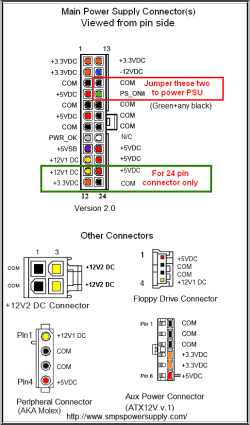
Here's how to test yours if suspect. Press the latch on the side of the main connector and wiggle it out of its socket. The PSU won't power on unless the main connector is attached to the motherboard or you jumper the main connector as shown below. The common thing to use is a paper clip bent in a "U" shape and can be inserted in either side of the plastic connector.
DO NOT JUMPER ANY CONDUCTORS OTHER THAN GREEN AND BLACK.
There will be one green wire, jumper it to any black one. This will allow the PSU to power up and its fan will run. If it has an on/off switch confirm it is ON. If the EPS 12V 4/8 pin is connected to the motherboard your CPU fan may run.
It is a better test if you use a digital multimeter after you have the PSU running to check actual volts output at the pins. Touch the "-" lead to any black wire pin then the "+" to each of the other colored pins and take a reading. They should be ±5% of listed voltages.
The diagrams below show the current ATX configurations in use.
Last edited:
My Computer
- Computer type
- PC/Desktop
- Computer Manufacturer/Model Number
- Home Built Desktop By DataTech
- OS
- Windows 7 Ultimate X64 SP1
- CPU
- Intel i5-2550K, Differing ~4.4-4.8GHz No built in GPU
- Motherboard
- ASUS P8Z68-V PRO/GEN3
- Memory
- 16GB G.Skill Sniper 1866MHz @ 2133MHz 2x8GB
- Graphics Card(s)
- ASUS GTX650TIB-DC2OC-2GD5, (650TI Boost)
- Sound Card
- Onboard Realtek 5-1
- Monitor(s) Displays
- Samsung P2570HD
- Screen Resolution
- 1920x1080
- Hard Drives
- Samsung 840 Pro 256GB SSD for OS, 500GB Seagate Constellation (Enterprise drive) for Data
- PSU
- Corsair HX650W
- Case
- Inwin Dragon Rider
- Cooling
- Hyper 212 EVO w/two Noctua fans, push-pull, @1300 RPM
- Keyboard
- E-Z Eyes, bright yellow keys with large characters
- Mouse
- steelseries SENSEI Laser Pro Gaming
- Internet Speed
- 48-51Mbs Mbs down, 11 Mbs up Xfinity Cable
- Antivirus
- Norton Internet Security 2013
- Browser
- IE 10, Opera, Pale Moon if needed
- Other Info
- 4 case fans, LG BluRay-RE, ASUS DVD-RW, Mr. Fusion power supply, 1.21 gigawatts.