
Solved PSU went up in smoke. New PSU won't boot PC

A surge protector is designed to protect your system from surges from the wall outlet surges to your system.

A quality power supply has built in high and low voltage and amp protection BUT when a power supply goes up in smoke those protection could be damaged and the surges from the power supply could enter the rest of your computer.
They most likely did.

Burnt smells from the motherboard is a BIG clue.

I had a very long time ago had the same problem you had with a power supply.
I put a new power supply in and booted a few times. Then piece at a time things just started going bad. It only took a few days.
I ended up just building a new computer using a quality Corsair top of their line power supply. A power supply is no place to try and save money. Many members are also have good luck with EVGA Gold or higher.
 

My Computer My Computer

At a glance

Windows 10 Pro. 64/ version 1709 Windows 7 Pr...Intel i7-6800K @ 4.3Corsair Platinum 16 gig @2400EVGA GTX 1070 OC
Computer type
PC/Desktop
Computer Manufacturer/Model Number
Home made Desktop
OS
Windows 10 Pro. 64/ version 1709 Windows 7 Pro/64
CPU
Intel i7-6800K @ 4.3
Motherboard
ASUS X-99 Deluxe II
Memory
Corsair Platinum 16 gig @2400
Graphics Card(s)
EVGA GTX 1070 OC
Monitor(s) Displays
Asus 27" LED LCD/VE278Q
Screen Resolution
1920-1080 or 1280-720 HDMI
Hard Drives
INTEL SSD 730-240 Gb Sata 3.0/
PSU
EVGA Platium 1200W
Case
Phanteks Luxe Tempered Glass 8 fans/ one radiator
Cooling
XSPC/ Water Cooled CPU
Keyboard
Das 4 Professional
Mouse
Logitech M705/MX Anywhere 2-S
Internet Speed
100 mbits
Antivirus
Microsoft Security Essentials/ Malwarebytes Premium 3.0/ SAS
Browser
I.E. 11 default/Firefox/ ISP Time Warner Cable/Spectrum
Other Info
LG BluRay Burner/
Sound system-KLipsch-THX/
Icy Dock ssd Hot Swap bays.
Thanks LB.

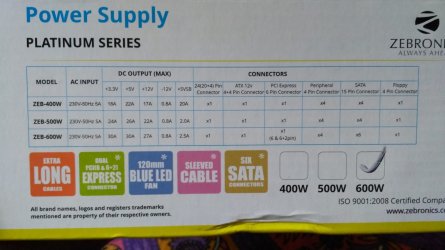
One more thing guys; I was recently reviewing the PSU brand I just purchased and it doesn't seem to have good reviews. The PSU is rated at 600 watts and the brand is Zebronics. Attached is the specification chart of the model.

Could you please review and advise whether this is something I could trust or should I just dump this in the garbage and go for a reputed brand like Corsair?

I don't like the idea of flushing $50 down the drain but a lot more is at stake here

Kindly advise

Many thanks
 

Attachments

  • 4q4d9w.jpg
    4q4d9w.jpg
    143 KB · Views: 1

My Computer My Computer

At a glance

Win 7 Professional 64 bitAMD FX-6100Corsair Vengeance 1600 Mhz 8 GBATI Radeon HD 5450 1GB
Computer type
PC/Desktop
Computer Manufacturer/Model Number
Custom Build
OS
Win 7 Professional 64 bit
CPU
AMD FX-6100
Motherboard
M5A78L-M/USB3
Memory
Corsair Vengeance 1600 Mhz 8 GB
Graphics Card(s)
ATI Radeon HD 5450 1GB
Sound Card
On Board
Monitor(s) Displays
LG Flatron L177WSB
Screen Resolution
1440 x 900
Hard Drives
Crucial MX 100 - 256 GB (Primary C:)
Seagate Barracuda - 160 GB
Seagate Barracuda - 500 GB
PSU
Cooler Master B500 Ver 2.0
Case
Cooler Master Elite 430
Cooling
Stock AMD Cooler
Keyboard
TVS Gold
Mouse
DELL USB
Internet Speed
1 Mbps
Antivirus
Avast Home V 12.1
Browser
Chrome
Other Info
Lenovo ThinkPad - E420
That brand seems to be restricted to India and is rarely if ever seen in North America.

I can't even find out who actually builds it in the standard databases. "Zebronics" is almost certainly just the brand name stuck on it for marketing purposes.

I'd never buy it myself. It could work for years---you have no way of knowing.

I'd replace it if you can get your money back.

The best thing you can do is post a link to the store or stores from which you will buy so we can look over their stock.

I'd look for something from any of these brands:

Seasonic
EVGA GS and GQ series
Corsair RM, AX, or HX series; avoid the CX series
Super Flower
XFX XTR or TS series

I wouldn't get obsessed with the platinum/gold/silver/bronze thing. That relates to efficiency rather than build quality.

There are many high quality gold units that are quite efficient.

I'd try to get something modular or semi-modular.

I looked at Amazon India---most of the brands seen are completely unknown in North America.

I did see some Corsair and Seasonic units around 500 watts.

This Corsair is pretty good and fully modular

Amazon.in: Buy Corsair RM Series RM550 550W 80 Plus Gold Certified Fully Modular Power Supply PSU SMPS Online at Low Prices in India | Corsair Reviews & Ratings


This Seasonic is OK too; semi-modular

Amazon.in: Buy Seasonic SSR-550RT S12G Series 550W Power Supply Online at Low Prices in India | Sea Sonic Reviews & Ratings

I don't see anything at Amazon from any other known good brand, but maybe you can find XFX, EVGA, Super Flower, etc at other suppliers in India. If not, I'd get one of the two above from Amazon.

Unless you want to stick with that Zebronics. If you do, you have more nerve than I do.
 

My Computer My Computer

At a glance

Windows 7 Home Premium SP1, 64-bitIntel Skylake i5-6600K, not overclocked8 GB HyperX DDR4-2666 (2 x 4 GB)none; graphics are integrated on CPU
Computer type
PC/Desktop
Computer Manufacturer/Model Number
Ignatz Special; 4 speed manual gearbox; factory air conditioning; one of one
OS
Windows 7 Home Premium SP1, 64-bit
CPU
Intel Skylake i5-6600K, not overclocked
Motherboard
AsRock Z170M Extreme 4, micro ATX
Memory
8 GB HyperX DDR4-2666 (2 x 4 GB)
Graphics Card(s)
none; graphics are integrated on CPU
Sound Card
onboard: Realtek ALC1150; external: USB Behringer UF0-202
Monitor(s) Displays
Dell S2340M 23 inch IPS
Screen Resolution
1600 x 900
Hard Drives
System: Crucial MX100 series SSD, 128 GB;
Data: Samsung Spinpoint 103SJ, 1 TB;
Backup: WD Caviar Green WD30EZRX-00D8PB0, 3 TB
PSU
Rosewill SilentNight 500 watt fanless, semi-modular
Case
Antec Solo II
Cooling
Noctua NH-U12S; Noctua F12 intake, Noctua S12A exhaust
Keyboard
Microsoft 200 6JH-00001 USB
Mouse
Dell or Microsoft optical wired; USB
Antivirus
Microsoft Security Essentials and Malwarebytes Premium
Browser
Pale Moon
Other Info
All fans PWM; speeds at idle: CPU circa 500 rpm; intake circa 600 rpm; exhaust circa 600 rpm; CPU temps 27 idle and 47 C load in a warm room (27 C/81 F) when running Intel Extreme Tuning Utility stress test.
Thanks for your response. Unfortunately, I can't return or exchange it since the seal has been opened. This was purchased from a brick and mortar store and they don't always have their stock updated on their website.

Anyhow, this is the website of the store I plan on visiting for my motherboard. Please let me know if you can find anything on it

http://mdcomputers.in/

I have already seen the consequences of a failing PSU and so I am very much wary of what PSU I put in next. Agreed discarding this Zebronics would set me back by $50 but then a lot more than that is at stake.

I am thinking of getting another new PSU along with my new mobo and I will look out for the models you have specified above. I hope that I can find them in the stores.

Can't believe I was so stupid to go with Zebronics :(
 

My Computer My Computer

At a glance

Win 7 Professional 64 bitAMD FX-6100Corsair Vengeance 1600 Mhz 8 GBATI Radeon HD 5450 1GB
Computer type
PC/Desktop
Computer Manufacturer/Model Number
Custom Build
OS
Win 7 Professional 64 bit
CPU
AMD FX-6100
Motherboard
M5A78L-M/USB3
Memory
Corsair Vengeance 1600 Mhz 8 GB
Graphics Card(s)
ATI Radeon HD 5450 1GB
Sound Card
On Board
Monitor(s) Displays
LG Flatron L177WSB
Screen Resolution
1440 x 900
Hard Drives
Crucial MX 100 - 256 GB (Primary C:)
Seagate Barracuda - 160 GB
Seagate Barracuda - 500 GB
PSU
Cooler Master B500 Ver 2.0
Case
Cooler Master Elite 430
Cooling
Stock AMD Cooler
Keyboard
TVS Gold
Mouse
DELL USB
Internet Speed
1 Mbps
Antivirus
Avast Home V 12.1
Browser
Chrome
Other Info
Lenovo ThinkPad - E420
Your dealer does carry Seasonic power supplies.

I guess you have an AMD FX-4100 processor. I don't know much about AMD, but that CPU is supposed to use the "AM3+" socket.

Here's a list of motherboards that have that socket, from the 4 major brands: Asus, MSI, Asrock, and Gigabyte.

AMD FX-4100 3.6GHz Quad-Core OEM/Tray Processor Compatible Motherboards - PCPartPicker

Pick out 2 or 3 in your price range and see if you can find them at your dealer.

The web site in your link is poorly designed and difficult to search, so I'm not going to do it. You do it, pick out a few candidates, and post the specific links to each candidate. Look for the features you need---type and number of USB ports, RAM slots, etc. You may have to do some of your research at the motherboard manufacturer's web site if the dealer's description doesn't give you enough info.
 

My Computer My Computer

At a glance

Windows 7 Home Premium SP1, 64-bitIntel Skylake i5-6600K, not overclocked8 GB HyperX DDR4-2666 (2 x 4 GB)none; graphics are integrated on CPU
Computer type
PC/Desktop
Computer Manufacturer/Model Number
Ignatz Special; 4 speed manual gearbox; factory air conditioning; one of one
OS
Windows 7 Home Premium SP1, 64-bit
CPU
Intel Skylake i5-6600K, not overclocked
Motherboard
AsRock Z170M Extreme 4, micro ATX
Memory
8 GB HyperX DDR4-2666 (2 x 4 GB)
Graphics Card(s)
none; graphics are integrated on CPU
Sound Card
onboard: Realtek ALC1150; external: USB Behringer UF0-202
Monitor(s) Displays
Dell S2340M 23 inch IPS
Screen Resolution
1600 x 900
Hard Drives
System: Crucial MX100 series SSD, 128 GB;
Data: Samsung Spinpoint 103SJ, 1 TB;
Backup: WD Caviar Green WD30EZRX-00D8PB0, 3 TB
PSU
Rosewill SilentNight 500 watt fanless, semi-modular
Case
Antec Solo II
Cooling
Noctua NH-U12S; Noctua F12 intake, Noctua S12A exhaust
Keyboard
Microsoft 200 6JH-00001 USB
Mouse
Dell or Microsoft optical wired; USB
Antivirus
Microsoft Security Essentials and Malwarebytes Premium
Browser
Pale Moon
Other Info
All fans PWM; speeds at idle: CPU circa 500 rpm; intake circa 600 rpm; exhaust circa 600 rpm; CPU temps 27 idle and 47 C load in a warm room (27 C/81 F) when running Intel Extreme Tuning Utility stress test.
Agreed that the new PSU could be a dud but when the system was checked with another PSU, it gave the same results
So we can rule out the PSU to be the culprit here
A perfectly good PSU can act defective in an otherwise good system. A bad PSU can actually boot and run a system. Reality was explained multiple times. Many assume a defect and a failure always coincide. They don't. A defect can exist and a computer still boots. A good part can act defective in an otherwise good system. Examples of why shotgunning creates confusion.

Defects can exist in multiple parts. Swap any one defective part and that computer still acts defective. Shotgunning only removes all defects when an entire computer is replaced by a new one. Another example of why shotgunning creates confusion.

Shotgunning is why so much confusion exists; why this simple problem was not solved tens of posts ago. You do not even know if a PSU is good. You only speculated it might be good.

Suddenly want to replace a PSU? How did that PSU go from 'defintively good' to 'definitely bad'? Speculation created all conclusions. Shotgunning creates confusion.

Why is a power controller doing what it is doing? After so many recommendations, you still do not know why a power controller is not powering the system? How many recommendations exist without even discussing that power controller? If a power controller creates your symptoms, then this makes sense: learn what that controller is doing and what its inputs are. That means numbers from a meter.

Without meter numbers, every conclusion (ie PSU is good) is only speculation. Since both supplies did not work in the system, then that proves both supplies are good? How is that an informed conclusion?

If a component is burned open, then numbers identified that defect long ago. He does not know how to use a meter. So he fears it. Another who knows of a power controller contradicts him. Who do you believe? The electrically naive who fears a meter or someone who was designing this stuff even before PCs existed?

No direct relationship exists between a 'failure' and a 'defect'. A defect can exist and a system does not fail. A defect can exist and a system does fail. Good parts can be put into a system and that system still fails. Good parts can be put into a system and that system works. Five pages of posts. Not one 'definitively known' part is identified. Everything remains subjective. Even the shop lied about short circuits and other mumbo jumbo - since he did not use a meter.

PSUs with poor reputations only work 99.1% of the time. PSUs with great reputations work 99.8% of the time. What does reputation of 10,000 other PSUs say about yours? Nothing. What matters is what your one PSU does. Without numbers from a meter, then nobody can honestly recommend binning or preserving that one PSU. Any recommendation without numbers is wild speculation. That means specification numbers. Any recommendation based in reputation is more speculation. Confusion abounds. Too many do not know how a computer works - will not even discuss a power controller. So they recommend subjectively, without numbers, and invent fear of a meter.

All this would have been resolved days ago had a meter and requested instructions been used. Why did the shop not identify a defect? He did not use a meter. He might have created more damage. Why make his mistake?

'Dirtiest' power comes from a UPS in battery backup mode. Power so 'dirty' as to be potentially harmful to motorized appliances. And ideal power for every computer. Best protection at a computer is already inside - to even make 'dirty' UPS power irrelevant. Your concern is an anomaly that can overwhelm that superior protection. Anomaly is only averted by something connected low impedance (ie less than 3 meter) to single point earth ground. Then robust protection inside a computer (and all other appliances) is not overwhelmed. Then even a surge protector and UPS is protected. This superior solution costs less money. And is the only solution always found in any facility that cannot have damage.

UPS does not and does not claim to avert hardware damage. To say more requires knowledge of what specifically was damaged. That remains unknown. The shop may have accidentally shorted something. Of course he smelled something burning and you did not. A UPS also would not avert that damage.
 

My Computer My Computer

At a glance

XP
OS
XP
Suddenly want to replace a PSU? How did that PSU go from 'defintively good' to 'definitely bad'? Speculation created all conclusions. Shotgunning creates confusion.
It went definitively bad because smoke came out of it, or haven't you been reading? The question here is whether the burned PSU did damage to the motherboard.

Why is a power controller doing what it is doing? After so many recommendations, you still do not know why a power controller is not powering the system? How many recommendations exist without even discussing that power controller? If a power controller creates your symptoms, then this makes sense: learn what that controller is doing and what its inputs are. That means numbers from a meter.
What power controller? And are you suggesting that the OP get down to the board level and start measuring components? I think that's a little beyond anyone without some technical training.

Without meter numbers, every conclusion (ie PSU is good) is only speculation. Since both supplies did not work in the system, then that proves both supplies are good? How is that an informed conclusion?
It's not an informed conclusion, it's a reasonable assumption, based on the available facts. It's clear by now that the OP doesn't have a meter, or doesn't know how to use one to troubleshoot the problem. It's not outside the realm of possibility that the two replacement supplies are faulty, but given the nature of the failure of the first supply, it's reasonable to suspect that the damage was not confined to the supply, particularly since the repair shop smelled burned components on the motherboard. A reasonable conclusion in this case is that the motherboard was affected due to those burned components.

PSUs with poor reputations only work 99.1% of the time. PSUs with great reputations work 99.8% of the time.
Please quote a source for this.

'Dirtiest' power comes from a UPS in battery backup mode.
Sorry, but this is flat out wrong. A battery is one of the best voltage ripple filters that there is. Again, please quote a source for this assertion.

UPS does not and does not claim to avert hardware damage.
A UPS with surge protection will mitigate damage, not completely avert it. But you have a better chance of surviving a surge with one than without.

Of course he smelled something burning and you did not. A UPS also would not avert that damage.
We do not know why the OP's original PSU failed, just that it did. It may have been a faulty component, or a surge. It has nothing to do with a UPS because, as I understand it, the OP didn't have a UPS/surge protector at the time of the failure.
 

My Computer My Computer

At a glance

Win 7 Pro x64/Win 10 Pro x64 dual bootAMD FX 8350 Vishera @ 420016 GB Mushkin Blackline DDR3-2400 @ 1866 (9-1...XFX Radeon R9 280 Double D Black Edition
Computer type
PC/Desktop
Computer Manufacturer/Model Number
Mellon Labs (custom build)
OS
Win 7 Pro x64/Win 10 Pro x64 dual boot
CPU
AMD FX 8350 Vishera @ 4200
Motherboard
ASUS M5A97 R2.0
Memory
16 GB Mushkin Blackline DDR3-2400 @ 1866 (9-10-10-10-31)
Graphics Card(s)
XFX Radeon R9 280 Double D Black Edition
Sound Card
Realtek HD Audio on MB. Sounds great.
Monitor(s) Displays
Acer 24", Acer 22"
Screen Resolution
3840 x 1080
Hard Drives
1 x Mushkin Chronos 120 GB SSD (Win 10)
1 x Samsung 850 EVO 250 GB SSD (Win 7)
1 x WD 1TB SATA Blue
1 x WD 1TB SATA Green
PSU
Corsair TX-750
Case
CoolerMaster HAF 912+
Cooling
Coolermaster Seidon 240M Liquid AIO. 6 case fans
Keyboard
Logitech G710+
Mouse
Logitech G500s
Internet Speed
Much better since I got fiber, but still way overpriced.
Antivirus
MSE, Malware Bytes for scanning
Browser
Firefox
Other Info
Corsair VOID USB headphones.

A Mellon Labs X-1 - LCD Smartie driven system status display.

Brought to you by the letter E
A perfectly good PSU can act defective in an otherwise good system. A bad PSU can actually boot and run a system. Reality was explained multiple times. Many assume a defect and a failure always coincide. They don't. A defect can exist and a computer still boots.

I agree. I once had a secondary drive that kept going out to the point that the manufacturer was confused. It turned out to be a bad PSU that was killing it even though the computer was booting and otherwise running fine. Now I agree that a brand new power supply would likely not cause any problems but we can't rule it out. Motherboards just don't burn. With age the capacitors might go bad but why else might a motherboard scorch other than a bad power supply? Possibly a spike that the PSU can't handle.
 

My Computers My Computers

  • At a glance

    Windows 7 pro/Windows 10 ProIntel i7 860 Quad core 2.8 ghz8 gbATI Radeon HD 5770 1 gb ram
    Computer type
    PC/Desktop
    Computer Manufacturer/Model Number
    HP Pavillion Elite HPE-250f
    OS
    Windows 7 pro/Windows 10 Pro
    CPU
    Intel i7 860 Quad core 2.8 ghz
    Memory
    8 gb
    Graphics Card(s)
    ATI Radeon HD 5770 1 gb ram
    Monitor(s) Displays
    Alienware 25 AW2521HF & Viewsonic
    Screen Resolution
    1920 x1080 & 1680x1050
    Hard Drives
    WD blue 1 tb & 500 gb.
    Browser
    FF of course.
    Other Info
    https://www.bestbuy.com/site/hp-pavilion-elite-desktop-intel-core-i7-processor-8gb-memory-1tb-hard-drive/9921493.p?skuId=9921493
  • At a glance

    Windows 2012 R2 Data center/Linux Minti3 9100 3.6GHz, 8M cache, 4C/4T8GB 2666MT/s DDR4 ECC UDIMM
    Computer type
    PC/Desktop
    System Manufacturer/Model Number
    Dell Poweredge T140
    OS
    Windows 2012 R2 Data center/Linux Mint
    CPU
    i3 9100 3.6GHz, 8M cache, 4C/4T
    Memory
    8GB 2666MT/s DDR4 ECC UDIMM
    Monitor(s) Displays
    Viewsonic
    Screen Resolution
    1680x1050
    Hard Drives
    1 TB & 750 GB
    Other Info
    https://www.dell.com/en-us/work/shop/productdetailstxn/poweredge-t140?~ck=bt
What power controller? And are you suggesting that the OP get down to the board level and start measuring components? I think that's a little beyond anyone without some technical training.
Point demonstrated by his post. Every computer has a power controller. He never heard of it? Those educated by hearsay, speculation, and advertising would not know of that controller. That processor monitors many inputs - including a front panel button. Based upon how long that button is pressed, a controller makes decisions - including if a PSU should power on or off. Anyone with basic computer knowledge knows about this controller and many other functions are in a power 'system'.

Only the naive assume a PSU is the entire power 'system'. The naive never learn of that controller. May even deny it. Then post subjective and bogus recommendations - mostly promoted by hearsay and advertising. Where did he once post a number? Never. That is how politicians spin lies and naive computer assemblers promote myths. No numbers.

Power controller decides when a PSU powers on or powers off. It even decides if the CPU is permitted to operate. Why is that relevant to the OP's symptoms? This was described repeatedly and earlier. An engineer who designed this stuff even before PC existed has posted facts that contradict what a majority believe. Who knows? The majority or a minority who actually do this stuff?

Everyone can know what that power controller is doing. A solution (how to know) was posted. And denied by many who *know* that controller does not exist; who did not first learn how a computer really works. Some deny due to fear. One foolishly assumed a PSU would be measured when unloaded - not connected its power supply 'system'. He could not bother to first reasd 'requested instructions'. He assumed. That is sufficient to know.

Reality should have been obvious. He does not know what existed even in the original IBM PC.

Reality, from someone who did this stuff before PC even existed, was posted. Since both supplies did not work, then that proves both supplies are good? How is that an informed conclusion? Classic junk science reasoning. How do we know? No numbers were posted. Can I be any more blunt?

A defective power system can make any other part (ie PSU) act defective. Long before suspecting any part, many components in a power system must first be confirmed. Including the power controller. That means numbers from a meter. Had those numbers been posted many days ago, then many component of the power system are known as good or defective - without doubt - without speculation. Then the problem was solved days ago.

This applies to everything in life. Any scam artist or wacko extremist can make subjective claims. Honest claims *always* come with perspective - that means numbers. Does that say every reply with numbers is honest? Of course not. But dishonest replies with numbers are quickly exposed. So the naive avoid all numbers.

Some do not even know every computer has a power controller. It decides when a computer powers on and when it powers off. This controller even decides when a CPU is permitted to execute the BIOS. How many discussed this hardware function that originally existed even in the original IBM PC? A comment that says how many *know* without first learning facts.

First a PSU was good because another "known good" PSU did the same failure. Later, wild speculation considered replacing an assumed 'defective' supply. Using what the naive use: reputation. Informed replies as based in numbers. Stated again because that reality separates hearsay and wild speculation from the minority who actually know how hardware works.

Define was how to have an answer immediately: a meter, some requested instruction, and minutes of labor. Only then can the informed post useful facts.


Meanwhile , dirtiest power comes from a UPS in battery backup mode. That 'dirtiest' power is irrelevant due to robust protection already inside every PC and all other electronics. If he knew otherwise, then manufacturer spec numbers were posted. He cannot. Hearsay, advertising, and speculation fear numbers. He does not post %THD numbers because he does not know what that spec number means. Somehow speculation and advertising is sufficient to be an expert - numbers be damned.

UPS is temporary and 'dirty' power so that unsaved data can be saved. It does not even claim hardware protection. That hardware protection is a classic urban myth.

Repeatedly explained was how to have a useful answer four pages ago. His problem exists due to hearsay. He ignores what was well understood even 40 years ago. Many fear numbers. Why? It is a meter. So it must be too complicated - even though junior high school science students use it? Another example of fear based only in wild speculation and hearsay.
 
Last edited:

My Computer My Computer

At a glance

XP
OS
XP
My kingdom for the "ignore" function.
 

My Computer My Computer

At a glance

Windows 7 Home Premium SP1, 64-bitIntel Skylake i5-6600K, not overclocked8 GB HyperX DDR4-2666 (2 x 4 GB)none; graphics are integrated on CPU
Computer type
PC/Desktop
Computer Manufacturer/Model Number
Ignatz Special; 4 speed manual gearbox; factory air conditioning; one of one
OS
Windows 7 Home Premium SP1, 64-bit
CPU
Intel Skylake i5-6600K, not overclocked
Motherboard
AsRock Z170M Extreme 4, micro ATX
Memory
8 GB HyperX DDR4-2666 (2 x 4 GB)
Graphics Card(s)
none; graphics are integrated on CPU
Sound Card
onboard: Realtek ALC1150; external: USB Behringer UF0-202
Monitor(s) Displays
Dell S2340M 23 inch IPS
Screen Resolution
1600 x 900
Hard Drives
System: Crucial MX100 series SSD, 128 GB;
Data: Samsung Spinpoint 103SJ, 1 TB;
Backup: WD Caviar Green WD30EZRX-00D8PB0, 3 TB
PSU
Rosewill SilentNight 500 watt fanless, semi-modular
Case
Antec Solo II
Cooling
Noctua NH-U12S; Noctua F12 intake, Noctua S12A exhaust
Keyboard
Microsoft 200 6JH-00001 USB
Mouse
Dell or Microsoft optical wired; USB
Antivirus
Microsoft Security Essentials and Malwarebytes Premium
Browser
Pale Moon
Other Info
All fans PWM; speeds at idle: CPU circa 500 rpm; intake circa 600 rpm; exhaust circa 600 rpm; CPU temps 27 idle and 47 C load in a warm room (27 C/81 F) when running Intel Extreme Tuning Utility stress test.
With age the capacitors might go bad but why else might a motherboard scorch other than a bad power supply?
Another powered off a computer that was always on for months. It would not repower. That proved (using wild speculation) that power cycling is destructive. Then I took it. A pullup resistor had one function. To bootstrap the power supply controller during power on. Sometime over many months, that resistor failed. It was scorched. But I did not notice until test equipment found it faster.

That resistor failed due to a manufacturing defect - the most common reason for electronics failure. Power cycling only created a symptoms - it would not power on maybe one month after that resistor failed. A classic example of how wild speculation jumps to conclusions rather than first learn how electronics really work.

Most failures (even years later) are due to manufacturing defects. We all learned about electronics failing because some company counterfeited electrolyte. That manufacturing defect only became obvious in all electronics many years later. So many, instead, blamed fictional surges. And bought a UPS or surge protector. They could not first learn facts provided by the fewer who actually do this stuff.

OP's problem is addressed productively and immediately had he used recommendations that provide numbers. It required minutes of labor. Apparently fear and myths from others means that defect remains for days - when it could have been resolved in minutes.

Why would that part smoke? Only observed after the shop did shotguning - and did not use a meter. A burning smell only existed after it went to a shop - that also made bogus claims about short circuits. Just another reason why informed tech do not shotgun.

Had the meter been used, then reasons for the failure could also be discussed. Shotgunning means one must cast blame using wild speculation such as power cycling, surges, voltage variations, heat, ... maybe even an earthquake. Why not? Wild speculation can take liberties. Great nations are founded in liberty.
 

My Computer My Computer

At a glance

XP
OS
XP

My Computer My Computer

At a glance

Windows 7 Home Premium 32-Bit - Build 7600 SP1Intel Core i3-2120 3.30GhzKingston 4 GB DDR3 1333 mhzAMD Radeon HD6670
Computer type
PC/Desktop
Computer Manufacturer/Model Number
Custom Build
OS
Windows 7 Home Premium 32-Bit - Build 7600 SP1
CPU
Intel Core i3-2120 3.30Ghz
Motherboard
Asus P8Z68-V LX Intel Z68 Socket H2 ATX
Memory
Kingston 4 GB DDR3 1333 mhz
Graphics Card(s)
AMD Radeon HD6670
Sound Card
Sound Blaster Audigy SE 24-Bit
Monitor(s) Displays
Asus VE228
Screen Resolution
1440 X 900
Hard Drives
OCZ Vertex 3 120 GB Sata 3 SSD ==
Kingston SH103/S3 120 G Hyper X 120 GB SSD ==
Western Digital 500 GB Caviar Green 7200 RPM ==
PSU
Corsair CX600M == 600 Watt
Case
NZXT Apollo - Silver with Clear Side Panel
Cooling
Three 120 mm Fans
Keyboard
Microsoft Natural 4000
Mouse
Microsoft Custom Optical 3000
Internet Speed
AT&T Fiber Optic Wireless Network
Antivirus
Microsoft Security Essentials
Browser
Chrome
Other Info
120 mm Blue LED Fan -- Three Blue LED Lazer Light Sticks
I try to remember that this forum to the best of my knowledge is not a course in computer electronics.
Computer electronics at a basic level is very helpful to most in my opinion.
I would bet a dollar to a wheelbarrow that most members on the forum don't have a quality DVOM and most don't need one. If they had one they wouldn't know how to use it.

Exact numbers gathered by exact methods would be very helpful but not very practical for most to do.
Where one would come up with the schematics of all the hardware in any computer is be on my knowledge.
These schematics and diagram would be needed to do a complete computer electronic test. Even a company like Asus would not spend much time doing a complete diagnostics of such hardware. It's to costly.
I'm quite sure companies like Asus are not going to release such information such as the schematics on things like a motherboard.

Now to my point.
Yes people like me that try to help do speculate. We have no other method from behind our keyboards.
Our combined experience (been there, done that) and some knowledge of computers is the methods we have at hand.
Most members requesting help don't have a quality DVOM, oscilloscope, or a signal generator along with the schematics and training to do such test. As far as I know only the manufacture of such things as a motherboard have the ability to test such things and only their brand. Why would anybody spend a $1000.00 dollars testing a $150.00 motherboard.

One doesn't need a lot of training to know when they smell the death smell of hardware when the smoke is let out.

Now I'm going to speculate.
With the information we have to work with I'm as sure as I can be that the computer is junk.
If it does boot with a new power supply other hardware in the computer will start dying over a very short period of time. It will cost more piecemeal this computer part at a time than it's worth many times over.

I have had two computer that had power supplies the smoke got let out.
The first computer which I thought had a quality power supply was completely destroyed in a few days after installing a new power supply.
The second computer had/has a known quality power supply and the only damage other than the power supply was one SSD and harness. I think it was more of a harness problem between the two but I can't prove it.
I RMA the power supply and SSD and I haven't had any problems in many months. The second computer is the one in my specs. It cost to much (thousands) to throw it away with out trying to repair it. Because of the cost to benefit ratio I had to try. Their is a balance to most everything.
That is why I use Corsairs top of the line power supplies.

Concerning probuddha computer; yes I'm speculating but it's the only method I have sitting on the other side of the world behind my keyboard.

probuddha I hope the best for you and your computer.

Note:
The RMA for the Corsair power supply and Intel SSD went very well.
It took a few day before the smell got out of my computer, room and nose.
 

My Computer My Computer

At a glance

Windows 10 Pro. 64/ version 1709 Windows 7 Pr...Intel i7-6800K @ 4.3Corsair Platinum 16 gig @2400EVGA GTX 1070 OC
Computer type
PC/Desktop
Computer Manufacturer/Model Number
Home made Desktop
OS
Windows 10 Pro. 64/ version 1709 Windows 7 Pro/64
CPU
Intel i7-6800K @ 4.3
Motherboard
ASUS X-99 Deluxe II
Memory
Corsair Platinum 16 gig @2400
Graphics Card(s)
EVGA GTX 1070 OC
Monitor(s) Displays
Asus 27" LED LCD/VE278Q
Screen Resolution
1920-1080 or 1280-720 HDMI
Hard Drives
INTEL SSD 730-240 Gb Sata 3.0/
PSU
EVGA Platium 1200W
Case
Phanteks Luxe Tempered Glass 8 fans/ one radiator
Cooling
XSPC/ Water Cooled CPU
Keyboard
Das 4 Professional
Mouse
Logitech M705/MX Anywhere 2-S
Internet Speed
100 mbits
Antivirus
Microsoft Security Essentials/ Malwarebytes Premium 3.0/ SAS
Browser
I.E. 11 default/Firefox/ ISP Time Warner Cable/Spectrum
Other Info
LG BluRay Burner/
Sound system-KLipsch-THX/
Icy Dock ssd Hot Swap bays.
Most members requesting help don't have a quality DVOM, oscilloscope, or a signal generator along with the schematics and training to do such test.

A smelly PSU was replaced. Computer still did not work. How can that be when you know a burned smell from a PSU means it must be defective?

Who said anything about complex equipment? Read requested instructions or just invent fears. Spend $10 on a meter. Solution is that expensive. How much does a shop repairmen cost? $80? He could not even fix it. Why make assumptions about a DVOM, oscilloscope, or a signal generator? The emotional assume rather than first read simple instructions. Please learn what is required rather than deluge us with bogus speculation.

An eight grade education is sufficient to collect and post three digit numbers - in minutes.. Then the few, who actually know how hardware works, post a solution. Without mocking expressions such as "it might be... " or "maybe you could try ..." Amazing (actually scary) how difficult this is for some adults. To read and learn before knowing something.

What determines when a computer can power on and off? A power controller. What is the OP's problem? Power cycling does not work. What determines that? A power controller. A meter, some requested instructions, and minutes of labor answers. That means numbers. Eyes must glaze over so that a power controller does not burn out retinas. Lions, and tigers, and bears. Oh my. Cue the music.

Somehow a $10 or 600 rupee meter costs a thousand dollars? He feels. So it must be true. Entire problem can be answered in minutes. But that means a layman must read instructions that even an eight grade science student can perform. Of course, someone must provide the kid with a $10 meter and a screw driver - a complex task.
 

My Computer My Computer

At a glance

XP
OS
XP
Got a new Cooler Master B500 V2.0 PSU and system is up and running again.

Thank you so much everyone for all your help
 
Last edited:

My Computer My Computer

At a glance

Win 7 Professional 64 bitAMD FX-6100Corsair Vengeance 1600 Mhz 8 GBATI Radeon HD 5450 1GB
Computer type
PC/Desktop
Computer Manufacturer/Model Number
Custom Build
OS
Win 7 Professional 64 bit
CPU
AMD FX-6100
Motherboard
M5A78L-M/USB3
Memory
Corsair Vengeance 1600 Mhz 8 GB
Graphics Card(s)
ATI Radeon HD 5450 1GB
Sound Card
On Board
Monitor(s) Displays
LG Flatron L177WSB
Screen Resolution
1440 x 900
Hard Drives
Crucial MX 100 - 256 GB (Primary C:)
Seagate Barracuda - 160 GB
Seagate Barracuda - 500 GB
PSU
Cooler Master B500 Ver 2.0
Case
Cooler Master Elite 430
Cooling
Stock AMD Cooler
Keyboard
TVS Gold
Mouse
DELL USB
Internet Speed
1 Mbps
Antivirus
Avast Home V 12.1
Browser
Chrome
Other Info
Lenovo ThinkPad - E420
Glad you got it running probuddha. Give it a few days of operation and let us know how it is running. :)
 

My Computer My Computer

At a glance

Win 7 Pro x64/Win 10 Pro x64 dual bootAMD FX 8350 Vishera @ 420016 GB Mushkin Blackline DDR3-2400 @ 1866 (9-1...XFX Radeon R9 280 Double D Black Edition
Computer type
PC/Desktop
Computer Manufacturer/Model Number
Mellon Labs (custom build)
OS
Win 7 Pro x64/Win 10 Pro x64 dual boot
CPU
AMD FX 8350 Vishera @ 4200
Motherboard
ASUS M5A97 R2.0
Memory
16 GB Mushkin Blackline DDR3-2400 @ 1866 (9-10-10-10-31)
Graphics Card(s)
XFX Radeon R9 280 Double D Black Edition
Sound Card
Realtek HD Audio on MB. Sounds great.
Monitor(s) Displays
Acer 24", Acer 22"
Screen Resolution
3840 x 1080
Hard Drives
1 x Mushkin Chronos 120 GB SSD (Win 10)
1 x Samsung 850 EVO 250 GB SSD (Win 7)
1 x WD 1TB SATA Blue
1 x WD 1TB SATA Green
PSU
Corsair TX-750
Case
CoolerMaster HAF 912+
Cooling
Coolermaster Seidon 240M Liquid AIO. 6 case fans
Keyboard
Logitech G710+
Mouse
Logitech G500s
Internet Speed
Much better since I got fiber, but still way overpriced.
Antivirus
MSE, Malware Bytes for scanning
Browser
Firefox
Other Info
Corsair VOID USB headphones.

A Mellon Labs X-1 - LCD Smartie driven system status display.

Brought to you by the letter E
Glad you got it running probuddha. Give it a few days of operation and let us know how it is running. :)

Surely. Thank you so much for all your help
 

My Computer My Computer

At a glance

Win 7 Professional 64 bitAMD FX-6100Corsair Vengeance 1600 Mhz 8 GBATI Radeon HD 5450 1GB
Computer type
PC/Desktop
Computer Manufacturer/Model Number
Custom Build
OS
Win 7 Professional 64 bit
CPU
AMD FX-6100
Motherboard
M5A78L-M/USB3
Memory
Corsair Vengeance 1600 Mhz 8 GB
Graphics Card(s)
ATI Radeon HD 5450 1GB
Sound Card
On Board
Monitor(s) Displays
LG Flatron L177WSB
Screen Resolution
1440 x 900
Hard Drives
Crucial MX 100 - 256 GB (Primary C:)
Seagate Barracuda - 160 GB
Seagate Barracuda - 500 GB
PSU
Cooler Master B500 Ver 2.0
Case
Cooler Master Elite 430
Cooling
Stock AMD Cooler
Keyboard
TVS Gold
Mouse
DELL USB
Internet Speed
1 Mbps
Antivirus
Avast Home V 12.1
Browser
Chrome
Other Info
Lenovo ThinkPad - E420
Back
Top