Public Documents can not be shared

Karl Kraus

New member
Local time
6:40 PM
Messages
6
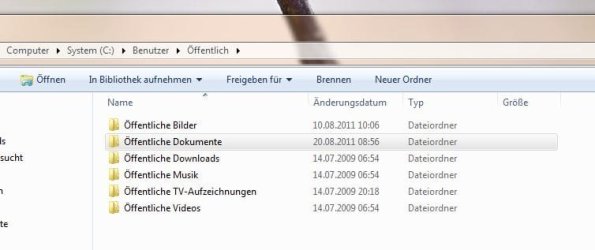
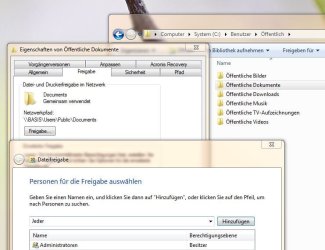
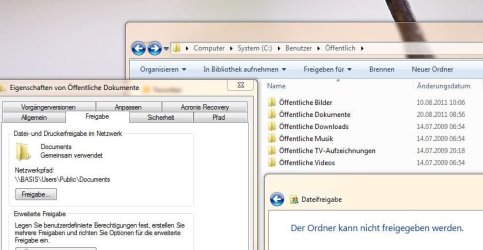
My folder "public documents" is just to share with administrators and the owner. It is not possible to add “everyone”. If I try to add “Everyone” a window opens: The folder can not be shared. That's the problem!
For all other folders in the directory “Public” it is possible to give full access for administrators, owners and everyone.
Accordingly, the folder "Public Documents" is shown in on the own computer but not on other computers in the network.
What is the reason an what have I to do, to share the folder “Documents” = Public Documents” with full access to Everyone?
Thank you for explanations and advices how I can solve the problem.
 

My Computer

OS
Win 7 Ultimate x64
Try this, open the Network and Sharing Center and then go to Advanced sharing options. Under Public Folder Sharing select "Turn on sharing so anyone with network access can read and write files in Public folders".
 

My Computer

Computer type
PC/Desktop
Computer Manufacturer/Model Number
Home Built
OS
Windows 10 Education 64 bit
CPU
AMD Phenom II X4 980 Black Edition Deneb 3.7GHz
Motherboard
Asus M4N68T-M V2 µATX Motherboard
Memory
8GB 4GBx2 Kingston PC10600 DDR3 1333 Memory
Graphics Card(s)
Zotac NVIDIA Geforce GT640 2 Gig DDR3 PCIe
Sound Card
VIA VT1708s High Definition Audio 8-channel Onboard
Monitor(s) Displays
22" LG E2242 1080p and 2 19" I-INC AG191D
Screen Resolution
1280x1024 - 1920x1080 - 1280x1024
Hard Drives
Crucial M100 256 GB SSD and 500 GB WD Blue SATA
PSU
Thermaltake TR 620
Case
Power Up Black ATX Mid-Tower Case
Cooling
Stock heatsink and fan
Keyboard
Logitech Wireless K350 Wave
Mouse
Logitech Wireless M570 Trackman Wheel
Internet Speed
80 Mbps Down 30 Mbps Up
Antivirus
Windows Defender
Browser
Internet Explorer 11
Other Info
HP DVD1040e Lightscribe - External USB2
Hi alphanumeric, exactly that is it what I have done before. The Resualt is that I got access to all other Folders - Video, Pictures - but no access to the Folder "Public Documents" an I could not chance the sharing option to "Everyone" using the explorer and right mouse click - properties - sharing. Thanks.
 

My Computer

OS
Win 7 Ultimate x64
Well then, I don't know what to tell you? I don't use HomeGroup and I have my system locked down to just the one shared folder on each PC. And that shared folder has restricted access.
 

My Computer

Computer type
PC/Desktop
Computer Manufacturer/Model Number
Home Built
OS
Windows 10 Education 64 bit
CPU
AMD Phenom II X4 980 Black Edition Deneb 3.7GHz
Motherboard
Asus M4N68T-M V2 µATX Motherboard
Memory
8GB 4GBx2 Kingston PC10600 DDR3 1333 Memory
Graphics Card(s)
Zotac NVIDIA Geforce GT640 2 Gig DDR3 PCIe
Sound Card
VIA VT1708s High Definition Audio 8-channel Onboard
Monitor(s) Displays
22" LG E2242 1080p and 2 19" I-INC AG191D
Screen Resolution
1280x1024 - 1920x1080 - 1280x1024
Hard Drives
Crucial M100 256 GB SSD and 500 GB WD Blue SATA
PSU
Thermaltake TR 620
Case
Power Up Black ATX Mid-Tower Case
Cooling
Stock heatsink and fan
Keyboard
Logitech Wireless K350 Wave
Mouse
Logitech Wireless M570 Trackman Wheel
Internet Speed
80 Mbps Down 30 Mbps Up
Antivirus
Windows Defender
Browser
Internet Explorer 11
Other Info
HP DVD1040e Lightscribe - External USB2
Thanks again. I fear my Englisch is to bad to explain exactly what I mean. I don't use HomeGroup. It ist workingplace network or public network. Perhapst the attached pictures may help?
 

My Computer

OS
Win 7 Ultimate x64
Thanks again. I fear my Englisch is to bad to explain exactly what I mean. I don't use HomeGroup. It ist workingplace network or public network. Perhapst the attached pictures may help?
 

Attachments

  • Public 1.JPG
    Public 1.JPG
    33.4 KB · Views: 6
  • Public 2.JPG
    Public 2.JPG
    57.1 KB · Views: 10
  • Public 3.JPG
    Public 3.JPG
    56.2 KB · Views: 9

My Computer

OS
Win 7 Ultimate x64
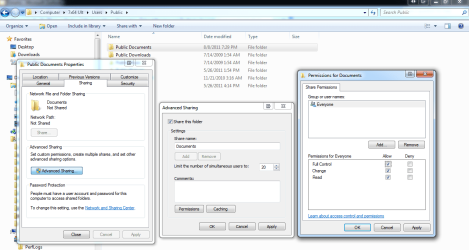
I can't really make sense of your screen shoots as I only speak English. I can share my Public Documents folder under advanced sharing and give full permission to everyone. Share Public Capture.PNG

I'm not sure why you can't though.
 
Last edited:

My Computer

Computer type
PC/Desktop
Computer Manufacturer/Model Number
Home Built
OS
Windows 10 Education 64 bit
CPU
AMD Phenom II X4 980 Black Edition Deneb 3.7GHz
Motherboard
Asus M4N68T-M V2 µATX Motherboard
Memory
8GB 4GBx2 Kingston PC10600 DDR3 1333 Memory
Graphics Card(s)
Zotac NVIDIA Geforce GT640 2 Gig DDR3 PCIe
Sound Card
VIA VT1708s High Definition Audio 8-channel Onboard
Monitor(s) Displays
22" LG E2242 1080p and 2 19" I-INC AG191D
Screen Resolution
1280x1024 - 1920x1080 - 1280x1024
Hard Drives
Crucial M100 256 GB SSD and 500 GB WD Blue SATA
PSU
Thermaltake TR 620
Case
Power Up Black ATX Mid-Tower Case
Cooling
Stock heatsink and fan
Keyboard
Logitech Wireless K350 Wave
Mouse
Logitech Wireless M570 Trackman Wheel
Internet Speed
80 Mbps Down 30 Mbps Up
Antivirus
Windows Defender
Browser
Internet Explorer 11
Other Info
HP DVD1040e Lightscribe - External USB2
Share public Documents

Hi alphanumeric, thanks a lot for your help and patience. Indeed i can share public documents with Advanced Sharing. But I wonder why this does not work with Share? Is that always the case with windows 7? If it is so, what sense does it make? All the best. Karl
 

My Computer

OS
Win 7 Ultimate x64
Last edited:

My Computer

Computer Manufacturer/Model Number
HP Pavilion Elite 495UK
OS
Windows 7 Ultimate SP1 64-Bit
CPU
Intel Core i7 870 @ 2.93GHz
Motherboard
MSI 2A9C (CPU1)
Memory
8Gb Dual-Channel DDR3 @ 664MHz
Graphics Card(s)
nVidia GeForce GTX 460 1024MB dedicated RAM
Sound Card
Realtek HD Audio
Monitor(s) Displays
HP2310i
Screen Resolution
1920 x 1080
Hard Drives
1x1954GB Hitachi HDS22020ALA 330 (RAID), 1x1954GB Hitachi External for backup and storage
PSU
460W
Case
HP Elite
Cooling
Air cooled
Keyboard
Logitech K750 solar-powered keyboard
Mouse
Logitech Wireless M180 mouse
Internet Speed
2Mb
Other Info
Pure Avanti Flow Internet Radio with iPod Dock, 64Gb iPod, HP USB Speakers, Sony MDR-V500 Headphones, Sony Vaio F-Series Laptop
Hi alphanumeric, thanks a lot for your help and patience. Indeed i can share public documents with Advanced Sharing. But I wonder why this does not work with Share? Is that always the case with windows 7? If it is so, what sense does it make? All the best. Karl

I don't know, I'm thinking if you don't use Homegroup you use advanced sharing. If you look though what seavixen32 has posted you may make some sense out of it. I have several reasons why I don't use homegroup, one being I still have an XP PC on my home network. I use advanced sharing because it lets me lock things down. I can restrict access to my shared folders to the users on my PC's. When I have guests, and I give them WIFI access, they can't access my shared folders. Good or bad its the way I've always done it. I may play around with homegroup at some point. If I can make it do what I want, I may use it.
 

My Computer

Computer type
PC/Desktop
Computer Manufacturer/Model Number
Home Built
OS
Windows 10 Education 64 bit
CPU
AMD Phenom II X4 980 Black Edition Deneb 3.7GHz
Motherboard
Asus M4N68T-M V2 µATX Motherboard
Memory
8GB 4GBx2 Kingston PC10600 DDR3 1333 Memory
Graphics Card(s)
Zotac NVIDIA Geforce GT640 2 Gig DDR3 PCIe
Sound Card
VIA VT1708s High Definition Audio 8-channel Onboard
Monitor(s) Displays
22" LG E2242 1080p and 2 19" I-INC AG191D
Screen Resolution
1280x1024 - 1920x1080 - 1280x1024
Hard Drives
Crucial M100 256 GB SSD and 500 GB WD Blue SATA
PSU
Thermaltake TR 620
Case
Power Up Black ATX Mid-Tower Case
Cooling
Stock heatsink and fan
Keyboard
Logitech Wireless K350 Wave
Mouse
Logitech Wireless M570 Trackman Wheel
Internet Speed
80 Mbps Down 30 Mbps Up
Antivirus
Windows Defender
Browser
Internet Explorer 11
Other Info
HP DVD1040e Lightscribe - External USB2
Dear seavixen32 and dear alphanumeric,
thank you very much for your very kind support. You are right, I Use Win 7 and some Macbook Pro in the Network. It seems that there is no solution to add the access for everyone on Public Document Folder in the Directory Public. But so it seems to be. But that doesn’t make real sense to me: why the folder public documents is different to the other folders in the same directory. I don’t know why and for what? LG Karl
 

My Computer

OS
Win 7 Ultimate x64

My Computer

Computer Manufacturer/Model Number
HP Pavilion Elite 495UK
OS
Windows 7 Ultimate SP1 64-Bit
CPU
Intel Core i7 870 @ 2.93GHz
Motherboard
MSI 2A9C (CPU1)
Memory
8Gb Dual-Channel DDR3 @ 664MHz
Graphics Card(s)
nVidia GeForce GTX 460 1024MB dedicated RAM
Sound Card
Realtek HD Audio
Monitor(s) Displays
HP2310i
Screen Resolution
1920 x 1080
Hard Drives
1x1954GB Hitachi HDS22020ALA 330 (RAID), 1x1954GB Hitachi External for backup and storage
PSU
460W
Case
HP Elite
Cooling
Air cooled
Keyboard
Logitech K750 solar-powered keyboard
Mouse
Logitech Wireless M180 mouse
Internet Speed
2Mb
Other Info
Pure Avanti Flow Internet Radio with iPod Dock, 64Gb iPod, HP USB Speakers, Sony MDR-V500 Headphones, Sony Vaio F-Series Laptop
Back
Top