- Local time
- 11:51 PM
- Messages
- 8,608
Clean out all temps by downloading TFC by Old Timer TFC - Temp File Cleaner by OldTimer - Geeks to Go Forums and save it to your desktop.
Save any unsaved work. TFC will close ALL open programs including your browser!
Double-click on TFC.exe to run it. If you are using Vista/Windows 7 right-click on the file and choose Run As Administrator.
Click the Start button to begin the cleaning process and let it run uninterrupted to completion.
Important! If TFC prompts you to reboot, please do so immediately. If not prompted, manually reboot the machine anyway to ensure a complete clean.
After rebooting, see if it still shows up.
Save any unsaved work. TFC will close ALL open programs including your browser!
Double-click on TFC.exe to run it. If you are using Vista/Windows 7 right-click on the file and choose Run As Administrator.
Click the Start button to begin the cleaning process and let it run uninterrupted to completion.
Important! If TFC prompts you to reboot, please do so immediately. If not prompted, manually reboot the machine anyway to ensure a complete clean.
After rebooting, see if it still shows up.
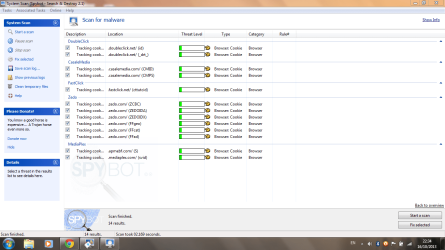
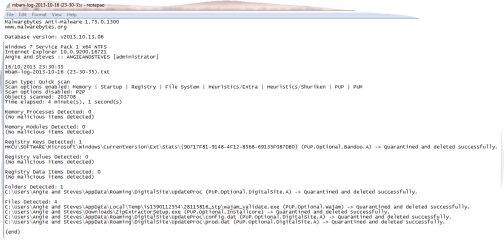
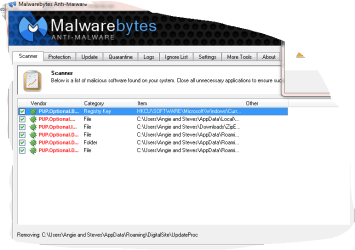
PUP.Optional.Bandoo.A got on your computer after you have installed a freeware software (video recording/streaming, download-managers or PDF creators) that had bundled into their installation this browser hijacker. This Potentially Unwanted Propgram is also bundled within the custom installer on many download sites (examples: CNET, Brothersoft or Softonic), so if you have downloaded a software from these websites, chances are that PUP.Optional.Bandoo.A was installed during the software setup process.
You should always pay attention when installing software because often, a software installer includes optional installs, such as this PUP.Optional.Bandoo.A browser hijacker. Be very careful what you agree to install.
Always opt for the custom installation and deselect anything that is not familiar, especially optional software that you never wanted to download and install in the first place. It goes without saying that you should not install software that you don’t trust.
My Computer
At a glance
Windows 7 Ultimate 32bit SP1Intel(R) Core(TM)2 Quad CPU @ 2.40GHz, 2400 MHz4 GBATI Radeon HD 2600 Pro
- Computer type
- PC/Desktop
- Computer Manufacturer/Model Number
- Bruce ... somewhere in his 40's
- OS
- Windows 7 Ultimate 32bit SP1
- CPU
- Intel(R) Core(TM)2 Quad CPU @ 2.40GHz, 2400 MHz
- Motherboard
- INTEL/D975XBX2
- Memory
- 4 GB
- Graphics Card(s)
- ATI Radeon HD 2600 Pro
- Monitor(s) Displays
- Samsung SyncMaster 914v
- Screen Resolution
- 1280 x 1024
- Hard Drives
- 2/500GB each ... ST3500630AS ATA Device.
One is not connected
- PSU
- Rocketfish 700 W
- Case
- G.Skill Gigabyte Chassis
- Keyboard
- Standard PS/2 Keyboard
- Mouse
- Microsoft PS/2 Mouse
- Internet Speed
- DSL
- Antivirus
- Avira Internet Security
- Browser
- IE 11
- Other Info
- ATI HDMI Audio