Q: Assigninig icons to File types

DarkStar GT

New member
Power User
Local time
12:48 AM
Messages
257
Location
Surrey, UK
Short version:
i) How can I assign an icon within a third-party software app to a filetype?
ii) How can I remove the assignment of a program to "always open" a filetype?


----------------------------
Background diagnostics:
In XP, a software app (Native Instruments' Kontakt 3) assigns different icons to several filetypes that it uses, so you can distinguish them in Explorer. This did not work in Windows 7. I wondered why.

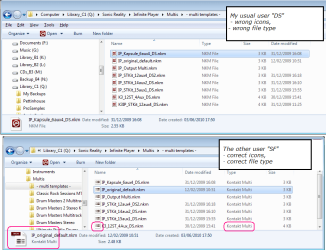
Below is a screenshot of what I've found in Windows 7, plus a screenshot from XP showing the available icons). The filetype (.nki) is mapped to the Registry key: Kontakt.Instrument.3. And here are the exported Registry entries:
Exported from Windows 7 Home Premium
Windows Registry Editor Version 5.00

[HKEY_CLASSES_ROOT\Kontakt.Instrument.3]
@="Kontakt Instrument"

[HKEY_CLASSES_ROOT\Kontakt.Instrument.3\DefaultIcon]
@="C:\\Program Files (x86)\\Native Instruments\\Kontakt 3\\.exe,1"

[HKEY_CLASSES_ROOT\Kontakt.Instrument.3\shell]

[HKEY_CLASSES_ROOT\Kontakt.Instrument.3\shell\open]

[HKEY_CLASSES_ROOT\Kontakt.Instrument.3\shell\open\command]
@="C:\\Program Files (x86)\\Native Instruments\\Kontakt 3\\.exe %1"

------------------------------------------------
Exported from Windows XP Home
Windows Registry Editor Version 5.00

[HKEY_CLASSES_ROOT\Kontakt.Instrument.3]
@="Kontakt Instrument"
"EditFlags"=dword:00000000

[HKEY_CLASSES_ROOT\Kontakt.Instrument.3\DefaultIcon]
@="C:\\Program Files\\Native Instruments\\Kontakt 3\\Kontakt 3.exe,1"

[HKEY_CLASSES_ROOT\Kontakt.Instrument.3\shell]

[HKEY_CLASSES_ROOT\Kontakt.Instrument.3\shell\open]

[HKEY_CLASSES_ROOT\Kontakt.Instrument.3\shell\open\command]
@="C:\\Program Files\\Native Instruments\\Kontakt 3\\Kontakt 3.exe %1"
I have noticed three things:
a) the Defaulticon data value has an extra \ just before .exe, but the Shell Open command works when I double-click an .nki file.
b) the icon index number is positive (although in this tutorial http://www.sevenforums.com/tutorials/57455-file-extension-icon-change-default-icon.html , negative index numbers are used),
c) there were DefaultIcon entries for the other filetypes with index values of 2, 3, and 4

------------------
After creating a System Restore point and Exporting the Registry keys:
i) Will it be safe to remove the extra \ in the DefaultIcon data values?
ii) Will be be safe to delete the shell\open branch?
 

Attachments

  • Kontakt icons_02.png
    Kontakt icons_02.png
    32.5 KB · Views: 37

My Computer My Computer

At a glance

Windows Home Premium (64)Intel Core i7 8608GB (4x2GB) Corsair TwinX XMS31GB Gainward 9500 GT
Computer type
PC/Desktop
Computer Manufacturer/Model Number
Scan 3XS P55 liteDAW
OS
Windows Home Premium (64)
CPU
Intel Core i7 860
Motherboard
Gigabyte GA-P55A-UD4
Memory
8GB (4x2GB) Corsair TwinX XMS3
Graphics Card(s)
1GB Gainward 9500 GT
Sound Card
M-Audio Delta 66
Monitor(s) Displays
Acer v223wBBd
Screen Resolution
1680 x 1050
Hard Drives
1 x 500 GB WD Barracuda (OS+Docs)
2 x 1TB Samsung Spinpoint F3 (Data)
PSU
Enermax EMD625AWT II - 625W Enermax Modu82+ II
Case
Fractal Design Define R2 Black
Cooling
Prolima Megahalems Super 6 Heatpipe Tower Cooler
Keyboard
Microsoft Digital Media Pro
Mouse
Belkin Optical Ergo
Internet Speed
8 Mbps nominal (14.9 achieved !)
Other Info
Digital Audio Workstation
There's no reason why either should be unsafe to try. I'm a little baffled as to how it's working with the additional \ at all. The worst that can happen is that you can't open the .nfi files but then you can just restore the values. There should be no adverse effects on the system generally and you've always got the restore point to save you from disaster if by some freak ten billion to one chance there is a problem.
 

My Computer My Computer

At a glance

Windows 7
OS
Windows 7
Update:

a) on closer inspection, the problem in the data value is not an extra backslash; rather it is the omission of the program name. For example, the Exported data value is:
[HKEY_CLASSES_ROOT\Kontakt.Instrument.3\DefaultIcon]
@="C:\\Program Files (x86)\\Native Instruments\\Kontakt 3\\.exe,1"
It should be:
[HKEY_CLASSES_ROOT\Kontakt.Instrument.3\DefaultIcon]
@="C:\\Program Files (x86)\\Native Instruments\\Kontakt 3\\Kontakt 3.exe,1"
[Exports form the Registry change single back-slashes in data values to double back-slashes]

b) I changed the values in the DefaultIcon and Shell-Open-Command keys for one element only. That still did not work; the icons were still not correct.

e) Here's the odd thing. I switched to another user -and the icons were correct for that user. I logged off that user, back to my normal one and the icons were wrong. Please see the attached screenshot.

f) That suggests to me that it is some sort of Windows 7 permissions problem, preventing access to those Registry keys in some cases.

g) let me give you some background details:
-- the Windows 7 PC is new, and one user account ("SF") was configured by the PC supplier,
-- I logged in as "SF" and created a second account ("DS") as an Administrator account
-- I logged in as "DS" and ran the program installer that created those Registry keys. So "DS" is the creator/owner.

h) But it looks like "SF" does have access to those Registry keys and "DS" does not.

i) I also checked the Defaulticons set up for filetypes when I installed 2 other programs as user "DS" (they were Foxit Reader and Reaper (a music production app). Those icons were displayed correctly for both users.

Does that make sense? It seems odd that the Windows 7 "owner" cannot access the Registry keys.

If I look at the Permissions in the Registry what should I expect to see? And any ideas how I can fix this?
 

Attachments

  • Multis for DS and SF.png
    Multis for DS and SF.png
    40.7 KB · Views: 22

My Computer My Computer

At a glance

Windows Home Premium (64)Intel Core i7 8608GB (4x2GB) Corsair TwinX XMS31GB Gainward 9500 GT
Computer type
PC/Desktop
Computer Manufacturer/Model Number
Scan 3XS P55 liteDAW
OS
Windows Home Premium (64)
CPU
Intel Core i7 860
Motherboard
Gigabyte GA-P55A-UD4
Memory
8GB (4x2GB) Corsair TwinX XMS3
Graphics Card(s)
1GB Gainward 9500 GT
Sound Card
M-Audio Delta 66
Monitor(s) Displays
Acer v223wBBd
Screen Resolution
1680 x 1050
Hard Drives
1 x 500 GB WD Barracuda (OS+Docs)
2 x 1TB Samsung Spinpoint F3 (Data)
PSU
Enermax EMD625AWT II - 625W Enermax Modu82+ II
Case
Fractal Design Define R2 Black
Cooling
Prolima Megahalems Super 6 Heatpipe Tower Cooler
Keyboard
Microsoft Digital Media Pro
Mouse
Belkin Optical Ergo
Internet Speed
8 Mbps nominal (14.9 achieved !)
Other Info
Digital Audio Workstation
I suspect that there is a second and overriding set of keys relating to the program elsewhere in the registry which apply only to the user account in which case it's not a matter of permissions at all.

However, the permissions associated with an Administrator are not those of the 'owner' (which is why we have so many tutorials on 'taking ownership'!) SYSTEM trumps Administrator when it comes to 'ownership' of Windows! But, as I say, I don't think that's the problem here
 

My Computer My Computer

At a glance

Windows 7
OS
Windows 7
I suspect that there is a second and overriding set of keys relating to the program elsewhere in the registry which apply only to the user account in which case it's not a matter of permissions at all.

That's an idea, thank you. I'll double-check that. Apart from "Kontakt.instrument" any thoughts on what to look for?
 

My Computer My Computer

At a glance

Windows Home Premium (64)Intel Core i7 8608GB (4x2GB) Corsair TwinX XMS31GB Gainward 9500 GT
Computer type
PC/Desktop
Computer Manufacturer/Model Number
Scan 3XS P55 liteDAW
OS
Windows Home Premium (64)
CPU
Intel Core i7 860
Motherboard
Gigabyte GA-P55A-UD4
Memory
8GB (4x2GB) Corsair TwinX XMS3
Graphics Card(s)
1GB Gainward 9500 GT
Sound Card
M-Audio Delta 66
Monitor(s) Displays
Acer v223wBBd
Screen Resolution
1680 x 1050
Hard Drives
1 x 500 GB WD Barracuda (OS+Docs)
2 x 1TB Samsung Spinpoint F3 (Data)
PSU
Enermax EMD625AWT II - 625W Enermax Modu82+ II
Case
Fractal Design Define R2 Black
Cooling
Prolima Megahalems Super 6 Heatpipe Tower Cooler
Keyboard
Microsoft Digital Media Pro
Mouse
Belkin Optical Ergo
Internet Speed
8 Mbps nominal (14.9 achieved !)
Other Info
Digital Audio Workstation
Short version:
i) How can I assign an icon within a third-party software app to a filetype?
ii) How can I remove the assignment of a program to "always open" a filetype?

Hi Darkstar GT !!
I have a very little conception about the registries , but I have answers to your short version in my way.

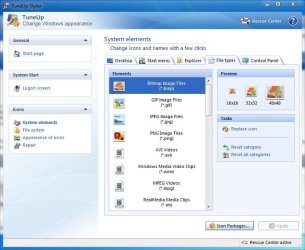
1. You can use TuneUp Styler (bundled with TuneUp Utilities) to assign custom icons for the filetypes (though the program is not free)

Capture.JPG

As tuneup utility is not free, and it is not able to replace all the system icons, I follow http://www.sevenforums.com/tutorials/73191-icons-change-using-resource-hacker.html#post642539 technique to change my icons.


2. Let us take the example of .jpg filetype . If we want to change the program to open .jpg by default, we are to ....
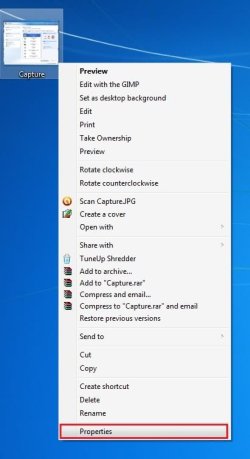
i] Right click on a jpeg file, and go to "properties"
Untitled.jpg

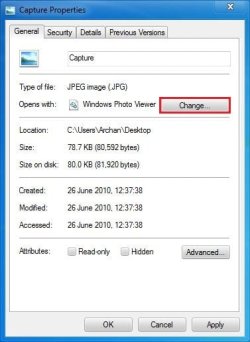
ii] Click on the "change" button
Untitled 4.jpg

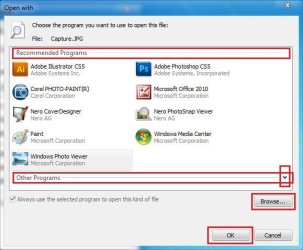
iii] In the upcoming "open with" window, first search your desired program in "recommended programs" . If it is not there, search in "other programs" by clicking the button in the crossed box in the pic. If it is not even there, click the "browse button", and search it in C:\Program Files. When got, Click on "ok" button
Untitled 3.JPG

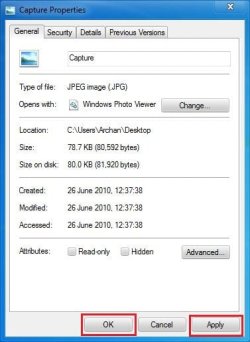
iv] Finally, to give the change effect, Click on "apply", and then "ok" . And you are done.
Untitled 2.JPG
 

My Computer My Computer

At a glance

Microsoft Windows 10 Pro Insider Preview 64-bitIntel(R) Core(TM) i3-4130 CPU @ 3.40GHzCorsair Vengence 4GB x2 (8.00GB Dual-Channel ...2047MB GeForce GTS 450 (ZOTAC International)
Computer type
PC/Desktop
Computer Manufacturer/Model Number
Self Assembled
OS
Microsoft Windows 10 Pro Insider Preview 64-bit
CPU
Intel(R) Core(TM) i3-4130 CPU @ 3.40GHz
Motherboard
Gigabyte Technology Co., Ltd. B85M-D3H
Memory
Corsair Vengence 4GB x2 (8.00GB Dual-Channel DDR3 @ 798MHz)
Graphics Card(s)
2047MB GeForce GTS 450 (ZOTAC International)
Sound Card
Onboard (Realtek High Definition Audio)
Monitor(s) Displays
LG Flatron E2040T
Screen Resolution
1600x900
Hard Drives
Western Digital 1 TB
Seagate 500 GB
PSU
Corsair VS550
Case
Cooler Master K380
Cooling
Cooler Master Seidon 120V Plus
Keyboard
Logitech MK260r
Mouse
Logitech MK260r
Internet Speed
PMPL Broadband
Antivirus
Windows Defender + MBAM
Browser
Firefox
Other Info
Dell Studio 15" Laptop
I suspect that there is a second and overriding set of keys relating to the program elsewhere in the registry which apply only to the user account in which case it's not a matter of permissions at all.

That's an idea, thank you. I'll double-check that. Apart from "Kontakt.instrument" any thoughts on what to look for?

I'd just keep it simple and search for "Kontakt". You might get a lot of entries that aren't useful but at least you'll be relatively sure that you haven't missed anything!
 

My Computer My Computer

At a glance

Windows 7
OS
Windows 7
Update and Resolution.

Well, after I bit of prowling around the Registry I did find some more entries. After editing/deleting them I have got rid of the problem.

For info:
After I had fixed the invalid path name for the DefaultIcon entry,
-- I found the keys
Code:
[HKEY_CURRENT_USER\Software\Microsoft\Windows\CurrentVersion\Explorer\FileExts\.nki]

[HKEY_CURRENT_USER\Software\Microsoft\Windows\CurrentVersion\Explorer\FileExts\.nki\OpenWithList]
"a"="Kontakt 3.exe"
"MRUList"="a"

[HKEY_CURRENT_USER\Software\Microsoft\Windows\CurrentVersion\Explorer\FileExts\.nki\OpenWithProgids]
"Kontakt.Instrument.3"=hex(0):

[HKEY_CURRENT_USER\Software\Microsoft\Windows\CurrentVersion\Explorer\FileExts\.nki\UserChoice]
"Progid"="Applications\\Kontakt 3.exe"
-- I removed the "a" and "MRUList" entries from OpenWithList
-- I removed the UserChoice key

For completeness, for HKEY_CLASSES_ROOT\Kontakt.Instrument.3
-- I removed the Shell key and its sub-keys


-------------
I think that it was originally caused when I associated Kontakt 3 with the filetype as the default program to use to open the file. I am not about to try it again to confirm that idea.


My Computer My Computer

At a glance

Windows Home Premium (64)Intel Core i7 8608GB (4x2GB) Corsair TwinX XMS31GB Gainward 9500 GT
Computer type
PC/Desktop
Computer Manufacturer/Model Number
Scan 3XS P55 liteDAW
OS
Windows Home Premium (64)
CPU
Intel Core i7 860
Motherboard
Gigabyte GA-P55A-UD4
Memory
8GB (4x2GB) Corsair TwinX XMS3
Graphics Card(s)
1GB Gainward 9500 GT
Sound Card
M-Audio Delta 66
Monitor(s) Displays
Acer v223wBBd
Screen Resolution
1680 x 1050
Hard Drives
1 x 500 GB WD Barracuda (OS+Docs)
2 x 1TB Samsung Spinpoint F3 (Data)
PSU
Enermax EMD625AWT II - 625W Enermax Modu82+ II
Case
Fractal Design Define R2 Black
Cooling
Prolima Megahalems Super 6 Heatpipe Tower Cooler
Keyboard
Microsoft Digital Media Pro
Mouse
Belkin Optical Ergo
Internet Speed
8 Mbps nominal (14.9 achieved !)
Other Info
Digital Audio Workstation
Back
Top