Q] Dual boot windows 7 and 8, partition size?

chetan4

New member
Local time
12:55 PM
Messages
4
Hello,
I want to dual boot windows 7 and 8.
I have 4 partitions in my exisiting OS(windows 7)
C: 97 gb free space 20 gb
D: 292 gb free space 140 gb
E: 250 gb free space 10 gb
F: 296 gb free space 296 gb(its empty)

So my question is how do i partition it to dual boot win 8 and could someone also recommend the partition size for it.
 

My Computer My Computer

At a glance

windows 7 home basic
Computer type
PC/Desktop
OS
windows 7 home basic
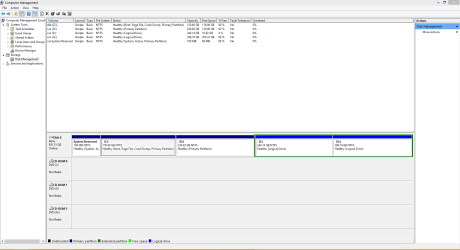
Please post back a screenshot of Disk Management - Post a Screen Capture Image.

First decide if C is the right size and if not what size you would like it to be.

I would move your data to E and F so that you can adjust the size of D to make it the Win8 partition, since an OS can benefit from being closer to the left hand side of the HDD.

If these are all Primary partitions you can adjust each one's size by adding or subtracting as much space as is available to/from any other partition even if it's not adjacent, following How to extend partition easily with Partition Wizard - video help.

If you have Logical partitions then there will need to be some minor changes before you can do this. Either way I would post back the screenshot and let us know the sizes you prefer so we can walk you through it.
 
Disk managenent

Hi,
So i did some resizing of my partitions and also cleaned up some data, also i have attached the screenshot of it.
Now do i need to install(dual-boot) windows 8 on my D: drive, could you guide me towards it?
 

Attachments

  • Capture.PNG
    Capture.PNG
    30.8 KB · Views: 6

My Computer My Computer

At a glance

windows 7 home basic
Computer type
PC/Desktop
OS
windows 7 home basic
I would make C larger and D smaller, in the end you will uninstall Windows 8 anyway :D so just give it 100 or 125 GB.
 

My Computer My Computer

At a glance

Windows 10 Pro x64Intel Core i7 6700KGSkill TridentZ RGB 16GB 3600 16-16-16-36EVGA GTX 980 Ti SC x2
Computer type
PC/Desktop
Computer Manufacturer/Model Number
Skylake Special #666
OS
Windows 10 Pro x64
CPU
Intel Core i7 6700K
Motherboard
Asus Sabertooth Z170 Mark 1
Memory
GSkill TridentZ RGB 16GB 3600 16-16-16-36
Graphics Card(s)
EVGA GTX 980 Ti SC x2
Sound Card
Realtek High Definition
Monitor(s) Displays
AOC G2460PG
Screen Resolution
1920 x 1080 144Hz
Hard Drives
Samsung 860 Pro 256GB, Seagate Barracuda 4TB x2
PSU
EVGA 1000 P2, EVGA White Custom Braided Cables
Case
Corsair Vengeance C70 Gunmetal Black
Cooling
Corsair H100i v2, Corsair ML120 x2, Thermal Grizzly Kryonaut
Keyboard
Logitech G910 Orion Spectrum
Mouse
Logitech G700s
Internet Speed
Verizon Fios Quantum Gateway 75/75
Antivirus
Windows Defender, Malwarebytes Free 3.8.3
Browser
Chrome
Other Info
Corsair SP120 x4, LG Blu-ray Drive, Durabrand HT-395 100 Watt Dolby Digital Amp, Corsair H2100 Wireless 7.1 Headset
how do I install it on my D: partition??
 

My Computer My Computer

At a glance

windows 7 home basic
Computer type
PC/Desktop
OS
windows 7 home basic
Be careful. You cannot create another primary partition because you already have 3 primary and 1 extended partition. You can, however, install Windows 8 in a logical partition because you have the 100MB system partition for the bootmgr. Not sure though whether the 100MB system partition is large enough to hold the Windows 8 bootmgr. Usually the Windows 8 bootmgr is larger and requires a 350MB system partitiom.

The more elegant method would be to install Windows 8 in a virtual VMware Player partition. That has the added advantage that you can run Windows 7 and Windows 8 side by side and share e.g. the clipboard which is very handy if you want to move data from one system to the other.

VMware Player - Install Windows 8
 

My Computer My Computer

At a glance

Vista, Windows7, Mint Mate, Zorin, Windows 8from 1.6GHz Duo to i7
Computer Manufacturer/Model Number
HP, Dell, Gateway, Toshiba - 4 laptops and 2 desktops
OS
Vista, Windows7, Mint Mate, Zorin, Windows 8
CPU
from 1.6GHz Duo to i7
Monitor(s) Displays
2x HP w2207
Hard Drives
5x HDD, 7x SSD, 12x Externals
Keyboard
with trackball - no mices
Mouse
Trackball mice
Internet Speed
DSL 6000
Back
Top