Question about a RAM STICK

JimW1956

New member
Local time
8:19 PM
Messages
25
I have an HP Touchsmart 310-1126. It came with a 6GB and a 2GB RAM Stick installed. The 2GB Stick is labeled with the following:

hynix 2GB 2Rx8 PC3-10600-9-10-2
HMT125S6TFR8C-H9 N0 AA

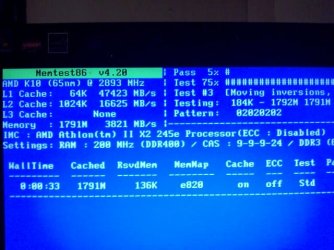
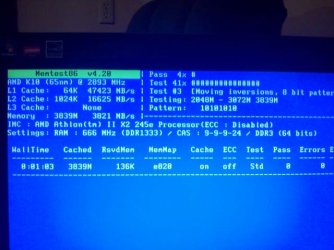
Testing the stick with MemTest86+ I get a different reading in each of the 2 RAM Slots. I have attached a picture of each slot reading.
I am wondering if this is normal or is there a problem somewhere?

Thanks in advance for any replies.
Jim
 

Attachments
  • 2GB Slot 1 Ram.jpg
    2GB Slot 1 Ram.jpg
    69.8 KB · Views: 9
  • 2GB Slot 2.jpg
    2GB Slot 2.jpg
    71.2 KB · Views: 8

My Computer

Computer Manufacturer/Model Number
HP Touchsmart 310-1126
OS
windows 7 Home Premium 64bit
CPU
AMD Athlon ll x2 245e 2900 Mhz
Motherboard
Quanta DA0NZ2MB6A0 (Aronia)
Memory
4GB PC3-10600MB/sec DDR3-1333
Graphics Card(s)
ATI Mobility Radion HD 4270
Sound Card
Integrated Realtek ALC269 High Defination Audio
Monitor(s) Displays
50.80cm (20in) LCD Panel Display with Touchscreen
Screen Resolution
1600 x 900
Hard Drives
Hitachi 1TB SATA
PSU
120w external power adapter
Case
All-in-One
Keyboard
HP USB
Mouse
HP USB
Internet Speed
12Mbps
According to the Memory Advisor tool at Crucial and Kingston (companies that specializes in memory), your 310-1126 has two memory slots. Each slot can hold a maximum of 4GB of RAM for a system total of 8GB. Are you sure you have a 6GB and a 2GB module?

Computer memory upgrades for HP - Compaq TouchSmart 310-1126 Desktop/PC from Crucial.com

Memory Search | Kingston

I believe your computer has dual channel architecture. Basically that means matched RAM sticks should be used in each of the two slots for optimum performance. It's OK to use just one stick of RAM but most computer manufacturers recommend putting the memory stick in slot # 1. Putting it in slot # 2 usually results in a decrease in performance or not having the memory recognized by the computer. I think that's why you're seeing different reading for the 2GB stick.
 

My Computer

Computer type
Laptop
Computer Manufacturer/Model Number
Sony Vaio VPCEB47GM Laptop
OS
Win 7 Pro 64-bit
CPU
Intel i5 2.4 Ghz
Memory
8GB DDR3
Graphics Card(s)
Intel HD 3000
Sound Card
IDT High Definition
Monitor(s) Displays
15.6 WGXA Anti-Glare LED
Screen Resolution
1280x800
Hard Drives
640Gb 7200rpm
Antivirus
MSE
Browser
Opera (primary) with IE9 backup
Hi marsmimar,

You are right I did mistype the size , I have the 2GB as referred to and the other is a 4GB for a total of 6GB from HP.
From the start of getting this PC it was constantly Freezing or BSOD'ing and the only thing I have found to do to make it usable was removing the 2GB stick, so I thought maybe the different readings were indicating a problen either with the stick or a RAM Slot.
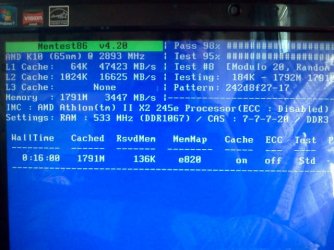
Here is the reading of the 4GB RAM stick ; it is the same in both slots.
 

Attachments

  • 4GB Memory Stick in Bank 1.jpg
    4GB Memory Stick in Bank 1.jpg
    55.4 KB · Views: 2

My Computer

Computer Manufacturer/Model Number
HP Touchsmart 310-1126
OS
windows 7 Home Premium 64bit
CPU
AMD Athlon ll x2 245e 2900 Mhz
Motherboard
Quanta DA0NZ2MB6A0 (Aronia)
Memory
4GB PC3-10600MB/sec DDR3-1333
Graphics Card(s)
ATI Mobility Radion HD 4270
Sound Card
Integrated Realtek ALC269 High Defination Audio
Monitor(s) Displays
50.80cm (20in) LCD Panel Display with Touchscreen
Screen Resolution
1600 x 900
Hard Drives
Hitachi 1TB SATA
PSU
120w external power adapter
Case
All-in-One
Keyboard
HP USB
Mouse
HP USB
Internet Speed
12Mbps
My usual disclaimer: I'm not an expert at anything.

By process of elimination, since the 4GB stick shows the same readings in both slots, it would seem logical that the 4GB stick and both slots are good. Just for clarification, you mentioned that, "From the start of getting this PC it was constantly Freezing or BSOD'ing and the only thing I have found to do to make it usable was removing the 2GB stick..."

If you use only the 2GB stick and install it in slot # 1, does the computer work? If no, I think it's safe to say the 2GB stick is bad.

In the category of personal opinion, RAM prices are pretty low right now. You could get a matched set of 8GB (2x4GB) for less than $40. I have a Sony Vaio that also came with 6GB (1x2GB and 1x4GB.) It had similar issues to what you've experienced. When I upgraded to 8GB, those problems went way.

2nd dislaimer: I have no personal affiliation with Crucial and offer this for informational purposes only.

I upgraded to Crucial. Most of the memory sticks I've seen are rated at 1.5 volts. These sticks are 1.35 volts. Lower voltage usually means cooler temperatures. But I bought the RAM about a year ago and paid almost $60. So if that 2GB stick doesn't work, I'd really consider a matched pair from any reputable company.
 

My Computer

Computer type
Laptop
Computer Manufacturer/Model Number
Sony Vaio VPCEB47GM Laptop
OS
Win 7 Pro 64-bit
CPU
Intel i5 2.4 Ghz
Memory
8GB DDR3
Graphics Card(s)
Intel HD 3000
Sound Card
IDT High Definition
Monitor(s) Displays
15.6 WGXA Anti-Glare LED
Screen Resolution
1280x800
Hard Drives
640Gb 7200rpm
Antivirus
MSE
Browser
Opera (primary) with IE9 backup
Back
Top