Question about desktop icons

helpfulnerd

New member
Local time
2:45 AM
Messages
19
Not sure if this question should be in this area of the forum, I think my question is about a tweak.

I am wondering if there is a way to disable the light blue translucent highlight effect to the desktop icons. I can't stand the look, and don't want it.

Can that be removed? Is there an option somewhere to turn that off? Or even a safe hack to get rid of it.

Any help is appreciated. Thanks for reading. Let me know if there is a better area to post this type of question. Sorry if its in the wrong place.

System:
Compaq Presario F763NR
AMD Athlon Dual Core 1.90 GHz
NVIDIA GeForce 700M / nForce 610M
1 GIG Ram
120 HD
Runnig win7 Built 7100
 

My Computer

Computer Manufacturer/Model Number
Compaq Presario F763NR
OS
Windows 7 RC1 Build 7100 32-bit
CPU
AMD Athlon 64 X2 Dual-Core TK-57 1.90 GHz
Memory
1 Gig 512 x 2
Graphics Card(s)
NVIDIA GeForce 7000M / nForce 610M
Sound Card
Conexant High Definition SmartAudio 221
Screen Resolution
1280 x 800 x 60 hertz
Hard Drives
120 Gig
Keyboard
Logitech / Alto Notebook Stand
Mouse
Logitech Laser Mouse
Internet Speed
Comcast High Speed Cable Modem
Hello Helpfulnerd, and welcome to Seven Forums.

You can uncheck the Show translucent selection rectangle in Visual Effects to just have a outline instead.

Hope this helps,
Shawn
 

My Computer

Computer type
PC/Desktop
Computer Manufacturer/Model Number
Self built custom
OS
64-bit Windows 11 Pro for Workstations
CPU
Intel i7-8700K OC'd to 5 GHz
Motherboard
ASUS ROG Maximus XI Formula Z390
Memory
64 GB (4x16GB) G.SKILL TridentZ RGB DDR4 3600 MHz
Graphics Card(s)
ASUS ROG-STRIX-GTX1080TI-O11G-GAMING
Sound Card
Integrated
Monitor(s) Displays
2 x Samsung Odyssey G7 27"
Screen Resolution
2560x1440
Hard Drives
1TB Samsung 990 PRO M.2,
4TB Samsung 990 PRO PRO M.2,
TerraMaster F8 SSD Plus NAS
PSU
Seasonic Prime Titanium 850W
Case
Thermaltake Core P3
Cooling
Corsair Hydro H115i
Keyboard
Logitech wireless K800
Mouse
Logitech MX Master 4
Internet Speed
2 Gb/s Download and 100 Mb/s Upload
Antivirus
Malwarebyte Anti-Malware Premium
Browser
Google Chrome
Other Info
Logitech Z625 speaker system,
Logitech BRIO 4K Pro webcam,
HP Color LaserJet Pro MFP M477fdn,
APC SMART-UPS RT 1000 XL - SURT1000XLI,
Galaxy S23 Plus phone
Shawn, thanks for the friendly welcome.

Thanks for the tip, unfortunately that was not the feature I was referring to. My fault for not being more clear. what I am curious about is when you put your mouse over an icon on the desktop a blue see through square shows up around the icon, same thing happens if you click once on an icon, it highlights in see through blue. Think of it as a rollover effect when you run your mouse over icons on the desktop, each icon gets highlighted in that see through blue color, and I want to get rid of that highlight or at least change the color of the highlight. Is that possible?

I want to get rid of that blue highlight around the icons themselves. The tip you gave me refers to the blue highlight when you click and drag to select multiple items on the desktop. Thanks for the tip though, learn something new everyday.

So I still need to know if its possible remove the blue square that shows up around an icon itself. Hopefully this can be done. Its just an extra thing MS did to make eye candy that I don't need or want.
 

My Computer

Computer Manufacturer/Model Number
Compaq Presario F763NR
OS
Windows 7 RC1 Build 7100 32-bit
CPU
AMD Athlon 64 X2 Dual-Core TK-57 1.90 GHz
Memory
1 Gig 512 x 2
Graphics Card(s)
NVIDIA GeForce 7000M / nForce 610M
Sound Card
Conexant High Definition SmartAudio 221
Screen Resolution
1280 x 800 x 60 hertz
Hard Drives
120 Gig
Keyboard
Logitech / Alto Notebook Stand
Mouse
Logitech Laser Mouse
Internet Speed
Comcast High Speed Cable Modem
Sorry, but the only way around that would be to use the Windows Classic theme intead of a Aero or Basic theme, and change the color for the Selected Items item in Advanced Appearance settings.

Hope this helps,
Shawn
 

My Computer

Computer type
PC/Desktop
Computer Manufacturer/Model Number
Self built custom
OS
64-bit Windows 11 Pro for Workstations
CPU
Intel i7-8700K OC'd to 5 GHz
Motherboard
ASUS ROG Maximus XI Formula Z390
Memory
64 GB (4x16GB) G.SKILL TridentZ RGB DDR4 3600 MHz
Graphics Card(s)
ASUS ROG-STRIX-GTX1080TI-O11G-GAMING
Sound Card
Integrated
Monitor(s) Displays
2 x Samsung Odyssey G7 27"
Screen Resolution
2560x1440
Hard Drives
1TB Samsung 990 PRO M.2,
4TB Samsung 990 PRO PRO M.2,
TerraMaster F8 SSD Plus NAS
PSU
Seasonic Prime Titanium 850W
Case
Thermaltake Core P3
Cooling
Corsair Hydro H115i
Keyboard
Logitech wireless K800
Mouse
Logitech MX Master 4
Internet Speed
2 Gb/s Download and 100 Mb/s Upload
Antivirus
Malwarebyte Anti-Malware Premium
Browser
Google Chrome
Other Info
Logitech Z625 speaker system,
Logitech BRIO 4K Pro webcam,
HP Color LaserJet Pro MFP M477fdn,
APC SMART-UPS RT 1000 XL - SURT1000XLI,
Galaxy S23 Plus phone
Shawn,

Thanks for looking into it. I look around and came to that conclusion as well. I was crossing my fingers that there might be a hack, or trick to make it go away. Those blue highlights are one of the only visual styles that I don't like.

maybe someone will figure it out.
 

My Computer

Computer Manufacturer/Model Number
Compaq Presario F763NR
OS
Windows 7 RC1 Build 7100 32-bit
CPU
AMD Athlon 64 X2 Dual-Core TK-57 1.90 GHz
Memory
1 Gig 512 x 2
Graphics Card(s)
NVIDIA GeForce 7000M / nForce 610M
Sound Card
Conexant High Definition SmartAudio 221
Screen Resolution
1280 x 800 x 60 hertz
Hard Drives
120 Gig
Keyboard
Logitech / Alto Notebook Stand
Mouse
Logitech Laser Mouse
Internet Speed
Comcast High Speed Cable Modem
I hope so. I'll keep my eye out for anything that may serve as a better workaround or solution and post back if I can find one.
 

My Computer

Computer type
PC/Desktop
Computer Manufacturer/Model Number
Self built custom
OS
64-bit Windows 11 Pro for Workstations
CPU
Intel i7-8700K OC'd to 5 GHz
Motherboard
ASUS ROG Maximus XI Formula Z390
Memory
64 GB (4x16GB) G.SKILL TridentZ RGB DDR4 3600 MHz
Graphics Card(s)
ASUS ROG-STRIX-GTX1080TI-O11G-GAMING
Sound Card
Integrated
Monitor(s) Displays
2 x Samsung Odyssey G7 27"
Screen Resolution
2560x1440
Hard Drives
1TB Samsung 990 PRO M.2,
4TB Samsung 990 PRO PRO M.2,
TerraMaster F8 SSD Plus NAS
PSU
Seasonic Prime Titanium 850W
Case
Thermaltake Core P3
Cooling
Corsair Hydro H115i
Keyboard
Logitech wireless K800
Mouse
Logitech MX Master 4
Internet Speed
2 Gb/s Download and 100 Mb/s Upload
Antivirus
Malwarebyte Anti-Malware Premium
Browser
Google Chrome
Other Info
Logitech Z625 speaker system,
Logitech BRIO 4K Pro webcam,
HP Color LaserJet Pro MFP M477fdn,
APC SMART-UPS RT 1000 XL - SURT1000XLI,
Galaxy S23 Plus phone
I don't think you can get rid of it. It shows the same way in Vista...

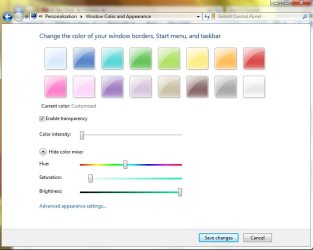
You can play around here and see if you can lighten it as I've done
 

Attachments

  • color and appearance.jpg
    color and appearance.jpg
    38.8 KB · Views: 114

My Computer

Computer type
PC/Desktop
Computer Manufacturer/Model Number
Bruce ... somewhere in his 40's
OS
Windows 7 Ultimate 32bit SP1
CPU
Intel(R) Core(TM)2 Quad CPU @ 2.40GHz, 2400 MHz
Motherboard
INTEL/D975XBX2
Memory
4 GB
Graphics Card(s)
ATI Radeon HD 2600 Pro
Monitor(s) Displays
Samsung SyncMaster 914v
Screen Resolution
1280 x 1024
Hard Drives
2/500GB each ... ST3500630AS ATA Device.
One is not connected
PSU
Rocketfish 700 W
Case
G.Skill Gigabyte Chassis
Keyboard
Standard PS/2 Keyboard
Mouse
Microsoft PS/2 Mouse
Internet Speed
DSL
Antivirus
Avira Internet Security
Browser
IE 11
Other Info
ATI HDMI Audio
Hi helpfulnerd,

There is a way of achieving what you want, but it unfortunately changes a number of other visual features.

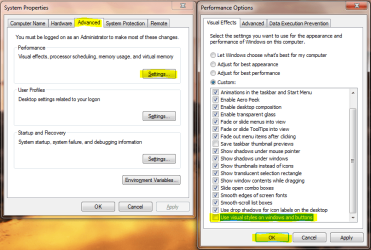
I take it that this is what you want to disable:
Capture.PNG Capture1.PNG

To do this, click on the Start Orb and select Control Panel. If you are in Category view, click on System and Security. Next, click on System and then Advanced system settings (note that you will have to provide administrative credentials to continue). The option you require is Use visual styles on windows and buttons and you need to deselect (clear) the checkbox. Finally, click on OK and close all dialogue boxes.
Capture2.PNG
 

My Computer

Computer type
PC/Desktop
Computer Manufacturer/Model Number
Dwarf Dwf/11/2012 r09/2013
OS
Windows 8.1 Pro RTM x64
CPU
Intel Core-i5-3570K 4-core @ 3.4GHz (Ivy Bridge) (OC 4.4GHz)
Motherboard
ASRock Z77 Extreme4-M
Memory
4 x 4GB DDR3-1600 Corsair Vengeance CMZ8GX3M2A1600C9B (16GB)
Graphics Card(s)
MSI GeForce GTX770 Gaming OC 2GB
Sound Card
Realtek High Definition on board solution (ALC 898)
Monitor(s) Displays
ViewSonic VA1912w Widescreen (VGA)
Screen Resolution
1440x900
Hard Drives
OCZ Agility 3 SSD 120GB SATA III x2 (RAID 0)
Samsung HD501LJ 500GB SATA II x2
Hitachi HDS721010CLA332 1TB SATA II
Iomega 1.5TB Ext USB 2.0
WD 2.0TB Ext USB 3.0
PSU
XFX Pro Series 850W Semi-Modular
Case
Gigabyte IF233
Cooling
1 x 120mm Front Inlet 1 x 120mm Rear Exhaust
Keyboard
Microsoft Comfort Curve Keyboard 3000 (USB)
Mouse
Microsoft Comfort Mouse 3000 for Business (USB)
Internet Speed
NetGear DG834Gv3 ADSL Modem/Router (Ethernet) ~4.0 Mb/s (O2)
Antivirus
Avast! 8.0.1497
Browser
IE 11
Other Info
Optical Drive: HL-DT-ST BD-RE BH10LS30 SATA Bluray
Lexmark S305 Printer/Scanner/Copier (USB)
WEI Score: 8.1/8.1/8.5/8.5/8.25
Asus Eee PC 1011PX Netbook (Windows 7 x86 Starter)
Oooo, that's ugly :p
 

My Computer

Computer type
PC/Desktop
Computer Manufacturer/Model Number
Bruce ... somewhere in his 40's
OS
Windows 7 Ultimate 32bit SP1
CPU
Intel(R) Core(TM)2 Quad CPU @ 2.40GHz, 2400 MHz
Motherboard
INTEL/D975XBX2
Memory
4 GB
Graphics Card(s)
ATI Radeon HD 2600 Pro
Monitor(s) Displays
Samsung SyncMaster 914v
Screen Resolution
1280 x 1024
Hard Drives
2/500GB each ... ST3500630AS ATA Device.
One is not connected
PSU
Rocketfish 700 W
Case
G.Skill Gigabyte Chassis
Keyboard
Standard PS/2 Keyboard
Mouse
Microsoft PS/2 Mouse
Internet Speed
DSL
Antivirus
Avira Internet Security
Browser
IE 11
Other Info
ATI HDMI Audio
Yeah, hello Classic style. :sick:
 

My Computer

Computer type
PC/Desktop
Computer Manufacturer/Model Number
Self built custom
OS
64-bit Windows 11 Pro for Workstations
CPU
Intel i7-8700K OC'd to 5 GHz
Motherboard
ASUS ROG Maximus XI Formula Z390
Memory
64 GB (4x16GB) G.SKILL TridentZ RGB DDR4 3600 MHz
Graphics Card(s)
ASUS ROG-STRIX-GTX1080TI-O11G-GAMING
Sound Card
Integrated
Monitor(s) Displays
2 x Samsung Odyssey G7 27"
Screen Resolution
2560x1440
Hard Drives
1TB Samsung 990 PRO M.2,
4TB Samsung 990 PRO PRO M.2,
TerraMaster F8 SSD Plus NAS
PSU
Seasonic Prime Titanium 850W
Case
Thermaltake Core P3
Cooling
Corsair Hydro H115i
Keyboard
Logitech wireless K800
Mouse
Logitech MX Master 4
Internet Speed
2 Gb/s Download and 100 Mb/s Upload
Antivirus
Malwarebyte Anti-Malware Premium
Browser
Google Chrome
Other Info
Logitech Z625 speaker system,
Logitech BRIO 4K Pro webcam,
HP Color LaserJet Pro MFP M477fdn,
APC SMART-UPS RT 1000 XL - SURT1000XLI,
Galaxy S23 Plus phone
Hey everyone.

Thanks for the new responses. Sorry I haven't responded to you all. When you work in the tech / computer field, and its my hobbie, I'm pretty busy.

Thanks Dwarf for your post. That is exactly what I am trying to do. I will try your tutorial. Thanks for uploading images to your post. I was going to do that. Just never got around to it.

Thanks all, for the help on this.
 

My Computer

Computer Manufacturer/Model Number
Compaq Presario F763NR
OS
Windows 7 RC1 Build 7100 32-bit
CPU
AMD Athlon 64 X2 Dual-Core TK-57 1.90 GHz
Memory
1 Gig 512 x 2
Graphics Card(s)
NVIDIA GeForce 7000M / nForce 610M
Sound Card
Conexant High Definition SmartAudio 221
Screen Resolution
1280 x 800 x 60 hertz
Hard Drives
120 Gig
Keyboard
Logitech / Alto Notebook Stand
Mouse
Logitech Laser Mouse
Internet Speed
Comcast High Speed Cable Modem
Well.....I forgot that I already tried that. All of a sudden my computer looked like Win7 and Win98 made love and had a very ugly OS baby.

Thanks for the tip Dwarf. I guess my search continues. This is why I like KDE, and other GUI utilities that let you choose exactly what you want to see.

MS did a better job in Win7, allowing you to change the glass window color, etc. Although being able to turn off any visual style on the fly without it looking like crap would be nice.

Anyway, thanks for the info everyone. I'll keep my eyes open for a hack to change this. I'll post anything I find, in case you guys want to know how to get rid of those stupid highlights too.

Laters
 

My Computer

Computer Manufacturer/Model Number
Compaq Presario F763NR
OS
Windows 7 RC1 Build 7100 32-bit
CPU
AMD Athlon 64 X2 Dual-Core TK-57 1.90 GHz
Memory
1 Gig 512 x 2
Graphics Card(s)
NVIDIA GeForce 7000M / nForce 610M
Sound Card
Conexant High Definition SmartAudio 221
Screen Resolution
1280 x 800 x 60 hertz
Hard Drives
120 Gig
Keyboard
Logitech / Alto Notebook Stand
Mouse
Logitech Laser Mouse
Internet Speed
Comcast High Speed Cable Modem
Back
Top