
Question about packets and bytes sent and received / n-work connection

BryanS

New member
Does this seem normal? (the bytes sent and received). It seems skype calls and watching in browser videos shoot them up into the billions after a few hours +. Upon googling around i am quite alarmed.
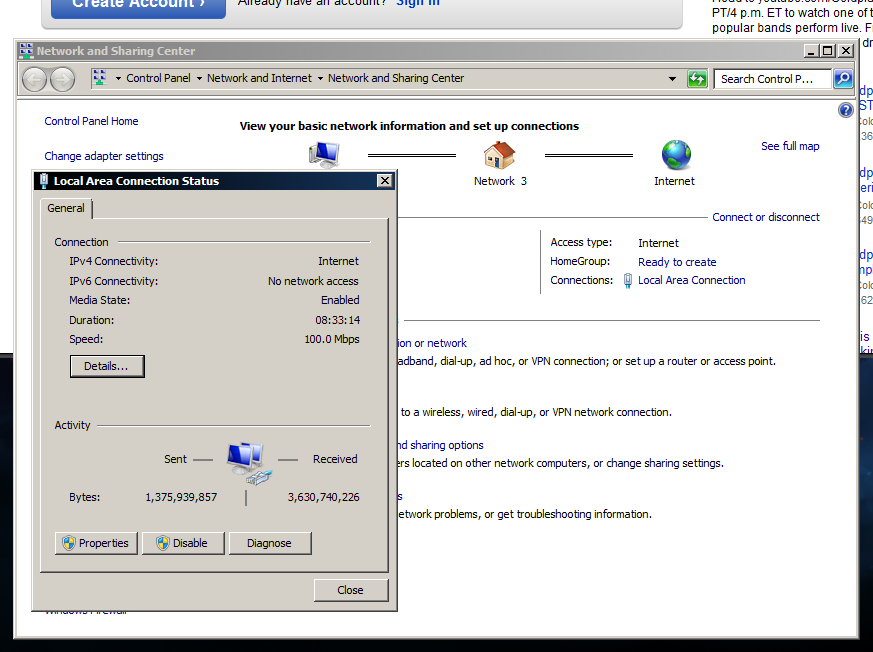
4Yz7V.png


And for my second question, Why did my network randomly change to "network 3"? A few weeks ago it just said 'network'. Thank you in advance
 

My Computer

OS
windows 7 home premium 64bit
Does this seem normal? (the bytes sent and received). It seems skype calls and watching in browser videos shoot them up into the billions after a few hours +. Upon googling around i am quite alarmed.

4Yz7V.png


And for my second question, Why did my network randomly change to "network 3"? A few weeks ago it just said 'network'. Thank you in advance

3.6 gigs in, 1.3 out over 8 hours is normal for video's. Probably renamed because of a new driver
 

My Computer

Computer Manufacturer/Model Number
HP Pavillion dv-7 1005 Tx
OS
Win 8 Release candidate 8400
CPU
[email protected]
Memory
4 gigs
Graphics Card(s)
Nvidia 9600M
Sound Card
HD built-in
Monitor(s) Displays
17" Wxga
Screen Resolution
1440x900
Cooling
none
Internet Speed
45Mb down 5Mb up
That's somewhat of a relief but i would still like to know more about this. After looking around on blogs for awhile i noticed people complaining about millions of bytes yet i see billions, which lead to the reason i made a thread. Would renaming the network do any harm? What about 'network' and 'network 2', where did those go?

I never updated drivers as they are all up to date and always will be. I don't see any type of ethernet driver installs under windows update history either. :huh:
 

My Computer

OS
windows 7 home premium 64bit
The network name could get jumbled around if you installed any sort of adapters like Hamachi or Tunngle. As for the data usage, it's nothing unusual.
 

My Computer

OS
Windows 7 Ultimate N x64
CPU
Amd 965 Phenom II Quad-Core 3.2GHz
Motherboard
MSI 870
Memory
8GB DDR3
Graphics Card(s)
Evga GeForce 460se
Monitor(s) Displays
21" LED backlit LCD
Hard Drives
500GB WD 6.0GB/s
PSU
650W
Case
Antec 900
Cooling
200mm top, 3x140mm. 2 in front, 1 in back.
That's somewhat of a relief but i would still like to know more about this. After looking around on blogs for awhile i noticed people complaining about millions of bytes yet i see billions, which lead to the reason i made a thread. Would renaming the network do any harm? What about 'network' and 'network 2', where did those go?

I never updated drivers as they are all up to date and always will be. I don't see any type of ethernet driver installs under windows update history either. :huh:

I am from the school that says if it isnt broken dont fix it. Re-naming may not be a problem but why re-name it if it is working

Regarding Billions of bytes, {grin} I go through 5 gigs/hour for most of the day every day.
 

My Computer

Computer Manufacturer/Model Number
HP Pavillion dv-7 1005 Tx
OS
Win 8 Release candidate 8400
CPU
[email protected]
Memory
4 gigs
Graphics Card(s)
Nvidia 9600M
Sound Card
HD built-in
Monitor(s) Displays
17" Wxga
Screen Resolution
1440x900
Cooling
none
Internet Speed
45Mb down 5Mb up
Check your manufacturers site for driver updates. Windows update sometimes doesnt show them.

Its common to recieve more bytes than sent. If it was the other way around I would be more concerned.

The network can rename for a few reasons, for example if you plug into a network with the same IP range it will create a new network name. Its not something to worry about. As ZigZag said, if it isn't broke dont fix it :)


Dave

Dave
 

My Computer

Computer type
PC/Desktop
Computer Manufacturer/Model Number
Custom
OS
Windows 7 Ultimate x64
CPU
Intel Core i7 2600K (O/C 4.7GHz)
Motherboard
Asus ROG Maximus IV Extreme-Z - Intel Z68 Chipset
Memory
8GB Corsair Vengeance LP, DDR3, 1600Mhz
Graphics Card(s)
Nvidia GTX 460 Graphics Card
Sound Card
Onboard
Monitor(s) Displays
Dell E228WFP
Hard Drives
2 x 500GB Samsung SpinPoint Drives (1 for OS, 1 for Data and Apps)
PSU
CoolerMaster 1000W
Case
CoolerMaster HAF
Cooling
Air
Internet Speed
Fibre - 60MB Down, 30MB Up
Antivirus
ESET NOD32 Antivirus
I feel a lot better about it now thank you much. I won't rename the network but i do have another question i might as well ask. Sometimes when i diagnose my internet connection it 'resets the local area connection adapter' and then it says default gateway not available with the word 'fixed' next to it. Why?

That happens every time i click diagnose
 

My Computer

OS
windows 7 home premium 64bit
I feel a lot better about it now thank you much. I won't rename the network but i do have another question i might as well ask. Sometimes when i diagnose my internet connection it 'resets the local area connection adapter' and then it says default gateway not available with the word 'fixed' next to it. Why?

That happens every time i click diagnose

Default gateway usually refers to your router but again why are you diagnosing your internet connection when it obviously working.

IF it is working and not slow leave it alone. Yours efforts to fix it may just brake it and then you really have a problem.
 

My Computer

Computer Manufacturer/Model Number
HP Pavillion dv-7 1005 Tx
OS
Win 8 Release candidate 8400
CPU
[email protected]
Memory
4 gigs
Graphics Card(s)
Nvidia 9600M
Sound Card
HD built-in
Monitor(s) Displays
17" Wxga
Screen Resolution
1440x900
Cooling
none
Internet Speed
45Mb down 5Mb up
Back
Top