Solved question about photoshop 7.0

kf10

New member
Member
VIP
Local time
6:17 PM
Messages
469
i am using photoshop 7.0

i have image Fig 1 and i want to change it to fig 2

what command or menu option should i use

i know i should post it into photoshop forum

but i already have too many forum passwords to manage

so i dont want to paste it into another forums, because it will require registration etc
 

Attachments
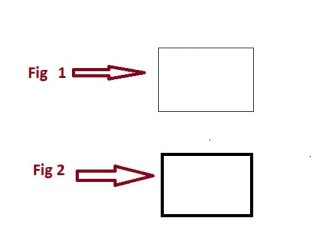
  • testing.jpg
    testing.jpg
    15.8 KB · Views: 25

My Computer My Computer

At a glance

Win 7 home premium 32 bit1.6 GHz dual core3GB
Computer type
PC/Desktop
Computer Manufacturer/Model Number
Dell Vostro A860 laptop
OS
Win 7 home premium 32 bit
CPU
1.6 GHz dual core
Memory
3GB
Hard Drives
160GB
Internet Speed
4Mbps
Antivirus
AVG
Browser
chrome
Choose the pencil tool and draw four lines.
 

My Computer My Computer

At a glance

Windows 10 x64i7-7700K16 GB 2400 MHzGTX 1060
Computer type
PC/Desktop
Computer Manufacturer/Model Number
Dell
OS
Windows 10 x64
CPU
i7-7700K
Memory
16 GB 2400 MHz
Graphics Card(s)
GTX 1060
Sound Card
Integrated, plus external Presonus Audiobox USB
Monitor(s) Displays
2x AOC 27"
Screen Resolution
1920x1080
Hard Drives
512 GB M.2 SSD
2 TB 7200 RPM disk
Internet Speed
110 Mbps
Browser
Firefox
On the somewhat related issue of too many passwords, you don't use a password manager like LastPass, DashLane or KeePass?
There are many free ones available.
 

My Computer My Computer

At a glance

Windows 7 Professional 64bitIntel i7-5960X64GB Corsair Dominator 2400MHz3 EVGA GTX980's
Computer type
PC/Desktop
Computer Manufacturer/Model Number
custom build
OS
Windows 7 Professional 64bit
CPU
Intel i7-5960X
Motherboard
EVGA X99 Classified
Memory
64GB Corsair Dominator 2400MHz
Graphics Card(s)
3 EVGA GTX980's
Sound Card
on board
Monitor(s) Displays
3 Dell E2715H 27"
Screen Resolution
1920x1080 (5760x1080)
Hard Drives
Samsung 950 Pro 1TB M.2 SSD,
Western Digital Black 2TB HDD's x5
Western Digital Black 1TB HDD's x3
PSU
Corsair AX1200i
Case
Corsair 750D
Cooling
Corsair H110i GT
Keyboard
Corsair K70
Mouse
Corsair M45
Internet Speed
250 down/10 up
Antivirus
Microsoft Security Essentials
Browser
IE 11, Google Chrome
Choose the pencil tool and draw four lines.

i knew that it can be done with pencil tool

but is there any other way to do it in photoshop 7.0
 

My Computer My Computer

At a glance

Win 7 home premium 32 bit1.6 GHz dual core3GB
Computer type
PC/Desktop
Computer Manufacturer/Model Number
Dell Vostro A860 laptop
OS
Win 7 home premium 32 bit
CPU
1.6 GHz dual core
Memory
3GB
Hard Drives
160GB
Internet Speed
4Mbps
Antivirus
AVG
Browser
chrome
On the somewhat related issue of too many passwords, you don't use a password manager like LastPass, DashLane or KeePass?
There are many free ones available.

no i dont use password managers because chrome remembers all the password
 

My Computer My Computer

At a glance

Win 7 home premium 32 bit1.6 GHz dual core3GB
Computer type
PC/Desktop
Computer Manufacturer/Model Number
Dell Vostro A860 laptop
OS
Win 7 home premium 32 bit
CPU
1.6 GHz dual core
Memory
3GB
Hard Drives
160GB
Internet Speed
4Mbps
Antivirus
AVG
Browser
chrome
Rectangular shape tool, zero or white fill, black stroke. Is this a trick question ?
 

My Computer My Computer

At a glance

Windows 7 Pro x64 sp1i7 4770K8GB Corsair Vengeance 1600MHzonboard
Computer type
PC/Desktop
Computer Manufacturer/Model Number
self build
OS
Windows 7 Pro x64 sp1
CPU
i7 4770K
Motherboard
MSI B85M-E45
Memory
8GB Corsair Vengeance 1600MHz
Graphics Card(s)
onboard
Monitor(s) Displays
LG 27MP35
Screen Resolution
1920-1080
Hard Drives
Seagate 2TB
PSU
Cooler Master GX 750
Case
Antec 300
Cooling
Seidon 120V
Internet Speed
60/18
Antivirus
MSE
Browser
Firefox
my native language is not english

therefor i have hard time explaining what i want to do in photoshop 7.0

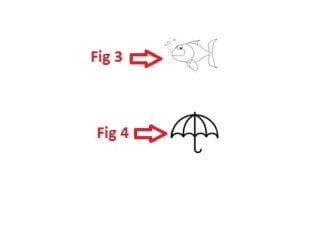
i want fig 3 to be thick like they are in fig 4
 

Attachments

  • testing 2.jpg
    testing 2.jpg
    5.8 KB · Views: 19

My Computer My Computer

At a glance

Win 7 home premium 32 bit1.6 GHz dual core3GB
Computer type
PC/Desktop
Computer Manufacturer/Model Number
Dell Vostro A860 laptop
OS
Win 7 home premium 32 bit
CPU
1.6 GHz dual core
Memory
3GB
Hard Drives
160GB
Internet Speed
4Mbps
Antivirus
AVG
Browser
chrome
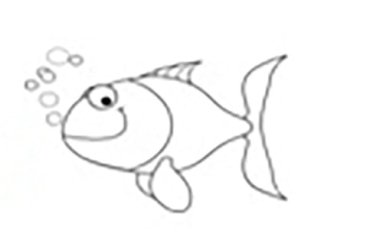
You are not going to get a nice sharp black image unless you use a trace program such as Illustrator, but I managed to get a darker image of the fish as follows -

original fish (enlarged)

fish_1.jpg

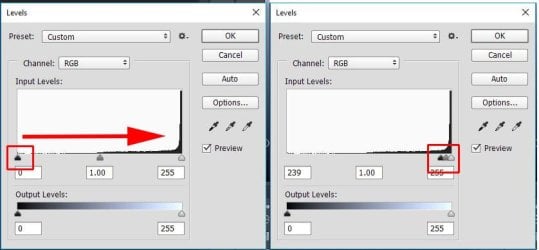
open image adjust > levels and move black slider to right

level_1.jpg

gives this

fish_2.jpg

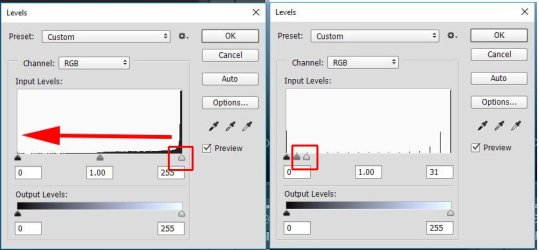
but has some artifacts, so open levels again and move white slider to left

level_2.jpg

gives this

fish_3.jpg

I have CC version, but I think v7 has levels
 

My Computer My Computer

At a glance

Windows 7 Pro x64 sp1i7 4770K8GB Corsair Vengeance 1600MHzonboard
Computer type
PC/Desktop
Computer Manufacturer/Model Number
self build
OS
Windows 7 Pro x64 sp1
CPU
i7 4770K
Motherboard
MSI B85M-E45
Memory
8GB Corsair Vengeance 1600MHz
Graphics Card(s)
onboard
Monitor(s) Displays
LG 27MP35
Screen Resolution
1920-1080
Hard Drives
Seagate 2TB
PSU
Cooler Master GX 750
Case
Antec 300
Cooling
Seidon 120V
Internet Speed
60/18
Antivirus
MSE
Browser
Firefox
thanks badcrc

it solved the problem

take care
love
 

My Computer My Computer

At a glance

Win 7 home premium 32 bit1.6 GHz dual core3GB
Computer type
PC/Desktop
Computer Manufacturer/Model Number
Dell Vostro A860 laptop
OS
Win 7 home premium 32 bit
CPU
1.6 GHz dual core
Memory
3GB
Hard Drives
160GB
Internet Speed
4Mbps
Antivirus
AVG
Browser
chrome
Back
Top