

I know that PhotoShop Elements 6 is 'outdated' (unsupported) software, but it has served me well under Win7 and it is familiar, I can do many simple tasks without checking help.
Recently during an image editing session a box dropped down and announced "your license to use this software has expired" (or words to that effect) and suddenly I could not use any program features. I couldn't even save my most recent work. I found my installation disk and uninstalled and reinstalled the program. It refused to recognize my serial number as valid.
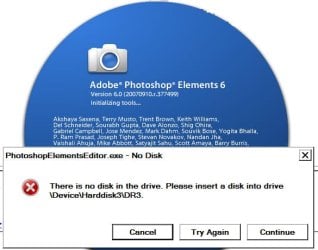
I was about to pull the plug on the program last night. I still had the disk in the CD drive and decided to try the 'repair' option which was the default. The 'install' routine that opened claimed there was 'no disk in the drive' but the message was superimposed on the familiar splash screen opening PSE6. Wonder of wonders the program was available in the Start Menu and it seems to work like always.
Is there a routine somewhere in the software that periodically triggers a check of the serial number? If so, is there a way to disable it without otherwise compromising the running of the program? If possible, I'd like to keep it running without having to resort to this 'opaque' process of repairing the installation. I don't understand how it worked, but it did.
Sorry, Adobe, but I have no interest in a pay-by-the-month subscription to a 'cloudy' version of your photo editing software, something with its own steep learning curve, when there are open source editors that I understand will allow me to continue to edit images as effectively as PSE6.
I'd appreciate comments from anyone who is more familiar with how a program like this 'works,'
thanks
baumgrenze
Recently during an image editing session a box dropped down and announced "your license to use this software has expired" (or words to that effect) and suddenly I could not use any program features. I couldn't even save my most recent work. I found my installation disk and uninstalled and reinstalled the program. It refused to recognize my serial number as valid.
I was about to pull the plug on the program last night. I still had the disk in the CD drive and decided to try the 'repair' option which was the default. The 'install' routine that opened claimed there was 'no disk in the drive' but the message was superimposed on the familiar splash screen opening PSE6. Wonder of wonders the program was available in the Start Menu and it seems to work like always.
Is there a routine somewhere in the software that periodically triggers a check of the serial number? If so, is there a way to disable it without otherwise compromising the running of the program? If possible, I'd like to keep it running without having to resort to this 'opaque' process of repairing the installation. I don't understand how it worked, but it did.
Sorry, Adobe, but I have no interest in a pay-by-the-month subscription to a 'cloudy' version of your photo editing software, something with its own steep learning curve, when there are open source editors that I understand will allow me to continue to edit images as effectively as PSE6.
I'd appreciate comments from anyone who is more familiar with how a program like this 'works,'
thanks
baumgrenze
Attachments
My Computer
At a glance
Win 7 Pro 64Intel Core 2 Quad Q6600 (2.4 GHz) Quad Core2 x Crucial 4GB Kit (2GBx2) DDR2 CT2KIT25664A...Sapphire Radeon HD 3870 PCIe 512 Mb
- Computer type
- PC/Desktop
- Computer Manufacturer/Model Number
- Custom built by GamePC/Solid Electric - Palo Alto - on 03/10/08
- OS
- Win 7 Pro 64
- CPU
- Intel Core 2 Quad Q6600 (2.4 GHz) Quad Core
- Motherboard
- Gigabyte GA-P35-DS3P Intel P35 ATX (rev. 2.1)
- Memory
- 2 x Crucial 4GB Kit (2GBx2) DDR2 CT2KIT25664AA800
- Graphics Card(s)
- Sapphire Radeon HD 3870 PCIe 512 Mb
- Sound Card
- RealTek audio on MOBO + EDIROL UA-1EX
- Monitor(s) Displays
- Samsung S24A450BW 24" LED monitor
- Screen Resolution
- 1600 x 1200 at 75 Hz
- Hard Drives
- 2 Crucial 128 Gb SSD (CT128M550SSD1)
one mounted and running Win7/Pro x64
one disconnected containing only Win10/Pro upgrade - in process
1 1TB WD Caviar Black (WD1003FZEX-00MK2A0) (Data drive)
1 2TB Seagate 2TB (PN/ 9JB1N3-576 - ST2000DM001-1ER
- PSU
- Seasonic S12-HT 650W 80% Efficiency Power Supply
- Case
- Lian Li PC-B25B
- Cooling
- Gigabyte Silent-Pipe
- Keyboard
- Dell MS Comfort
- Mouse
- HP x4000 wireless
- Internet Speed
- Sonic FTTN @ 23 Mbps
- Antivirus
- Avast
- Browser
- SeaMonkey
- Other Info
- BIOS: Award Software International, Inc. F6 06/18/2009
System Specs - Updated on 09//16/19


