
Solved Question about this tutorial, (Changing Icons)

CriticalError

New member
Member
VIP
Local time
2:21 AM
Messages
118

My Computer

OS
Windows 7 Ultimate 32
CPU
AMD Athlon 64 X2 4400+ Brisbane 65nm Technology
Motherboard
ASUSTek Computer INC. NARRA3 (Socket AM2 )
Memory
Size 3072 MBytes
Graphics Card(s)
ATI Radeon HD 3450
Sound Card
Realtek High Definition Audio
Monitor(s) Displays
Name Generic PnP Monitor on ATI Radeon HD 3450 Current Resol
Screen Resolution
1440x900
Hard Drives
Manufacturer Seagate
Form Factor 3.5"
Interface ATA
Capacity 352GB
Real size 360,080,695,296 bytes
RAID Type None
S.M.A.R.T
S.M.A.R.T not supported
Partition 0
Partition ID Disk #0, Partition #0
Disk Letter C:
File System NTFS
Vista/7 icons can be 256x256 .png or a Windows XP .ico which i think is 32x32 or 48x48 as standard.

Make sure the images are square (e.g. 48x48 and I think a multiple of 16)

XP icons

Vista/7

Try using a photoshop plugin for ico and png icons. (That is of course if you have photoshop.)

ICO plugin
 

My Computer

Computer type
PC/Desktop
Computer Manufacturer/Model Number
GIGABYTE Rig (Custom)
OS
Windows 7 Professional (x64/SP1) /Linux Mint 16
CPU
Intel i5-3570k 3.40 GHz @ 4.6 GHz
Motherboard
GIGABYTE Z77X-D3H
Memory
8GB (2133MHz) DDR3
Graphics Card(s)
Asus GTX560 Ti (Nvidia)
Monitor(s) Displays
HP 23", Acer 19" and a Dell 17"
Screen Resolution
1080p, 1440x900 and 1280x1024
Hard Drives
Sandisk Extreme 120GB (SSD), WD 2TB green and 4 other HDDs
PSU
Antec 620w High Current Gamer
Case
Corsair Obsidian 600D
Cooling
CPU - Antec KÜHLER H₂O 920
Keyboard
Steelseries 6Gv2
Mouse
Roccat LUA
Internet Speed
4 - 6mb/s
Antivirus
ESET NOD32
Browser
Chrome/Firefox
Other Info
Intel Gigabit CT (PCIE NIC) and Thinkpad T61p,
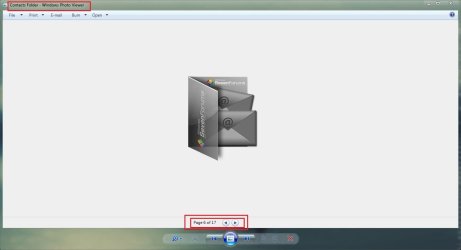
This tutorial was made by me . You know, icons, if made properly, contain a number of images, with various sizes and resolutions . Well, take an example. I am uploading an icon View attachment Contacts Folder.zip (as we cannot upload the .ico files in the forum, I am uploading a zip containing the .ico file) .... a single icon, that contains 17 different icons in it. I am admitting that I made the icon a bit wrong ... there might be a few more sizes and resolutions :)

Download the zip, extract the icon and open in windows photo viewer, you will get this thing !
Capture.JPG

At the same time, if you use an image having a lesser resolution, you will get a message "out of system resources" while trying to replace the resource.

I hope I could explain it ? And criticisms are always welcome :)
 

My Computer

Computer type
PC/Desktop
Computer Manufacturer/Model Number
Self Assembled
OS
Microsoft Windows 10 Pro Insider Preview 64-bit
CPU
Intel(R) Core(TM) i3-4130 CPU @ 3.40GHz
Motherboard
Gigabyte Technology Co., Ltd. B85M-D3H
Memory
Corsair Vengence 4GB x2 (8.00GB Dual-Channel DDR3 @ 798MHz)
Graphics Card(s)
2047MB GeForce GTS 450 (ZOTAC International)
Sound Card
Onboard (Realtek High Definition Audio)
Monitor(s) Displays
LG Flatron E2040T
Screen Resolution
1600x900
Hard Drives
Western Digital 1 TB
Seagate 500 GB
PSU
Corsair VS550
Case
Cooler Master K380
Cooling
Cooler Master Seidon 120V Plus
Keyboard
Logitech MK260r
Mouse
Logitech MK260r
Internet Speed
PMPL Broadband
Antivirus
Windows Defender + MBAM
Browser
Firefox
Other Info
Dell Studio 15" Laptop
This tutorial was made by me . You know, icons, if made properly, contain a number of images, with various sizes and resolutions . Well, take an example. I am uploading an icon View attachment 190965 (as we cannot upload the .ico files in the forum, I am uploading a zip containing the .ico file) .... a single icon, that contains 17 different icons in it. I am admitting that I made the icon a bit wrong ... there might be a few more sizes and resolutions :)

Download the zip, extract the icon and open in windows photo viewer, you will get this thing !
View attachment 190966

At the same time, if you use an image having a lesser resolution, you will get a message "out of system resources" while trying to replace the resource.

I hope I could explain it ? And criticisms are always welcome :)

When I replace the images in the dll file does it need to be 256x256? that was not made clear in the tutorial.. So I am wondering what size I need.
 

My Computer

OS
Windows 7 Ultimate 32
CPU
AMD Athlon 64 X2 4400+ Brisbane 65nm Technology
Motherboard
ASUSTek Computer INC. NARRA3 (Socket AM2 )
Memory
Size 3072 MBytes
Graphics Card(s)
ATI Radeon HD 3450
Sound Card
Realtek High Definition Audio
Monitor(s) Displays
Name Generic PnP Monitor on ATI Radeon HD 3450 Current Resol
Screen Resolution
1440x900
Hard Drives
Manufacturer Seagate
Form Factor 3.5"
Interface ATA
Capacity 352GB
Real size 360,080,695,296 bytes
RAID Type None
S.M.A.R.T
S.M.A.R.T not supported
Partition 0
Partition ID Disk #0, Partition #0
Disk Letter C:
File System NTFS
When I replace the images in the dll file does it need to be 256x256? that was not made clear in the tutorial.. So I am wondering what size I need.
Take the icon I placed in the above example .... here is the snip from IcoFX with that icon opened .... tell me , what should I say about the size ? It contains, as apparently visible, 256x256, 128x128, 48x48, 32x32, 24x24, 16x16 .... almost all the possible sizes that are required in various places throughout the system.
Capture.JPG
An icon, if properly made, is of this very characteristics. Almost all the icons you may download are of this type. Unfortunately, if you use a flat (single layered) icon, it should be as large as possible. But, there is a little problem. take the example of a HDD icon. It is shown in the explorer window, as well as in the navigation pane. A single icon ... when in explorer window, it should be 256x256; and at the same time, when in navigation pane, it should be 16x16.

So, an icon usually means a normal icon as I described . I cannot recommend you to use a flat icon, due to the reason I have described above. I hope , the particular icon you are trying with is of a normal icon as I described. If not, you are to use the best available size, no doubt.

If it is still not clear, let me know :)

EDIT : The tutorial thread is still open for discussion. Better you should have posted it in that very thread, inspite of opening a new thread .
 
Last edited:

My Computer

Computer type
PC/Desktop
Computer Manufacturer/Model Number
Self Assembled
OS
Microsoft Windows 10 Pro Insider Preview 64-bit
CPU
Intel(R) Core(TM) i3-4130 CPU @ 3.40GHz
Motherboard
Gigabyte Technology Co., Ltd. B85M-D3H
Memory
Corsair Vengence 4GB x2 (8.00GB Dual-Channel DDR3 @ 798MHz)
Graphics Card(s)
2047MB GeForce GTS 450 (ZOTAC International)
Sound Card
Onboard (Realtek High Definition Audio)
Monitor(s) Displays
LG Flatron E2040T
Screen Resolution
1600x900
Hard Drives
Western Digital 1 TB
Seagate 500 GB
PSU
Corsair VS550
Case
Cooler Master K380
Cooling
Cooler Master Seidon 120V Plus
Keyboard
Logitech MK260r
Mouse
Logitech MK260r
Internet Speed
PMPL Broadband
Antivirus
Windows Defender + MBAM
Browser
Firefox
Other Info
Dell Studio 15" Laptop
When I replace the images in the dll file does it need to be 256x256? that was not made clear in the tutorial.. So I am wondering what size I need.
Take the icon I placed in the above example .... here is the snip from IcoFX with that icon opened .... tell me , what should I say about the size ? It contains, as apparently visible, 256x256, 128x128, 48x48, 32x32, 24x24, 16x16 .... almost all the possible sizes that are required in various places throughout the system.
View attachment 190975
An icon, if properly made, is of this very characteristics. Almost all the icons you may download are of this type. Unfortunately, if you use a flat (single layered) icon, it should be as large as possible. But, there is a little problem. take the example of a HDD icon. It is shown in the explorer window, as well as in the navigation pane. A single icon ... when in explorer window, it should be 256x256; and at the same time, when in navigation pane, it should be 16x16.

So, an icon usually means a normal icon as I described . I cannot recommend you to use a flat icon, due to the reason I have described above. I hope , the particular icon you are trying with is of a normal icon as I described. If not, you are to use the best available size, no doubt.

If it is still not clear, let me know :)

OK I understand I have followed your tutorial too but I can't replace imagers.dll I have took ownership and changed it's name to inagersOLD.dll and I try to copy my imagers.dll modified but it will not let me put it in system32 folder and now I cannot rename inagersOLD.dll back to it's original name! Why can't I copy?
 

My Computer

OS
Windows 7 Ultimate 32
CPU
AMD Athlon 64 X2 4400+ Brisbane 65nm Technology
Motherboard
ASUSTek Computer INC. NARRA3 (Socket AM2 )
Memory
Size 3072 MBytes
Graphics Card(s)
ATI Radeon HD 3450
Sound Card
Realtek High Definition Audio
Monitor(s) Displays
Name Generic PnP Monitor on ATI Radeon HD 3450 Current Resol
Screen Resolution
1440x900
Hard Drives
Manufacturer Seagate
Form Factor 3.5"
Interface ATA
Capacity 352GB
Real size 360,080,695,296 bytes
RAID Type None
S.M.A.R.T
S.M.A.R.T not supported
Partition 0
Partition ID Disk #0, Partition #0
Disk Letter C:
File System NTFS
Put the question in the appropriate thread (I mean the tutorial thread) please ?
 

My Computer

Computer type
PC/Desktop
Computer Manufacturer/Model Number
Self Assembled
OS
Microsoft Windows 10 Pro Insider Preview 64-bit
CPU
Intel(R) Core(TM) i3-4130 CPU @ 3.40GHz
Motherboard
Gigabyte Technology Co., Ltd. B85M-D3H
Memory
Corsair Vengence 4GB x2 (8.00GB Dual-Channel DDR3 @ 798MHz)
Graphics Card(s)
2047MB GeForce GTS 450 (ZOTAC International)
Sound Card
Onboard (Realtek High Definition Audio)
Monitor(s) Displays
LG Flatron E2040T
Screen Resolution
1600x900
Hard Drives
Western Digital 1 TB
Seagate 500 GB
PSU
Corsair VS550
Case
Cooler Master K380
Cooling
Cooler Master Seidon 120V Plus
Keyboard
Logitech MK260r
Mouse
Logitech MK260r
Internet Speed
PMPL Broadband
Antivirus
Windows Defender + MBAM
Browser
Firefox
Other Info
Dell Studio 15" Laptop
I solved never mind...but it comes under customization and tutorial...
 

My Computer

OS
Windows 7 Ultimate 32
CPU
AMD Athlon 64 X2 4400+ Brisbane 65nm Technology
Motherboard
ASUSTek Computer INC. NARRA3 (Socket AM2 )
Memory
Size 3072 MBytes
Graphics Card(s)
ATI Radeon HD 3450
Sound Card
Realtek High Definition Audio
Monitor(s) Displays
Name Generic PnP Monitor on ATI Radeon HD 3450 Current Resol
Screen Resolution
1440x900
Hard Drives
Manufacturer Seagate
Form Factor 3.5"
Interface ATA
Capacity 352GB
Real size 360,080,695,296 bytes
RAID Type None
S.M.A.R.T
S.M.A.R.T not supported
Partition 0
Partition ID Disk #0, Partition #0
Disk Letter C:
File System NTFS
Back
Top
