
midnightrun
New member
- Local time
- 4:41 PM
- Messages
- 6
Hi,
I have modified imageres.dll which contains icons with "Resource Hacker" software, in order to replace icons.
(I'm aware of 7tsp.exe but I prefer to replace manually using "Resource Hacker").
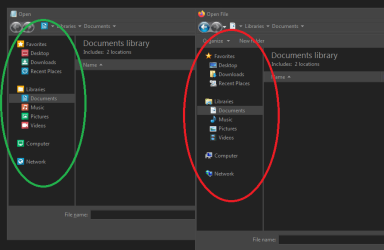
The new icons are now OK in Window's explorer but with some apps when opening/browsing for files, somehow old icons are displayed (attached screenshot).
I've cleared the cache and restarted the computer.
Any idea where the OS is picking these old icons, so I can replace them as well?
- - - Updated - - -
Edit: I've found an answer using common sense^^
I thought that apps would use different imageres.dll file, regarding if it's an x86 or x64 app :
C:\Windows\System32\imageres.dll > for x86 Apps
C:\Windows\SysWOW64\imageres.dll > for x64 Apps
(I used Se7en File Replacer to replace .dll files)
I post this in case it's useful for someone in the future.
I have modified imageres.dll which contains icons with "Resource Hacker" software, in order to replace icons.
(I'm aware of 7tsp.exe but I prefer to replace manually using "Resource Hacker").
The new icons are now OK in Window's explorer but with some apps when opening/browsing for files, somehow old icons are displayed (attached screenshot).
I've cleared the cache and restarted the computer.
Any idea where the OS is picking these old icons, so I can replace them as well?
- - - Updated - - -
Edit: I've found an answer using common sense^^
I thought that apps would use different imageres.dll file, regarding if it's an x86 or x64 app :
C:\Windows\System32\imageres.dll > for x86 Apps
C:\Windows\SysWOW64\imageres.dll > for x64 Apps
(I used Se7en File Replacer to replace .dll files)
I post this in case it's useful for someone in the future.
Attachments
My Computer
- Computer type
- PC/Desktop
- OS
- win 7 pro x64