Question about UAC warnings....

CommonTater

New member
Local time
10:10 AM
Messages
1,170
Location
Southern Ontario Canada
Hi Gang...
This is new... I have a mess of stuff on Win7. But I'm seeing some very inconsistent security behavior....

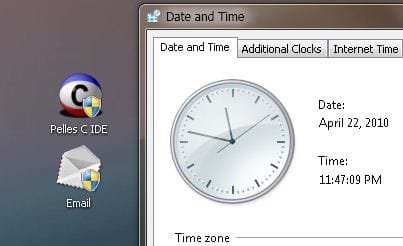
Some of my icons have the little security shield on them...

Capture.PNG

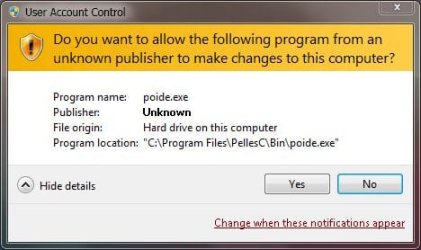
When I enable UAC I get a warning about these two programs every single time. Now, I have no problem about the system telling me I might be on the brink of screwing up. In fact I think that's a good thing...

So, my question... Is there a means to selectively disable UAC warnings for programs I know are ok while still leaving them active for others??? I.E. to bypass UAC on a program by program basis?
 

My Computer

Computer Manufacturer/Model Number
Homebrew
OS
XP Pro SP3 X86 / Win7 Pro X86
CPU
Amd 64 x2 4200 (2.4ghz)
Motherboard
Asus M2N-MX SE Plus
Memory
Kingston DDR2 800 2gb
Graphics Card(s)
Nvidia GF-8400
Sound Card
Realtek on Motherboard
Monitor(s) Displays
Acer x-193bw
Screen Resolution
1440 x 900
Hard Drives
Western Digital 500g
PSU
350watt In-Win
Case
In-Win
Cooling
Air
Keyboard
yes
Mouse
yes
Internet Speed
5mpbs
Other Info
Also ASRock ION 330 as HTPC (on XP).
Acer Aspire as GP netbook (on XP).
I know little to you... but are you networked with other computers and sharing those folders? GL :)
 

My Computer

Computer Manufacturer/Model Number
Toshiba Satellite
OS
Windows 7 Home Premium 64-bit
CPU
Pentium(R) Dual-Core T4300 @ 2.10GHz
Motherboard
Toshiba Model KSWAA - Chipset Intel GL40 Rev 07
Memory
3 GB DDR2 PC2-6400 (400 MHz) Samsung M4 70T2864Q23-CF7
Graphics Card(s)
Mobile Intel GMA4500M 32bit OS (64bit OS) dynamically
Sound Card
Realtek ALC272-GR Software Sound
Monitor(s) Displays
16.0" HD TFT with TrueBrite Matrix colour LCD display
Screen Resolution
1366 x 768
Hard Drives
FUJITSU MJA2320BH G2-(S2) 320GB (5400RPM) Serial-ATA
Keyboard
Canadian Bilingual Keyboard 105 keys with 13 Function keys
Mouse
Touchpad Point device & Lexma USB Mouse
Internet Speed
Walking is Faster
Other Info
Wireless LAN Realtek RTL89191SE 802.11n PCI-E NIC + a
LAN Realek PCIe FE Family Controller and
TOSHIBA Software Modem

My Computer

Computer Manufacturer/Model Number
HP, Dell, Gateway, Toshiba - 4 laptops and 2 desktops
OS
Vista, Windows7, Mint Mate, Zorin, Windows 8
CPU
from 1.6GHz Duo to i7
Monitor(s) Displays
2x HP w2207
Hard Drives
5x HDD, 7x SSD, 12x Externals
Keyboard
with trackball - no mices
Mouse
Trackball mice
Internet Speed
DSL 6000
I know little to you... but are you networked with other computers and sharing those folders? GL :)

No... both are local to this machine, neither is shared.

Hey... it's not always how much you know that matters... the thing of the moment is do you know THIS? I don't, that's why I asked...;)
 

My Computer

Computer Manufacturer/Model Number
Homebrew
OS
XP Pro SP3 X86 / Win7 Pro X86
CPU
Amd 64 x2 4200 (2.4ghz)
Motherboard
Asus M2N-MX SE Plus
Memory
Kingston DDR2 800 2gb
Graphics Card(s)
Nvidia GF-8400
Sound Card
Realtek on Motherboard
Monitor(s) Displays
Acer x-193bw
Screen Resolution
1440 x 900
Hard Drives
Western Digital 500g
PSU
350watt In-Win
Case
In-Win
Cooling
Air
Keyboard
yes
Mouse
yes
Internet Speed
5mpbs
Other Info
Also ASRock ION 330 as HTPC (on XP).
Acer Aspire as GP netbook (on XP).

My Computer

Computer Manufacturer/Model Number
Homebrew
OS
XP Pro SP3 X86 / Win7 Pro X86
CPU
Amd 64 x2 4200 (2.4ghz)
Motherboard
Asus M2N-MX SE Plus
Memory
Kingston DDR2 800 2gb
Graphics Card(s)
Nvidia GF-8400
Sound Card
Realtek on Motherboard
Monitor(s) Displays
Acer x-193bw
Screen Resolution
1440 x 900
Hard Drives
Western Digital 500g
PSU
350watt In-Win
Case
In-Win
Cooling
Air
Keyboard
yes
Mouse
yes
Internet Speed
5mpbs
Other Info
Also ASRock ION 330 as HTPC (on XP).
Acer Aspire as GP netbook (on XP).
It is not possible by design.

Which is rather unfortunate, but it makes sense.

~Lordbob
 

My Computer

Computer Manufacturer/Model Number
Hera
OS
Windows 7 Ultimate x64, Mint 9
CPU
Intel i5-2500k
Motherboard
ASUS P8P67 Pro
Memory
2x 4Gb Corsair VENGEANCE DDR3-1600
Graphics Card(s)
NVidia GeForce N260GTX Twin Frozr
Sound Card
Realtek HD OnBoard Audio
Monitor(s) Displays
ASUS 24" Monitor
Screen Resolution
1920x1080
Hard Drives
G.SKILL Phoenix Series 60GB SATA II MLC Internal Solid State Drive (SSD)
SAMSUNG Spinpoint F3R 1TB 7200 RPM 32MB Cache SATA II
PSU
Cooler Master Real Power Pro 750W
Case
Cooler Master Haf 932
Cooling
Fans
Keyboard
Razer Tarantula
Mouse
Razer Lachesis
Internet Speed
not fast enough
It is not possible by design.

Which is rather unfortunate, but it makes sense.

~Lordbob

It may be by design but I really don't think it makes much sense. It's very intrusive.

Both of the example programs, in the image, are software I've been using for a long time and I trust them implicitly... so much so that I'm reluctant to go out looking for replacements. But I'm also into them each about 5 or 10 times a day and that UAC is going to be a major annoyance after about the 3rd time... I know I can turn it off, but I'd rather not as I need it to test compatibility with software I am developing... Again, several times a day.

The odd thing is that when I first installed Win7 as my primary it didn't do that... only now that it's my secondary (XP is primary ... long story, I'm sure you've seen) did it start doing this...

Oh well, if there's no way around it I'll just turn UAC off and enable it when I need to test...

Well, unless anyone has additional suggestions...
 

My Computer

Computer Manufacturer/Model Number
Homebrew
OS
XP Pro SP3 X86 / Win7 Pro X86
CPU
Amd 64 x2 4200 (2.4ghz)
Motherboard
Asus M2N-MX SE Plus
Memory
Kingston DDR2 800 2gb
Graphics Card(s)
Nvidia GF-8400
Sound Card
Realtek on Motherboard
Monitor(s) Displays
Acer x-193bw
Screen Resolution
1440 x 900
Hard Drives
Western Digital 500g
PSU
350watt In-Win
Case
In-Win
Cooling
Air
Keyboard
yes
Mouse
yes
Internet Speed
5mpbs
Other Info
Also ASRock ION 330 as HTPC (on XP).
Acer Aspire as GP netbook (on XP).
It is already a lot less intrusive than it was in Vista. I guess you skipped Vista and are not used to the UAC. I am not really bothered by it, but you are right - They should allow a list of "trusted programs" like any good AV program does - even MSE. Maybe in /8 they will come around to it.
 

My Computer

Computer Manufacturer/Model Number
HP, Dell, Gateway, Toshiba - 4 laptops and 2 desktops
OS
Vista, Windows7, Mint Mate, Zorin, Windows 8
CPU
from 1.6GHz Duo to i7
Monitor(s) Displays
2x HP w2207
Hard Drives
5x HDD, 7x SSD, 12x Externals
Keyboard
with trackball - no mices
Mouse
Trackball mice
Internet Speed
DSL 6000
It is not possible by design.

Which is rather unfortunate, but it makes sense.

~Lordbob

It may be by design but I really don't think it makes much sense. It's very intrusive.

Both of the example programs, in the image, are software I've been using for a long time and I trust them implicitly... so much so that I'm reluctant to go out looking for replacements. But I'm also into them each about 5 or 10 times a day and that UAC is going to be a major annoyance after about the 3rd time... I know I can turn it off, but I'd rather not as I need it to test compatibility with software I am developing... Again, several times a day.

The odd thing is that when I first installed Win7 as my primary it didn't do that... only now that it's my secondary (XP is primary ... long story, I'm sure you've seen) did it start doing this...

Oh well, if there's no way around it I'll just turn UAC off and enable it when I need to test...

Well, unless anyone has additional suggestions...
They have it set that way so a virus cannot add itself to the whitelist.

~Lordbob
 

My Computer

Computer Manufacturer/Model Number
Hera
OS
Windows 7 Ultimate x64, Mint 9
CPU
Intel i5-2500k
Motherboard
ASUS P8P67 Pro
Memory
2x 4Gb Corsair VENGEANCE DDR3-1600
Graphics Card(s)
NVidia GeForce N260GTX Twin Frozr
Sound Card
Realtek HD OnBoard Audio
Monitor(s) Displays
ASUS 24" Monitor
Screen Resolution
1920x1080
Hard Drives
G.SKILL Phoenix Series 60GB SATA II MLC Internal Solid State Drive (SSD)
SAMSUNG Spinpoint F3R 1TB 7200 RPM 32MB Cache SATA II
PSU
Cooler Master Real Power Pro 750W
Case
Cooler Master Haf 932
Cooling
Fans
Keyboard
Razer Tarantula
Mouse
Razer Lachesis
Internet Speed
not fast enough

My Computer

Computer type
PC/Desktop
Computer Manufacturer/Model Number
Home Built
OS
Windows 8.1 Pro w/Media Center 64bit, Windows 7 HP 64bit
CPU
Phenom II X6 1100T
Motherboard
ASUS M5A99X EVO
Memory
Crucial Balistic 8gb DDR3-1866 CL9
Graphics Card(s)
MSI R6850 Cyclone IGD5 PE
Sound Card
On Board
Monitor(s) Displays
ASUS VE258Q 25" LED with DVI-HDMI-DisplayPort
Screen Resolution
1920 x 1080
Hard Drives
Two WD Cavier Black 2TB Sata III, WD My Book Essential 2TB USB 3.0
PSU
Seasonic X650 80 Plus GOLD Modular
Case
Corsair 400R
Cooling
Antec Kuhler H2O 620, Two 120mm and four 140mm
Keyboard
Logitech K120
Mouse
Logitech Marble Mouse USB, Logitech Precision Game Pad
Internet Speed
15MB
Antivirus
Norton IS 2013, Malwarebytes Pro Beta 2
Browser
IE-11, FF-27
Other Info
APC UPS ES 750, Netgear WNR3500L Gigabit & Wireless N Router with SamKnows Test Program, Motorola SB6120 Gigabit Cable Modem. Brother HL-2170W Laser Printer, Epson V300 Scanner

Thank you Jim... much appreciated... But through task scheduler? Odd...

They have it set that way so a virus cannot add itself to the whitelist.
~Lordbob

I get the idea LordBob... I just don't agree with it.

A more secure and probably more successful approach would be to log in as the administrator and set a permission switch.


It is already a lot less intrusive than it was in Vista. I guess you skipped Vista and are not used to the UAC. I am not really bothered by it, but you are right - They should allow a list of "trusted programs" like any good AV program does - even MSE. Maybe in /8 they will come around to it.

Yep, whs, I'm aware of that much. I did skip Vista... it asked if I really wanted to do perfectly ordinary things once too often and found itself in the trashcan.

Anyway even more mysterious.... here are my two program icons this morning...

Capture.JPG

Note that except for reading all the provided insight, I did nothing to change them... All I did last night was turn off the computer and snuggle up in bed... Yet the little shield overlay is gone this morning and both programs now run without UAC interference.

I wonder what tomorror will bring...
 

My Computer

Computer Manufacturer/Model Number
Homebrew
OS
XP Pro SP3 X86 / Win7 Pro X86
CPU
Amd 64 x2 4200 (2.4ghz)
Motherboard
Asus M2N-MX SE Plus
Memory
Kingston DDR2 800 2gb
Graphics Card(s)
Nvidia GF-8400
Sound Card
Realtek on Motherboard
Monitor(s) Displays
Acer x-193bw
Screen Resolution
1440 x 900
Hard Drives
Western Digital 500g
PSU
350watt In-Win
Case
In-Win
Cooling
Air
Keyboard
yes
Mouse
yes
Internet Speed
5mpbs
Other Info
Also ASRock ION 330 as HTPC (on XP).
Acer Aspire as GP netbook (on XP).
Yes CT, the elevated shortcut is the easiest solution. I have a folder for the shortcuts called AdminShortcuts and each shortcut is named admin<program>. Each one points to the task as it states in the Tut and then I put those shortcuts wherever I want. things like GPUz and CCleaner require permission, but with the shortcut, it just loads.

I have never seen the sheild-icon thing....
 

My Computer

Computer type
Laptop
Computer Manufacturer/Model Number
ASUS G60-RBBX05
OS
Win7 Home Premium 64x
CPU
Intel Core 2 Duo P7450 / 2.13 GHz (2.29 with Extreme Turbo)
Memory
4 GB PC-6400 Hyundai (2X2) at 800Mhz
Graphics Card(s)
NVIDIA GeForce GTX 260M 1GB DDR3 VRAM
Monitor(s) Displays
16" LED Backlit
Screen Resolution
1366 x 768 on laptop 1600x1050 max res on 22" external mon
Hard Drives
OCZ Agility 3 60GB SSD / 320 GB - Serial ATA-150 - 7200 rpm
PSU
6-cell Lithium ion { lasts 1.5 hours }
Case
ASUS G60 Laptop
Keyboard
Chicklet type back-lit (white light) keyboard
Mouse
Logitech G9 Laser Mouse 3200dpi and 1000 reports per minute
Internet Speed
Comcast 8.60mb/s up - 3.11mb/s down
Antivirus
MSE
Browser
Firefox
Other Info
General mid-budget gaming Comp. Low batterylife - High FrameRates - currently overheating problems :(

2nd Rig: Case: Rosewill BLACKHAWK Gaming ATX Mid Tower Computer Case

Mobo: GIGABYTE GA-990FXA-UD3
CPU: AMD FX-6200 Zambezi 3.8GHz (4.1GHz Turbo)
Heatsink: COOLER MASTER V8 CPU Cooler
RAM: Patriot Viper 3 8GB (2 x 4GB) 240-Pin DDR3 SDRAM 1866 (PC3 15000)
GPU: SAPPHIRE Radeon HD 6850 1GB 2
Yes CT, the elevated shortcut is the easiest solution. I have a folder for the shortcuts called AdminShortcuts and each shortcut is named admin<program>. Each one points to the task as it states in the Tut and then I put those shortcuts wherever I want. things like GPUz and CCleaner require permission, but with the shortcut, it just loads.

I have never seen the sheild-icon thing....

First time I've seen it too...

Thanks for the help everyone... maybe next time the problem will stay around long enough for me to fix it...:rolleyes:
 

My Computer

Computer Manufacturer/Model Number
Homebrew
OS
XP Pro SP3 X86 / Win7 Pro X86
CPU
Amd 64 x2 4200 (2.4ghz)
Motherboard
Asus M2N-MX SE Plus
Memory
Kingston DDR2 800 2gb
Graphics Card(s)
Nvidia GF-8400
Sound Card
Realtek on Motherboard
Monitor(s) Displays
Acer x-193bw
Screen Resolution
1440 x 900
Hard Drives
Western Digital 500g
PSU
350watt In-Win
Case
In-Win
Cooling
Air
Keyboard
yes
Mouse
yes
Internet Speed
5mpbs
Other Info
Also ASRock ION 330 as HTPC (on XP).
Acer Aspire as GP netbook (on XP).
They have it set that way so a virus cannot add itself to the whitelist.
~Lordbob

I get the idea LordBob... I just don't agree with it.

A more secure and probably more successful approach would be to log in as the administrator and set a permission switch.
I agree it is not the most favourable solution from a user point of view.

There are somethings I run at startup that require a UAC prompt, and it is irritating, but ultimately harmless. I just live with it.

~Lordbob
 

My Computer

Computer Manufacturer/Model Number
Hera
OS
Windows 7 Ultimate x64, Mint 9
CPU
Intel i5-2500k
Motherboard
ASUS P8P67 Pro
Memory
2x 4Gb Corsair VENGEANCE DDR3-1600
Graphics Card(s)
NVidia GeForce N260GTX Twin Frozr
Sound Card
Realtek HD OnBoard Audio
Monitor(s) Displays
ASUS 24" Monitor
Screen Resolution
1920x1080
Hard Drives
G.SKILL Phoenix Series 60GB SATA II MLC Internal Solid State Drive (SSD)
SAMSUNG Spinpoint F3R 1TB 7200 RPM 32MB Cache SATA II
PSU
Cooler Master Real Power Pro 750W
Case
Cooler Master Haf 932
Cooling
Fans
Keyboard
Razer Tarantula
Mouse
Razer Lachesis
Internet Speed
not fast enough
Sorry for this off topic question, but do you really find this feature useful? I see you're sticking hard to UAC and even digging for answers - why just don't turn it off?

Because it tells you you're installing a software, just after you click on setup.exe?

Don't you think UAC is good mostly for inexperienced users?
 

My Computer

OS
Windows 7 Ultimate 64-bit / Windows XP Professional 32-bit
CPU
AMD Athlon X4 630 4x2.8 GHz
Motherboard
Gigabyte MA770T-UD3P
Memory
A-Data Ext. DDR III 4 GB (2x2GB) 1333 MHz CL7
Graphics Card(s)
Sapphire Radeon HD5770 1 GB
Sound Card
Integrated
Monitor(s) Displays
Dell 22 Ultrasharp 2209WA
Hard Drives
Samsung SpinPoint F1 500 GB
PSU
OCZ ModXStream Pro 500W
Case
Cooler Master Elite 331 Black
Cooling
Standard
Sorry for this off topic question, but do you really find this feature useful? I see you're sticking hard to UAC and even digging for answers - why just don't turn it off?

Because it tells you you're installing a software, just after you click on setup.exe?

Don't you think UAC is good mostly for unexperienced users?
It is definitely good for inexperienced users.
It is good for experienced users too.

While it can be annoying, you will always know if something other than you triggers one.

~Lordbob
 

My Computer

Computer Manufacturer/Model Number
Hera
OS
Windows 7 Ultimate x64, Mint 9
CPU
Intel i5-2500k
Motherboard
ASUS P8P67 Pro
Memory
2x 4Gb Corsair VENGEANCE DDR3-1600
Graphics Card(s)
NVidia GeForce N260GTX Twin Frozr
Sound Card
Realtek HD OnBoard Audio
Monitor(s) Displays
ASUS 24" Monitor
Screen Resolution
1920x1080
Hard Drives
G.SKILL Phoenix Series 60GB SATA II MLC Internal Solid State Drive (SSD)
SAMSUNG Spinpoint F3R 1TB 7200 RPM 32MB Cache SATA II
PSU
Cooler Master Real Power Pro 750W
Case
Cooler Master Haf 932
Cooling
Fans
Keyboard
Razer Tarantula
Mouse
Razer Lachesis
Internet Speed
not fast enough
Sorry for this off topic question, but do you really find this feature useful? I see you're sticking hard to UAC and even digging for answers - why just don't turn it off?

Because it tells you you're installing a software, just after you click on setup.exe?

Don't you think UAC is good mostly for unexperienced users?
It is definitely good for inexperienced users.
It is good for experienced users too.

While it can be annoying, you will always know if something other than you triggers one.

~Lordbob

+1 the danger with UAC is you tend to become complacent, or i do anyway, UAC flashed up for something not initiated by me the other day, and i automatically clicked yes, cue "Oh S**T S**T S**T what was that?" luckily for me, it was just a java update, but still, a cautionary tale, remember to check what its asking you for.
 

My Computer

Computer type
PC/Desktop
Computer Manufacturer/Model Number
Medion Erazer (note to self: insert model number) - with custom additions
OS
Windows 10 Pro x64
CPU
Intel Core i5 7400 @ 3.00GHz
Motherboard
OEM supllied with PC
Memory
8GB 2133Mhz DDR4 (OEM supplied)
Graphics Card(s)
Gygabyte Windforce GTX 1050Ti (Factory Overclocked)
Sound Card
Realtek
Monitor(s) Displays
Acer Al1980 + HKC
Screen Resolution
1360*768(HKC) / 1280*1024(Acer)
Hard Drives
1TB Toshiba
1TB WD Caviar Green
120GB Samsung Evo 840
PSU
OEM supplied (no power rating on case)
Case
OEM Supplied
Cooling
Stock
Keyboard
Logitech Wireless
Mouse
Logitect Wireless
Internet Speed
40Mb/s Down 10Mb/s Up
Antivirus
Defender
Browser
Firefox
Sorry for this off topic question, but do you really find this feature useful? I see you're sticking hard to UAC and even digging for answers - why just don't turn it off?

Because it tells you you're installing a software, just after you click on setup.exe?

Don't you think UAC is good mostly for inexperienced users?

Can't speak for the others... but in my case I am developing a couple of software packages and need the UAC running for testing it. It's no fun if you're working across a network and the UAC pops up on a machine you can't even see....
 

My Computer

Computer Manufacturer/Model Number
Homebrew
OS
XP Pro SP3 X86 / Win7 Pro X86
CPU
Amd 64 x2 4200 (2.4ghz)
Motherboard
Asus M2N-MX SE Plus
Memory
Kingston DDR2 800 2gb
Graphics Card(s)
Nvidia GF-8400
Sound Card
Realtek on Motherboard
Monitor(s) Displays
Acer x-193bw
Screen Resolution
1440 x 900
Hard Drives
Western Digital 500g
PSU
350watt In-Win
Case
In-Win
Cooling
Air
Keyboard
yes
Mouse
yes
Internet Speed
5mpbs
Other Info
Also ASRock ION 330 as HTPC (on XP).
Acer Aspire as GP netbook (on XP).
Incredible....

Go out for supper... come home fire up the computer and...

Capture.JPG

They're baaaaaack....


Here's the error message I'm getting....

Capture2.JPG

The program is digitally signed.

WTF is going on????


EDIT:
This is interesting...

User Account Control
 
Last edited:

My Computer

Computer Manufacturer/Model Number
Homebrew
OS
XP Pro SP3 X86 / Win7 Pro X86
CPU
Amd 64 x2 4200 (2.4ghz)
Motherboard
Asus M2N-MX SE Plus
Memory
Kingston DDR2 800 2gb
Graphics Card(s)
Nvidia GF-8400
Sound Card
Realtek on Motherboard
Monitor(s) Displays
Acer x-193bw
Screen Resolution
1440 x 900
Hard Drives
Western Digital 500g
PSU
350watt In-Win
Case
In-Win
Cooling
Air
Keyboard
yes
Mouse
yes
Internet Speed
5mpbs
Other Info
Also ASRock ION 330 as HTPC (on XP).
Acer Aspire as GP netbook (on XP).

Does the programs write stuff (maybe settings to some ini..etc) to protected areas (program files, windows folder, non-user areas)?

Don't really know UAC well enough but to me I think its to control changes in system areas.


OT:
Just re-enabled UAC yesterday, trying to get used to it.
So UAC even nag about deleting stuff in an external HDD!
Fixed it by giving "Everyone" full access.
Had to move my ChromePlus portable folder from Program Files cause of access rights.
Editing winapp2.ini needs an elevated notepad.

Being restricted is challenging :P
 

My Computer

OS
Windows 7 Pro x64
CPU
C2D E6550
Motherboard
Asus P5K-SE
Memory
DDR2 PC2-5300 4x1GB
Graphics Card(s)
Asus ENGT430 (NVidia 430GT)
Sound Card
Xonar DX
Monitor(s) Displays
LG W2241T
Screen Resolution
1680x1050
Hard Drives
80GB and 1TB from WD
250GB from Seagate
PSU
CM eXtreme Power 430W
Case
elite 330
Cooling
Stock
Keyboard
Powerlogic ZEN Z200
Mouse
MS Basic Optical Mouse 2.0
Back
Top