Questions about Backing up?

Josh7

New member
Member
Local time
3:17 PM
Messages
81
I have questions about backing up.

I know You can use CD'S to back up but I do not want to because they eventually break and don't hold that much space.

Should I buy a external hard-drive?

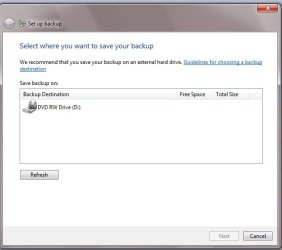
Also I don't have to use CD'S what does this mean I went to back up and it says I can back up on my DVD drive?

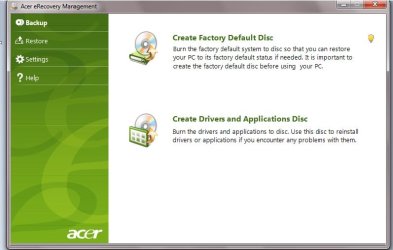
Also there is something called a Acer factory disc. Can you put this on a external hard-drive to? or can it only go on a disc?

Thank you very much:D
 

Attachments

  • Untitled.jpg
    Untitled.jpg
    22.9 KB · Views: 5
  • Untitled2.jpg
    Untitled2.jpg
    42 KB · Views: 7

My Computer

Computer Manufacturer/Model Number
Acer
OS
Windows 7 Home Premium x64
CPU
Quadcore
Motherboard
Nvidea Chipset 9200
Memory
4GB
Graphics Card(s)
Nvidea Gefore 9200
Monitor(s) Displays
Dell LCD Monitor
Screen Resolution
1280 x 1024
Hard Drives
1TB
Keyboard
Hp
Mouse
Acer Wired
Internet Speed
100.0 Mbps
Other Info
Got the Acer keyboard to lazy to plug it in.

My Computer

Computer Manufacturer/Model Number
HP, Dell, Gateway, Toshiba - 4 laptops and 2 desktops
OS
Vista, Windows7, Mint Mate, Zorin, Windows 8
CPU
from 1.6GHz Duo to i7
Monitor(s) Displays
2x HP w2207
Hard Drives
5x HDD, 7x SSD, 12x Externals
Keyboard
with trackball - no mices
Mouse
Trackball mice
Internet Speed
DSL 6000
Go External

Get a dock that you can easily exchange drives by just unpluging and plugging in. You can get one that will run esata and/or usb. Then get a large 500Gig or Terabyte drive and use it for backups. You won't be sorry.
 

My Computer

Computer Manufacturer/Model Number
BGC (Bob's Garage Crew)
OS
win 7 X64 Ultimate SP1
CPU
I3770K
Motherboard
Asus P8Z77-V Deluxe
Memory
G Skill F3-14900CL9-4GBXL x 4
Graphics Card(s)
NVIDIA GeForce GTX670 + Intel 4000
Sound Card
Realtek HD 5.1 (MOB)
Monitor(s) Displays
Asus VW224T (1)
Screen Resolution
1920 x 1080
Hard Drives
SATA Corsair Force GT 2.5" 180GB (System) Sata 3
OCZ Vertex3 120GB
OCZ Vertex 2 120GB 2.5" SATA II
ST31000524AS 1000.2GB
WD15EARS (External)
PSU
CoolerMaster 1000 Watt
Case
CoolerMaster HAF X
Cooling
CPU -- CoolerMaster 520N
Keyboard
MS Wireless 3000 V2
Mouse
MS Wireless 3000 V2
Internet Speed
Cable
Antivirus
Norton Internet Security
Browser
IE9
Other Info
AMI Bios 1805
OC'd 3%
Thank you both for the ideas. Looks like I'll look for a external hard-drive that 750GB drive on that website you posted is pretty cheap.

I tried putting a CD in to download the Acer thing on there says I need a DVD.

So you definitely can't put the acer factory on a drive?
 

My Computer

Computer Manufacturer/Model Number
Acer
OS
Windows 7 Home Premium x64
CPU
Quadcore
Motherboard
Nvidea Chipset 9200
Memory
4GB
Graphics Card(s)
Nvidea Gefore 9200
Monitor(s) Displays
Dell LCD Monitor
Screen Resolution
1280 x 1024
Hard Drives
1TB
Keyboard
Hp
Mouse
Acer Wired
Internet Speed
100.0 Mbps
Other Info
Got the Acer keyboard to lazy to plug it in.
You need 2 DVDs to make the Acer Factory Recovery disks. These will enable you you restore your computer to the state when you first turned it on. Acer will have an eRecovery area allowing you you do the same factory recovery from a hidden partition on your internal HDD.

You will also need to make at some stage a "System Repair Disk". This is an important DVD which you can make within Windows. The option will appear on the Backup & Restore page. With Acer you shouldn't need to download one.

Images , backups etc always use the ext HDD approach you are planning.
Windows inbuilt imaging and backup works fine for most people.
By all means get free imaging software like Macrium Reflect free as a safeguard.
 

My Computer

Computer type
PC/Desktop
Computer Manufacturer/Model Number
Own build
OS
Windows 7x64 Home Premium SP1
CPU
Intel i7 2600k
Motherboard
ASUS P8Z68 Deluxe
Memory
G.Skill Ripjaws (DDR3-1600) 2x4GB
Graphics Card(s)
Nvidia GeForce GTS 450; Intel HD Graphics 3000(GT2+)
Monitor(s) Displays
Dell Ultrasharp IPS panel U2311H, Samsung SyncMaster P2350
Screen Resolution
1920x1080
Hard Drives
Samsung 850 Pro SSD 256GB, Samsung SSD 840 120GB, Seagates 1TB Barracuda ST31000528AS x2
PSU
Seasonic M12II 520W
Case
Lian Li Lancool PC-K60
Cooling
Case: 1x120mm, 3x140mm CPU: Hyper 212+
Keyboard
Logitech MK520 (wireless)
Mouse
Logitech MK520
Internet Speed
6-7 Mbps
Antivirus
Norton Security Premium, Malwarebytes on 2 (MSE on 3rd PC)
Browser
FireFox
Other Info
Audio: Logitech Z523 2.1
Agree, get a large external HDD, eSATA connection will be the fastest.

Macrium Reflect is a very good free backup program.
 

My Computer

Computer type
PC/Desktop
Computer Manufacturer/Model Number
76~2.0
OS
Windows 7 Ult x64 - SP1/ Windows 8 Pro x64
CPU
Intel Core i5-3570K 4.6GHz
Motherboard
Gigabyte GA-Z77X UD3H, f18
Memory
8GB (2X4GB) DDR3 1600 Corsair Vengeance CL8 1.5v
Graphics Card(s)
Sapphire HD 7770 Vapor-X OC 1GB DDR5
Sound Card
Onboard VIA VT2021
Monitor(s) Displays
22" LCD Dell
Screen Resolution
1680x1050
Hard Drives
Samsung 840Pro 128GB SSD,
Seagate Barracuda 500GB SATA2 7200rpm 32MB cache, Seagate Barracuda 1TB SATA2 7200rpm 32MB cache,
PSU
Corsair HX650W
Case
Cooler Master Storm Scout
Cooling
Corsair H80 2x12cm Noctua NF P12 , 2x14cm case fans
Keyboard
Logitech Wave
Mouse
CM Sentinel
Internet Speed
Dismal
Antivirus
Avast
Browser
Opera Next
Other Info
Haswell laptop: HP Envy 17t-j, i7-4700MQ, GeForce 740M 2GB DDR3, 17.3" Full HD 1920x1080, 16GB RAM, Samsung 840 Pro 128GB, 1TB Hitachi 7200 HDD,
Desktop: eSATA ports,
External eSATA Seagate 500GB SATA2 7200rpm,
External WD USB 500GB
I don't understand what is imaging software used for do you necessarily need it to back up stuff?
 

My Computer

Computer Manufacturer/Model Number
Acer
OS
Windows 7 Home Premium x64
CPU
Quadcore
Motherboard
Nvidea Chipset 9200
Memory
4GB
Graphics Card(s)
Nvidea Gefore 9200
Monitor(s) Displays
Dell LCD Monitor
Screen Resolution
1280 x 1024
Hard Drives
1TB
Keyboard
Hp
Mouse
Acer Wired
Internet Speed
100.0 Mbps
Other Info
Got the Acer keyboard to lazy to plug it in.
I don't understand what is imaging software used for do you necessarily need it to back up stuff?
Depends what you mean by "stuff". If you want to backup your user data, you can just copy it to any other (preferably external) drive. But if you want to backup the OS and all the installed programs with all their settings and tweaks, then you need imaging. When you restore the image, your system will look exactly the same way it was when you took the image - and that can include your user data too.
Have a look at this, it may give you a better feel for it.
 

My Computer

Computer Manufacturer/Model Number
HP, Dell, Gateway, Toshiba - 4 laptops and 2 desktops
OS
Vista, Windows7, Mint Mate, Zorin, Windows 8
CPU
from 1.6GHz Duo to i7
Monitor(s) Displays
2x HP w2207
Hard Drives
5x HDD, 7x SSD, 12x Externals
Keyboard
with trackball - no mices
Mouse
Trackball mice
Internet Speed
DSL 6000
I don't understand what is imaging software used for do you necessarily need it to back up stuff?
Depends what you mean by "stuff". If you want to backup your user data, you can just copy it to any other (preferably external) drive. But if you want to backup the OS and all the installed programs with all their settings and tweaks, then you need imaging. When you restore the image, your system will look exactly the same way it was when you took the image - and that can include your user data too.
Have a look at this, it may give you a better feel for it.

Wow thats awesome so lets say my computer broke right now. I had external and I was using this software. I got my computer to work again but everything was lost. Does this software store on the external hard drive to or what?
 

My Computer

Computer Manufacturer/Model Number
Acer
OS
Windows 7 Home Premium x64
CPU
Quadcore
Motherboard
Nvidea Chipset 9200
Memory
4GB
Graphics Card(s)
Nvidea Gefore 9200
Monitor(s) Displays
Dell LCD Monitor
Screen Resolution
1280 x 1024
Hard Drives
1TB
Keyboard
Hp
Mouse
Acer Wired
Internet Speed
100.0 Mbps
Other Info
Got the Acer keyboard to lazy to plug it in.
I don't understand what is imaging software used for do you necessarily need it to back up stuff?
Depends what you mean by "stuff". If you want to backup your user data, you can just copy it to any other (preferably external) drive. But if you want to backup the OS and all the installed programs with all their settings and tweaks, then you need imaging. When you restore the image, your system will look exactly the same way it was when you took the image - and that can include your user data too.
Have a look at this, it may give you a better feel for it.

Wow thats awesome so lets say my computer broke right now. I had external and I was using this software. I got my computer to work again but everything was lost. Does this software store on the external hard drive to or what?
Case1 - Lets say your system stops working because of a virus or any other software malfunction. Then you just pull in the last image (from when the system was still OK) and you are back in business. That restore operation takes appr. 20 to 30 minutes (depending on the imaging program you use and the speed of your disk).

Case2 - Your disk with the OS and all your data breaks. Then you buy a new disk, install it and pull in the image from the external disk - same operation as above. In little time you are back in business.

Case3 - your computer broke completely because you dropped it or it fell into the water. Here an image cannot help you because you cannot transfer it to another system.
 

My Computer

Computer Manufacturer/Model Number
HP, Dell, Gateway, Toshiba - 4 laptops and 2 desktops
OS
Vista, Windows7, Mint Mate, Zorin, Windows 8
CPU
from 1.6GHz Duo to i7
Monitor(s) Displays
2x HP w2207
Hard Drives
5x HDD, 7x SSD, 12x Externals
Keyboard
with trackball - no mices
Mouse
Trackball mice
Internet Speed
DSL 6000
Good explainations whs.

An Image program is the best way to backup and restore your computer, OS and Apps as well as personal info.

Keep the backups on an external HDD or seperate internal HDD, incase your main HDD fails.

Use image backup and you can say goodby to re-installing the OS, all of the Apps and re-setting all the things the way you like them.
 

My Computer

Computer type
PC/Desktop
Computer Manufacturer/Model Number
76~2.0
OS
Windows 7 Ult x64 - SP1/ Windows 8 Pro x64
CPU
Intel Core i5-3570K 4.6GHz
Motherboard
Gigabyte GA-Z77X UD3H, f18
Memory
8GB (2X4GB) DDR3 1600 Corsair Vengeance CL8 1.5v
Graphics Card(s)
Sapphire HD 7770 Vapor-X OC 1GB DDR5
Sound Card
Onboard VIA VT2021
Monitor(s) Displays
22" LCD Dell
Screen Resolution
1680x1050
Hard Drives
Samsung 840Pro 128GB SSD,
Seagate Barracuda 500GB SATA2 7200rpm 32MB cache, Seagate Barracuda 1TB SATA2 7200rpm 32MB cache,
PSU
Corsair HX650W
Case
Cooler Master Storm Scout
Cooling
Corsair H80 2x12cm Noctua NF P12 , 2x14cm case fans
Keyboard
Logitech Wave
Mouse
CM Sentinel
Internet Speed
Dismal
Antivirus
Avast
Browser
Opera Next
Other Info
Haswell laptop: HP Envy 17t-j, i7-4700MQ, GeForce 740M 2GB DDR3, 17.3" Full HD 1920x1080, 16GB RAM, Samsung 840 Pro 128GB, 1TB Hitachi 7200 HDD,
Desktop: eSATA ports,
External eSATA Seagate 500GB SATA2 7200rpm,
External WD USB 500GB
Something else about Internal hard drives... can they get viruses?
 

My Computer

Computer Manufacturer/Model Number
Acer
OS
Windows 7 Home Premium x64
CPU
Quadcore
Motherboard
Nvidea Chipset 9200
Memory
4GB
Graphics Card(s)
Nvidea Gefore 9200
Monitor(s) Displays
Dell LCD Monitor
Screen Resolution
1280 x 1024
Hard Drives
1TB
Keyboard
Hp
Mouse
Acer Wired
Internet Speed
100.0 Mbps
Other Info
Got the Acer keyboard to lazy to plug it in.
Something else about Internal hard drives... can they get viruses?
Of course. If you have no good antivirus program and/or visit shady websites or download from questionable torrents.
 

My Computer

Computer Manufacturer/Model Number
HP, Dell, Gateway, Toshiba - 4 laptops and 2 desktops
OS
Vista, Windows7, Mint Mate, Zorin, Windows 8
CPU
from 1.6GHz Duo to i7
Monitor(s) Displays
2x HP w2207
Hard Drives
5x HDD, 7x SSD, 12x Externals
Keyboard
with trackball - no mices
Mouse
Trackball mice
Internet Speed
DSL 6000
Something else about Internal hard drives... can they get viruses?
Yes
and external HDD
and USB flash drives --- my son was kind enough to bring a couple home from school
etc
if you can write to it you can get a virus.
 

My Computer

Computer type
PC/Desktop
Computer Manufacturer/Model Number
Own build
OS
Windows 7x64 Home Premium SP1
CPU
Intel i7 2600k
Motherboard
ASUS P8Z68 Deluxe
Memory
G.Skill Ripjaws (DDR3-1600) 2x4GB
Graphics Card(s)
Nvidia GeForce GTS 450; Intel HD Graphics 3000(GT2+)
Monitor(s) Displays
Dell Ultrasharp IPS panel U2311H, Samsung SyncMaster P2350
Screen Resolution
1920x1080
Hard Drives
Samsung 850 Pro SSD 256GB, Samsung SSD 840 120GB, Seagates 1TB Barracuda ST31000528AS x2
PSU
Seasonic M12II 520W
Case
Lian Li Lancool PC-K60
Cooling
Case: 1x120mm, 3x140mm CPU: Hyper 212+
Keyboard
Logitech MK520 (wireless)
Mouse
Logitech MK520
Internet Speed
6-7 Mbps
Antivirus
Norton Security Premium, Malwarebytes on 2 (MSE on 3rd PC)
Browser
FireFox
Other Info
Audio: Logitech Z523 2.1
Back
Top