questions about pc build

Bruce SX

New member
Member
Local time
4:04 PM
Messages
29
Location
SF Bay Area
Greetings,

I am at present coming to you from my soon-to-be-retired Windows XP Dell tower. Therefore I haven't been able to upload my complete projected system specs. The following below is my project.

I have acquired two Dell Precision T3400 towers...sans hard drives, RAM and video cards. They were previously owned by a company that used them to make/and test games(2K GAMES). These towers were retired, via a moving company, and I acquired them from one of the moving company's employees.

One of the tower CPU's is a Intel Core2 extreme. The other tower CPU is a Intel Core2 quad. I haven't decided which to use. The power supplies are 525 Watt.

At present I have acquired one Western hardrive, 1TB(WD Blue), WD1DEZES to install.(the seller guarantees it, and has three more available at $35 ea., should I grow a pair and maybe attempt a RAID configuration).

I am planning to acquire 4 1G RAM chips($40).

I am still trying to decide what graphics card to install($20-40 budget).

I plan on a fresh install of Windows 7(free if I'm lucky).

Or should I be considering Windows 8 ?

I am purchasing all the components from Craigslist, or Ebay, since my budget is strictly limited for this project. Hopefully, I could get everything up and running by, of all dates, April 1st or thereabouts.

Any and all suggestions will be gratefully appreciated.

Thanks,

:cool:
 

My Computer

Computer type
PC/Desktop
Computer Manufacturer/Model Number
Dell Optiplex 980
OS
Win 7Pro 64bit
CPU
Intel(R) Core(TM) i5 CPU 650 @ 3.20GHz 3.19GHz
Memory
4 X 1GB at present
Graphics Card(s)
onboard
Sound Card
onboard
Monitor(s) Displays
22" Viewsonic
Screen Resolution
1680 x 1050
Hard Drives
500 GB HDD
Case
Manufacturer specific
Cooling
Manufacturer specific
Keyboard
AZIO KB505U
Mouse
Logitech tracball
Antivirus
Ad-Aware Lavasoft
Browser
Mozilla Firefox 64
The core 2 extreme will be better. I have a intel core2 quad running without a video card Windows 7 fine. A graphics card could bottleneck it ot be worse.
 

My Computer

Computer type
PC/Desktop
Computer Manufacturer/Model Number
Dell Vostro 400/Dell XPS 8700(Slightly Customized for me by Dell)/Toshiba Satellite T135
OS
Windows 7 Professional 32-bit/Windows 8 64-bit/Win7 Pro64-bit
CPU
Intel Core 2 Quad Q6600/Intel Core i7 4790/Intel Pentium
Memory
2GB/16GB/4GB
Graphics Card(s)
Intel G33/G31 Express(Vostro)/NVIDIA GeForce GTX 745(XPS)
Monitor(s) Displays
HP 2009m(Vostro)/ViewSonic VX2250wm-LED(XPS)
Screen Resolution
1600x900(Vostro)/1920x1080(XPS)
Hard Drives
Seagate ST3160815AS(Vostro)/Western Digital Blue(Satellite)
External:
Western Digital My Passport 0748
Samsung HM121HC
Keyboard
Dell L100)(Vostro)/Dell KB2133p(XPS)
Mouse
Dell M-UAV-DEL8(XPS)
Internet Speed
100 Mbit/s(Only when IPTV is plugged out)
Antivirus
Avast, Malwarebytes PRO
Browser
Internet Explorer 11
Other Info
Note: Names with slashes between two different parts mean that the left is my old desktop and the right is my old laptop and the middle is my new desktop.(Unless specified)
Ping is horrible for servers overseas in US and Europe.
New laptop:LG Gram(Not available in US) Processor:Intel Core i3 4th Gen Ultra Low Power RAM:4GB Hard Drive:SK Hynix OEM MSATA or M.2 Graphics:Intel HD
I rec Windows 7 since XP drivers are more compatible with Win7 if there is no driver avail. But you may have to go with Win8 if product keys are not purchasable anymore.
 

My Computer

Computer type
PC/Desktop
Computer Manufacturer/Model Number
Dell Vostro 400/Dell XPS 8700(Slightly Customized for me by Dell)/Toshiba Satellite T135
OS
Windows 7 Professional 32-bit/Windows 8 64-bit/Win7 Pro64-bit
CPU
Intel Core 2 Quad Q6600/Intel Core i7 4790/Intel Pentium
Memory
2GB/16GB/4GB
Graphics Card(s)
Intel G33/G31 Express(Vostro)/NVIDIA GeForce GTX 745(XPS)
Monitor(s) Displays
HP 2009m(Vostro)/ViewSonic VX2250wm-LED(XPS)
Screen Resolution
1600x900(Vostro)/1920x1080(XPS)
Hard Drives
Seagate ST3160815AS(Vostro)/Western Digital Blue(Satellite)
External:
Western Digital My Passport 0748
Samsung HM121HC
Keyboard
Dell L100)(Vostro)/Dell KB2133p(XPS)
Mouse
Dell M-UAV-DEL8(XPS)
Internet Speed
100 Mbit/s(Only when IPTV is plugged out)
Antivirus
Avast, Malwarebytes PRO
Browser
Internet Explorer 11
Other Info
Note: Names with slashes between two different parts mean that the left is my old desktop and the right is my old laptop and the middle is my new desktop.(Unless specified)
Ping is horrible for servers overseas in US and Europe.
New laptop:LG Gram(Not available in US) Processor:Intel Core i3 4th Gen Ultra Low Power RAM:4GB Hard Drive:SK Hynix OEM MSATA or M.2 Graphics:Intel HD

My Computer

Computer type
PC/Desktop
Computer Manufacturer/Model Number
Dell Optiplex 980
OS
Win 7Pro 64bit
CPU
Intel(R) Core(TM) i5 CPU 650 @ 3.20GHz 3.19GHz
Memory
4 X 1GB at present
Graphics Card(s)
onboard
Sound Card
onboard
Monitor(s) Displays
22" Viewsonic
Screen Resolution
1680 x 1050
Hard Drives
500 GB HDD
Case
Manufacturer specific
Cooling
Manufacturer specific
Keyboard
AZIO KB505U
Mouse
Logitech tracball
Antivirus
Ad-Aware Lavasoft
Browser
Mozilla Firefox 64
Hi Bruce

At present I have acquired one Western hardrive, 1TB(WD Blue), WD1DEZES to install.(the seller guarantees it, and has three more available at $35 ea., should I grow a pair and maybe attempt a RAID configuration).

You may want to consider adding a small HDD (just for your OS) and use the 1TB HDD for apps etc :)
 

My Computer

Computer type
PC/Desktop
Computer Manufacturer/Model Number
Home Built
OS
Win 7 Pro x64, Win 10 Pro x64, Linux Light x86
CPU
Core i7 3770K
Motherboard
Gigabyte GA-Z77P-D3
Memory
Crucial Ballistix Sport 8GB
Graphics Card(s)
ASUS GeForce GTX 650 Ti
Sound Card
On board
Monitor(s) Displays
ASUS 22 W/S
Screen Resolution
1920 x 1080
Hard Drives
Intel 320 Series SSD, WD Caviar Black 1TB
PSU
Corsair CX 750w
Case
Black Night
Cooling
120mm fans front/back, Coolermaster Hyper 212 Evo
Keyboard
Razer Blackwidow Expert 2013 Mechanical Keyboard
Mouse
Logitech G300 Gaming Mouse
Internet Speed
20mb Unlimited
Antivirus
ZA Antivirus + Firewall
Browser
Cyberfox
Other Info
Powered USB Hub, External Drives 3 x 1TB, Phone Dock.
Well if you plan to do any gaming you should get a video card.
 

My Computer

Computer type
PC/Desktop
Computer Manufacturer/Model Number
Dell Vostro 400/Dell XPS 8700(Slightly Customized for me by Dell)/Toshiba Satellite T135
OS
Windows 7 Professional 32-bit/Windows 8 64-bit/Win7 Pro64-bit
CPU
Intel Core 2 Quad Q6600/Intel Core i7 4790/Intel Pentium
Memory
2GB/16GB/4GB
Graphics Card(s)
Intel G33/G31 Express(Vostro)/NVIDIA GeForce GTX 745(XPS)
Monitor(s) Displays
HP 2009m(Vostro)/ViewSonic VX2250wm-LED(XPS)
Screen Resolution
1600x900(Vostro)/1920x1080(XPS)
Hard Drives
Seagate ST3160815AS(Vostro)/Western Digital Blue(Satellite)
External:
Western Digital My Passport 0748
Samsung HM121HC
Keyboard
Dell L100)(Vostro)/Dell KB2133p(XPS)
Mouse
Dell M-UAV-DEL8(XPS)
Internet Speed
100 Mbit/s(Only when IPTV is plugged out)
Antivirus
Avast, Malwarebytes PRO
Browser
Internet Explorer 11
Other Info
Note: Names with slashes between two different parts mean that the left is my old desktop and the right is my old laptop and the middle is my new desktop.(Unless specified)
Ping is horrible for servers overseas in US and Europe.
New laptop:LG Gram(Not available in US) Processor:Intel Core i3 4th Gen Ultra Low Power RAM:4GB Hard Drive:SK Hynix OEM MSATA or M.2 Graphics:Intel HD
You may want to consider adding a small HDD (just for your OS) and use the 1TB HDD for apps etc :)
Hi Stephanie,

I'm sure that your suggestion is a excellent idea. Would there be a specific advantage for this? More importantly...is it difficult? I ask out of ignorance. I suppose I had best check out all the forums here to enhance my knowledge of building a system tailored to my needs. I certainly don't want to just be someone that is merely here to receive information.

I enjoy learning, but I certainly like asking for help along the way. Any direction that I can be pointed in to better prepare me, so that I don't become a bore asking ignorant questions, would be appreciated.

Besides, I look forward to sharing my results here.

@Computer0304
: I was planning to install a DirectX 10 or 11 capable card with with lightweight gaming in mind. One having the capability to handle something on the level of Half-life. Or would that be overkill?

Thank you both:D
 

My Computer

Computer type
PC/Desktop
Computer Manufacturer/Model Number
Dell Optiplex 980
OS
Win 7Pro 64bit
CPU
Intel(R) Core(TM) i5 CPU 650 @ 3.20GHz 3.19GHz
Memory
4 X 1GB at present
Graphics Card(s)
onboard
Sound Card
onboard
Monitor(s) Displays
22" Viewsonic
Screen Resolution
1680 x 1050
Hard Drives
500 GB HDD
Case
Manufacturer specific
Cooling
Manufacturer specific
Keyboard
AZIO KB505U
Mouse
Logitech tracball
Antivirus
Ad-Aware Lavasoft
Browser
Mozilla Firefox 64

My Computer

Computer type
PC/Desktop
Computer Manufacturer/Model Number
Skylake Special #666
OS
Windows 10 Pro x64
CPU
Intel Core i7 6700K
Motherboard
Asus Sabertooth Z170 Mark 1
Memory
GSkill TridentZ RGB 16GB 3600 16-16-16-36
Graphics Card(s)
EVGA GTX 980 Ti SC x2
Sound Card
Realtek High Definition
Monitor(s) Displays
AOC G2460PG
Screen Resolution
1920 x 1080 144Hz
Hard Drives
Samsung 860 Pro 256GB, Seagate Barracuda 4TB x2
PSU
EVGA 1000 P2, EVGA White Custom Braided Cables
Case
Corsair Vengeance C70 Gunmetal Black
Cooling
Corsair H100i v2, Corsair ML120 x2, Thermal Grizzly Kryonaut
Keyboard
Logitech G910 Orion Spectrum
Mouse
Logitech G700s
Internet Speed
Verizon Fios Quantum Gateway 75/75
Antivirus
Windows Defender, Malwarebytes Free 3.8.3
Browser
Chrome
Other Info
Corsair SP120 x4, LG Blu-ray Drive, Durabrand HT-395 100 Watt Dolby Digital Amp, Corsair H2100 Wireless 7.1 Headset
A ssd for the os is the fastest option, but a pair of black 1tb's in raid0 would be fairly fast.

I get the budget build, a used 60gb ssd can be had for under $30 and still plenty of life remaining.
 

My Computer

Computer type
PC/Desktop
Computer Manufacturer/Model Number
Custom, Dell and Lenono LT's
OS
Win8/8.1,Win7-U64, Vista U64, uncounted Linux distor's
CPU
AMD and Intell, 9590, 8350, i5 3570k
Motherboard
CFVFZ, GA990FXA, Z77e-itx
Memory
Corsair G Skill
Graphics Card(s)
Crossfired Sapphire HD 7950 Vapor-X, ASUS R9 280X TOP
Sound Card
Realtek ALC889
Monitor(s) Displays
ViewSonic VX2770SMH 27" / ViewSonic VX2433 LCD 24"
Screen Resolution
1080i HD
Hard Drives
Samsung SSD 840 Pro
OCZ Agility 3's
OCZ Vector's
WD's Blue, red, green, Velociraptors
Seagate USB3 & Hybrid's
ASUS Blu-Ray
ASUS DVD
PSU
Corsair AX1200i, Seasonice 850 Gold
Case
Cooler Master HAF 922 & HAF 932, Lian Li Train case.
Cooling
Air, Glacer 240L expanded, custom EK loop with duel D5's
Keyboard
Microsoft SideWinder X4 USB Keyboard / Logitech 250 PS2
Mouse
Logitech G500 / MS wireless 5000
Internet Speed
Best of 5ms / 75+ dn / 12+ up More or less.
Antivirus
MS esentials-MalwareBytes
Browser
Firefox Chromebook
should I grow a pair and maybe attempt a RAID configuration)

Grow away :)


Having the OS on a smaller drive and the apps on the other limits the amount of work the hard drive has to do and thus less "thrashing". The advantage would be slightly quicker booting and opening of apps. You should only consider this if you already have an existing 7200rpm drive. It's not worth doing if the 2nd drive is only 5400rpm.

However if you are considering allowing the budget for a second drive for Raid, then a cheap SSD for the OS and a few core apps and the other drive for other apps/storage is the much better course of action. The speed difference of having the OS on a SSD is very significant.

Having a separate OS/storage drive is not hard to do. With both drives physically installed, when you install the OS on the drive you want, Windows will automatically assign the second drive a letter and it's all setup to go as a storage drive.

For "day to day" usage, you'll just need to remember that when installing apps you have to point the installer to the other drive and not the OS drive. Basically using the custom option and changing the drive letter.

Otherwise if you use Raid 0, both drives are seen as one and you just use it as such.

Below are the configs for speed preferences in order:

1. SSD w/OS + 1TB w/apps, storage
2. RAID 0
3. Small 7200rpm HDD w/OS + 1TB w/apps, storage
4. A single 1TB drive


I plan on a fresh install of Windows 7(free if I'm lucky).

Or should I be considering Windows 8 ?
Whichever you can get the cheapest. (free always wins)

Overall, you don't to stand to gain much by Going Win 8. Conversely you don't lose out much by sticking with Win 7.

As long as it's x64, either is a good choice.


I was planning to install a DirectX 10 or 11 capable card with with lightweight gaming in mind. One having the capability to handle something on the level of Half-life. Or would that be overkill?

Without knowing what motherboard you have (or whether it has an integrated GPU on the motherboard) you will need a GPU anyway. If the boards were previously used for game development, then it's unlikely that it would have an Integrated GPU.

Considering your GPU budget and age of games then a DX9 card should be sufficient. Half Life era/level games don't utilize DX10 or DX11. Only newer titles do and for $20-$40 you'd be very hard pressed to find a card powerful enough to run DX11 features anyway. For your needs, aim for the fastest DX9 capable card you can afford.


Also, do you have the stock Heat Sink Fan/Cooler for the CPU? Or are they already installed on the board with the chip in place?

If not, you will have to factor in Thermal Paste when it comes time to installing the cooler.
 

My Computer

Computer type
PC/Desktop
Computer Manufacturer/Model Number
Systems by SmartEyeball
OS
8 Pro x64
CPU
i7 3770K 4.6GHz
Motherboard
ASUS P8Z77 WS
Memory
16GB G.Skill Trident X 2666mhz
Graphics Card(s)
x2 EVGA 780 Ti Superclocked SLI
Sound Card
SB X-FI Surround 5.1 PRO USB / ATH-AD900 Headphones
Monitor(s) Displays
x3 Dell U2410 / 58" Samsung
Screen Resolution
5760*1200/ 1920*1200
Hard Drives
2x Intel 520 240GB (RAID 0) * 2x WD Caviar Blacks 2TB (RAID 0) * 2TB WD Caviar Black * Sony Optirac DVD
PSU
Silverstone Strider Evolution 1200W
Case
Thermaltake Level 10 GT Snow Edition
Cooling
Noctua NH-D14
Keyboard
Topre Realforce // Ducky Shine MX Black // Filco Ninja TKL
Mouse
Thermaltake Theron (Highly Recommended) + Razer Imperator
Antivirus
MSE
Browser
IE, FF, WaterFox
Other Info
GT Extreme V2 Sim Racing Cockpit + 40" LCD and K/B Mouse stand ▼
Fanatec CSR Elite Wheel + Clubsport V1 Pedals + CSR shifter/7G-H ▼Saitek X52 Pro ▼ TrackIR 5 Pro
Buttkicker v2 Seat Rumbler with Dedicated 5.1 and Sub Woofer attached to frame ▼
=
Bloody Big Grin
Hi smarteyeball,

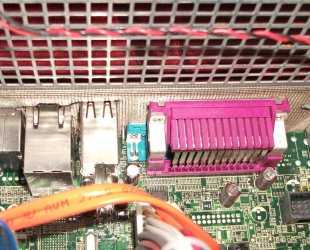
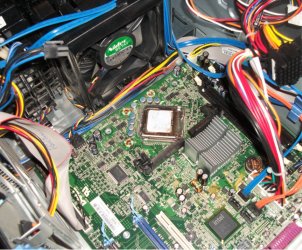
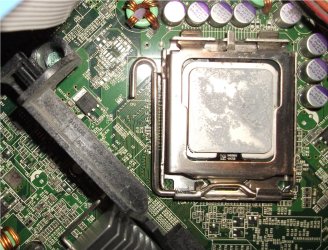
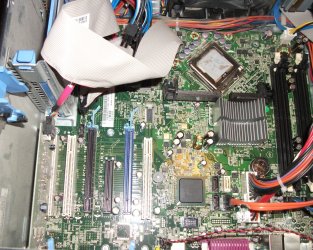
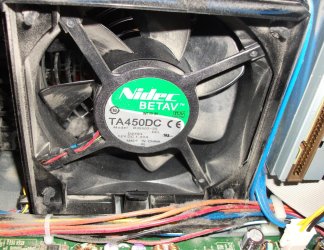
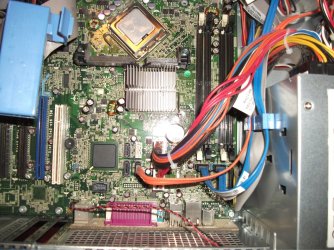
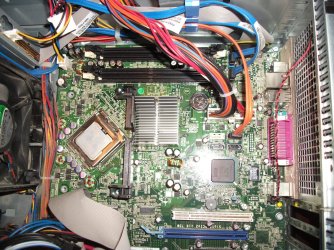
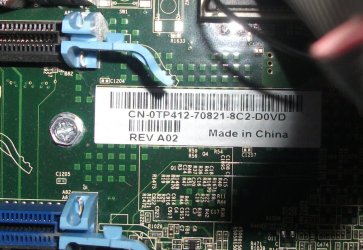
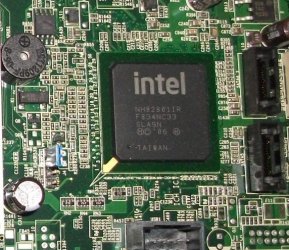
I have added images of the tower I'm working on. If you need more, or better, info from me I'll do my best to satisfy.

I'm thinking that there just may be built in graphics, but by looking I just don't know. I am a novice getting inside the workings of a pc. The images may help.

I have decided to get 2 2GB RAM chips. Crucial made by Dell.

I could get the following video card by Gigabyte for $10. Geforce 8500 GT 256mb GPU Video card.I have also been considring a Quadro by Dell with as high specs as I can get.

Thanks for expounding on the advantages of a second drive for the OS(that goes for
Stephanie, AddRAM and madcratebuilder, who also took the time to comment:thumbsup:). I can see how it will make a difference. Even though it may take me a bit longer to finish this project I am willing to wait; if it means building one that I can get maybe 3-4 years of work from.
All I need to decide on is HDD or SSD. I'm leaning towards SSD as I believe(from what I've read) that that would be optimum, and give me a better level of versatility.

Actually, it was while searching for my system info that I found a link to this site. I am very fortunate to have landed in the company of some well learned individuals, and am grateful for it.

KR
Bruce


Attachments

  • DellPC_a 002.jpg
    DellPC_a 002.jpg
    134.1 KB · Views: 2
  • DellPC_a 019.jpg
    DellPC_a 019.jpg
    92.9 KB · Views: 85
  • DellPC_a 027.jpg
    DellPC_a 027.jpg
    116.8 KB · Views: 2
  • DellPC_a 020.jpg
    DellPC_a 020.jpg
    220 KB · Views: 2
  • DellPC_a 021.jpg
    DellPC_a 021.jpg
    245.2 KB · Views: 2

My Computer

Computer type
PC/Desktop
Computer Manufacturer/Model Number
Dell Optiplex 980
OS
Win 7Pro 64bit
CPU
Intel(R) Core(TM) i5 CPU 650 @ 3.20GHz 3.19GHz
Memory
4 X 1GB at present
Graphics Card(s)
onboard
Sound Card
onboard
Monitor(s) Displays
22" Viewsonic
Screen Resolution
1680 x 1050
Hard Drives
500 GB HDD
Case
Manufacturer specific
Cooling
Manufacturer specific
Keyboard
AZIO KB505U
Mouse
Logitech tracball
Antivirus
Ad-Aware Lavasoft
Browser
Mozilla Firefox 64
Hi smarteyeball,

I have added images of the tower I'm working on. If you need more, or better, info from me I'll do my best to satisfy.

I'm thinking that there just may be built in graphics, but by looking I just don't know. I am a novice getting inside the workings of a pc. The images may help.

Thanks for those, it's helped identify the motherboard model. (just some general info about your board)

Dell Bluford E139765 Motherboard

LGA 775 Socket (intel uses the amount of pins for the CPU to identify their boards. )
Intel X38 Chipset (That's the chip in the photo. Not overly important to know)
PCI-E 2.0 x16 (The slot type for the GPU)
Integrated Audio
Max Memory 8GB (4x2GB - will not support 4GB+ modules)

One question regarding the CPU's you have there - could you either take a picture of the top of them (where the details are) or simply the model numbers ie E8400, QX6800, QX9650 etc.

While one of them may be an extreme, the other may actually be quicker.


I have decided to get 2 2GB RAM chips. Crucial made by Dell.
By rights, the motherboard should support pretty much any DDR2 800Mhz/PC2-6400 2GB 1.8v modules.

4x1GB or 2x2GB makes no difference (unless you wish to upgrade to 8GB later on.)

The board supports either DDR2 667mhz or DDR2 800Mhz. DDR2 800mhz is faster.


I could get the following video card by Gigabyte for $10. Geforce 8500 GT 256mb GPU Video card.I have also been considring a Quadro by Dell with as high specs as I can get.
I wouldn't worry too much about a quadro - they are more intended for workstations than games and the drivers are slanted that way too. Not saying you shouldn't. Quadro or not - the faster the better.

An 8500GT should run the original Half Life with no problems. For $10 you can't go wrong grabbing one.

If nothing else, it will easily tide you over should you decide you need more grunt in the future.

There is no integrated GPU on this motherboard.


Thanks for expounding on the advantages of a second drive for the OS
You're welcome Bruce :)


I can see how it will make a difference. Even though it may take me a bit longer to finish this project I am willing to wait; if it means building one that I can get maybe 3-4 years of work from.
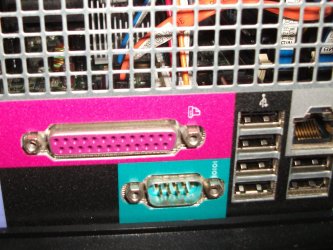
From your described usage intentions, there's no reason why this build should not easily last you 3-4 years. Plus there is some room to upgrade should you wish to.

It's part of the rationale behind suggesting an SSD. It really is one component you would not regret installing. To be honest, the only complaint about SSD's I've seen repeated often is "Why did I take so long to get one?"


Actually, it was while searching for my system info that I found a link to this site. I am very fortunate to have landed in the company of some well learned individuals, and am grateful for it.

KR
Bruce
And we are happy to help. There are a lot of knowledgeable people on this site indeed.
 

My Computer

Computer type
PC/Desktop
Computer Manufacturer/Model Number
Systems by SmartEyeball
OS
8 Pro x64
CPU
i7 3770K 4.6GHz
Motherboard
ASUS P8Z77 WS
Memory
16GB G.Skill Trident X 2666mhz
Graphics Card(s)
x2 EVGA 780 Ti Superclocked SLI
Sound Card
SB X-FI Surround 5.1 PRO USB / ATH-AD900 Headphones
Monitor(s) Displays
x3 Dell U2410 / 58" Samsung
Screen Resolution
5760*1200/ 1920*1200
Hard Drives
2x Intel 520 240GB (RAID 0) * 2x WD Caviar Blacks 2TB (RAID 0) * 2TB WD Caviar Black * Sony Optirac DVD
PSU
Silverstone Strider Evolution 1200W
Case
Thermaltake Level 10 GT Snow Edition
Cooling
Noctua NH-D14
Keyboard
Topre Realforce // Ducky Shine MX Black // Filco Ninja TKL
Mouse
Thermaltake Theron (Highly Recommended) + Razer Imperator
Antivirus
MSE
Browser
IE, FF, WaterFox
Other Info
GT Extreme V2 Sim Racing Cockpit + 40" LCD and K/B Mouse stand ▼
Fanatec CSR Elite Wheel + Clubsport V1 Pedals + CSR shifter/7G-H ▼Saitek X52 Pro ▼ TrackIR 5 Pro
Buttkicker v2 Seat Rumbler with Dedicated 5.1 and Sub Woofer attached to frame ▼
=
Bloody Big Grin
Hi smarteyeball......

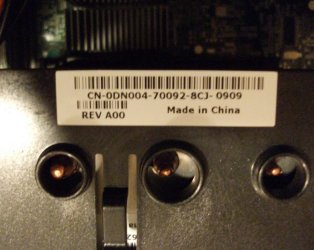
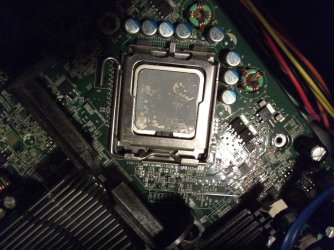
......Here are some more images. I think they may be the correct ones you asked me to provide.....hope so. Anyway I may have gone and done it. I uncovered the GPU, and probably it will need a reapplication of that silver thermal paste.....after a good cleaning with 97% alcohol.

The # numbers on the GPU are: 3574654 over 6A1886

These are the numbers printed on the Core2 extreme GPU.

I am in the process of imaging the Core2 quatro board.

To the images.

KR
Bruce
 

Attachments

  • DellPC_b 001.jpg
    DellPC_b 001.jpg
    226.2 KB · Views: 4
  • DellPC_b 010.jpg
    DellPC_b 010.jpg
    230.3 KB · Views: 2
  • DellPC_b 007 (2).jpg
    DellPC_b 007 (2).jpg
    325.8 KB · Views: 2

My Computer

Computer type
PC/Desktop
Computer Manufacturer/Model Number
Dell Optiplex 980
OS
Win 7Pro 64bit
CPU
Intel(R) Core(TM) i5 CPU 650 @ 3.20GHz 3.19GHz
Memory
4 X 1GB at present
Graphics Card(s)
onboard
Sound Card
onboard
Monitor(s) Displays
22" Viewsonic
Screen Resolution
1680 x 1050
Hard Drives
500 GB HDD
Case
Manufacturer specific
Cooling
Manufacturer specific
Keyboard
AZIO KB505U
Mouse
Logitech tracball
Antivirus
Ad-Aware Lavasoft
Browser
Mozilla Firefox 64
Anyway I may have gone and done it. I uncovered the GPU, and probably it will need a reapplication of that silver thermal paste.....after a good cleaning with 97% alcohol.

The # numbers on the GPU are: 3574654 over 6A1886

These are the numbers printed on the Core2 extreme GPU.

Just to clarify - do you actually mean CPU and not GPU?

The CPU is the Central Processing Unit (the one in your shots)

The GPU is the Graphics Processing Unit, or the the video card. (Easy enough to mistake)

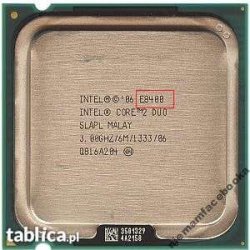
Unfortunately those numbers didn't turn up anything (Not sure what those are - they aren't the serial or batch numbers) and the thermal paste is obscuring the CPU type.

For example:

Core2details.jpg

The number outlined in red is the model number I need for both chips.

Since they need to be cleaned, there is no rush supplying that detail.


And yes, you will definitely need to reapply the thermal paste. Any time the Heat Sink is removed it should be replaced. The idea behind thermal paste is that neither the top of the CPU or the bottom of the heatsink are truly flat. There are a lot of tiny scratches/imperfections. Thermal paste is needed to "fill in" those gaps to create a smooth contact in which to disperse heat evenly from the top of the CPPU and up and out of the heatsink.


Out of curiosity Bruce, where are you getting the info that one of the boards is a an Extreme and the other a normal Core2 quad etc? The sticker on the front of the tower?

(And forgive me If I'm telling you thinks you already know, I find it's easier to cover everything just in case)
 

My Computer

Computer type
PC/Desktop
Computer Manufacturer/Model Number
Systems by SmartEyeball
OS
8 Pro x64
CPU
i7 3770K 4.6GHz
Motherboard
ASUS P8Z77 WS
Memory
16GB G.Skill Trident X 2666mhz
Graphics Card(s)
x2 EVGA 780 Ti Superclocked SLI
Sound Card
SB X-FI Surround 5.1 PRO USB / ATH-AD900 Headphones
Monitor(s) Displays
x3 Dell U2410 / 58" Samsung
Screen Resolution
5760*1200/ 1920*1200
Hard Drives
2x Intel 520 240GB (RAID 0) * 2x WD Caviar Blacks 2TB (RAID 0) * 2TB WD Caviar Black * Sony Optirac DVD
PSU
Silverstone Strider Evolution 1200W
Case
Thermaltake Level 10 GT Snow Edition
Cooling
Noctua NH-D14
Keyboard
Topre Realforce // Ducky Shine MX Black // Filco Ninja TKL
Mouse
Thermaltake Theron (Highly Recommended) + Razer Imperator
Antivirus
MSE
Browser
IE, FF, WaterFox
Other Info
GT Extreme V2 Sim Racing Cockpit + 40" LCD and K/B Mouse stand ▼
Fanatec CSR Elite Wheel + Clubsport V1 Pedals + CSR shifter/7G-H ▼Saitek X52 Pro ▼ TrackIR 5 Pro
Buttkicker v2 Seat Rumbler with Dedicated 5.1 and Sub Woofer attached to frame ▼
=
Bloody Big Grin
Round 2.....quatro

Here are the numbers and images of the No. 2 tower. Again, thanks for all the assistance!

Numbers on the Intel Core2 quatro GPU: N488888 over 4A4250. I didn't realize how dusty this tower was until I was editing the images. I will clean it up before all else. I'll give it a sheep dip....just in case:o

KR
Bruce
 

Attachments

  • DellPC_quatro 009.jpg
    DellPC_quatro 009.jpg
    391.7 KB · Views: 1
  • DellPC_quatro 007.jpg
    DellPC_quatro 007.jpg
    564.1 KB · Views: 1
  • DellPC_quatro 015.jpg
    DellPC_quatro 015.jpg
    378.8 KB · Views: 1
  • DellPC_quatro 016.jpg
    DellPC_quatro 016.jpg
    437.2 KB · Views: 1
  • DellPC_quatro 006.jpg
    DellPC_quatro 006.jpg
    525.3 KB · Views: 2

My Computer

Computer type
PC/Desktop
Computer Manufacturer/Model Number
Dell Optiplex 980
OS
Win 7Pro 64bit
CPU
Intel(R) Core(TM) i5 CPU 650 @ 3.20GHz 3.19GHz
Memory
4 X 1GB at present
Graphics Card(s)
onboard
Sound Card
onboard
Monitor(s) Displays
22" Viewsonic
Screen Resolution
1680 x 1050
Hard Drives
500 GB HDD
Case
Manufacturer specific
Cooling
Manufacturer specific
Keyboard
AZIO KB505U
Mouse
Logitech tracball
Antivirus
Ad-Aware Lavasoft
Browser
Mozilla Firefox 64
Anyway I may have gone and done it. I uncovered the GPU, and probably it will need a reapplication of that silver thermal paste.....after a good cleaning with 97% alcohol.

The # numbers on the GPU are: 3574654 over 6A1886

These are the numbers printed on the Core2 extreme GPU.

Just to clarify - do you actually mean CPU and not GPU?

The CPU is the Central Processing Unit (the one in your shots)

The GPU is the Graphics Processing Unit, or the the video card. (Easy enough to mistake)

Unfortunately those numbers didn't turn up anything (Not sure what those are - they aren't the serial or batch numbers) and the thermal paste is obscuring the CPU type.

For example:

View attachment 308363

The number outlined in red is the model number I need for both chips.

Since they need to be cleaned, there is no rush supplying that detail.


And yes, you will definitely need to reapply the thermal paste. Any time the Heat Sink is removed it should be replaced. The idea behind thermal paste is that neither the top of the CPU or the bottom of the heatsink are truly flat. There are a lot of tiny scratches/imperfections. Thermal paste is needed to "fill in" those gaps to create a smooth contact in which to disperse heat evenly from the top of the CPPU and up and out of the heatsink.


Out of curiosity Bruce, where are you getting the info that one of the boards is a an Extreme and the other a normal Core2 quad etc? The sticker on the front of the tower?

(And forgive me If I'm telling you thinks you already know, I find it's easier to cover everything just in case)

Yep, GPU was a typo. I did mean CPU....D'oH !

Yes, I got the info about the boards from the front of the towers. The one that I have been calling quatro has a void sticker(I'll image that if you like). I guess I shouldn't believe everything I read??

KR
Bruce

PS....I guess I need to be very careful pulling the CPU's.
 

My Computer

Computer type
PC/Desktop
Computer Manufacturer/Model Number
Dell Optiplex 980
OS
Win 7Pro 64bit
CPU
Intel(R) Core(TM) i5 CPU 650 @ 3.20GHz 3.19GHz
Memory
4 X 1GB at present
Graphics Card(s)
onboard
Sound Card
onboard
Monitor(s) Displays
22" Viewsonic
Screen Resolution
1680 x 1050
Hard Drives
500 GB HDD
Case
Manufacturer specific
Cooling
Manufacturer specific
Keyboard
AZIO KB505U
Mouse
Logitech tracball
Antivirus
Ad-Aware Lavasoft
Browser
Mozilla Firefox 64
Hi smarteyeball......

......
(And forgive me If I'm telling you thinks you already know, I find it's easier to cover everything just in case)
This is a statement that I will never have a problem with. I am a complete novice at this. I also have skin as thick as a rhino, so you do not need to be forgiven for helping me. Cheers!

KR
Bruce
 

My Computer

Computer type
PC/Desktop
Computer Manufacturer/Model Number
Dell Optiplex 980
OS
Win 7Pro 64bit
CPU
Intel(R) Core(TM) i5 CPU 650 @ 3.20GHz 3.19GHz
Memory
4 X 1GB at present
Graphics Card(s)
onboard
Sound Card
onboard
Monitor(s) Displays
22" Viewsonic
Screen Resolution
1680 x 1050
Hard Drives
500 GB HDD
Case
Manufacturer specific
Cooling
Manufacturer specific
Keyboard
AZIO KB505U
Mouse
Logitech tracball
Antivirus
Ad-Aware Lavasoft
Browser
Mozilla Firefox 64
No worries mate - when it comes to learning/getting used to new terms it's easy to confuse :)

And no need for a sticker photo. Since they are Dell towers, chances are they are what they say they are unless they were upgraded. Best way to find out is to look at the component itself.

When it comes to the CPU - Notice the latch on the side? Simply push it down and away from the socket (unlatching it basically) until it's loose. Then you can push the hinge at the rear and will lift out the cpu (or use a finger nail to pry).

With those intel CPU's and later, the pins are in the socket and the bottom of the CPU is covered in gold connector pads. What you want to watch out for is damaging the socket pins. Just try to avoid dropping the CPU or knocking the sockets pins. It's actually quite easy to remove the CPU.

This is a statement that I will never have a problem with. I am a complete novice at this. I also have skin as thick as a rhino, so you do not need to be forgiven for helping me. Cheers!

KR
Bruce

To be honest, it's blokes like you who genuinely appreciate help that I'm happy to go the extra mile for. And if you learn something new - even better ;)

We've all been where you are, starting from scratch at one point or another.
 

My Computer

Computer type
PC/Desktop
Computer Manufacturer/Model Number
Systems by SmartEyeball
OS
8 Pro x64
CPU
i7 3770K 4.6GHz
Motherboard
ASUS P8Z77 WS
Memory
16GB G.Skill Trident X 2666mhz
Graphics Card(s)
x2 EVGA 780 Ti Superclocked SLI
Sound Card
SB X-FI Surround 5.1 PRO USB / ATH-AD900 Headphones
Monitor(s) Displays
x3 Dell U2410 / 58" Samsung
Screen Resolution
5760*1200/ 1920*1200
Hard Drives
2x Intel 520 240GB (RAID 0) * 2x WD Caviar Blacks 2TB (RAID 0) * 2TB WD Caviar Black * Sony Optirac DVD
PSU
Silverstone Strider Evolution 1200W
Case
Thermaltake Level 10 GT Snow Edition
Cooling
Noctua NH-D14
Keyboard
Topre Realforce // Ducky Shine MX Black // Filco Ninja TKL
Mouse
Thermaltake Theron (Highly Recommended) + Razer Imperator
Antivirus
MSE
Browser
IE, FF, WaterFox
Other Info
GT Extreme V2 Sim Racing Cockpit + 40" LCD and K/B Mouse stand ▼
Fanatec CSR Elite Wheel + Clubsport V1 Pedals + CSR shifter/7G-H ▼Saitek X52 Pro ▼ TrackIR 5 Pro
Buttkicker v2 Seat Rumbler with Dedicated 5.1 and Sub Woofer attached to frame ▼
=
Bloody Big Grin
Hi smarteyeball......

......I haven't cleaned the thermal compound off of the CPU's yet, but I did order the following: Arctic alumina ceramic thermal compound. Do you think that it will do the job correctly? If not I'll get the Arctic #5.

KR
Bruce


My Computer

Computer type
PC/Desktop
Computer Manufacturer/Model Number
Dell Optiplex 980
OS
Win 7Pro 64bit
CPU
Intel(R) Core(TM) i5 CPU 650 @ 3.20GHz 3.19GHz
Memory
4 X 1GB at present
Graphics Card(s)
onboard
Sound Card
onboard
Monitor(s) Displays
22" Viewsonic
Screen Resolution
1680 x 1050
Hard Drives
500 GB HDD
Case
Manufacturer specific
Cooling
Manufacturer specific
Keyboard
AZIO KB505U
Mouse
Logitech tracball
Antivirus
Ad-Aware Lavasoft
Browser
Mozilla Firefox 64
Yes it will do the job correctly most likely. You should get a aftermarket cooler since they are way better than stock.
 

My Computer

Computer type
PC/Desktop
Computer Manufacturer/Model Number
Dell Vostro 400/Dell XPS 8700(Slightly Customized for me by Dell)/Toshiba Satellite T135
OS
Windows 7 Professional 32-bit/Windows 8 64-bit/Win7 Pro64-bit
CPU
Intel Core 2 Quad Q6600/Intel Core i7 4790/Intel Pentium
Memory
2GB/16GB/4GB
Graphics Card(s)
Intel G33/G31 Express(Vostro)/NVIDIA GeForce GTX 745(XPS)
Monitor(s) Displays
HP 2009m(Vostro)/ViewSonic VX2250wm-LED(XPS)
Screen Resolution
1600x900(Vostro)/1920x1080(XPS)
Hard Drives
Seagate ST3160815AS(Vostro)/Western Digital Blue(Satellite)
External:
Western Digital My Passport 0748
Samsung HM121HC
Keyboard
Dell L100)(Vostro)/Dell KB2133p(XPS)
Mouse
Dell M-UAV-DEL8(XPS)
Internet Speed
100 Mbit/s(Only when IPTV is plugged out)
Antivirus
Avast, Malwarebytes PRO
Browser
Internet Explorer 11
Other Info
Note: Names with slashes between two different parts mean that the left is my old desktop and the right is my old laptop and the middle is my new desktop.(Unless specified)
Ping is horrible for servers overseas in US and Europe.
New laptop:LG Gram(Not available in US) Processor:Intel Core i3 4th Gen Ultra Low Power RAM:4GB Hard Drive:SK Hynix OEM MSATA or M.2 Graphics:Intel HD
Back
Top