Questions regarding Pagefile.sys

glennc

New member
Power User
VIP
Local time
8:45 PM
Messages
1,024
Hello,
You Gentlemen recently helped me remove the clean pagefile.sys on shutdown thus shortening the time immensely. My question, is there a way to clean the pagefile.sys with maybe overwrites manually? I have 4GB of RAM and the pagefile.sys suggested 5390 MB. I rarely run 80% of my RAM, does that amount of disk space sound prudent?
Also would a 8 GB flash drive set to use as extended memory be faster than a HD Caviar Black with 3G SATA? Thanks, trying to get ideas as my main drive is becomming moderately full.
Thanks for any advice or opinions.
glennc
 

My Computer

Computer type
PC/Desktop
Computer Manufacturer/Model Number
Self-Built
OS
Windows 7 Ultimate
CPU
AMD Phenom-II X4 965
Motherboard
Gigabyte GA-MA785GM-US2H
Memory
8192 MB DDR2-SDRAM
Graphics Card(s)
ATI Radeon HD 4200
Sound Card
ATI Radeon HD 4200 High Definition Audo
Monitor(s) Displays
LG Electronics W1943
Screen Resolution
1360 X 768
Hard Drives
C: 500 GB Caviar Black SATA
E: 500 GB Caviar Black SATA
PSU
Ultra LSP 750
Case
Ultra XBlaster
Cooling
2 Fans, CPU Fan, PS Fan
Keyboard
Acer
Mouse
Logitech
Internet Speed
6 MB
I wouldn't waste my time with Readyboost, considering you have more than 1 GB of system memory. How is your 500 GB drive broken down that you are running out of space on it?
 

My Computer

OS
Windows 7 Ultimate x64 SP1
CPU
Intel Core i7-2600
Motherboard
Gigabyte GA-P67A-UD3P-B3
Memory
12 GB Patriot Extreme DDR3-1333
Graphics Card(s)
Nvidia GTX 470
Monitor(s) Displays
Dell UltraSharp 2209WA
Hard Drives
OCZ Agility3 240 GB, WD5001AALS, WD7501AALS
PSU
OCZ ModStream 700W
Case
CoolerMaster HAF 912 Advanced
Cooling
CoolerMaster Hyper 212 Plus
Hello DeaconFrost,
Thanks for your reply and assistance. I have 119 GB left of 465 GB. I currently have 5370 MBs for pagefile.sys. On my XP system I was using a third of a 160 GB drive.
So I'm unfamiliar enough to be concerned. I would also like to wipe my pagefile.sys once in a while manually.
glennc
 

My Computer

Computer type
PC/Desktop
Computer Manufacturer/Model Number
Self-Built
OS
Windows 7 Ultimate
CPU
AMD Phenom-II X4 965
Motherboard
Gigabyte GA-MA785GM-US2H
Memory
8192 MB DDR2-SDRAM
Graphics Card(s)
ATI Radeon HD 4200
Sound Card
ATI Radeon HD 4200 High Definition Audo
Monitor(s) Displays
LG Electronics W1943
Screen Resolution
1360 X 768
Hard Drives
C: 500 GB Caviar Black SATA
E: 500 GB Caviar Black SATA
PSU
Ultra LSP 750
Case
Ultra XBlaster
Cooling
2 Fans, CPU Fan, PS Fan
Keyboard
Acer
Mouse
Logitech
Internet Speed
6 MB
I have 4GB of RAM and the pagefile.sys suggested 5390 MB. I rarely run 80% of my RAM, does that amount of disk space sound prudent?
Unless you are very tight on disk space, I wouldn't change it or worry about it.

Also would a 8 GB flash drive set to use as extended memory be faster than a HD Caviar Black with 3G SATA?
No, the flash drive will be many, many times slower. Even with a USB 3.0 interface, you have far more bandwidth available to the hard drive.
 

My Computer

Computer Manufacturer/Model Number
Self-Built in July 2009
OS
Windows 7 Ultimate x64
CPU
Intel Q9550 2.83Ghz OC'd to 3.40Ghz
Motherboard
Gigabyte GA-EP45-UD3R rev. 1.1, F12 BIOS
Memory
8GB G.Skill PI DDR2-800, 4-4-4-12 timings
Graphics Card(s)
EVGA 1280MB Nvidia GeForce GTX570
Sound Card
Realtek ALC899A 8 channel onboard audio
Monitor(s) Displays
23" Acer x233H
Screen Resolution
1920x1080
Hard Drives
Intel X25-M 80GB Gen 2 SSD
Western Digital 1TB Caviar Black, 32MB cache. WD1001FALS
PSU
Corsair 620HX modular
Case
Antec P182
Cooling
stock
Keyboard
ABS M1 Mechanical
Mouse
Logitech G9 Laser Mouse
Internet Speed
15/2 cable modem
Other Info
Windows and Linux enthusiast. Logitech G35 Headset.
Hello pparks1,
Thanks for your response and thoughts on the matter. Glad for the info reference the flash drives.
glennc
 

My Computer

Computer type
PC/Desktop
Computer Manufacturer/Model Number
Self-Built
OS
Windows 7 Ultimate
CPU
AMD Phenom-II X4 965
Motherboard
Gigabyte GA-MA785GM-US2H
Memory
8192 MB DDR2-SDRAM
Graphics Card(s)
ATI Radeon HD 4200
Sound Card
ATI Radeon HD 4200 High Definition Audo
Monitor(s) Displays
LG Electronics W1943
Screen Resolution
1360 X 768
Hard Drives
C: 500 GB Caviar Black SATA
E: 500 GB Caviar Black SATA
PSU
Ultra LSP 750
Case
Ultra XBlaster
Cooling
2 Fans, CPU Fan, PS Fan
Keyboard
Acer
Mouse
Logitech
Internet Speed
6 MB
Do you know what is using all of that space on your main drive? That seems like a huage amount of space in use...even with a few large games installed. I do agree that it is best to let the pagefile alone, aka system managed, and there's no reason to ever want to or consider wiping the pagefile. Find out what's taking up all of your space, and that will be a far better solution.
 

My Computer

OS
Windows 7 Ultimate x64 SP1
CPU
Intel Core i7-2600
Motherboard
Gigabyte GA-P67A-UD3P-B3
Memory
12 GB Patriot Extreme DDR3-1333
Graphics Card(s)
Nvidia GTX 470
Monitor(s) Displays
Dell UltraSharp 2209WA
Hard Drives
OCZ Agility3 240 GB, WD5001AALS, WD7501AALS
PSU
OCZ ModStream 700W
Case
CoolerMaster HAF 912 Advanced
Cooling
CoolerMaster Hyper 212 Plus
Hello DeaconFrost,
Thanks for following up. I am of the habit of setting the pagefile.sys to the system requested for minimum and maximum, giving me a static block of memory. This is probably taking up some of it. I've read the you should clear your pagefile.sys for leftover data, thus I had it previously wiping on shutdown. I would like a way to do that manually intermittently. The largest amount of files is photos, some music files for
rhapsody. Not much else I can think of. I will check in more depth.
glennc
 

My Computer

Computer type
PC/Desktop
Computer Manufacturer/Model Number
Self-Built
OS
Windows 7 Ultimate
CPU
AMD Phenom-II X4 965
Motherboard
Gigabyte GA-MA785GM-US2H
Memory
8192 MB DDR2-SDRAM
Graphics Card(s)
ATI Radeon HD 4200
Sound Card
ATI Radeon HD 4200 High Definition Audo
Monitor(s) Displays
LG Electronics W1943
Screen Resolution
1360 X 768
Hard Drives
C: 500 GB Caviar Black SATA
E: 500 GB Caviar Black SATA
PSU
Ultra LSP 750
Case
Ultra XBlaster
Cooling
2 Fans, CPU Fan, PS Fan
Keyboard
Acer
Mouse
Logitech
Internet Speed
6 MB
The concept of setting a min and max for the pagefile worked well in Windows XP, but hasn't been a needed or valid tweak since then. Vista, and then Windows 7 moreso, could manage the virtual memory system very well on their own.

I'm not sure where you read about clearing the pagefile, but that isn't needed at all. I can't say I've ever heard of such a thing, and I wouldn't waste any time or effort worrying about it.

The thing to remember is, Windows 7 isn't Windows XP, and shouldn't be treated as such. Most, if not all, of those "tweaks" that enthusiasts have done with XP aren't needed anymore. We can finally sit back, let the system handle itself, and just go on using our computers.
 

My Computer

OS
Windows 7 Ultimate x64 SP1
CPU
Intel Core i7-2600
Motherboard
Gigabyte GA-P67A-UD3P-B3
Memory
12 GB Patriot Extreme DDR3-1333
Graphics Card(s)
Nvidia GTX 470
Monitor(s) Displays
Dell UltraSharp 2209WA
Hard Drives
OCZ Agility3 240 GB, WD5001AALS, WD7501AALS
PSU
OCZ ModStream 700W
Case
CoolerMaster HAF 912 Advanced
Cooling
CoolerMaster Hyper 212 Plus
The whole clearing the pagefile originated with security issues where it could be used to gather scant information that could be used to violate security. I recall this as being one of the 'necessary evils' for some machines when you wanted to be sure people couldn't mess with something on that system. The draw back is, I do not believe there is a way to manually clear the pagefile, as it is a system controlled file and still requires a restart for changes within it, which is why clearing the pagefile only happens at shutdown.

Also, since the pagefile is directly related to Virtual Memory, messing with that location during system operation is much like you trying to yank out your ram and sticking it back in while the computer is on. Don't forget, Windows is still actively using the pagefile for virtual ram at any given time during operation.
 

My Computer

Computer Manufacturer/Model Number
Alienware Area 51 Desktop and Dell Inspirion 17R (N7010)
OS
Windows 7 Ultimate x64 and Home Premium x64
CPU
Intel i7 960 (3.2 GHz Quad Core)
Motherboard
Alienware Intel based X58
Memory
12 Gigs (Triple Channel)
Graphics Card(s)
Alienware OEM nVidia GTX 560 Ti (1.25 Gig)
Sound Card
Creative Labs X-Fi Titanium
Monitor(s) Displays
Samsung PX2370 LED 23" Monitor
Screen Resolution
1920x1080
Hard Drives
2 320 Gig SATA in Raid 1 Configuration (System/App)
1 1 Tera SATA (Games)
1 1 Tera SATA (Data/Music/Videos)
PSU
750 Watt Power Supply
Case
Alienware Area 51 Desktop
Cooling
Liquid Cooled
Keyboard
Logitech G510
Mouse
Microsoft Trackball Explorer
Internet Speed
Cable
Hello Gentlemen,
Thank you for the education. I know that Windows 7 is different as it has taken a disliking of me. But I will let it handle the pagefile.sys as it might give me more space.
Still wondering about the wiping the file as they have W7 programs designed to do just that. Great stuff, thanx
glennc
 

My Computer

Computer type
PC/Desktop
Computer Manufacturer/Model Number
Self-Built
OS
Windows 7 Ultimate
CPU
AMD Phenom-II X4 965
Motherboard
Gigabyte GA-MA785GM-US2H
Memory
8192 MB DDR2-SDRAM
Graphics Card(s)
ATI Radeon HD 4200
Sound Card
ATI Radeon HD 4200 High Definition Audo
Monitor(s) Displays
LG Electronics W1943
Screen Resolution
1360 X 768
Hard Drives
C: 500 GB Caviar Black SATA
E: 500 GB Caviar Black SATA
PSU
Ultra LSP 750
Case
Ultra XBlaster
Cooling
2 Fans, CPU Fan, PS Fan
Keyboard
Acer
Mouse
Logitech
Internet Speed
6 MB
I wouldn't worry about wiping the file, unless this is some kind of kiosk system that many people share and use. Simply put, on your own system, there's no need to do so.
 

My Computer

OS
Windows 7 Ultimate x64 SP1
CPU
Intel Core i7-2600
Motherboard
Gigabyte GA-P67A-UD3P-B3
Memory
12 GB Patriot Extreme DDR3-1333
Graphics Card(s)
Nvidia GTX 470
Monitor(s) Displays
Dell UltraSharp 2209WA
Hard Drives
OCZ Agility3 240 GB, WD5001AALS, WD7501AALS
PSU
OCZ ModStream 700W
Case
CoolerMaster HAF 912 Advanced
Cooling
CoolerMaster Hyper 212 Plus
I wouldn't worry about wiping the file, unless this is some kind of kiosk system that many people share and use. Simply put, on your own system, there's no need to do so.

Well, unless you are a paranoid techno geek that feels that people are going to get sensitive information out of your pagefile. But at that point, you should have a giant electro magnet nearby to flip on, because if you are that worried about people accessing your data, you should just flick a switch and rub a giant magnet around your system to make it completely inaccessable.

Just so you know, the government and some others have data recovery tools to really get at what you have on your system that a pagefile purge won't save you. :)
 

My Computer

Computer Manufacturer/Model Number
Alienware Area 51 Desktop and Dell Inspirion 17R (N7010)
OS
Windows 7 Ultimate x64 and Home Premium x64
CPU
Intel i7 960 (3.2 GHz Quad Core)
Motherboard
Alienware Intel based X58
Memory
12 Gigs (Triple Channel)
Graphics Card(s)
Alienware OEM nVidia GTX 560 Ti (1.25 Gig)
Sound Card
Creative Labs X-Fi Titanium
Monitor(s) Displays
Samsung PX2370 LED 23" Monitor
Screen Resolution
1920x1080
Hard Drives
2 320 Gig SATA in Raid 1 Configuration (System/App)
1 1 Tera SATA (Games)
1 1 Tera SATA (Data/Music/Videos)
PSU
750 Watt Power Supply
Case
Alienware Area 51 Desktop
Cooling
Liquid Cooled
Keyboard
Logitech G510
Mouse
Microsoft Trackball Explorer
Internet Speed
Cable
Even with a relatively large RAM you can never be sure when the pagefile is being used. For normal operations it will probably not be used, but e.g. AV scans use it very often.
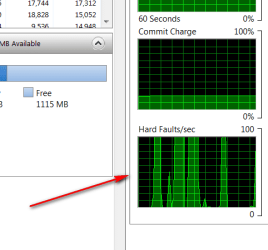
Make the test: Scan with your AV program whilst you have the Resource Monitor > Memory tab open. Look at the Hard Faults/sec diagram on the bottom right. If that shows any activity, then your page file is active.
Now imagine what would happen if you ran a cleanup during that time. That would be like pulling the plug on your OS disk. Unfortunately there is no "Safely Remove" for the pagefile.sys.
This is what it shows on my system with 4GBs of RAM when I run a Norton scan - pretty busy despite of more than 1GB of free RAM and plenty of cached RAM.
 

Attachments

  • 2010-09-13_191730.png
    2010-09-13_191730.png
    6.9 KB · Views: 0

My Computer

Computer Manufacturer/Model Number
HP, Dell, Gateway, Toshiba - 4 laptops and 2 desktops
OS
Vista, Windows7, Mint Mate, Zorin, Windows 8
CPU
from 1.6GHz Duo to i7
Monitor(s) Displays
2x HP w2207
Hard Drives
5x HDD, 7x SSD, 12x Externals
Keyboard
with trackball - no mices
Mouse
Trackball mice
Internet Speed
DSL 6000
Here is few things to think on. Windows 7 is not XP. It works different and better than XP. The tips and tweaks we all did with older operating system seldom apply to Windows 7. The only one that is any where close is Vista. Try this and it will help you understand the way Windows handles Ram. Start/ type in resmon enter. Go to memory. You will notice that there are several sections. You will notice that your ram is not being used up, its puts in cached and standby. If your system needs it (bang) its got it. Just let Windows 7 do its job, you will like it.
 

My Computer

Computer type
PC/Desktop
Computer Manufacturer/Model Number
Home made Desktop
OS
Windows 10 Pro. 64/ version 1709 Windows 7 Pro/64
CPU
Intel i7-6800K @ 4.3
Motherboard
ASUS X-99 Deluxe II
Memory
Corsair Platinum 16 gig @2400
Graphics Card(s)
EVGA GTX 1070 OC
Monitor(s) Displays
Asus 27" LED LCD/VE278Q
Screen Resolution
1920-1080 or 1280-720 HDMI
Hard Drives
INTEL SSD 730-240 Gb Sata 3.0/
PSU
EVGA Platium 1200W
Case
Phanteks Luxe Tempered Glass 8 fans/ one radiator
Cooling
XSPC/ Water Cooled CPU
Keyboard
Das 4 Professional
Mouse
Logitech M705/MX Anywhere 2-S
Internet Speed
100 mbits
Antivirus
Microsoft Security Essentials/ Malwarebytes Premium 3.0/ SAS
Browser
I.E. 11 default/Firefox/ ISP Time Warner Cable/Spectrum
Other Info
LG BluRay Burner/
Sound system-KLipsch-THX/
Icy Dock ssd Hot Swap bays.
Well you Fine Members have convinced me. I ain't gonna worry about it. I appreciate the explanations and tests to show what is happening. Good stuff!
glennc
 

My Computer

Computer type
PC/Desktop
Computer Manufacturer/Model Number
Self-Built
OS
Windows 7 Ultimate
CPU
AMD Phenom-II X4 965
Motherboard
Gigabyte GA-MA785GM-US2H
Memory
8192 MB DDR2-SDRAM
Graphics Card(s)
ATI Radeon HD 4200
Sound Card
ATI Radeon HD 4200 High Definition Audo
Monitor(s) Displays
LG Electronics W1943
Screen Resolution
1360 X 768
Hard Drives
C: 500 GB Caviar Black SATA
E: 500 GB Caviar Black SATA
PSU
Ultra LSP 750
Case
Ultra XBlaster
Cooling
2 Fans, CPU Fan, PS Fan
Keyboard
Acer
Mouse
Logitech
Internet Speed
6 MB
Back
Top