Hey everyone!
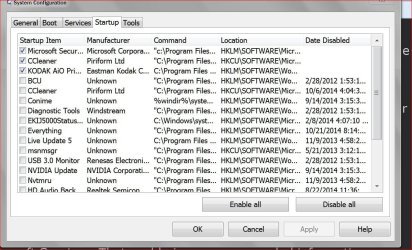
So I've recently gotten interested in computers, internet security, and the like! That being said, I'm trying to learn as much as possible about my computer and how to make it function as efficiently as possible. My computer is a HP Pavilion dv6 with an i7 processor. I just recently cleaned out the fan and applied new thermal paste as the temperatures on this DV6 are unreal (Seems to be a cooling design flaw as many have had this problem). So, today I realized that there's quite a few things running at startup and I was wondering if I could shrink the following list. I put some things that I have questions about regarding each startup item in parenthesis following the item.
Apple Push
CineForm Status (Manufacturer = Unknown. This scares me a little, should I worried about the smanufacturer being unkown?)
Cisco AnyConnect Secure Mobility Client
Citrix ICA Client
cyberlink brs
Google Update
Google Update (why would I have two of these?)
HP Digital Imaging
HP Digital Imaging (again, why would I have two of these?)
HP Launch Box
HP On Screen Display
HP Quick Launch
HP QuickWeb
hpwuSchd Application
IAStorIcon
iCloud
iCloud Control Panel
iCloud for Windos
IDT PC Audio
Intel (R) Common User Interface
Intel (R) Common User Interface
Intel (R) Common User Interface (again, why do I have multiple of these?)
iTunes
Logitech Download Assistant
Logitech SetPoint
Logitech SetPoint
McAfee Agent
McAfee Security Scanner +
PowerDVD RC Service
QuickTime
Sendori
SUPERAntiSpyware
Synaptics Pointing Device Driver
VirusScan Enterprise
Windows (R) Win 7 DDK drive
Wondershare Helper Compact.exe (Manufacturer = Unknown)
Sorry for the long list but any help is appreciated. I also have some other questions I'd appreciate input on!
1) I had Youcam running in my processes but I've never used Youcam and never heard of it/don't remember ever installing it. I've never used my webcam so I was wondering why this process was occurring and if I should be worried.
2) What're your favorite noobie websites for learning computers, networking, computer maintenance, etc.
3) Almost everytime I run my SUPERAntiSpyware tests, I come up with "hits" if you will and then these things are deleted. Should I be worried?
I appreciate all the help in advance! Hopefully these questions aren't too noobish. Thanks all
So I've recently gotten interested in computers, internet security, and the like! That being said, I'm trying to learn as much as possible about my computer and how to make it function as efficiently as possible. My computer is a HP Pavilion dv6 with an i7 processor. I just recently cleaned out the fan and applied new thermal paste as the temperatures on this DV6 are unreal (Seems to be a cooling design flaw as many have had this problem). So, today I realized that there's quite a few things running at startup and I was wondering if I could shrink the following list. I put some things that I have questions about regarding each startup item in parenthesis following the item.
Apple Push
CineForm Status (Manufacturer = Unknown. This scares me a little, should I worried about the smanufacturer being unkown?)
Cisco AnyConnect Secure Mobility Client
Citrix ICA Client
cyberlink brs
Google Update
Google Update (why would I have two of these?)
HP Digital Imaging
HP Digital Imaging (again, why would I have two of these?)
HP Launch Box
HP On Screen Display
HP Quick Launch
HP QuickWeb
hpwuSchd Application
IAStorIcon
iCloud
iCloud Control Panel
iCloud for Windos
IDT PC Audio
Intel (R) Common User Interface
Intel (R) Common User Interface
Intel (R) Common User Interface (again, why do I have multiple of these?)
iTunes
Logitech Download Assistant
Logitech SetPoint
Logitech SetPoint
McAfee Agent
McAfee Security Scanner +
PowerDVD RC Service
QuickTime
Sendori
SUPERAntiSpyware
Synaptics Pointing Device Driver
VirusScan Enterprise
Windows (R) Win 7 DDK drive
Wondershare Helper Compact.exe (Manufacturer = Unknown)
Sorry for the long list but any help is appreciated. I also have some other questions I'd appreciate input on!
1) I had Youcam running in my processes but I've never used Youcam and never heard of it/don't remember ever installing it. I've never used my webcam so I was wondering why this process was occurring and if I should be worried.
2) What're your favorite noobie websites for learning computers, networking, computer maintenance, etc.
3) Almost everytime I run my SUPERAntiSpyware tests, I come up with "hits" if you will and then these things are deleted. Should I be worried?
I appreciate all the help in advance! Hopefully these questions aren't too noobish. Thanks all
My Computer
At a glance
Windows 7 Home Premium 64 bitIntel Core i7-2670QM8 GB RAM
- Computer type
- PC/Desktop
- Computer Manufacturer/Model Number
- HP
- OS
- Windows 7 Home Premium 64 bit
- CPU
- Intel Core i7-2670QM
- Memory
- 8 GB RAM
- Antivirus
- Avast! Free
- Browser
- Chrome