Quick Launch - Enable or Disable

How to Enable or Disable Quick Launch in Windows 7

   Information
By default Quick Launch is disabled in Windows 7. This will show you how to enable or disable Quick Launch as a taskbar toolbar using small or large icons in Windows 7.

   Note
Quick Launch is a toolbar on the taskbar. Quick Launch is used to open a program quickly from a shortcut from within it separate from the pinned programs on the taskbar.

The Quick Launch folder is located at the hidden system folder location below to add shortcuts to.

C:\Users\(user-name)\AppData\Roaming\Microsoft\Internet Explorer\Quick Launch

   Tip
Microsoft has made available a hotfix that will resolve a problem where the taskbar customizations are lost and reset to defaults when automatic logon is enabled in Windows 7 and Windows Server 2008 R2. More details are available at FIX: The Taskbar is reset to the default settings when you use the "Automatically Log On" feature in Windows 7 and in Windows Server 2008 R2.


If you still have the issue of where the pinned Quick Launch used in this tutorial disappears on you after logging off and on or restarting the computer, then a workaround for this issue is to either:
EXAMPLE: Default Windows 7 Taskbar
1441d1234757806-quick-launch-enable-disable-disabled.jpg


EXAMPLE: Quick Launch Enabled on Right Side of Taskbar
NOTE: This is the new Quick Launch toolbar with text and title, small icons, or large icons.
2048d1234327806-quick-launch-enable-disable-quick_launch_toolbar.jpg


4733d1234757607-quick-launch-enable-disable-small_quick_launch.jpg


4732d1234757607-quick-launch-enable-disable-large_quick_launch.jpg


EXAMPLE: Quick Launch Enabled on Left Side of Taskbar
NOTE: This is the new Quick Launch toolbar without text and title, and with small icons or large icons.

Right_Example-1.jpg

Right_Example-2.jpg


OPTION ONE

To Add Quick Launch to Taskbar


1. Right click on a empty space on the taskbar, then select (hover on) Taskbar and click on New Toolbar. (See screenshot below)
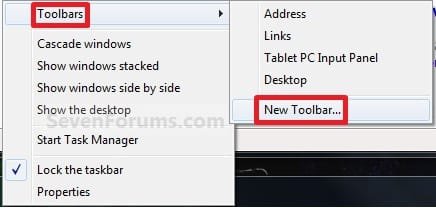
Right_Click_Taskbar.jpg
2. In the Folder line, type or copy the location below. (See screenshot below)
%userprofile%\AppData\Roaming\Microsoft\Internet Explorer\Quick Launch
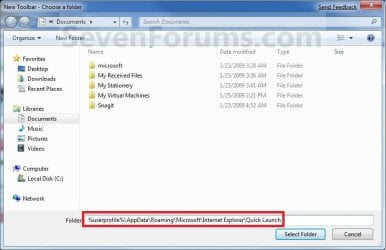
Select_Folder.jpg
3. Click on the Select Folder button. (See screenshot above)

4. You now have a Quick Launch toolbar on the taskbar. (See screenshot below)
NOTE: Click on the arrow to see your Quick Launch shortcuts.
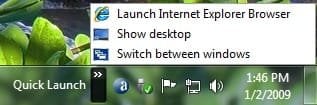
Quick_Launch_Toolbar.jpg
5. To Expand the Quick Launch Toolbar
A) Unlock the taskbar.

B) Left click and hold on the dotted separator line just to the left of Quick Launch, then drag it to the left or right to adjust to unhide all of the icons. Release the left click when done. (See screenshot below)
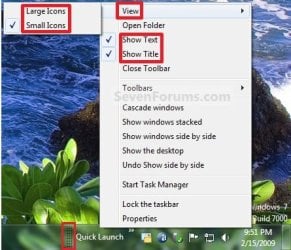
Right_Click_Toolbar.jpg
C) Lock the taskbar.
6. To Remove Quick Launch Toolbar Icon Text or Title
A) Unlock the taskbar.

B) Right click on the dotted separator line just to the left of Quick Launch, then uncheck the Show Text and Show Title by clicking on them. (See screenshot below step 5B)

C) Lock the taskbar.
7. To Have Small or Large Icons for Quick Launch Toolbar
A) Unlock the taskbar.

B) Right click on the dotted separator line just to the left of Quick Launch, then click on View and select to have Large Icons or Small Icons. (See screenshot below step 5B)

C) Lock the taskbar.
8. To Have Quick Launch Toolbar on Left Side of Taskbar
A) Unlock the taskbar.

B) Left click and hold on the dotted separator line just to the left of Quick Launch, then drag Quick Launch as far to the left on the taskbar as you are able to and release.

C) If you still have any pinned program icons to the left of Quick Launch, then left click and hold on the dotted separator line just to the left of the icons and hold, and drag it to the right past Quick Launch and release. (See screenshot below)

RightSide_1.jpg
D) The Quick Launch toolbar is now on the far left side of the taskbar. (See screenshot below)

RightSide_2.jpg
E) Left click and hold on the dotted separator line for the other icons and drag them left or right to make any adjustments to how you want them placed on the taskbar. (See screenshot above)

F) Lock the taskbar.


OPTION TWO

To Remove Quick Launch from Taskbar


1. Right click on a empty space on the taskbar and click on Toolbars and Quick Launch to uncheck and remove it from the taskbar. (See screenshot below)
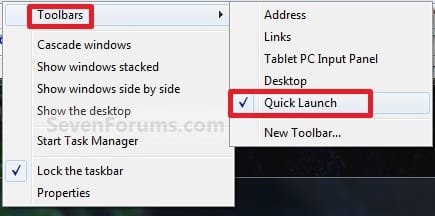
Remove.jpg
That's it,
Shawn


Attachments

  • Small_Quick_Launch.jpg
    Small_Quick_Launch.jpg
    8.5 KB · Views: 1,657,225
  • Large_Quick_Launch.jpg
    Large_Quick_Launch.jpg
    8.5 KB · Views: 1,656,917
  • Disabled.jpg
    Disabled.jpg
    9.3 KB · Views: 1,677,290
Last edited:
just did this trick...thank you for posting this.

It's weird. My HP netbook has 7 Home premium, and has quick launch already there and ready to go. I had to do this hack to my HP 64 bit Ultimate Win 7.....

Man, I like an empty desktop, so I rely on quick launch....


Thanks again for this Tut.!!!!
 

My Computer

Computer Manufacturer/Model Number
HP Tower (x2), HP Netbook
OS
Windows 7 Ultimate x64, 7 Premium, & XP
CPU
Intel Core 2 Duo E4600 @ 2.40GHz
Motherboard
ASUSTek (stock)
Memory
4.0GB Dual-Channel DDR2 @ 333MHz
Graphics Card(s)
NVidia geForce9500 1 Gig
Sound Card
Realtek Something 7.1
Monitor(s) Displays
(2) HP w2207's (22" Display)
Screen Resolution
1680x1050 x2 60hz
Hard Drives
Stock, 300 Gig
Case
stock
Cooling
Never enough! :-)
Keyboard
HP
Mouse
Logitech Optical
Internet Speed
Never Fast Enough
Other Info
Owner/Administrator of:
www.tunemytoyota.com
You're most welcome Kneel. :)
 

My Computer

Computer type
PC/Desktop
Computer Manufacturer/Model Number
Self built custom
OS
64-bit Windows 11 Pro for Workstations
CPU
Intel i7-8700K OC'd to 5 GHz
Motherboard
ASUS ROG Maximus XI Formula Z390
Memory
64 GB (4x16GB) G.SKILL TridentZ RGB DDR4 3600 MHz
Graphics Card(s)
ASUS ROG-STRIX-GTX1080TI-O11G-GAMING
Sound Card
Integrated
Monitor(s) Displays
2 x Samsung Odyssey G7 27"
Screen Resolution
2560x1440
Hard Drives
1TB Samsung 990 PRO M.2,
4TB Samsung 990 PRO PRO M.2,
TerraMaster F8 SSD Plus NAS
PSU
Seasonic Prime Titanium 850W
Case
Thermaltake Core P3
Cooling
Corsair Hydro H115i
Keyboard
Logitech wireless K800
Mouse
Logitech MX Master 4
Internet Speed
2 Gb/s Download and 100 Mb/s Upload
Antivirus
Malwarebyte Anti-Malware Premium
Browser
Google Chrome
Other Info
Logitech Z625 speaker system,
Logitech BRIO 4K Pro webcam,
HP Color LaserJet Pro MFP M477fdn,
APC SMART-UPS RT 1000 XL - SURT1000XLI,
Galaxy S23 Plus phone
Hi Brink (and others). I've been reading this 31xpage thread with interest. I'm doing an experimental install of Win7 Ultimate on a workshop machine (my own pcs are running XPP) so I can better tune the Win7 laptops that customers are starting to bring to me.

Re the Quicklaunch workaround (which I'm just about to try), I had a couple of thoughts about alternatives. I'm not a fan of wide screens; I reckon that they distort a lot of images.

So on my own Acer XP laptop, with a 15" screen that measures 330mm x 210mm, I keep my Taskbar\Quicklaunch panel at the left of the screen, not the bottom. This way, my desktop more approximates a 'square format'. If I moved it to the more conventional bottom of screen, this would accentuate the screen's 'wideness'.
The side position works well because I have four vertical columns of icons in my Quicklaunch area, with a total of around 60 icons.

Now, I haven't tried customizing my workshop Win7 yet, but it occurred to me that, if it were possible to pose some sort of elongated folder on either side of the screen, perhaps that would serve as a 'dock' for regular shortcuts?

Again on that subject, there was a great little app around in the days of W98. It was called 'Desklist' and, once installed in the tray, it showed with one click, every desktop icon. The developer abandoned it, but I've always thought it had a lot of promise.

Anyway, I'll post this and get on with my customized Win7.
Cheers from New Zealand.
 

My Computer

Computer type
PC/Desktop
Computer Manufacturer/Model Number
My build
OS
Win7 Ultimate SP1
CPU
Intel Core i5 9400 Coffee Lake 14nm
Motherboard
Asus Prime H310M-E R2.0 (LGA1151)
Memory
16G DDR4
Graphics Card(s)
NVidia GeForce GTX 960
Sound Card
Realtek High Definition Audio (mobo)
Monitor(s) Displays
Asus PA248 24" 16:10 format
Screen Resolution
1920x1200@59Hz
Hard Drives
1863GB Seagate ST2000DM
3726GB Seagate ST4000DM
1863GB Seagate ST2000DM
6TB Seagate
465GB NVMe Samsung SSD 970
PSU
750G2
Case
Tower
Cooling
Standard
Keyboard
USB
Mouse
USB
Internet Speed
920Mbs/480Mbs
Antivirus
Malwarebytes
Browser
Firefox
Hello Teckneeculler, and welcome to Seven Forums.

You might take a look at the free program StandaloneStack to see if it may be close to doing what the old program "Desklist" did.

Hope this helps,
Shawn
 
Last edited:

My Computer

Computer type
PC/Desktop
Computer Manufacturer/Model Number
Self built custom
OS
64-bit Windows 11 Pro for Workstations
CPU
Intel i7-8700K OC'd to 5 GHz
Motherboard
ASUS ROG Maximus XI Formula Z390
Memory
64 GB (4x16GB) G.SKILL TridentZ RGB DDR4 3600 MHz
Graphics Card(s)
ASUS ROG-STRIX-GTX1080TI-O11G-GAMING
Sound Card
Integrated
Monitor(s) Displays
2 x Samsung Odyssey G7 27"
Screen Resolution
2560x1440
Hard Drives
1TB Samsung 990 PRO M.2,
4TB Samsung 990 PRO PRO M.2,
TerraMaster F8 SSD Plus NAS
PSU
Seasonic Prime Titanium 850W
Case
Thermaltake Core P3
Cooling
Corsair Hydro H115i
Keyboard
Logitech wireless K800
Mouse
Logitech MX Master 4
Internet Speed
2 Gb/s Download and 100 Mb/s Upload
Antivirus
Malwarebyte Anti-Malware Premium
Browser
Google Chrome
Other Info
Logitech Z625 speaker system,
Logitech BRIO 4K Pro webcam,
HP Color LaserJet Pro MFP M477fdn,
APC SMART-UPS RT 1000 XL - SURT1000XLI,
Galaxy S23 Plus phone
Thanks Shawn, an interesting little app. BTW, your Quick Launch tip works perfectly :-)
 

My Computer

Computer type
PC/Desktop
Computer Manufacturer/Model Number
My build
OS
Win7 Ultimate SP1
CPU
Intel Core i5 9400 Coffee Lake 14nm
Motherboard
Asus Prime H310M-E R2.0 (LGA1151)
Memory
16G DDR4
Graphics Card(s)
NVidia GeForce GTX 960
Sound Card
Realtek High Definition Audio (mobo)
Monitor(s) Displays
Asus PA248 24" 16:10 format
Screen Resolution
1920x1200@59Hz
Hard Drives
1863GB Seagate ST2000DM
3726GB Seagate ST4000DM
1863GB Seagate ST2000DM
6TB Seagate
465GB NVMe Samsung SSD 970
PSU
750G2
Case
Tower
Cooling
Standard
Keyboard
USB
Mouse
USB
Internet Speed
920Mbs/480Mbs
Antivirus
Malwarebytes
Browser
Firefox
You're most welcome Teckneeculler. Thank you. :)
 

My Computer

Computer type
PC/Desktop
Computer Manufacturer/Model Number
Self built custom
OS
64-bit Windows 11 Pro for Workstations
CPU
Intel i7-8700K OC'd to 5 GHz
Motherboard
ASUS ROG Maximus XI Formula Z390
Memory
64 GB (4x16GB) G.SKILL TridentZ RGB DDR4 3600 MHz
Graphics Card(s)
ASUS ROG-STRIX-GTX1080TI-O11G-GAMING
Sound Card
Integrated
Monitor(s) Displays
2 x Samsung Odyssey G7 27"
Screen Resolution
2560x1440
Hard Drives
1TB Samsung 990 PRO M.2,
4TB Samsung 990 PRO PRO M.2,
TerraMaster F8 SSD Plus NAS
PSU
Seasonic Prime Titanium 850W
Case
Thermaltake Core P3
Cooling
Corsair Hydro H115i
Keyboard
Logitech wireless K800
Mouse
Logitech MX Master 4
Internet Speed
2 Gb/s Download and 100 Mb/s Upload
Antivirus
Malwarebyte Anti-Malware Premium
Browser
Google Chrome
Other Info
Logitech Z625 speaker system,
Logitech BRIO 4K Pro webcam,
HP Color LaserJet Pro MFP M477fdn,
APC SMART-UPS RT 1000 XL - SURT1000XLI,
Galaxy S23 Plus phone
Hi,

I use quicklaunch a lot, mainly because I need to open several instances of a program very often and because I don't like clutter.
Now I fixed this myself after a bit of looking around. But there is one thing that comprimised the 'quick' from quicklaunch; a security alert. Every time I open a quicklaunch instance (apart from 'run'), it asks if I want to open this .lnk file. I think because it can't confirm the publisher of the file, even though I get this with calc, notepad and paint too. :s

Thank you in advance,

CX

win7quickstartflauwe.png

Open file - security alert

Do you want to open this file?

Name: C:\Users\CX\Favorites\Koppelingen\Notepad.lnk
Publisher: Unknown publisher
Type: Shortcut
From: C:\Users\CX\Favorites\Koppelingen\Notepad.lnk

[Open] [Cancel]
---
Dispite the fact that files that you have downloaded from internet could be useful, can this filetype cause harm to your computer. Do not execute this software of you hesitate about the orgins. What's the risk?
 

My Computer

Computer Manufacturer/Model Number
ACER Aspire G7710
OS
Windows 7
CPU
Intel i7 2.67 Ghz x 8
Motherboard
Dunno lol
Memory
6 Gb DDR3
Graphics Card(s)
NVIDIA GeForce 285 GTX
Sound Card
Dunno lol
Monitor(s) Displays
Flatron w2234S
Hard Drives
2 Tb
PSU
Dunno lol
Case
Orange
Cooling
Liquid

My Computer

Computer type
PC/Desktop
Computer Manufacturer/Model Number
Self built custom
OS
64-bit Windows 11 Pro for Workstations
CPU
Intel i7-8700K OC'd to 5 GHz
Motherboard
ASUS ROG Maximus XI Formula Z390
Memory
64 GB (4x16GB) G.SKILL TridentZ RGB DDR4 3600 MHz
Graphics Card(s)
ASUS ROG-STRIX-GTX1080TI-O11G-GAMING
Sound Card
Integrated
Monitor(s) Displays
2 x Samsung Odyssey G7 27"
Screen Resolution
2560x1440
Hard Drives
1TB Samsung 990 PRO M.2,
4TB Samsung 990 PRO PRO M.2,
TerraMaster F8 SSD Plus NAS
PSU
Seasonic Prime Titanium 850W
Case
Thermaltake Core P3
Cooling
Corsair Hydro H115i
Keyboard
Logitech wireless K800
Mouse
Logitech MX Master 4
Internet Speed
2 Gb/s Download and 100 Mb/s Upload
Antivirus
Malwarebyte Anti-Malware Premium
Browser
Google Chrome
Other Info
Logitech Z625 speaker system,
Logitech BRIO 4K Pro webcam,
HP Color LaserJet Pro MFP M477fdn,
APC SMART-UPS RT 1000 XL - SURT1000XLI,
Galaxy S23 Plus phone
Thank you for your reply. I've tried those now.

Both options one of the first link don't work, as I don't have the corresponding button or checkbox.
I've tried the first option of the second link, though I didn't notice a difference after applying and rebooting either of those registery fixes. I don't have the corresponding windows version to try the second option.
Dragging the .exe files directly to the quicklaunch (both moving and creating a shotcut to it) resulted in the same outcome.

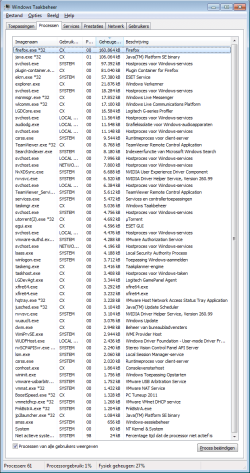
I've attached my active processes, note AVG's pc tuneup and ESET Nod32 anivirus.

Thank you in advance,

CX
 

Attachments

  • active processes.png
    active processes.png
    98.7 KB · Views: 293

My Computer

Computer Manufacturer/Model Number
ACER Aspire G7710
OS
Windows 7
CPU
Intel i7 2.67 Ghz x 8
Motherboard
Dunno lol
Memory
6 Gb DDR3
Graphics Card(s)
NVIDIA GeForce 285 GTX
Sound Card
Dunno lol
Monitor(s) Displays
Flatron w2234S
Hard Drives
2 Tb
PSU
Dunno lol
Case
Orange
Cooling
Liquid
CX,

Open the hidden Quick Launch folder in the NOTE box at the top of the tutorial, then right click in the folder and click on New and Shortcut to add the shortcuts into Quick Launch instead.
 

My Computer

Computer type
PC/Desktop
Computer Manufacturer/Model Number
Self built custom
OS
64-bit Windows 11 Pro for Workstations
CPU
Intel i7-8700K OC'd to 5 GHz
Motherboard
ASUS ROG Maximus XI Formula Z390
Memory
64 GB (4x16GB) G.SKILL TridentZ RGB DDR4 3600 MHz
Graphics Card(s)
ASUS ROG-STRIX-GTX1080TI-O11G-GAMING
Sound Card
Integrated
Monitor(s) Displays
2 x Samsung Odyssey G7 27"
Screen Resolution
2560x1440
Hard Drives
1TB Samsung 990 PRO M.2,
4TB Samsung 990 PRO PRO M.2,
TerraMaster F8 SSD Plus NAS
PSU
Seasonic Prime Titanium 850W
Case
Thermaltake Core P3
Cooling
Corsair Hydro H115i
Keyboard
Logitech wireless K800
Mouse
Logitech MX Master 4
Internet Speed
2 Gb/s Download and 100 Mb/s Upload
Antivirus
Malwarebyte Anti-Malware Premium
Browser
Google Chrome
Other Info
Logitech Z625 speaker system,
Logitech BRIO 4K Pro webcam,
HP Color LaserJet Pro MFP M477fdn,
APC SMART-UPS RT 1000 XL - SURT1000XLI,
Galaxy S23 Plus phone
Thanks for your reply once again.

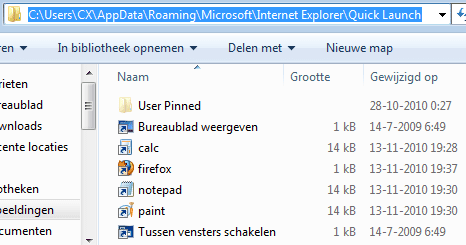
I've removed the icons (except Run, which works properly) from my quicklaunch first, then I placed shortcuts to my applications. After rebooting, I noticed that there were no new icons in my quicklaunch apart from Run. Have I missed something?

I've attached a screenshot of how it's set up. Note that Bureaublad weergeven (show desktop) and Tussen vensters schakelen (Switch between windows) never showed up either, but I don't need those at all.

Sincerely,

CX

EDIT: Also, the quicklaunch folder isn't set to hidden for me.
 

Attachments

  • Shotcuts in quicklaunch.png
    Shotcuts in quicklaunch.png
    17.8 KB · Views: 446

My Computer

Computer Manufacturer/Model Number
ACER Aspire G7710
OS
Windows 7
CPU
Intel i7 2.67 Ghz x 8
Motherboard
Dunno lol
Memory
6 Gb DDR3
Graphics Card(s)
NVIDIA GeForce 285 GTX
Sound Card
Dunno lol
Monitor(s) Displays
Flatron w2234S
Hard Drives
2 Tb
PSU
Dunno lol
Case
Orange
Cooling
Liquid
It's the AppData folder that is normally hidden, and faded when it is set to not be hidden.

Do the shortcuts work when you click on them there?

You might restart the computer to see if they show up afterwards.

If not, then as a test, create a new administrator account and add Quick Launch to the taskbar to see how it work in that user account.
 

My Computer

Computer type
PC/Desktop
Computer Manufacturer/Model Number
Self built custom
OS
64-bit Windows 11 Pro for Workstations
CPU
Intel i7-8700K OC'd to 5 GHz
Motherboard
ASUS ROG Maximus XI Formula Z390
Memory
64 GB (4x16GB) G.SKILL TridentZ RGB DDR4 3600 MHz
Graphics Card(s)
ASUS ROG-STRIX-GTX1080TI-O11G-GAMING
Sound Card
Integrated
Monitor(s) Displays
2 x Samsung Odyssey G7 27"
Screen Resolution
2560x1440
Hard Drives
1TB Samsung 990 PRO M.2,
4TB Samsung 990 PRO PRO M.2,
TerraMaster F8 SSD Plus NAS
PSU
Seasonic Prime Titanium 850W
Case
Thermaltake Core P3
Cooling
Corsair Hydro H115i
Keyboard
Logitech wireless K800
Mouse
Logitech MX Master 4
Internet Speed
2 Gb/s Download and 100 Mb/s Upload
Antivirus
Malwarebyte Anti-Malware Premium
Browser
Google Chrome
Other Info
Logitech Z625 speaker system,
Logitech BRIO 4K Pro webcam,
HP Color LaserJet Pro MFP M477fdn,
APC SMART-UPS RT 1000 XL - SURT1000XLI,
Galaxy S23 Plus phone
Oh right.

Yes, the shotcuts work when I click them from inside the Quick Launch folder.
And yes, I had rebooted my system after I added them.

I've added a new admin account, but somehow I managed to disable the usage of multiple accounts. :huh:
I'll try to enable that, it might take a while. Thank you for the quick replies. :D

Translation;
Change user
Logoff

Lock
Reboot
Hibernate

EDIT: Couldn't find any way to enable the usage of multiple accounts. :s
 

Attachments

  • NoOtherAccounts.png
    NoOtherAccounts.png
    21.2 KB · Views: 373
Last edited:

My Computer

Computer Manufacturer/Model Number
ACER Aspire G7710
OS
Windows 7
CPU
Intel i7 2.67 Ghz x 8
Motherboard
Dunno lol
Memory
6 Gb DDR3
Graphics Card(s)
NVIDIA GeForce 285 GTX
Sound Card
Dunno lol
Monitor(s) Displays
Flatron w2234S
Hard Drives
2 Tb
PSU
Dunno lol
Case
Orange
Cooling
Liquid

My Computer

Computer type
PC/Desktop
Computer Manufacturer/Model Number
Self built custom
OS
64-bit Windows 11 Pro for Workstations
CPU
Intel i7-8700K OC'd to 5 GHz
Motherboard
ASUS ROG Maximus XI Formula Z390
Memory
64 GB (4x16GB) G.SKILL TridentZ RGB DDR4 3600 MHz
Graphics Card(s)
ASUS ROG-STRIX-GTX1080TI-O11G-GAMING
Sound Card
Integrated
Monitor(s) Displays
2 x Samsung Odyssey G7 27"
Screen Resolution
2560x1440
Hard Drives
1TB Samsung 990 PRO M.2,
4TB Samsung 990 PRO PRO M.2,
TerraMaster F8 SSD Plus NAS
PSU
Seasonic Prime Titanium 850W
Case
Thermaltake Core P3
Cooling
Corsair Hydro H115i
Keyboard
Logitech wireless K800
Mouse
Logitech MX Master 4
Internet Speed
2 Gb/s Download and 100 Mb/s Upload
Antivirus
Malwarebyte Anti-Malware Premium
Browser
Google Chrome
Other Info
Logitech Z625 speaker system,
Logitech BRIO 4K Pro webcam,
HP Color LaserJet Pro MFP M477fdn,
APC SMART-UPS RT 1000 XL - SURT1000XLI,
Galaxy S23 Plus phone
O.O you guys have tutorials for everything. :o
Okay that worked, and I tested it with my temporary admin account.

The admin account had the same dialog box.

If you have the time, would you be willing to assist me using teamviewer, it could speed things up. :)
 

My Computer

Computer Manufacturer/Model Number
ACER Aspire G7710
OS
Windows 7
CPU
Intel i7 2.67 Ghz x 8
Motherboard
Dunno lol
Memory
6 Gb DDR3
Graphics Card(s)
NVIDIA GeForce 285 GTX
Sound Card
Dunno lol
Monitor(s) Displays
Flatron w2234S
Hard Drives
2 Tb
PSU
Dunno lol
Case
Orange
Cooling
Liquid
@CX Gamer: Looks like you missed one step in the tutorial, you actually haven't created the QuickLaunch bar, you are using your Internet Explorer's Favorites folder, this is why all .lnk files require manual confirmation before opening. Or you somehow linked your Favorites folder to the QuickLaunch bar. Try this:

1) Delete all the shortcuts to applications from your Favorites folder.
The Favorites folder should contain only your web sites favorites, not programs.
2) Go through Shawn's tutorial once again until the QuickLaunch toolbar appears.
3) Create shortcuts safely by drag and drop from the Start menu. Zum Beispiel:
- Click on Start|All Programs|Accessories ("Start" AKA the "Windows" button)
- Right-click on Notepad and drag and drop to the QuickLaunch toolbar
- Release the right-click and select "Create shortcuts here"

2 other configuration tricks I find useful:

1) Move the QuickLaunch toolbar on the left next to the Windows|Start icon
- Right-click "Unlock the taskbar" on the taskbar if it's currently locked
- Click on the left between the vertical 3-dotted line and the first taskbar's icon
- A 4-arrow anchor should appear. Then move the taskbar to the right
- Once the 2 bars are switched, resize them with the vertical 3-dotted lines.
Remember, the trick is to move the taskbar right, not the QuickLaunch bar left.

2) Expand the height of the taskbar to 2 lines instead of 1:
- Again, unlock the taskbar if it's not unlocked already
- Move the mouse to the bottom of the screen
- Move it upwards slowly until it becomes a 2-arrow cursor
- Then click and move it upwards again until the taskbar expands to 2 lines
- Right-click "Lock the taskbar" to preserve your settings
You can then use twice more shortcuts or keep the bar's width to the minimum.
 

My Computer

Computer Manufacturer/Model Number
Home built
OS
Windows 7 x64 Ultimate English + language kits
CPU
Intel Core 2 6420 2.13GHz
Motherboard
Asus P5W DH Deluxe
Memory
4GB
Graphics Card(s)
NVIDIA GeForce 8800 GTX 768MB
Sound Card
Onboard audio
Monitor(s) Displays
Dell 1901FP
Hard Drives
Seagate Barracuda 1.5 and 0.5 TB
Thank you for your reply. Right now I'm having a facepalm moment of which 2 hands just isn't enough. I've used the Links toolbar, rather than having followed this tutorial. I thought we were talking about the same thing. I'll follow this tutorial now. Sorry to be of such bother, but thank you for your helpfull expertese. :)

EDIT: Yes, works like a charm. :D
 

My Computer

Computer Manufacturer/Model Number
ACER Aspire G7710
OS
Windows 7
CPU
Intel i7 2.67 Ghz x 8
Motherboard
Dunno lol
Memory
6 Gb DDR3
Graphics Card(s)
NVIDIA GeForce 285 GTX
Sound Card
Dunno lol
Monitor(s) Displays
Flatron w2234S
Hard Drives
2 Tb
PSU
Dunno lol
Case
Orange
Cooling
Liquid
Very nice catch Chimel. I knew it had to be something simple that was being overlooked by us somewhere. :)
 

My Computer

Computer type
PC/Desktop
Computer Manufacturer/Model Number
Self built custom
OS
64-bit Windows 11 Pro for Workstations
CPU
Intel i7-8700K OC'd to 5 GHz
Motherboard
ASUS ROG Maximus XI Formula Z390
Memory
64 GB (4x16GB) G.SKILL TridentZ RGB DDR4 3600 MHz
Graphics Card(s)
ASUS ROG-STRIX-GTX1080TI-O11G-GAMING
Sound Card
Integrated
Monitor(s) Displays
2 x Samsung Odyssey G7 27"
Screen Resolution
2560x1440
Hard Drives
1TB Samsung 990 PRO M.2,
4TB Samsung 990 PRO PRO M.2,
TerraMaster F8 SSD Plus NAS
PSU
Seasonic Prime Titanium 850W
Case
Thermaltake Core P3
Cooling
Corsair Hydro H115i
Keyboard
Logitech wireless K800
Mouse
Logitech MX Master 4
Internet Speed
2 Gb/s Download and 100 Mb/s Upload
Antivirus
Malwarebyte Anti-Malware Premium
Browser
Google Chrome
Other Info
Logitech Z625 speaker system,
Logitech BRIO 4K Pro webcam,
HP Color LaserJet Pro MFP M477fdn,
APC SMART-UPS RT 1000 XL - SURT1000XLI,
Galaxy S23 Plus phone
Haha, nothing to it, it was in CX's first screenshot.
I created a Notepad shortcut in my Favorites folder, and sure enough, it asked me for the same confirmation.

@CX Gamer: RTFT Read The Frigging Tutorial! ^-^ Glad to help. Tchüss!
 

My Computer

Computer Manufacturer/Model Number
Home built
OS
Windows 7 x64 Ultimate English + language kits
CPU
Intel Core 2 6420 2.13GHz
Motherboard
Asus P5W DH Deluxe
Memory
4GB
Graphics Card(s)
NVIDIA GeForce 8800 GTX 768MB
Sound Card
Onboard audio
Monitor(s) Displays
Dell 1901FP
Hard Drives
Seagate Barracuda 1.5 and 0.5 TB
got a question about quick links hope this is the right section i had a skim through

I prefer to use quick links over desktop icons but ive noticed it freezes for sometimes a minute because i use a large number of icons, is there anyway to get around this handicap or shall i just use less icons or stop using it?
 

My Computer

OS
windows 7 home premium
CPU
Intel i7 2600k
Motherboard
Asus P8P67 Deluxe
Memory
ddr3 8gbs
Graphics Card(s)
Geforce GTX 570
Sound Card
Asus Xonar
Monitor(s) Displays
dell 2405
Screen Resolution
1920 by 1200
Hard Drives
OCZ vertex 2e (2x)
Seagate 1tb storage
PSU
Corsair TX 750W
Case
Antec 1200
Cooling
Corsair H70 CPU Cooler
Keyboard
g15
Mouse
g5
Internet Speed
50mb
Other Info
computer is called a Ultima Tyrannosaur
Back
Top