
Quick Launch - Enable or Disable

How to Enable or Disable Quick Launch in Windows 7

   Information
By default Quick Launch is disabled in Windows 7. This will show you how to enable or disable Quick Launch as a taskbar toolbar using small or large icons in Windows 7.

   Note
Quick Launch is a toolbar on the taskbar. Quick Launch is used to open a program quickly from a shortcut from within it separate from the pinned programs on the taskbar.

The Quick Launch folder is located at the hidden system folder location below to add shortcuts to.

C:\Users\(user-name)\AppData\Roaming\Microsoft\Internet Explorer\Quick Launch

   Tip
Microsoft has made available a hotfix that will resolve a problem where the taskbar customizations are lost and reset to defaults when automatic logon is enabled in Windows 7 and Windows Server 2008 R2. More details are available at FIX: The Taskbar is reset to the default settings when you use the "Automatically Log On" feature in Windows 7 and in Windows Server 2008 R2.


If you still have the issue of where the pinned Quick Launch used in this tutorial disappears on you after logging off and on or restarting the computer, then a workaround for this issue is to either:
EXAMPLE: Default Windows 7 Taskbar
1441d1234757806-quick-launch-enable-disable-disabled.jpg


EXAMPLE: Quick Launch Enabled on Right Side of Taskbar
NOTE: This is the new Quick Launch toolbar with text and title, small icons, or large icons.
2048d1234327806-quick-launch-enable-disable-quick_launch_toolbar.jpg


4733d1234757607-quick-launch-enable-disable-small_quick_launch.jpg


4732d1234757607-quick-launch-enable-disable-large_quick_launch.jpg


EXAMPLE: Quick Launch Enabled on Left Side of Taskbar
NOTE: This is the new Quick Launch toolbar without text and title, and with small icons or large icons.

Right_Example-1.jpg

Right_Example-2.jpg


OPTION ONE

To Add Quick Launch to Taskbar


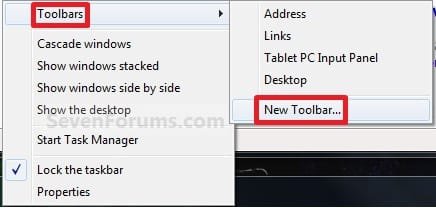
1. Right click on a empty space on the taskbar, then select (hover on) Taskbar and click on New Toolbar. (See screenshot below)
Right_Click_Taskbar.jpg
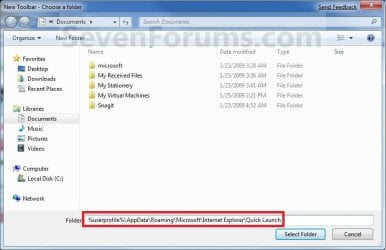
2. In the Folder line, type or copy the location below. (See screenshot below)
%userprofile%\AppData\Roaming\Microsoft\Internet Explorer\Quick Launch
Select_Folder.jpg
3. Click on the Select Folder button. (See screenshot above)

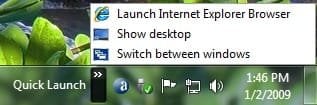
4. You now have a Quick Launch toolbar on the taskbar. (See screenshot below)
NOTE: Click on the arrow to see your Quick Launch shortcuts.
Quick_Launch_Toolbar.jpg
5. To Expand the Quick Launch Toolbar
A) Unlock the taskbar.

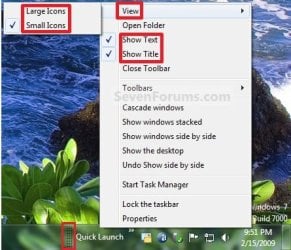
B) Left click and hold on the dotted separator line just to the left of Quick Launch, then drag it to the left or right to adjust to unhide all of the icons. Release the left click when done. (See screenshot below)
Right_Click_Toolbar.jpg
C) Lock the taskbar.
6. To Remove Quick Launch Toolbar Icon Text or Title
A) Unlock the taskbar.

B) Right click on the dotted separator line just to the left of Quick Launch, then uncheck the Show Text and Show Title by clicking on them. (See screenshot below step 5B)

C) Lock the taskbar.
7. To Have Small or Large Icons for Quick Launch Toolbar
A) Unlock the taskbar.

B) Right click on the dotted separator line just to the left of Quick Launch, then click on View and select to have Large Icons or Small Icons. (See screenshot below step 5B)

C) Lock the taskbar.
8. To Have Quick Launch Toolbar on Left Side of Taskbar
A) Unlock the taskbar.

B) Left click and hold on the dotted separator line just to the left of Quick Launch, then drag Quick Launch as far to the left on the taskbar as you are able to and release.

C) If you still have any pinned program icons to the left of Quick Launch, then left click and hold on the dotted separator line just to the left of the icons and hold, and drag it to the right past Quick Launch and release. (See screenshot below)

RightSide_1.jpg
D) The Quick Launch toolbar is now on the far left side of the taskbar. (See screenshot below)

RightSide_2.jpg
E) Left click and hold on the dotted separator line for the other icons and drag them left or right to make any adjustments to how you want them placed on the taskbar. (See screenshot above)

F) Lock the taskbar.


OPTION TWO

To Remove Quick Launch from Taskbar


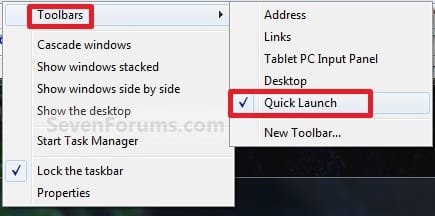
1. Right click on a empty space on the taskbar and click on Toolbars and Quick Launch to uncheck and remove it from the taskbar. (See screenshot below)
Remove.jpg
That's it,
Shawn


Attachments

  • Disabled.jpg
    Disabled.jpg
    9.3 KB · Views: 1,677,290
  • Large_Quick_Launch.jpg
    Large_Quick_Launch.jpg
    8.5 KB · Views: 1,656,917
  • Small_Quick_Launch.jpg
    Small_Quick_Launch.jpg
    8.5 KB · Views: 1,657,225
Last edited:
Thank you Churin. Hopefully we'll find something in common that may be related.
 

My Computer

Computer type
PC/Desktop
Computer Manufacturer/Model Number
Self built custom
OS
64-bit Windows 11 Pro for Workstations
CPU
Intel i7-8700K OC'd to 5 GHz
Motherboard
ASUS ROG Maximus XI Formula Z390
Memory
64 GB (4x16GB) G.SKILL TridentZ RGB DDR4 3600 MHz
Graphics Card(s)
ASUS ROG-STRIX-GTX1080TI-O11G-GAMING
Sound Card
Integrated
Monitor(s) Displays
2 x Samsung Odyssey G7 27"
Screen Resolution
2560x1440
Hard Drives
1TB Samsung 990 PRO M.2,
4TB Samsung 990 PRO PRO M.2,
TerraMaster F8 SSD Plus NAS
PSU
Seasonic Prime Titanium 850W
Case
Thermaltake Core P3
Cooling
Corsair Hydro H115i
Keyboard
Logitech wireless K800
Mouse
Logitech MX Master 4
Internet Speed
2 Gb/s Download and 100 Mb/s Upload
Antivirus
Malwarebyte Anti-Malware Premium
Browser
Google Chrome
Other Info
Logitech Z625 speaker system,
Logitech BRIO 4K Pro webcam,
HP Color LaserJet Pro MFP M477fdn,
APC SMART-UPS RT 1000 XL - SURT1000XLI,
Galaxy S23 Plus phone
I deleted the Quick Launch because it did not have the "pin to..." function in the right click context menu. I use taskbars instead - one for programs and one for folders. But those buggers also disappear after each reboot.
There must be a bug in the taskbar functions that manifests itself under certain conditions. Maybe the RTM will fix it. I am still on build 7100.
 

My Computer

Computer Manufacturer/Model Number
HP, Dell, Gateway, Toshiba - 4 laptops and 2 desktops
OS
Vista, Windows7, Mint Mate, Zorin, Windows 8
CPU
from 1.6GHz Duo to i7
Monitor(s) Displays
2x HP w2207
Hard Drives
5x HDD, 7x SSD, 12x Externals
Keyboard
with trackball - no mices
Mouse
Trackball mice
Internet Speed
DSL 6000
Another anomaly noted about Quick Launch(Vista/Xp type) is that if a check mark is removed from Quick Launch in the menu, the menu entry of Quick Launch disappears. The disappearance is not immediate but it is no longer there when the menu is displayed subsequently. The problem was noted on the Unit B and D in the table previously posted.
 

My Computer

Computer type
PC/Desktop
OS
W7 Ult x64, W8 Pro x64 and W10 Pro x64
CPU
Phenom FX6300
Motherboard
Gigabyte GA-970A-UD3 rev. 1.2
Memory
16GB DDR3 1866 G.Skill F3-1866C9D-16GWM x2
Graphics Card(s)
Radeon R7 360
Sound Card
Asus Xonar DS
Monitor(s) Displays
27" x2, Dell P2715Q
Screen Resolution
3840 x 2160
Hard Drives
Samsung 850Pro 1TB SSD - system
Samsung 4TB SSD - Data
PSU
Corsair CX450M
Case
Corsair 200R
Cooling
Zalman CNPS5X Performa
Internet Speed
400Mbps/12Mbps
Other Info
2nd machine: Same as above
3rd machine: Apple MacAir with W7 Ult installed
Churin,

If you mean OPTION TWO in the tutorial, then it is strange that Quick Launch is not removed immediately after unchecking it from the Toolbars menu.
 

My Computer

Computer type
PC/Desktop
Computer Manufacturer/Model Number
Self built custom
OS
64-bit Windows 11 Pro for Workstations
CPU
Intel i7-8700K OC'd to 5 GHz
Motherboard
ASUS ROG Maximus XI Formula Z390
Memory
64 GB (4x16GB) G.SKILL TridentZ RGB DDR4 3600 MHz
Graphics Card(s)
ASUS ROG-STRIX-GTX1080TI-O11G-GAMING
Sound Card
Integrated
Monitor(s) Displays
2 x Samsung Odyssey G7 27"
Screen Resolution
2560x1440
Hard Drives
1TB Samsung 990 PRO M.2,
4TB Samsung 990 PRO PRO M.2,
TerraMaster F8 SSD Plus NAS
PSU
Seasonic Prime Titanium 850W
Case
Thermaltake Core P3
Cooling
Corsair Hydro H115i
Keyboard
Logitech wireless K800
Mouse
Logitech MX Master 4
Internet Speed
2 Gb/s Download and 100 Mb/s Upload
Antivirus
Malwarebyte Anti-Malware Premium
Browser
Google Chrome
Other Info
Logitech Z625 speaker system,
Logitech BRIO 4K Pro webcam,
HP Color LaserJet Pro MFP M477fdn,
APC SMART-UPS RT 1000 XL - SURT1000XLI,
Galaxy S23 Plus phone
Brink,

Correction: The Quick Launch entry immediately disappears if the check marked Quick Launch in the menu is clicked on.

I just mistakenly assumed that the entry of Quick Launch stays there so that I can check mark it when I want to have Quick Lauch turned on.
 

My Computer

Computer type
PC/Desktop
OS
W7 Ult x64, W8 Pro x64 and W10 Pro x64
CPU
Phenom FX6300
Motherboard
Gigabyte GA-970A-UD3 rev. 1.2
Memory
16GB DDR3 1866 G.Skill F3-1866C9D-16GWM x2
Graphics Card(s)
Radeon R7 360
Sound Card
Asus Xonar DS
Monitor(s) Displays
27" x2, Dell P2715Q
Screen Resolution
3840 x 2160
Hard Drives
Samsung 850Pro 1TB SSD - system
Samsung 4TB SSD - Data
PSU
Corsair CX450M
Case
Corsair 200R
Cooling
Zalman CNPS5X Performa
Internet Speed
400Mbps/12Mbps
Other Info
2nd machine: Same as above
3rd machine: Apple MacAir with W7 Ult installed
Brink,

Correction: The Quick Launch entry immediately disappears if the check marked Quick Launch in the menu is clicked on.

I just mistakenly assumed that the entry of Quick Launch stays there so that I can check mark it when I want to have Quick Lauch turned on.

Oh, ok. Yeah that would be nice to be able to check and uncheck it to add and remove it at will. ;)
 

My Computer

Computer type
PC/Desktop
Computer Manufacturer/Model Number
Self built custom
OS
64-bit Windows 11 Pro for Workstations
CPU
Intel i7-8700K OC'd to 5 GHz
Motherboard
ASUS ROG Maximus XI Formula Z390
Memory
64 GB (4x16GB) G.SKILL TridentZ RGB DDR4 3600 MHz
Graphics Card(s)
ASUS ROG-STRIX-GTX1080TI-O11G-GAMING
Sound Card
Integrated
Monitor(s) Displays
2 x Samsung Odyssey G7 27"
Screen Resolution
2560x1440
Hard Drives
1TB Samsung 990 PRO M.2,
4TB Samsung 990 PRO PRO M.2,
TerraMaster F8 SSD Plus NAS
PSU
Seasonic Prime Titanium 850W
Case
Thermaltake Core P3
Cooling
Corsair Hydro H115i
Keyboard
Logitech wireless K800
Mouse
Logitech MX Master 4
Internet Speed
2 Gb/s Download and 100 Mb/s Upload
Antivirus
Malwarebyte Anti-Malware Premium
Browser
Google Chrome
Other Info
Logitech Z625 speaker system,
Logitech BRIO 4K Pro webcam,
HP Color LaserJet Pro MFP M477fdn,
APC SMART-UPS RT 1000 XL - SURT1000XLI,
Galaxy S23 Plus phone
I noticed the uncheck and it disappears too, but I dont need to uncheck it ;)

Also mine has not "disappeared" so hopefully it hangs around! I like it so much better. I left the pin to option on my laptop for now because I dont need quick lanch on there for my work prgs. I will see if it grows on me at all. Only thing I cant seem to get around is if I have one program instance open of say windows explorer, I can click on it to minimize it, if I have two open I cant! Very annoying to me!
 

My Computer

Computer Manufacturer/Model Number
Custom
OS
Windows 7 Pro
CPU
Q9650 @ 4.05ghz
Motherboard
Asus Striker II Extreme
Memory
Kingston DDR3 @1800mhz 8GB
Graphics Card(s)
BFG GTX 285SC
Sound Card
Audigy Fatal1ty
Monitor(s) Displays
Dell 24" 1920x 1200
Hard Drives
Raid 0 1TB Windows 7-64
Raid 0 800GB XP-32
PSU
Zalman 950-HP
Case
Cooler Master 690
Cooling
Zalman Pure Copper
Thank you

I installed windows 7 on saturday oct 24th and was so frustrated with the absence of quick launch and in general with the new taskbar. After exhausting windows 7 help, and searching the internet, without success, I was left regretting that I had upgraded to this os. I stumbled upon this forum this morning, and followed your instructions, and voila-I have quick launch and a familiarity with my old vista toolbar Thanks so much for this help. Microsoft was no help at all with this issue, only saying that quick launch was not available with windows 7. I imagine that they are going to get tons of complaints about this. thanks again!!!!!!!
P.S. I am not that impressed with this upgrade and don't consider it worthy of the money spent. No noticeable improvement in performance and it is difficult to navigate.
 
Last edited:

My Computer

OS
windows 7 home premium
You're welcome Brian, and welcome to Seven Forums. :)

I'm sorry to hear that you do not seem to be to happy with Windows 7 so far. Please be sure to post any questions or problems that you are having in the appropriate area of the forum. We'll be happy to help you with them.
 

My Computer

Computer type
PC/Desktop
Computer Manufacturer/Model Number
Self built custom
OS
64-bit Windows 11 Pro for Workstations
CPU
Intel i7-8700K OC'd to 5 GHz
Motherboard
ASUS ROG Maximus XI Formula Z390
Memory
64 GB (4x16GB) G.SKILL TridentZ RGB DDR4 3600 MHz
Graphics Card(s)
ASUS ROG-STRIX-GTX1080TI-O11G-GAMING
Sound Card
Integrated
Monitor(s) Displays
2 x Samsung Odyssey G7 27"
Screen Resolution
2560x1440
Hard Drives
1TB Samsung 990 PRO M.2,
4TB Samsung 990 PRO PRO M.2,
TerraMaster F8 SSD Plus NAS
PSU
Seasonic Prime Titanium 850W
Case
Thermaltake Core P3
Cooling
Corsair Hydro H115i
Keyboard
Logitech wireless K800
Mouse
Logitech MX Master 4
Internet Speed
2 Gb/s Download and 100 Mb/s Upload
Antivirus
Malwarebyte Anti-Malware Premium
Browser
Google Chrome
Other Info
Logitech Z625 speaker system,
Logitech BRIO 4K Pro webcam,
HP Color LaserJet Pro MFP M477fdn,
APC SMART-UPS RT 1000 XL - SURT1000XLI,
Galaxy S23 Plus phone
I've been playing with Quick Launch for quite a while; mostly on 32bit Ultimate. While I can get the QL to display the way I want to, like others I had problems with QL remaining after changing my desktop background, changing something in the theme, installing something, or with it just plain disappearing on a reboot. Just when I thought I solved my problem with QL, it disappears. I have spent a lot of time on this problem.

So I tried turning off UAC. All my problems went away. I can do anything I want to do with QL and have had no more problems with it disappearing.

Just though I would share that piece of information.

FYI, I do not advocate turning off UAC to have Quick Launch.
 

My Computers

System One System Two

  • Computer type
    Laptop
    Computer Manufacturer/Model Number
    Dell Precision 7510
    OS
    W7PRO
    CPU
    Intel i7-6820HQ @ 2.7GHz
    Memory
    16GB
  • Computer type
    Laptop
    OS
    W7Pro
I installed windows 7 on saturday oct 24th and was so frustrated with the absence of quick launch and in general with the new taskbar. After exhausting windows 7 help, and searching the internet, without success, I was left regretting that I had upgraded to this os. I stumbled upon this forum this morning, and followed your instructions, and voila-I have quick launch and a familiarity with my old vista toolbar Thanks so much for this help. Microsoft was no help at all with this issue, only saying that quick launch was not available with windows 7. I imagine that they are going to get tons of complaints about this. thanks again!!!!!!!
P.S. I am not that impressed with this upgrade and don't consider it worthy of the money spent. No noticeable improvement in performance and it is difficult to navigate.


A few months ago (with the Beta version) I was of the same opinion as you are. But it kind of grows on you. Give it a few weeks. But on the Quick Launch I agree with you - and there are a few other nice Vista functions they left out. You'll find (or miss) them eventually.
 

My Computer

Computer Manufacturer/Model Number
HP, Dell, Gateway, Toshiba - 4 laptops and 2 desktops
OS
Vista, Windows7, Mint Mate, Zorin, Windows 8
CPU
from 1.6GHz Duo to i7
Monitor(s) Displays
2x HP w2207
Hard Drives
5x HDD, 7x SSD, 12x Externals
Keyboard
with trackball - no mices
Mouse
Trackball mice
Internet Speed
DSL 6000
I've been playing with Quick Launch for quite a while; mostly on 32bit Ultimate. While I can get the QL to display the way I want to, like others I had problems with QL remaining after changing my desktop background, changing something in the theme, installing something, or with it just plain disappearing on a reboot. Just when I thought I solved my problem with QL, it disappears. I have spent a lot of time on this problem.

So I tried turning off UAC. All my problems went away. I can do anything I want to do with QL and have had no more problems with it disappearing.

Just though I would share that piece of information.

FYI, I do not advocate turning off UAC to have Quick Launch.

Thank you for sharing this RA. :)
 

My Computer

Computer type
PC/Desktop
Computer Manufacturer/Model Number
Self built custom
OS
64-bit Windows 11 Pro for Workstations
CPU
Intel i7-8700K OC'd to 5 GHz
Motherboard
ASUS ROG Maximus XI Formula Z390
Memory
64 GB (4x16GB) G.SKILL TridentZ RGB DDR4 3600 MHz
Graphics Card(s)
ASUS ROG-STRIX-GTX1080TI-O11G-GAMING
Sound Card
Integrated
Monitor(s) Displays
2 x Samsung Odyssey G7 27"
Screen Resolution
2560x1440
Hard Drives
1TB Samsung 990 PRO M.2,
4TB Samsung 990 PRO PRO M.2,
TerraMaster F8 SSD Plus NAS
PSU
Seasonic Prime Titanium 850W
Case
Thermaltake Core P3
Cooling
Corsair Hydro H115i
Keyboard
Logitech wireless K800
Mouse
Logitech MX Master 4
Internet Speed
2 Gb/s Download and 100 Mb/s Upload
Antivirus
Malwarebyte Anti-Malware Premium
Browser
Google Chrome
Other Info
Logitech Z625 speaker system,
Logitech BRIO 4K Pro webcam,
HP Color LaserJet Pro MFP M477fdn,
APC SMART-UPS RT 1000 XL - SURT1000XLI,
Galaxy S23 Plus phone
I have successfuly add the quick launch bar back to my windows 7, but what is happening is that everytime I reboot my machine the quick launch is gone... it's making me crazy... can someone help me please?
 

My Computer

OS
7 64bits
I have successfuly add the quick launch bar back to my windows 7, but what is happening is that everytime I reboot my machine the quick launch is gone... it's making me crazy... can someone help me please?


If you read this whole thread you will see that many people seem to have the same problem. Seems to be a win7 bug in the taskbar area. I have that problem with Toolbars too.
 

My Computer

Computer Manufacturer/Model Number
HP, Dell, Gateway, Toshiba - 4 laptops and 2 desktops
OS
Vista, Windows7, Mint Mate, Zorin, Windows 8
CPU
from 1.6GHz Duo to i7
Monitor(s) Displays
2x HP w2207
Hard Drives
5x HDD, 7x SSD, 12x Externals
Keyboard
with trackball - no mices
Mouse
Trackball mice
Internet Speed
DSL 6000
I have successfuly add the quick launch bar back to my windows 7, but what is happening is that everytime I reboot my machine the quick launch is gone... it's making me crazy... can someone help me please?


If you read this whole thread you will see that many people seem to have the same problem. Seems to be a win7 bug in the taskbar area. I have that problem with Toolbars too.
It must not be your case, but I have this issue only if I shut down or reboot when taskbar is not locked. I've never had this issue when taskbar is locked.

Kari
 

My Computer

Computer type
Laptop
Computer Manufacturer/Model Number
HP ENVY 17-1150eg
OS
Windows 10 Pro x64 EN-GB
CPU
1.6 GHz Intel Core i7-720QM Processor
Memory
6 GB
Graphics Card(s)
ATI Mobility Radeon HD 5850 Graphics
Sound Card
Beats sound system with integrated subwoofer
Monitor(s) Displays
17" laptop display, 22" LED and 32" Full HD TV through HDMI
Screen Resolution
1600*900 (1), 1920*1080 (2&3)
Hard Drives
Internal: 2 x 500 GB SATA Hard Disk Drive 7200 rpm
External: 2TB for backups, 3TB USB3 network drive for media
Cooling
As Envy runs a bit warm, I have it on a Cooler Master pad
Keyboard
Logitech diNovo Media Desktop Laser (bluetooth)
Mouse
Logitech Performance Mouse MX
Internet Speed
50/10 Mbps VDSL
Antivirus
Windows Defender 4.3.9431.0
Browser
Maxthon 3.5.2., IE11
I have successfuly add the quick launch bar back to my windows 7, but what is happening is that everytime I reboot my machine the quick launch is gone... it's making me crazy... can someone help me please?


If you read this whole thread you will see that many people seem to have the same problem. Seems to be a win7 bug in the taskbar area. I have that problem with Toolbars too.
It must not be your case, but I have this issue only if I shut down or reboot when taskbar is not locked. I've never had this issue when taskbar is locked.

Kari

here it happes both locked or unlocked... I don't understand how is it possible that a bug this serious takes so much time for microsoft to correct.
 

My Computer

OS
7 64bits
Hi to everyone

I'm new to here and I'm for over ten years now a MCSE and I do not understand the reason why MS acks with such thing in this way. I also was very unimpressed as I saw the the QL was not available. The QL and the new Taskband are two different thinks and as written above this discussion was done now.

But there are two different thinks that makes me great headache.

1. The QL disappears after a reboot
2. The copy of user profiles. Not to copy a ready made user profile to the default profile - I speak about to copy a ready made user profil to another user. This behavior in Win7 is a absolute no go and if MS do not provide us with a tool or any improvement, our company will not migrate to 7 (348 PC's)

To 1. I can say that after I arranged the QL I saved the current theme to a new one and after this the QL appears after each reboot or shutdown. If this solves the problem great. Other people here should also test this.
 

My Computer

OS
Win7 Ultimate x64 retail
Hello Purecut, and welcome to Seven Forums.

Thank you for sharing your results with #1. I have added a extra step 9 to the tutorial to help prevent folks from losing QL after restarting. :)
 

My Computer

Computer type
PC/Desktop
Computer Manufacturer/Model Number
Self built custom
OS
64-bit Windows 11 Pro for Workstations
CPU
Intel i7-8700K OC'd to 5 GHz
Motherboard
ASUS ROG Maximus XI Formula Z390
Memory
64 GB (4x16GB) G.SKILL TridentZ RGB DDR4 3600 MHz
Graphics Card(s)
ASUS ROG-STRIX-GTX1080TI-O11G-GAMING
Sound Card
Integrated
Monitor(s) Displays
2 x Samsung Odyssey G7 27"
Screen Resolution
2560x1440
Hard Drives
1TB Samsung 990 PRO M.2,
4TB Samsung 990 PRO PRO M.2,
TerraMaster F8 SSD Plus NAS
PSU
Seasonic Prime Titanium 850W
Case
Thermaltake Core P3
Cooling
Corsair Hydro H115i
Keyboard
Logitech wireless K800
Mouse
Logitech MX Master 4
Internet Speed
2 Gb/s Download and 100 Mb/s Upload
Antivirus
Malwarebyte Anti-Malware Premium
Browser
Google Chrome
Other Info
Logitech Z625 speaker system,
Logitech BRIO 4K Pro webcam,
HP Color LaserJet Pro MFP M477fdn,
APC SMART-UPS RT 1000 XL - SURT1000XLI,
Galaxy S23 Plus phone
I have managed to get my taskbar to look just like a Windows 7 version of the Vista taskbar.

taskbar.png


However, with the pinning objects to the taskbar option, the Quick Launch really is unnecessary. That is only, however, if I can get the "Show Desktop" shortcut to pin itself to the taskbar. That's the only thing I use Quick Launch for, as I've found the taskbar gets too crowded with programs that are running to have shortcuts on it as well. I use ObjectDock for that purpose. Is there a way to pin the shortcut for "Show Desktop" onto the taskbar?

I know it's in the bottom right corner as a simple button, but it's also surrounded by my clock and the system tray, and also I'm used to it's previous location. Is there any way to do this?
 

My Computer

OS
Windows 7
A Gazillion thanks

I just joined to be able to view (and ask, if I couldn't find) a solution to the disappeared "Quick Launch" and what is the very first thread I find?
Thank you, thank you and again thank you.:D
 

My Computer

Computer Manufacturer/Model Number
Acer Aspire 5738PG
OS
Win 7 Home Premium
Memory
4GB
Monitor(s) Displays
Notebook LCD
Back
Top


