Quick Launch - Enable or Disable

How to Enable or Disable Quick Launch in Windows 7

   Information
By default Quick Launch is disabled in Windows 7. This will show you how to enable or disable Quick Launch as a taskbar toolbar using small or large icons in Windows 7.

   Note
Quick Launch is a toolbar on the taskbar. Quick Launch is used to open a program quickly from a shortcut from within it separate from the pinned programs on the taskbar.

The Quick Launch folder is located at the hidden system folder location below to add shortcuts to.

C:\Users\(user-name)\AppData\Roaming\Microsoft\Internet Explorer\Quick Launch

   Tip
Microsoft has made available a hotfix that will resolve a problem where the taskbar customizations are lost and reset to defaults when automatic logon is enabled in Windows 7 and Windows Server 2008 R2. More details are available at FIX: The Taskbar is reset to the default settings when you use the "Automatically Log On" feature in Windows 7 and in Windows Server 2008 R2.


If you still have the issue of where the pinned Quick Launch used in this tutorial disappears on you after logging off and on or restarting the computer, then a workaround for this issue is to either:
EXAMPLE: Default Windows 7 Taskbar
1441d1234757806-quick-launch-enable-disable-disabled.jpg


EXAMPLE: Quick Launch Enabled on Right Side of Taskbar
NOTE: This is the new Quick Launch toolbar with text and title, small icons, or large icons.
2048d1234327806-quick-launch-enable-disable-quick_launch_toolbar.jpg


4733d1234757607-quick-launch-enable-disable-small_quick_launch.jpg


4732d1234757607-quick-launch-enable-disable-large_quick_launch.jpg


EXAMPLE: Quick Launch Enabled on Left Side of Taskbar
NOTE: This is the new Quick Launch toolbar without text and title, and with small icons or large icons.

Right_Example-1.jpg

Right_Example-2.jpg


OPTION ONE

To Add Quick Launch to Taskbar


1. Right click on a empty space on the taskbar, then select (hover on) Taskbar and click on New Toolbar. (See screenshot below)
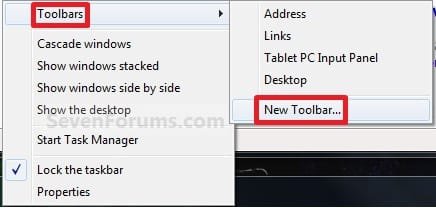
Right_Click_Taskbar.jpg
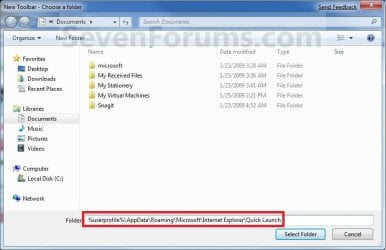
2. In the Folder line, type or copy the location below. (See screenshot below)
%userprofile%\AppData\Roaming\Microsoft\Internet Explorer\Quick Launch
Select_Folder.jpg
3. Click on the Select Folder button. (See screenshot above)

4. You now have a Quick Launch toolbar on the taskbar. (See screenshot below)
NOTE: Click on the arrow to see your Quick Launch shortcuts.
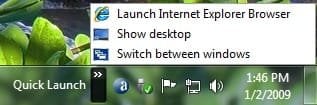
Quick_Launch_Toolbar.jpg
5. To Expand the Quick Launch Toolbar
A) Unlock the taskbar.

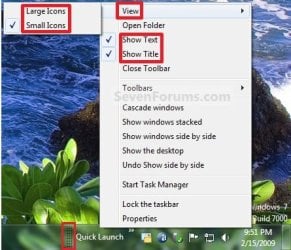
B) Left click and hold on the dotted separator line just to the left of Quick Launch, then drag it to the left or right to adjust to unhide all of the icons. Release the left click when done. (See screenshot below)
Right_Click_Toolbar.jpg
C) Lock the taskbar.
6. To Remove Quick Launch Toolbar Icon Text or Title
A) Unlock the taskbar.

B) Right click on the dotted separator line just to the left of Quick Launch, then uncheck the Show Text and Show Title by clicking on them. (See screenshot below step 5B)

C) Lock the taskbar.
7. To Have Small or Large Icons for Quick Launch Toolbar
A) Unlock the taskbar.

B) Right click on the dotted separator line just to the left of Quick Launch, then click on View and select to have Large Icons or Small Icons. (See screenshot below step 5B)

C) Lock the taskbar.
8. To Have Quick Launch Toolbar on Left Side of Taskbar
A) Unlock the taskbar.

B) Left click and hold on the dotted separator line just to the left of Quick Launch, then drag Quick Launch as far to the left on the taskbar as you are able to and release.

C) If you still have any pinned program icons to the left of Quick Launch, then left click and hold on the dotted separator line just to the left of the icons and hold, and drag it to the right past Quick Launch and release. (See screenshot below)

RightSide_1.jpg
D) The Quick Launch toolbar is now on the far left side of the taskbar. (See screenshot below)

RightSide_2.jpg
E) Left click and hold on the dotted separator line for the other icons and drag them left or right to make any adjustments to how you want them placed on the taskbar. (See screenshot above)

F) Lock the taskbar.


OPTION TWO

To Remove Quick Launch from Taskbar


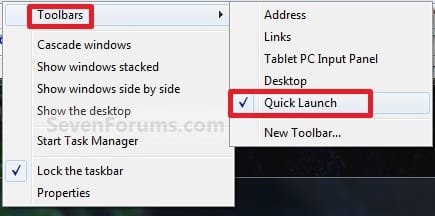
1. Right click on a empty space on the taskbar and click on Toolbars and Quick Launch to uncheck and remove it from the taskbar. (See screenshot below)
Remove.jpg
That's it,
Shawn


Attachments

  • Small_Quick_Launch.jpg
    Small_Quick_Launch.jpg
    17.5 KB · Views: 1,657,225
  • Large_Quick_Launch.jpg
    Large_Quick_Launch.jpg
    17.6 KB · Views: 1,656,917
  • Disabled.jpg
    Disabled.jpg
    18.9 KB · Views: 1,677,290
Last edited:
I have managed to get my taskbar to look just like a Windows 7 version of the Vista taskbar.

taskbar.png


However, with the pinning objects to the taskbar option, the Quick Launch really is unnecessary. That is only, however, if I can get the "Show Desktop" shortcut to pin itself to the taskbar. That's the only thing I use Quick Launch for, as I've found the taskbar gets too crowded with programs that are running to have shortcuts on it as well. I use ObjectDock for that purpose. Is there a way to pin the shortcut for "Show Desktop" onto the taskbar?

I know it's in the bottom right corner as a simple button, but it's also surrounded by my clock and the system tray, and also I'm used to it's previous location. Is there any way to do this?

Hello Rarisgold,

This can help show you how to create and pin a "Show Desktop" shortcut on the taskbar.

http://www.sevenforums.com/tutorials/26379-show-desktop-icon-taskbar.html

Hope this helps,
Shawn
 

My Computer

Computer type
PC/Desktop
Computer Manufacturer/Model Number
Self built custom
OS
64-bit Windows 11 Pro for Workstations
CPU
Intel i7-8700K OC'd to 5 GHz
Motherboard
ASUS ROG Maximus XI Formula Z390
Memory
64 GB (4x16GB) G.SKILL TridentZ RGB DDR4 3600 MHz
Graphics Card(s)
ASUS ROG-STRIX-GTX1080TI-O11G-GAMING
Sound Card
Integrated
Monitor(s) Displays
2 x Samsung Odyssey G7 27"
Screen Resolution
2560x1440
Hard Drives
1TB Samsung 990 PRO M.2,
4TB Samsung 990 PRO PRO M.2,
TerraMaster F8 SSD Plus NAS
PSU
Seasonic Prime Titanium 850W
Case
Thermaltake Core P3
Cooling
Corsair Hydro H115i
Keyboard
Logitech wireless K800
Mouse
Logitech MX Master 4
Internet Speed
2 Gb/s Download and 100 Mb/s Upload
Antivirus
Malwarebyte Anti-Malware Premium
Browser
Google Chrome
Other Info
Logitech Z625 speaker system,
Logitech BRIO 4K Pro webcam,
HP Color LaserJet Pro MFP M477fdn,
APC SMART-UPS RT 1000 XL - SURT1000XLI,
Galaxy S23 Plus phone
Good Post

Thanks very much for the Quick Launch post. I have been using Windows 7 over year now. At first I thought the task bar was a good thing and in some ways it is. However, with quick launch, I can get many more icons on the bar and I can right click an icon and see its properties and change them if I wish. I can also run two or more instances of the same program from the quick launch bar.

Therefore, I use both bars.
 

My Computer

OS
Windows 7 Ultimate
When I click the expand arrow to show all the programs I have on quick launch, it shows a blank screen area. It takes like 5 seconds before the icons actually show.
 

My Computer

Computer type
PC/Desktop
Computer Manufacturer/Model Number
Custom build
OS
Windows 7 64 bit
CPU
i5 4690k
Motherboard
Asrock Z97m Pro4
Memory
16gb DDR3 SDRAM DDR3 1866
Graphics Card(s)
ATI HD 7770
Sound Card
HTO Striker
Hard Drives
Sandisk Extreme 250gb SSD
PSU
Corsair CX 500
Hello Chaoz,

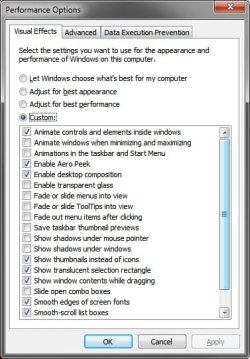
You might see if the fade, slide, and taskbar animation type Visual Effects settings being turned on may be affecting this. Test by unchecking them.

Visual_Effects.jpg

Speeding up the Menu Show Delay time may help as well.

Hope this helps,
Shawn
 

My Computer

Computer type
PC/Desktop
Computer Manufacturer/Model Number
Self built custom
OS
64-bit Windows 11 Pro for Workstations
CPU
Intel i7-8700K OC'd to 5 GHz
Motherboard
ASUS ROG Maximus XI Formula Z390
Memory
64 GB (4x16GB) G.SKILL TridentZ RGB DDR4 3600 MHz
Graphics Card(s)
ASUS ROG-STRIX-GTX1080TI-O11G-GAMING
Sound Card
Integrated
Monitor(s) Displays
2 x Samsung Odyssey G7 27"
Screen Resolution
2560x1440
Hard Drives
1TB Samsung 990 PRO M.2,
4TB Samsung 990 PRO PRO M.2,
TerraMaster F8 SSD Plus NAS
PSU
Seasonic Prime Titanium 850W
Case
Thermaltake Core P3
Cooling
Corsair Hydro H115i
Keyboard
Logitech wireless K800
Mouse
Logitech MX Master 4
Internet Speed
2 Gb/s Download and 100 Mb/s Upload
Antivirus
Malwarebyte Anti-Malware Premium
Browser
Google Chrome
Other Info
Logitech Z625 speaker system,
Logitech BRIO 4K Pro webcam,
HP Color LaserJet Pro MFP M477fdn,
APC SMART-UPS RT 1000 XL - SURT1000XLI,
Galaxy S23 Plus phone
Anyone know how to get the keyboard shortcuts to work with quicklaunch? I don't have anything pinned to the taskbar, only QL. And i can't get (Windows key) + (1-9) to work, although the first time i added the QL it DID work. Then i took it away to try the new taskbar again before deciding to return to QL, but now i can't get the keyboard shortcuts to work :(
 

My Computer

OS
Windows 7
Hello Intotheblue, and welcome to Seven Forums.

Sorry, but the keyboard shortcuts no longer work for QuickLaunch like they did in Vista. Instead the keyboard shortcuts are for the separate pinned icons on the taskbar. :(
 

My Computer

Computer type
PC/Desktop
Computer Manufacturer/Model Number
Self built custom
OS
64-bit Windows 11 Pro for Workstations
CPU
Intel i7-8700K OC'd to 5 GHz
Motherboard
ASUS ROG Maximus XI Formula Z390
Memory
64 GB (4x16GB) G.SKILL TridentZ RGB DDR4 3600 MHz
Graphics Card(s)
ASUS ROG-STRIX-GTX1080TI-O11G-GAMING
Sound Card
Integrated
Monitor(s) Displays
2 x Samsung Odyssey G7 27"
Screen Resolution
2560x1440
Hard Drives
1TB Samsung 990 PRO M.2,
4TB Samsung 990 PRO PRO M.2,
TerraMaster F8 SSD Plus NAS
PSU
Seasonic Prime Titanium 850W
Case
Thermaltake Core P3
Cooling
Corsair Hydro H115i
Keyboard
Logitech wireless K800
Mouse
Logitech MX Master 4
Internet Speed
2 Gb/s Download and 100 Mb/s Upload
Antivirus
Malwarebyte Anti-Malware Premium
Browser
Google Chrome
Other Info
Logitech Z625 speaker system,
Logitech BRIO 4K Pro webcam,
HP Color LaserJet Pro MFP M477fdn,
APC SMART-UPS RT 1000 XL - SURT1000XLI,
Galaxy S23 Plus phone
Hello Intotheblue, and welcome to Seven Forums.

Sorry, but the keyboard shortcuts no longer work for QuickLaunch like they did in Vista. Instead the keyboard shortcuts are for the separate pinned icons on the taskbar. :(

Ah thx, and thx for the quick reply. I could have sworn that the first time i unpinned everything from the taskbar and added QL i got keyboard shortcuts to work, (used windows + 5) so i knew it wasn't hitting win+1 to bring up the first open window or anything. Guess i was just imagining things?
 

My Computer

OS
Windows 7

My Computer

Computer type
PC/Desktop
Computer Manufacturer/Model Number
Custom build
OS
Windows 7 64 bit
CPU
i5 4690k
Motherboard
Asrock Z97m Pro4
Memory
16gb DDR3 SDRAM DDR3 1866
Graphics Card(s)
ATI HD 7770
Sound Card
HTO Striker
Hard Drives
Sandisk Extreme 250gb SSD
PSU
Corsair CX 500
Chaoz,

Do you have these type of delays when opening or expanding anything else?

It's a bit drastic, but you could try a repair install to try and fix it without losing anything.
 

My Computer

Computer type
PC/Desktop
Computer Manufacturer/Model Number
Self built custom
OS
64-bit Windows 11 Pro for Workstations
CPU
Intel i7-8700K OC'd to 5 GHz
Motherboard
ASUS ROG Maximus XI Formula Z390
Memory
64 GB (4x16GB) G.SKILL TridentZ RGB DDR4 3600 MHz
Graphics Card(s)
ASUS ROG-STRIX-GTX1080TI-O11G-GAMING
Sound Card
Integrated
Monitor(s) Displays
2 x Samsung Odyssey G7 27"
Screen Resolution
2560x1440
Hard Drives
1TB Samsung 990 PRO M.2,
4TB Samsung 990 PRO PRO M.2,
TerraMaster F8 SSD Plus NAS
PSU
Seasonic Prime Titanium 850W
Case
Thermaltake Core P3
Cooling
Corsair Hydro H115i
Keyboard
Logitech wireless K800
Mouse
Logitech MX Master 4
Internet Speed
2 Gb/s Download and 100 Mb/s Upload
Antivirus
Malwarebyte Anti-Malware Premium
Browser
Google Chrome
Other Info
Logitech Z625 speaker system,
Logitech BRIO 4K Pro webcam,
HP Color LaserJet Pro MFP M477fdn,
APC SMART-UPS RT 1000 XL - SURT1000XLI,
Galaxy S23 Plus phone
THANK YOU SO MUCH......:D
 

My Computer

Computer Manufacturer/Model Number
Dell XPS 400
OS
Windows 7
CPU
Dual 2.60 GHz Intel Pentium
Memory
2 Gig
Graphics Card(s)
256 mb Nvidia GeForce 6800
You're welcome Mod9k, and welcome to Seven Forums. :)
 

My Computer

Computer type
PC/Desktop
Computer Manufacturer/Model Number
Self built custom
OS
64-bit Windows 11 Pro for Workstations
CPU
Intel i7-8700K OC'd to 5 GHz
Motherboard
ASUS ROG Maximus XI Formula Z390
Memory
64 GB (4x16GB) G.SKILL TridentZ RGB DDR4 3600 MHz
Graphics Card(s)
ASUS ROG-STRIX-GTX1080TI-O11G-GAMING
Sound Card
Integrated
Monitor(s) Displays
2 x Samsung Odyssey G7 27"
Screen Resolution
2560x1440
Hard Drives
1TB Samsung 990 PRO M.2,
4TB Samsung 990 PRO PRO M.2,
TerraMaster F8 SSD Plus NAS
PSU
Seasonic Prime Titanium 850W
Case
Thermaltake Core P3
Cooling
Corsair Hydro H115i
Keyboard
Logitech wireless K800
Mouse
Logitech MX Master 4
Internet Speed
2 Gb/s Download and 100 Mb/s Upload
Antivirus
Malwarebyte Anti-Malware Premium
Browser
Google Chrome
Other Info
Logitech Z625 speaker system,
Logitech BRIO 4K Pro webcam,
HP Color LaserJet Pro MFP M477fdn,
APC SMART-UPS RT 1000 XL - SURT1000XLI,
Galaxy S23 Plus phone
Chaoz,

Do you have these type of delays when opening or expanding anything else?

It's a bit drastic, but you could try a repair install to try and fix it without losing anything.

Seems to much trouble to fix this problem. Guess I'll just pin these programs to the start menu. Thanks for the help though.
 

My Computer

Computer type
PC/Desktop
Computer Manufacturer/Model Number
Custom build
OS
Windows 7 64 bit
CPU
i5 4690k
Motherboard
Asrock Z97m Pro4
Memory
16gb DDR3 SDRAM DDR3 1866
Graphics Card(s)
ATI HD 7770
Sound Card
HTO Striker
Hard Drives
Sandisk Extreme 250gb SSD
PSU
Corsair CX 500
I was wondering if anyone can help me out here. I added the quick launch following the intruction in the first post...problem is, after several reboot, it disappears. I have tried some suggestions including going through the regedit. But it stuff up my explorer - I get a BLACK screen after reboot. I give up the search online, asking directly might be the best.

Any suggestions please?
 

My Computer

Computer type
PC/Desktop
Computer Manufacturer/Model Number
Custom build
OS
Microsoft Windows 7 Ultimate 64-bit 7601 Multiprocessor Free Service Pack 1
CPU
Intel(R) Core(TM) i5 CPU 650 @ 3.20GHz
Motherboard
Gigabyte Technology Co., Ltd. P55A-UD3
Memory
12.00 GB
Graphics Card(s)
NVIDIA GeForce GTX 570
Sound Card
(1) High Definition Audio Device (2) High Definition Audio
Monitor(s) Displays
BenQ 21"
Screen Resolution
1920 x 1080 x 32 bits (4294967296 colors) @ 60 Hz
Hard Drives
(1) WDC WD15EARS-00S8B1 ATA Device (2) WDC WD20EARS-00MVWB0 ATA Device (3) Samsung SSD 840 Series SCSI Disk Device
Hello Flowright. and welcome to Seven Forums.

Usually step 9 in OPTION ONE to save the current theme with QL prevents it from disappearing. If you change the theme, you will need to save it again as well.

Hope this helps,
Shawn
 

My Computer

Computer type
PC/Desktop
Computer Manufacturer/Model Number
Self built custom
OS
64-bit Windows 11 Pro for Workstations
CPU
Intel i7-8700K OC'd to 5 GHz
Motherboard
ASUS ROG Maximus XI Formula Z390
Memory
64 GB (4x16GB) G.SKILL TridentZ RGB DDR4 3600 MHz
Graphics Card(s)
ASUS ROG-STRIX-GTX1080TI-O11G-GAMING
Sound Card
Integrated
Monitor(s) Displays
2 x Samsung Odyssey G7 27"
Screen Resolution
2560x1440
Hard Drives
1TB Samsung 990 PRO M.2,
4TB Samsung 990 PRO PRO M.2,
TerraMaster F8 SSD Plus NAS
PSU
Seasonic Prime Titanium 850W
Case
Thermaltake Core P3
Cooling
Corsair Hydro H115i
Keyboard
Logitech wireless K800
Mouse
Logitech MX Master 4
Internet Speed
2 Gb/s Download and 100 Mb/s Upload
Antivirus
Malwarebyte Anti-Malware Premium
Browser
Google Chrome
Other Info
Logitech Z625 speaker system,
Logitech BRIO 4K Pro webcam,
HP Color LaserJet Pro MFP M477fdn,
APC SMART-UPS RT 1000 XL - SURT1000XLI,
Galaxy S23 Plus phone
Hello Flowright. and welcome to Seven Forums.

Usually step 9 in OPTION ONE to save the current theme with QL prevents it from disappearing. If you change the theme, you will need to save it again as well.

Hope this helps,
Shawn

Hmm, funny. I have already a theme saved for what I have (and using it). I just deleted and saved it again. If I have more problem I will post back. Thanks a lot for the help. Finger crossed :)
 

My Computer

Computer type
PC/Desktop
Computer Manufacturer/Model Number
Custom build
OS
Microsoft Windows 7 Ultimate 64-bit 7601 Multiprocessor Free Service Pack 1
CPU
Intel(R) Core(TM) i5 CPU 650 @ 3.20GHz
Motherboard
Gigabyte Technology Co., Ltd. P55A-UD3
Memory
12.00 GB
Graphics Card(s)
NVIDIA GeForce GTX 570
Sound Card
(1) High Definition Audio Device (2) High Definition Audio
Monitor(s) Displays
BenQ 21"
Screen Resolution
1920 x 1080 x 32 bits (4294967296 colors) @ 60 Hz
Hard Drives
(1) WDC WD15EARS-00S8B1 ATA Device (2) WDC WD20EARS-00MVWB0 ATA Device (3) Samsung SSD 840 Series SCSI Disk Device
Thank you for posting this tutorial, thank you for the detail, and thank you for making it despite whether or not you find the quicklaunch unnecessary. I personally don't see it as unnecessary because items being pinned to the taskbar are fairly large in comparison to quicklaunch icons, as many others have said, and because unopened items pinned to the taskbar get mixed in between opened items pinned to the taskbar. This to me is extremely annoying because I may not normally have certain programs open, but on an occasion if I get enough programs open that are before a program I may frequent, it moves the unopened icon away from where I'm normally used to it being. It's just extremely less efficient to me when things aren't where I left them, so to say.
 

My Computer

OS
Windows 7 Home Premium
CPU
Intel Core i7 920
Motherboard
X58
Memory
6GB DDR3 1066
Graphics Card(s)
Nvidia GTS 250
Monitor(s) Displays
Asus 23" 1080p 16x9
You're welcome Darrell, and welcome to Seven Forums. :)
 

My Computer

Computer type
PC/Desktop
Computer Manufacturer/Model Number
Self built custom
OS
64-bit Windows 11 Pro for Workstations
CPU
Intel i7-8700K OC'd to 5 GHz
Motherboard
ASUS ROG Maximus XI Formula Z390
Memory
64 GB (4x16GB) G.SKILL TridentZ RGB DDR4 3600 MHz
Graphics Card(s)
ASUS ROG-STRIX-GTX1080TI-O11G-GAMING
Sound Card
Integrated
Monitor(s) Displays
2 x Samsung Odyssey G7 27"
Screen Resolution
2560x1440
Hard Drives
1TB Samsung 990 PRO M.2,
4TB Samsung 990 PRO PRO M.2,
TerraMaster F8 SSD Plus NAS
PSU
Seasonic Prime Titanium 850W
Case
Thermaltake Core P3
Cooling
Corsair Hydro H115i
Keyboard
Logitech wireless K800
Mouse
Logitech MX Master 4
Internet Speed
2 Gb/s Download and 100 Mb/s Upload
Antivirus
Malwarebyte Anti-Malware Premium
Browser
Google Chrome
Other Info
Logitech Z625 speaker system,
Logitech BRIO 4K Pro webcam,
HP Color LaserJet Pro MFP M477fdn,
APC SMART-UPS RT 1000 XL - SURT1000XLI,
Galaxy S23 Plus phone
Good job on the detailed steps for people. I was quite annoyed that they removed the quicklaunch folder as a default option, at the least they should have have left it there but not enabled (like the fairly useless/redundant 'desktop' toolbar option). Whats more annoying then having to manually making your own quicklaunch? MS, and people who try to re itterate what MS tells them about their pin up bar being more useful and compact. Its not. If you want it like Mac, use a mac. If MS wants to expand functionality great, leave the old working ones alone. I am a power user and I had to put QL back on within 20 minutes of using win7.

QL is smaller and more intuitive. When I want a new tab, i'll click on new tab in my browser. When i click on the IE application shortcut icon, i am expecting a completely new window, and it's own taskbar and I should get one.

While some of the new features are nice and will take some getting used to, They removed too many things that they didn't necessarily need to remove. Two months in and I use QL 98% of the time. The rest mainly because they also removed the media player toolbar in favor of the damn pin up interface. Im switching back to winamp as a result. I did really try to use the built in player. it's list management and lack of toolbar functionality sucks.
 

My Computer

OS
Windows 7 64 bit Ultimate
Hello Flowright. and welcome to Seven Forums.

Usually step 9 in OPTION ONE to save the current theme with QL prevents it from disappearing. If you change the theme, you will need to save it again as well.

Hope this helps,
Shawn

Hmm, funny. I have already a theme saved for what I have (and using it). I just deleted and saved it again. If I have more problem I will post back. Thanks a lot for the help. Finger crossed :)

Uh oh....Bad news. The Quicklaunch disappeared again... Even after saving the theme. What should I try next? :sarc:

The folder is still in here
C:\Users\LAU BROTHER\AppData\Roaming\Microsoft\Internet Explorer\Quick Launch
But the thing is that I have to add the toolbar again, shift it near the Start bar logo...etc...
Also the Language toolbar icon disappear. I have to click Unlock taskbar, then lock it again to see it, weird....

I want to add that I usually hibernate my PC, so I don't reboot unless I have to. May be that could be that could contribute to this problem? Help would be appreciated thanks.
 

My Computer

Computer type
PC/Desktop
Computer Manufacturer/Model Number
Custom build
OS
Microsoft Windows 7 Ultimate 64-bit 7601 Multiprocessor Free Service Pack 1
CPU
Intel(R) Core(TM) i5 CPU 650 @ 3.20GHz
Motherboard
Gigabyte Technology Co., Ltd. P55A-UD3
Memory
12.00 GB
Graphics Card(s)
NVIDIA GeForce GTX 570
Sound Card
(1) High Definition Audio Device (2) High Definition Audio
Monitor(s) Displays
BenQ 21"
Screen Resolution
1920 x 1080 x 32 bits (4294967296 colors) @ 60 Hz
Hard Drives
(1) WDC WD15EARS-00S8B1 ATA Device (2) WDC WD20EARS-00MVWB0 ATA Device (3) Samsung SSD 840 Series SCSI Disk Device
Flowright,

Strange. I just cannot get QL to dissappear for me when I restart.

As a test, create a new administrator account to see how QL works in it.
 

My Computer

Computer type
PC/Desktop
Computer Manufacturer/Model Number
Self built custom
OS
64-bit Windows 11 Pro for Workstations
CPU
Intel i7-8700K OC'd to 5 GHz
Motherboard
ASUS ROG Maximus XI Formula Z390
Memory
64 GB (4x16GB) G.SKILL TridentZ RGB DDR4 3600 MHz
Graphics Card(s)
ASUS ROG-STRIX-GTX1080TI-O11G-GAMING
Sound Card
Integrated
Monitor(s) Displays
2 x Samsung Odyssey G7 27"
Screen Resolution
2560x1440
Hard Drives
1TB Samsung 990 PRO M.2,
4TB Samsung 990 PRO PRO M.2,
TerraMaster F8 SSD Plus NAS
PSU
Seasonic Prime Titanium 850W
Case
Thermaltake Core P3
Cooling
Corsair Hydro H115i
Keyboard
Logitech wireless K800
Mouse
Logitech MX Master 4
Internet Speed
2 Gb/s Download and 100 Mb/s Upload
Antivirus
Malwarebyte Anti-Malware Premium
Browser
Google Chrome
Other Info
Logitech Z625 speaker system,
Logitech BRIO 4K Pro webcam,
HP Color LaserJet Pro MFP M477fdn,
APC SMART-UPS RT 1000 XL - SURT1000XLI,
Galaxy S23 Plus phone
Back
Top