
Quick Launch Problems

jamieresearch

New member
Local time
6:24 AM
Messages
47
I activated quick launch like it had been in previous versions of Windows.

It works great, and I love it.

However, there's an icon on there that seems to be invalid. I get that weird Windows icon that comes up when a file is bad, and when I hover over it, it tells me it's an iTunes shortcut. I've tried to delete it, tried to remove it from the quick launch, tried to move it to the desktop - nothing works. I can't get it out of my quick launch area.

I've attached a screen shot of what the error message is when I try to do anything to it.

Anyone have any suggestions?

Thanx,
Jamie
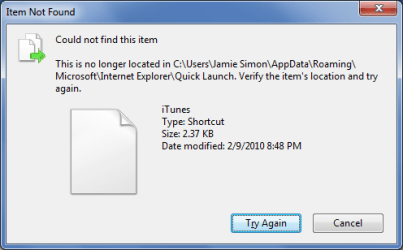
bad icon.png
 
Last edited by a moderator:

My Computer

Computer Manufacturer/Model Number
HP / dv7-1451nr
OS
windows 7
CPU
2.20 GHz AMD Turion X2 Ultra ZM-82 Dual-Core Mobile Processo
Memory
4096MB
Graphics Card(s)
ATI Radeon HD 3200 Graphics RS780M
Sound Card
Altec Lansing with SRS Premium Sound
Monitor(s) Displays
17.0�? Diagonal WXGA+ High-Definition HP BrightView W
Hard Drives
500GB (5400RPM)
Keyboard
101-key compatible
Mouse
Touch Pad with On/Off button and dedicated vertical scroll U
Other Info
I THINK I filled in the info in the correct places. If not, here is the link to the specs from HP. It probably tells you more of what you need to know.

http://h20000.www2.hp.com/bizsupport/TechSupport/Document.jsp?lang=en&cc=us&objectID=c01753033&jumpid=reg_R1002_USEN
Open the quicklaunch folder and try refreshing it.

~Lordbob
 

My Computer

Computer Manufacturer/Model Number
Hera
OS
Windows 7 Ultimate x64, Mint 9
CPU
Intel i5-2500k
Motherboard
ASUS P8P67 Pro
Memory
2x 4Gb Corsair VENGEANCE DDR3-1600
Graphics Card(s)
NVidia GeForce N260GTX Twin Frozr
Sound Card
Realtek HD OnBoard Audio
Monitor(s) Displays
ASUS 24" Monitor
Screen Resolution
1920x1080
Hard Drives
G.SKILL Phoenix Series 60GB SATA II MLC Internal Solid State Drive (SSD)
SAMSUNG Spinpoint F3R 1TB 7200 RPM 32MB Cache SATA II
PSU
Cooler Master Real Power Pro 750W
Case
Cooler Master Haf 932
Cooling
Fans
Keyboard
Razer Tarantula
Mouse
Razer Lachesis
Internet Speed
not fast enough
Sollution

Right click on the icon and select, remove or exit or quit....etc..

let us know whether you are able to do that...
 

My Computer

Computer Manufacturer/Model Number
wipro
OS
windows 7
CPU
wipro
Motherboard
intel
Memory
8 gb
Hard Drives
580 gb
Hi

Go To C:\Users\<Username>\AppData\Roaming\Microsoft\Internet Explorer\Quick Launch\User Pinned\TaskBar

Change the Username above to the account name on your PC - You can delete the entry from there :)
Don't forget to enable "Show Hidden Files, Folders and Drives" under the View Tab in Folder options
Hope this helps

Regards
 
Last edited by a moderator:

My Computer

Computer Manufacturer/Model Number
Custom
OS
Win7 HP (x64)/Win7 Ultimate (x64)
CPU
Core i7 920
Motherboard
Intel X58
Memory
6 x 2GB Corsair XMS3
Graphics Card(s)
CF HD4890
Sound Card
Asus Xonar
Monitor(s) Displays
Dell 2408WFP
Screen Resolution
1920 x 1200
Hard Drives
2 x 150GB WDC Velociraptors (Raid 0)
1 x 1TB Seagate
1 x 1.5TB Seagate
PSU
Corsair HX1000W
Case
Antec 1200
Keyboard
Razer Lycosa/N52te
Mouse
Razer Lachesis
Yeah, that was the first thing I did, but thanx. I'm pretty computer savvy - used to do support way back when - so I did all the things I can think of. This was obviously the first step. :)


Right click on the icon and select, remove or exit or quit....etc..

let us know whether you are able to do that...
 

My Computer

Computer Manufacturer/Model Number
HP / dv7-1451nr
OS
windows 7
CPU
2.20 GHz AMD Turion X2 Ultra ZM-82 Dual-Core Mobile Processo
Memory
4096MB
Graphics Card(s)
ATI Radeon HD 3200 Graphics RS780M
Sound Card
Altec Lansing with SRS Premium Sound
Monitor(s) Displays
17.0�? Diagonal WXGA+ High-Definition HP BrightView W
Hard Drives
500GB (5400RPM)
Keyboard
101-key compatible
Mouse
Touch Pad with On/Off button and dedicated vertical scroll U
Other Info
I THINK I filled in the info in the correct places. If not, here is the link to the specs from HP. It probably tells you more of what you need to know.

http://h20000.www2.hp.com/bizsupport/TechSupport/Document.jsp?lang=en&cc=us&objectID=c01753033&jumpid=reg_R1002_USEN
Well, it's logical, but when I go into that folder (and yes, I unhid everything), there's nothing there. *sigh* It's like this icon is a phantom icon. That folder is completely empty.

Any other suggestions?

Hi

Go To C:\Users\<Username>\AppData\Roaming\Microsoft\Internet Explorer\Quick Launch\User Pinned\TaskBar

Change the Username above to the account name on your PC - You can delete the entry from there :)
Don't forget to enable "Show Hidden Files, Folders and Drives" under the View Tab in Folder options
Hope this helps

Regards
 

My Computer

Computer Manufacturer/Model Number
HP / dv7-1451nr
OS
windows 7
CPU
2.20 GHz AMD Turion X2 Ultra ZM-82 Dual-Core Mobile Processo
Memory
4096MB
Graphics Card(s)
ATI Radeon HD 3200 Graphics RS780M
Sound Card
Altec Lansing with SRS Premium Sound
Monitor(s) Displays
17.0�? Diagonal WXGA+ High-Definition HP BrightView W
Hard Drives
500GB (5400RPM)
Keyboard
101-key compatible
Mouse
Touch Pad with On/Off button and dedicated vertical scroll U
Other Info
I THINK I filled in the info in the correct places. If not, here is the link to the specs from HP. It probably tells you more of what you need to know.

http://h20000.www2.hp.com/bizsupport/TechSupport/Document.jsp?lang=en&cc=us&objectID=c01753033&jumpid=reg_R1002_USEN

My Computer

Computer Manufacturer/Model Number
HP / dv7-1451nr
OS
windows 7
CPU
2.20 GHz AMD Turion X2 Ultra ZM-82 Dual-Core Mobile Processo
Memory
4096MB
Graphics Card(s)
ATI Radeon HD 3200 Graphics RS780M
Sound Card
Altec Lansing with SRS Premium Sound
Monitor(s) Displays
17.0�? Diagonal WXGA+ High-Definition HP BrightView W
Hard Drives
500GB (5400RPM)
Keyboard
101-key compatible
Mouse
Touch Pad with On/Off button and dedicated vertical scroll U
Other Info
I THINK I filled in the info in the correct places. If not, here is the link to the specs from HP. It probably tells you more of what you need to know.

http://h20000.www2.hp.com/bizsupport/TechSupport/Document.jsp?lang=en&cc=us&objectID=c01753033&jumpid=reg_R1002_USEN
Well, I wound up turning QL off and then turning it back on and that seems to have fixed the problem. Thanx for all the suggestions, all!
 

My Computer

Computer Manufacturer/Model Number
HP / dv7-1451nr
OS
windows 7
CPU
2.20 GHz AMD Turion X2 Ultra ZM-82 Dual-Core Mobile Processo
Memory
4096MB
Graphics Card(s)
ATI Radeon HD 3200 Graphics RS780M
Sound Card
Altec Lansing with SRS Premium Sound
Monitor(s) Displays
17.0�? Diagonal WXGA+ High-Definition HP BrightView W
Hard Drives
500GB (5400RPM)
Keyboard
101-key compatible
Mouse
Touch Pad with On/Off button and dedicated vertical scroll U
Other Info
I THINK I filled in the info in the correct places. If not, here is the link to the specs from HP. It probably tells you more of what you need to know.

http://h20000.www2.hp.com/bizsupport/TechSupport/Document.jsp?lang=en&cc=us&objectID=c01753033&jumpid=reg_R1002_USEN
Well, I wound up turning QL off and then turning it back on and that seems to have fixed the problem. Thanx for all the suggestions, all!
I guess it just had an error. Glad it works now.

~Lordbob
 

My Computer

Computer Manufacturer/Model Number
Hera
OS
Windows 7 Ultimate x64, Mint 9
CPU
Intel i5-2500k
Motherboard
ASUS P8P67 Pro
Memory
2x 4Gb Corsair VENGEANCE DDR3-1600
Graphics Card(s)
NVidia GeForce N260GTX Twin Frozr
Sound Card
Realtek HD OnBoard Audio
Monitor(s) Displays
ASUS 24" Monitor
Screen Resolution
1920x1080
Hard Drives
G.SKILL Phoenix Series 60GB SATA II MLC Internal Solid State Drive (SSD)
SAMSUNG Spinpoint F3R 1TB 7200 RPM 32MB Cache SATA II
PSU
Cooler Master Real Power Pro 750W
Case
Cooler Master Haf 932
Cooling
Fans
Keyboard
Razer Tarantula
Mouse
Razer Lachesis
Internet Speed
not fast enough
Back
Top