
jamieresearch
New member
- Local time
- 7:50 AM
- Messages
- 47
I activated quick launch like it had been in previous versions of Windows.
It works great, and I love it.
However, there's an icon on there that seems to be invalid. I get that weird Windows icon that comes up when a file is bad, and when I hover over it, it tells me it's an iTunes shortcut. I've tried to delete it, tried to remove it from the quick launch, tried to move it to the desktop - nothing works. I can't get it out of my quick launch area.
I've attached a screen shot of what the error message is when I try to do anything to it.
Anyone have any suggestions?
Thanx,
Jamie
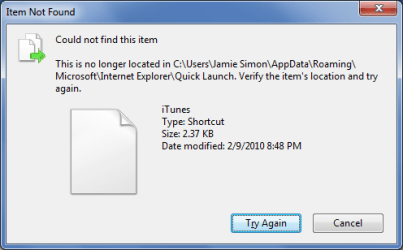
It works great, and I love it.
However, there's an icon on there that seems to be invalid. I get that weird Windows icon that comes up when a file is bad, and when I hover over it, it tells me it's an iTunes shortcut. I've tried to delete it, tried to remove it from the quick launch, tried to move it to the desktop - nothing works. I can't get it out of my quick launch area.
I've attached a screen shot of what the error message is when I try to do anything to it.
Anyone have any suggestions?
Thanx,
Jamie
Last edited by a moderator:
My Computer
- Computer Manufacturer/Model Number
- HP / dv7-1451nr
- OS
- windows 7
- CPU
- 2.20 GHz AMD Turion X2 Ultra ZM-82 Dual-Core Mobile Processo
- Memory
- 4096MB
- Graphics Card(s)
- ATI Radeon HD 3200 Graphics RS780M
- Sound Card
- Altec Lansing with SRS Premium Sound
- Monitor(s) Displays
- 17.0�? Diagonal WXGA+ High-Definition HP BrightView W
- Hard Drives
- 500GB (5400RPM)
- Keyboard
- 101-key compatible
- Mouse
- Touch Pad with On/Off button and dedicated vertical scroll U
- Other Info
- I THINK I filled in the info in the correct places. If not, here is the link to the specs from HP. It probably tells you more of what you need to know.
http://h20000.www2.hp.com/bizsupport/TechSupport/Document.jsp?lang=en&cc=us&objectID=c01753033&jumpid=reg_R1002_USEN


