Quick or Full Format for new Intel Series-320

garuda

New member
Power User
Local time
9:53 AM
Messages
89
Just received my two new Intel 320-Series and want to put them in one of my Sager notebooks, which already has an x25-m 160 boot drive. I did the v.1.92 f/w update successfully.

I want to use the two Series-320s for user data files only, not O/S boot drive. So do you recommend a “quick” or “full” format? Does it matter which? Does “full” still check sectors on a new empty SSD?

Any special concerns or advice with these series-320 SSDs since they won’t be the boot HDD? I’m a bit rusty on the SSDs since I haven’t kept up with the new SSD particulars since my initial install of my X25-m boot drives a year ago. Thanks for any advice/comments for the 320s!
garuda
 

My Computer My Computer

Computer type
PC/Desktop
Computer Manufacturer/Model Number
Homemade with cube tower
OS
Windows 7 Ultimate x64
CPU
2x - Xeon E5-2687W
Motherboard
ASUS Z9PE-D8 WS
Memory
128GB Kingston - (2ea kits – 4x16GB)
Graphics Card(s)
Gigabyte GTX-680 & EVGA GTX-Titan
Sound Card
Realtek ALC898 8-chan audio
Monitor(s) Displays
2ea - Samsung T260HD 25.5-Inch LCD HDTV / Monitors
Screen Resolution
1920x1200
Hard Drives
8 ea. Crucial & Samsung EVO 2TB SSDs; misc 4ea. 8TB external Seagate spinners.
PSU
Corsair AX-1200
Case
Lian-Li cube custom
Cooling
2x Dynatron R-17 - CPU Air sinks (160watts TDP)
Keyboard
HP slimline wireless
Mouse
Microsoft ARC
Internet Speed
Faster than a speeding bullet.
Antivirus
Norton Security 360 - 2020
I don't full format anything these days.
 

My Computer My Computer

Computer Manufacturer/Model Number
Self-Built in July 2009
OS
Windows 7 Ultimate x64
CPU
Intel Q9550 2.83Ghz OC'd to 3.40Ghz
Motherboard
Gigabyte GA-EP45-UD3R rev. 1.1, F12 BIOS
Memory
8GB G.Skill PI DDR2-800, 4-4-4-12 timings
Graphics Card(s)
EVGA 1280MB Nvidia GeForce GTX570
Sound Card
Realtek ALC899A 8 channel onboard audio
Monitor(s) Displays
23" Acer x233H
Screen Resolution
1920x1080
Hard Drives
Intel X25-M 80GB Gen 2 SSD
Western Digital 1TB Caviar Black, 32MB cache. WD1001FALS
PSU
Corsair 620HX modular
Case
Antec P182
Cooling
stock
Keyboard
ABS M1 Mechanical
Mouse
Logitech G9 Laser Mouse
Internet Speed
15/2 cable modem
Other Info
Windows and Linux enthusiast. Logitech G35 Headset.
Don't full format an SSD, do a quick format.
 

My Computer My Computer

Computer type
PC/Desktop
Computer Manufacturer/Model Number
Home built (GeneO industries)/Model 4
OS
Windows 10 Pro. EFI boot partition, full EFI boot
CPU
i7 4770k 4.4GHz (44-44-43-43 turbo) @ 1.248V
Motherboard
ASUS Maximus VI Hero
Memory
16GB (8GBx2) @2200 MHz G.skill Sniper 10-11-10-30-1, 1.6V
Graphics Card(s)
MSI GTX 970 Gaming 4G
Sound Card
Onboard SupremeFX Audio
Monitor(s) Displays
NEC Spectraview 2490WUXi-SV
Screen Resolution
1920 x 1200
Hard Drives
Samsung 850 Pro 256GB (OS), Samsung 2x 128GB 840 Pro SSD in RAID0, 3x WD Blue 6Gb/s 1TB RAID0, WD 2TB Black external USB 3.0, 2TB WD20EARS Green external USB 3.0, 2x 500GB Seagate and 1 750 GB external USB, 1x 350GB external USB3
PSU
Seasonic X-850 (2012 KM3 model)
Case
Fractal Design Define R4
Cooling
NH-D14, NF-F12, NF-A15; NF-P14, NF-P12,NF-A14, S12A PWM
Keyboard
Cooler Master Storm Quickfire Rapid - Brown
Mouse
Logitech G602
Internet Speed
126.4 Mb/s down, 24.3 Mb/s up
Other Info
USB 3.0 x8 , SATA III x8, eSATA, USB 2.0 x6. Samsung DVD R/W drive.

WEI: CPU 7.8, Memory 7.9, Graphics 7.9, Disk 7.9
You really want to be careful on alignment of your SSD drives.

I am linking to a good friend of mine, she is one of the most knowledgeable reviewers of SSD drives to be found. Read this information here and she links to a program for setting the alignment to ensure the longevity of your new drives.

Dee's SSD Facts and Questions
 

My Computer My Computer

Computer Manufacturer/Model Number
My Build
OS
win7 Ult 64
CPU
i7 3930K & 3960X
Motherboard
ASUS P9X79 Deluxe
Memory
16GB G-Skill 2133MHz
Graphics Card(s)
Sapphire HD 7970
Sound Card
On-board
Monitor(s) Displays
ASUS 27 inch
Screen Resolution
1920X1080
Hard Drives
Crucial M4 256GB, 1.5TB WD Black for Data/Images
PSU
Corsair AX1200
Case
NZXT 810
Cooling
Custom Loop, Swiftech HDBlock
Keyboard
Mionix
Mouse
Mionix
Internet Speed
Cable
Just received my two new Intel 320-Series and want to put them in one of my Sager notebooks, which already has an x25-m 160 boot drive. I did the v.1.92 f/w update successfully.

I want to use the two Series-320s for user data files only, not O/S boot drive. So do you recommend a “quick” or “full” format? Does it matter which? Does “full” still check sectors on a new empty SSD?

Any special concerns or advice with these series-320 SSDs since they won’t be the boot HDD? I’m a bit rusty on the SSDs since I haven’t kept up with the new SSD particulars since my initial install of my X25-m boot drives a year ago. Thanks for any advice/comments for the 320s!
garuda

First don't sweat all of the advice you get on SSDs. Win 7 correctly handles SSDs. There are some other will known operating systems out there which do not.

2nd, I always peform a full format on a new drive. If the mfg has done his job, then this step is overkill, but that isn't always the case and QC does not 100% test.

3rd. Win 7 is not going to try and defrag your SSDs since that is not pertinent to a non-sequential storage media such as a SSD. Win 7 is rather smart.
 

My Computer My Computer

Computer Manufacturer/Model Number
Toshiba Satellite S875D-S7239 laptop
OS
MS Windows 7 Ultimate SP1 64-bit
CPU
AMD A10-4600M
Motherboard
AMD Pumori (Socket FT1)
Memory
6.00 GB Dual-Channel DDR3 @ 798MHz (11-11-12-28)
Graphics Card(s)
AMD Radeon HD 7660G
Sound Card
High Definition Audio Device
Monitor(s) Displays
Generic PnP Monitor (1600x900@60Hz)
Screen Resolution
1600x900@60Hz
Hard Drives
SSD 119GB Corsair CSSD-V128GB2 ATA Device
Keyboard
Standard PS/2 Keyboard
Mouse
HP Wireless Optical Mobile Mouse Model FHA-3410
Internet Speed
What the local pub, local coffee shop offers.
Other Info
Optical Drive:MATSHITA BD-CMB UJ160B ATA Device


Also have an Asus ha1002xp netbook with Win 7 Ultimate installed.
2nd, I always peform a full format on a new drive. If the mfg has done his job, then this step is overkill, but that isn't always the case and QC does not 100% test.

I would agree it's overkill. I've likely installed at least 200 hard drives in work computers and never once performed a full format and things have been just fine.
 

My Computer My Computer

Computer Manufacturer/Model Number
Self-Built in July 2009
OS
Windows 7 Ultimate x64
CPU
Intel Q9550 2.83Ghz OC'd to 3.40Ghz
Motherboard
Gigabyte GA-EP45-UD3R rev. 1.1, F12 BIOS
Memory
8GB G.Skill PI DDR2-800, 4-4-4-12 timings
Graphics Card(s)
EVGA 1280MB Nvidia GeForce GTX570
Sound Card
Realtek ALC899A 8 channel onboard audio
Monitor(s) Displays
23" Acer x233H
Screen Resolution
1920x1080
Hard Drives
Intel X25-M 80GB Gen 2 SSD
Western Digital 1TB Caviar Black, 32MB cache. WD1001FALS
PSU
Corsair 620HX modular
Case
Antec P182
Cooling
stock
Keyboard
ABS M1 Mechanical
Mouse
Logitech G9 Laser Mouse
Internet Speed
15/2 cable modem
Other Info
Windows and Linux enthusiast. Logitech G35 Headset.
I have 4 SSDs and have never run a full format on one, and have never had a problem with one. I create an aligned partition with diskpart and install the OS.
 

My Computers My Computers

System One System Two

  • Computer type
    PC/Desktop
    Computer Manufacturer/Model Number
    ALWAYS UNDER CONSTRUCTION
    OS
    Windows 11 Pro
    CPU
    Ryzen 9 5900X
    Motherboard
    Asus X570 Crosshair Viii Hero
    Memory
    32GB G Skill DDR4-3600
    Graphics Card(s)
    EVGA RTX 3080 FTW 3 Ultra
    Sound Card
    On Board/Sennheiser PC37X Headset
    Monitor(s) Displays
    3 X Asus 27"
    Screen Resolution
    2560x1440
    Hard Drives
    2 X 1 TB NVME drives
    PSU
    EVGA 850
    Case
    Phanteks Eclipse P400A
    Cooling
    EVGA 280 AIO
    Keyboard
    Logitech G510s/ Logitech G13
    Mouse
    Logitech G502
    Internet Speed
    24/1
    Antivirus
    ESET/MBAM Pro/SAS Pro
    Browser
    Chrome/ Firefox/ Edge
  • Computer type
    Laptop
    System Manufacturer/Model Number
    Dell 16 Plus
    OS
    Windows 11 Pro
    CPU
    Intel Ultra 9 288V
    Memory
    32 GB LPDDR5X 8533
    Monitor(s) Displays
    16" Mini-LED HDR600 Touch 90 Hz
    Screen Resolution
    2560X1600
    Hard Drives
    1 TB NVME
As essenbe says

I have 7 or 8 internal SSDs with 4 or 5 of them running 24/7 and have never formatted any of them Quick or Full.

Diskpart or Gparted are your friends and Win7 does a dam fine job of keeping the SSD working great.
 

My Computer My Computer

Computer Manufacturer/Model Number
My Build
OS
win7 Ult 64
CPU
i7 3930K & 3960X
Motherboard
ASUS P9X79 Deluxe
Memory
16GB G-Skill 2133MHz
Graphics Card(s)
Sapphire HD 7970
Sound Card
On-board
Monitor(s) Displays
ASUS 27 inch
Screen Resolution
1920X1080
Hard Drives
Crucial M4 256GB, 1.5TB WD Black for Data/Images
PSU
Corsair AX1200
Case
NZXT 810
Cooling
Custom Loop, Swiftech HDBlock
Keyboard
Mionix
Mouse
Mionix
Internet Speed
Cable
Thanks again, guys!
 

My Computer My Computer

Computer type
PC/Desktop
Computer Manufacturer/Model Number
Homemade with cube tower
OS
Windows 7 Ultimate x64
CPU
2x - Xeon E5-2687W
Motherboard
ASUS Z9PE-D8 WS
Memory
128GB Kingston - (2ea kits – 4x16GB)
Graphics Card(s)
Gigabyte GTX-680 & EVGA GTX-Titan
Sound Card
Realtek ALC898 8-chan audio
Monitor(s) Displays
2ea - Samsung T260HD 25.5-Inch LCD HDTV / Monitors
Screen Resolution
1920x1200
Hard Drives
8 ea. Crucial & Samsung EVO 2TB SSDs; misc 4ea. 8TB external Seagate spinners.
PSU
Corsair AX-1200
Case
Lian-Li cube custom
Cooling
2x Dynatron R-17 - CPU Air sinks (160watts TDP)
Keyboard
HP slimline wireless
Mouse
Microsoft ARC
Internet Speed
Faster than a speeding bullet.
Antivirus
Norton Security 360 - 2020
Preparation of Series-320 drives for use as "file storage" drives instead of using as "O/S installed on boot SSD.
Thanks to all here and whs for your input in helping me with my new Series 320 drives. Since there were several opinions expressed on this thread, I decided to do a bit more research and try a few options --- only because whenever the documentation touted that Win7 would auto-align and therefore formatting was unnecessary, this statement seemed always in the context of W7 being installed on a boot SSD (C-drive).

However, I wasn't certain if the same applied when the SSD was to be used as only a "user file storage" drive instead of boot drive. I suspiciously reasoned, that without any interface with W7 (by either formatting or installing O/S), how could the SSD know how to offset for proper alignment.

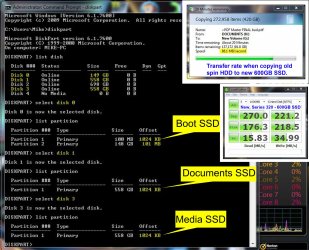
I will share what I learned from my experience which might help novices (like myself) facing the same situation. First, I updated to firmware ver. 1.9.2. (Even the latest new Series320s have only old F/W 0302 installed on it). Then "initialized" SSD in W7's Computer Management window. (ORB > Control Panel > Sys& Sec > Admin Tools > Computer Mgmt > Disk Mgmt). Then from my experience, two options are available to achieve both "Basic/Simple Volume" and "1024 Offset (or something divisible by 4).

Opt#1: right-click unallocated SSD box in Computer Mgmt panel, select "Simple Volume" and follow the Wizard's dialog sequence and select "Quick Format" (all default values will work).

Opt#2: follow the " SSD Alignment" tutorial by poster WHS, except ignore the "ACTIVE" command for Diskpart when ONLY wanting to prep the drive for "file storage" and not O/S install. Thanks whs!

ie. furnished by whs:
Diskpart (enter)
List disk (enter)
Select disk n (where n is the number that was given for your SSD in List disk)(enter)
Create partition primary align=1024 (enter)
Exit (enter)

Since I had two drives, I tried both methods out of curiosity; they both worked for me. My numbers are reflected below in the screenshot jpg -- using the Verification procedure by whs. I also include the "data transfer rate" when I copied the old spin HDD to the new SSD. If any of the seasoned veterans see a error with any of these numbers or cares to comment, please reply.
 

Attachments

  • Screenshot for Diskpart.jpg
    Screenshot for Diskpart.jpg
    549.9 KB · Views: 71

My Computer My Computer

Computer type
PC/Desktop
Computer Manufacturer/Model Number
Homemade with cube tower
OS
Windows 7 Ultimate x64
CPU
2x - Xeon E5-2687W
Motherboard
ASUS Z9PE-D8 WS
Memory
128GB Kingston - (2ea kits – 4x16GB)
Graphics Card(s)
Gigabyte GTX-680 & EVGA GTX-Titan
Sound Card
Realtek ALC898 8-chan audio
Monitor(s) Displays
2ea - Samsung T260HD 25.5-Inch LCD HDTV / Monitors
Screen Resolution
1920x1200
Hard Drives
8 ea. Crucial & Samsung EVO 2TB SSDs; misc 4ea. 8TB external Seagate spinners.
PSU
Corsair AX-1200
Case
Lian-Li cube custom
Cooling
2x Dynatron R-17 - CPU Air sinks (160watts TDP)
Keyboard
HP slimline wireless
Mouse
Microsoft ARC
Internet Speed
Faster than a speeding bullet.
Antivirus
Norton Security 360 - 2020
Back
Top