
Solved Quiet audio playback with certain files (attached)

drockwood94

New member
Local time
4:03 AM
Messages
16
Location
Illinois
Okay, so here's the deal. At my place of work, we are migrating to Windows 7. We use computers that run an access frontend as timeclocks with sounds that play on loudspeakers at specific times. When we were using Windows XP, the played audio was extremely loud (so-much-so that you don't want to be near the speaker when it goes off). We need it this way, as they are located in a loud factory and need to be heard.

On Windows 7, the sound plays much more quietly. The catch is that it's only these sounds that are being problematic. Music and system sounds play extremely loudly.

Some things I've done already:
Ensured that the volume is all the way up both master and in mixer for windows media player.
Ensured that volume is all the way up in windows media player.
Tested other sounds. They work fine.
Tested on more than just the known problem computers. It appears to be a universal issue. (It plays loud on every XP machine I've tested, but quiet on the 7 machines.)
Tested it in a different media player (Gom and VLC) same volume output.
Changed audio bitrate (no effect)
Reinstalled drivers - nothing different
Used stock drivers (Microsoft provided) - no avail
Disabled volume reduction when communications are detected
Disabled allowing exclusive control of audio device

I looked online, and there's not a lot of documentation about similar problems, but some people had stated that disabling enhancements on the desired audio device would help. While this did help, it did not really make it the same volume as before.

Nothing seems to work.

Any ideas or suggestions?

I've attached the files that we are working with
Three of the sounds are identical. I don't know why. I don't have access to any of the backend to clean it up.
 

Attachments

Last edited:

My Computer My Computer

Computer type
PC/Desktop
Computer Manufacturer/Model Number
Custom Build
OS
Windows 7 Professional x64
CPU
Intel Sandy Bridge i3-2120
Motherboard
ASRock Z77 Extreme3
Memory
16 GB DDR3 1600MHz
Graphics Card(s)
EVGA Superclocked Nvidia GeForce 660 3GB GDDR5 192-Bit
Hard Drives
2x1TB WD Blue
1x2TB WD Blue
1x128GB Hynix SSD
Antivirus
Microsoft Security Essentials
Browser
Chrome, Firefox, Opera, Dolphin, and IE
This is obviously an application specific issue. If the program was designed for Windows XP and now being used on Windows 7 machines that can be the issue. Windows 7 (and Vista and Windows 8) handle some audio functions differently than XP, thus a Windows 7 specific program version may be needed.

Have you checked with the software vendor for any Vista/Win 7 updates?
 

My Computer My Computer

Computer type
PC/Desktop
Computer Manufacturer/Model Number
My Own Build
OS
Windows 10 64 bit
CPU
Intel i7 6700K
Motherboard
ASUS ROG Maximus VIII Hero
Memory
16GB Corsair Dominator
Graphics Card(s)
Intel CPU Graphics
Sound Card
RealTek
Monitor(s) Displays
27" Dell S2719dgf
Screen Resolution
2560X1440
Hard Drives
1 TB Samsung 850 EVO SSD for Win 10 Pro
500GB Samsung 850 EVO SSD for Win 10 Insider
2 TB drive for backup
PSU
EVGA Supernova 750G2
Case
BeQuiet Silent Base 600
Cooling
Deepcool Captain 120EX
Keyboard
Microsoft Wireless 2000
Mouse
Microsoft wireless
Internet Speed
100 MB/sec (Cable)
Antivirus
Microsoft Defender and Malwarebytes
Browser
Edge/Firefox
Other Info
Cakewalk (Sonar) by BandLab and Studio One 4.1 Pro recording studio software. MOTU 896Mk3 Hybrid recording interface, Frontier Tranzport wireless control unit, Behringer X-Touch Control Surface.
Five USB connected optical drives for CD Audio production using Nero BurningROM
Misunderstanding

This is obviously an application specific issue. If the program was designed for Windows XP and now being used on Windows 7 machines that can be the issue. Windows 7 (and Vista and Windows 8) handle some audio functions differently than XP, thus a Windows 7 specific program version may be needed.

It appears that I may have not explained my problem clearly. The program that we are using is Windows Media Player, packaged with both Windows XP and 7, albeit with some updates. We are simply trying to play an audio (.wav) file at the proper volume (attached in my original post). I also stated in my original post that the audio file sounds the same across media applications (VLC, GOM, iTunes, and Windows Media Player), so I don't believe that it could be application specific.

Have you checked with the software vendor for any Vista/Win 7 updates?

Since the original program I am attempting is provided directly by Microsoft, if there were any updates, they would be installed through windows update automatically. For the other media players I have tried, the version I am using is the latest, and, therefore, built for Windows 7 and later.
 
Last edited:

My Computer My Computer

Computer type
PC/Desktop
Computer Manufacturer/Model Number
Custom Build
OS
Windows 7 Professional x64
CPU
Intel Sandy Bridge i3-2120
Motherboard
ASRock Z77 Extreme3
Memory
16 GB DDR3 1600MHz
Graphics Card(s)
EVGA Superclocked Nvidia GeForce 660 3GB GDDR5 192-Bit
Hard Drives
2x1TB WD Blue
1x2TB WD Blue
1x128GB Hynix SSD
Antivirus
Microsoft Security Essentials
Browser
Chrome, Firefox, Opera, Dolphin, and IE
I looked at the buzze.wav using my audio editor (Goldwave) and it shows a -1 signal, which should be adequate. The others sound loud, using WMP and the volume control on my speakers.

Are you using the Speaker jack (GREEN) on the PC? to feed the external amplifiers? Or, do you have a separate "Line Out" that you are using?

The fact that other audio plays at correct volume levels, either goes back to the sound itself or the external speaker system. Does other PC audio, e.g. a known good song file play OK on the factory speakers?

I see "My System Specs". Is this a sample of the PC's you are using? Or is it some other PC? Also what sound device do you have? RealTek? IDT? Conexant?

I have a recording studio, so I deal with audio and audio issues daily.
 

My Computer My Computer

Computer type
PC/Desktop
Computer Manufacturer/Model Number
My Own Build
OS
Windows 10 64 bit
CPU
Intel i7 6700K
Motherboard
ASUS ROG Maximus VIII Hero
Memory
16GB Corsair Dominator
Graphics Card(s)
Intel CPU Graphics
Sound Card
RealTek
Monitor(s) Displays
27" Dell S2719dgf
Screen Resolution
2560X1440
Hard Drives
1 TB Samsung 850 EVO SSD for Win 10 Pro
500GB Samsung 850 EVO SSD for Win 10 Insider
2 TB drive for backup
PSU
EVGA Supernova 750G2
Case
BeQuiet Silent Base 600
Cooling
Deepcool Captain 120EX
Keyboard
Microsoft Wireless 2000
Mouse
Microsoft wireless
Internet Speed
100 MB/sec (Cable)
Antivirus
Microsoft Defender and Malwarebytes
Browser
Edge/Firefox
Other Info
Cakewalk (Sonar) by BandLab and Studio One 4.1 Pro recording studio software. MOTU 896Mk3 Hybrid recording interface, Frontier Tranzport wireless control unit, Behringer X-Touch Control Surface.
Five USB connected optical drives for CD Audio production using Nero BurningROM
Thank you for replying so quickly and trying to help. I'll address your response in order.

The sounds are loud, just not LOUD. What are the chances you have both a windows XP machine and a Windows 7 machine you can hook up to the same sound system? It's almost the only way you can experience my issue first-hand. I'm using the standard green speaker port.

We have not changed the speaker system, and it affects more than these specific speakers. It happens on headphones, this speaker, and across all of our windows 7 machines. Songs appear to play properly, but we cannot actually test this with the factory speakers at full volume, as we don't want to play loud music while the workers are busy.

The "My System Specs" section is actually my own personal computer, as I intend to use this forum more after the resolution of this issue. The computer's we are using in the factory are Dell Optiplex 3020s (with stock hardware)
Intel® 4th generation Core™ i5 Quad Core
Intel® H81 Chipset
Windows 7® Professional SP1 (32/64 bit)
Integrated Intel® HD Graphics 4600
It's a realtek card

I don't want to get too distracted by the specific computer, though, as it behaves similarly on other models as well. (HP Pro 3400 is our office test machine)


I've been playing around with a free audio editor (audacity) and I've found that, even on the integrated mono speaker, mixing in mono vs stereo makes a difference as to volume. The loudspeaker (think this: http://soundonline.co.za/image/cache/data/Products/Luco/pah126-horn-speaker-800x800.jpg) may only have a mono 3.5 mm connector. (I'll check and report back) Could Windows 7 handle a mono speaker differently than XP? For instance, XP detects it's mono, and sends both channels to the one speaker, whereas windows 7 detects it's mono and only sends the one channel?
 

My Computer My Computer

Computer type
PC/Desktop
Computer Manufacturer/Model Number
Custom Build
OS
Windows 7 Professional x64
CPU
Intel Sandy Bridge i3-2120
Motherboard
ASRock Z77 Extreme3
Memory
16 GB DDR3 1600MHz
Graphics Card(s)
EVGA Superclocked Nvidia GeForce 660 3GB GDDR5 192-Bit
Hard Drives
2x1TB WD Blue
1x2TB WD Blue
1x128GB Hynix SSD
Antivirus
Microsoft Security Essentials
Browser
Chrome, Firefox, Opera, Dolphin, and IE
I don't have an XP system, only Win 7 and Win 8 systems.

XP handled some audio functions differently than Vista/Win7/Win8 and the reason I questioned the program that generates or keys the tones.

I don't know how a mono signal is handled (I should but don't) but I suspect it is only one channel. Do you have the correct speakers set? Go to the Control Panel/Hardware and Sound and finally the Sound Playback Panel. Click on the "Speakers" to highlight that and then click the "Configure" Button.


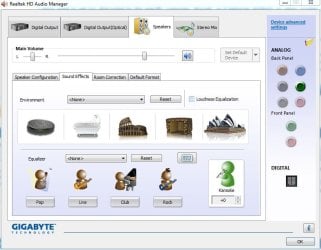
I have RealTek and also the RealTek HD Audio Manager (located in Device Manager/Hardware and Sound).

There is a "Loudness Equalization" option on mine and that has increased the volume level for some with low volume levels. If you have this, give it a try.
 

Attachments

  • Capture.JPG
    Capture.JPG
    61.7 KB · Views: 0

My Computer My Computer

Computer type
PC/Desktop
Computer Manufacturer/Model Number
My Own Build
OS
Windows 10 64 bit
CPU
Intel i7 6700K
Motherboard
ASUS ROG Maximus VIII Hero
Memory
16GB Corsair Dominator
Graphics Card(s)
Intel CPU Graphics
Sound Card
RealTek
Monitor(s) Displays
27" Dell S2719dgf
Screen Resolution
2560X1440
Hard Drives
1 TB Samsung 850 EVO SSD for Win 10 Pro
500GB Samsung 850 EVO SSD for Win 10 Insider
2 TB drive for backup
PSU
EVGA Supernova 750G2
Case
BeQuiet Silent Base 600
Cooling
Deepcool Captain 120EX
Keyboard
Microsoft Wireless 2000
Mouse
Microsoft wireless
Internet Speed
100 MB/sec (Cable)
Antivirus
Microsoft Defender and Malwarebytes
Browser
Edge/Firefox
Other Info
Cakewalk (Sonar) by BandLab and Studio One 4.1 Pro recording studio software. MOTU 896Mk3 Hybrid recording interface, Frontier Tranzport wireless control unit, Behringer X-Touch Control Surface.
Five USB connected optical drives for CD Audio production using Nero BurningROM
I checked and the loudspeaker has a stereo connector, so all audio should be going to the speaker properly (Unless the wire doesn't connect to the speaker with both channels. The speaker has 5 wires (Red and black for signal and Green, white and grey for power) This means that, at some location on the wire, the stereo connector is wired to the red and black wires. It could be that they are only connected to one of the two channels.

I have the speakers configured properly, according to the steps in your instructions. I don't have the audio manager pictured above, but there is a loudness equalization option native to Windows 7. This option does not work. In fact, disabling all enhancements seems to make for the loudest effect thus far. It's still nowhere near the original volume, though.

I misunderstood your question about the program used in your first post. The original program used to generate these sounds is unknown to me, but I've edited the sounds in audacity and re-exported them after taking the original clipping out. (I don't know if I gave you the new or old version.)

It's unfortunate that you don't have access to a Windows XP system, but is also understandable, as it's old and no longer supported.

I was hired on here to help migrate their system 2 months ago, so am unfamiliar with their whole system, but am pretty well versed in general computer troubleshooting. This is the only problem that's legitimately stumped me in quite some time.

(I've never actually made a forum post asking for PC help. This is my first one.)
 

My Computer My Computer

Computer type
PC/Desktop
Computer Manufacturer/Model Number
Custom Build
OS
Windows 7 Professional x64
CPU
Intel Sandy Bridge i3-2120
Motherboard
ASRock Z77 Extreme3
Memory
16 GB DDR3 1600MHz
Graphics Card(s)
EVGA Superclocked Nvidia GeForce 660 3GB GDDR5 192-Bit
Hard Drives
2x1TB WD Blue
1x2TB WD Blue
1x128GB Hynix SSD
Antivirus
Microsoft Security Essentials
Browser
Chrome, Firefox, Opera, Dolphin, and IE
I'm a retired LAN/WAN Network and Hardware Help Desk Manager. I've been in electronics and computers since "Before PC's". I've worked as a computer tech on old discrete component computers in the mid 60's at the Ascension Island Tracking Station and then on the Apollo project as a processor tech then programmer.

I worked as a guitar amp tech in Nashville in the early 70's.

If the speakers only have Red and Black wires for audio, then they are only mono. Red probably the "hot" and black "Ground". If you trace the wires back I would bet they are only connected to the Tip or Ring connection and ground.
 

My Computer My Computer

Computer type
PC/Desktop
Computer Manufacturer/Model Number
My Own Build
OS
Windows 10 64 bit
CPU
Intel i7 6700K
Motherboard
ASUS ROG Maximus VIII Hero
Memory
16GB Corsair Dominator
Graphics Card(s)
Intel CPU Graphics
Sound Card
RealTek
Monitor(s) Displays
27" Dell S2719dgf
Screen Resolution
2560X1440
Hard Drives
1 TB Samsung 850 EVO SSD for Win 10 Pro
500GB Samsung 850 EVO SSD for Win 10 Insider
2 TB drive for backup
PSU
EVGA Supernova 750G2
Case
BeQuiet Silent Base 600
Cooling
Deepcool Captain 120EX
Keyboard
Microsoft Wireless 2000
Mouse
Microsoft wireless
Internet Speed
100 MB/sec (Cable)
Antivirus
Microsoft Defender and Malwarebytes
Browser
Edge/Firefox
Other Info
Cakewalk (Sonar) by BandLab and Studio One 4.1 Pro recording studio software. MOTU 896Mk3 Hybrid recording interface, Frontier Tranzport wireless control unit, Behringer X-Touch Control Surface.
Five USB connected optical drives for CD Audio production using Nero BurningROM
My apologies. I had been looking at a model we have in the office, but it's not the same model. The model in the factory has 7 wires. It has Brown/Brown-White, Green-Green/White, Red-Red/White, and Black.

The Horn says green is for the tip, and red is the ring. Both are wired up, so I would assume that it's meant to be able to interpret stereo signals. (It is only a single horn, though, so it is technically mono.) It shouldn't be the horn, because that worked before the swap, but the wiring is sound.

Here's the horn we're using:
http://www.valcom.com/pdf/v1030c_v1036c.pdf

I really just don't know.
 

My Computer My Computer

Computer type
PC/Desktop
Computer Manufacturer/Model Number
Custom Build
OS
Windows 7 Professional x64
CPU
Intel Sandy Bridge i3-2120
Motherboard
ASRock Z77 Extreme3
Memory
16 GB DDR3 1600MHz
Graphics Card(s)
EVGA Superclocked Nvidia GeForce 660 3GB GDDR5 192-Bit
Hard Drives
2x1TB WD Blue
1x2TB WD Blue
1x128GB Hynix SSD
Antivirus
Microsoft Security Essentials
Browser
Chrome, Firefox, Opera, Dolphin, and IE
For testing, I converted the buzze.wav to a stereo file. Try this and see what happens.

Buzzestereo.wav
 

My Computer My Computer

Computer type
PC/Desktop
Computer Manufacturer/Model Number
My Own Build
OS
Windows 10 64 bit
CPU
Intel i7 6700K
Motherboard
ASUS ROG Maximus VIII Hero
Memory
16GB Corsair Dominator
Graphics Card(s)
Intel CPU Graphics
Sound Card
RealTek
Monitor(s) Displays
27" Dell S2719dgf
Screen Resolution
2560X1440
Hard Drives
1 TB Samsung 850 EVO SSD for Win 10 Pro
500GB Samsung 850 EVO SSD for Win 10 Insider
2 TB drive for backup
PSU
EVGA Supernova 750G2
Case
BeQuiet Silent Base 600
Cooling
Deepcool Captain 120EX
Keyboard
Microsoft Wireless 2000
Mouse
Microsoft wireless
Internet Speed
100 MB/sec (Cable)
Antivirus
Microsoft Defender and Malwarebytes
Browser
Edge/Firefox
Other Info
Cakewalk (Sonar) by BandLab and Studio One 4.1 Pro recording studio software. MOTU 896Mk3 Hybrid recording interface, Frontier Tranzport wireless control unit, Behringer X-Touch Control Surface.
Five USB connected optical drives for CD Audio production using Nero BurningROM
Unfortunately, this didn't seem to work. Also, I accidentally hit the Mark Solved button instead of post reply. It's back to unsolved.
 

My Computer My Computer

Computer type
PC/Desktop
Computer Manufacturer/Model Number
Custom Build
OS
Windows 7 Professional x64
CPU
Intel Sandy Bridge i3-2120
Motherboard
ASRock Z77 Extreme3
Memory
16 GB DDR3 1600MHz
Graphics Card(s)
EVGA Superclocked Nvidia GeForce 660 3GB GDDR5 192-Bit
Hard Drives
2x1TB WD Blue
1x2TB WD Blue
1x128GB Hynix SSD
Antivirus
Microsoft Security Essentials
Browser
Chrome, Firefox, Opera, Dolphin, and IE
I'm going to try a similar-sounding audio file.
 
Last edited:

My Computer My Computer

Computer type
PC/Desktop
Computer Manufacturer/Model Number
Custom Build
OS
Windows 7 Professional x64
CPU
Intel Sandy Bridge i3-2120
Motherboard
ASRock Z77 Extreme3
Memory
16 GB DDR3 1600MHz
Graphics Card(s)
EVGA Superclocked Nvidia GeForce 660 3GB GDDR5 192-Bit
Hard Drives
2x1TB WD Blue
1x2TB WD Blue
1x128GB Hynix SSD
Antivirus
Microsoft Security Essentials
Browser
Chrome, Firefox, Opera, Dolphin, and IE
Okay, so the attached file works fine. But the previously attached file (of the same name in my first post) does not. Besides the frequency of the audio, there's not much difference.
 

Attachments

My Computer My Computer

Computer type
PC/Desktop
Computer Manufacturer/Model Number
Custom Build
OS
Windows 7 Professional x64
CPU
Intel Sandy Bridge i3-2120
Motherboard
ASRock Z77 Extreme3
Memory
16 GB DDR3 1600MHz
Graphics Card(s)
EVGA Superclocked Nvidia GeForce 660 3GB GDDR5 192-Bit
Hard Drives
2x1TB WD Blue
1x2TB WD Blue
1x128GB Hynix SSD
Antivirus
Microsoft Security Essentials
Browser
Chrome, Firefox, Opera, Dolphin, and IE
So if I understand you correctly the problem is the audio files and this last buzzer.wav works OK???
 

My Computer My Computer

Computer type
PC/Desktop
Computer Manufacturer/Model Number
My Own Build
OS
Windows 10 64 bit
CPU
Intel i7 6700K
Motherboard
ASUS ROG Maximus VIII Hero
Memory
16GB Corsair Dominator
Graphics Card(s)
Intel CPU Graphics
Sound Card
RealTek
Monitor(s) Displays
27" Dell S2719dgf
Screen Resolution
2560X1440
Hard Drives
1 TB Samsung 850 EVO SSD for Win 10 Pro
500GB Samsung 850 EVO SSD for Win 10 Insider
2 TB drive for backup
PSU
EVGA Supernova 750G2
Case
BeQuiet Silent Base 600
Cooling
Deepcool Captain 120EX
Keyboard
Microsoft Wireless 2000
Mouse
Microsoft wireless
Internet Speed
100 MB/sec (Cable)
Antivirus
Microsoft Defender and Malwarebytes
Browser
Edge/Firefox
Other Info
Cakewalk (Sonar) by BandLab and Studio One 4.1 Pro recording studio software. MOTU 896Mk3 Hybrid recording interface, Frontier Tranzport wireless control unit, Behringer X-Touch Control Surface.
Five USB connected optical drives for CD Audio production using Nero BurningROM
Yes, the one I attached in my last response is working as desired. The audio files had something wrong with them. No idea what.
 

My Computer My Computer

Computer type
PC/Desktop
Computer Manufacturer/Model Number
Custom Build
OS
Windows 7 Professional x64
CPU
Intel Sandy Bridge i3-2120
Motherboard
ASRock Z77 Extreme3
Memory
16 GB DDR3 1600MHz
Graphics Card(s)
EVGA Superclocked Nvidia GeForce 660 3GB GDDR5 192-Bit
Hard Drives
2x1TB WD Blue
1x2TB WD Blue
1x128GB Hynix SSD
Antivirus
Microsoft Security Essentials
Browser
Chrome, Firefox, Opera, Dolphin, and IE
Sorry, as desired may not be appropriate. It is working at the proper volume. I believe that the clipping is messing with the loudspeaker, though, as it doesn't put the pauses in.
 

My Computer My Computer

Computer type
PC/Desktop
Computer Manufacturer/Model Number
Custom Build
OS
Windows 7 Professional x64
CPU
Intel Sandy Bridge i3-2120
Motherboard
ASRock Z77 Extreme3
Memory
16 GB DDR3 1600MHz
Graphics Card(s)
EVGA Superclocked Nvidia GeForce 660 3GB GDDR5 192-Bit
Hard Drives
2x1TB WD Blue
1x2TB WD Blue
1x128GB Hynix SSD
Antivirus
Microsoft Security Essentials
Browser
Chrome, Firefox, Opera, Dolphin, and IE
Sounds like you may have to modify the sounds to get them where you want them.

I use Goldwave, a shareware audio editor for my final step in my recording studio. Goldwave was what I used to convert the one tone from mono to stereo.
 

My Computer My Computer

Computer type
PC/Desktop
Computer Manufacturer/Model Number
My Own Build
OS
Windows 10 64 bit
CPU
Intel i7 6700K
Motherboard
ASUS ROG Maximus VIII Hero
Memory
16GB Corsair Dominator
Graphics Card(s)
Intel CPU Graphics
Sound Card
RealTek
Monitor(s) Displays
27" Dell S2719dgf
Screen Resolution
2560X1440
Hard Drives
1 TB Samsung 850 EVO SSD for Win 10 Pro
500GB Samsung 850 EVO SSD for Win 10 Insider
2 TB drive for backup
PSU
EVGA Supernova 750G2
Case
BeQuiet Silent Base 600
Cooling
Deepcool Captain 120EX
Keyboard
Microsoft Wireless 2000
Mouse
Microsoft wireless
Internet Speed
100 MB/sec (Cable)
Antivirus
Microsoft Defender and Malwarebytes
Browser
Edge/Firefox
Other Info
Cakewalk (Sonar) by BandLab and Studio One 4.1 Pro recording studio software. MOTU 896Mk3 Hybrid recording interface, Frontier Tranzport wireless control unit, Behringer X-Touch Control Surface.
Five USB connected optical drives for CD Audio production using Nero BurningROM
I edited the clipping out of the audio file. I'll see if it works on Monday when I return to work.

Thanks so much for helping me with this.
 

My Computer My Computer

Computer type
PC/Desktop
Computer Manufacturer/Model Number
Custom Build
OS
Windows 7 Professional x64
CPU
Intel Sandy Bridge i3-2120
Motherboard
ASRock Z77 Extreme3
Memory
16 GB DDR3 1600MHz
Graphics Card(s)
EVGA Superclocked Nvidia GeForce 660 3GB GDDR5 192-Bit
Hard Drives
2x1TB WD Blue
1x2TB WD Blue
1x128GB Hynix SSD
Antivirus
Microsoft Security Essentials
Browser
Chrome, Firefox, Opera, Dolphin, and IE
Good luck with the project. Looks like its sorted out.

Jack
 

My Computer My Computer

Computer type
PC/Desktop
Computer Manufacturer/Model Number
My Own Build
OS
Windows 10 64 bit
CPU
Intel i7 6700K
Motherboard
ASUS ROG Maximus VIII Hero
Memory
16GB Corsair Dominator
Graphics Card(s)
Intel CPU Graphics
Sound Card
RealTek
Monitor(s) Displays
27" Dell S2719dgf
Screen Resolution
2560X1440
Hard Drives
1 TB Samsung 850 EVO SSD for Win 10 Pro
500GB Samsung 850 EVO SSD for Win 10 Insider
2 TB drive for backup
PSU
EVGA Supernova 750G2
Case
BeQuiet Silent Base 600
Cooling
Deepcool Captain 120EX
Keyboard
Microsoft Wireless 2000
Mouse
Microsoft wireless
Internet Speed
100 MB/sec (Cable)
Antivirus
Microsoft Defender and Malwarebytes
Browser
Edge/Firefox
Other Info
Cakewalk (Sonar) by BandLab and Studio One 4.1 Pro recording studio software. MOTU 896Mk3 Hybrid recording interface, Frontier Tranzport wireless control unit, Behringer X-Touch Control Surface.
Five USB connected optical drives for CD Audio production using Nero BurningROM
Back
Top