qustion about calendar in wlm

Just married

New member
Member
VIP
Local time
3:46 PM
Messages
96
I am using the standard version of wlm. When I click the calendar link near the bottom left of the widow I get a simple calendar place in the upper left area. Below that I have an option to create a calendar, I did, called in my name. I expected to setup an event on a particular date then when I clicked that date on the calendar my event appears somewhere. Did not happen??

Also one of the bars near the top displays REPLY, FORWARD, ETC. there is an entry thatreads "add to calendar" when clicked it, the messader that is selected comes up that apparently lets me apply a calendar date to which I did but nothing happens, clicking that date on the calendar does nothing.

The program is not all bad, would just like it to work a little better or work right.
 

My Computer My Computer

At a glance

Windows 7 Pro 64 bitAMD6GBON BOARD
Computer Manufacturer/Model Number
assemble my own
OS
Windows 7 Pro 64 bit
CPU
AMD
Motherboard
ASUS
Memory
6GB
Graphics Card(s)
ON BOARD
Sound Card
ON BOARD
Monitor(s) Displays
HP FALT SCREEN 21"
Hard Drives
ONE 1.5TB, ONE .5TB
PSU
500w
Case
NEW TO FIT
Cooling
WGAT CANE WUTG CASE
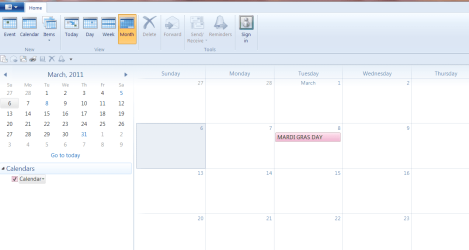
What version are you using? 2010 or 2011. Here is a view of 2011.

Calender.PNG

You will notice at the bottom there is a check mark by the calender name. That needs to be checked for the events to show up in the calender "view". You can have more then one calender but the events for each one that is checked will show up in the calender view with different colors. My view option at the top is set to show a Month and it appears to the right.
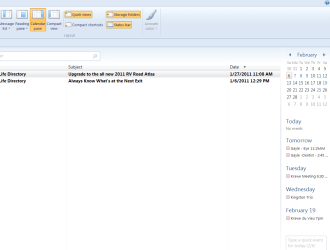
In Mail under View I use Calender Pane which puts the calender in a pane to the right of my e-mails and also will show the next five events.

Calender View.PNG

Jim :geek:
 
Last edited:

My Computer My Computer

At a glance

Windows 8.1 Pro w/Media Center 64bit, Windows...Phenom II X6 1100TCrucial Balistic 8gb DDR3-1866 CL9MSI R6850 Cyclone IGD5 PE
Computer type
PC/Desktop
Computer Manufacturer/Model Number
Home Built
OS
Windows 8.1 Pro w/Media Center 64bit, Windows 7 HP 64bit
CPU
Phenom II X6 1100T
Motherboard
ASUS M5A99X EVO
Memory
Crucial Balistic 8gb DDR3-1866 CL9
Graphics Card(s)
MSI R6850 Cyclone IGD5 PE
Sound Card
On Board
Monitor(s) Displays
ASUS VE258Q 25" LED with DVI-HDMI-DisplayPort
Screen Resolution
1920 x 1080
Hard Drives
Two WD Cavier Black 2TB Sata III, WD My Book Essential 2TB USB 3.0
PSU
Seasonic X650 80 Plus GOLD Modular
Case
Corsair 400R
Cooling
Antec Kuhler H2O 620, Two 120mm and four 140mm
Keyboard
Logitech K120
Mouse
Logitech Marble Mouse USB, Logitech Precision Game Pad
Internet Speed
15MB
Antivirus
Norton IS 2013, Malwarebytes Pro Beta 2
Browser
IE-11, FF-27
Other Info
APC UPS ES 750, Netgear WNR3500L Gigabit & Wireless N Router with SamKnows Test Program, Motorola SB6120 Gigabit Cable Modem. Brother HL-2170W Laser Printer, Epson V300 Scanner
I tried 2011 did not like it, no file edit view, the heading area was link Office 2011 which is teribal in my opinion. The version I have is version 2009, not w010. When I removed essentioals 2011 it took all of the Windows Live Mail with it. Went to Microsoft and downloaded what I thought was the one I installed Windows 7 Pro which it was not but similar. Would like to get back what I had when I installed Win7Pro. If an update is availbel for the 2009 version to the 2010 that would be fine.
 

My Computer My Computer

At a glance

Windows 7 Pro 64 bitAMD6GBON BOARD
Computer Manufacturer/Model Number
assemble my own
OS
Windows 7 Pro 64 bit
CPU
AMD
Motherboard
ASUS
Memory
6GB
Graphics Card(s)
ON BOARD
Sound Card
ON BOARD
Monitor(s) Displays
HP FALT SCREEN 21"
Hard Drives
ONE 1.5TB, ONE .5TB
PSU
500w
Case
NEW TO FIT
Cooling
WGAT CANE WUTG CASE
Back
Top