
Radeon Mobility HD 4570 Not working after win 7 upgrade

I have a very similar problem but Device Manager DOES recognise both, but I just can't use or select the HD4570.
I have upgraded drivers through acer website, windows update and latest catalyst control from ATI

When I plug the power lead in, the control centre message comes up asking if I want to switch graphics processors, I select yes, then it says "Switch complete, now using power saving GPU"

If I go to the catalyst control centre and try select the "High Perforrmance GPU" it just does the same

I need help cos I like Windows 7, but need my HD 4570 for gaming
 

My Computer My Computer

At a glance

Windows 7AMD Turion X2 UltraATI Mobiloty Radeon HD4570, Radeon HD3200
Computer Manufacturer/Model Number
Acer Aspire 7535G
OS
Windows 7
CPU
AMD Turion X2 Ultra
Graphics Card(s)
ATI Mobiloty Radeon HD4570, Radeon HD3200
Halfway Ash - sounds like you have exactly the same problem that I have. Please post here if you find a solution.

Seb - did you manage to get your higher power graphics processor working then? I am not to fussed about the 3200, I just want my 4570 for games!!! I have updated the motherboard BIOS with one released 28th October and still no joy...

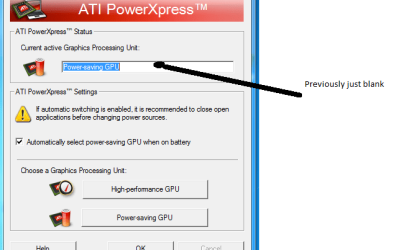
An bit of an update though - since following torrent g's last piece of advice there has been a change to PowerExpress. The HD4570 is still not working, but now power express populates the "card" box with "Power saving GPU" which was not happening before - random but no good to me.

illustration.png

I am going to try unistalling all the ATI drivers in safemode and re-installing following torrents advice

H.
 

My Computer My Computer

At a glance

Windows 7Turion X2 Ultra4gbRadeon mobility HD 4570
Computer Manufacturer/Model Number
Acer
OS
Windows 7
CPU
Turion X2 Ultra
Memory
4gb
Graphics Card(s)
Radeon mobility HD 4570
Yeah

The box is empty for me. It does not say what GPU I am using

What CCC version should I be using ?
10 ?

I have heard there is a beta 11. Might that help ?

Seriously considering going back to vista and that is bad !!
 

My Computer My Computer

At a glance

Windows 7AMD Turion X2 UltraATI Mobiloty Radeon HD4570, Radeon HD3200
Computer Manufacturer/Model Number
Acer Aspire 7535G
OS
Windows 7
CPU
AMD Turion X2 Ultra
Graphics Card(s)
ATI Mobiloty Radeon HD4570, Radeon HD3200
where is the best place to download the latest drivers and CCC for HD 4570 ?

Cheers
 

My Computer My Computer

At a glance

Windows 7AMD Turion X2 UltraATI Mobiloty Radeon HD4570, Radeon HD3200
Computer Manufacturer/Model Number
Acer Aspire 7535G
OS
Windows 7
CPU
AMD Turion X2 Ultra
Graphics Card(s)
ATI Mobiloty Radeon HD4570, Radeon HD3200

My Computer My Computer

At a glance

windows 7 ultimate x64amd athlon 64 x2 QL-64ATI mobility Radeon HD4570
Computer Manufacturer/Model Number
acer/aspire 7535G
OS
windows 7 ultimate x64
CPU
amd athlon 64 x2 QL-64
Graphics Card(s)
ATI mobility Radeon HD4570
I thought I had it working but it keeps booting in 640 x 480 now so it looks like it was still using the 3200 after all...

So no, still not working. But I'm not getting that code 10 error now, windows reckons it's working, it just... isn't.
 

My Computer My Computer

At a glance

Windows 7
OS
Windows 7
Ok my flat mate suggested that I load up virtual pc and windowXP or Vista to run games in when I need. Apparently this means two operating systems! Is this likely to work?

Any feedback?
 

My Computer My Computer

At a glance

Windows 7Turion X2 Ultra4gbRadeon mobility HD 4570
Computer Manufacturer/Model Number
Acer
OS
Windows 7
CPU
Turion X2 Ultra
Memory
4gb
Graphics Card(s)
Radeon mobility HD 4570
Yeah I was thinking of doing some kind of dual boot too, but it's a bit of a lame solution to a problem that Acer should be solving for us.

Try uninstalling Catalyst control manager/install manager and the powerexpress stuff, then uninstall the drivers in safe mode and reboot and let windows install its own for the cards. I still don't have the "code 10" error in windows after doing that and it ran one of my games well. The games I have aren't exactly intensive on graphics but I wouldn't have thought the 3200 would do it by itself... maybe it kicked in the other one on its own?

It's unlikely but worth a shot...
 

My Computer My Computer

At a glance

Windows 7
OS
Windows 7

My Computer My Computer

At a glance

Windows 7 ultimate 64 bit / XP Home sp3intel Core 2 Duo E8400 3.0ghz8 gigs 1066 OCZ Fata1tyEVGA GTX 580 Call of Duty Black Ops Edition
Computer Manufacturer/Model Number
Self Built
OS
Windows 7 ultimate 64 bit / XP Home sp3
CPU
intel Core 2 Duo E8400 3.0ghz
Motherboard
Asus P5ND bios 1401
Memory
8 gigs 1066 OCZ Fata1ty
Graphics Card(s)
EVGA GTX 580 Call of Duty Black Ops Edition
Sound Card
Creative Soundblaster Audigy 2zs
Monitor(s) Displays
Asus 24in LCD's 2MS X2
Screen Resolution
1920x1080p @60Hz
Hard Drives
WD Caviar 500 Black/ WD Caviar 200 Blue
PSU
OCZ 700W GameXtreme
Case
NZXT Apollo
Cooling
Corsair H50 CPU/120mm x3 /60mm x2 /Corsair Dominator Ram
Keyboard
Logitech Bluetooth Wireless MX5000
Mouse
Logitech Bluetooth Wireless MX1000
Internet Speed
Download 19.83 Upload 0.97
Other Info
Logitech Z2300 Speakers/ Bose Noise Cancelling Headphones/Avermedia PCI-e Hybrid TV Bravo/Epson NX415 all in one/ 4 Port Powered USB Hub/ LG 10x Bluray Burner /TSST Corp DVDRW External
i have exactly the same problem here! so frustrating - closest iv got is to getting the 4570 working but only able to run as a projector not as it used to switch - driving me mad!
 

My Computer My Computer

At a glance

Windows 7Turion X2 Ultra ZM-82 2.2GHz4GBHD 3200 + Mobility HD 4570
Computer Manufacturer/Model Number
Acer Aspire 7535G
OS
Windows 7
CPU
Turion X2 Ultra ZM-82 2.2GHz
Memory
4GB
Graphics Card(s)
HD 3200 + Mobility HD 4570
Monitor(s) Displays
17.3" HD+ LED LCD
Hard Drives
500GB
There are a lot of people with this problem now, loads of Google results about it. And it's not just this laptop either, or these graphics cards, but several Acer laptops using two ATI graphics cards are having issues. Example: http://www.sevenforums.com/drivers/34135-power-xpress-problems.html - different laptop, different cards, same issue.

I guess it's only a matter of time before Acer, AMD, or some other people fix it? Or Acer end up with lots of laptops being sent back to them...
 

My Computer My Computer

At a glance

Windows 7
OS
Windows 7
Problem solved!

This is only a temporary solution until Acer or ATI release a driver or Power Xpress that is compatible with Windows 7 but

I now have my HD 4570 working.
Power Xpress won't switch between them automatically anymore, but at least you'll have the graphics you've paid for, and you can still switch between the two graphics cards manually if you wish to!

This will also work with other ATI dual graphics cards systems on Windows 7 using Power Xpress.


Proof that it's working for me:

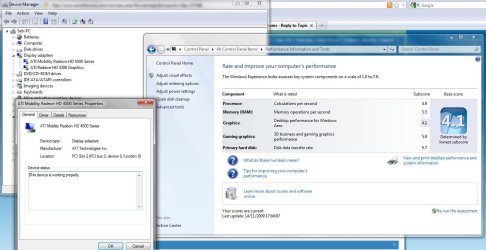
Windows user experience rating with 3200 was 3.8. After fiddling about I now have 4.1 (see attached images) and the 3D gaming rating is up at 5.9. I'm 99.9% sure this HAS worked for me, I can't see how my rating would have gone up if it hasn't started using the 4570.


So how did I do it?

Firstly, bear in mind that you may not have all the exact same issues I had, but this will probably still get your powerful GPU working. It seems the problem varies a little between different people (probably because of the other stuff they've tried to do to fix it). Just plough through it and let us know how it worked out for you!

Well first I totally removed all the ATI software. Go to "uninstall a program" (can type it into start menu box) find ATI isntall manager (or a name similar to that) and uninstall it. Express uninstall everything. Then reboot. Update the drivers for the 4570 graphics card. The code 10 error should now be gone. If it isn't, go into safe mode (keep hitting F8 on start up to get to it), go into "Device manager" (type that into start menu box for quick access too - this is also where you check for the code 10 error), uninstall both drivers and make sure on uninstalling you ccheck the box that says "Delete driver software for this device". Just to be safe, I recommend running Driver Sweeper as the other person suggested to make sure it's all gone. Then reboot. When windows launches, it should search for and install the drivers for you - you may need to be connected to the internet.

Now if you've succesfully got both drivers installed and updated, with no code 10 error, you may notice this strange little gem, which is the key to the whole problem: moving your mouse cursor to the right edge of the screen, it should keep going past the edge and moving left again take a while to reappear. This is because Windows is treating the two graphics cards as extended desktops on two displays. Your 4570 IS working, but it's outputting to a non-existent display (hence why the other guy here got it working on a projector). Don't worry if you don't have this issue, this will probably still get your 4570 working.

To solve this is really simple. Right click desktop, click screen resolution. See those two monitors? AHA! Click identify. Whichever number appears on your screen, you want to set the "Multiple displays" option to "show desktop only on __" where the number is the OTHER number (NOT the one that popped up on your sccreen). Click apply. Voila! Your 4570 hits you smack bang in the face!

To check it all worked, run the user experience rating thing. It should push up the score somewhat. If it didn't work, try the other display number in the multiple display setting. If it still doesn't work, I've obviously forgotten something special I did, and if you let me know I'll try and work it out for you ASAP.


To switch between the cards: couldn't be easier, just right click desktop, select screen resolution and change the "Show desktop only on __" to the other display number. On mine "2" is the HD 4570 and "1" is the HD 3200.
 

Attachments

  • fixed.JPG
    fixed.JPG
    121.4 KB · Views: 776
Last edited:

My Computer My Computer

At a glance

Windows 7
OS
Windows 7
Seb,

That is brilliant - thank you for posting such comprehensive, easy to follow instructions. It is weird, I have got two screens listed under display (though it didn't do the weird scrolling thing you described). The key to solving the code 10 error for me was manually un-installing both drivers. However, without loading up CCC again, there isn't really a way to see if I am using the 4570.

Have you tried loading up CCC? I am not aware of the windows user experience test - going to try running Fallout 3 now to see if it works! Will let you know the outcome. Here's hoping ACER / micro soft pull there fingers out and sort a proper solution - I still think it beggars belief that they release these things without properly testing them
 

My Computer My Computer

At a glance

Windows 7Turion X2 Ultra4gbRadeon mobility HD 4570
Computer Manufacturer/Model Number
Acer
OS
Windows 7
CPU
Turion X2 Ultra
Memory
4gb
Graphics Card(s)
Radeon mobility HD 4570
Quick Update -

Yup, this definitely works - I found and checked the windows user experience index - when you change the display number from "1" to "2" the graphics score doubles from 3 to 6 and when you click on the detail tab the graphics driver is listed as the 4500 series.

Fantastic - good work Seb!!
 

My Computer My Computer

At a glance

Windows 7Turion X2 Ultra4gbRadeon mobility HD 4570
Computer Manufacturer/Model Number
Acer
OS
Windows 7
CPU
Turion X2 Ultra
Memory
4gb
Graphics Card(s)
Radeon mobility HD 4570
Have you tried loading up CCC?

Glad to hear it works for you too!

I haven't tried reinstalling CCC. I don't see the point, as the cards still work with only the drivers and it's still possible to switch between the two. My laptop is rarely unplugged for more than 20 minutes at a time so I don't need the automatic Power Xpress - if I need to use the battery for longer I'll switch them myself.

Would be good to know if CCC works or not though. I might try it some time, but I'd rather not go through the chaos of getting it working again until I have plenty of free time!

It's quite interesting that you don't get the off the screen mouse. I guess yours was only using the 3200 and not extending it. It's strange how we all have the same problem but with slight differences isn't it! At least there seems to be a common "fix" for it now though.
 

My Computer My Computer

At a glance

Windows 7
OS
Windows 7
install the Windows update first, then reset the computer , Download ATI windows 7 Beta driver , 9.9 ,(ATI Catalyst? Mobility Display Driver ) Download Mobility Modder ( ATI MobilityModder - DriverHeaven.net ) Unzipp the windows 7 beta driver , and use the modder , after that install the Driver and it will work , CCC works aswell ...only thing is u cant see the PowerXpress , but 4750 will work on first screen without problems.....Powerxpress aint supported yet , thats why it doesnt work , called today and they are working on a solution
 

My Computer My Computer

At a glance

Windows 7 Ultimate x64
OS
Windows 7 Ultimate x64
I can edit any inf to include any card if needed for you guys.

Upload the inf along with copy/paste of hardware id strings and consider it done.

Use the latest driver from ATI's site to get the .inf and for install later, after edit.
 

My Computer My Computer

At a glance

7600.20510 x86P4 550 3.4 GHz HT running at 3.5 GHzOCZ 2 GB(2x1GB) DDR400mHz running @ 414 mHzHIS Radeon HD 3850 IceQ 3 Turbo HDMI Dual DL-...
Computer Manufacturer/Model Number
self built
OS
7600.20510 x86
CPU
P4 550 3.4 GHz HT running at 3.5 GHz
Motherboard
MSI PM8M3-V (MS-7211 v1.x) Micro-ATX mainboard
Memory
OCZ 2 GB(2x1GB) DDR400mHz running @ 414 mHz
Graphics Card(s)
HIS Radeon HD 3850 IceQ 3 Turbo HDMI Dual DL-DVI AGP
Sound Card
MOTU Traveler firewire studio interface 192 kHz 24 bit
Monitor(s) Displays
22" widescreen Acer X223W LCD, 17" Compaq P75 CRT
Screen Resolution
1680x1050 and 1280x1024
Hard Drives
SATA I x2 WD, 400 GB and 120 GB, SATA 2 WD Caviar Black 1 TB
PSU
350W generic
Case
Cybertronpc, it glows blue
Cooling
stock cpu fan, Ice-Q 3 gpu and system, many case fans
Keyboard
Logitch Classical Keyboard 200
Mouse
Logitech Mediaplay cordless
Internet Speed
1792/448 kbits/sec
Other Info
SATA II PCI fake RAID adapter, 1 GB Readyboost, original ATI Remote Wonder (even works with WMC perfectly), Logitech Rumblepad 2 game controller x2
On a side note, whilst the good people of Acer/ATI work on a permanant fix......has anyone elses touchpads stopped functioning as they used to - I used to have multitouch commands and the scroll bar at the right doesnt work anymore - I cannot reinstall the ALPS software from ACER and the other touchpad driver is not as good as the way it used to be before the upgrade! (7535G)
 

My Computer My Computer

At a glance

Windows 7Turion X2 Ultra ZM-82 2.2GHz4GBHD 3200 + Mobility HD 4570
Computer Manufacturer/Model Number
Acer Aspire 7535G
OS
Windows 7
CPU
Turion X2 Ultra ZM-82 2.2GHz
Memory
4GB
Graphics Card(s)
HD 3200 + Mobility HD 4570
Monitor(s) Displays
17.3" HD+ LED LCD
Hard Drives
500GB
has anyone elses touchpads stopped functioning as they used to - I used to have multitouch commands and the scroll bar at the right doesnt work anymore

Yeah I had that problem too, but uninstalling ALPS then reinstalling ALPS software taken from Acer website sorted it out. It actually gave me more features after doing this... got multi touch rotation added in as well!
 

My Computer My Computer

At a glance

Windows 7
OS
Windows 7
install the Windows update first, then reset the computer , Download ATI windows 7 Beta driver , 9.9 ,(ATI Catalyst? Mobility Display Driver ) Download Mobility Modder ( ATI MobilityModder - DriverHeaven.net ) Unzipp the windows 7 beta driver , and use the modder , after that install the Driver and it will work , CCC works aswell ...only thing is u cant see the PowerXpress , but 4750 will work on first screen without problems.....Powerxpress aint supported yet , thats why it doesnt work , called today and they are working on a solution

I'm pretty sure the drivers were never the problem. Maybe the first driver that came with the upgrade was but the driver I have now works fine and I've not modded it at all. The problem was not being able to switch to the higher power GPU, which if I'm not mistaken is a Power Xpress problem and has nothing to do with the chipset drivers. And as you say, it's not supported yet...

I can edit any inf to include any card if needed for you guys.

Isn't this what you and Mr Pipe tried right at the very beginning?


ATI sent me a message telling me not to uninstall the drivers, so they seem to think the drivers aren't a problem too. Unless they mean a completely different driver... They said:

Note: please do not uninstall the chipset driver.


Check control panel> programs and features, remove Catalyst Install Manager (CIM), choose the express option, reboot if necessary.
Check control panel> programs and features, remove CIM if it still present, reboot if requested.
Check control panel> programs and features, if ATI Software Uninstall Utility is present, remove it. Reboot.
Check control panel> programs and features, if there were any errors in the removing of ATI Software uninstall utility or it is still present, do the registry edit that follows:

Hold down the windows key on the keyboard and, at the same time, press R.

- Type Regedit and click Ok

- Click Registry and export the Registry to a file, so as to back it up

- Open the folder HKEY_CURRENT_USER, open Software and remove any ATI entries

- Open the folder HKEY_LOCAL_MACHINE, open Software and remove any ATI entries

Then install the latest Catalyst Software Suite for Windows 7.
They seem to just want us to remove every trace of their software then replace it with a fresh install from a more recent version. Don't know if it'll solve the Power Xpress problem, probably not, but it might get everything else working pretty quickly.


I'm not going to bother trying it in a rush, as I'm happy with my current set up now - both cards work, and I can switch them over. Just not through ATI software. I actually prefer it this way - no ATI software clutter using up my resources! But if someone tries it and it works that'd be really great news for us all.
 

My Computer My Computer

At a glance

Windows 7
OS
Windows 7
Back
Top