Raid 0 Backup

2002z06

New member
Local time
10:59 AM
Messages
38
Location
Northeast
Is it possible to backup a raid 0 array, if so what is best way, image clone, Ghost 15 or Windows 7 backup?
 

My Computer

Computer Manufacturer/Model Number
My build
OS
xp pro Win 7
CPU
Intel Core i7-920 Bloomfield 2.66GHz 4 x 256KB L2 Cache 8MB
Motherboard
GIGABYTE GA-EX58-UD5 LGA 1366 Intel X58 ATX Intel
Memory
Crucial Ballistix 6GB (3 x 2GB) 240-Pin DDR3 SDRAM DDR3 1600
Graphics Card(s)
XFX HD-577A-ZNFC Radeon HD 5770 (Juniper XT) 1GB 128-bit GDD
Sound Card
On Board Audio Channels 8 Channels
Monitor(s) Displays
Dell 2407WFP
Screen Resolution
1900x1200
Hard Drives
2 Seagate Barracuda ES.2 ST31000340NS 1TB 7200 RPM 32MB Cache SATA 3.0Gb Raid 0, WD 350 GB, Maxtor 160 GB
PSU
CORSAIR CMPSU-1000HX 1000W ATX12V 2.2 / EPS12V 2.91 SLI Read
Case
Lian Lia Aluminum
Cooling
Noctua NH-U12P SE2 120mm SSO CPU Cooler, Several case fans
Keyboard
Logitech
Mouse
Logitech Track ball
Internet Speed
Comcast Hi Speed
Other Info
Dual boot XP Pro Win 7
Is it possible to backup a raid 0 array, if so what is best way, image clone, Ghost 15 or Windows 7 backup?
In simplest terms, the RAID software spreads you data around your hard drives based on the RAID configuration chosen. Windows sees an "Image" based on all the data therefore the data can be backed up, but RAID is not something that can be backed up.

Just do normal backups. Use Windows 7 backup and image, or one of many free and paid backup utilities, and if your hard drive crashes, replace it and restore with the saved image and/or backups.

Cheers!
Robert
 

My Computer

OS
...
I understand that, raid writes data to both drives. So you back up the image, I have raid 0, 2 drives, if 1 drive crahes you replace the drive, recreate the the raid array then backup from the drive you stored your backup.
 

My Computer

Computer Manufacturer/Model Number
My build
OS
xp pro Win 7
CPU
Intel Core i7-920 Bloomfield 2.66GHz 4 x 256KB L2 Cache 8MB
Motherboard
GIGABYTE GA-EX58-UD5 LGA 1366 Intel X58 ATX Intel
Memory
Crucial Ballistix 6GB (3 x 2GB) 240-Pin DDR3 SDRAM DDR3 1600
Graphics Card(s)
XFX HD-577A-ZNFC Radeon HD 5770 (Juniper XT) 1GB 128-bit GDD
Sound Card
On Board Audio Channels 8 Channels
Monitor(s) Displays
Dell 2407WFP
Screen Resolution
1900x1200
Hard Drives
2 Seagate Barracuda ES.2 ST31000340NS 1TB 7200 RPM 32MB Cache SATA 3.0Gb Raid 0, WD 350 GB, Maxtor 160 GB
PSU
CORSAIR CMPSU-1000HX 1000W ATX12V 2.2 / EPS12V 2.91 SLI Read
Case
Lian Lia Aluminum
Cooling
Noctua NH-U12P SE2 120mm SSO CPU Cooler, Several case fans
Keyboard
Logitech
Mouse
Logitech Track ball
Internet Speed
Comcast Hi Speed
Other Info
Dual boot XP Pro Win 7
I understand that, raid writes data to both drives. So you back up the image, I have raid 0, 2 drives, if 1 drive crahes you replace the drive, recreate the the raid array then backup from the drive you stored your backup.
Yes, you understand correctly. That is exactly what you do with your backup (including a hard drive image if you are wise enough to create one).

But please understand my very selective use of "image" as it refers to RAID. No mater what configuration of RAID is selected, a single hard drive removed from the RAID setup is useless, in that you can not plug it into a computer and read data from it. The RAID software collects the data from each drive and translates it into an "image" your computer recognizes. The RAID software will allow you to replace a crashed hard drive and do a restore as if the RAID setup was just a single hard drive.

I thought this Dell web site had some useful info on RAID:

RAID | Dell

Cheers!
Robert
 

My Computer

OS
...
Does Windows 7 backup do an image, if not is Ghost 15 good
 

My Computer

Computer Manufacturer/Model Number
My build
OS
xp pro Win 7
CPU
Intel Core i7-920 Bloomfield 2.66GHz 4 x 256KB L2 Cache 8MB
Motherboard
GIGABYTE GA-EX58-UD5 LGA 1366 Intel X58 ATX Intel
Memory
Crucial Ballistix 6GB (3 x 2GB) 240-Pin DDR3 SDRAM DDR3 1600
Graphics Card(s)
XFX HD-577A-ZNFC Radeon HD 5770 (Juniper XT) 1GB 128-bit GDD
Sound Card
On Board Audio Channels 8 Channels
Monitor(s) Displays
Dell 2407WFP
Screen Resolution
1900x1200
Hard Drives
2 Seagate Barracuda ES.2 ST31000340NS 1TB 7200 RPM 32MB Cache SATA 3.0Gb Raid 0, WD 350 GB, Maxtor 160 GB
PSU
CORSAIR CMPSU-1000HX 1000W ATX12V 2.2 / EPS12V 2.91 SLI Read
Case
Lian Lia Aluminum
Cooling
Noctua NH-U12P SE2 120mm SSO CPU Cooler, Several case fans
Keyboard
Logitech
Mouse
Logitech Track ball
Internet Speed
Comcast Hi Speed
Other Info
Dual boot XP Pro Win 7
Does Windows 7 backup do an image, if not is Ghost 15 good
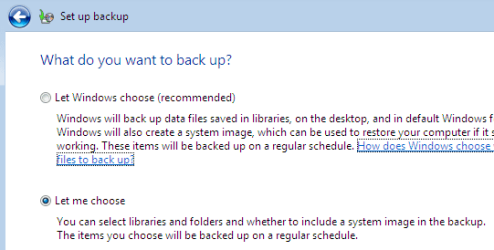
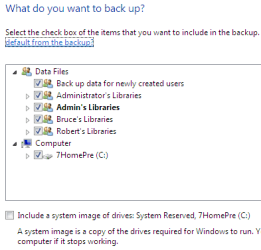
Yes, the ability to create and restore (you can restore an image saved to a partition on a hard drive with either the install DVD or the Repair CD) a hard drive image is built into 7: Just type 'backup' in the search box to find it -->

backup_01.png

backup_02.png
 

My Computer

OS
...
Hello,

Just wanted to put a twist on this thread.
Can I take an image created in windows 7 off of a single drive install and then create a Raid 0 setup with two drives and restore the single disk image to a raid 0 comfiguration?

Thanks!
Doug
 

My Computer

OS
Window 7 ultimate
Hello,

Just wanted to put a twist on this thread.
Can I take an image created in windows 7 off of a single drive install and then create a Raid 0 setup with two drives and restore the single disk image to a raid 0 comfiguration?

Thanks!
Doug


I would guess this should work. The raid controller will mask the drives to appear as one to the OS...so I would think it would look the same way to the backup application.
 

My Computer

Computer Manufacturer/Model Number
Self-Built in July 2009
OS
Windows 7 Ultimate x64
CPU
Intel Q9550 2.83Ghz OC'd to 3.40Ghz
Motherboard
Gigabyte GA-EP45-UD3R rev. 1.1, F12 BIOS
Memory
8GB G.Skill PI DDR2-800, 4-4-4-12 timings
Graphics Card(s)
EVGA 1280MB Nvidia GeForce GTX570
Sound Card
Realtek ALC899A 8 channel onboard audio
Monitor(s) Displays
23" Acer x233H
Screen Resolution
1920x1080
Hard Drives
Intel X25-M 80GB Gen 2 SSD
Western Digital 1TB Caviar Black, 32MB cache. WD1001FALS
PSU
Corsair 620HX modular
Case
Antec P182
Cooling
stock
Keyboard
ABS M1 Mechanical
Mouse
Logitech G9 Laser Mouse
Internet Speed
15/2 cable modem
Other Info
Windows and Linux enthusiast. Logitech G35 Headset.
It will work, but helps a great deal if you have the RAID controller enabled and the drivers installed before loading the image. Or at least it worked for me doing just that in Vista (don't see why 7 would be any different),

1. Install drive(s)
2. Create array in the bios
3. Boot to Windows and install the RAID driver
4. Restart and load image on array
5. Go into the bios and change the boot order to the array
6. Boot to Windows like normal
7. Once up and running, format old OS drive.

For me at least other than more space, Windows didn't even know it had been moved.
 

My Computer

Computer type
PC/Desktop
Computer Manufacturer/Model Number
Me
OS
Win 7 Ultimate x64
CPU
FX-8350 @ 4.6 GHz so far
Motherboard
Asus M5A97 EVO
Memory
ADATA XPG V1 Series Black 8GB DDR3 1600
Graphics Card(s)
Sapphire R9 270x Dual-X
Sound Card
Xonar DGX w/ Corsair Vengence 1300
Monitor(s) Displays
Acer S232HL Abid
Screen Resolution
1920x1080
Hard Drives
120 GB OCZ Vertex 3
500 GB Seagate 7200.12
PSU
Antec Earthwatts 650W Green
Case
Antec Three Hundred
Cooling
Cooler Master 212 EVO
Keyboard
Logitech G510
Mouse
Logitech G500s
Internet Speed
35000/3000
It will work, but helps a great deal if you have the RAID controller enabled and the drivers installed before loading the image. Or at least it worked for me doing just that in Vista (don't see why 7 would be any different),

1. Install drive(s)
2. Create array in the bios
3. Boot to Windows and install the RAID driver
4. Restart and load image on array
5. Go into the bios and change the boot order to the array
6. Boot to Windows like normal
7. Once up and running, format old OS drive.

For me at least other than more space, Windows didn't even know it had been moved.

The slight twist is #3. I have a single drive (current os) and a second one on the way. These are the only two drives for the array. I need to do this by saving the image on a remote drive, then wiping the existing os drive, adding the new drive, and making the Raid0 out of the two. Then boot with the os dvd/recover cd, and then re-image to the array. What do you think? Also, I was worried about the win7 image as I've read on other threads that the image is very picky about seeing new hardware.

Thanks for the help!!
Doug
 

My Computer

OS
Window 7 ultimate
What was your outcome with the above process? I'm getting ready to go from a single SSD C: to two SSD RAID0 C: and want to make no mistakes.
 

My Computer

Computer Manufacturer/Model Number
Custom Build
OS
Windows 7 Professional 64-bit
CPU
Core i7 920 @ 3.32Ghz
Motherboard
MSI X58 Pro
Memory
6GB Mushkin DDR3 1600
Graphics Card(s)
ATI Radeon HD 4650
Sound Card
n/a
Monitor(s) Displays
2 X Dell 2405 FPW
Hard Drives
WDC Caviar Black 500GB - system
Hitachi 80GB backup storage (for now)
DVD RW burner
DVD player
PSU
OCZ 500 watt
Case
Antec 300
Cooling
Thermalright HR-01 CPU Cooler, Thermalright 120mm Fan Duct
ghost 15 has saved the day

Does Windows 7 backup do an image, if not is Ghost 15 good

I have been using ghost 15 for 6 months and just love what it does for my life in front of the computer. In short i get my work done quicker, in a large part not having to mess with windows, I focus on my application, and the task at hand. more info is available, just ask. Cowpatty.
 

My Computer

OS
windows 7 64bit professional
CPU
i7 3ghz
Motherboard
intel DQ57TM,
Memory
12GB
Hard Drives
6gb/second sata quantity =(two)
SSD 80gb quantity =(eight)
Case
home shop made
Other Info
LSI 3ware 9650se 8 port raid controller
LaCie.png


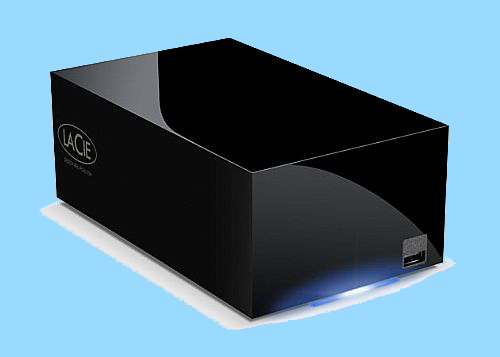
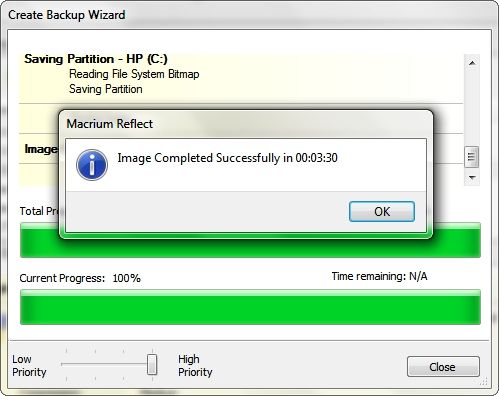
I use a LaCie 2 TB Raid 0 eSATA drive that I back up to using both Windows 7 System Imaging and Macrium Reflect. It backs up a 7.5 GB Macrium Reflect complete Image in 3.5 minutes...

f62ef7a1.jpg


And restores the Image from the Raid 0 drive in 4 minutes and 40 seconds which makes for a very quick recovery form any disaster and a 25 GB Windows 7 System Image only takes about 5 minutes and 45 seconds to restore when using this eSATA Raid 0 drive...

~Maxx~

87e3bf13.png
 

My Computer

Computer Manufacturer/Model Number
HP HPE 270f
OS
Windows 7 x64 Home Premium
CPU
Intel Core i7 930 @ 2.8 Ghz Socket 1366 LGA
Motherboard
Pegatron Truckee v1.04E41
Memory
8 GB 1366 Mhz DDR3 (PC3-10700) RAM
Graphics Card(s)
ATI Radeon 5770 1 GB DDR5 RAM
Sound Card
Realtech High Definition
Monitor(s) Displays
32" Sony Bravia
Screen Resolution
1366 X 768
Hard Drives
Intel 25nm 120 GB Series 320 SSD HD Tune- 265 MBps Read/ 130 MBps Write

LaCie 1TB + 1TB RAID 0 eSATA Drive HD Tune- 160 MBps Read/ 90 MBps Write
Keyboard
Logitech Illuminated
Mouse
Logitech MX Revolution
Internet Speed
36.4 Mbps Maximum on a 37 Mbps Motorola SB501 Modem
It will work, but helps a great deal if you have the RAID controller enabled and the drivers installed before loading the image. Or at least it worked for me doing just that in Vista (don't see why 7 would be any different),

1. Install drive(s)
2. Create array in the bios
3. Boot to Windows and install the RAID driver
4. Restart and load image on array
5. Go into the bios and change the boot order to the array
6. Boot to Windows like normal
7. Once up and running, format old OS drive.

For me at least other than more space, Windows didn't even know it had been moved.


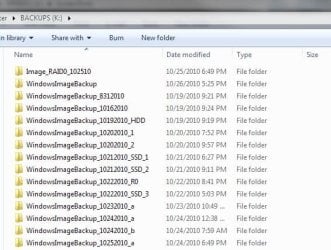
Win 7-64 Pro here. I am also running RAID-0 and I image with Win 7 backup daily since I turned off my system restore.

How I restore my image is almost the same way Stormy did. Except after step #3, I don't restart or I'll lose the "loaded RAID driver". Then install my USB 3.0 driver (my backups are on external USB 3.0 docking.

After RAID driver loaded I use diskpart to clean and create partition and assigned drive letter. Then just restore the image from my ext USB docking HDD.

So basically I am done at step #3.

I wasn't kidding I image my everyday maybe more then one if I did something dump I can go back in no time :D just keeps rename the windowsimage directories :D
 

Attachments

  • bkups.JPG
    bkups.JPG
    52.6 KB · Views: 66

My Computer

Computer Manufacturer/Model Number
Homebrew
OS
Windows 7 Pro 64bit
CPU
AMD Phenom II X6 1090T at 4013MHz
Motherboard
ASUS M4A87TD/USB 3.0
Memory
8GB A-DATA 1600
Graphics Card(s)
GTX460
Sound Card
On-board
Monitor(s) Displays
ACER H233H and ACER X203H
Hard Drives
2x Crucial C300-64GB RAID 0
2x WD 1TB BLACK RAID 0
1x WD 1TB BLACK
1x WD 1TB GREEN
PSU
750 WATTS
Case
Antec Three Hundred
Cooling
Zalman CNPS10X Performa (Push/Pull)
Keyboard
M$
Mouse
M$
Internet Speed
Verizon FiOS 20/20
Back
Top