RAID Controller causes bluescreens, error BCCode: 51

drfsupercenter

New member
Power User
Local time
5:06 PM
Messages
198
Just a quick backstory before I post the details.

I am currently living in Florida, and won't be back at home (Michigan) until the end of March. I built a computer to record TV shows, it's basically just standard hardware ($60 motherboard, some budget RAM sticks, an AMD Radeon 5570 video card, etc), with the Ceton InfiniTV tuner as its main component. Using a CableCARD from my cable service in Michigan, I can record up to 4 shows at once, and essentially use this computer as a giant DVR.

OS-wise, it's running Windows 7 Enterprise x64 with SP1. (Why Enterprise? I'm a TechNet member and have one of those Enterprise keys that can be activated 500 times, so I figured I'd use it for this. Why not, right?) All the TV recording functions are done through Windows Media Center.

Before about a month ago, it just had a couple of 2TB hard drives for storing my recordings. But given that I've had this computer for a couple years, the hard drives would fill up often and I had to keep moving my recordings to another computer. I had an external RAID storage device with about 12TB of combined storage, and stored my stuff on there. Until a few months ago, when I tried to add another hard drive to the array and the entire thing broke on me, due to it being a really cheap external enclosure.

After recovering what I could, I sold off the drives and got myself a set of 8 3TB Western Digital Red drives, as those are specially made for RAID storage. I figured it makes more sense to just store all of the files to the TV-recording machine, as that will ultimately save time in the long run when it comes to moving files around.

So I got myself a RAID card and some hotswap bays (so that my mother can easily swap drives out if they fail, since I won't be home most of the time) and set it all up.

However, ever since, the computer will blue-screen randomly and I can't figure out why.


The actual RAID hardware works fine. It sees all 8 hard drives, Windows shows the driver as working properly, and I can use the MegaRAID software to manage it. I've created a RAID5 array with 21TB, and can copy data to and from it. Using CrystalDiskMark, I can confirm that it has pretty normal read and write speeds for an array of that size.

When it does bluescreen, it gives me a "memory" error. As in, the main cause for that particular error is because of the memory. So I used both the Windows built-in RAM diagnostic, and Memtest x86+, and both of those came back fine with no errors. Considering that it never crashed before adding the RAID hardware, I would assume it has to 3do with the RAID card... but why? The drivers are installed properly and my computer can see the partition fine.

Here's some more info. The most recent bluescreen (Actually, this one shows as a registry error, not memory):
Code:
012613-47517-01.dmp    1/26/2013 3:55:14 PM    REGISTRY_ERROR    0x00000051    00000000`00000001    fffff8a0`0190b010    00000000`31ec7bdb    00000000`00000465    ntoskrnl.exe    ntoskrnl.exe+7efc0    NT Kernel & System    Microsoft® Windows® Operating System    Microsoft Corporation    6.1.7601.17944 (win7sp1_gdr.120830-0333)    x64    ntoskrnl.exe+7efc0                    C:\Windows\Minidump\012613-47517-01.dmp    4    15    7601    275,736

Here's one from the time before last, that shows MEMORY_MANAGEMENT like most of them:
Code:
012413-47439-01.dmp    1/24/2013 12:20:23 AM    MEMORY_MANAGEMENT    0x0000001a    00000000`00041287    00000000`00000030    00000000`00000000    00000000`00000000    ntoskrnl.exe    ntoskrnl.exe+7efc0    NT Kernel & System    Microsoft® Windows® Operating System    Microsoft Corporation    6.1.7601.17944 (win7sp1_gdr.120830-0333)    x64    ntoskrnl.exe+7efc0                    C:\Windows\Minidump\012413-47439-01.dmp    4    15    7601    275,736

If anyone wants the .dmp files, I'd be happy to upload them. Using Nirsoft's tool, I can see a ton of the bluescreen history.

But here's the really weird part. I have my computer set to automatically reboot when it bluescreens (you know, the default in Windows 7?), but yet it doesn't. My mom tells me that when it crashes, there is NOTHING on-screen (I've got a monitor hooked up to it so she can read off diagnostics if needed), that the light is green (meaning there's a signal, orange is no signal) but totally black. My friend suggested that the blue-screen itself crashed... is that possible? I've never heard of that.

If you guys could help me determine if this is some weird hardware defect, opposed to a driver or system problem, that would be appreciated.
 

My Computer

Computer Manufacturer/Model Number
MSI
OS
Windows 7 Ultimate and Ubuntu 9.04
CPU
Intel Core 2 Quad
Memory
4GB DDR3 RAM
Graphics Card(s)
NVIDIA GTS 160M (1GB GPU)
Sound Card
Realtek HD Audio
Screen Resolution
1680x1050
Hard Drives
500GB SATA

My Computer

Computer type
PC/Desktop
Computer Manufacturer/Model Number
Golden Mk. I.4
OS
Windows 10 Pro x64 ; Xubuntu x64
CPU
Intel i7 860 @ 2.80 GHz O/C'ed to 4.0GHz
Motherboard
Gigabyte P55A-UD3R Rev.1. Award BIOS F13
Memory
16GB Corsair Vengance DDR3 @ 661 MHz Dual Channel (9-9-9-24)
Graphics Card(s)
EVGA NVidia GTX 560 1024MB
Sound Card
Realtek Integrated
Monitor(s) Displays
Dual Samsung SyncMaster 2494HS
Screen Resolution
1920*1080 and 1920*1080
Hard Drives
1*Samsung 840 EVO 120GB SSD;
1*OCZ Vertex 2 60GB SSD;
2*Samsung F3 SpinPoint 1TB in RAID0;
1*Samsung F1 SpinPoint 1TB;
2*Western Digital 1TB External USB 3.0
1*Western Digital 500GB External USB 3.0
1*Seagate 500GB External USB 2.0
PSU
Thermaltake ToughPower QFan 750W
Case
Thermaltake Element S VK60001W2Z
Cooling
Corsair H60 Water Cooling, 2*230mm and 2*80mm case fans
Keyboard
Logitech G110
Mouse
Logitech MX518
Alright, here you go, a really huge amount of files from the utility.
 

Attachments

My Computer

Computer Manufacturer/Model Number
MSI
OS
Windows 7 Ultimate and Ubuntu 9.04
CPU
Intel Core 2 Quad
Memory
4GB DDR3 RAM
Graphics Card(s)
NVIDIA GTS 160M (1GB GPU)
Sound Card
Realtek HD Audio
Screen Resolution
1680x1050
Hard Drives
500GB SATA
On another note, if someone could figure out how to make my computer automatically reboot (like it should) when it crashes, that would help me a lot. As it is, every time it goes offline, I have to call my mom back in Michigan and have her hit the reset button. I can only access the computer using TeamViewer or VNC, so I have no access to reboot it when it bluescreens.
 

My Computer

Computer Manufacturer/Model Number
MSI
OS
Windows 7 Ultimate and Ubuntu 9.04
CPU
Intel Core 2 Quad
Memory
4GB DDR3 RAM
Graphics Card(s)
NVIDIA GTS 160M (1GB GPU)
Sound Card
Realtek HD Audio
Screen Resolution
1680x1050
Hard Drives
500GB SATA
Bump
 

My Computer

Computer Manufacturer/Model Number
MSI
OS
Windows 7 Ultimate and Ubuntu 9.04
CPU
Intel Core 2 Quad
Memory
4GB DDR3 RAM
Graphics Card(s)
NVIDIA GTS 160M (1GB GPU)
Sound Card
Realtek HD Audio
Screen Resolution
1680x1050
Hard Drives
500GB SATA
Sorry - I had missed that. I'll take a look this evening, but I might need to draft in some help on this.

Regards,
Golden
 

My Computer

Computer type
PC/Desktop
Computer Manufacturer/Model Number
Golden Mk. I.4
OS
Windows 10 Pro x64 ; Xubuntu x64
CPU
Intel i7 860 @ 2.80 GHz O/C'ed to 4.0GHz
Motherboard
Gigabyte P55A-UD3R Rev.1. Award BIOS F13
Memory
16GB Corsair Vengance DDR3 @ 661 MHz Dual Channel (9-9-9-24)
Graphics Card(s)
EVGA NVidia GTX 560 1024MB
Sound Card
Realtek Integrated
Monitor(s) Displays
Dual Samsung SyncMaster 2494HS
Screen Resolution
1920*1080 and 1920*1080
Hard Drives
1*Samsung 840 EVO 120GB SSD;
1*OCZ Vertex 2 60GB SSD;
2*Samsung F3 SpinPoint 1TB in RAID0;
1*Samsung F1 SpinPoint 1TB;
2*Western Digital 1TB External USB 3.0
1*Western Digital 500GB External USB 3.0
1*Seagate 500GB External USB 2.0
PSU
Thermaltake ToughPower QFan 750W
Case
Thermaltake Element S VK60001W2Z
Cooling
Corsair H60 Water Cooling, 2*230mm and 2*80mm case fans
Keyboard
Logitech G110
Mouse
Logitech MX518
OK. Thats a mass of bugcheck codes, but 0x50 and 0x1A are the most common.

You said that you had already run MemTest86+. How long did you run it for> We recommend a minimum of 7 passes. If you didn't run it for that long, please do so again reporting back afterwards.

http://www.sevenforums.com/tutorials/105647-ram-test-memtest86.html

Also, please check to see that you have the latest RAID card driver installed and updated.

Code:
crash dump file: E:\Debug5\011013-45677-01.dmp
uptime: 14:21:39
This was probably caused by the following module: ntkrnlmp.exe (nt!KeBugCheckEx+0x0) 
Bugcheck code: 0x3B (0xC0000005, 0xFFFFF80002F9C382, 0xFFFFF8800A578A60, 0x0)
Error: SYSTEM_SERVICE_EXCEPTION
Bug check description: This indicates that an exception happened while executing a routine that transitions from non-privileged code to privileged code. 
This appears to be a typical software driver bug and is not likely to be caused by a hardware problem. 
The crash took place in the Windows kernel. Possibly this problem is caused by another driver that cannot be identified at this time.

Code 0x3B could be a malware problem. Which anti-virus software is currently installed?

Regards,
Golden
 

My Computer

Computer type
PC/Desktop
Computer Manufacturer/Model Number
Golden Mk. I.4
OS
Windows 10 Pro x64 ; Xubuntu x64
CPU
Intel i7 860 @ 2.80 GHz O/C'ed to 4.0GHz
Motherboard
Gigabyte P55A-UD3R Rev.1. Award BIOS F13
Memory
16GB Corsair Vengance DDR3 @ 661 MHz Dual Channel (9-9-9-24)
Graphics Card(s)
EVGA NVidia GTX 560 1024MB
Sound Card
Realtek Integrated
Monitor(s) Displays
Dual Samsung SyncMaster 2494HS
Screen Resolution
1920*1080 and 1920*1080
Hard Drives
1*Samsung 840 EVO 120GB SSD;
1*OCZ Vertex 2 60GB SSD;
2*Samsung F3 SpinPoint 1TB in RAID0;
1*Samsung F1 SpinPoint 1TB;
2*Western Digital 1TB External USB 3.0
1*Western Digital 500GB External USB 3.0
1*Seagate 500GB External USB 2.0
PSU
Thermaltake ToughPower QFan 750W
Case
Thermaltake Element S VK60001W2Z
Cooling
Corsair H60 Water Cooling, 2*230mm and 2*80mm case fans
Keyboard
Logitech G110
Mouse
Logitech MX518
Also, do some general USB troubleshooting. For the port, first, uninstall and reinstall the USB ports drivers.

  1. Right click on Computer icon > manage. It will open the computer management window.
  2. Click on "Device Manager" in the left pane, it will list all installed devices up.
  3. Expand "USB Serial Bus Controllers" by clicking on the triangle in front of it.
  4. Click on one item to select, then right click and uninstall.
  5. Do the same for all.
  6. Restart the computer.
  7. At restart, windows will auto configure the appropriate drivers.
And, Disable USB Selective Suspense too.
USB Selective Suspend - Turn On or Off

For the devices, first, detach all the USB devices other than the keyboard and mouse.
Then, Update the drivers for them all, including the keyboard and mouse, if any third party drivers are installed for them.

Update your ATI/AMD display driver.
You can get it from the link in our forum, http://www.sevenforums.com/graphic-...alyst-video-driver-windows-7-a.html#post17671, or you may go to AMD Graphics Driver and Software and opt for Automatically Detect and Install the appropriate driver for your card.
During installation, you may opt for advanced installation, and install the display driver only, not the Catalyst Control Center.

And then enable Driver Verifier to monitor the drivers.
Driver Verifier - Enable and Disable
Run Driver Verifier for 24 hours or the occurrence of the next crash, whichever is earlier.

   Information
Why Driver Verifier:
It puts a stress on the drivers, ans so it makes the unstable drivers crash. Hopefully the driver that crashes is recorded in the memory dump.

How Can we know that DV is enabled:
It will make the system bit of slow, laggy.

   Warning
Before enabling DV, make it sure that you have earlier System restore points made in your computer. You can check it easily by using CCleaner looking at Tools > System Restore.

If there is no points, make a System Restore Point manually before enabling DV.

   Tip


Let us know the results, with the subsequent crash dumps, if any.
 

My Computer

Computer type
PC/Desktop
Computer Manufacturer/Model Number
Self Assembled
OS
Microsoft Windows 10 Pro Insider Preview 64-bit
CPU
Intel(R) Core(TM) i3-4130 CPU @ 3.40GHz
Motherboard
Gigabyte Technology Co., Ltd. B85M-D3H
Memory
Corsair Vengence 4GB x2 (8.00GB Dual-Channel DDR3 @ 798MHz)
Graphics Card(s)
2047MB GeForce GTS 450 (ZOTAC International)
Sound Card
Onboard (Realtek High Definition Audio)
Monitor(s) Displays
LG Flatron E2040T
Screen Resolution
1600x900
Hard Drives
Western Digital 1 TB
Seagate 500 GB
PSU
Corsair VS550
Case
Cooler Master K380
Cooling
Cooler Master Seidon 120V Plus
Keyboard
Logitech MK260r
Mouse
Logitech MK260r
Internet Speed
PMPL Broadband
Antivirus
Windows Defender + MBAM
Browser
Firefox
Other Info
Dell Studio 15" Laptop
OK. Thats a mass of bugcheck codes, but 0x50 and 0x1A are the most common.

You said that you had already run MemTest86+. How long did you run it for> We recommend a minimum of 7 passes. If you didn't run it for that long, please do so again reporting back afterwards.

Just once. I've never seen the need to have more than 1 "pass" if there are no errors. But I'm happy to try it again...

Also, please check to see that you have the latest RAID card driver installed and updated.
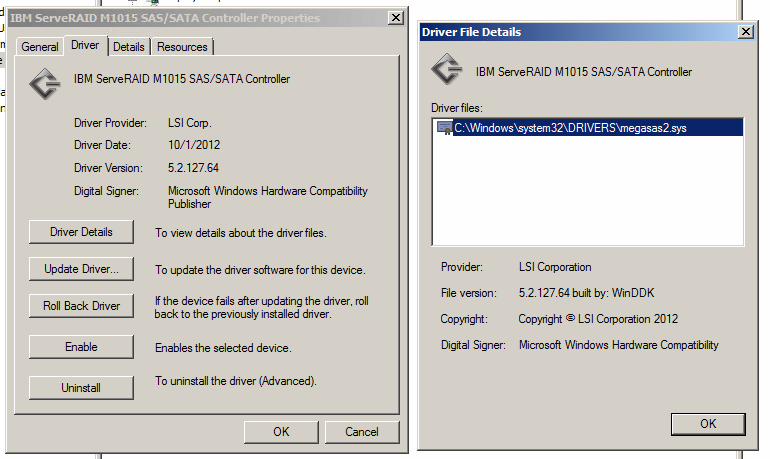
Yes, as far as I know it's the latest one.

uejWPbV.png


If someone who's familiar with that RAID card could verify, there's a screenshot of the driver version.

Code 0x3B could be a malware problem. Which anti-virus software is currently installed?

None. I don't ever download files on that machine, it's only connected to the Internet at all to download guide listings and to allow remote access. It's definitely not a virus problem, though, as I haven't had a single bluescreen since disabling the RAID controller... my money's on some sort of driver issue with the controller.

Trying Arc's suggestion about the USB stuff now.
 

My Computer

Computer Manufacturer/Model Number
MSI
OS
Windows 7 Ultimate and Ubuntu 9.04
CPU
Intel Core 2 Quad
Memory
4GB DDR3 RAM
Graphics Card(s)
NVIDIA GTS 160M (1GB GPU)
Sound Card
Realtek HD Audio
Screen Resolution
1680x1050
Hard Drives
500GB SATA
Well THAT'S interesting. As soon as I tried to uninstall one of the USB drivers, it bluescreened!

Maybe it has something to do with USB instead of the RAID controller... which is just bizarre if you ask me! My motherboard has some USB 3.0 ports, which required the drivers from my motherboard's CD, everything else was installed when I installed the OS. Now I'm confused.

--EDIT--

Actually, I'm wrong. LOL. It's because I have a USB Wi-Fi adapter, so by removing all the USB drivers, it disconnected itself from the Internet.

I'll call my mom later tonight and have her do the rest of them, I suppose.
 
Last edited:

My Computer

Computer Manufacturer/Model Number
MSI
OS
Windows 7 Ultimate and Ubuntu 9.04
CPU
Intel Core 2 Quad
Memory
4GB DDR3 RAM
Graphics Card(s)
NVIDIA GTS 160M (1GB GPU)
Sound Card
Realtek HD Audio
Screen Resolution
1680x1050
Hard Drives
500GB SATA

My Computer

Computer type
PC/Desktop
Computer Manufacturer/Model Number
Self Assembled
OS
Microsoft Windows 10 Pro Insider Preview 64-bit
CPU
Intel(R) Core(TM) i3-4130 CPU @ 3.40GHz
Motherboard
Gigabyte Technology Co., Ltd. B85M-D3H
Memory
Corsair Vengence 4GB x2 (8.00GB Dual-Channel DDR3 @ 798MHz)
Graphics Card(s)
2047MB GeForce GTS 450 (ZOTAC International)
Sound Card
Onboard (Realtek High Definition Audio)
Monitor(s) Displays
LG Flatron E2040T
Screen Resolution
1600x900
Hard Drives
Western Digital 1 TB
Seagate 500 GB
PSU
Corsair VS550
Case
Cooler Master K380
Cooling
Cooler Master Seidon 120V Plus
Keyboard
Logitech MK260r
Mouse
Logitech MK260r
Internet Speed
PMPL Broadband
Antivirus
Windows Defender + MBAM
Browser
Firefox
Other Info
Dell Studio 15" Laptop
OK. Don't forget to run MemTest86+ for a minimum of 7 passes - in the many thousands of BSOD analysis we perform here, we have estbalsihed that as being the number required to provide a reliable guide as to the stability of the RAM.

It will take several hours, so we recommend an overnight job on this.
 

My Computer

Computer type
PC/Desktop
Computer Manufacturer/Model Number
Golden Mk. I.4
OS
Windows 10 Pro x64 ; Xubuntu x64
CPU
Intel i7 860 @ 2.80 GHz O/C'ed to 4.0GHz
Motherboard
Gigabyte P55A-UD3R Rev.1. Award BIOS F13
Memory
16GB Corsair Vengance DDR3 @ 661 MHz Dual Channel (9-9-9-24)
Graphics Card(s)
EVGA NVidia GTX 560 1024MB
Sound Card
Realtek Integrated
Monitor(s) Displays
Dual Samsung SyncMaster 2494HS
Screen Resolution
1920*1080 and 1920*1080
Hard Drives
1*Samsung 840 EVO 120GB SSD;
1*OCZ Vertex 2 60GB SSD;
2*Samsung F3 SpinPoint 1TB in RAID0;
1*Samsung F1 SpinPoint 1TB;
2*Western Digital 1TB External USB 3.0
1*Western Digital 500GB External USB 3.0
1*Seagate 500GB External USB 2.0
PSU
Thermaltake ToughPower QFan 750W
Case
Thermaltake Element S VK60001W2Z
Cooling
Corsair H60 Water Cooling, 2*230mm and 2*80mm case fans
Keyboard
Logitech G110
Mouse
Logitech MX518
OK, so here's the thing. I have both a USB mouse and a USB network connection, so I cannot really remove all of them without disabling all that. I had my mom reboot it for me using the keyboard and pressing ALT+F4 a few times.

We did this several times, and removing any of the Root Hubs just disables everything USB, essentially locking us out.

If anything, I am going to guess that this one would be the one causing problems:
ASMedia XHCI Controller
PCI\VEN_1B21&DEV_1042&SUBSYS_84881043&REV_00

The rest of them are either: Standard Enhanced PCI to USB Host Controller, Standard OpenHCD USB Host Controller, or a bunch of USB Root Hub's.

As far as Safe Mode goes, wouldn't that still disable the USB mouse? So even if I call my mom and have her do it, unless there's a way to use command line/keyboard controls to remove the drivers, it's just not going to happen.

I will have her run Memtest overnight and see what happens.

And I can do the rest of that stuff tomorrow. First priority after the memtest will be updating the AMD graphics drivers, though I highly doubt that is the issue as I JUST installed the OS, along with all the drivers, less than a month ago.
 

My Computer

Computer Manufacturer/Model Number
MSI
OS
Windows 7 Ultimate and Ubuntu 9.04
CPU
Intel Core 2 Quad
Memory
4GB DDR3 RAM
Graphics Card(s)
NVIDIA GTS 160M (1GB GPU)
Sound Card
Realtek HD Audio
Screen Resolution
1680x1050
Hard Drives
500GB SATA
We need all the system specs of the computer you are trying to fix.
This will help: Speccy Free System information Utility
Enter them in the 'My System Specs' drop box at the lower left of any of your posts, so everyone can see them.
"budget RAM" always throws up a red flag, this type of RAM is very prone to errors.
Memtest86+ runs different tests with each pass, this is why it is important to run 7 Full Passes.

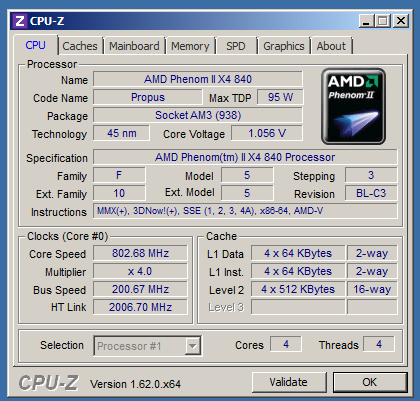
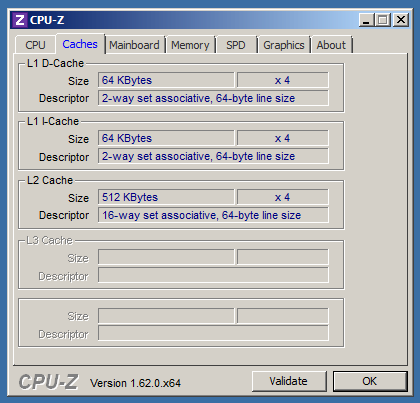
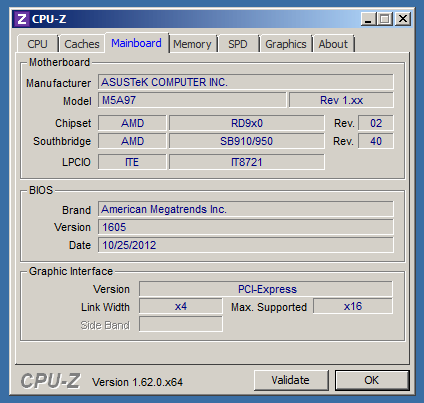
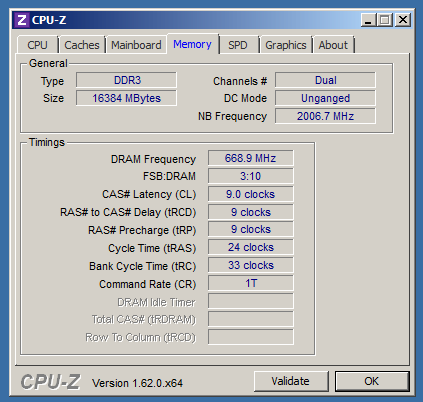
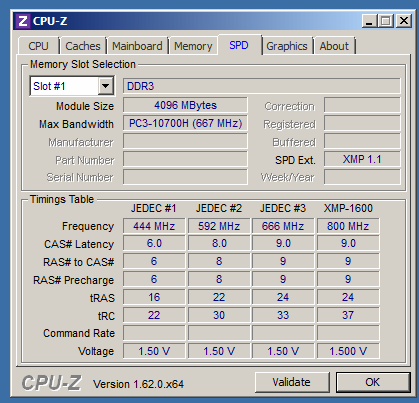
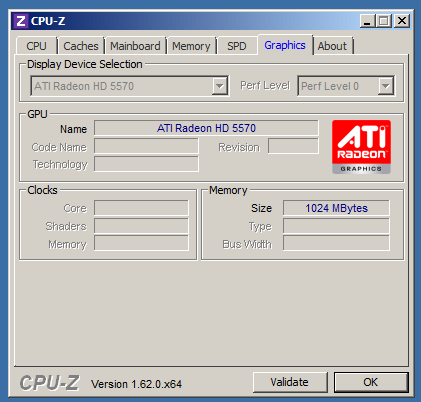
Can you download CPUZ and post a snip of the CPU, Mainboard, Memory, and SPD tabs.
For posting the information , enter 'Snipping tool' in the Start button > Search box, hit enter. Select the area you want to post and save to a convenient place.
How to Post a Screenshot in Seven Forums
If your Mom can do this, go to your BIOS and tell us what the CPU, RAM and the CPU integrated memory controller voltages are.

Code 0x3B could be a malware problem. Which anti-virus software is currently installed?

None. I don't ever download files on that machine, it's only connected to the Internet at all to download guide listings and to allow remote access. It's definitely not a virus problem, though, as I haven't had a single bluescreen since disabling the RAID controller... my money's on some sort of driver issue with the controller.
You need to run an Anti-Virus.
Microsoft Security Essentials*- Free Antivirus for Windows

I have a USB Wi-Fi adapter
We have seen these cause many issues/crashes.
Recommend to get a PCI wireless card, they are cheap and much more reliable.

If anything, I am going to guess that this one would be the one causing problems:
ASMedia XHCI Controller
The ASMedia can be problematic.
Is it a Intel or AMD board?
If it's an Intel board use the Intel USB ports for testing as they are usually more stable.

Graphics card drivers are troublesome at the best of times, it's not unusual to have the newest drivers crash, sometimes you need to install older drivers to find a stable one.
 

My Computer

Computer type
PC/Desktop
Computer Manufacturer/Model Number
76~2.0
OS
Windows 7 Ult x64 - SP1/ Windows 8 Pro x64
CPU
Intel Core i5-3570K 4.6GHz
Motherboard
Gigabyte GA-Z77X UD3H, f18
Memory
8GB (2X4GB) DDR3 1600 Corsair Vengeance CL8 1.5v
Graphics Card(s)
Sapphire HD 7770 Vapor-X OC 1GB DDR5
Sound Card
Onboard VIA VT2021
Monitor(s) Displays
22" LCD Dell
Screen Resolution
1680x1050
Hard Drives
Samsung 840Pro 128GB SSD,
Seagate Barracuda 500GB SATA2 7200rpm 32MB cache, Seagate Barracuda 1TB SATA2 7200rpm 32MB cache,
PSU
Corsair HX650W
Case
Cooler Master Storm Scout
Cooling
Corsair H80 2x12cm Noctua NF P12 , 2x14cm case fans
Keyboard
Logitech Wave
Mouse
CM Sentinel
Internet Speed
Dismal
Antivirus
Avast
Browser
Opera Next
Other Info
Haswell laptop: HP Envy 17t-j, i7-4700MQ, GeForce 740M 2GB DDR3, 17.3" Full HD 1920x1080, 16GB RAM, Samsung 840 Pro 128GB, 1TB Hitachi 7200 HDD,
Desktop: eSATA ports,
External eSATA Seagate 500GB SATA2 7200rpm,
External WD USB 500GB
It's an AMD board.

CPU-Z Validator 3.1
here's a CPU-Z dump I did a couple weeks ago.

So far the memtest is on pass 5 and still no errors. It's been running for almost 24 hours now, and taking its time.

I suppose I can have her read off the voltages after the memtest is done. As far as Wi-Fi goes, sadly I'm stuck for now because my mom isn't good with opening up computers, so there's really no way I can get access to the inside of the case until I'm home in two months.
 

My Computer

Computer Manufacturer/Model Number
MSI
OS
Windows 7 Ultimate and Ubuntu 9.04
CPU
Intel Core 2 Quad
Memory
4GB DDR3 RAM
Graphics Card(s)
NVIDIA GTS 160M (1GB GPU)
Sound Card
Realtek HD Audio
Screen Resolution
1680x1050
Hard Drives
500GB SATA
Always post information like this so it's visible for all to see.
For posting the information , enter 'Snipping tool' in the Start button > Search box, hit enter. Select the area you want to post and save to a convenient place.
How to Post a Screenshot in Seven Forums
CPUZ validation.PNG

When you get a chance, post the other information requested: Mainboard, Memory, and SPD tabs.

The Bus speed looks like you're overclocking, if you are, return everything to Optimized Defaults while testing.
Your RAM is running at 722.4MHz which gives actual speed of 1444.8MHz.
There is a known issue with this AMD CPU product line for running RAM above 1333MHz.
Returning the BIOS to Optimized Defaults should fix this and likely the problems you are having. I have fixed many AMD system issues by returning the RAM frequency to 1333MHz.

16GB RAM will take a long time to make 7 full passes with memtest86+.
Let us know the memtest86+ results.
 

My Computer

Computer type
PC/Desktop
Computer Manufacturer/Model Number
76~2.0
OS
Windows 7 Ult x64 - SP1/ Windows 8 Pro x64
CPU
Intel Core i5-3570K 4.6GHz
Motherboard
Gigabyte GA-Z77X UD3H, f18
Memory
8GB (2X4GB) DDR3 1600 Corsair Vengeance CL8 1.5v
Graphics Card(s)
Sapphire HD 7770 Vapor-X OC 1GB DDR5
Sound Card
Onboard VIA VT2021
Monitor(s) Displays
22" LCD Dell
Screen Resolution
1680x1050
Hard Drives
Samsung 840Pro 128GB SSD,
Seagate Barracuda 500GB SATA2 7200rpm 32MB cache, Seagate Barracuda 1TB SATA2 7200rpm 32MB cache,
PSU
Corsair HX650W
Case
Cooler Master Storm Scout
Cooling
Corsair H80 2x12cm Noctua NF P12 , 2x14cm case fans
Keyboard
Logitech Wave
Mouse
CM Sentinel
Internet Speed
Dismal
Antivirus
Avast
Browser
Opera Next
Other Info
Haswell laptop: HP Envy 17t-j, i7-4700MQ, GeForce 740M 2GB DDR3, 17.3" Full HD 1920x1080, 16GB RAM, Samsung 840 Pro 128GB, 1TB Hitachi 7200 HDD,
Desktop: eSATA ports,
External eSATA Seagate 500GB SATA2 7200rpm,
External WD USB 500GB
Yeah, I did try to overclock the RAM, because it's spec 1600MHz and the "optimal defaults" were something silly like 1066.

But the odd thing was that as soon as I saved my changes and rebooted, it changed from 1600 down to that 1444 approximately, which I don't quite get... every other motherboard I have used will do even increments according to the DDR3 overclocking specs.

If I did any faster than 1444 it would bluescreen when booting, so I changed it back. I suppose I can have her reset it to optimized defaults and see if that helps. I will know the memtest results in the morning, it was still at 6 passes when my mom went to bed.
 

My Computer

Computer Manufacturer/Model Number
MSI
OS
Windows 7 Ultimate and Ubuntu 9.04
CPU
Intel Core 2 Quad
Memory
4GB DDR3 RAM
Graphics Card(s)
NVIDIA GTS 160M (1GB GPU)
Sound Card
Realtek HD Audio
Screen Resolution
1680x1050
Hard Drives
500GB SATA
Alright, it got all the way to 10 passes 0 errors, so I think we can rule out defective RAM.

Here's a photo gallery of various BIOS screens that I had my mom take:
Danny's computer screen - Imgur

I'd hotlink them but they're pretty big photos and I'm not sure what info you guys want. We did load optimized defaults, so I see the RAM is back to 1333... or supposedly it is. I will do CPU-Z in a bit and post those as well.
 

My Computer

Computer Manufacturer/Model Number
MSI
OS
Windows 7 Ultimate and Ubuntu 9.04
CPU
Intel Core 2 Quad
Memory
4GB DDR3 RAM
Graphics Card(s)
NVIDIA GTS 160M (1GB GPU)
Sound Card
Realtek HD Audio
Screen Resolution
1680x1050
Hard Drives
500GB SATA
CtqB0Cw.png


5xPOWBZ.png


PHVzK7T.png

And before anyone asks, I have my graphics card in the x4 slot because I need x8 bandwidth for the RAID controller, and my board only has two x16-sized slots.

5HNnPYF.png


Eobk0D1.png

(All four slots are the same, I have 4 identical RAM sticks.)

6cpsCun.png


How's that look? Now that the RAM is running at normal speed again, I might re-enable the RAID controller and see what happens.

--EDIT--

And here's from Speccy:
http://speccy.piriform.com/results/ZR2WFPPqQQjd3IDrZnvdJKX
 
Last edited:

My Computer

Computer Manufacturer/Model Number
MSI
OS
Windows 7 Ultimate and Ubuntu 9.04
CPU
Intel Core 2 Quad
Memory
4GB DDR3 RAM
Graphics Card(s)
NVIDIA GTS 160M (1GB GPU)
Sound Card
Realtek HD Audio
Screen Resolution
1680x1050
Hard Drives
500GB SATA
OK. Unless Dave has other suggestions, re-enable the controller and run your system as normal. Lets see if those BSOD's still appear.
 

My Computer

Computer type
PC/Desktop
Computer Manufacturer/Model Number
Golden Mk. I.4
OS
Windows 10 Pro x64 ; Xubuntu x64
CPU
Intel i7 860 @ 2.80 GHz O/C'ed to 4.0GHz
Motherboard
Gigabyte P55A-UD3R Rev.1. Award BIOS F13
Memory
16GB Corsair Vengance DDR3 @ 661 MHz Dual Channel (9-9-9-24)
Graphics Card(s)
EVGA NVidia GTX 560 1024MB
Sound Card
Realtek Integrated
Monitor(s) Displays
Dual Samsung SyncMaster 2494HS
Screen Resolution
1920*1080 and 1920*1080
Hard Drives
1*Samsung 840 EVO 120GB SSD;
1*OCZ Vertex 2 60GB SSD;
2*Samsung F3 SpinPoint 1TB in RAID0;
1*Samsung F1 SpinPoint 1TB;
2*Western Digital 1TB External USB 3.0
1*Western Digital 500GB External USB 3.0
1*Seagate 500GB External USB 2.0
PSU
Thermaltake ToughPower QFan 750W
Case
Thermaltake Element S VK60001W2Z
Cooling
Corsair H60 Water Cooling, 2*230mm and 2*80mm case fans
Keyboard
Logitech G110
Mouse
Logitech MX518
Back
Top