Good results on memtest86+, but I wouldn't rule out the RAM. That is the best known RAM test, it may still be in need of some adjustments.
After going through several of your debug files, there is a general theme of memory issues, which leads me to suspect the RAM. Although could be the graphics RAM or the corrupt file system/HDD error for the page file.
The other issue I see is on the forth BIOS screen shot, CPU temp 49°C, that is hot for an AMD CPU, they usually run very cool.
You need to remove the CPU cooler, clean surfaces with alcohol, re-apply thermal paste. Make sure the CPU cooler is firmly attached, too loose or too tight will cause high temps.
You should run a CPU stress test to verify.
OCCT stability checking tool Run the CPU:OCCT test for at least 30 minutes, be sure to monitor your CPU and GPU temps.
Set the time before you start.
When its done, pass or fail, it will make some graphs. Post these here as they are useful for analyses.
Use Core Temp , to check the CPU temps when at idle, under load and/or testing.
Let us know the minimum and maximum temps you get.
Max CPU core temp for your CPU is 76°C.
Find the CPU/NB and DRAM voltage in your BIOS. If it's on 'Auto' you may need to increase it by the smallest amount available to get the actual voltage reading.
We can make a couple of RAM settings changes with the above information, and see if they will make a difference.
Let us know if there are any more crashes, as always, post the full crash reports.
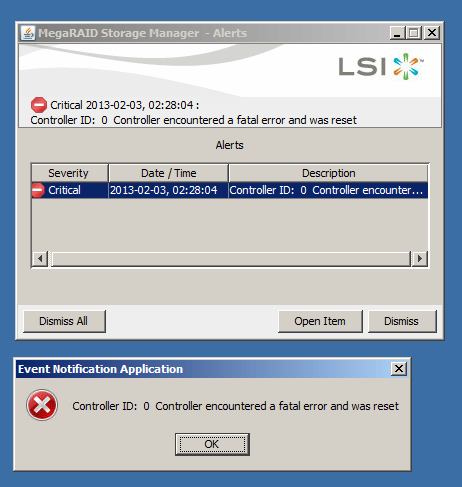
Do you know what 'MR_MONITOR' might be related to?
It's showing a lot of errors in your App Events Log.
There are also a lot of USB errors, not much info to go on but I would suspect the wireless USB dongle.
After going through several of your debug files, there is a general theme of memory issues, which leads me to suspect the RAM. Although could be the graphics RAM or the corrupt file system/HDD error for the page file.
The other issue I see is on the forth BIOS screen shot, CPU temp 49°C, that is hot for an AMD CPU, they usually run very cool.
You need to remove the CPU cooler, clean surfaces with alcohol, re-apply thermal paste. Make sure the CPU cooler is firmly attached, too loose or too tight will cause high temps.
You should run a CPU stress test to verify.
OCCT stability checking tool Run the CPU:OCCT test for at least 30 minutes, be sure to monitor your CPU and GPU temps.
Set the time before you start.
When its done, pass or fail, it will make some graphs. Post these here as they are useful for analyses.
Use Core Temp , to check the CPU temps when at idle, under load and/or testing.
Let us know the minimum and maximum temps you get.
Max CPU core temp for your CPU is 76°C.
Find the CPU/NB and DRAM voltage in your BIOS. If it's on 'Auto' you may need to increase it by the smallest amount available to get the actual voltage reading.
We can make a couple of RAM settings changes with the above information, and see if they will make a difference.
Let us know if there are any more crashes, as always, post the full crash reports.
Do you know what 'MR_MONITOR' might be related to?
It's showing a lot of errors in your App Events Log.
There are also a lot of USB errors, not much info to go on but I would suspect the wireless USB dongle.
My Computer
- Computer type
- PC/Desktop
- Computer Manufacturer/Model Number
- 76~2.0
- OS
- Windows 7 Ult x64 - SP1/ Windows 8 Pro x64
- CPU
- Intel Core i5-3570K 4.6GHz
- Motherboard
- Gigabyte GA-Z77X UD3H, f18
- Memory
- 8GB (2X4GB) DDR3 1600 Corsair Vengeance CL8 1.5v
- Graphics Card(s)
- Sapphire HD 7770 Vapor-X OC 1GB DDR5
- Sound Card
- Onboard VIA VT2021
- Monitor(s) Displays
- 22" LCD Dell
- Screen Resolution
- 1680x1050
- Hard Drives
- Samsung 840Pro 128GB SSD,
Seagate Barracuda 500GB SATA2 7200rpm 32MB cache, Seagate Barracuda 1TB SATA2 7200rpm 32MB cache,
- PSU
- Corsair HX650W
- Case
- Cooler Master Storm Scout
- Cooling
- Corsair H80 2x12cm Noctua NF P12 , 2x14cm case fans
- Keyboard
- Logitech Wave
- Mouse
- CM Sentinel
- Internet Speed
- Dismal
- Antivirus
- Avast
- Browser
- Opera Next
- Other Info
- Haswell laptop: HP Envy 17t-j, i7-4700MQ, GeForce 740M 2GB DDR3, 17.3" Full HD 1920x1080, 16GB RAM, Samsung 840 Pro 128GB, 1TB Hitachi 7200 HDD,
Desktop: eSATA ports,
External eSATA Seagate 500GB SATA2 7200rpm,
External WD USB 500GB