RAM and CPU Usage Inquiry

heatman323

New member
Member
Local time
11:35 PM
Messages
47
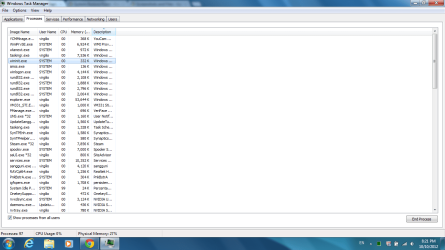
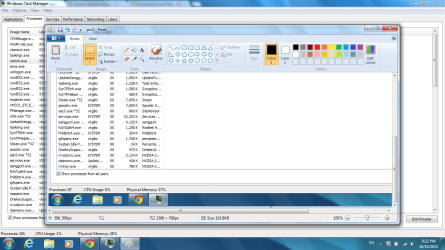
Hi all i just wanted to know whats going on with my laptop(lenovo ideapad), as i just bought the awesome guild wars 2 but after only a day of playing, the next day i played it it kept crashing in all sorts of ways(blue screens, purple pixels, blackouts etc.). okay so i dont know if the videocard is the problem, i hear theres a chance it is as ive heard stuff about nvidia being incompatible with gw2, but i also think its the ram and other stuff. ive got i7 and an 8 gig ram, i dont know how to post screenies though ive searched this stuff on google but i still cant paste the screenie i captured in paint. well these are the stuff i see on my task manager :
with only this and task manager running, i have 94 processes(i hear this is bad, is it normal to have like 10 .exe of chrome? or are they like different parts of chrome?), cpu usage at 0-1%, physical memory at 19-21%. forgive me if the details i post are quite beginner-ish, because honestly i really am quite a beginner in these things. if anyone could kindly assess my problem it would be thoroughly appreciated, thank you
 

My Computer

Computer Manufacturer/Model Number
Lenovo Ideapad Y580
OS
Microsoft Windows 7 Home Premium 64-bit SP1
CPU
Intel Core i7 @ 2.30GHz 55 °C Ivy Bridge 22nm Technology
Motherboard
LENOVO Product Name (U3E1) 56 °C
Memory
Type DDR3 Size 8192 MBytes Channels # Dual DRAM Frequency 79
Graphics Card(s)
Generic PnP Monitor (1366x768@60Hz) NVIDIA GeForce GTX 660M
Sound Card
Realtek High Definition Audio
Screen Resolution
1366 x 768
Hard Drives
932GB Seagate ST1000LM024 HN-M101MBB (SATA)
Internet Speed
7 mbps
Hello heatman and welcome to Seven Forums.

It would help to know a bit more about your computer. At the top of any Forum page click on "User CP". Then in the left column, click on "Edit System Spec". Fill in as much info as you can. A free tool called Speccy can give you the specs. As to posting a screenshot, follow the instructions in this tutorial. When describing computer issues a picture really is worth a thousand words. :)

Speccy - System Information - Free Download

http://www.sevenforums.com/tutorials/9733-screenshots-files-upload-post-seven-forums.html

To get a better idea of how your computer is using RAM, CPU, etc Windows 7 has a built-in tool called Resource Monitor.

http://www.sevenforums.com/tutorials/12523-resource-monitor.html

An i7 with 8GB RAM should be able to handle most any game on the market today. But one problem is trying to play a game on a laptop due to heat build up. Laptops have very bad air circulation due to physical design limitations. In order to protect components, too much heat = random shut downs, BSODs, etc. That free tool called Speccy can also monitor in real time your computer temps. And it probably wouldn't hurt to use a cooling pad with your laptop.

It's also possible that Nvidia has an updated driver for your GPU. Out of date drivers can also lead to BSODs. You could check on their website if your machine has the latest driver installed.

   Warning
Sometimes a new driver can cause even more compatibility and usage problems. Before installing a newer driver create a restore point "just in case".


94 processes seems to be on the high side. Although I believe a lot depends on how many tabs you have open. I think each tab is considered a separate process by IE, Firefox and Chrome. A screenshot of your Task Manager could help to identify the processes that are running.
 

My Computer

Computer type
Laptop
Computer Manufacturer/Model Number
Sony Vaio VPCEB47GM Laptop
OS
Win 7 Pro 64-bit
CPU
Intel i5 2.4 Ghz
Memory
8GB DDR3
Graphics Card(s)
Intel HD 3000
Sound Card
IDT High Definition
Monitor(s) Displays
15.6 WGXA Anti-Glare LED
Screen Resolution
1280x800
Hard Drives
640Gb 7200rpm
Antivirus
MSE
Browser
Opera (primary) with IE9 backup
Well that was quite a challenge and hopefully I filled out all the important information that's needed. I also just finished on how to post screenies. But about the updated driver, the nvidia site requested me to get java, but the java site wasn't informative or helpful at all, and I don't know which java to download. Or should I download them all?
Also, I'm quite amazed at the community here you guys are too kind and assisting, it blows me away. I can't remember the last time I went to a "tame" community, I hope you guys don't find that offensive I actually meant that as a compliment. Ah yes and since I couldn't download the java and hence couldn't download the nvidia driver, I put the restore point to hold. Thanks again to everyone who'll help out.

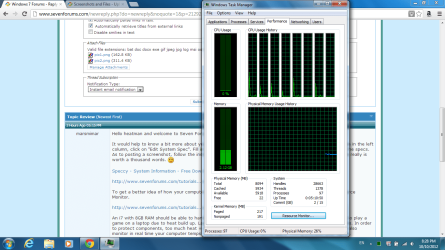
Note : the CPU usage on the performance tab of the task manager fluctuates from 9-35%
when I first open the task manager. Is that normal?
 

Attachments

  • pic1.png
    pic1.png
    162.8 KB · Views: 25
  • pic2.png
    pic2.png
    311.4 KB · Views: 23
  • pic3.png
    pic3.png
    218.5 KB · Views: 31

My Computer

Computer Manufacturer/Model Number
Lenovo Ideapad Y580
OS
Microsoft Windows 7 Home Premium 64-bit SP1
CPU
Intel Core i7 @ 2.30GHz 55 °C Ivy Bridge 22nm Technology
Motherboard
LENOVO Product Name (U3E1) 56 °C
Memory
Type DDR3 Size 8192 MBytes Channels # Dual DRAM Frequency 79
Graphics Card(s)
Generic PnP Monitor (1366x768@60Hz) NVIDIA GeForce GTX 660M
Sound Card
Realtek High Definition Audio
Screen Resolution
1366 x 768
Hard Drives
932GB Seagate ST1000LM024 HN-M101MBB (SATA)
Internet Speed
7 mbps
I just noticed that these crashes started happening frequently after I had about 4 straight crashes running GW2 where I had to hold the power button as it had, well I'm not really sure what the term is but from where I'm from we call it a "hang". I just wanted to know what are the negative effects of holding the power button to close, and doing it multiple times in a day. Also, I think this has lead to affect something internal in my laptop, as I noticed that even the not-so-heavy game League of Legends(cartoony graphics, DotA style game if some of you don't know) experienced the same "hang" with the purple pixels but it only froze for a couple of seconds before resuming, unlike in GW2 it would become unresponsive and frozen wholly, and TF2 which would crash right away before I even enter the menu screen(I used to be able to reach the menu screen, now it's gotten worse before I even leave the steam loading screen I get an "unable to play" compared to the first crashes where it occurred in the menu screen).
 

My Computer

Computer Manufacturer/Model Number
Lenovo Ideapad Y580
OS
Microsoft Windows 7 Home Premium 64-bit SP1
CPU
Intel Core i7 @ 2.30GHz 55 °C Ivy Bridge 22nm Technology
Motherboard
LENOVO Product Name (U3E1) 56 °C
Memory
Type DDR3 Size 8192 MBytes Channels # Dual DRAM Frequency 79
Graphics Card(s)
Generic PnP Monitor (1366x768@60Hz) NVIDIA GeForce GTX 660M
Sound Card
Realtek High Definition Audio
Screen Resolution
1366 x 768
Hard Drives
932GB Seagate ST1000LM024 HN-M101MBB (SATA)
Internet Speed
7 mbps
Good job on the system specs and the screenshots! :thumbsup:

The good news is I believe your RAM and CPU usage are in the normal range. Windows 7 has a totally different philosophy when it comes to RAM. Win 7 believes that unused RAM is wasted RAM. So the more RAM a computer has, the more RAM will be allocated to "something". It could be cached for future use, it could be applied towards the GPU, but it's gonna get used.

Figuring out CPU usage involves fortune tellers, Tarot cards, crystal balls, and the Psychic Hotline. Most of the processes have cryptic names like Apvfb.exe, VesMgrSub.exe, etc. Just looking at the name usually doesn't tell you a lot, particularly if the process can be killed until such time you actually need it. A lot of programs want to start up as soon as you start your computer. That usually means a process (or several) will also show up in Task Manager. Let's say you have a video editing program on your computer that starts up as soon as you boot the machine. And it has about 6 different processes. If you're not editing any videos right at startup, no need for that program to fire up until you actually need it.

So how do you know which processes you can kill? Google the process name, see what program it's associated with, and then decide if you really need to have it running. End result: fewer programs load when you start your computer, computer should start faster, and fewer processes in Task Manager. You can also use a utility called MSCONFIG to disable/enable things to see what effect they might have. Some folks disable everything except their antivirus and touchpad controls. Here are a couple of guides to give you an idea of what can be done:

Using msconfig

http://www.sevenforums.com/tutorial...ation-conflicts-performing-clean-startup.html

http://www.sevenforums.com/crashes-debugging/70248-troubleshooting-msconfig.html

I do not know why Nvidia is telling you to install Java. Perhaps it needs Java for its own GPU control panel to work and you'll need the control panel to adjust various settings for your computer. I'm not knowledgeable enough on that. If you decide to install Java, it's pretty straight forward and this is the Java website to use.

Holding the power button to shut down a computer can lead to damaged or corrupt system files or worse. Here's a previous Forum thread of what a hard shut down can do.

http://www.sevenforums.com/general-...ws-7-unbareably-slow-after-hard-shutdown.html

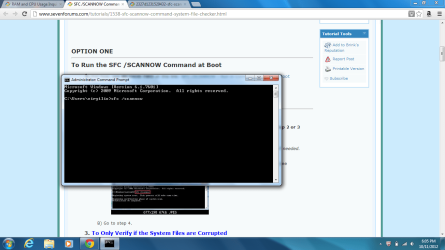
I would strongly suggest you run a system file checker scan to see if you have any damaged or corrupt files. Run it from an elevated command prompt (option two.) If any problems are found, run the scan 3 times and reboot your computer in between each scan. I think you need to know if any system files need fixing before trying to work on the 97 running processes.

http://www.sevenforums.com/tutorials/1538-sfc-scannow-command-system-file-checker.html

Sorry for the info overload. Hope it gives you some food for thought. Post back with any other questions or concerns. Lots of tame Forum members to call upon as well as a few wild ones. ;)
 

My Computer

Computer type
Laptop
Computer Manufacturer/Model Number
Sony Vaio VPCEB47GM Laptop
OS
Win 7 Pro 64-bit
CPU
Intel i5 2.4 Ghz
Memory
8GB DDR3
Graphics Card(s)
Intel HD 3000
Sound Card
IDT High Definition
Monitor(s) Displays
15.6 WGXA Anti-Glare LED
Screen Resolution
1280x800
Hard Drives
640Gb 7200rpm
Antivirus
MSE
Browser
Opera (primary) with IE9 backup
Thank you very much, at least now I have SOMETHING to work on, rather than me worrying and panicking the whole day. And honestly, I can't think of a person who would refuse tons of information overloads that'll help them. Thanks again.
I'll probably work on these tomorrow, currently 4am. And again, thanks for taking the time to help out a clueless gamer
:D:D
 

My Computer

Computer Manufacturer/Model Number
Lenovo Ideapad Y580
OS
Microsoft Windows 7 Home Premium 64-bit SP1
CPU
Intel Core i7 @ 2.30GHz 55 °C Ivy Bridge 22nm Technology
Motherboard
LENOVO Product Name (U3E1) 56 °C
Memory
Type DDR3 Size 8192 MBytes Channels # Dual DRAM Frequency 79
Graphics Card(s)
Generic PnP Monitor (1366x768@60Hz) NVIDIA GeForce GTX 660M
Sound Card
Realtek High Definition Audio
Screen Resolution
1366 x 768
Hard Drives
932GB Seagate ST1000LM024 HN-M101MBB (SATA)
Internet Speed
7 mbps
These types of laptops with i7 quad core and discrete graphics cards are well known to have heat issues.
The issues you're having are likely caused by overheating CPU and/or GPU.
You need to get a good laptop cooler.

Follow the good advice from marsmimar, and also post the idle and under load CPU core temps from Speccy or Use Real Temp.
Max CPU core temps for a laptop are generally 100°C, but that's way too high in my opinion.
Any sustained temp above 90°C is going to cause problems.

In the mean time, never put the laptop on any material surface like cloth, put something under the back to raise it at least 1 inch, this will allow better airflow. Be sure not to block any air vents on the bottom of the laptop.
Always monitor your CPU and GPU temps, try to bring it back to an idle before it gets too hot and crashes.
 

My Computer

Computer type
PC/Desktop
Computer Manufacturer/Model Number
76~2.0
OS
Windows 7 Ult x64 - SP1/ Windows 8 Pro x64
CPU
Intel Core i5-3570K 4.6GHz
Motherboard
Gigabyte GA-Z77X UD3H, f18
Memory
8GB (2X4GB) DDR3 1600 Corsair Vengeance CL8 1.5v
Graphics Card(s)
Sapphire HD 7770 Vapor-X OC 1GB DDR5
Sound Card
Onboard VIA VT2021
Monitor(s) Displays
22" LCD Dell
Screen Resolution
1680x1050
Hard Drives
Samsung 840Pro 128GB SSD,
Seagate Barracuda 500GB SATA2 7200rpm 32MB cache, Seagate Barracuda 1TB SATA2 7200rpm 32MB cache,
PSU
Corsair HX650W
Case
Cooler Master Storm Scout
Cooling
Corsair H80 2x12cm Noctua NF P12 , 2x14cm case fans
Keyboard
Logitech Wave
Mouse
CM Sentinel
Internet Speed
Dismal
Antivirus
Avast
Browser
Opera Next
Other Info
Haswell laptop: HP Envy 17t-j, i7-4700MQ, GeForce 740M 2GB DDR3, 17.3" Full HD 1920x1080, 16GB RAM, Samsung 840 Pro 128GB, 1TB Hitachi 7200 HDD,
Desktop: eSATA ports,
External eSATA Seagate 500GB SATA2 7200rpm,
External WD USB 500GB
I have now begun the system file checker, I think I did it correctly but just to be sure, I'll post a screenshot.

@Dave76
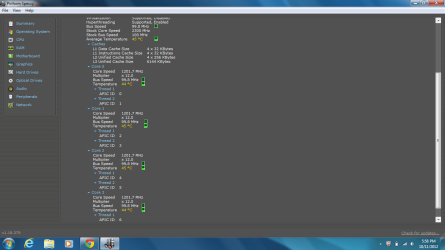
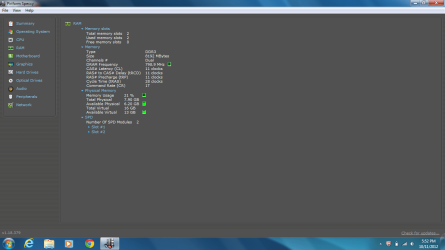
I saw all sorts of temperatures so I think I'll just post all the temps I saw

Thanks to both of you for taking the time to help out a beginner :D

And my oh my these screenies really are worth a thousand words, maybe more:geek:

Edit / Update : I have googled about the new nvidia driver for my video card, and the feedback from fellow Guild Wars 2 players for version 306.97 wasn't really good, there were even some that reported it causing some minor disturbance, so I think I'll put the update on hold.
 

Attachments

  • pic8.png
    pic8.png
    209.8 KB · Views: 10
  • pic7.png
    pic7.png
    150.8 KB · Views: 14
  • pic6.png
    pic6.png
    139.8 KB · Views: 15

My Computer

Computer Manufacturer/Model Number
Lenovo Ideapad Y580
OS
Microsoft Windows 7 Home Premium 64-bit SP1
CPU
Intel Core i7 @ 2.30GHz 55 °C Ivy Bridge 22nm Technology
Motherboard
LENOVO Product Name (U3E1) 56 °C
Memory
Type DDR3 Size 8192 MBytes Channels # Dual DRAM Frequency 79
Graphics Card(s)
Generic PnP Monitor (1366x768@60Hz) NVIDIA GeForce GTX 660M
Sound Card
Realtek High Definition Audio
Screen Resolution
1366 x 768
Hard Drives
932GB Seagate ST1000LM024 HN-M101MBB (SATA)
Internet Speed
7 mbps
I'm beginning to think my video card was fried from all those forced shutdowns by holding the power button. Sigh. Guess it's time to put the warranty to work. I just finished my first scan and am just beginning on my 2nd.

@Dave76
To bring it back to an idle? To do that, I just close all programs and wait for it to cool down right? What do you think is the normal range of heat in % shown on those green bars in the task manager?
 

Attachments

  • pic9.png
    pic9.png
    233.6 KB · Views: 6

My Computer

Computer Manufacturer/Model Number
Lenovo Ideapad Y580
OS
Microsoft Windows 7 Home Premium 64-bit SP1
CPU
Intel Core i7 @ 2.30GHz 55 °C Ivy Bridge 22nm Technology
Motherboard
LENOVO Product Name (U3E1) 56 °C
Memory
Type DDR3 Size 8192 MBytes Channels # Dual DRAM Frequency 79
Graphics Card(s)
Generic PnP Monitor (1366x768@60Hz) NVIDIA GeForce GTX 660M
Sound Card
Realtek High Definition Audio
Screen Resolution
1366 x 768
Hard Drives
932GB Seagate ST1000LM024 HN-M101MBB (SATA)
Internet Speed
7 mbps
Hi again heatman. Your temps there look well within reason but they don't show the GPU temps. Did the scannow now complete and what was the message at the end?
 

My Computer

Computer type
PC/Desktop
Computer Manufacturer/Model Number
Home Built Desktop By DataTech
OS
Windows 7 Ultimate X64 SP1
CPU
Intel i5-2550K, Differing ~4.4-4.8GHz No built in GPU
Motherboard
ASUS P8Z68-V PRO/GEN3
Memory
16GB G.Skill Sniper 1866MHz @ 2133MHz 2x8GB
Graphics Card(s)
ASUS GTX650TIB-DC2OC-2GD5, (650TI Boost)
Sound Card
Onboard Realtek 5-1
Monitor(s) Displays
Samsung P2570HD
Screen Resolution
1920x1080
Hard Drives
Samsung 840 Pro 256GB SSD for OS, 500GB Seagate Constellation (Enterprise drive) for Data
PSU
Corsair HX650W
Case
Inwin Dragon Rider
Cooling
Hyper 212 EVO w/two Noctua fans, push-pull, @1300 RPM
Keyboard
E-Z Eyes, bright yellow keys with large characters
Mouse
steelseries SENSEI Laser Pro Gaming
Internet Speed
48-51Mbs Mbs down, 11 Mbs up Xfinity Cable
Antivirus
Norton Internet Security 2013
Browser
IE 10, Opera, Pale Moon if needed
Other Info
4 case fans, LG BluRay-RE, ASUS DVD-RW, Mr. Fusion power supply, 1.21 gigawatts.
Are those CPU core temps while your laptop is at an idle?
RealTemp will give you more info, min/max and current CPU core temps.
Download and run it, when your system is at idle then run a stress test or demanding game, it will keep record of the lowest and highest temps as well as the current temp.
Then post a snip here.

Good plan, new graphics drivers can cause problems, best to search to see if anyone is having issues before you install them.

I'm beginning to think my video card was fried from all those forced shutdowns by holding the power button. Sigh. Guess it's time to put the warranty to work. I just finished my first scan and am just beginning on my 2nd.

@Dave76
To bring it back to an idle? To do that, I just close all programs and wait for it to cool down right? What do you think is the normal range of heat in % shown on those green bars in the task manager?

What did the SFC scan say when it finished the first one?
It will tell you it didn't find anything or it found something it couldn't fix which means you need to run it again.

Yes, stop your game or test and let the system idle.
Surfing or low CPU usage is ok, the temps should come down pretty quickly.

Task Manager doesn't show you any heat/CPU temp information, you need a program like RealTemp to see them.
 

My Computer

Computer type
PC/Desktop
Computer Manufacturer/Model Number
76~2.0
OS
Windows 7 Ult x64 - SP1/ Windows 8 Pro x64
CPU
Intel Core i5-3570K 4.6GHz
Motherboard
Gigabyte GA-Z77X UD3H, f18
Memory
8GB (2X4GB) DDR3 1600 Corsair Vengeance CL8 1.5v
Graphics Card(s)
Sapphire HD 7770 Vapor-X OC 1GB DDR5
Sound Card
Onboard VIA VT2021
Monitor(s) Displays
22" LCD Dell
Screen Resolution
1680x1050
Hard Drives
Samsung 840Pro 128GB SSD,
Seagate Barracuda 500GB SATA2 7200rpm 32MB cache, Seagate Barracuda 1TB SATA2 7200rpm 32MB cache,
PSU
Corsair HX650W
Case
Cooler Master Storm Scout
Cooling
Corsair H80 2x12cm Noctua NF P12 , 2x14cm case fans
Keyboard
Logitech Wave
Mouse
CM Sentinel
Internet Speed
Dismal
Antivirus
Avast
Browser
Opera Next
Other Info
Haswell laptop: HP Envy 17t-j, i7-4700MQ, GeForce 740M 2GB DDR3, 17.3" Full HD 1920x1080, 16GB RAM, Samsung 840 Pro 128GB, 1TB Hitachi 7200 HDD,
Desktop: eSATA ports,
External eSATA Seagate 500GB SATA2 7200rpm,
External WD USB 500GB

My Computer

Computer type
PC/Desktop
Computer Manufacturer/Model Number
Home Built Desktop By DataTech
OS
Windows 7 Ultimate X64 SP1
CPU
Intel i5-2550K, Differing ~4.4-4.8GHz No built in GPU
Motherboard
ASUS P8Z68-V PRO/GEN3
Memory
16GB G.Skill Sniper 1866MHz @ 2133MHz 2x8GB
Graphics Card(s)
ASUS GTX650TIB-DC2OC-2GD5, (650TI Boost)
Sound Card
Onboard Realtek 5-1
Monitor(s) Displays
Samsung P2570HD
Screen Resolution
1920x1080
Hard Drives
Samsung 840 Pro 256GB SSD for OS, 500GB Seagate Constellation (Enterprise drive) for Data
PSU
Corsair HX650W
Case
Inwin Dragon Rider
Cooling
Hyper 212 EVO w/two Noctua fans, push-pull, @1300 RPM
Keyboard
E-Z Eyes, bright yellow keys with large characters
Mouse
steelseries SENSEI Laser Pro Gaming
Internet Speed
48-51Mbs Mbs down, 11 Mbs up Xfinity Cable
Antivirus
Norton Internet Security 2013
Browser
IE 10, Opera, Pale Moon if needed
Other Info
4 case fans, LG BluRay-RE, ASUS DVD-RW, Mr. Fusion power supply, 1.21 gigawatts.
Hi Britton and thanks for the assurance on the Performance Assessment thread awhile back. About the GPU temp, I googled what it meant(yes, I'm THAT noobish...:confused:),
and it stood for graphics processing unit so I'm assuming that would be under the graphics card or "Graphics" on speccy. But I cant seem to find any indications of current temperature in this section. I see another on "Motherboard", but I doubt this is the one but if it is, its going at 52-56%. Hope I got it right.

Update : Just finished 3 scans, all were fine with no problems. I guess the problem comes from within, probably the video card / nvidia?
 

My Computer

Computer Manufacturer/Model Number
Lenovo Ideapad Y580
OS
Microsoft Windows 7 Home Premium 64-bit SP1
CPU
Intel Core i7 @ 2.30GHz 55 °C Ivy Bridge 22nm Technology
Motherboard
LENOVO Product Name (U3E1) 56 °C
Memory
Type DDR3 Size 8192 MBytes Channels # Dual DRAM Frequency 79
Graphics Card(s)
Generic PnP Monitor (1366x768@60Hz) NVIDIA GeForce GTX 660M
Sound Card
Realtek High Definition Audio
Screen Resolution
1366 x 768
Hard Drives
932GB Seagate ST1000LM024 HN-M101MBB (SATA)
Internet Speed
7 mbps
Speccy is funny, it shows my GPU temp on this rig, but not on another AMD rig I have.:confused:
 

My Computer

Computer type
PC/Desktop
Computer Manufacturer/Model Number
Home Built Desktop By DataTech
OS
Windows 7 Ultimate X64 SP1
CPU
Intel i5-2550K, Differing ~4.4-4.8GHz No built in GPU
Motherboard
ASUS P8Z68-V PRO/GEN3
Memory
16GB G.Skill Sniper 1866MHz @ 2133MHz 2x8GB
Graphics Card(s)
ASUS GTX650TIB-DC2OC-2GD5, (650TI Boost)
Sound Card
Onboard Realtek 5-1
Monitor(s) Displays
Samsung P2570HD
Screen Resolution
1920x1080
Hard Drives
Samsung 840 Pro 256GB SSD for OS, 500GB Seagate Constellation (Enterprise drive) for Data
PSU
Corsair HX650W
Case
Inwin Dragon Rider
Cooling
Hyper 212 EVO w/two Noctua fans, push-pull, @1300 RPM
Keyboard
E-Z Eyes, bright yellow keys with large characters
Mouse
steelseries SENSEI Laser Pro Gaming
Internet Speed
48-51Mbs Mbs down, 11 Mbs up Xfinity Cable
Antivirus
Norton Internet Security 2013
Browser
IE 10, Opera, Pale Moon if needed
Other Info
4 case fans, LG BluRay-RE, ASUS DVD-RW, Mr. Fusion power supply, 1.21 gigawatts.
Download and run HWiNFO64
HWiNFO64 Download Information

Click the sensors tab and check the temps, CPU and GPU.
Post a screen shot of the sensors tab.
 

My Computer

Computer type
PC/Desktop
Computer Manufacturer/Model Number
76~2.0
OS
Windows 7 Ult x64 - SP1/ Windows 8 Pro x64
CPU
Intel Core i5-3570K 4.6GHz
Motherboard
Gigabyte GA-Z77X UD3H, f18
Memory
8GB (2X4GB) DDR3 1600 Corsair Vengeance CL8 1.5v
Graphics Card(s)
Sapphire HD 7770 Vapor-X OC 1GB DDR5
Sound Card
Onboard VIA VT2021
Monitor(s) Displays
22" LCD Dell
Screen Resolution
1680x1050
Hard Drives
Samsung 840Pro 128GB SSD,
Seagate Barracuda 500GB SATA2 7200rpm 32MB cache, Seagate Barracuda 1TB SATA2 7200rpm 32MB cache,
PSU
Corsair HX650W
Case
Cooler Master Storm Scout
Cooling
Corsair H80 2x12cm Noctua NF P12 , 2x14cm case fans
Keyboard
Logitech Wave
Mouse
CM Sentinel
Internet Speed
Dismal
Antivirus
Avast
Browser
Opera Next
Other Info
Haswell laptop: HP Envy 17t-j, i7-4700MQ, GeForce 740M 2GB DDR3, 17.3" Full HD 1920x1080, 16GB RAM, Samsung 840 Pro 128GB, 1TB Hitachi 7200 HDD,
Desktop: eSATA ports,
External eSATA Seagate 500GB SATA2 7200rpm,
External WD USB 500GB
Currently downloading Real Temp. All 3 scans were fine btw.

@Dave76
I'm sorry but, does "laptop being idle" mean that there isn't any program running? Sorry I'm just really not used to technical terms.
 

My Computer

Computer Manufacturer/Model Number
Lenovo Ideapad Y580
OS
Microsoft Windows 7 Home Premium 64-bit SP1
CPU
Intel Core i7 @ 2.30GHz 55 °C Ivy Bridge 22nm Technology
Motherboard
LENOVO Product Name (U3E1) 56 °C
Memory
Type DDR3 Size 8192 MBytes Channels # Dual DRAM Frequency 79
Graphics Card(s)
Generic PnP Monitor (1366x768@60Hz) NVIDIA GeForce GTX 660M
Sound Card
Realtek High Definition Audio
Screen Resolution
1366 x 768
Hard Drives
932GB Seagate ST1000LM024 HN-M101MBB (SATA)
Internet Speed
7 mbps
You can browse the web, use programs that don't stress the system.
Just open Task Manager > Resource Monitor and you can see what programs are using resources.
No watching videos etc.

RealTemp is a good CPU temp monitor, it's small and you can have it sitting in the corner when needed.
HWiNFO64 will give you CPU core temps and your GPU temps.
 

My Computer

Computer type
PC/Desktop
Computer Manufacturer/Model Number
76~2.0
OS
Windows 7 Ult x64 - SP1/ Windows 8 Pro x64
CPU
Intel Core i5-3570K 4.6GHz
Motherboard
Gigabyte GA-Z77X UD3H, f18
Memory
8GB (2X4GB) DDR3 1600 Corsair Vengeance CL8 1.5v
Graphics Card(s)
Sapphire HD 7770 Vapor-X OC 1GB DDR5
Sound Card
Onboard VIA VT2021
Monitor(s) Displays
22" LCD Dell
Screen Resolution
1680x1050
Hard Drives
Samsung 840Pro 128GB SSD,
Seagate Barracuda 500GB SATA2 7200rpm 32MB cache, Seagate Barracuda 1TB SATA2 7200rpm 32MB cache,
PSU
Corsair HX650W
Case
Cooler Master Storm Scout
Cooling
Corsair H80 2x12cm Noctua NF P12 , 2x14cm case fans
Keyboard
Logitech Wave
Mouse
CM Sentinel
Internet Speed
Dismal
Antivirus
Avast
Browser
Opera Next
Other Info
Haswell laptop: HP Envy 17t-j, i7-4700MQ, GeForce 740M 2GB DDR3, 17.3" Full HD 1920x1080, 16GB RAM, Samsung 840 Pro 128GB, 1TB Hitachi 7200 HDD,
Desktop: eSATA ports,
External eSATA Seagate 500GB SATA2 7200rpm,
External WD USB 500GB
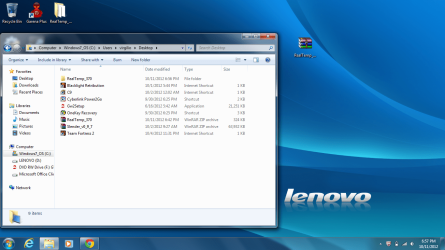
... Well this is embarassing. I have forgotten how to run and use a .zip file WOW. I have already downloaded the realtemp zip and extracted it but I forgot what do I do next or how do I execute it. Just finished downloading hw64 and about to run it.
 

Attachments

  • pic10.png
    pic10.png
    575.7 KB · Views: 3

My Computer

Computer Manufacturer/Model Number
Lenovo Ideapad Y580
OS
Microsoft Windows 7 Home Premium 64-bit SP1
CPU
Intel Core i7 @ 2.30GHz 55 °C Ivy Bridge 22nm Technology
Motherboard
LENOVO Product Name (U3E1) 56 °C
Memory
Type DDR3 Size 8192 MBytes Channels # Dual DRAM Frequency 79
Graphics Card(s)
Generic PnP Monitor (1366x768@60Hz) NVIDIA GeForce GTX 660M
Sound Card
Realtek High Definition Audio
Screen Resolution
1366 x 768
Hard Drives
932GB Seagate ST1000LM024 HN-M101MBB (SATA)
Internet Speed
7 mbps
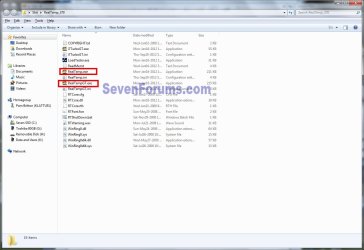
Open the RealTemp folder, there should be something like Realtemp.exe there, double click it. It is a stand alone app and needs no install to run.
realtemp.jpg
 

My Computer

Computer type
PC/Desktop
Computer Manufacturer/Model Number
Home Built Desktop By DataTech
OS
Windows 7 Ultimate X64 SP1
CPU
Intel i5-2550K, Differing ~4.4-4.8GHz No built in GPU
Motherboard
ASUS P8Z68-V PRO/GEN3
Memory
16GB G.Skill Sniper 1866MHz @ 2133MHz 2x8GB
Graphics Card(s)
ASUS GTX650TIB-DC2OC-2GD5, (650TI Boost)
Sound Card
Onboard Realtek 5-1
Monitor(s) Displays
Samsung P2570HD
Screen Resolution
1920x1080
Hard Drives
Samsung 840 Pro 256GB SSD for OS, 500GB Seagate Constellation (Enterprise drive) for Data
PSU
Corsair HX650W
Case
Inwin Dragon Rider
Cooling
Hyper 212 EVO w/two Noctua fans, push-pull, @1300 RPM
Keyboard
E-Z Eyes, bright yellow keys with large characters
Mouse
steelseries SENSEI Laser Pro Gaming
Internet Speed
48-51Mbs Mbs down, 11 Mbs up Xfinity Cable
Antivirus
Norton Internet Security 2013
Browser
IE 10, Opera, Pale Moon if needed
Other Info
4 case fans, LG BluRay-RE, ASUS DVD-RW, Mr. Fusion power supply, 1.21 gigawatts.
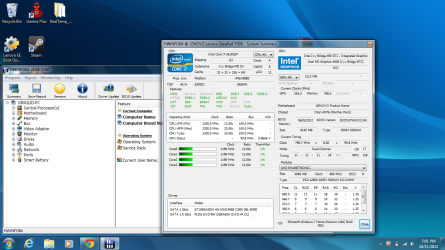
Here are the results of the hw64
 

Attachments

  • pic1.png
    pic1.png
    508.2 KB · Views: 6

My Computer

Computer Manufacturer/Model Number
Lenovo Ideapad Y580
OS
Microsoft Windows 7 Home Premium 64-bit SP1
CPU
Intel Core i7 @ 2.30GHz 55 °C Ivy Bridge 22nm Technology
Motherboard
LENOVO Product Name (U3E1) 56 °C
Memory
Type DDR3 Size 8192 MBytes Channels # Dual DRAM Frequency 79
Graphics Card(s)
Generic PnP Monitor (1366x768@60Hz) NVIDIA GeForce GTX 660M
Sound Card
Realtek High Definition Audio
Screen Resolution
1366 x 768
Hard Drives
932GB Seagate ST1000LM024 HN-M101MBB (SATA)
Internet Speed
7 mbps
Back
Top