RAM and CPU Usage Inquiry

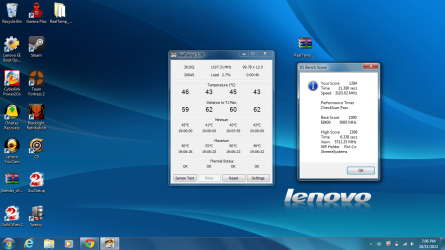
Just got the realtemp to work and wow do I feel dumb. Anyway I got the XS bench to work, but the sensor test was kinda complicated and was asking for something.
 

Attachments

  • pic2.png
    pic2.png
    696.6 KB · Views: 6
  • pic3.png
    pic3.png
    591.4 KB · Views: 4

My Computer

Computer Manufacturer/Model Number
Lenovo Ideapad Y580
OS
Microsoft Windows 7 Home Premium 64-bit SP1
CPU
Intel Core i7 @ 2.30GHz 55 °C Ivy Bridge 22nm Technology
Motherboard
LENOVO Product Name (U3E1) 56 °C
Memory
Type DDR3 Size 8192 MBytes Channels # Dual DRAM Frequency 79
Graphics Card(s)
Generic PnP Monitor (1366x768@60Hz) NVIDIA GeForce GTX 660M
Sound Card
Realtek High Definition Audio
Screen Resolution
1366 x 768
Hard Drives
932GB Seagate ST1000LM024 HN-M101MBB (SATA)
Internet Speed
7 mbps
You don't need to do anything with the XS bench or Sensor test.
Just use it to monitor the CPU core temps.

In HWiNFO64 click the Sensor button in the top of the window.
Scroll down to see the CPU core and GPU temps.

Leave RealTemp and/or HWiNFO64 open and play a game for several minutes or until the CPU/GPU temps stabilize, then post a snip here.
 

My Computer

Computer type
PC/Desktop
Computer Manufacturer/Model Number
76~2.0
OS
Windows 7 Ult x64 - SP1/ Windows 8 Pro x64
CPU
Intel Core i5-3570K 4.6GHz
Motherboard
Gigabyte GA-Z77X UD3H, f18
Memory
8GB (2X4GB) DDR3 1600 Corsair Vengeance CL8 1.5v
Graphics Card(s)
Sapphire HD 7770 Vapor-X OC 1GB DDR5
Sound Card
Onboard VIA VT2021
Monitor(s) Displays
22" LCD Dell
Screen Resolution
1680x1050
Hard Drives
Samsung 840Pro 128GB SSD,
Seagate Barracuda 500GB SATA2 7200rpm 32MB cache, Seagate Barracuda 1TB SATA2 7200rpm 32MB cache,
PSU
Corsair HX650W
Case
Cooler Master Storm Scout
Cooling
Corsair H80 2x12cm Noctua NF P12 , 2x14cm case fans
Keyboard
Logitech Wave
Mouse
CM Sentinel
Internet Speed
Dismal
Antivirus
Avast
Browser
Opera Next
Other Info
Haswell laptop: HP Envy 17t-j, i7-4700MQ, GeForce 740M 2GB DDR3, 17.3" Full HD 1920x1080, 16GB RAM, Samsung 840 Pro 128GB, 1TB Hitachi 7200 HDD,
Desktop: eSATA ports,
External eSATA Seagate 500GB SATA2 7200rpm,
External WD USB 500GB
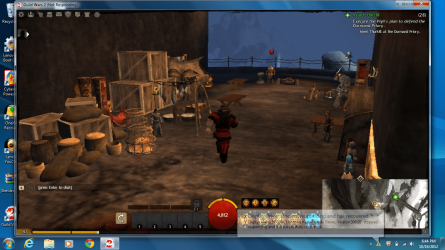
2 straight crashes with our air condition turned on. Didn't even have time to record the realtemp temperatures, it blue screened like a boss. And this was with GW2 on window mode. Also, I vaguely remember reading something during the BSOD something like dumping physical memory? Is this a sign of something more worse than a GPU overheating? Seems like I'll need to have my laptop repaired or something this seems out of my hands, hopefully not you guys' hands or that means I'll go straight to the repairs.
 

My Computer

Computer Manufacturer/Model Number
Lenovo Ideapad Y580
OS
Microsoft Windows 7 Home Premium 64-bit SP1
CPU
Intel Core i7 @ 2.30GHz 55 °C Ivy Bridge 22nm Technology
Motherboard
LENOVO Product Name (U3E1) 56 °C
Memory
Type DDR3 Size 8192 MBytes Channels # Dual DRAM Frequency 79
Graphics Card(s)
Generic PnP Monitor (1366x768@60Hz) NVIDIA GeForce GTX 660M
Sound Card
Realtek High Definition Audio
Screen Resolution
1366 x 768
Hard Drives
932GB Seagate ST1000LM024 HN-M101MBB (SATA)
Internet Speed
7 mbps
When a system crashes you will usually see a Blue screen with some information and a Stop Code.
It will then make a crash dump file, it gets this info from a 'Memory Dump' and puts it a file.
If you follow the instructions below, we can analyze the dump files and try to find the cause of your crashes.

Blue Screen of Death (BSOD) Posting Instructions
When posting a new crash dump, include all System File Collection and health reports. They contain valuable information that we can use to find the cause of the crashes.
Post them here for now. If needed I can have the thread moved to the 'Crashes and Debugging' forum later.

You can also open the two monitor programs and play a game that is fairly stressful but doesn't crash on you, that way we can get some info on the CPU/GPU temps.

 

My Computer

Computer type
PC/Desktop
Computer Manufacturer/Model Number
76~2.0
OS
Windows 7 Ult x64 - SP1/ Windows 8 Pro x64
CPU
Intel Core i5-3570K 4.6GHz
Motherboard
Gigabyte GA-Z77X UD3H, f18
Memory
8GB (2X4GB) DDR3 1600 Corsair Vengeance CL8 1.5v
Graphics Card(s)
Sapphire HD 7770 Vapor-X OC 1GB DDR5
Sound Card
Onboard VIA VT2021
Monitor(s) Displays
22" LCD Dell
Screen Resolution
1680x1050
Hard Drives
Samsung 840Pro 128GB SSD,
Seagate Barracuda 500GB SATA2 7200rpm 32MB cache, Seagate Barracuda 1TB SATA2 7200rpm 32MB cache,
PSU
Corsair HX650W
Case
Cooler Master Storm Scout
Cooling
Corsair H80 2x12cm Noctua NF P12 , 2x14cm case fans
Keyboard
Logitech Wave
Mouse
CM Sentinel
Internet Speed
Dismal
Antivirus
Avast
Browser
Opera Next
Other Info
Haswell laptop: HP Envy 17t-j, i7-4700MQ, GeForce 740M 2GB DDR3, 17.3" Full HD 1920x1080, 16GB RAM, Samsung 840 Pro 128GB, 1TB Hitachi 7200 HDD,
Desktop: eSATA ports,
External eSATA Seagate 500GB SATA2 7200rpm,
External WD USB 500GB
When a system crashes you will usually see a Blue screen with some information and a Stop Code.
It will then make a crash dump file, it gets this info from a 'Memory Dump' and puts it a file.
If you follow the instructions below, we can analyze the dump files and try to find the cause of your crashes.

Blue Screen of Death (BSOD) Posting Instructions
When posting a new crash dump, include all System File Collection and health reports. They contain valuable information that we can use to find the cause of the crashes.
Post them here for now. If needed I can have the thread moved to the 'Crashes and Debugging' forum later.

You can also open the two monitor programs and play a game that is fairly stressful but doesn't crash on you, that way we can get some info on the CPU/GPU temps.

Will do. Hmm fairly stressful, I have a game that uses cartoon-ish graphics, LoL, but I have max FPS over there. Seems TF2 fits "fairly stressful", problem is ever since this GW2 BSOD fiasco I have been having problems running it. Sigh. I'll give it a shot, thanks.
 

My Computer

Computer Manufacturer/Model Number
Lenovo Ideapad Y580
OS
Microsoft Windows 7 Home Premium 64-bit SP1
CPU
Intel Core i7 @ 2.30GHz 55 °C Ivy Bridge 22nm Technology
Motherboard
LENOVO Product Name (U3E1) 56 °C
Memory
Type DDR3 Size 8192 MBytes Channels # Dual DRAM Frequency 79
Graphics Card(s)
Generic PnP Monitor (1366x768@60Hz) NVIDIA GeForce GTX 660M
Sound Card
Realtek High Definition Audio
Screen Resolution
1366 x 768
Hard Drives
932GB Seagate ST1000LM024 HN-M101MBB (SATA)
Internet Speed
7 mbps
Post the BSOD reports from the link above and I'll take a look at them.
Usually a lot of info that can help.
 

My Computer

Computer type
PC/Desktop
Computer Manufacturer/Model Number
76~2.0
OS
Windows 7 Ult x64 - SP1/ Windows 8 Pro x64
CPU
Intel Core i5-3570K 4.6GHz
Motherboard
Gigabyte GA-Z77X UD3H, f18
Memory
8GB (2X4GB) DDR3 1600 Corsair Vengeance CL8 1.5v
Graphics Card(s)
Sapphire HD 7770 Vapor-X OC 1GB DDR5
Sound Card
Onboard VIA VT2021
Monitor(s) Displays
22" LCD Dell
Screen Resolution
1680x1050
Hard Drives
Samsung 840Pro 128GB SSD,
Seagate Barracuda 500GB SATA2 7200rpm 32MB cache, Seagate Barracuda 1TB SATA2 7200rpm 32MB cache,
PSU
Corsair HX650W
Case
Cooler Master Storm Scout
Cooling
Corsair H80 2x12cm Noctua NF P12 , 2x14cm case fans
Keyboard
Logitech Wave
Mouse
CM Sentinel
Internet Speed
Dismal
Antivirus
Avast
Browser
Opera Next
Other Info
Haswell laptop: HP Envy 17t-j, i7-4700MQ, GeForce 740M 2GB DDR3, 17.3" Full HD 1920x1080, 16GB RAM, Samsung 840 Pro 128GB, 1TB Hitachi 7200 HDD,
Desktop: eSATA ports,
External eSATA Seagate 500GB SATA2 7200rpm,
External WD USB 500GB
I'm currently reading the Dump Files - Configure Windows to Create on BSOD and would just like to be sure if I'm using the correct dump. It says here that if I have 2 GB or more of RAM installed, then a complete memory dump is unable to be done. I guess I'll go with the Kernel Memory Dump? Also, I took a mobile pic of my screen just seconds before I got a BSOD, and here's what it said :

Display driver stopped responding and has recovered.
Display driver NVIDIA Windows Kernel Mode Driver, Version 295.93 stopped responding and has successfully recovered.

I nearly always get this message beside my date and time before a crash, I've been noticing it more frequently after the crashes these days. I also don't understand how has it "successfully recovered", if it mockingly crashes and enters BSOD mode right after the notification:shock:
 

My Computer

Computer Manufacturer/Model Number
Lenovo Ideapad Y580
OS
Microsoft Windows 7 Home Premium 64-bit SP1
CPU
Intel Core i7 @ 2.30GHz 55 °C Ivy Bridge 22nm Technology
Motherboard
LENOVO Product Name (U3E1) 56 °C
Memory
Type DDR3 Size 8192 MBytes Channels # Dual DRAM Frequency 79
Graphics Card(s)
Generic PnP Monitor (1366x768@60Hz) NVIDIA GeForce GTX 660M
Sound Card
Realtek High Definition Audio
Screen Resolution
1366 x 768
Hard Drives
932GB Seagate ST1000LM024 HN-M101MBB (SATA)
Internet Speed
7 mbps
No, use the Small memory dump, also called minidump.

Use Option one:
6. To have Windows Create a Small memory dump (Minidump) File on BSOD

Your graphics driver crash is probably caused by the GPU overheating, we need to check this before it can be ruled out.
The "successfully recovered" would tend to confirm the GPU overheating, meaning the driver recovered but was unable to continue.
 

My Computer

Computer type
PC/Desktop
Computer Manufacturer/Model Number
76~2.0
OS
Windows 7 Ult x64 - SP1/ Windows 8 Pro x64
CPU
Intel Core i5-3570K 4.6GHz
Motherboard
Gigabyte GA-Z77X UD3H, f18
Memory
8GB (2X4GB) DDR3 1600 Corsair Vengeance CL8 1.5v
Graphics Card(s)
Sapphire HD 7770 Vapor-X OC 1GB DDR5
Sound Card
Onboard VIA VT2021
Monitor(s) Displays
22" LCD Dell
Screen Resolution
1680x1050
Hard Drives
Samsung 840Pro 128GB SSD,
Seagate Barracuda 500GB SATA2 7200rpm 32MB cache, Seagate Barracuda 1TB SATA2 7200rpm 32MB cache,
PSU
Corsair HX650W
Case
Cooler Master Storm Scout
Cooling
Corsair H80 2x12cm Noctua NF P12 , 2x14cm case fans
Keyboard
Logitech Wave
Mouse
CM Sentinel
Internet Speed
Dismal
Antivirus
Avast
Browser
Opera Next
Other Info
Haswell laptop: HP Envy 17t-j, i7-4700MQ, GeForce 740M 2GB DDR3, 17.3" Full HD 1920x1080, 16GB RAM, Samsung 840 Pro 128GB, 1TB Hitachi 7200 HDD,
Desktop: eSATA ports,
External eSATA Seagate 500GB SATA2 7200rpm,
External WD USB 500GB
Hmm the tut doesn't say but I think they used to want a small memory dump, Dave?
 

My Computer

Computer type
PC/Desktop
Computer Manufacturer/Model Number
Home Built Desktop By DataTech
OS
Windows 7 Ultimate X64 SP1
CPU
Intel i5-2550K, Differing ~4.4-4.8GHz No built in GPU
Motherboard
ASUS P8Z68-V PRO/GEN3
Memory
16GB G.Skill Sniper 1866MHz @ 2133MHz 2x8GB
Graphics Card(s)
ASUS GTX650TIB-DC2OC-2GD5, (650TI Boost)
Sound Card
Onboard Realtek 5-1
Monitor(s) Displays
Samsung P2570HD
Screen Resolution
1920x1080
Hard Drives
Samsung 840 Pro 256GB SSD for OS, 500GB Seagate Constellation (Enterprise drive) for Data
PSU
Corsair HX650W
Case
Inwin Dragon Rider
Cooling
Hyper 212 EVO w/two Noctua fans, push-pull, @1300 RPM
Keyboard
E-Z Eyes, bright yellow keys with large characters
Mouse
steelseries SENSEI Laser Pro Gaming
Internet Speed
48-51Mbs Mbs down, 11 Mbs up Xfinity Cable
Antivirus
Norton Internet Security 2013
Browser
IE 10, Opera, Pale Moon if needed
Other Info
4 case fans, LG BluRay-RE, ASUS DVD-RW, Mr. Fusion power supply, 1.21 gigawatts.
Beat you to it ;)

Yes, Small memory dump.
 

My Computer

Computer type
PC/Desktop
Computer Manufacturer/Model Number
76~2.0
OS
Windows 7 Ult x64 - SP1/ Windows 8 Pro x64
CPU
Intel Core i5-3570K 4.6GHz
Motherboard
Gigabyte GA-Z77X UD3H, f18
Memory
8GB (2X4GB) DDR3 1600 Corsair Vengeance CL8 1.5v
Graphics Card(s)
Sapphire HD 7770 Vapor-X OC 1GB DDR5
Sound Card
Onboard VIA VT2021
Monitor(s) Displays
22" LCD Dell
Screen Resolution
1680x1050
Hard Drives
Samsung 840Pro 128GB SSD,
Seagate Barracuda 500GB SATA2 7200rpm 32MB cache, Seagate Barracuda 1TB SATA2 7200rpm 32MB cache,
PSU
Corsair HX650W
Case
Cooler Master Storm Scout
Cooling
Corsair H80 2x12cm Noctua NF P12 , 2x14cm case fans
Keyboard
Logitech Wave
Mouse
CM Sentinel
Internet Speed
Dismal
Antivirus
Avast
Browser
Opera Next
Other Info
Haswell laptop: HP Envy 17t-j, i7-4700MQ, GeForce 740M 2GB DDR3, 17.3" Full HD 1920x1080, 16GB RAM, Samsung 840 Pro 128GB, 1TB Hitachi 7200 HDD,
Desktop: eSATA ports,
External eSATA Seagate 500GB SATA2 7200rpm,
External WD USB 500GB
I nearly always get this message beside my date and time before a crash, I've been noticing it more frequently after the crashes these days. I also don't understand how has it "successfully recovered", if it mockingly crashes and enters BSOD mode right after the notification:shock:

Think of the recovery as similar to stubbing your toe. Once the pain goes away, one could say there's been a successful recovery. But having a successful recovery means absolutely nothing if you continue to stub your toe. And it won't mean anything until the underlying cause of WHY you keep stubbing your toe is eliminated.

If the GPU overheats and then cools down to an acceptable temperature, it successfully recovered. But just like your toe, if you keep on stubbing it, eventually it might break because it's been weakened from all the previous stubs (stubbings?). Not the greatest of analogies perhaps, but it works for me and that's what counts! :roflmao:
 

My Computer

Computer type
Laptop
Computer Manufacturer/Model Number
Sony Vaio VPCEB47GM Laptop
OS
Win 7 Pro 64-bit
CPU
Intel i5 2.4 Ghz
Memory
8GB DDR3
Graphics Card(s)
Intel HD 3000
Sound Card
IDT High Definition
Monitor(s) Displays
15.6 WGXA Anti-Glare LED
Screen Resolution
1280x800
Hard Drives
640Gb 7200rpm
Antivirus
MSE
Browser
Opera (primary) with IE9 backup
Sorry for the delay, had other issues to attend to.
Here it is, finally. Hope it's the right one, had to rerun grab all cause I clicked it without doing the minidump first.
 

Attachments

My Computer

Computer Manufacturer/Model Number
Lenovo Ideapad Y580
OS
Microsoft Windows 7 Home Premium 64-bit SP1
CPU
Intel Core i7 @ 2.30GHz 55 °C Ivy Bridge 22nm Technology
Motherboard
LENOVO Product Name (U3E1) 56 °C
Memory
Type DDR3 Size 8192 MBytes Channels # Dual DRAM Frequency 79
Graphics Card(s)
Generic PnP Monitor (1366x768@60Hz) NVIDIA GeForce GTX 660M
Sound Card
Realtek High Definition Audio
Screen Resolution
1366 x 768
Hard Drives
932GB Seagate ST1000LM024 HN-M101MBB (SATA)
Internet Speed
7 mbps
Sorry for the delay, had other issues to attend to.
Here it is, finally. Hope it's the right one, had to rerun grab all cause I clicked it without doing the minidump first.

Hopefully Dave will pop in soon to take a look at your files.
 

My Computer

Computer type
Laptop
Computer Manufacturer/Model Number
Sony Vaio VPCEB47GM Laptop
OS
Win 7 Pro 64-bit
CPU
Intel i5 2.4 Ghz
Memory
8GB DDR3
Graphics Card(s)
Intel HD 3000
Sound Card
IDT High Definition
Monitor(s) Displays
15.6 WGXA Anti-Glare LED
Screen Resolution
1280x800
Hard Drives
640Gb 7200rpm
Antivirus
MSE
Browser
Opera (primary) with IE9 backup
The last 6 and the first one(6 Oct) are all the same.

16 crashes back to the 6th, will look at a few of the last ones:
Code:
STOP 0x00000116: VIDEO_TDR_ERROR
Usual causes:  Video driver, overheating, bad video card, ?BIOS, ?Power to card
Probably caused by : nvlddmkm.sys ( nvlddmkm+d45ab0 )
IMAGE_NAME:  nvlddmkm.sys
FAILURE_BUCKET_ID:  X64_0x116_IMAGE_nvlddmkm.sys

See this post for troubleshooting steps:
STOP 0x116: VIDEO_TDR_ERROR troubleshooting(also for STOP 0x117 errors

From your System Event Logs:
Code:
Event[14096]:
  Log Name: System
  Source: Microsoft-Windows-Kernel-Power
  Date: 2012-10-15T19:54:17.125
  Event ID: 89
  Task: N/A
  Level: Information
  Opcode: Info
  Keyword: N/A
  User: S-1-5-18
  User Name: NT AUTHORITY\SYSTEM
  Computer: virgilio-PC
  Description: 
ACPI thermal zone ACPI\ThermalZone\TZ00 has been enumerated.             
_PSV = 273K             
_TC1 = 0             
_TC2 = 0             
_TSP = 0ms             
_AC0 = 0K             
_AC1 = 0K             
_AC2 = 0K             
_AC3 = 0K             
_AC4 = 0K             
_AC5 = 0K             
_AC6 = 0K             
_AC7 = 0K             
_AC8 = 0K             
_AC9 = 0K             
_CRT = 400K             
_HOT = 400K             
_PSL - see event data.

Event[14098]:
  Log Name: System
  Source: Microsoft-Windows-Kernel-Processor-Power
  Date: 2012-10-15T19:54:18.045
  Event ID: 26
  Task: N/A
  Level: Information
  Opcode: Info
  Keyword: N/A
  User: S-1-5-18
  User Name: NT AUTHORITY\SYSTEM
  Computer: virgilio-PC
  Description: 
Processor 0 in group 0 exposes the following:

2 idle state(s)
13 performance state(s)
8 throttle state(s)

Event[14099]:
  Log Name: System
  Source: Microsoft-Windows-Kernel-Processor-Power
  Date: 2012-10-15T19:54:18.045
  Event ID: 26
  Task: N/A
  Level: Information
  Opcode: Info
  Keyword: N/A
  User: S-1-5-18
  User Name: NT AUTHORITY\SYSTEM
  Computer: virgilio-PC
  Description: 
Processor 1 in group 0 exposes the following:

2 idle state(s)
13 performance state(s)
8 throttle state(s)

Event[14100]:
  Log Name: System
  Source: Microsoft-Windows-Kernel-Processor-Power
  Date: 2012-10-15T19:54:18.045
  Event ID: 26
  Task: N/A
  Level: Information
  Opcode: Info
  Keyword: N/A
  User: S-1-5-18
  User Name: NT AUTHORITY\SYSTEM
  Computer: virgilio-PC
  Description: 
Processor 2 in group 0 exposes the following:

2 idle state(s)
13 performance state(s)
8 throttle state(s)

Event[14101]:
  Log Name: System
  Source: Microsoft-Windows-Kernel-Processor-Power
  Date: 2012-10-15T19:54:18.045
  Event ID: 26
  Task: N/A
  Level: Information
  Opcode: Info
  Keyword: N/A
  User: S-1-5-18
  User Name: NT AUTHORITY\SYSTEM
  Computer: virgilio-PC
  Description: 
Processor 3 in group 0 exposes the following:

2 idle state(s)
13 performance state(s)
8 throttle state(s)

Event[14102]:
  Log Name: System
  Source: Microsoft-Windows-Kernel-Processor-Power
  Date: 2012-10-15T19:54:18.045
  Event ID: 26
  Task: N/A
  Level: Information
  Opcode: Info
  Keyword: N/A
  User: S-1-5-18
  User Name: NT AUTHORITY\SYSTEM
  Computer: virgilio-PC
  Description: 
Processor 4 in group 0 exposes the following:

2 idle state(s)
13 performance state(s)
8 throttle state(s)

Event[14103]:
  Log Name: System
  Source: Microsoft-Windows-Kernel-Processor-Power
  Date: 2012-10-15T19:54:18.045
  Event ID: 26
  Task: N/A
  Level: Information
  Opcode: Info
  Keyword: N/A
  User: S-1-5-18
  User Name: NT AUTHORITY\SYSTEM
  Computer: virgilio-PC
  Description: 
Processor 5 in group 0 exposes the following:

2 idle state(s)
13 performance state(s)
8 throttle state(s)

Event[14104]:
  Log Name: System
  Source: Microsoft-Windows-Kernel-Processor-Power
  Date: 2012-10-15T19:54:18.045
  Event ID: 26
  Task: N/A
  Level: Information
  Opcode: Info
  Keyword: N/A
  User: S-1-5-18
  User Name: NT AUTHORITY\SYSTEM
  Computer: virgilio-PC
  Description: 
Processor 6 in group 0 exposes the following:

2 idle state(s)
13 performance state(s)
8 throttle state(s)

Event[14105]:
  Log Name: System
  Source: Microsoft-Windows-Kernel-Processor-Power
  Date: 2012-10-15T19:54:18.045
  Event ID: 26
  Task: N/A
  Level: Information
  Opcode: Info
  Keyword: N/A
  User: S-1-5-18
  User Name: NT AUTHORITY\SYSTEM
  Computer: virgilio-PC
  Description: 
Processor 7 in group 0 exposes the following:

2 idle state(s)
13 performance state(s)
8 throttle state(s)
These indicate your CPU is overheating.
This is not uncommon for laptops with your specs.
Make sure it's getting adequate ventilation, don't block the cooling vents.
You might consider getting a laptop cooler.

Code:
Event[14093]:
  Log Name: System
  Source: Application Popup
  Date: 2012-10-15T19:54:14.629
  Event ID: 1060
  Task: N/A
  Level: Error
  Opcode: N/A
  Keyword: Classic
  User: N/A
  User Name: N/A
  Computer: virgilio-PC
  Description: 
\SystemRoot\SysWow64\Drivers\funfrm.SYS has been blocked from loading due to incompatibility with this system. Please contact your software vendor for a compatible version of the driver.
This is a Keyboard & Mouse Driver from Lenovo.
Remove this driver or check for updates from the Lenovo support site.
 
Last edited:

My Computer

Computer type
PC/Desktop
Computer Manufacturer/Model Number
76~2.0
OS
Windows 7 Ult x64 - SP1/ Windows 8 Pro x64
CPU
Intel Core i5-3570K 4.6GHz
Motherboard
Gigabyte GA-Z77X UD3H, f18
Memory
8GB (2X4GB) DDR3 1600 Corsair Vengeance CL8 1.5v
Graphics Card(s)
Sapphire HD 7770 Vapor-X OC 1GB DDR5
Sound Card
Onboard VIA VT2021
Monitor(s) Displays
22" LCD Dell
Screen Resolution
1680x1050
Hard Drives
Samsung 840Pro 128GB SSD,
Seagate Barracuda 500GB SATA2 7200rpm 32MB cache, Seagate Barracuda 1TB SATA2 7200rpm 32MB cache,
PSU
Corsair HX650W
Case
Cooler Master Storm Scout
Cooling
Corsair H80 2x12cm Noctua NF P12 , 2x14cm case fans
Keyboard
Logitech Wave
Mouse
CM Sentinel
Internet Speed
Dismal
Antivirus
Avast
Browser
Opera Next
Other Info
Haswell laptop: HP Envy 17t-j, i7-4700MQ, GeForce 740M 2GB DDR3, 17.3" Full HD 1920x1080, 16GB RAM, Samsung 840 Pro 128GB, 1TB Hitachi 7200 HDD,
Desktop: eSATA ports,
External eSATA Seagate 500GB SATA2 7200rpm,
External WD USB 500GB
Thank you Dave and mars. I have a question btw, I've done some googling and was wondering if these steps will work : Handling "nvlddmkm.sys" Crash
http://www.sevenforums.com/crashes-debugging/181509-bsod-error-nvlddmkm-sys.html

Yesterday when I ran out of options and was waiting for a respone I gave the driver update a chance, and since I still had class tomorrow I tried it. All seemed well when I got to test it for 2 minutes.

Now for the good news and bad news. Good news is, just now I tried to play GW2 and I made it till the loading screen to the character but that was it. There was something like 306.97 driver not responding or something, so I guess it was because of the driver update. The good news is, I didn't get a BSOD! Hope this help you guys. I'll try again and follow up with a screenie if it does crash again.
 

My Computer

Computer Manufacturer/Model Number
Lenovo Ideapad Y580
OS
Microsoft Windows 7 Home Premium 64-bit SP1
CPU
Intel Core i7 @ 2.30GHz 55 °C Ivy Bridge 22nm Technology
Motherboard
LENOVO Product Name (U3E1) 56 °C
Memory
Type DDR3 Size 8192 MBytes Channels # Dual DRAM Frequency 79
Graphics Card(s)
Generic PnP Monitor (1366x768@60Hz) NVIDIA GeForce GTX 660M
Sound Card
Realtek High Definition Audio
Screen Resolution
1366 x 768
Hard Drives
932GB Seagate ST1000LM024 HN-M101MBB (SATA)
Internet Speed
7 mbps
Got it! And as expected, no crash/BSOD/flashing screen, just the unresponsive GW2 window. Am about to try TF2 to see if I'll still have crashes. Slight improvement but I'll take it! Hope to fix it to 100% though and get to play GW2 consistently without any problems. Thanks all for the help!
 

Attachments

  • pic1.png
    pic1.png
    1.1 MB · Views: 6

My Computer

Computer Manufacturer/Model Number
Lenovo Ideapad Y580
OS
Microsoft Windows 7 Home Premium 64-bit SP1
CPU
Intel Core i7 @ 2.30GHz 55 °C Ivy Bridge 22nm Technology
Motherboard
LENOVO Product Name (U3E1) 56 °C
Memory
Type DDR3 Size 8192 MBytes Channels # Dual DRAM Frequency 79
Graphics Card(s)
Generic PnP Monitor (1366x768@60Hz) NVIDIA GeForce GTX 660M
Sound Card
Realtek High Definition Audio
Screen Resolution
1366 x 768
Hard Drives
932GB Seagate ST1000LM024 HN-M101MBB (SATA)
Internet Speed
7 mbps
@Dave -

Went back through the entire thread just to make sure this wasn't already discussed. Couldn't find anything. What are your feelings about specifically targeting and stress testing GPU and RAM? Your thoughts on using these?:

FurMark: VGA Stress Test, Graphics Card and GPU Stability Test, Burn-in Test, OpenGL Benchmark and GPU Temperature | oZone3D.Net

http://www.sevenforums.com/tutorials/105647-ram-test-memtest86.html

Maybe Lio (heatman) has a wonky piece of hardware that is on the verge of failing and could be verified under stress. If memtest would take too long (usually suggested that it run overnight) maybe swapping out RAM modules and using just one at a time in each RAM slot?
 

My Computer

Computer type
Laptop
Computer Manufacturer/Model Number
Sony Vaio VPCEB47GM Laptop
OS
Win 7 Pro 64-bit
CPU
Intel i5 2.4 Ghz
Memory
8GB DDR3
Graphics Card(s)
Intel HD 3000
Sound Card
IDT High Definition
Monitor(s) Displays
15.6 WGXA Anti-Glare LED
Screen Resolution
1280x800
Hard Drives
640Gb 7200rpm
Antivirus
MSE
Browser
Opera (primary) with IE9 backup
I hope that was all for Dave. I didn't understand a single thing.:(
Thanks for reaching out though guys, appreciate it VERY, VERY much.

edit : btw, I just used my restore point as ver. 306.97 of the nvidia driver has issues, though what it DID eliminate, as I said above, was the BSOD. But I had a freeze that lasted forever on TF2, so I'm trying ver. 306.23 on nvidia.

edit again :
This is a Keyboard & Mouse Driver from Lenovo.
Remove this driver or check for updates from the Lenovo support site.
I'm sorry, but how?
 

My Computer

Computer Manufacturer/Model Number
Lenovo Ideapad Y580
OS
Microsoft Windows 7 Home Premium 64-bit SP1
CPU
Intel Core i7 @ 2.30GHz 55 °C Ivy Bridge 22nm Technology
Motherboard
LENOVO Product Name (U3E1) 56 °C
Memory
Type DDR3 Size 8192 MBytes Channels # Dual DRAM Frequency 79
Graphics Card(s)
Generic PnP Monitor (1366x768@60Hz) NVIDIA GeForce GTX 660M
Sound Card
Realtek High Definition Audio
Screen Resolution
1366 x 768
Hard Drives
932GB Seagate ST1000LM024 HN-M101MBB (SATA)
Internet Speed
7 mbps
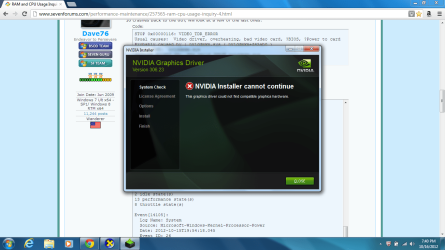
It won't update...
something to do with the restore point?
 

Attachments

  • pic1.png
    pic1.png
    298.9 KB · Views: 3

My Computer

Computer Manufacturer/Model Number
Lenovo Ideapad Y580
OS
Microsoft Windows 7 Home Premium 64-bit SP1
CPU
Intel Core i7 @ 2.30GHz 55 °C Ivy Bridge 22nm Technology
Motherboard
LENOVO Product Name (U3E1) 56 °C
Memory
Type DDR3 Size 8192 MBytes Channels # Dual DRAM Frequency 79
Graphics Card(s)
Generic PnP Monitor (1366x768@60Hz) NVIDIA GeForce GTX 660M
Sound Card
Realtek High Definition Audio
Screen Resolution
1366 x 768
Hard Drives
932GB Seagate ST1000LM024 HN-M101MBB (SATA)
Internet Speed
7 mbps
Just a couple of words about drivers. Well, maybe more than just a couple. :)

It's best to let Windows install drivers for your hardware automatically. You should avoid manually updating a driver unless Windows is unable to find a driver for one of your devices but you were able to obtain one some other way, or if technical support personnel ask you to install drivers from a disc or from the device manufacturer's website. If you decide to manually update a driver, here's how:
You must be logged on as an administrator to perform these steps.

  1. Open Device Manager by clicking the Start button
    4f6cbd09-148c-4dd8-b1f2-48f232a2fd33_47.png
    , clicking Control Panel, clicking System and Maintenance, and then clicking Device Manager.*
    18abb370-ac1e-4b6b-b663-e028a75bf05b_41.png
    If you are prompted for an administrator password or confirmation, type the password or provide confirmation.
  2. In Device Manager, locate the device you want to update, and then double-click the device name.
  3. Click the Driver tab, and then click Update Driver and follow the instructions


Source: Update a driver for hardware that isn't working properly

Now for a true story. Earlier this year Windows Update told me that a newer driver was available for my computer. I installed it and immediately started getting BSODs. I uninstalled it and resinstalled the previous driver by using a restore point. BSODs stopped. Then I went directly to the manufacturer's website and downloaded the new driver from them. Again, immediate BSODs. Uninstalled yet again and wrote a fairly negative email to the manufacturer. The manufacturer responded and enlightened me about drivers.

When a manufacturer releases a new driver, every computer manufacturer is allowed to customize or modify that driver for their own line of products. Until the computer manufacturer lists the updated driver on THEIR support page, there is no guarantee that an updated driver will work on a specific machine. About 6 months after the original driver release date my computer manufacturer (Sony) updated the driver for their line of Vaio laptops. Check Lenovo fo rrecommended drivers.

http://support.lenovo.com/en_US/research/hints-or-tips/detail.page?&DocID=HT073649
 

My Computer

Computer type
Laptop
Computer Manufacturer/Model Number
Sony Vaio VPCEB47GM Laptop
OS
Win 7 Pro 64-bit
CPU
Intel i5 2.4 Ghz
Memory
8GB DDR3
Graphics Card(s)
Intel HD 3000
Sound Card
IDT High Definition
Monitor(s) Displays
15.6 WGXA Anti-Glare LED
Screen Resolution
1280x800
Hard Drives
640Gb 7200rpm
Antivirus
MSE
Browser
Opera (primary) with IE9 backup
Back
Top