RAM Defrag tool

pacaveli420

New member
Member
Local time
1:30 PM
Messages
32
Does anyone know of a RAM defrag tool that works in windows 7?
yes I'm aware that an actual defrag of RAM does not improve access performance and that rebooting will clear the RAM, etc etc.
I want it because usually a ram defrag can recover unused memory.
or if someone knows an alternate solution to accomplishing the same thing....
basically after windows has been running for quite a while there seems to be a lot of RAM that is not available....but not in use either.
for example, right now, I only have about 1.2GB out of 6GB free
this is not because I have ~5GB worth of memory being dedicated to open applications and windows.
I could restart...open up the same applications and only be using like 2GB vs the current ~5GB

back in XP days I would use system mechanic's ram defrag and it'd work fairly well. I don't believe they have it in their software any longer though. any ideas?
 

My Computer

Computer Manufacturer/Model Number
Me
OS
Windows 7 Ultimate x64
CPU
AMD Phenom II x3 720
Motherboard
Gigabyte
Memory
6 GB DDR3 1600
Graphics Card(s)
Nvidia 250GTS
Monitor(s) Displays
Acer 23"
Screen Resolution
1680x1050
Hard Drives
Lots of WD's
PSU
OCZ Powerstream
Keyboard
Microsoft something....
Mouse
Microsoft Comfort 3000
Internet Speed
20Mb
Those ram/memory optimizers are nothing but pure snake-oil. As good an article about it as any,

The Truth About Windows Memory O

Do yourself and Windows a favor, let Windows manage it.
 

My Computer

Computer type
PC/Desktop
Computer Manufacturer/Model Number
Me
OS
Win 7 Ultimate x64
CPU
FX-8350 @ 4.6 GHz so far
Motherboard
Asus M5A97 EVO
Memory
ADATA XPG V1 Series Black 8GB DDR3 1600
Graphics Card(s)
Sapphire R9 270x Dual-X
Sound Card
Xonar DGX w/ Corsair Vengence 1300
Monitor(s) Displays
Acer S232HL Abid
Screen Resolution
1920x1080
Hard Drives
120 GB OCZ Vertex 3
500 GB Seagate 7200.12
PSU
Antec Earthwatts 650W Green
Case
Antec Three Hundred
Cooling
Cooler Master 212 EVO
Keyboard
Logitech G510
Mouse
Logitech G500s
Internet Speed
35000/3000
yeah none of that is really news to me. I still appear to have ram 'in use' that's actually not though
so 'letting windows manage it' is not really the best solution in this situation
 

My Computer

Computer Manufacturer/Model Number
Me
OS
Windows 7 Ultimate x64
CPU
AMD Phenom II x3 720
Motherboard
Gigabyte
Memory
6 GB DDR3 1600
Graphics Card(s)
Nvidia 250GTS
Monitor(s) Displays
Acer 23"
Screen Resolution
1680x1050
Hard Drives
Lots of WD's
PSU
OCZ Powerstream
Keyboard
Microsoft something....
Mouse
Microsoft Comfort 3000
Internet Speed
20Mb
Where are you looking that it is showing it "in use"?
 

My Computer

Computer type
PC/Desktop
Computer Manufacturer/Model Number
Me
OS
Win 7 Ultimate x64
CPU
FX-8350 @ 4.6 GHz so far
Motherboard
Asus M5A97 EVO
Memory
ADATA XPG V1 Series Black 8GB DDR3 1600
Graphics Card(s)
Sapphire R9 270x Dual-X
Sound Card
Xonar DGX w/ Corsair Vengence 1300
Monitor(s) Displays
Acer S232HL Abid
Screen Resolution
1920x1080
Hard Drives
120 GB OCZ Vertex 3
500 GB Seagate 7200.12
PSU
Antec Earthwatts 650W Green
Case
Antec Three Hundred
Cooling
Cooler Master 212 EVO
Keyboard
Logitech G510
Mouse
Logitech G500s
Internet Speed
35000/3000
task manager / memory usage
 

My Computer

Computer Manufacturer/Model Number
Me
OS
Windows 7 Ultimate x64
CPU
AMD Phenom II x3 720
Motherboard
Gigabyte
Memory
6 GB DDR3 1600
Graphics Card(s)
Nvidia 250GTS
Monitor(s) Displays
Acer 23"
Screen Resolution
1680x1050
Hard Drives
Lots of WD's
PSU
OCZ Powerstream
Keyboard
Microsoft something....
Mouse
Microsoft Comfort 3000
Internet Speed
20Mb
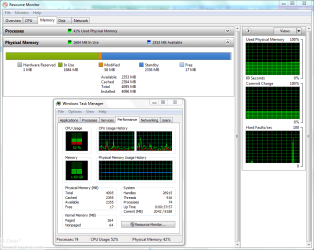
Post a screen shot. Also hit the Start button and type in resmon and hit enter and post a screen shot of that as well.
 

My Computer

Computer type
PC/Desktop
Computer Manufacturer/Model Number
Me
OS
Win 7 Ultimate x64
CPU
FX-8350 @ 4.6 GHz so far
Motherboard
Asus M5A97 EVO
Memory
ADATA XPG V1 Series Black 8GB DDR3 1600
Graphics Card(s)
Sapphire R9 270x Dual-X
Sound Card
Xonar DGX w/ Corsair Vengence 1300
Monitor(s) Displays
Acer S232HL Abid
Screen Resolution
1920x1080
Hard Drives
120 GB OCZ Vertex 3
500 GB Seagate 7200.12
PSU
Antec Earthwatts 650W Green
Case
Antec Three Hundred
Cooling
Cooler Master 212 EVO
Keyboard
Logitech G510
Mouse
Logitech G500s
Internet Speed
35000/3000
Task Manager:
5efvxz.png

Resource Monitor:
28ho2g4.png
 

My Computer

Computer Manufacturer/Model Number
Me
OS
Windows 7 Ultimate x64
CPU
AMD Phenom II x3 720
Motherboard
Gigabyte
Memory
6 GB DDR3 1600
Graphics Card(s)
Nvidia 250GTS
Monitor(s) Displays
Acer 23"
Screen Resolution
1680x1050
Hard Drives
Lots of WD's
PSU
OCZ Powerstream
Keyboard
Microsoft something....
Mouse
Microsoft Comfort 3000
Internet Speed
20Mb
Something doesn't look right here. This is what mine shows:

Capture.PNG

Have you disabled your virtual memory (paging file)?
 

My Computer

Computer type
PC/Desktop
Computer Manufacturer/Model Number
Dwarf Dwf/11/2012 r09/2013
OS
Windows 8.1 Pro RTM x64
CPU
Intel Core-i5-3570K 4-core @ 3.4GHz (Ivy Bridge) (OC 4.4GHz)
Motherboard
ASRock Z77 Extreme4-M
Memory
4 x 4GB DDR3-1600 Corsair Vengeance CMZ8GX3M2A1600C9B (16GB)
Graphics Card(s)
MSI GeForce GTX770 Gaming OC 2GB
Sound Card
Realtek High Definition on board solution (ALC 898)
Monitor(s) Displays
ViewSonic VA1912w Widescreen (VGA)
Screen Resolution
1440x900
Hard Drives
OCZ Agility 3 SSD 120GB SATA III x2 (RAID 0)
Samsung HD501LJ 500GB SATA II x2
Hitachi HDS721010CLA332 1TB SATA II
Iomega 1.5TB Ext USB 2.0
WD 2.0TB Ext USB 3.0
PSU
XFX Pro Series 850W Semi-Modular
Case
Gigabyte IF233
Cooling
1 x 120mm Front Inlet 1 x 120mm Rear Exhaust
Keyboard
Microsoft Comfort Curve Keyboard 3000 (USB)
Mouse
Microsoft Comfort Mouse 3000 for Business (USB)
Internet Speed
NetGear DG834Gv3 ADSL Modem/Router (Ethernet) ~4.0 Mb/s (O2)
Antivirus
Avast! 8.0.1497
Browser
IE 11
Other Info
Optical Drive: HL-DT-ST BD-RE BH10LS30 SATA Bluray
Lexmark S305 Printer/Scanner/Copier (USB)
WEI Score: 8.1/8.1/8.5/8.5/8.25
Asus Eee PC 1011PX Netbook (Windows 7 x86 Starter)
Up time 35 days? Let's have one of resmon after a restart. And even after 35 days it still shouldn't look like that unless you're running something that has a massive memory leak.

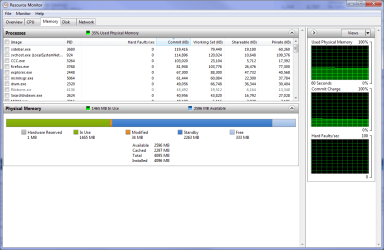
Mine after 3 days of up time,

resmon.png

And that is with playing several different games, converting a few movies, general usage, etc.
 

My Computer

Computer type
PC/Desktop
Computer Manufacturer/Model Number
Me
OS
Win 7 Ultimate x64
CPU
FX-8350 @ 4.6 GHz so far
Motherboard
Asus M5A97 EVO
Memory
ADATA XPG V1 Series Black 8GB DDR3 1600
Graphics Card(s)
Sapphire R9 270x Dual-X
Sound Card
Xonar DGX w/ Corsair Vengence 1300
Monitor(s) Displays
Acer S232HL Abid
Screen Resolution
1920x1080
Hard Drives
120 GB OCZ Vertex 3
500 GB Seagate 7200.12
PSU
Antec Earthwatts 650W Green
Case
Antec Three Hundred
Cooling
Cooler Master 212 EVO
Keyboard
Logitech G510
Mouse
Logitech G500s
Internet Speed
35000/3000
yeah none of that is really news to me. I still appear to have ram 'in use' that's actually not though
so 'letting windows manage it' is not really the best solution in this situation

win 7 uses paged memory differently than XP, and it may seem like there is a leak but there isnt.

By rebooting you are just making the page file rebuild itself again.
 

My Computer

Computer Manufacturer/Model Number
HP Pavillion dv-7 1005 Tx
OS
Win 8 Release candidate 8400
CPU
[email protected]
Memory
4 gigs
Graphics Card(s)
Nvidia 9600M
Sound Card
HD built-in
Monitor(s) Displays
17" Wxga
Screen Resolution
1440x900
Cooling
none
Internet Speed
45Mb down 5Mb up
Something doesn't look right here. This is what mine shows
mine 'looks' fine. I see nothing that yours has that mine doesn't
except I have a triple core and 2GB more ram

I haven't disabled my page file...and that's not really relevant. this is about the physical ram
Up time 35 days?
awesome right?
and I know a restart will trash the ram and it'll look a lot different
that was one of my first points.
I just want a tool that allows recovery of any ram that's no longer actually in use...as obviously I'm not using ~5GB of ram...but yet windows / my pc seems to show that I am
I'm not sure if this is due to programs not properly clearing out the ram when they are closed or what
 

My Computer

Computer Manufacturer/Model Number
Me
OS
Windows 7 Ultimate x64
CPU
AMD Phenom II x3 720
Motherboard
Gigabyte
Memory
6 GB DDR3 1600
Graphics Card(s)
Nvidia 250GTS
Monitor(s) Displays
Acer 23"
Screen Resolution
1680x1050
Hard Drives
Lots of WD's
PSU
OCZ Powerstream
Keyboard
Microsoft something....
Mouse
Microsoft Comfort 3000
Internet Speed
20Mb
Or instead of looking for a band-aid you could try and figure out which program is causing the problem and check for updates or an alternative.

If you want to try and figure out what is causing it start with this,

Process Explorer

provides more info than Windows own tools.
 

My Computer

Computer type
PC/Desktop
Computer Manufacturer/Model Number
Me
OS
Win 7 Ultimate x64
CPU
FX-8350 @ 4.6 GHz so far
Motherboard
Asus M5A97 EVO
Memory
ADATA XPG V1 Series Black 8GB DDR3 1600
Graphics Card(s)
Sapphire R9 270x Dual-X
Sound Card
Xonar DGX w/ Corsair Vengence 1300
Monitor(s) Displays
Acer S232HL Abid
Screen Resolution
1920x1080
Hard Drives
120 GB OCZ Vertex 3
500 GB Seagate 7200.12
PSU
Antec Earthwatts 650W Green
Case
Antec Three Hundred
Cooling
Cooler Master 212 EVO
Keyboard
Logitech G510
Mouse
Logitech G500s
Internet Speed
35000/3000
what if it's something I can't replace, or it's multiple applications, or just windows itself?
I keep most of my stuff up to date if possible. I know firefox sometimes has some leak issues...but I don't know if that's the same as it not removing memory it has allocated for itself. and I'm not giving up my firefox =)

I don't think that software will be of any use. it's only going to tell me about currently opened processed....dlls they have loaded and so forth.
 

My Computer

Computer Manufacturer/Model Number
Me
OS
Windows 7 Ultimate x64
CPU
AMD Phenom II x3 720
Motherboard
Gigabyte
Memory
6 GB DDR3 1600
Graphics Card(s)
Nvidia 250GTS
Monitor(s) Displays
Acer 23"
Screen Resolution
1680x1050
Hard Drives
Lots of WD's
PSU
OCZ Powerstream
Keyboard
Microsoft something....
Mouse
Microsoft Comfort 3000
Internet Speed
20Mb
for anyone else that this may be helpful too:
it seems the main program responsible for over allocating all my RAM was the windows indexer
I rebooted and decided to kill some processes prior to see if any of them were the culprits
upon killing it my RAM use dropped about 1.5GB - 2GB even though task manager reported it as using only 100MB or so
this was undoubtedly related to me rebuilding the index database earlier that day (I guess indexing ~2million items takes a good chunk of RAM =P)
it'd still be nice to have a RAM defrag / scrubber for situations where (closed or open) applications unnecessarily still have allocated space though. so if anyone knows of anything, let me know
 

My Computer

Computer Manufacturer/Model Number
Me
OS
Windows 7 Ultimate x64
CPU
AMD Phenom II x3 720
Motherboard
Gigabyte
Memory
6 GB DDR3 1600
Graphics Card(s)
Nvidia 250GTS
Monitor(s) Displays
Acer 23"
Screen Resolution
1680x1050
Hard Drives
Lots of WD's
PSU
OCZ Powerstream
Keyboard
Microsoft something....
Mouse
Microsoft Comfort 3000
Internet Speed
20Mb
It looks to me you just have to many things running at the same time. Winamp, several browsers, ect. Your ram and Windows 7 looks like it is working properly you just have a lot of things open all at one time.
 

My Computer

Computer type
PC/Desktop
Computer Manufacturer/Model Number
Home made Desktop
OS
Windows 10 Pro. 64/ version 1709 Windows 7 Pro/64
CPU
Intel i7-6800K @ 4.3
Motherboard
ASUS X-99 Deluxe II
Memory
Corsair Platinum 16 gig @2400
Graphics Card(s)
EVGA GTX 1070 OC
Monitor(s) Displays
Asus 27" LED LCD/VE278Q
Screen Resolution
1920-1080 or 1280-720 HDMI
Hard Drives
INTEL SSD 730-240 Gb Sata 3.0/
PSU
EVGA Platium 1200W
Case
Phanteks Luxe Tempered Glass 8 fans/ one radiator
Cooling
XSPC/ Water Cooled CPU
Keyboard
Das 4 Professional
Mouse
Logitech M705/MX Anywhere 2-S
Internet Speed
100 mbits
Antivirus
Microsoft Security Essentials/ Malwarebytes Premium 3.0/ SAS
Browser
I.E. 11 default/Firefox/ ISP Time Warner Cable/Spectrum
Other Info
LG BluRay Burner/
Sound system-KLipsch-THX/
Icy Dock ssd Hot Swap bays.
thnx for the reply Johnson, will check that out!
 

My Computer

Computer Manufacturer/Model Number
Me
OS
Windows 7 Ultimate x64
CPU
AMD Phenom II x3 720
Motherboard
Gigabyte
Memory
6 GB DDR3 1600
Graphics Card(s)
Nvidia 250GTS
Monitor(s) Displays
Acer 23"
Screen Resolution
1680x1050
Hard Drives
Lots of WD's
PSU
OCZ Powerstream
Keyboard
Microsoft something....
Mouse
Microsoft Comfort 3000
Internet Speed
20Mb

My Computer

Computer Manufacturer/Model Number
Averatec 6130HS-20
OS
Windows 7 Professional 32-bit (6.1, Build 7600)
CPU
Intel(R) Pentium(R) 4 3.00 GHz HT
Memory
2.0 GB
Graphics Card(s)
ATI Mobility Radeon 9600 64MB
Sound Card
Realtek AC'97 Audio
Screen Resolution
1280 x 800
Hard Drives
Seagate 96023A 60GB 7200RPM -
Seagate FreeAgentDesktop 250GB
Cooling
20 Inch Box Fan
Mouse
Targus PAWM10 Wireless Optical Laptop Mouse

My Computer

Computer Manufacturer/Model Number
HP Media Center
OS
Windows 7 32 bit
CPU
AMD 5200+ dual core
Memory
2 GB
Graphics Card(s)
NVidia GeForce 6150SE 128 MB
Monitor(s) Displays
CRT
Screen Resolution
1280x1024
Hard Drives
500 GB Sata internal :

SIIG USB 3.0 docking stations w/WD Caviar Black 6 Gb/s drives
Keyboard
PS/2
Mouse
PS/2 Wheel Mouse
Other Info
SIIG USB 3.0 PCIexpress card.
Well if there are still a lot of free RAM space, let Windows take care of it. If you feel you are getting a little bit low on free memory, close any programs that are not in use or consuming a lot of resources. Doing a quick Goggle search will make a lot of results.

I have used RAM cleaners. Apparently, if you have cleared too much RAM, your PC might hang for a while.
 

My Computer

Computer Manufacturer/Model Number
Custom Built
OS
Windows 7 Ultimate 32 Bit, Windows Developer Preview, Linux Mint 9 Gnome 32 Bit
CPU
Intel Pentium Dual CPU E2180@2GHz
Motherboard
Elitegroup 671T-M3
Graphics Card(s)
NVIDIA GeForce 7200 GS
Monitor(s) Displays
AOC TFT1560 15" LCD Monitor
Screen Resolution
1024x768
Keyboard
Logitech USB Keyboard
Back
Top