RAM Defrag tool

My original issue was something (a program...I found it had been the index service) had left memory allocated but was no longer actually using it. it was not because I 'had too many programs open' or etc
I appreciate the replies but some of you seem to have missed the point.
I always keep my startup clean of BS and have numerous services disabled that I don't need, etc.

I have used RAM cleaners. Apparently, if you have cleared too much RAM, your PC might hang for a while.
yeah I've used ones that have done the same thing. this one doesn't seem to have that problem. it's quite instant and I really haven't noticed any performance degradation after using it. honestly...if anything....stuff runs better. but that might just be some placebo.


Apparently it works by enumerating running process and calling EmptyWorkingSet() API call on each process.
I guess that's a bit outta my IT scope....cuz it doesn't mean much to me =P
superfetch is there for a reason though, I'd like to leave it alone. since I open pretty much the same programs all the time it's probably being beneficial to me
 

My Computer

Computer Manufacturer/Model Number
Me
OS
Windows 7 Ultimate x64
CPU
AMD Phenom II x3 720
Motherboard
Gigabyte
Memory
6 GB DDR3 1600
Graphics Card(s)
Nvidia 250GTS
Monitor(s) Displays
Acer 23"
Screen Resolution
1680x1050
Hard Drives
Lots of WD's
PSU
OCZ Powerstream
Keyboard
Microsoft something....
Mouse
Microsoft Comfort 3000
Internet Speed
20Mb
Ram cleaners are completely useless in windows 7
Define Ram Cleaner. CleanMem as pointed out by MilesAhead uses an API that Win 7 uses itself for the same purpose. Does that also make Windows 7 useless? CleanMem just allows you to use what Win 7 is already doing except Win 7 in my opinion doesn't do it in a timely or thorough enough manner.
 

My Computer

Computer Manufacturer/Model Number
Averatec 6130HS-20
OS
Windows 7 Professional 32-bit (6.1, Build 7600)
CPU
Intel(R) Pentium(R) 4 3.00 GHz HT
Memory
2.0 GB
Graphics Card(s)
ATI Mobility Radeon 9600 64MB
Sound Card
Realtek AC'97 Audio
Screen Resolution
1280 x 800
Hard Drives
Seagate 96023A 60GB 7200RPM -
Seagate FreeAgentDesktop 250GB
Cooling
20 Inch Box Fan
Mouse
Targus PAWM10 Wireless Optical Laptop Mouse
Perhaps I am missing something here but ...

If you have a application that truly has a memory leak and causing problems you need to isolate the culprit and either remove it, or update/patch that app.

Things like this just mask the issue and fix nothing. The memory leak will still be there.
All you will do by using apps like this, as well as disabling services to "tweak' the system to run better is break it, and make things worse in the long run.

If you leave all the services set as Win7 has them, and don't worry about RAM use, the system will be far more responsive and smoother running than if you try to optimize it.
It tweaks itself.


As far as RAM use:

When you run a program and close it, It doesnt always get dumped from memory, just moved to standby.

That way, if you decide to use it later, (amoung everything else 7 thinks you might use) its already loaded in memory and ready to go. It simply changes it to in use status.

It will dump things out of memory you are not currently using whenever a application or game requests that space if needed.


I guess I've never understood why anyone would want to stop the OS from using what RAM it has available to it, to its full extent.

You have have it, why let it set empty when the OS can make use of it?

By stopping it from doing so, or manually cleaning it out constantly is just crippling the system.


I know there will be those who completely disagree, but thats my 2 cents.
 

My Computer

Computer Manufacturer/Model Number
Custom (Self Build)
OS
Windows 7 Home Premium 64bit
CPU
Intel Core i7 2700k
Motherboard
eVGA P67 SLI
Memory
8GB Mushkin Redline Ridgebacks @1866
Graphics Card(s)
EVGA GTX570 SC
Sound Card
XiFi Titanium HD
Monitor(s) Displays
LG W2453V
Screen Resolution
1920x1080
Hard Drives
Intel 320 80GB -- Intel X25-V 40GB --WD Black 1TB x2 -- WD Blue 640GB
PSU
Seasonic x750
Case
Corsair 600T SE White
Cooling
eVGA Superclocked CPU Cooler
Keyboard
Saitek Cyborg
Antivirus
Kaspersky
Browser
IE
Other Info
LG BD/DVD
i agree with wishmaster. fix the cause not the symptoms. fix the leak. disable windows indexing if needed.

and one sure fire method to ensure you always have half your memory free is to open the case, remove half of your memory boards & lock them in a safe. they'll always be free then. free memory is memory that is not being used. useless.

as it's up to you, if you insist on persuing this, try 'process lasso' from bitsum, in it's current beta incarnation it does allow you to set memory and cpu% limits on a process which if exceeded will shutdown or restart the process. it also allows you to trim (manually or on a schedule) the memory of all, or of individual processes and they even tell you it's NOT RECCOMMENDED. it also adjusts prioritys of processes that are hogging the cpu...they have a freeware version if you are tight, i've got a lifetime license myself.
 

My Computer

Computer type
PC/Desktop
Computer Manufacturer/Model Number
Custom build Nanu by 3SX
OS
Win 7 ultimate x64 sp1
CPU
Intel i7 4 core 3770k ivy bridge o/c to 4.2ghz
Motherboard
Asus p8z77-i Deluxe
Memory
16 GB
Graphics Card(s)
Nvidia geforce GTX650
Sound Card
Realtek on mb
Monitor(s) Displays
24in. lcd/led
Screen Resolution
1920x1080
Hard Drives
128GB Kingston SSD
500GB seagate maximus xt hybrid
500GB hitachi HD
500GB external WD Passport usb3
PSU
Silverstone 450 watt
Case
Silverstone FT03 Black Fortress
Cooling
Water cooler
Keyboard
Logitech wireless kbd/mouse mk300
Mouse
Logitech wireless kbd/mouse mk300
Internet Speed
8mb adsl (actuall speed is around 6mb)
Other Info
Asus DSL-N55U wireless router
SONY BC-5850H 6X BLURAY writer
OUTPOST Security Suite
The reason I stated there might be to many things running is OP post #7. It shows winamp 582 kb, Firefox 578 kb, 4 chrome open 198000 kb, Search inderer 117000 kb and of course we can't see it all. If the rest of the list is like this would suggest to me there are a lot of things open and using up the ram. Now if the OP wants or needs all this running at the same time stick more ram in your computer. Your ram is working properly, you are just using it all.
 

My Computer

Computer type
PC/Desktop
Computer Manufacturer/Model Number
Home made Desktop
OS
Windows 10 Pro. 64/ version 1709 Windows 7 Pro/64
CPU
Intel i7-6800K @ 4.3
Motherboard
ASUS X-99 Deluxe II
Memory
Corsair Platinum 16 gig @2400
Graphics Card(s)
EVGA GTX 1070 OC
Monitor(s) Displays
Asus 27" LED LCD/VE278Q
Screen Resolution
1920-1080 or 1280-720 HDMI
Hard Drives
INTEL SSD 730-240 Gb Sata 3.0/
PSU
EVGA Platium 1200W
Case
Phanteks Luxe Tempered Glass 8 fans/ one radiator
Cooling
XSPC/ Water Cooled CPU
Keyboard
Das 4 Professional
Mouse
Logitech M705/MX Anywhere 2-S
Internet Speed
100 mbits
Antivirus
Microsoft Security Essentials/ Malwarebytes Premium 3.0/ SAS
Browser
I.E. 11 default/Firefox/ ISP Time Warner Cable/Spectrum
Other Info
LG BluRay Burner/
Sound system-KLipsch-THX/
Icy Dock ssd Hot Swap bays.
...

Apparently it works by enumerating running process and calling EmptyWorkingSet() API call on each process.
I guess that's a bit outta my IT scope....cuz it doesn't mean much to me =P
superfetch is there for a reason though, I'd like to leave it alone. since I open pretty much the same programs all the time it's probably being beneficial to me

What it means is, the OS allocates memory for a process to use called a Working Set. Say the app doesn't need the average amount of memory given since it's not going to do much, but it's going to sit in the tray in case you hit a hotkey. It can call EmptyWorkingSet() to tell Windows to take the memory back.

This memory utility is just doing that. If the program does need the memory it will call functions to get some from the OS. So you can be giving it up just to turn around and ask for it back. It may be ok to use it on some apps. Guess that's why it has a list to control the apps you use it on or exclude some apps or whatever.

Afa Superfetch, if you don't want to change the setting, I'd still advise deleting the stats so it doesn't cache the program with the memory leak. Open an admin command prompt. Change to C:\Windows\Prefetch. and do
delete *.*

It will calculate new stats from there. Contrary to popular believe it doesn't take like 5 years to figure out what programs you use a lot. When I delete the stats for my boot files, I get one slow boot then it's back in business.
 

My Computer

Computer Manufacturer/Model Number
HP Media Center
OS
Windows 7 32 bit
CPU
AMD 5200+ dual core
Memory
2 GB
Graphics Card(s)
NVidia GeForce 6150SE 128 MB
Monitor(s) Displays
CRT
Screen Resolution
1280x1024
Hard Drives
500 GB Sata internal :

SIIG USB 3.0 docking stations w/WD Caviar Black 6 Gb/s drives
Keyboard
PS/2
Mouse
PS/2 Wheel Mouse
Other Info
SIIG USB 3.0 PCIexpress card.
these best describe my feelings about this thread: :mad2::doh::cry:
once again I'll reiterate....the problem was / is NOT a program with a memory leak
it was because windows index service had memory allocated for it that it was no longer using
the reason it had so much allocated is because it just ran through ~2 million files rebuilding the index
somehow windows (or indexing itself) decided because of this that it still needed a bunch of ram allocated
thnx for the info MilesAhead, that all seems to make sense!
yeah. the apps that need it will just ask for it again, but the apps that really don't need it and have a bunch allocated....it'll solve that issue. which is exactly what I was wanting.

-Layback Bear
I have pretty much the same things open now as I did then and I have ~2.5GB of free ram (this is without doing anything with the cleanmem). I did NOT have too many things open. also you have kb confused with MB for the FF and winamp use.
 

My Computer

Computer Manufacturer/Model Number
Me
OS
Windows 7 Ultimate x64
CPU
AMD Phenom II x3 720
Motherboard
Gigabyte
Memory
6 GB DDR3 1600
Graphics Card(s)
Nvidia 250GTS
Monitor(s) Displays
Acer 23"
Screen Resolution
1680x1050
Hard Drives
Lots of WD's
PSU
OCZ Powerstream
Keyboard
Microsoft something....
Mouse
Microsoft Comfort 3000
Internet Speed
20Mb
Do you have to use a page file in windows 7? Its just my machine never really uses more than 2.5gb of my 4gb of ram, the annoying thing tho i noticed that my machine does use virtual memory at times even tho my RAM is not fully used? How do you turn off or change the page file size that you set for your HD?
 

My Computer

OS
Windows 7 64bit
CPU
Phenom IIx4 955 Black Edition
Memory
4GB Kingston 1066mhz DDR2
Graphics Card(s)
Gigabyte 260GTX
Monitor(s) Displays
Samsung syncmaster 2033
Hard Drives
500GB Samsung ATA
500GB Segate ATA
PSU
Antec True blue 750W Modular
Case
Antec 1200
Cooling
Prolimatech Megahalems Performance CPU Cooler/2x Apache Fan
pacaveli420 could please post your resmon again, I like learning things.
Firefox 578.040 KB.
 

My Computer

Computer type
PC/Desktop
Computer Manufacturer/Model Number
Home made Desktop
OS
Windows 10 Pro. 64/ version 1709 Windows 7 Pro/64
CPU
Intel i7-6800K @ 4.3
Motherboard
ASUS X-99 Deluxe II
Memory
Corsair Platinum 16 gig @2400
Graphics Card(s)
EVGA GTX 1070 OC
Monitor(s) Displays
Asus 27" LED LCD/VE278Q
Screen Resolution
1920-1080 or 1280-720 HDMI
Hard Drives
INTEL SSD 730-240 Gb Sata 3.0/
PSU
EVGA Platium 1200W
Case
Phanteks Luxe Tempered Glass 8 fans/ one radiator
Cooling
XSPC/ Water Cooled CPU
Keyboard
Das 4 Professional
Mouse
Logitech M705/MX Anywhere 2-S
Internet Speed
100 mbits
Antivirus
Microsoft Security Essentials/ Malwarebytes Premium 3.0/ SAS
Browser
I.E. 11 default/Firefox/ ISP Time Warner Cable/Spectrum
Other Info
LG BluRay Burner/
Sound system-KLipsch-THX/
Icy Dock ssd Hot Swap bays.
29oo3zb.png

not 578.040 KB
578,040 KB

craney5 you can shut off page file in system properties
run sysdm.cpl
advanced
performance settings
advanced
change
uncheck the auto option at the top and you can shut it off
generally 7 is smart enough to use ram and page file when necessary though
I shut off paging in XP because it wasn't....but I've left it alone on 7
 

My Computer

Computer Manufacturer/Model Number
Me
OS
Windows 7 Ultimate x64
CPU
AMD Phenom II x3 720
Motherboard
Gigabyte
Memory
6 GB DDR3 1600
Graphics Card(s)
Nvidia 250GTS
Monitor(s) Displays
Acer 23"
Screen Resolution
1680x1050
Hard Drives
Lots of WD's
PSU
OCZ Powerstream
Keyboard
Microsoft something....
Mouse
Microsoft Comfort 3000
Internet Speed
20Mb
It appears that you have made a good improvement, glad to see that. After using it that way for a while let us know the ups and downs.
 

My Computer

Computer type
PC/Desktop
Computer Manufacturer/Model Number
Home made Desktop
OS
Windows 10 Pro. 64/ version 1709 Windows 7 Pro/64
CPU
Intel i7-6800K @ 4.3
Motherboard
ASUS X-99 Deluxe II
Memory
Corsair Platinum 16 gig @2400
Graphics Card(s)
EVGA GTX 1070 OC
Monitor(s) Displays
Asus 27" LED LCD/VE278Q
Screen Resolution
1920-1080 or 1280-720 HDMI
Hard Drives
INTEL SSD 730-240 Gb Sata 3.0/
PSU
EVGA Platium 1200W
Case
Phanteks Luxe Tempered Glass 8 fans/ one radiator
Cooling
XSPC/ Water Cooled CPU
Keyboard
Das 4 Professional
Mouse
Logitech M705/MX Anywhere 2-S
Internet Speed
100 mbits
Antivirus
Microsoft Security Essentials/ Malwarebytes Premium 3.0/ SAS
Browser
I.E. 11 default/Firefox/ ISP Time Warner Cable/Spectrum
Other Info
LG BluRay Burner/
Sound system-KLipsch-THX/
Icy Dock ssd Hot Swap bays.
that is with no changes...that's why I said it's without the cleanmem
the only change was I rebooted, which cleared the indexing issue

usually after I run cleanmem it'll drop my ram use down to about 2.5-3GB
 

My Computer

Computer Manufacturer/Model Number
Me
OS
Windows 7 Ultimate x64
CPU
AMD Phenom II x3 720
Motherboard
Gigabyte
Memory
6 GB DDR3 1600
Graphics Card(s)
Nvidia 250GTS
Monitor(s) Displays
Acer 23"
Screen Resolution
1680x1050
Hard Drives
Lots of WD's
PSU
OCZ Powerstream
Keyboard
Microsoft something....
Mouse
Microsoft Comfort 3000
Internet Speed
20Mb
that is with no changes...that's why I said it's without the cleanmem
the only change was I rebooted, which cleared the indexing issue

usually after I run cleanmem it'll drop my ram use down to about 2.5-3GB

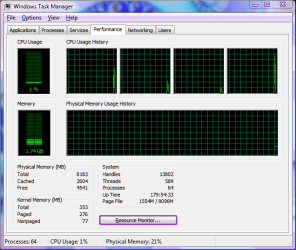
Superfetch set to only cache boot files:

tm.png
 

My Computer

Computer Manufacturer/Model Number
HP Media Center
OS
Windows 7 32 bit
CPU
AMD 5200+ dual core
Memory
2 GB
Graphics Card(s)
NVidia GeForce 6150SE 128 MB
Monitor(s) Displays
CRT
Screen Resolution
1280x1024
Hard Drives
500 GB Sata internal :

SIIG USB 3.0 docking stations w/WD Caviar Black 6 Gb/s drives
Keyboard
PS/2
Mouse
PS/2 Wheel Mouse
Other Info
SIIG USB 3.0 PCIexpress card.
29oo3zb.png

not 578.040 KB
578,040 KB

craney5 you can shut off page file in system properties
run sysdm.cpl
advanced
performance settings
advanced
change
uncheck the auto option at the top and you can shut it off
generally 7 is smart enough to use ram and page file when necessary though
I shut off paging in XP because it wasn't....but I've left it alone on 7


Thanks for that mate, When you set your own page file size in windows is there a "general rule of thumb" to how big this page file should be compared to how much RAM you have installed?

Thanks again
 

My Computer

OS
Windows 7 64bit
CPU
Phenom IIx4 955 Black Edition
Memory
4GB Kingston 1066mhz DDR2
Graphics Card(s)
Gigabyte 260GTX
Monitor(s) Displays
Samsung syncmaster 2033
Hard Drives
500GB Samsung ATA
500GB Segate ATA
PSU
Antec True blue 750W Modular
Case
Antec 1200
Cooling
Prolimatech Megahalems Performance CPU Cooler/2x Apache Fan
Superfetch set to only cache boot files:

View attachment 103716
interesting. is that just with windows running? or with your usual stuff open?
as someone else was saying though....free ram is kinda useless.
and I never really run out (except when something leaks a bunch or indexing allocates 2GB to itself =P)

Thanks for that mate, When you set your own page file size in windows is there a "general rule of thumb" to how big this page file should be compared to how much RAM you have installed?

Thanks again

my general rule of thumb is to let windows (if win 7) manage it. that way it can increase it if larger is needed =P. windows currently has mine set to 6GB right now, matching my ram. in older days a rule I heard a lot was 1.5x as much ram as you have....but that's kinda a stupid rule. if you had a PC with only 128MB you'd need to have a bigger page file to offset that. otherwise you couldn't open much. you'll want it to be a decent size....but not be taking up too much space on your hdd (if you have limited space).
 

My Computer

Computer Manufacturer/Model Number
Me
OS
Windows 7 Ultimate x64
CPU
AMD Phenom II x3 720
Motherboard
Gigabyte
Memory
6 GB DDR3 1600
Graphics Card(s)
Nvidia 250GTS
Monitor(s) Displays
Acer 23"
Screen Resolution
1680x1050
Hard Drives
Lots of WD's
PSU
OCZ Powerstream
Keyboard
Microsoft something....
Mouse
Microsoft Comfort 3000
Internet Speed
20Mb
Superfetch set to only cache boot files:

View attachment 103716
interesting. is that just with windows running? or with your usual stuff open?
as someone else was saying though....free ram is kinda useless.
and I never really run out (except when something leaks a bunch or indexing allocates 2GB to itself =P)
The point is not the free ram so much as Superfetch will run my HD gathering stats to try to predict what I'm going to do. It will not do so in any useful fashion that's worth the trade-off of running my HD incessantly. By caching only boot files, one slow boot does the stat taking, I get rapid boots, and my HD doesn't run on. As a side effect I happen to get free ram. If you just have to reign in an unruly program, then the thread has been solved and I see no reason why you plow on.

=========================================
edit: I used this setting originally because Vista ran my HD on so badly. Since I originally posted this I have changed Superfetch setting back to default and use a defragged page file. Seems to run smooth. And if any apps just have to have a page file, well it's there. W7 handles it much better than Vista.
=================================================

Thanks for that mate, When you set your own page file size in windows is there a "general rule of thumb" to how big this page file should be compared to how much RAM you have installed?

Thanks again

What works is what works for you. There is no "one answer." That's why the number is adjustable in the first place. If one number worked way better than any other, they'd just hard wire it in the code like Avagadro's constant.
 
Last edited:

My Computer

Computer Manufacturer/Model Number
HP Media Center
OS
Windows 7 32 bit
CPU
AMD 5200+ dual core
Memory
2 GB
Graphics Card(s)
NVidia GeForce 6150SE 128 MB
Monitor(s) Displays
CRT
Screen Resolution
1280x1024
Hard Drives
500 GB Sata internal :

SIIG USB 3.0 docking stations w/WD Caviar Black 6 Gb/s drives
Keyboard
PS/2
Mouse
PS/2 Wheel Mouse
Other Info
SIIG USB 3.0 PCIexpress card.
OP #1 post. Does anyone know of a RAM defrag tool that works in windows 7? My answer is, no I do not.
 

My Computer

Computer type
PC/Desktop
Computer Manufacturer/Model Number
Home made Desktop
OS
Windows 10 Pro. 64/ version 1709 Windows 7 Pro/64
CPU
Intel i7-6800K @ 4.3
Motherboard
ASUS X-99 Deluxe II
Memory
Corsair Platinum 16 gig @2400
Graphics Card(s)
EVGA GTX 1070 OC
Monitor(s) Displays
Asus 27" LED LCD/VE278Q
Screen Resolution
1920-1080 or 1280-720 HDMI
Hard Drives
INTEL SSD 730-240 Gb Sata 3.0/
PSU
EVGA Platium 1200W
Case
Phanteks Luxe Tempered Glass 8 fans/ one radiator
Cooling
XSPC/ Water Cooled CPU
Keyboard
Das 4 Professional
Mouse
Logitech M705/MX Anywhere 2-S
Internet Speed
100 mbits
Antivirus
Microsoft Security Essentials/ Malwarebytes Premium 3.0/ SAS
Browser
I.E. 11 default/Firefox/ ISP Time Warner Cable/Spectrum
Other Info
LG BluRay Burner/
Sound system-KLipsch-THX/
Icy Dock ssd Hot Swap bays.

My Computer

Computer Manufacturer/Model Number
custom built by me
OS
windows 7 ultimate x64
CPU
phenom II x4 840 socket
Motherboard
asus m4a78t-e
Memory
16 GB of DDR3 1333
Graphics Card(s)
onboard
Sound Card
onboard
Monitor(s) Displays
generic
Screen Resolution
1440 x 900/Landscape
Hard Drives
wdc 500, wdc 500 sata raid
PSU
coolermaster 700w
Case
rosewill
Cooling
antec & vantec 80mm, 120mm
Keyboard
generic
Mouse
GE mini
Internet Speed
10 mbps up/40 mbps down
other memory defragmentors?

I play an online game that has problems crashing because it has "memory leak".
No, they probably won't ever fix it... so am looking for a work around.
A ram clearing program was suggested by another player.

I found 2 programs at CNET downloads that say part of what they do is clean the RAM
(and are Win 7 compatible)
Advanced System Optimizer
and
System Mechanic Free
and the above mentioned
CleanMem

has anyone tried them?
I am wondering if they can be used while the game is open?

thx
 

My Computer

OS
win 7 64 bit
Back
Top