
RAM full at startup

superflex

New member
Local time
10:15 AM
Messages
3
Hello All,

I bought a new SSD 128 (see specs below) for my lenovo w510. I did a fresh windows install. Things were fine for a few days but now when I start my computer I have to wait for my RAM. For some reason my memory is almost full at 7.82gb when I start windows. This goes away after a few minutes and the memory is back to around 1gb. Sort of missing the whole point of the ssd fast bootup thing right now.

One thing to note is that explorer.exe is spiking like crazy during this time. This will probably be part of the explanation.

Any ideas?
 

Attachments

  • taskmanager.jpg
    taskmanager.jpg
    131.4 KB · Views: 66

My Computer

Computer Manufacturer/Model Number
Lenovo ThinkPad W510 (Laptop)
OS
Windows 7 Ultimate x64
CPU
Intel Core i7 Q820 @ 1.73 GHz
Memory
8 GB DDR3
Graphics Card(s)
NVIDIA Quadro FX 880M
Hard Drives
Kingston SSDNow V Series Gen II 128GB 2.5IN SATA2 Solid State Disk Flash Drive
Download process explorer and see what is using the memory.
Run an antivirus scan'
Download and run malwarebytes.
Something should show with these tests.
 

My Computer

Computer type
PC/Desktop
Computer Manufacturer/Model Number
Dell XPS 420
OS
Windows 10, Home Clean Install
CPU
Intel Core2 processsor Q8200(2.33Ghz 1333FSB) Quad Core Tech
Motherboard
Dell
Memory
6 gb
Graphics Card(s)
ATI Radeon 256MB HD3650
Sound Card
Intergrated 7.1 Channel Audio
Monitor(s) Displays
Dell SP2009W 20"
Hard Drives
640 GB Serial ATA Hard drive
Cooling
Fan
Keyboard
Dell USB Keyboard
Mouse
Dell Premium Optical USB
Internet Speed
DSL 2.85
things are getting worse?

Thanks for the quick reply:

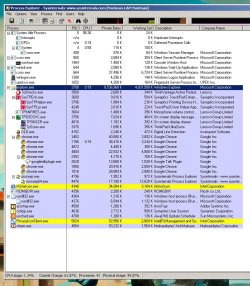
I should have mentioned, I ran a full system scan for virus and malware/spyware. With no results. I did install and ran process explorer. And for some strange reason caught the computer spiking after the initial startup. Unfortunately, there's nothing valuable in what process explorer is telling me. See image. I guess now I have to start worrying about this happening at all times instead of just at start up.
 

Attachments

  • process explorer.jpg
    process explorer.jpg
    162.4 KB · Views: 58

My Computer

Computer Manufacturer/Model Number
Lenovo ThinkPad W510 (Laptop)
OS
Windows 7 Ultimate x64
CPU
Intel Core i7 Q820 @ 1.73 GHz
Memory
8 GB DDR3
Graphics Card(s)
NVIDIA Quadro FX 880M
Hard Drives
Kingston SSDNow V Series Gen II 128GB 2.5IN SATA2 Solid State Disk Flash Drive
My Computer

Computer type
PC/Desktop
Computer Manufacturer/Model Number
Dell XPS 420
OS
Windows 10, Home Clean Install
CPU
Intel Core2 processsor Q8200(2.33Ghz 1333FSB) Quad Core Tech
Motherboard
Dell
Memory
6 gb
Graphics Card(s)
ATI Radeon 256MB HD3650
Sound Card
Intergrated 7.1 Channel Audio
Monitor(s) Displays
Dell SP2009W 20"
Hard Drives
640 GB Serial ATA Hard drive
Cooling
Fan
Keyboard
Dell USB Keyboard
Mouse
Dell Premium Optical USB
Internet Speed
DSL 2.85
ok i'll try that tonight - although I have a feeling this has to do with my SSD and windows 7 settings...
 

My Computer

Computer Manufacturer/Model Number
Lenovo ThinkPad W510 (Laptop)
OS
Windows 7 Ultimate x64
CPU
Intel Core i7 Q820 @ 1.73 GHz
Memory
8 GB DDR3
Graphics Card(s)
NVIDIA Quadro FX 880M
Hard Drives
Kingston SSDNow V Series Gen II 128GB 2.5IN SATA2 Solid State Disk Flash Drive
I only know what you tell us. Try the clean boot and hold off on the memtest for now.
 

My Computer

Computer type
PC/Desktop
Computer Manufacturer/Model Number
Dell XPS 420
OS
Windows 10, Home Clean Install
CPU
Intel Core2 processsor Q8200(2.33Ghz 1333FSB) Quad Core Tech
Motherboard
Dell
Memory
6 gb
Graphics Card(s)
ATI Radeon 256MB HD3650
Sound Card
Intergrated 7.1 Channel Audio
Monitor(s) Displays
Dell SP2009W 20"
Hard Drives
640 GB Serial ATA Hard drive
Cooling
Fan
Keyboard
Dell USB Keyboard
Mouse
Dell Premium Optical USB
Internet Speed
DSL 2.85
During the 'few days' of your 'fine' working have you installed any new applications? If explorer.exe is taking up the RAM at first then it could be due to startup programs all running at the same time. Try running msconfig (type into start menu search) and see what is showing under the 'Startup' tab.


OS
 

My Computer

Computer Manufacturer/Model Number
Compaq Desktop
OS
Windows 7 Ultimate x64
CPU
AMD Sempron Dual Core
Memory
3GB
Graphics Card(s)
NVIDIA GeForce 6150SE nForce 430
Screen Resolution
1024x768
Hard Drives
150GB Sata
As I said hold off on memtest for now. Go with clean boot or msconfig, basically the same and report results.
 

My Computer

Computer type
PC/Desktop
Computer Manufacturer/Model Number
Dell XPS 420
OS
Windows 10, Home Clean Install
CPU
Intel Core2 processsor Q8200(2.33Ghz 1333FSB) Quad Core Tech
Motherboard
Dell
Memory
6 gb
Graphics Card(s)
ATI Radeon 256MB HD3650
Sound Card
Intergrated 7.1 Channel Audio
Monitor(s) Displays
Dell SP2009W 20"
Hard Drives
640 GB Serial ATA Hard drive
Cooling
Fan
Keyboard
Dell USB Keyboard
Mouse
Dell Premium Optical USB
Internet Speed
DSL 2.85
If you are in Process Explorer, right click on the explorer.exe > Properties > Threads tab. What is the threads count (it shows on top before the list of the threads). To give you an idea, mine is between 10 and 28 (during my test).
 

My Computer

Computer Manufacturer/Model Number
HP, Dell, Gateway, Toshiba - 4 laptops and 2 desktops
OS
Vista, Windows7, Mint Mate, Zorin, Windows 8
CPU
from 1.6GHz Duo to i7
Monitor(s) Displays
2x HP w2207
Hard Drives
5x HDD, 7x SSD, 12x Externals
Keyboard
with trackball - no mices
Mouse
Trackball mice
Internet Speed
DSL 6000
Back
Top