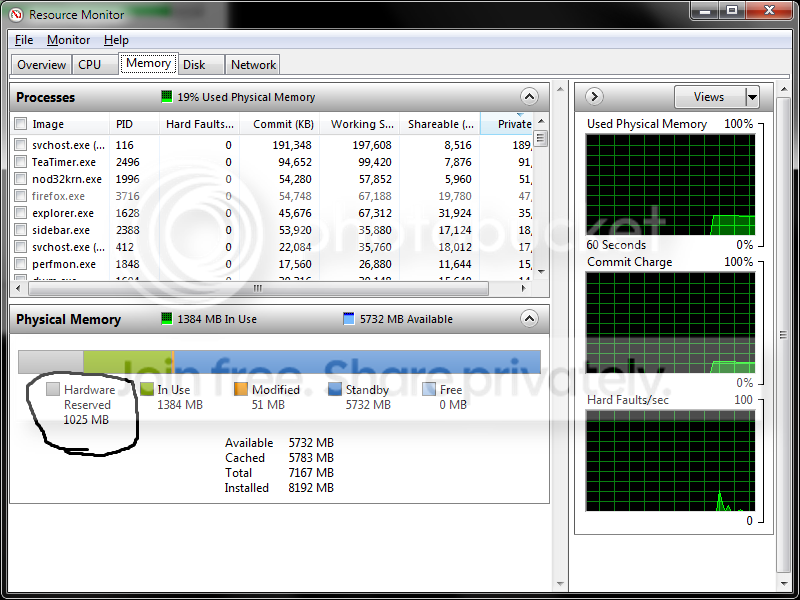
It's 4:53 am here and I am a bit tired to say the least, but I never pass on a good discussion.

First because it isn't necessary unless one does something to use up all 8gb, in which case the pc would crash.
It is actually necessary for some peripheral scenarios - dump creation and perfmon being the usual examples.
Actually I don't care about dumpfiles and monitoring on my production systems. They simply never crash.
I set my systems up through a very strict order, that I thoroughly tested in a test (second boot) environment.
I keep logs of everything I do.
Only after thorough testing I put it into my production machine.
On the test environment I have pagefile enabled for the reasons you mentioned.
Second because creation, growth and maintenance of the pagefile by windows means repeated unnecessary disk access.
Creation is only done at the sysadmin's behest. "Growth and maintenance" are done as necessary, so that's a circular argument. If it wasn't necessary, they wouldn't be growing.
Have to contradict you here.
Although this is true in theory, in the real windows world it's not.
It grows regardless of how much free memory you have left.
I'll prove my case by turning it around. If it's growth was necessary, disabling it would crash my pc.
OK, but what was the upside - why did you do it?
Already answered: it noticeably speeds up the OS cause unnecessary reads/writes no longer occur.
(And read my next reply.)
You're indirectly accusing the Memory Manager or the app (see below) of having a bug which caused excessive working set trimming in the ebsence of memory pressure.
Regardless of which of the two is causing it, fact is that it does happen. Disabling pagefile solves it.
Why wouldn't I disable it when Music Production and cristal clear sound is my goal?
Frankly, I think it is the mem manager cause Cubase SX is not the only audio app that crackles with many audio tracks playing.
Every audio app I used has it, Adobe Audition, Reaper, Ableton and Sonar.
And not only on this machine. My previous setup had exactly the same.
Note that I am not just putting a few tracks together.
They are complete orchestrations with usually 30 up to 60 tracks of audio and midi, stacks of virtual instruments and effects.
A page can stay resident almost indefinitely in situations where plenty of RAM is available. Even if it's trimmed, it ends up on the standby and modified lists where it can be quickly soft-faulted back into the process WS without incurring the penalty of HDD access.
Again, that's theory.
The OS shouldn't offload to disk when you have plenty of RAM available, but in practice with the pagefile enabled, it does.
When I just fully loaded my project and all virtual instruments are loaded in RAM, I play the recorded tracks and all runs fine.
From that moment on, in task manager I can see the virtual memory grow, same as the free physical memory, very slowly.
After a few hrs of working, the crackling starts to occur, and I can see the virtual memory grew quite a lot, and I have more free phys. mem than when I started.
When I save, close and reopen the app, all is fine again.
I can only conclude the OS is in fact offloading to disk, even though it's not supposed to.
With a Ram speed critical process like virtual instruments, it results in crackling sound when you play 30 or more audio/midi tracks.
Oh, sure, but now you're accusing the process/app playing those virtual instruments of having a bug and potentially not calling VirtualLock() to ensure critical pages are resident at the times where disk access is to be avoided.
Yes.
Greetz to you again.

PS. I'm off to bed, but I will read your reply first thing tomorrow.