RAM is sooo high!

Kopp

New member
Local time
9:54 AM
Messages
8
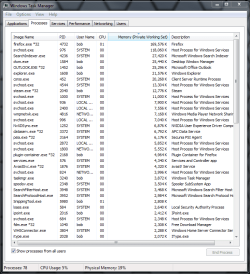
A few months ago my RAM usage just started reaching 1gb at its lowest. Now it hits over 2.5gb sometimes and is seen at 1.5gb normally. Programs I used to be able to run now have problems frequently and have rendered my gaming laptop to a MSpaint and notepad oriented computer.

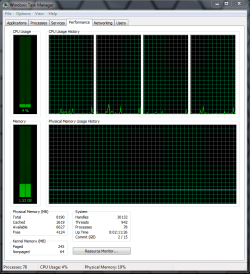
I haven't installed anything new and i began deleted a load of stuff from my computer, no luck. I've tried 3 separate computer optimizing tools and still not much worked. I've searched the internet but all i can find is other people with problems where RAM goes from normal to 100%. By the way i have 6gb of ram. I've attached a picture of my task manager that i just took.

Thank you for taking the time to look at this!
 

Attachments

  • help.png
    help.png
    47.1 KB · Views: 84

My Computer

Computer Manufacturer/Model Number
ASUS Notebook G72GX (laptop)
OS
windows 7 home premium x64
CPU
Intel(R) Core(TM)2 Duo CPU
Memory
6GB
Graphics Card(s)
NVIDIA GeForce GTX 260M
Sound Card
High Definition Audio Controller [NoDB]
Monitor(s) Displays
Monitor Generic PnP Monitor [NoDB]
Screen Resolution
1600X900
Hard Drives
S/N E0C9-5013: 500 GB
Ram is meant to be used....the more the better, however.....according to your screen print you are using just 29% of your physical memory at idle (based on CPU usage of 1%)......quit low really and right on par based on my 8gb ram that uses 18% at idle. Try looking at all users for hidden processes but 2.5gb of 6gb still leaves a lot of RAM available so it doesn't appear that RAM is your problem. How much does your video card(s) require, etc. If you are worried then run the windows ram testing (perhaps you have some bad memory):

http://www.sevenforums.com/tutorials/715-memory-diagnostics-tool.html

or install more ram. I never have issues with 8gb. Check on programs that you have in startup although your specs look like mine:

Ram1.PNGRam2.PNG
 

My Computer

Computer Manufacturer/Model Number
Systemax N2000 Gaming PC
OS
Windows 7 Ultimate x64
CPU
Q6600 @2.4ghz (G0 stepping)
Motherboard
XFX nforce 680i LT
Memory
8 gb OCZ vista essential sli PC-6400
Graphics Card(s)
Dual 9800gt in SLI mode
Sound Card
Integrated 8.1 High Definition Audio
Monitor(s) Displays
Dual Sceptre x246w 24 inch monitors
Screen Resolution
1920 x 1200 each monitor
Hard Drives
500 GB SATA II / 7500 rpm
PSU
Cooler Master Real Power Pro 1250W
Case
N2000 server tower
Cooling
Thermaltake Bigwater 760 is
Keyboard
MS Intelitype 6000 v2.0
Mouse
MS Intelipoint 6000
Internet Speed
Wi-power 1.5GB up / 512k down
Other Info
Windows 7 Ultimate x64, Windows 7 Pro x64, Windows Home Premium X86, Windows XP pro, Windows Home Server x86, Ubuntu 10.4 x86 and x64, Ubuntu server 10.4, SQL Server 2005, MySQL 5.0
I experienced this once and every time I would run a game it would memory leak and take up all 6 gb of ram which was impossible because I had never seen any pc game require that much ram. Long story short my memory had fried adn I think taken the memory controller with it. I hope that you are not facing the same situation mate because it honestly is a major hassle.
 

My Computer

OS
Windows 7 x64 Pro
CPU
Intel 990X
Motherboard
Asus P6T Deluxe V2
Memory
CORSAIR XMS3 6GB SDRAM DDR3 1600 (7-7-7-20)
Graphics Card(s)
2 x BFG 285 GTX OCXs in SLI
Sound Card
X-fi Elite Pro
Monitor(s) Displays
HP LP 3065
Screen Resolution
2560 x 1600
Hard Drives
2 x 150 gb Velociraptors RAID 0
PSU
PC Power & Cooling 750W
Case
CM Stacker 832
Cooling
Stock cooler
Keyboard
Saitek Eclipse II
Mouse
Logitech MX Revolution
hm, i ran the check and it found no errors. I assume it's the RAM because before it used to be below 10% and that's when it ran fine. Heck if i remember right, 8% was high. The RAM usage is the only change i can see since my computer started pooping on me.

I really hope its not faulty RAM cards but if it is how can i check? What should i look at to see why my computers running slow if it's not the RAM at all, because something caused the change in RAM usage at least.
 

My Computer

Computer Manufacturer/Model Number
ASUS Notebook G72GX (laptop)
OS
windows 7 home premium x64
CPU
Intel(R) Core(TM)2 Duo CPU
Memory
6GB
Graphics Card(s)
NVIDIA GeForce GTX 260M
Sound Card
High Definition Audio Controller [NoDB]
Monitor(s) Displays
Monitor Generic PnP Monitor [NoDB]
Screen Resolution
1600X900
Hard Drives
S/N E0C9-5013: 500 GB
Approx 1.75-2GB of RAM use at idle is normal for 6-8GB of RAM.
Windows starts keeping most used apps in RAM if its free.

I wouldn't worry.
 

My Computer

Computer Manufacturer/Model Number
Custom (Self Build)
OS
Windows 7 Home Premium 64bit
CPU
Intel Core i7 2700k
Motherboard
eVGA P67 SLI
Memory
8GB Mushkin Redline Ridgebacks @1866
Graphics Card(s)
EVGA GTX570 SC
Sound Card
XiFi Titanium HD
Monitor(s) Displays
LG W2453V
Screen Resolution
1920x1080
Hard Drives
Intel 320 80GB -- Intel X25-V 40GB --WD Black 1TB x2 -- WD Blue 640GB
PSU
Seasonic x750
Case
Corsair 600T SE White
Cooling
eVGA Superclocked CPU Cooler
Keyboard
Saitek Cyborg
Antivirus
Kaspersky
Browser
IE
Other Info
LG BD/DVD
Well, from your attached screenshots, you have 77 processes running at idle. That there is your actually killer of RAM. That is simply way too high for idle, normally, it should run around 50 to 60 processes at idle.

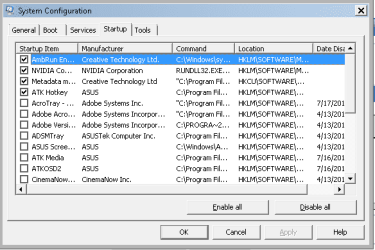
Do this, type in msconfig from the Start menu, go to the Startup tab, and basically disable as much as you safely can. Since you have a laptop, there may be a few startup items you have to keep, like Synaptics touch driver for your touchpad. What you should have starting up are anti-virus/firewall software, Desktop gadgets or some random other specific thing.
 

My Computer

Computer Manufacturer/Model Number
ASUS
OS
Windows 7 Ultimate x64
CPU
AMD Athlon 240 II @ 2.8-4.004 ghz
Motherboard
M4A78LT-M LE
Memory
SuperTalent 4gb DDR3
Graphics Card(s)
ATI Radeon 3000HD
Screen Resolution
1440*900
Case
Re-modded Dell Dimension 4550
Cooling
Vantec 92mm Tornado x2
Other Info
It looks pretty.
@Coke Robot
okay thanks, ill try to lower the processes.

@Wishmaster
It might be "normal" but this laptop is supposed to be a gaming computer and now the games cant run without such drops in fps that they're entirely unplayable. Before i could run the all with the highest settings and now they're unbearably slow with the lowest settings. THAT isn't normal and that's the part im trying to fix.
 

My Computer

Computer Manufacturer/Model Number
ASUS Notebook G72GX (laptop)
OS
windows 7 home premium x64
CPU
Intel(R) Core(TM)2 Duo CPU
Memory
6GB
Graphics Card(s)
NVIDIA GeForce GTX 260M
Sound Card
High Definition Audio Controller [NoDB]
Monitor(s) Displays
Monitor Generic PnP Monitor [NoDB]
Screen Resolution
1600X900
Hard Drives
S/N E0C9-5013: 500 GB
I'm going to ask this just to put it out in the open, have you defragmented the hard drive?
 

My Computer

Computer Manufacturer/Model Number
ASUS
OS
Windows 7 Ultimate x64
CPU
AMD Athlon 240 II @ 2.8-4.004 ghz
Motherboard
M4A78LT-M LE
Memory
SuperTalent 4gb DDR3
Graphics Card(s)
ATI Radeon 3000HD
Screen Resolution
1440*900
Case
Re-modded Dell Dimension 4550
Cooling
Vantec 92mm Tornado x2
Other Info
It looks pretty.
What should i look at to see why my computers running slow if it's not the RAM at all, because something caused the change in RAM usage at least.

Well, from your attached screenshots, you have 77 processes running at idle. That there is your actually killer of RAM.

Definitely the first thing to look at.

@Wishmaster
It might be "normal" but this laptop is supposed to be a gaming computer

It doesn't make a difference if it's a gaming rig or not - if one or more processes are bogging your PC down it's going to run badly regardless.

If your PC is still running like crap after doing what's been suggested:

Cull those process, run a virus scan, defrag etc

then it's time to start focusing on hardware.
 

My Computer

Computer type
PC/Desktop
Computer Manufacturer/Model Number
Systems by SmartEyeball
OS
8 Pro x64
CPU
i7 3770K 4.6GHz
Motherboard
ASUS P8Z77 WS
Memory
16GB G.Skill Trident X 2666mhz
Graphics Card(s)
x2 EVGA 780 Ti Superclocked SLI
Sound Card
SB X-FI Surround 5.1 PRO USB / ATH-AD900 Headphones
Monitor(s) Displays
x3 Dell U2410 / 58" Samsung
Screen Resolution
5760*1200/ 1920*1200
Hard Drives
2x Intel 520 240GB (RAID 0) * 2x WD Caviar Blacks 2TB (RAID 0) * 2TB WD Caviar Black * Sony Optirac DVD
PSU
Silverstone Strider Evolution 1200W
Case
Thermaltake Level 10 GT Snow Edition
Cooling
Noctua NH-D14
Keyboard
Topre Realforce // Ducky Shine MX Black // Filco Ninja TKL
Mouse
Thermaltake Theron (Highly Recommended) + Razer Imperator
Antivirus
MSE
Browser
IE, FF, WaterFox
Other Info
GT Extreme V2 Sim Racing Cockpit + 40" LCD and K/B Mouse stand ▼
Fanatec CSR Elite Wheel + Clubsport V1 Pedals + CSR shifter/7G-H ▼Saitek X52 Pro ▼ TrackIR 5 Pro
Buttkicker v2 Seat Rumbler with Dedicated 5.1 and Sub Woofer attached to frame ▼
=
Bloody Big Grin
I agree with smarteyeball, do all that if it hasn't been done yet.

But I doubt hardware is an issue with the ASUS G7 series, they mean business! :)
 

My Computer

Computer Manufacturer/Model Number
ASUS
OS
Windows 7 Ultimate x64
CPU
AMD Athlon 240 II @ 2.8-4.004 ghz
Motherboard
M4A78LT-M LE
Memory
SuperTalent 4gb DDR3
Graphics Card(s)
ATI Radeon 3000HD
Screen Resolution
1440*900
Case
Re-modded Dell Dimension 4550
Cooling
Vantec 92mm Tornado x2
Other Info
It looks pretty.
what are your page file settings.. make sure you ALWAYS have a page file. This would cause abnormal ram usage since windows can't use the page file. make sure it's set to at least 10-12 GB as the max and 6 as the MIN. other users on this forum might have other recommendations but that's mine.
 

My Computer

Computer Manufacturer/Model Number
Dell D630
OS
Windows 7 Professinal x64
CPU
Intel Core 2 Duo T9300
Motherboard
ICH8 Intel
Memory
8GB DDR2 1066MHZ (4.5GB/s Bandwidth)
Graphics Card(s)
nVidia Quadro NVS 135M
Sound Card
C-Major
Screen Resolution
1400x900
Hard Drives
Seagate Momentus XT Hybrid Drive 500GB
PSU
PA-12 90Watt
Case
Stock
Cooling
Stock (after my mods cools really well)
Other Info
Network Card: NetXtreme 57xx
Thanks guys i appreciate the help here!

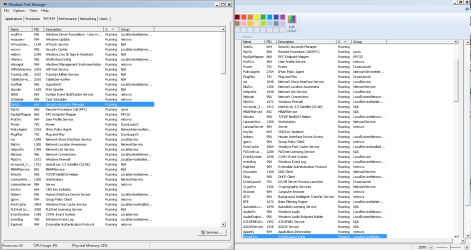
I was able to take down the processes but want to get them lower. Only four items are in startup so i went to the services tab assuming there would be some stuff there i can get rid of but im not exactly sure what i can safely remove.
I've also run defrag and disk cleanup to delete stuff, both somewhat frequently and the other day as well :)
 

Attachments

  • help.png
    help.png
    37.6 KB · Views: 9
  • help please.png
    help please.png
    6.9 KB · Views: 10

My Computer

Computer Manufacturer/Model Number
ASUS Notebook G72GX (laptop)
OS
windows 7 home premium x64
CPU
Intel(R) Core(TM)2 Duo CPU
Memory
6GB
Graphics Card(s)
NVIDIA GeForce GTX 260M
Sound Card
High Definition Audio Controller [NoDB]
Monitor(s) Displays
Monitor Generic PnP Monitor [NoDB]
Screen Resolution
1600X900
Hard Drives
S/N E0C9-5013: 500 GB
Please keep in mind:

Your PC wanting to use/keep more things in memory is a different that being bogged down with many useless processes/services.
I do agree, disabling applications at startup that are not at all needed is a very good idea.

But altering Windows default Services, or any application thats acts as a performance booster (other than Windows own) may actually hinder performance more than it helps.


After cleaning up junks files, defragmenting, and disabling un-needed startup items, has game performance improved any?

One other thing I think is fair to mention.
So games do not run optimally with the out of box settings. Sometimes they need .ini tweaks etc, to get them running better on a particular system. These type of games usually have nothing to do with your system set up.
 

My Computer

Computer Manufacturer/Model Number
Custom (Self Build)
OS
Windows 7 Home Premium 64bit
CPU
Intel Core i7 2700k
Motherboard
eVGA P67 SLI
Memory
8GB Mushkin Redline Ridgebacks @1866
Graphics Card(s)
EVGA GTX570 SC
Sound Card
XiFi Titanium HD
Monitor(s) Displays
LG W2453V
Screen Resolution
1920x1080
Hard Drives
Intel 320 80GB -- Intel X25-V 40GB --WD Black 1TB x2 -- WD Blue 640GB
PSU
Seasonic x750
Case
Corsair 600T SE White
Cooling
eVGA Superclocked CPU Cooler
Keyboard
Saitek Cyborg
Antivirus
Kaspersky
Browser
IE
Other Info
LG BD/DVD
A few months ago my RAM usage just started reaching 1gb at its lowest. Now it hits over 2.5gb sometimes and is seen at 1.5gb normally. Programs I used to be able to run now have problems frequently and have rendered my gaming laptop to a MSpaint and notepad oriented computer.

Thank you for taking the time to look at this!

FWIW, I had some similar problems with my kids computers over the last 12 months. They a all run Windows 7 Ultimate, with 8GB RAM, GTX460 gfx with 1GB RAM, and ran I7-920, until recently when I upgraded them to I5-2500 and I5-2500K.

For some online games we found that running in window mode rather than full screen fixed the problems. The problems were caused by updates to the game. The publisher released new versions and the problem went away.

We also found that a combination of security and performance updates from Micro$oft and nVidia caused some problems. We found that one particular "performance patch" that M$ released actually made things worse. However, that patch was superceded and the problem was resolved. The point being, it might be worthwhile making sure all your M$ and video patches are up to date

There are some processes that are just a waste, such as IPHelper (for the time being at least), security Center, Offline files and in my opinion Windows search. But them I'm very organised, and this thread isn't abount tuning systems.

My system runs at 1.25gb on idle after being rebooted. When applications have been opened and closed it will go up to 1.35gb at idle. The system has 8GB RAM. I have 43 processes running.

The only program I have found to cause problems is HCenc 0.25, which will use all available memory when encoding, then strip memory from other processes and requires a reboot to fix.

We also found a problem with my router killed some online games, like runescape, GMod, Counter Strike and AruaRose. These appeared to be lagging really badly, and leave terrible mouse trails everywhere and when we reset the router to factory defaults and reconfigured it the problems went away.

Things don't just go awry for no reason. If you have system restore enabled, have you tried going back to a point at which things worked well (If you can remember the date things last worked well)?

hth
 

My Computer

Computer type
PC/Desktop
Computer Manufacturer/Model Number
Home Made
OS
Linux Mint 17 Cinnamon | Win 7 Ult x64
CPU
Intel I7-3770K @ 4.2ghz
Motherboard
ASRock Extreme 4
Memory
32GB G-Skill C10Q
Graphics Card(s)
EVGA GTX 670 2GB SC
Sound Card
Creative Fatality ExtremeGamer
Monitor(s) Displays
LG E2742V x 2
Screen Resolution
1920x1080
Hard Drives
256GB Vertex 4 SSD
2TB Seagate ST2000DM001
1TB Seagate ST1000DM003
PSU
Corsair HX 650
Case
HAF 932 advanced
Cooling
Corsair H100i liquid cooler
Keyboard
Logitech Wireless
Mouse
Logitech Wireless
Internet Speed
OptusNet NBN 100/40
Antivirus
Malwarebytes
Browser
Firefox 30
Other Info
Router: Sagemcom F@st 3846 Crippled by Optus.
no i haven't tried a system restore and i did obtain some success when i took down startup applications. My processes right now are at 67 with 717 threads (if that matters) and 1.47 gb ram used with only firefox running. I just want to mention that the games worked perfectly before and i have been considering a system restore but to get it back to when it ran perfectly would be setting it back over a year. I have too many files on here that I've devoted too much time in to just throw them away considering i don't have any external memory.
 

My Computer

Computer Manufacturer/Model Number
ASUS Notebook G72GX (laptop)
OS
windows 7 home premium x64
CPU
Intel(R) Core(TM)2 Duo CPU
Memory
6GB
Graphics Card(s)
NVIDIA GeForce GTX 260M
Sound Card
High Definition Audio Controller [NoDB]
Monitor(s) Displays
Monitor Generic PnP Monitor [NoDB]
Screen Resolution
1600X900
Hard Drives
S/N E0C9-5013: 500 GB
I'm not sure if I see/interpret your example screen/snip correctly but it seems you're running stuff you don't need to run whilst gaming...
Over time your system acumulates loads of software that comes with processes that run / sleep in the background and seem to take up memory. That is not necesarily a bad thing because sleeping processes are put away in your pging file which is fine as long as they don't want to wake up on a regular basis.

If you want to stop that altogether, clear out all automatic update processes.. And extreme, if your game is local and doesn't need internet, take out your nic and disable AV and Firewall, anti malware whilst gaming locally. Just remember to turn them back on after....
 

My Computer

Computer Manufacturer/Model Number
custom build
OS
Windows 7 64b Ultimate
CPU
I7-2600 3.40GHz - testing various OC levels..
Motherboard
ASUS Sabretooth
Memory
2x 4Gb DDR3/1333
Graphics Card(s)
GTX570 - testing OC levels
Sound Card
motherboard 7.1 DIG.
Monitor(s) Displays
2x Ilyama 24" E2409HDS-B1 2ms/DVI
Screen Resolution
1920 x 1080
Hard Drives
120 GB Intel Elmcrest SSD
1 TB SATAII 7200RPM/32MB
External 2TB USB3
PSU
Corsair Pro HX850W
Cooling
Coolermaster Hyper V8
Keyboard
Logitech G110
Mouse
Logitech G700
Internet Speed
25Mb
Other Info
CPU: 7,7 RAM: 7,7 GTX: 7,9 GTX 3D : 7,9 SSD 7,6
Overall 7,6 ...... now to speed up the SSD... ;)

Also use a Dell XPS M1710 on Vista 32b
Asus LT on Vista 32
3 older machines still doing fine on Linux/ubuntu but not used much anymore...
this laptop is supposed to be a gaming computer
This is an oxymoron.
 

My Computer

Computer Manufacturer/Model Number
HP, Dell, Gateway, Toshiba - 4 laptops and 2 desktops
OS
Vista, Windows7, Mint Mate, Zorin, Windows 8
CPU
from 1.6GHz Duo to i7
Monitor(s) Displays
2x HP w2207
Hard Drives
5x HDD, 7x SSD, 12x Externals
Keyboard
with trackball - no mices
Mouse
Trackball mice
Internet Speed
DSL 6000
this laptop is supposed to be a gaming computer
This is an oxymoron.

You probably mean a contradictio in terminis ;)

But that is not necesarily true... I 've seen great gaming lt's with full hd screens and the cpu and gpu power to back it up.... But in this case... You may be right. It wholly depends on the games the op wishes to play....
 

My Computer

Computer Manufacturer/Model Number
custom build
OS
Windows 7 64b Ultimate
CPU
I7-2600 3.40GHz - testing various OC levels..
Motherboard
ASUS Sabretooth
Memory
2x 4Gb DDR3/1333
Graphics Card(s)
GTX570 - testing OC levels
Sound Card
motherboard 7.1 DIG.
Monitor(s) Displays
2x Ilyama 24" E2409HDS-B1 2ms/DVI
Screen Resolution
1920 x 1080
Hard Drives
120 GB Intel Elmcrest SSD
1 TB SATAII 7200RPM/32MB
External 2TB USB3
PSU
Corsair Pro HX850W
Cooling
Coolermaster Hyper V8
Keyboard
Logitech G110
Mouse
Logitech G700
Internet Speed
25Mb
Other Info
CPU: 7,7 RAM: 7,7 GTX: 7,9 GTX 3D : 7,9 SSD 7,6
Overall 7,6 ...... now to speed up the SSD... ;)

Also use a Dell XPS M1710 on Vista 32b
Asus LT on Vista 32
3 older machines still doing fine on Linux/ubuntu but not used much anymore...
67 processes at idle to me is quite high. Mine, for example, runs about 49-51 idle. Try taking some more startup items if you can. Or, if you crapware installed, uninstalling those will reduce the amount of processes further.
 

My Computer

Computer Manufacturer/Model Number
ASUS
OS
Windows 7 Ultimate x64
CPU
AMD Athlon 240 II @ 2.8-4.004 ghz
Motherboard
M4A78LT-M LE
Memory
SuperTalent 4gb DDR3
Graphics Card(s)
ATI Radeon 3000HD
Screen Resolution
1440*900
Case
Re-modded Dell Dimension 4550
Cooling
Vantec 92mm Tornado x2
Other Info
It looks pretty.
I see Tune Utilities Service and MBAM Service running. What antivirus do you have? MBAM Pro slowed things down on my machine too much so I ditched its real time protection.

Do you print? Do you share files? Do you share Windows Media? Check out Black Viper for services that you can safely disable or set to manual based on how you use your machine. Just write down any settings before you make a change so you can always go back to your default setting.


Black Viper’s Windows 7 Service Pack 1 Service Configurations | Black Viper's Website | www.blackviper.com
 

My Computer

OS
Windows 7 Home Premium x64 SP1
Back
Top