RAM Optimizer Applications List

WyattWhiteEagle

Member
Member
VIP
Local time
3:13 PM
Messages
166
I coulda swore I seen a list of RAM optimizer applications somewhere.

I been looking everywhere I might think it would show up.

I don't remember if the list was somewhere here on the forums or if someone provided a link to it.

Does anyone know about this list?

I found it only once and didn't subscribe to it and now I'm having a heck of a time lookin for it.
 

My Computer

Computer type
Laptop
Computer Manufacturer/Model Number
Acer Aspire E1-532
OS
Microsoft Windows 7 Home Premium 64-bit 7601 Multiprocessor Free Service Pack 1
CPU
Intel(R) Celeron(R) 2957U @ 1.40GHz
Motherboard
Acer EA50_HW
Memory
8.00 GB
Graphics Card(s)
Intel(R) HD Graphics
Sound Card
High Definition Audio Device
Screen Resolution
1366 x 768 x 32 bits (4294967296 colors) @ 59 Hz
Hard Drives
TOSHIBA MQ01ABD100 ATA Device
Whenever you see such a program, immediately discard it as useless and harmful and move on. RAM optimizers are actually detrimental to system performance and make claims that are easily proven wrong.

Take into account that ideal RAM usage is 100%.
If you have memory problems, close unneeded programs.
 

My Computer

Computer type
Laptop
Computer Manufacturer/Model Number
Toshiba Sattelite A665-S6092
OS
Windows 7 Ultimate x64
CPU
Intel Core i7-740QM
Memory
8 GB DDR3
Graphics Card(s)
NVIDIA GeForce 330GT
Screen Resolution
1366x768
Hard Drives
Samsung 840 SSD 500GB
1TB USB3 external HD
Cooling
Coolermaster Notepal U3 notebook cooling pad
Internet Speed
3mbps ASDL
Antivirus
ClamWin 0.98.7
Browser
Opera 12.17 x86 (main), Firefox 38 (sec), IE11 (last resort)
Windows has sophisticated and highly developed memory management. It does not need and will not benefit from third party "optimizers". These things are advertised all over the Internet. Some are worse than others, none are useful.
 

My Computer

Computer type
PC/Desktop
Computer Manufacturer/Model Number
HP
OS
Windows 7 Pro 64 bit
CPU
Xeon W3520
Memory
8 GB
Graphics Card(s)
Nvidia Geforce 210
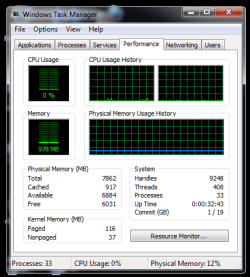
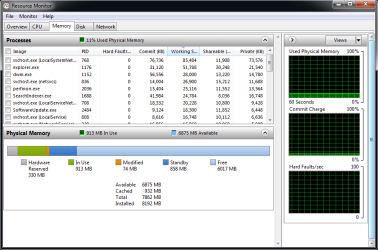
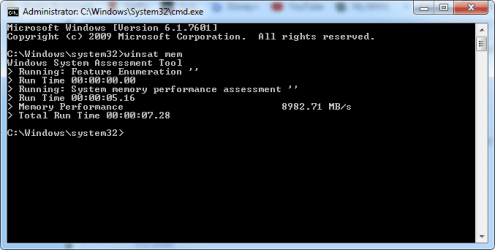
Maybe it's just me, but considering how I have only 33 processes in Task Manager and quite a bit of Free Memory in Resource Monitor, seems like my Memory Assessment should be quite a bit faster.

Virtual Memory is set at 12288 mb

What are yall's thoughts?
 

Attachments

  • TaskMngrPerf.png
    TaskMngrPerf.png
    46.9 KB · Views: 20
  • ResMonMemory.png
    ResMonMemory.png
    58.1 KB · Views: 2
  • MemAssess.png
    MemAssess.png
    42.7 KB · Views: 19

My Computer

Computer type
Laptop
Computer Manufacturer/Model Number
Acer Aspire E1-532
OS
Microsoft Windows 7 Home Premium 64-bit 7601 Multiprocessor Free Service Pack 1
CPU
Intel(R) Celeron(R) 2957U @ 1.40GHz
Motherboard
Acer EA50_HW
Memory
8.00 GB
Graphics Card(s)
Intel(R) HD Graphics
Sound Card
High Definition Audio Device
Screen Resolution
1366 x 768 x 32 bits (4294967296 colors) @ 59 Hz
Hard Drives
TOSHIBA MQ01ABD100 ATA Device
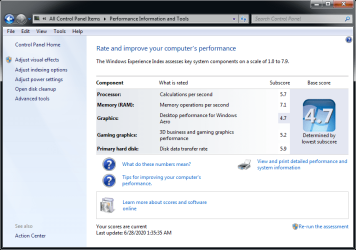
Here's my WEI.
 

Attachments

  • WEI.png
    WEI.png
    103 KB · Views: 2

My Computer

Computer type
Laptop
Computer Manufacturer/Model Number
Acer Aspire E1-532
OS
Microsoft Windows 7 Home Premium 64-bit 7601 Multiprocessor Free Service Pack 1
CPU
Intel(R) Celeron(R) 2957U @ 1.40GHz
Motherboard
Acer EA50_HW
Memory
8.00 GB
Graphics Card(s)
Intel(R) HD Graphics
Sound Card
High Definition Audio Device
Screen Resolution
1366 x 768 x 32 bits (4294967296 colors) @ 59 Hz
Hard Drives
TOSHIBA MQ01ABD100 ATA Device
Memory speed doesn't depends on the workload or used/free memory, it depends on the hardware you're using. Freeing more memory will only degrade performance, as you'll be forcing improper usage of the pagefile. And besides, with almost an idle computer, it doesn't seems like you need any optimization.

Are you having some concrete performance problem? Or you just want to artificially increase some benchmark?
 

My Computer

Computer type
Laptop
Computer Manufacturer/Model Number
Toshiba Sattelite A665-S6092
OS
Windows 7 Ultimate x64
CPU
Intel Core i7-740QM
Memory
8 GB DDR3
Graphics Card(s)
NVIDIA GeForce 330GT
Screen Resolution
1366x768
Hard Drives
Samsung 840 SSD 500GB
1TB USB3 external HD
Cooling
Coolermaster Notepal U3 notebook cooling pad
Internet Speed
3mbps ASDL
Antivirus
ClamWin 0.98.7
Browser
Opera 12.17 x86 (main), Firefox 38 (sec), IE11 (last resort)
Memory speed doesn't depends on the workload or used/free memory, it depends on the hardware you're using. Freeing more memory will only degrade performance, as you'll be forcing improper usage of the pagefile. And besides, with almost an idle computer, it doesn't seems like you need any optimization.

Are you having some concrete performance problem? Or you just want to artificially increase some benchmark?

I just want to make sure the RAM isn't retaining any old or obsolete items.

Following the steps, I notice a difference for the better but I wonder if there is something more that can be done.

Code:
Right-click anywhere on the desktop and 
select "New" > "Shortcut."

Enter the following line when asked for location of 
the shortcut: 
%windir%\system32\rundll32.exe advapi32.dll,ProcessIdleTasks 

Hit "Next."
Enter a descriptive name (such as "Clear Unused RAM") and hit "Finish."

Open this newly created shortcut and you will notice a slight increase in performance.
 

My Computer

Computer type
Laptop
Computer Manufacturer/Model Number
Acer Aspire E1-532
OS
Microsoft Windows 7 Home Premium 64-bit 7601 Multiprocessor Free Service Pack 1
CPU
Intel(R) Celeron(R) 2957U @ 1.40GHz
Motherboard
Acer EA50_HW
Memory
8.00 GB
Graphics Card(s)
Intel(R) HD Graphics
Sound Card
High Definition Audio Device
Screen Resolution
1366 x 768 x 32 bits (4294967296 colors) @ 59 Hz
Hard Drives
TOSHIBA MQ01ABD100 ATA Device
I just want to make sure the RAM isn't retaining any old or obsolete items.

That's the job of the OS kernel, and it's very good at it. One of the page file functions is precisely to make this possible under presure, but when the system has spare resources, there is no point in clearing anything. In fact, it's better to let the OS aggresively cache data in spare RAM to improve performance, rather that trying to keep it free (ie, wasted).
Even old items may come in handy at some latter time, so flushing them prematurely is wasteful. And if more memory is required, the kernel will remove older cache entries before newer ones, plus paging out less frequently used pages to disk.

What you can do to improve this is to close unneded programs. Let Windows decide when (and if) to clear them out of memory.

Apart from looking at indicator (of questionable usefulness), are you having a concrete performance problem?
 

My Computer

Computer type
Laptop
Computer Manufacturer/Model Number
Toshiba Sattelite A665-S6092
OS
Windows 7 Ultimate x64
CPU
Intel Core i7-740QM
Memory
8 GB DDR3
Graphics Card(s)
NVIDIA GeForce 330GT
Screen Resolution
1366x768
Hard Drives
Samsung 840 SSD 500GB
1TB USB3 external HD
Cooling
Coolermaster Notepal U3 notebook cooling pad
Internet Speed
3mbps ASDL
Antivirus
ClamWin 0.98.7
Browser
Opera 12.17 x86 (main), Firefox 38 (sec), IE11 (last resort)
That's the job of the OS kernel, and it's very good at it. One of the page file functions is precisely to make this possible under presure, but when the system has spare resources, there is no point in clearing anything. In fact, it's better to let the OS aggresively cache data in spare RAM to improve performance, rather that trying to keep it free (ie, wasted).
Even old items may come in handy at some latter time, so flushing them prematurely is wasteful. And if more memory is required, the kernel will remove older cache entries before newer ones, plus paging out less frequently used pages to disk.

What you can do to improve this is to close unneded programs. Let Windows decide when (and if) to clear them out of memory.

Apart from looking at indicator (of questionable usefulness), are you having a concrete performance problem?

BSOD Memory Dumps are irritating when they happen. I haven't had one in a long time as I frequently run cleaners.

As far as concrete perfomance problems, I'm not noticing any with RAM issues.

I am noticing other performance issues such as drivers failed attempts to load multiple times (I started a thread about it here in the performance forum, moved to the more appropriate Drivers forum.)

Also seeing a few errors in Event Viewer and System Health Report.
 
Last edited:

My Computer

Computer type
Laptop
Computer Manufacturer/Model Number
Acer Aspire E1-532
OS
Microsoft Windows 7 Home Premium 64-bit 7601 Multiprocessor Free Service Pack 1
CPU
Intel(R) Celeron(R) 2957U @ 1.40GHz
Motherboard
Acer EA50_HW
Memory
8.00 GB
Graphics Card(s)
Intel(R) HD Graphics
Sound Card
High Definition Audio Device
Screen Resolution
1366 x 768 x 32 bits (4294967296 colors) @ 59 Hz
Hard Drives
TOSHIBA MQ01ABD100 ATA Device
BSOD Memory Dumps are irritating when they happen. I haven't had one in a long time as I frequently run cleaners.

Cleaners don't prevent BSODs at all. They just delete supposedly unneded stuff. BSODs always come from buggy drivers or kernel faults, not anything normal programs can influence.


As far as concrete perfomance problems, I'm not noticing any with RAM issues.

Great! Then just leave it alone until you do find a problem. Using RAM optimizers (and cleanners and "optimization" programs) is a way to cause problems, not solving them.


I am noticing other performance issues such as drivers failed attempts to load multiple times (I started a thread about it here in the performance forum, moved to the more appropriate Drivers forum.)

Also seeing a few errors in Event Viewer and System Health Report.

That could indicate a broken driver or faulty hardware, you could try updating the offending driver to see if it aliviates the problem.
don't worry about event viewer errors. Having lots of them is normal, even in a perfectly clean system.
 

My Computer

Computer type
Laptop
Computer Manufacturer/Model Number
Toshiba Sattelite A665-S6092
OS
Windows 7 Ultimate x64
CPU
Intel Core i7-740QM
Memory
8 GB DDR3
Graphics Card(s)
NVIDIA GeForce 330GT
Screen Resolution
1366x768
Hard Drives
Samsung 840 SSD 500GB
1TB USB3 external HD
Cooling
Coolermaster Notepal U3 notebook cooling pad
Internet Speed
3mbps ASDL
Antivirus
ClamWin 0.98.7
Browser
Opera 12.17 x86 (main), Firefox 38 (sec), IE11 (last resort)
I have been using Windows on the NT platform for near 20 years now. I do not use cleaners or optimizers. In all that time I seem to have avoided most of the problems that the ads for cleaners and optimizers say I must be having and need their products to solve. I have not seen a BSOD on Windows 10 in the year I have been using it on 2 computers. I did see a few on older systems but they were all isolated cases that did not repeat. I do not do frequent clean installs. And these computers are by no means new, in fact quite old. I must be lucky. Or maybe the cleaners and optimizers are the problem.
 

My Computer

Computer type
PC/Desktop
Computer Manufacturer/Model Number
HP
OS
Windows 7 Pro 64 bit
CPU
Xeon W3520
Memory
8 GB
Graphics Card(s)
Nvidia Geforce 210
What you can do to improve this is to close unneded programs. Let Windows decide when (and if) to clear them out of memory.

Apart from looking at indicator (of questionable usefulness), are you having a concrete performance problem?

What exactly do you mean by "close unneeded programs" and where do I find these "unneeded programs" that need to be closed or uninstalled?

Instead of me looking at "indicators of questionable usefulness", which "indicators" do you suggest I be looking at?
 

My Computer

Computer type
Laptop
Computer Manufacturer/Model Number
Acer Aspire E1-532
OS
Microsoft Windows 7 Home Premium 64-bit 7601 Multiprocessor Free Service Pack 1
CPU
Intel(R) Celeron(R) 2957U @ 1.40GHz
Motherboard
Acer EA50_HW
Memory
8.00 GB
Graphics Card(s)
Intel(R) HD Graphics
Sound Card
High Definition Audio Device
Screen Resolution
1366 x 768 x 32 bits (4294967296 colors) @ 59 Hz
Hard Drives
TOSHIBA MQ01ABD100 ATA Device
Agree with Alejandro85's posts.

Unneeded programs are programs you have open/running on your desktop or in the background that you don't currently need running. Being that your RAM isn't being taxed for space, I'd leave the RAM be!
 

My Computer

Computer type
PC/Desktop
Computer Manufacturer/Model Number
HP Desktop & Compaq Laptop
OS
Win 10 x64, Linux Lite, Win 7 x64, BlackArch, & Kali
Hard Drives
Samsung 850 Pro 256Gb,
Hitachi HDD 1Tb,
Crucial MX SSD 250Gb
Segate 3Tb USB 3.0 Ext. Backup HDD
Internet Speed
150Mbps dn, 20Mbps up
Antivirus
Avast Free, Malwarebytes Anti-Exploit & Anti-Ransomware
Browser
Firefox, Chrome, Opera, & VPN
Back
Top