RAM Performance

seekermeister

Old School
Guru
Gold Member
VIP
Local time
5:37 PM
Messages
6,618
Location
Indian Territory
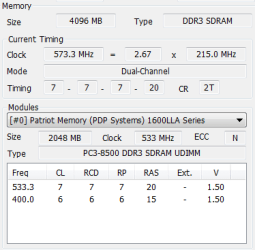
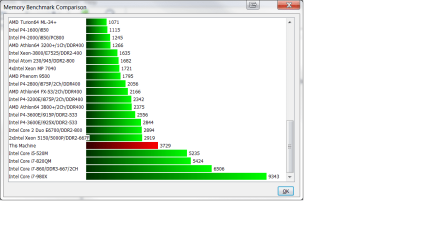
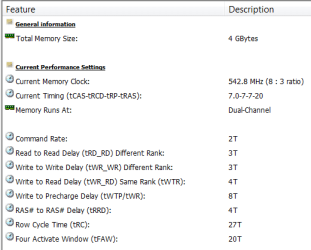
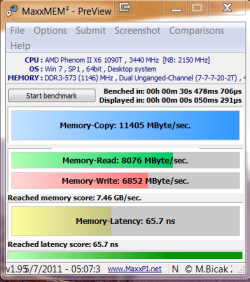
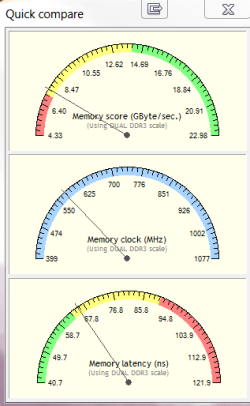
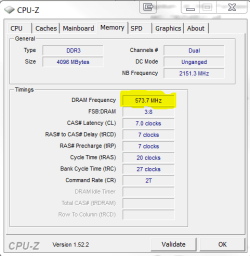
I've been going in circles since I put this rig together, trying to get my RAM to perform the way that I thought that it should. The RAM is Patriot PGS34G1600LLKA, which is suppose to be PC3-12800 1600MHz. However, as can be seen in the screenshots, it doesn't appear to be performing as it should.

I ran Memtest-86 for 6 passes without any errors, and hoping that it might reconfigure the motherboard in some fashion that would help, I set it to use it's UCC overclocking at boot, but if there is any improvement, I don't see it.

I want to be able to find the solution, and if that isn't possible, determine what is at fault...the RAM or the motherboard. All responses and insights appreciated.

EDIT: Note that in the second screenshot, that it labels the RAM as PC3-8500, rather than PC3-12800.
 

Attachments
  • CPU-Z.PNG
    CPU-Z.PNG
    11.7 KB · Views: 21
  • HWiNFO -1.PNG
    HWiNFO -1.PNG
    7.5 KB · Views: 9
  • HWiNFO - 2.png
    HWiNFO - 2.png
    28.3 KB · Views: 29
  • HWiNFO -3.PNG
    HWiNFO -3.PNG
    8.8 KB · Views: 11
  • MaxMEM2 - 1.PNG
    MaxMEM2 - 1.PNG
    22.4 KB · Views: 12
  • MaxMEM2 - 2.PNG
    MaxMEM2 - 2.PNG
    10.4 KB · Views: 9
Last edited:

My Computer

Computer Manufacturer/Model Number
DIY
OS
W7x64 Pro, SuSe 12.1/** W7 x64 Pro, XP MCE
CPU
Phenom II 1090T w/Noctua NH-D14 /**4400+ X2 w/CM Hyper TX 3
Motherboard
ASRock 890FX Deluxe 4/**A8N-SLI
Memory
2 x 2GB Patriot PGS34g1600LLKA/**4x1GB Corsair VS
Graphics Card(s)
EVGA GTX460 SC/**EVGA 8800GTS
Sound Card
Asus Xonar D2X/**Xonar D1
Monitor(s) Displays
Acer X233H, Dell E152FPc /**LG M237-WD
Screen Resolution
1920x1080 & 1024x768/**1980x1080
Hard Drives
WDC 2TB, 1.5TB, 1TB, 500GB,Seagate 500GB , Maxtor 80GB /**500GB Seagate & WDC 1TB Black
PSU
CM RS600 w/ APC BX1000G/**Antec 500 TP w/ APC BX1000
Case
HAF922/**Antec 1040IIB
Cooling
3x200mm, 1x140 and 1x120mm/**5x80mm fans
Keyboard
Logitech Media USB/**Saitek Eclipse
Mouse
Cordless Trackman Wheel/**Ditto
Internet Speed
3.3Mbps
Other Info
SB 560 5.1 w/ Sennheiser RS140/**Creative T20 speakers, Dvico FusionHDTV7 Gold RT, Cisco E3000, HP 5510V AIO, Linksys E3000, Belkin F5U237 hub and **F5D8055 adapter
(** = 2nd rig)
I also tried an encode while UCC was enabled, and had to abort pretty quickly, because the CPU maxed it's temperature and was still climbing.
 

My Computer

Computer Manufacturer/Model Number
DIY
OS
W7x64 Pro, SuSe 12.1/** W7 x64 Pro, XP MCE
CPU
Phenom II 1090T w/Noctua NH-D14 /**4400+ X2 w/CM Hyper TX 3
Motherboard
ASRock 890FX Deluxe 4/**A8N-SLI
Memory
2 x 2GB Patriot PGS34g1600LLKA/**4x1GB Corsair VS
Graphics Card(s)
EVGA GTX460 SC/**EVGA 8800GTS
Sound Card
Asus Xonar D2X/**Xonar D1
Monitor(s) Displays
Acer X233H, Dell E152FPc /**LG M237-WD
Screen Resolution
1920x1080 & 1024x768/**1980x1080
Hard Drives
WDC 2TB, 1.5TB, 1TB, 500GB,Seagate 500GB , Maxtor 80GB /**500GB Seagate & WDC 1TB Black
PSU
CM RS600 w/ APC BX1000G/**Antec 500 TP w/ APC BX1000
Case
HAF922/**Antec 1040IIB
Cooling
3x200mm, 1x140 and 1x120mm/**5x80mm fans
Keyboard
Logitech Media USB/**Saitek Eclipse
Mouse
Cordless Trackman Wheel/**Ditto
Internet Speed
3.3Mbps
Other Info
SB 560 5.1 w/ Sennheiser RS140/**Creative T20 speakers, Dvico FusionHDTV7 Gold RT, Cisco E3000, HP 5510V AIO, Linksys E3000, Belkin F5U237 hub and **F5D8055 adapter
(** = 2nd rig)
seekermeister:
In CPU-Z, the SPD tab, have you tried to change your timings in BIOS?

Just guessing, here.
And what is the MOBO rated FSB; the reason I ask is the 3:8 DRAM ratio reported in CPU-Z- quite odd.
Would you please send a shot of the SPD tab in CPU-Z?

TIA,
 

My Computer

Computer Manufacturer/Model Number
OEM - Me
OS
Windows 7 Home Premium x64
CPU
AMD Phenom II X6 1600T
Motherboard
GigaByte GZ-990FXA-UD3
Memory
16GB PC3-10700 (1342MHz)
Graphics Card(s)
ATI Radeon 5770 HD (x2) CrossFire
Sound Card
On-board RealTek chipset
Monitor(s) Displays
3x Hanns-G 1920x1080 Monitors
Screen Resolution
3x Hanns-G 1920x1080 Monitors
Hard Drives
Intel 25-V SSD 40GB: 218 MB/s AT: 0.1ms
Intel X-25M SSD 80GB: 230MB/s AT: 0.1ms
Seagate 750GB: 133 MB/s AT: 13ms (perpendicular storage)
Buffalo HD-PCTU3 1TB External drive
PSU
OCZ Stealth X Stream 750W
Case
Cheap (unknown)
Cooling
Stock
Keyboard
HP USB
Mouse
LogiTech USB
Internet Speed
1.5 Mbps - Slow - At the tail-end of a rural network
Other Info
Printer: Epson Stylus C-84
Scanner: HP 3500C Flatbed
DVD-RW: Plextor
DVD-ROM: Unknown
WEI: 7.4
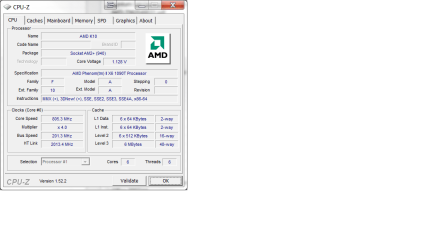
The motherboard is rated at FSB 2600 MHz (5.2 GT/s). The SPD tab is totally grayed out, except a dropdown window for selecting the RAM, but changing that changes nothing else. Here is a screenshot of the first CPU-Z tab:

EDIT: As far as changing the timings in the BIOS, the only things that I have done was to reset the RAM voltage from 1.65v to 1.7v, which is what the RAM is rated at. Also, as I mentioned previously, I tried using the motherboards UCC, which is a builtin overclocking function, but I disabled that when I found that encoding caused the CPU to overheat.
 

Attachments

  • CPUZ CPU.png
    CPUZ CPU.png
    19.2 KB · Views: 41

My Computer

Computer Manufacturer/Model Number
DIY
OS
W7x64 Pro, SuSe 12.1/** W7 x64 Pro, XP MCE
CPU
Phenom II 1090T w/Noctua NH-D14 /**4400+ X2 w/CM Hyper TX 3
Motherboard
ASRock 890FX Deluxe 4/**A8N-SLI
Memory
2 x 2GB Patriot PGS34g1600LLKA/**4x1GB Corsair VS
Graphics Card(s)
EVGA GTX460 SC/**EVGA 8800GTS
Sound Card
Asus Xonar D2X/**Xonar D1
Monitor(s) Displays
Acer X233H, Dell E152FPc /**LG M237-WD
Screen Resolution
1920x1080 & 1024x768/**1980x1080
Hard Drives
WDC 2TB, 1.5TB, 1TB, 500GB,Seagate 500GB , Maxtor 80GB /**500GB Seagate & WDC 1TB Black
PSU
CM RS600 w/ APC BX1000G/**Antec 500 TP w/ APC BX1000
Case
HAF922/**Antec 1040IIB
Cooling
3x200mm, 1x140 and 1x120mm/**5x80mm fans
Keyboard
Logitech Media USB/**Saitek Eclipse
Mouse
Cordless Trackman Wheel/**Ditto
Internet Speed
3.3Mbps
Other Info
SB 560 5.1 w/ Sennheiser RS140/**Creative T20 speakers, Dvico FusionHDTV7 Gold RT, Cisco E3000, HP 5510V AIO, Linksys E3000, Belkin F5U237 hub and **F5D8055 adapter
(** = 2nd rig)
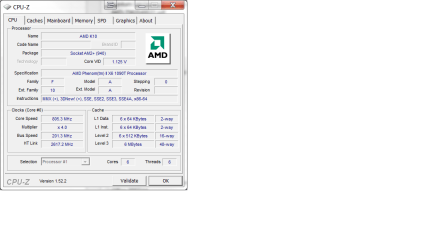
Since it appeared that the FSB speed was too low, I went into the BIOS, and found the multiplier for the HT, and changed i from 10 to 13, which made the HT link value in CPU-Z to approximate the rated FSB speed, but now I'm wondering if HT link has anything to do with FSB speed? If anything, it made the memory values worse than before.
 

Attachments

  • CPU Tab 2.png
    CPU Tab 2.png
    19.1 KB · Views: 23

My Computer

Computer Manufacturer/Model Number
DIY
OS
W7x64 Pro, SuSe 12.1/** W7 x64 Pro, XP MCE
CPU
Phenom II 1090T w/Noctua NH-D14 /**4400+ X2 w/CM Hyper TX 3
Motherboard
ASRock 890FX Deluxe 4/**A8N-SLI
Memory
2 x 2GB Patriot PGS34g1600LLKA/**4x1GB Corsair VS
Graphics Card(s)
EVGA GTX460 SC/**EVGA 8800GTS
Sound Card
Asus Xonar D2X/**Xonar D1
Monitor(s) Displays
Acer X233H, Dell E152FPc /**LG M237-WD
Screen Resolution
1920x1080 & 1024x768/**1980x1080
Hard Drives
WDC 2TB, 1.5TB, 1TB, 500GB,Seagate 500GB , Maxtor 80GB /**500GB Seagate & WDC 1TB Black
PSU
CM RS600 w/ APC BX1000G/**Antec 500 TP w/ APC BX1000
Case
HAF922/**Antec 1040IIB
Cooling
3x200mm, 1x140 and 1x120mm/**5x80mm fans
Keyboard
Logitech Media USB/**Saitek Eclipse
Mouse
Cordless Trackman Wheel/**Ditto
Internet Speed
3.3Mbps
Other Info
SB 560 5.1 w/ Sennheiser RS140/**Creative T20 speakers, Dvico FusionHDTV7 Gold RT, Cisco E3000, HP 5510V AIO, Linksys E3000, Belkin F5U237 hub and **F5D8055 adapter
(** = 2nd rig)
@seekermeister:

Have you tried using AMD Overdrive program?
I have used it in the past and it's very flexible; it allows changing just about every aspect of your CPU and RAM settings- in very small steps if you like.
Or you can use its automatic functions if you have the time. It took a long time on my machine and I didn't see much improvement.

At least with this program, you would be able to experiment until you are happy. You can always revert to your original settings if you are not.

It's a lot easier than bouncing back and forth from BIOS to the OS.

If you'd like to try it out, here's the link: AMD OverDrive
Be sure to read the System Requirements before you waste your time with the download ;)

I hope this helps,
 

My Computer

Computer Manufacturer/Model Number
OEM - Me
OS
Windows 7 Home Premium x64
CPU
AMD Phenom II X6 1600T
Motherboard
GigaByte GZ-990FXA-UD3
Memory
16GB PC3-10700 (1342MHz)
Graphics Card(s)
ATI Radeon 5770 HD (x2) CrossFire
Sound Card
On-board RealTek chipset
Monitor(s) Displays
3x Hanns-G 1920x1080 Monitors
Screen Resolution
3x Hanns-G 1920x1080 Monitors
Hard Drives
Intel 25-V SSD 40GB: 218 MB/s AT: 0.1ms
Intel X-25M SSD 80GB: 230MB/s AT: 0.1ms
Seagate 750GB: 133 MB/s AT: 13ms (perpendicular storage)
Buffalo HD-PCTU3 1TB External drive
PSU
OCZ Stealth X Stream 750W
Case
Cheap (unknown)
Cooling
Stock
Keyboard
HP USB
Mouse
LogiTech USB
Internet Speed
1.5 Mbps - Slow - At the tail-end of a rural network
Other Info
Printer: Epson Stylus C-84
Scanner: HP 3500C Flatbed
DVD-RW: Plextor
DVD-ROM: Unknown
WEI: 7.4
I have not used this before, and since I read your post right after waking, I went ahead and installed it without reading anything except the disclaimer notices that the program popped. Since I know nothing about OCing, nor do I want to tackle that yet (I don't guess that just trying to get everything to run as designed is overclocking), the greatest value that I found immediately is the temperature readings for the cores. These read 10 degrees cooler than SpeedFan's CPU temp, but does equal the core temp of SpeedFan.

If I understand correctly, it is the CPU temperature, rather than the core temperature, that is most critical and should be used for monitoring...is it not? Is the maximum temperature stated for this processor (62 degrees) based on the CPU or core temperatures?
 

My Computer

Computer Manufacturer/Model Number
DIY
OS
W7x64 Pro, SuSe 12.1/** W7 x64 Pro, XP MCE
CPU
Phenom II 1090T w/Noctua NH-D14 /**4400+ X2 w/CM Hyper TX 3
Motherboard
ASRock 890FX Deluxe 4/**A8N-SLI
Memory
2 x 2GB Patriot PGS34g1600LLKA/**4x1GB Corsair VS
Graphics Card(s)
EVGA GTX460 SC/**EVGA 8800GTS
Sound Card
Asus Xonar D2X/**Xonar D1
Monitor(s) Displays
Acer X233H, Dell E152FPc /**LG M237-WD
Screen Resolution
1920x1080 & 1024x768/**1980x1080
Hard Drives
WDC 2TB, 1.5TB, 1TB, 500GB,Seagate 500GB , Maxtor 80GB /**500GB Seagate & WDC 1TB Black
PSU
CM RS600 w/ APC BX1000G/**Antec 500 TP w/ APC BX1000
Case
HAF922/**Antec 1040IIB
Cooling
3x200mm, 1x140 and 1x120mm/**5x80mm fans
Keyboard
Logitech Media USB/**Saitek Eclipse
Mouse
Cordless Trackman Wheel/**Ditto
Internet Speed
3.3Mbps
Other Info
SB 560 5.1 w/ Sennheiser RS140/**Creative T20 speakers, Dvico FusionHDTV7 Gold RT, Cisco E3000, HP 5510V AIO, Linksys E3000, Belkin F5U237 hub and **F5D8055 adapter
(** = 2nd rig)
I decided to try out the Auto Clock portion of Overdrive, but that resulted in the first BSOD that I've had on this rig. Therefore, that discouraged me from proceeding any further with that at this point. I do not have things setup to analyze crash dumps yet, so if someone would process this one, I would appreciate it:
 

Attachments

My Computer

Computer Manufacturer/Model Number
DIY
OS
W7x64 Pro, SuSe 12.1/** W7 x64 Pro, XP MCE
CPU
Phenom II 1090T w/Noctua NH-D14 /**4400+ X2 w/CM Hyper TX 3
Motherboard
ASRock 890FX Deluxe 4/**A8N-SLI
Memory
2 x 2GB Patriot PGS34g1600LLKA/**4x1GB Corsair VS
Graphics Card(s)
EVGA GTX460 SC/**EVGA 8800GTS
Sound Card
Asus Xonar D2X/**Xonar D1
Monitor(s) Displays
Acer X233H, Dell E152FPc /**LG M237-WD
Screen Resolution
1920x1080 & 1024x768/**1980x1080
Hard Drives
WDC 2TB, 1.5TB, 1TB, 500GB,Seagate 500GB , Maxtor 80GB /**500GB Seagate & WDC 1TB Black
PSU
CM RS600 w/ APC BX1000G/**Antec 500 TP w/ APC BX1000
Case
HAF922/**Antec 1040IIB
Cooling
3x200mm, 1x140 and 1x120mm/**5x80mm fans
Keyboard
Logitech Media USB/**Saitek Eclipse
Mouse
Cordless Trackman Wheel/**Ditto
Internet Speed
3.3Mbps
Other Info
SB 560 5.1 w/ Sennheiser RS140/**Creative T20 speakers, Dvico FusionHDTV7 Gold RT, Cisco E3000, HP 5510V AIO, Linksys E3000, Belkin F5U237 hub and **F5D8055 adapter
(** = 2nd rig)
@seekermeister:

If I remember right, and it has been a long time, the automatic tuning feature of AMD Overdrive inches the settings upwards until a crash. I believe this is normal. During the process it keeps checking system stability until those tests fail. At this point it should have retained the highest stable settings for your computer.

As long as you have it set to retain those parameters, it will "remember" between re-boots of the system.
There is a setting somewhere that will let you revert to the default system settings so you can always backtrack.

I personally don't like the automated option as it took way too long and didn't noticeably improve performance; I prefer to handle that manually.

Since your RAM speeds seem to be the issue, I would focus on them. Even though overclocking is not your goal, there are many very good articles on the subject that will give you the information you seek. Try Googling "RAM overclocking", for instance. There are even some videos at the AMD site where you got the program.

A good place to start to get a grip on this subject is here: Overclocking Guide - Overclockers Forums
This particular post has a section on "RAM and what it has to do with Overclocking"; just scroll down a bit and you'll see it.
---

Regarding the SPD tab in CPU-Z being grayed out:
That page is informative in nature.
It shows what the timings/voltages are for your RAM sticks as reported by the chips themselves.
FYI: SPD= Serial Presence Detect

Regarding Core vs CPU Temps:
I always look at the core temps. I think they more accurately reflect the temperatures of the CPU. By the way, 62C seems to me very low for an upper limit- I'd check that information again.

Regarding your dump file:
I can be of no help whatsoever. Sorry...

If you feel overwhelmed by AMD Overdrive, then the straightforward method would be to make note of the timings in CPU-Z, then go into BIOS and manually set them. If your computer won't re-boot then you'll have to return them to their default values. Beyond this, without having the computer in front of me, I don't have any other suggestions.

I think the best advice would be to read everything you can find on the subject. Particularly articles that relate specifically to your RAM & Motherboard.

Good luck!
 

My Computer

Computer Manufacturer/Model Number
OEM - Me
OS
Windows 7 Home Premium x64
CPU
AMD Phenom II X6 1600T
Motherboard
GigaByte GZ-990FXA-UD3
Memory
16GB PC3-10700 (1342MHz)
Graphics Card(s)
ATI Radeon 5770 HD (x2) CrossFire
Sound Card
On-board RealTek chipset
Monitor(s) Displays
3x Hanns-G 1920x1080 Monitors
Screen Resolution
3x Hanns-G 1920x1080 Monitors
Hard Drives
Intel 25-V SSD 40GB: 218 MB/s AT: 0.1ms
Intel X-25M SSD 80GB: 230MB/s AT: 0.1ms
Seagate 750GB: 133 MB/s AT: 13ms (perpendicular storage)
Buffalo HD-PCTU3 1TB External drive
PSU
OCZ Stealth X Stream 750W
Case
Cheap (unknown)
Cooling
Stock
Keyboard
HP USB
Mouse
LogiTech USB
Internet Speed
1.5 Mbps - Slow - At the tail-end of a rural network
Other Info
Printer: Epson Stylus C-84
Scanner: HP 3500C Flatbed
DVD-RW: Plextor
DVD-ROM: Unknown
WEI: 7.4
@seekermeister:

I did a quick Google search for your CPU and found this:
"First and foremost we have to restate the fact that it is difficult to get accurate temperature readings from AMD Phenom II X6 processors since their internal diodes are way off the mark. Using trusted programs like Core Temp or AMD's own OverDrive utility will gave us sub-ambient temps at idle and full load temps that never exceeded 32C. Having said that, A.O.D does have a 'CPU Temperature' reading in the 'Board Status' section that seems slightly more accurate than the individual core temperature readings in the 'CPU Status' section. In our opinion, the above temperatures are still probably 10-15C lower than actual. Nevertheless, these new six-core processors do appear to run very cool indeed, we really couldn't feel much heat radiating from the heatsinks."

Source: AMD Phenom II X6 1055T & 1090T Six-Core Processors Review - Page 15

I am surprised by the low temps for this processor, but that's a good thing. :)
 

My Computer

Computer Manufacturer/Model Number
OEM - Me
OS
Windows 7 Home Premium x64
CPU
AMD Phenom II X6 1600T
Motherboard
GigaByte GZ-990FXA-UD3
Memory
16GB PC3-10700 (1342MHz)
Graphics Card(s)
ATI Radeon 5770 HD (x2) CrossFire
Sound Card
On-board RealTek chipset
Monitor(s) Displays
3x Hanns-G 1920x1080 Monitors
Screen Resolution
3x Hanns-G 1920x1080 Monitors
Hard Drives
Intel 25-V SSD 40GB: 218 MB/s AT: 0.1ms
Intel X-25M SSD 80GB: 230MB/s AT: 0.1ms
Seagate 750GB: 133 MB/s AT: 13ms (perpendicular storage)
Buffalo HD-PCTU3 1TB External drive
PSU
OCZ Stealth X Stream 750W
Case
Cheap (unknown)
Cooling
Stock
Keyboard
HP USB
Mouse
LogiTech USB
Internet Speed
1.5 Mbps - Slow - At the tail-end of a rural network
Other Info
Printer: Epson Stylus C-84
Scanner: HP 3500C Flatbed
DVD-RW: Plextor
DVD-ROM: Unknown
WEI: 7.4
@seekermeister:

If I remember right, and it has been a long time, the automatic tuning feature of AMD Overdrive inches the settings upwards until a crash. I believe this is normal. During the process it keeps checking system stability until those tests fail. At this point it should have retained the highest stable settings for your computer.

As long as you have it set to retain those parameters, it will "remember" between re-boots of the system.
I have been looking for a setting for it to retain parameters, and haven't found it. Do you know where to look?
There is a setting somewhere that will let you revert to the default system settings so you can always backtrack.
This I have found.
I personally don't like the automated option as it took way too long and didn't noticeably improve performance; I prefer to handle that manually.
I may come to the same conclusion as you have, but still want to try the Auto Clock, because it would be simpler.
Since your RAM speeds seem to be the issue, I would focus on them. Even though overclocking is not your goal, there are many very good articles on the subject that will give you the information you seek. Try Googling "RAM overclocking", for instance. There are even some videos at the AMD site where you got the program.

A good place to start to get a grip on this subject is here: Overclocking Guide - Overclockers Forums
This particular post has a section on "RAM and what it has to do with Overclocking"; just scroll down a bit and you'll see it.
---
I'm not yet ready to tackle the task of manually setting all of this, manual or not. One needs to understand what all of those settings mean, before messing around with them.
Regarding the SPD tab in CPU-Z being grayed out:
That page is informative in nature.
It shows what the timings/voltages are for your RAM sticks as reported by the chips themselves.
FYI: SPD= Serial Presence Detect
Not exactly sure what that means, because it appears that the CPU controls the RAM, rather than the motherboard chip...if I understand.
Regarding Core vs CPU Temps:
I always look at the core temps. I think they more accurately reflect the temperatures of the CPU. By the way, 62C seems to me very low for an upper limit- I'd check that information again.
I wish your were right, but according to this and a number of other places I Googled, that is the max:

AMD Processors for Desktops: AMD Phenom

Regarding your dump file:
I can be of no help whatsoever. Sorry...

If you feel overwhelmed by AMD Overdrive, then the straightforward method would be to make note of the timings in CPU-Z, then go into BIOS and manually set them. If your computer won't re-boot then you'll have to return them to their default values. Beyond this, without having the computer in front of me, I don't have any other suggestions.

I think the best advice would be to read everything you can find on the subject. Particularly articles that relate specifically to your RAM & Motherboard.

Good luck!

This seems like good advise, except that I don't find Overdrive any more overwhelming that the BIOS settings themselves. Maybe I expect too much, but I have never had to do such things in the past, just to get things running normally.
 

My Computer

Computer Manufacturer/Model Number
DIY
OS
W7x64 Pro, SuSe 12.1/** W7 x64 Pro, XP MCE
CPU
Phenom II 1090T w/Noctua NH-D14 /**4400+ X2 w/CM Hyper TX 3
Motherboard
ASRock 890FX Deluxe 4/**A8N-SLI
Memory
2 x 2GB Patriot PGS34g1600LLKA/**4x1GB Corsair VS
Graphics Card(s)
EVGA GTX460 SC/**EVGA 8800GTS
Sound Card
Asus Xonar D2X/**Xonar D1
Monitor(s) Displays
Acer X233H, Dell E152FPc /**LG M237-WD
Screen Resolution
1920x1080 & 1024x768/**1980x1080
Hard Drives
WDC 2TB, 1.5TB, 1TB, 500GB,Seagate 500GB , Maxtor 80GB /**500GB Seagate & WDC 1TB Black
PSU
CM RS600 w/ APC BX1000G/**Antec 500 TP w/ APC BX1000
Case
HAF922/**Antec 1040IIB
Cooling
3x200mm, 1x140 and 1x120mm/**5x80mm fans
Keyboard
Logitech Media USB/**Saitek Eclipse
Mouse
Cordless Trackman Wheel/**Ditto
Internet Speed
3.3Mbps
Other Info
SB 560 5.1 w/ Sennheiser RS140/**Creative T20 speakers, Dvico FusionHDTV7 Gold RT, Cisco E3000, HP 5510V AIO, Linksys E3000, Belkin F5U237 hub and **F5D8055 adapter
(** = 2nd rig)
@seekermeister:

I did a quick Google search for your CPU and found this:
"First and foremost we have to restate the fact that it is difficult to get accurate temperature readings from AMD Phenom II X6 processors since their internal diodes are way off the mark. Using trusted programs like Core Temp or AMD's own OverDrive utility will gave us sub-ambient temps at idle and full load temps that never exceeded 32C. Having said that, A.O.D does have a 'CPU Temperature' reading in the 'Board Status' section that seems slightly more accurate than the individual core temperature readings in the 'CPU Status' section. In our opinion, the above temperatures are still probably 10-15C lower than actual. Nevertheless, these new six-core processors do appear to run very cool indeed, we really couldn't feel much heat radiating from the heatsinks."

Source: AMD Phenom II X6 1055T & 1090T Six-Core Processors Review - Page 15

I am surprised by the low temps for this processor, but that's a good thing. :)

I found the temperature chart in that article particularly interesting, because the temperature range that it showed with the stock cooler is very close to what I got. I think that mine was ~ 2 degrees hotter. What surprised me is that it didn't improve any with my Cooler Master Hyper TX3. With what it showed for the Thermalright Ultra-120 extreme, I may need to buy a new one of those, but looking at the compatibility chart, it is not clear that it would fit my rig?

Ultimate CPU Cooling Solutions! USA
 

My Computer

Computer Manufacturer/Model Number
DIY
OS
W7x64 Pro, SuSe 12.1/** W7 x64 Pro, XP MCE
CPU
Phenom II 1090T w/Noctua NH-D14 /**4400+ X2 w/CM Hyper TX 3
Motherboard
ASRock 890FX Deluxe 4/**A8N-SLI
Memory
2 x 2GB Patriot PGS34g1600LLKA/**4x1GB Corsair VS
Graphics Card(s)
EVGA GTX460 SC/**EVGA 8800GTS
Sound Card
Asus Xonar D2X/**Xonar D1
Monitor(s) Displays
Acer X233H, Dell E152FPc /**LG M237-WD
Screen Resolution
1920x1080 & 1024x768/**1980x1080
Hard Drives
WDC 2TB, 1.5TB, 1TB, 500GB,Seagate 500GB , Maxtor 80GB /**500GB Seagate & WDC 1TB Black
PSU
CM RS600 w/ APC BX1000G/**Antec 500 TP w/ APC BX1000
Case
HAF922/**Antec 1040IIB
Cooling
3x200mm, 1x140 and 1x120mm/**5x80mm fans
Keyboard
Logitech Media USB/**Saitek Eclipse
Mouse
Cordless Trackman Wheel/**Ditto
Internet Speed
3.3Mbps
Other Info
SB 560 5.1 w/ Sennheiser RS140/**Creative T20 speakers, Dvico FusionHDTV7 Gold RT, Cisco E3000, HP 5510V AIO, Linksys E3000, Belkin F5U237 hub and **F5D8055 adapter
(** = 2nd rig)
@seekermeister:

Retaining settings:
I haven't used this program for a long time, but it seems to me that it is hidden in a little menu on the bottom-right of the window. Maybe a drop-down box? If I could see a snapshot of the main window, that might refresh my memory.

SPD:
Each stick of RAM has a SPD chip on it that the BIOS accesses for default values. This has nothing to do with the CPU or MoBo.

Core vs CPU Temps:
In my past Google searches on this subject it would seem most people tend to pay attention to the Core temps over the CPU temps.
In the same search I did for your CPU I found supporting claims. In fact, CoreTemp, which is a temperature monitor I use, and from what I've read is highly regarded, only shows Core Temps. It also has a setting to show TjMax. That is, Tjunction Max.

"Tj max is the maximum allowable temp for a processor's internal cores, if you reach TjMax the processor's THERMTRIP# signal will activate shutdown to prevent damage to the processor." Source: Google search (you'll notice the reference to cores). This is just me, but I'd rather monitor the higher temperatures than the more general and usually lower CPU temperatures. Your call.

If you are interested, you can get the CoreTemp Gadget and CoreTemp utility here:
Windows Live Gallery

MAX CPU Temp: Actually, it's a good thing that it runs so cool.

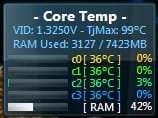
Here's a snap of what the CoreTemp Gadget looks like on my desk top. You'll notice the whopping high 99C TjMax. If my CPU ever got that hot, I'd be in a panic state. Actually, I've never seen it go above 55C -- gaming or otherwise.

And you are certainly right when you say that you shouldn't have to jump through hoops to get it working correctly. I sympathize. I've never heard of this type of problem before now.

BIOS should read the SPD and adjust accordingly. Emphasis on 'should'. Your DRAM clock should be set to 800Mhz (=1600).
I notice in your specs that you have a couple of Corsairs? What's the specs on them? Your system will choose the slower of the two speeds when you've mixed memory sticks. It is a bottleneck. One should always try to avoid using different brands and types of memory. You might try removing the Corsairs and see what happens?
 

Attachments

  • ScreenShot00166.jpg
    ScreenShot00166.jpg
    6.2 KB · Views: 92

My Computer

Computer Manufacturer/Model Number
OEM - Me
OS
Windows 7 Home Premium x64
CPU
AMD Phenom II X6 1600T
Motherboard
GigaByte GZ-990FXA-UD3
Memory
16GB PC3-10700 (1342MHz)
Graphics Card(s)
ATI Radeon 5770 HD (x2) CrossFire
Sound Card
On-board RealTek chipset
Monitor(s) Displays
3x Hanns-G 1920x1080 Monitors
Screen Resolution
3x Hanns-G 1920x1080 Monitors
Hard Drives
Intel 25-V SSD 40GB: 218 MB/s AT: 0.1ms
Intel X-25M SSD 80GB: 230MB/s AT: 0.1ms
Seagate 750GB: 133 MB/s AT: 13ms (perpendicular storage)
Buffalo HD-PCTU3 1TB External drive
PSU
OCZ Stealth X Stream 750W
Case
Cheap (unknown)
Cooling
Stock
Keyboard
HP USB
Mouse
LogiTech USB
Internet Speed
1.5 Mbps - Slow - At the tail-end of a rural network
Other Info
Printer: Epson Stylus C-84
Scanner: HP 3500C Flatbed
DVD-RW: Plextor
DVD-ROM: Unknown
WEI: 7.4
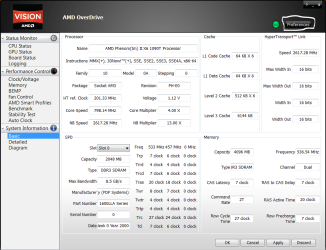
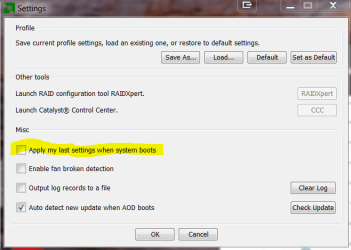
Here is the screenshot that you asked for. Is the preference button on the top right that you meant? If so, I assume that what you were speaking of is in settings...is the highlighted settings would you referred to?

What you say about core vs CPU temp makes sense, except that the temperature chart in the link in my last post appears to be using CPU temp, rather than core. I would assume that they would use the one relevant to the max limits...wouldn't they?
 

Attachments

  • AOD Basic.PNG
    AOD Basic.PNG
    51.3 KB · Views: 15
  • AOD Settings.PNG
    AOD Settings.PNG
    20.1 KB · Views: 7

My Computer

Computer Manufacturer/Model Number
DIY
OS
W7x64 Pro, SuSe 12.1/** W7 x64 Pro, XP MCE
CPU
Phenom II 1090T w/Noctua NH-D14 /**4400+ X2 w/CM Hyper TX 3
Motherboard
ASRock 890FX Deluxe 4/**A8N-SLI
Memory
2 x 2GB Patriot PGS34g1600LLKA/**4x1GB Corsair VS
Graphics Card(s)
EVGA GTX460 SC/**EVGA 8800GTS
Sound Card
Asus Xonar D2X/**Xonar D1
Monitor(s) Displays
Acer X233H, Dell E152FPc /**LG M237-WD
Screen Resolution
1920x1080 & 1024x768/**1980x1080
Hard Drives
WDC 2TB, 1.5TB, 1TB, 500GB,Seagate 500GB , Maxtor 80GB /**500GB Seagate & WDC 1TB Black
PSU
CM RS600 w/ APC BX1000G/**Antec 500 TP w/ APC BX1000
Case
HAF922/**Antec 1040IIB
Cooling
3x200mm, 1x140 and 1x120mm/**5x80mm fans
Keyboard
Logitech Media USB/**Saitek Eclipse
Mouse
Cordless Trackman Wheel/**Ditto
Internet Speed
3.3Mbps
Other Info
SB 560 5.1 w/ Sennheiser RS140/**Creative T20 speakers, Dvico FusionHDTV7 Gold RT, Cisco E3000, HP 5510V AIO, Linksys E3000, Belkin F5U237 hub and **F5D8055 adapter
(** = 2nd rig)
@seekermeister:
Yes, the highlighted setting is what I was thinking of.

I don't know what temp source they were using; they did mention CoreTemp and that only shows core temps. In any case, they alluded to not trusting the recorded temps very much. By as much as 15C! Even with AMD's own monitors! That's quite a lot.
 

My Computer

Computer Manufacturer/Model Number
OEM - Me
OS
Windows 7 Home Premium x64
CPU
AMD Phenom II X6 1600T
Motherboard
GigaByte GZ-990FXA-UD3
Memory
16GB PC3-10700 (1342MHz)
Graphics Card(s)
ATI Radeon 5770 HD (x2) CrossFire
Sound Card
On-board RealTek chipset
Monitor(s) Displays
3x Hanns-G 1920x1080 Monitors
Screen Resolution
3x Hanns-G 1920x1080 Monitors
Hard Drives
Intel 25-V SSD 40GB: 218 MB/s AT: 0.1ms
Intel X-25M SSD 80GB: 230MB/s AT: 0.1ms
Seagate 750GB: 133 MB/s AT: 13ms (perpendicular storage)
Buffalo HD-PCTU3 1TB External drive
PSU
OCZ Stealth X Stream 750W
Case
Cheap (unknown)
Cooling
Stock
Keyboard
HP USB
Mouse
LogiTech USB
Internet Speed
1.5 Mbps - Slow - At the tail-end of a rural network
Other Info
Printer: Epson Stylus C-84
Scanner: HP 3500C Flatbed
DVD-RW: Plextor
DVD-ROM: Unknown
WEI: 7.4
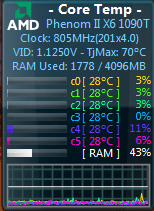
I did install CoreTemp, which seems to agree with AOD, as far as core temps go, but one thing that caught my eye is that it shows TJMax at 70 degrees, which is 8 degrees above max temp for this processor. That caused me to Google, where I found this thread.

TJ Max for a Phenom II X6 1090t? - Overclockers UK Forums

While I found no clear cut consensus, some expressed doubt about using CoreTemp.
 

Attachments

  • CoreTemp.PNG
    CoreTemp.PNG
    11.3 KB · Views: 87

My Computer

Computer Manufacturer/Model Number
DIY
OS
W7x64 Pro, SuSe 12.1/** W7 x64 Pro, XP MCE
CPU
Phenom II 1090T w/Noctua NH-D14 /**4400+ X2 w/CM Hyper TX 3
Motherboard
ASRock 890FX Deluxe 4/**A8N-SLI
Memory
2 x 2GB Patriot PGS34g1600LLKA/**4x1GB Corsair VS
Graphics Card(s)
EVGA GTX460 SC/**EVGA 8800GTS
Sound Card
Asus Xonar D2X/**Xonar D1
Monitor(s) Displays
Acer X233H, Dell E152FPc /**LG M237-WD
Screen Resolution
1920x1080 & 1024x768/**1980x1080
Hard Drives
WDC 2TB, 1.5TB, 1TB, 500GB,Seagate 500GB , Maxtor 80GB /**500GB Seagate & WDC 1TB Black
PSU
CM RS600 w/ APC BX1000G/**Antec 500 TP w/ APC BX1000
Case
HAF922/**Antec 1040IIB
Cooling
3x200mm, 1x140 and 1x120mm/**5x80mm fans
Keyboard
Logitech Media USB/**Saitek Eclipse
Mouse
Cordless Trackman Wheel/**Ditto
Internet Speed
3.3Mbps
Other Info
SB 560 5.1 w/ Sennheiser RS140/**Creative T20 speakers, Dvico FusionHDTV7 Gold RT, Cisco E3000, HP 5510V AIO, Linksys E3000, Belkin F5U237 hub and **F5D8055 adapter
(** = 2nd rig)
I used to use SpeedFan for many years, then I recently ran across CoreTemp. I've never had a temperature issue with this computer. I guess it just gives me peace of mind to see the temps idling around 35C.

This is the first time I've heard of any distrust for it's reports. I also see that someone there advises using the CPU as opposed to the Core values for that particular chip. He says the core temp results are inaccurate. Maybe something specific to that CPU? I don't know...

If it is off, how would one know? Unless you had some high-buck monitoring equipment to compare it to?

Getting back to the memory issue:
Have you tried removing those Corsair sticks yet? Any change in the speeds reported by CPU-Z? I'm really interested in seeing what effect that has on your readings.

I would also disable any overclocking feature in BIOS as this will sway your findings.
---

It's approaching 11pm here and I'm going to hit the hay.
I'll be back tomorrow. by then I'm sure many here will have come up with a gazillion ideas for you to try. :)
Good-night, seekermeister,
 

My Computer

Computer Manufacturer/Model Number
OEM - Me
OS
Windows 7 Home Premium x64
CPU
AMD Phenom II X6 1600T
Motherboard
GigaByte GZ-990FXA-UD3
Memory
16GB PC3-10700 (1342MHz)
Graphics Card(s)
ATI Radeon 5770 HD (x2) CrossFire
Sound Card
On-board RealTek chipset
Monitor(s) Displays
3x Hanns-G 1920x1080 Monitors
Screen Resolution
3x Hanns-G 1920x1080 Monitors
Hard Drives
Intel 25-V SSD 40GB: 218 MB/s AT: 0.1ms
Intel X-25M SSD 80GB: 230MB/s AT: 0.1ms
Seagate 750GB: 133 MB/s AT: 13ms (perpendicular storage)
Buffalo HD-PCTU3 1TB External drive
PSU
OCZ Stealth X Stream 750W
Case
Cheap (unknown)
Cooling
Stock
Keyboard
HP USB
Mouse
LogiTech USB
Internet Speed
1.5 Mbps - Slow - At the tail-end of a rural network
Other Info
Printer: Epson Stylus C-84
Scanner: HP 3500C Flatbed
DVD-RW: Plextor
DVD-ROM: Unknown
WEI: 7.4
While I admit that I haven't done much as far as tweaking the RAM, and nothing in terms of overclocking it, I still feel that there is something that I should do to get the system to properly recognize my RAM type. All of the diagnostics that I have used properly identified the RAM brand and model, but some of them have identified them as PC8500 DDR3, instead of PC12,800 DDR 3. All of them show a clock speed corresponding to PC8500 DDR3 @ ~ 533MHz, which I think would be = to 1066MHz after being doubled, which is the clock speed for the lower RAM category. I think that my RAM should be shown as 800MHz, which doubled would be 1600MHz as my RAM is supposed to be.

Maybe I'm wrong, but I don't feel that this is something that is to be done by tweaking or OCing. Is there some other BIOS setting required for the RAM to run properly, or do I just have some mislabeled RAM?
 

My Computer

Computer Manufacturer/Model Number
DIY
OS
W7x64 Pro, SuSe 12.1/** W7 x64 Pro, XP MCE
CPU
Phenom II 1090T w/Noctua NH-D14 /**4400+ X2 w/CM Hyper TX 3
Motherboard
ASRock 890FX Deluxe 4/**A8N-SLI
Memory
2 x 2GB Patriot PGS34g1600LLKA/**4x1GB Corsair VS
Graphics Card(s)
EVGA GTX460 SC/**EVGA 8800GTS
Sound Card
Asus Xonar D2X/**Xonar D1
Monitor(s) Displays
Acer X233H, Dell E152FPc /**LG M237-WD
Screen Resolution
1920x1080 & 1024x768/**1980x1080
Hard Drives
WDC 2TB, 1.5TB, 1TB, 500GB,Seagate 500GB , Maxtor 80GB /**500GB Seagate & WDC 1TB Black
PSU
CM RS600 w/ APC BX1000G/**Antec 500 TP w/ APC BX1000
Case
HAF922/**Antec 1040IIB
Cooling
3x200mm, 1x140 and 1x120mm/**5x80mm fans
Keyboard
Logitech Media USB/**Saitek Eclipse
Mouse
Cordless Trackman Wheel/**Ditto
Internet Speed
3.3Mbps
Other Info
SB 560 5.1 w/ Sennheiser RS140/**Creative T20 speakers, Dvico FusionHDTV7 Gold RT, Cisco E3000, HP 5510V AIO, Linksys E3000, Belkin F5U237 hub and **F5D8055 adapter
(** = 2nd rig)
If it were me, I would look in CPUZs SPD tab and see what the recommended voltage, and timings are for it to run at DDR3 1333.

Then boot into your bios, and change these variables so that the RAm is set to DDR3 1333.

Re-Test and see what results you get.

It may actually perform better.


It also wouldn't hurt to run a MEMTEST86 test, just to be sure the RAM is good.


--EDIT--
I remember this from a little while back. Stormy pointed it out. Might be worth a read.
http://forum.giga-byte.co.uk/index.php/topic,2515.0.html
 

My Computer

Computer Manufacturer/Model Number
Custom (Self Build)
OS
Windows 7 Home Premium 64bit
CPU
Intel Core i7 2700k
Motherboard
eVGA P67 SLI
Memory
8GB Mushkin Redline Ridgebacks @1866
Graphics Card(s)
EVGA GTX570 SC
Sound Card
XiFi Titanium HD
Monitor(s) Displays
LG W2453V
Screen Resolution
1920x1080
Hard Drives
Intel 320 80GB -- Intel X25-V 40GB --WD Black 1TB x2 -- WD Blue 640GB
PSU
Seasonic x750
Case
Corsair 600T SE White
Cooling
eVGA Superclocked CPU Cooler
Keyboard
Saitek Cyborg
Antivirus
Kaspersky
Browser
IE
Other Info
LG BD/DVD
If it were me, I would look in CPUZs SPD tab and see what the recommended voltage, and timings are for it to run at DDR3 1333.

Then boot into your bios, and change these variables so that the RAm is set to DDR3 1333.

Re-Test and see what results you get.

It may actually perform better.


It also wouldn't hurt to run a MEMTEST86 test, just to be sure the RAM is good.


--EDIT--
I remember this from a little while back. Stormy pointed it out. Might be worth a read.
VERY IMPORTANT INFORMATION REGARDING AMD AM3 CPU's and RAM SPEEDS

As I mentioned in my OP, I did run Memtest86 and it passed 6 runs, so there is no solution in that direction. Also, as I mentioned previously, everything on CPU-Z's SPD tab is grayed out, so it is of no use.

I will check again later, because I have a movie playing at the moment, but I do not recall anything regarding a BIOS setting for the DDR type. However, even if there were, what would DDR3 1333 have to do with it, since my RAM is DDR3 1600?
 

My Computer

Computer Manufacturer/Model Number
DIY
OS
W7x64 Pro, SuSe 12.1/** W7 x64 Pro, XP MCE
CPU
Phenom II 1090T w/Noctua NH-D14 /**4400+ X2 w/CM Hyper TX 3
Motherboard
ASRock 890FX Deluxe 4/**A8N-SLI
Memory
2 x 2GB Patriot PGS34g1600LLKA/**4x1GB Corsair VS
Graphics Card(s)
EVGA GTX460 SC/**EVGA 8800GTS
Sound Card
Asus Xonar D2X/**Xonar D1
Monitor(s) Displays
Acer X233H, Dell E152FPc /**LG M237-WD
Screen Resolution
1920x1080 & 1024x768/**1980x1080
Hard Drives
WDC 2TB, 1.5TB, 1TB, 500GB,Seagate 500GB , Maxtor 80GB /**500GB Seagate & WDC 1TB Black
PSU
CM RS600 w/ APC BX1000G/**Antec 500 TP w/ APC BX1000
Case
HAF922/**Antec 1040IIB
Cooling
3x200mm, 1x140 and 1x120mm/**5x80mm fans
Keyboard
Logitech Media USB/**Saitek Eclipse
Mouse
Cordless Trackman Wheel/**Ditto
Internet Speed
3.3Mbps
Other Info
SB 560 5.1 w/ Sennheiser RS140/**Creative T20 speakers, Dvico FusionHDTV7 Gold RT, Cisco E3000, HP 5510V AIO, Linksys E3000, Belkin F5U237 hub and **F5D8055 adapter
(** = 2nd rig)
Back
Top