Ram showing up Wrong

XGUNTHERC

I Click Home Too Much
Power User
VIP
Local time
1:05 AM
Messages
440
Location
Viva Las Vegas
I don't know if it's been this way the entire time since I officially upgraded from build 7201 to the released version. or if it just started but my CPU Meter in sidebar is only showing that I have 2814MB of ram.. lol

and when I right click properties on my Computer and enter the System tab where you check WEI score and specs. it says 4.0GB of ram (2.75GB Usable)...

What is that about? I'm confused atm.. maybe a stick went bad. but it's 2x2GB.. it's not like half of a stick would be working. lol and yes I'm on a 64 bit OS

any suggestions?
 

My Computer

OS
Windows 7 Ultimate Edition x64
CPU
Q9650 E0 @ 4.0 GHz 1.304v
Motherboard
eVGA 750i FTW!
Memory
2x2GB Corsair Dominator PC2-8500C5D 1100 Mhz 5-5-5-15
Graphics Card(s)
eVGA/Gigabyte GTX 480's SLI
Sound Card
X-Fi XtremeGamer
Monitor(s) Displays
Dell U2410 24" IPS Panel (Beautiful)
Screen Resolution
1900 x 1200 & 1680 x 1050
Hard Drives
WD Caviar Black 640GB AALS x2 (Raid0) + Seagate Pro 500GB External x2
PSU
Enermax Revolution 85+ 1050w PSU
Case
Cooler Master HAF 932 H20
Cooling
Apogee GTZ, Feser 360, D5 Vario, Scythe GT 1850's
Keyboard
Logitech G11
Mouse
Logitech MX-518 / G9
Internet Speed
Fast!
Other Info
Nikon D40 DSLR 18-105mm VR - Nikon 35mm f/1.8 & 55-200mm VR
Bose Companion 3 - 16GB Patriot Xporter USB - ATH AD900's & UR Triple.Fi 10 Custom Phones w/ 32GB iPod Touch 3rd Gen -
Google Nexus One (Phone Rocks!) w/ Kingston 16GB MicroSDHC Class 10 running Amon RA1.7 and Cyan 5.06.1
I don't know if it's been this way the entire time since I officially upgraded from build 7201 to the released version. or if it just started but my CPU Meter in sidebar is only showing that I have 2814MB of ram.. lol

and when I right click properties on my Computer and enter the System tab where you check WEI score and specs. it says 4.0GB of ram (2.75GB Usable)...

What is that about? I'm confused atm.. maybe a stick went bad. but it's 2x2GB.. it's not like half of a stick would be working. lol and yes I'm on a 64 bit OS

any suggestions?

Normal. suspect 32bit and integrated graphics. Plus win 7 will cache at least a gig.

Ken J
 

My Computer

Computer Manufacturer/Model Number
HP Pavillion dv-7 1005 Tx
OS
Win 8 Release candidate 8400
CPU
[email protected]
Memory
4 gigs
Graphics Card(s)
Nvidia 9600M
Sound Card
HD built-in
Monitor(s) Displays
17" Wxga
Screen Resolution
1440x900
Cooling
none
Internet Speed
45Mb down 5Mb up
huh..

no I have 64bit operating system. and I have no integrated graphics, but I do have SLI GTX 260's both with 896MB of ram each.

I don't remember CPU Meter showing anything other than 4096
 

My Computer

OS
Windows 7 Ultimate Edition x64
CPU
Q9650 E0 @ 4.0 GHz 1.304v
Motherboard
eVGA 750i FTW!
Memory
2x2GB Corsair Dominator PC2-8500C5D 1100 Mhz 5-5-5-15
Graphics Card(s)
eVGA/Gigabyte GTX 480's SLI
Sound Card
X-Fi XtremeGamer
Monitor(s) Displays
Dell U2410 24" IPS Panel (Beautiful)
Screen Resolution
1900 x 1200 & 1680 x 1050
Hard Drives
WD Caviar Black 640GB AALS x2 (Raid0) + Seagate Pro 500GB External x2
PSU
Enermax Revolution 85+ 1050w PSU
Case
Cooler Master HAF 932 H20
Cooling
Apogee GTZ, Feser 360, D5 Vario, Scythe GT 1850's
Keyboard
Logitech G11
Mouse
Logitech MX-518 / G9
Internet Speed
Fast!
Other Info
Nikon D40 DSLR 18-105mm VR - Nikon 35mm f/1.8 & 55-200mm VR
Bose Companion 3 - 16GB Patriot Xporter USB - ATH AD900's & UR Triple.Fi 10 Custom Phones w/ 32GB iPod Touch 3rd Gen -
Google Nexus One (Phone Rocks!) w/ Kingston 16GB MicroSDHC Class 10 running Amon RA1.7 and Cyan 5.06.1
when I right click properties on my Computer and enter the System tab where you check WEI score and specs. it says 4.0GB of ram (2.75GB Usable)...
Huh? I have systems with Win7 Home Premium and Win7 Professional (both 64-bit) and when I right click on Computer (there is no "my") and there is no System tab. I don't think Win 7 In fact, there are no tabs at all. But in looking at the System section in WEI, it only reports the "Installed memory (RAM):) - there's nothing there about how much is "usable".

It sure sounds like you are running 32-bit. Note that under the Installed memory, it reports the System type. What does yours say there? Or better yet, can you post a screen shot?
 

My Computer

Computer Manufacturer/Model Number
BrightWorks Systems B4
OS
Windows 7 Profession 64-bit
CPU
Intel Core i7-860 Quad
Motherboard
Gigabyte P55-UD4P
Memory
Mushkin 4x2Gb PC12800
Graphics Card(s)
Gigabyte GTX260 896Mb
Sound Card
Integrated 7.1 HD Dolby
Monitor(s) Displays
2 Samsung 2220wm-HAS 22"
Screen Resolution
1680 x 1050 | 1680 x 1050
Hard Drives
WD HE 1Tb
PSU
Corsair TX-750W
Case
Ultra M998
Cooling
OEM
Keyboard
MS Wireless Comfort 5000
Mouse
MS Wireless 5000
Internet Speed
Cable and pretty darn fast
Have you done any BIOS updates? Anyways looking in the BIOS for any Memory remapping options. Anyways open Resource Monitor (Start > type "resource"), then go to the memory tab. And guys it does not matter weather it is 32 or 64 bit in this case. 32-bit can handle 4 GB it cannot handle Hardware reservations, and that has to do with the chipset which effects both.
 

My Computer

Computer type
PC/Desktop
Computer Manufacturer/Model Number
Alienware Aurora ALX R4
OS
Windows 10 Pro (x64)
CPU
Intel Core i7-3930K (3.2GHz - 4.5GHz)
Motherboard
Alienware Aurora-R4 x79
Memory
4x Samsung 4GB PC3-12800 DDR3 (16GB 1600MHz)
Graphics Card(s)
Nvidia Geforce GTX 690
Sound Card
SteelSeries Siberia Elite
Monitor(s) Displays
Dell UltraSharp U3011
Screen Resolution
2560x1600
Hard Drives
Samsung 850 Pro 256 GB, Seagate 1TB Desktop Hybrid HDD, 2x Western Digital 4TB Green HDD
PSU
875W Some Dell PSU <.<
Case
Alienware Aurora ALX
Cooling
Custom Liquid Cooling (EK CPU & GPU blocks) dual EK 480RAD
Keyboard
Logitech G710+ Mechanical
Mouse
Logitech G700s
Internet Speed
Verizon Fios (50 mbps average)
Other Info
Server: Intel NUC D54250WYK: i5-4250U, 16GB, 256 GB mSATA, Windows Server 2012 R2
I'm smart enough to know I'm running 64bit guys.. lol. I have a 64bit system. and I changed it from Computer to My Computer. I'm used to that. lol and no not a system tab, but you know what I meant. System section in Control panel where you check the WEI it does in fact show all 4GB. and then says (2.75GB Usable) Very weird I've never seen that in this system. Here's a screeny


Pretty confused. I recently reinstalled win 7 from build 7201 to the Final release. I'm running 64bit Ultimate Edition..

Let me know what you think Digerati.. and see the CPU Meter showing up as 2814 and not 4096....
 

My Computer

OS
Windows 7 Ultimate Edition x64
CPU
Q9650 E0 @ 4.0 GHz 1.304v
Motherboard
eVGA 750i FTW!
Memory
2x2GB Corsair Dominator PC2-8500C5D 1100 Mhz 5-5-5-15
Graphics Card(s)
eVGA/Gigabyte GTX 480's SLI
Sound Card
X-Fi XtremeGamer
Monitor(s) Displays
Dell U2410 24" IPS Panel (Beautiful)
Screen Resolution
1900 x 1200 & 1680 x 1050
Hard Drives
WD Caviar Black 640GB AALS x2 (Raid0) + Seagate Pro 500GB External x2
PSU
Enermax Revolution 85+ 1050w PSU
Case
Cooler Master HAF 932 H20
Cooling
Apogee GTZ, Feser 360, D5 Vario, Scythe GT 1850's
Keyboard
Logitech G11
Mouse
Logitech MX-518 / G9
Internet Speed
Fast!
Other Info
Nikon D40 DSLR 18-105mm VR - Nikon 35mm f/1.8 & 55-200mm VR
Bose Companion 3 - 16GB Patriot Xporter USB - ATH AD900's & UR Triple.Fi 10 Custom Phones w/ 32GB iPod Touch 3rd Gen -
Google Nexus One (Phone Rocks!) w/ Kingston 16GB MicroSDHC Class 10 running Amon RA1.7 and Cyan 5.06.1
I'm smart enough to know I'm running 64bit guys.. lol. I have a 64bit system. and I changed it from Computer to My Computer. I'm used to that. lol and no not a system tab, but you know what I meant. System section in Control panel where you check the WEI it does in fact show all 4GB. and then says (2.75GB Usable) Very weird I've never seen that in this system
Sorry to question your comments, but as you said this is weird. Making sure we are talking the same language by using the same terminology is important, so that we really do know what you mean.

As can be seen below, mine does not state how much RAM is available but the CPU Usage gadget shows the full 4Gb.

I can't image Ultimate would report it differently than Pro - hopefully someone else running Ultimate will chime in. What does CPUz show?
 

Attachments

  • WEI.PNG
    WEI.PNG
    11.6 KB · Views: 76

My Computer

Computer Manufacturer/Model Number
BrightWorks Systems B4
OS
Windows 7 Profession 64-bit
CPU
Intel Core i7-860 Quad
Motherboard
Gigabyte P55-UD4P
Memory
Mushkin 4x2Gb PC12800
Graphics Card(s)
Gigabyte GTX260 896Mb
Sound Card
Integrated 7.1 HD Dolby
Monitor(s) Displays
2 Samsung 2220wm-HAS 22"
Screen Resolution
1680 x 1050 | 1680 x 1050
Hard Drives
WD HE 1Tb
PSU
Corsair TX-750W
Case
Ultra M998
Cooling
OEM
Keyboard
MS Wireless Comfort 5000
Mouse
MS Wireless 5000
Internet Speed
Cable and pretty darn fast
Open Resource Monitor (Start > type "resource"), then go to the memory tab. Screenshot of that.
 

My Computer

Computer type
PC/Desktop
Computer Manufacturer/Model Number
Alienware Aurora ALX R4
OS
Windows 10 Pro (x64)
CPU
Intel Core i7-3930K (3.2GHz - 4.5GHz)
Motherboard
Alienware Aurora-R4 x79
Memory
4x Samsung 4GB PC3-12800 DDR3 (16GB 1600MHz)
Graphics Card(s)
Nvidia Geforce GTX 690
Sound Card
SteelSeries Siberia Elite
Monitor(s) Displays
Dell UltraSharp U3011
Screen Resolution
2560x1600
Hard Drives
Samsung 850 Pro 256 GB, Seagate 1TB Desktop Hybrid HDD, 2x Western Digital 4TB Green HDD
PSU
875W Some Dell PSU <.<
Case
Alienware Aurora ALX
Cooling
Custom Liquid Cooling (EK CPU & GPU blocks) dual EK 480RAD
Keyboard
Logitech G710+ Mechanical
Mouse
Logitech G700s
Internet Speed
Verizon Fios (50 mbps average)
Other Info
Server: Intel NUC D54250WYK: i5-4250U, 16GB, 256 GB mSATA, Windows Server 2012 R2
Open Resource Monitor (Start > type "resource"), then go to the memory tab. Screenshot of that.


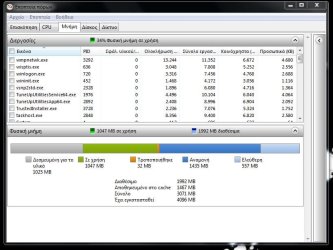
dude I checked this and i see that 1024MB of physical memory is contained can't send a photo cuz it's greek.

how do I fix this?
 

My Computer

OS
win 7 x64 ultimate
I maybe not be able to read Greek by the diagram of the physical memory should be universal.
 

My Computer

Computer type
PC/Desktop
Computer Manufacturer/Model Number
Alienware Aurora ALX R4
OS
Windows 10 Pro (x64)
CPU
Intel Core i7-3930K (3.2GHz - 4.5GHz)
Motherboard
Alienware Aurora-R4 x79
Memory
4x Samsung 4GB PC3-12800 DDR3 (16GB 1600MHz)
Graphics Card(s)
Nvidia Geforce GTX 690
Sound Card
SteelSeries Siberia Elite
Monitor(s) Displays
Dell UltraSharp U3011
Screen Resolution
2560x1600
Hard Drives
Samsung 850 Pro 256 GB, Seagate 1TB Desktop Hybrid HDD, 2x Western Digital 4TB Green HDD
PSU
875W Some Dell PSU <.<
Case
Alienware Aurora ALX
Cooling
Custom Liquid Cooling (EK CPU & GPU blocks) dual EK 480RAD
Keyboard
Logitech G710+ Mechanical
Mouse
Logitech G700s
Internet Speed
Verizon Fios (50 mbps average)
Other Info
Server: Intel NUC D54250WYK: i5-4250U, 16GB, 256 GB mSATA, Windows Server 2012 R2
here it is

here is the picture
 

Attachments

  • Καταγραφή.JPG
    Καταγραφή.JPG
    68.4 KB · Views: 115

My Computer

OS
win 7 x64 ultimate
I maybe not be able to read Greek by the diagram of the physical memory should be universal.


I uploaded the picture please help me.

Well about 1 GB is being reserved for Hardware, so you will need to look in the BIOS for a memory remap option or close to that. If you do not have that option...not much that can be done aside from getting a new motherboard and chipset or BIOS update.
 

My Computer

Computer type
PC/Desktop
Computer Manufacturer/Model Number
Alienware Aurora ALX R4
OS
Windows 10 Pro (x64)
CPU
Intel Core i7-3930K (3.2GHz - 4.5GHz)
Motherboard
Alienware Aurora-R4 x79
Memory
4x Samsung 4GB PC3-12800 DDR3 (16GB 1600MHz)
Graphics Card(s)
Nvidia Geforce GTX 690
Sound Card
SteelSeries Siberia Elite
Monitor(s) Displays
Dell UltraSharp U3011
Screen Resolution
2560x1600
Hard Drives
Samsung 850 Pro 256 GB, Seagate 1TB Desktop Hybrid HDD, 2x Western Digital 4TB Green HDD
PSU
875W Some Dell PSU <.<
Case
Alienware Aurora ALX
Cooling
Custom Liquid Cooling (EK CPU & GPU blocks) dual EK 480RAD
Keyboard
Logitech G710+ Mechanical
Mouse
Logitech G700s
Internet Speed
Verizon Fios (50 mbps average)
Other Info
Server: Intel NUC D54250WYK: i5-4250U, 16GB, 256 GB mSATA, Windows Server 2012 R2
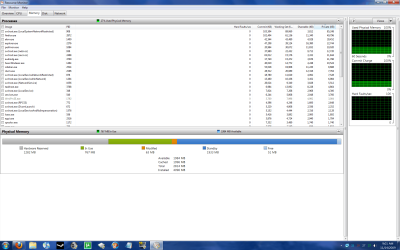
Here's mine.. my only concern is I'm almost positive that this was not happening on Build 7000, or 7201. So makes me think it's something that was added to the final build. I didn't need a bios update, or New motherboard before.. that doesn't make sense. I could see BIOS update, but needing a new motherboard when mines less than 2 years old and of a pretty large brand. seems odd. We'd see tons of people asking about this if it was motherboard based.

I'll check in the bios.

and Thanks Digerati. I wasn't trying to be rude.

The Resource Monitor shows all 4096 Installed.. hm. and CPU-Z also reported everything normal.
 

Attachments

  • Resource Monitor.png
    Resource Monitor.png
    88.4 KB · Views: 61

My Computer

OS
Windows 7 Ultimate Edition x64
CPU
Q9650 E0 @ 4.0 GHz 1.304v
Motherboard
eVGA 750i FTW!
Memory
2x2GB Corsair Dominator PC2-8500C5D 1100 Mhz 5-5-5-15
Graphics Card(s)
eVGA/Gigabyte GTX 480's SLI
Sound Card
X-Fi XtremeGamer
Monitor(s) Displays
Dell U2410 24" IPS Panel (Beautiful)
Screen Resolution
1900 x 1200 & 1680 x 1050
Hard Drives
WD Caviar Black 640GB AALS x2 (Raid0) + Seagate Pro 500GB External x2
PSU
Enermax Revolution 85+ 1050w PSU
Case
Cooler Master HAF 932 H20
Cooling
Apogee GTZ, Feser 360, D5 Vario, Scythe GT 1850's
Keyboard
Logitech G11
Mouse
Logitech MX-518 / G9
Internet Speed
Fast!
Other Info
Nikon D40 DSLR 18-105mm VR - Nikon 35mm f/1.8 & 55-200mm VR
Bose Companion 3 - 16GB Patriot Xporter USB - ATH AD900's & UR Triple.Fi 10 Custom Phones w/ 32GB iPod Touch 3rd Gen -
Google Nexus One (Phone Rocks!) w/ Kingston 16GB MicroSDHC Class 10 running Amon RA1.7 and Cyan 5.06.1
The Resource Monitor shows all 4096 Installed.. hm. and CPU-Z also reported everything normal.

But as you can see from the physical layout of your memory, 1282 MB is being reserved for hardware. I bet you it is your graphic's card and its drivers that is why it probably wasn't in the previous builds. I've been seeing the same thing over and over again with Nvidia.

It might be listed in DirectX Diagnostics, WIN + R > "dxdiag" > Display.
 

My Computer

Computer type
PC/Desktop
Computer Manufacturer/Model Number
Alienware Aurora ALX R4
OS
Windows 10 Pro (x64)
CPU
Intel Core i7-3930K (3.2GHz - 4.5GHz)
Motherboard
Alienware Aurora-R4 x79
Memory
4x Samsung 4GB PC3-12800 DDR3 (16GB 1600MHz)
Graphics Card(s)
Nvidia Geforce GTX 690
Sound Card
SteelSeries Siberia Elite
Monitor(s) Displays
Dell UltraSharp U3011
Screen Resolution
2560x1600
Hard Drives
Samsung 850 Pro 256 GB, Seagate 1TB Desktop Hybrid HDD, 2x Western Digital 4TB Green HDD
PSU
875W Some Dell PSU <.<
Case
Alienware Aurora ALX
Cooling
Custom Liquid Cooling (EK CPU & GPU blocks) dual EK 480RAD
Keyboard
Logitech G710+ Mechanical
Mouse
Logitech G700s
Internet Speed
Verizon Fios (50 mbps average)
Other Info
Server: Intel NUC D54250WYK: i5-4250U, 16GB, 256 GB mSATA, Windows Server 2012 R2
huh.. DX Diagnostics?

So how do I change, or fix this.. it could be my GPU. I looked at that first as they both have 896mb of ram. totaling that up and comparing the numbers are still off, unless it's not reserving all the memory, and in that case would be dumb not to use it all.
 

My Computer

OS
Windows 7 Ultimate Edition x64
CPU
Q9650 E0 @ 4.0 GHz 1.304v
Motherboard
eVGA 750i FTW!
Memory
2x2GB Corsair Dominator PC2-8500C5D 1100 Mhz 5-5-5-15
Graphics Card(s)
eVGA/Gigabyte GTX 480's SLI
Sound Card
X-Fi XtremeGamer
Monitor(s) Displays
Dell U2410 24" IPS Panel (Beautiful)
Screen Resolution
1900 x 1200 & 1680 x 1050
Hard Drives
WD Caviar Black 640GB AALS x2 (Raid0) + Seagate Pro 500GB External x2
PSU
Enermax Revolution 85+ 1050w PSU
Case
Cooler Master HAF 932 H20
Cooling
Apogee GTZ, Feser 360, D5 Vario, Scythe GT 1850's
Keyboard
Logitech G11
Mouse
Logitech MX-518 / G9
Internet Speed
Fast!
Other Info
Nikon D40 DSLR 18-105mm VR - Nikon 35mm f/1.8 & 55-200mm VR
Bose Companion 3 - 16GB Patriot Xporter USB - ATH AD900's & UR Triple.Fi 10 Custom Phones w/ 32GB iPod Touch 3rd Gen -
Google Nexus One (Phone Rocks!) w/ Kingston 16GB MicroSDHC Class 10 running Amon RA1.7 and Cyan 5.06.1
I think the setting number of processors and modifing the amount of memory used at boot in msconfig causes this. If you've set the number of processors in boot to 4, and changed the maximum memory, try disabling both and see if it fixes it.
 

My Computer

Computer type
PC/Desktop
Computer Manufacturer/Model Number
Custom Built
OS
Windows 8.1 Pro x64
CPU
Intel Core i7 4790k
Motherboard
MSI Z97S Krait Edition
Memory
8GB Corsair Dominator 1600MHz
Graphics Card(s)
MSI TwinFrozr GeForce GTX770
Sound Card
ASUS Xonar DX/XD 7.1
Monitor(s) Displays
Dell 24" S2409W + Dell 20" E207WFP
Screen Resolution
1920x1080 + 1680x1050
Hard Drives
1x 120GB OCZ Agility 3, 1x 750GB Western Digital Caviar Black, 1x 1TB Western Digital Caviar Blue
PSU
Corsair HX850 modular
Case
Fractal Design Define R4
Cooling
Corsair H60 w/ twin Corsair SP120 fans
Keyboard
Logitech G510S Keyboard
Mouse
Logitech G500S Laser Mouse
Internet Speed
40Mbps
Antivirus
Microsoft Security Essentials
Browser
Google Chrome
Other Info
LG Blu-Ray player
yes I have messed with that. I'll try setting back to default. I'll set ram to default, but why not set to use all processors. or does it not really speed it up any.
 

My Computer

OS
Windows 7 Ultimate Edition x64
CPU
Q9650 E0 @ 4.0 GHz 1.304v
Motherboard
eVGA 750i FTW!
Memory
2x2GB Corsair Dominator PC2-8500C5D 1100 Mhz 5-5-5-15
Graphics Card(s)
eVGA/Gigabyte GTX 480's SLI
Sound Card
X-Fi XtremeGamer
Monitor(s) Displays
Dell U2410 24" IPS Panel (Beautiful)
Screen Resolution
1900 x 1200 & 1680 x 1050
Hard Drives
WD Caviar Black 640GB AALS x2 (Raid0) + Seagate Pro 500GB External x2
PSU
Enermax Revolution 85+ 1050w PSU
Case
Cooler Master HAF 932 H20
Cooling
Apogee GTZ, Feser 360, D5 Vario, Scythe GT 1850's
Keyboard
Logitech G11
Mouse
Logitech MX-518 / G9
Internet Speed
Fast!
Other Info
Nikon D40 DSLR 18-105mm VR - Nikon 35mm f/1.8 & 55-200mm VR
Bose Companion 3 - 16GB Patriot Xporter USB - ATH AD900's & UR Triple.Fi 10 Custom Phones w/ 32GB iPod Touch 3rd Gen -
Google Nexus One (Phone Rocks!) w/ Kingston 16GB MicroSDHC Class 10 running Amon RA1.7 and Cyan 5.06.1
Look in the bios for some kind of memory remapping setting.

Edit - Ugh...sorry about that...just noticed that Logic said this already.
 

My Computer

Computer Manufacturer/Model Number
self built
OS
7600.20510 x86
CPU
P4 550 3.4 GHz HT running at 3.5 GHz
Motherboard
MSI PM8M3-V (MS-7211 v1.x) Micro-ATX mainboard
Memory
OCZ 2 GB(2x1GB) DDR400mHz running @ 414 mHz
Graphics Card(s)
HIS Radeon HD 3850 IceQ 3 Turbo HDMI Dual DL-DVI AGP
Sound Card
MOTU Traveler firewire studio interface 192 kHz 24 bit
Monitor(s) Displays
22" widescreen Acer X223W LCD, 17" Compaq P75 CRT
Screen Resolution
1680x1050 and 1280x1024
Hard Drives
SATA I x2 WD, 400 GB and 120 GB, SATA 2 WD Caviar Black 1 TB
PSU
350W generic
Case
Cybertronpc, it glows blue
Cooling
stock cpu fan, Ice-Q 3 gpu and system, many case fans
Keyboard
Logitch Classical Keyboard 200
Mouse
Logitech Mediaplay cordless
Internet Speed
1792/448 kbits/sec
Other Info
SATA II PCI fake RAID adapter, 1 GB Readyboost, original ATI Remote Wonder (even works with WMC perfectly), Logitech Rumblepad 2 game controller x2
but why not set to use all processors. or does it not really speed it up any.

It's actually a diagnostic tool. Windows uses all available cores by default anyway, so there is no performance increase.
 

My Computer

Computer type
PC/Desktop
Computer Manufacturer/Model Number
Systems by SmartEyeball
OS
8 Pro x64
CPU
i7 3770K 4.6GHz
Motherboard
ASUS P8Z77 WS
Memory
16GB G.Skill Trident X 2666mhz
Graphics Card(s)
x2 EVGA 780 Ti Superclocked SLI
Sound Card
SB X-FI Surround 5.1 PRO USB / ATH-AD900 Headphones
Monitor(s) Displays
x3 Dell U2410 / 58" Samsung
Screen Resolution
5760*1200/ 1920*1200
Hard Drives
2x Intel 520 240GB (RAID 0) * 2x WD Caviar Blacks 2TB (RAID 0) * 2TB WD Caviar Black * Sony Optirac DVD
PSU
Silverstone Strider Evolution 1200W
Case
Thermaltake Level 10 GT Snow Edition
Cooling
Noctua NH-D14
Keyboard
Topre Realforce // Ducky Shine MX Black // Filco Ninja TKL
Mouse
Thermaltake Theron (Highly Recommended) + Razer Imperator
Antivirus
MSE
Browser
IE, FF, WaterFox
Other Info
GT Extreme V2 Sim Racing Cockpit + 40" LCD and K/B Mouse stand ▼
Fanatec CSR Elite Wheel + Clubsport V1 Pedals + CSR shifter/7G-H ▼Saitek X52 Pro ▼ TrackIR 5 Pro
Buttkicker v2 Seat Rumbler with Dedicated 5.1 and Sub Woofer attached to frame ▼
=
Bloody Big Grin
Back
Top