RAM slow?

brayway

CyberBeat
VIP
Local time
9:49 AM
Messages
355
Location
Dunedin - New Zealand
Hello there,
alright here is my problem,
i recently bought a new MB CPU and RAM.
i had a few problems at first but have ironed all them out, now here is my new one.
the RAM bought is Kingston KHX8500D2K2/2GN which is a 2GB kit 2*1GB
and is clocked standard to 1066MHz
my MB is an ASUS P5KPL/1600 and can take memory up to 1066.
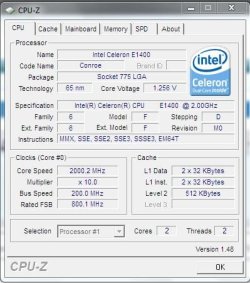
My CPU is an Intel Celeron 1400 Dual Core at 2.0GHz
so my ram should be running at 1066 shouldn't it?
well everything picks it up at 800MHZ which i find is strange.
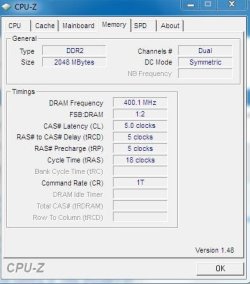
and i just now ran CPUz and it is picking it up at 400MHz ??
and i haven't even tried over-clocking so this is how it was when i built it.
any ideas?
 

Attachments
  • RAM.JPG
    RAM.JPG
    32.7 KB · Views: 28

My Computer

Computer Manufacturer/Model Number
800D Black Hole
OS
Windows 7 Professional X64
CPU
Intel Core i7 950 @ 4GHz [watercooled]
Motherboard
EVGA X58 Classified 3 [watercooled]
Memory
12GB Corsair Dominator 1600 [Watercooled]
Graphics Card(s)
GTX470 3 way SLI [watercooled]
Monitor(s) Displays
3X Acer X233H 23"
Screen Resolution
5760X1080
Hard Drives
OCZ Vertex 2 60GB
PSU
Silverstone ST1500
Case
Corsair 800D
Cooling
2X 480 Rads|10X 120MM|3X 140mm + AE5
Keyboard
Das Ultimate
Mouse
Razer Mamba
Hi brayway,

What do the CPU and SPD tabs show?
 

My Computer

Computer type
PC/Desktop
Computer Manufacturer/Model Number
Dwarf Dwf/11/2012 r09/2013
OS
Windows 8.1 Pro RTM x64
CPU
Intel Core-i5-3570K 4-core @ 3.4GHz (Ivy Bridge) (OC 4.4GHz)
Motherboard
ASRock Z77 Extreme4-M
Memory
4 x 4GB DDR3-1600 Corsair Vengeance CMZ8GX3M2A1600C9B (16GB)
Graphics Card(s)
MSI GeForce GTX770 Gaming OC 2GB
Sound Card
Realtek High Definition on board solution (ALC 898)
Monitor(s) Displays
ViewSonic VA1912w Widescreen (VGA)
Screen Resolution
1440x900
Hard Drives
OCZ Agility 3 SSD 120GB SATA III x2 (RAID 0)
Samsung HD501LJ 500GB SATA II x2
Hitachi HDS721010CLA332 1TB SATA II
Iomega 1.5TB Ext USB 2.0
WD 2.0TB Ext USB 3.0
PSU
XFX Pro Series 850W Semi-Modular
Case
Gigabyte IF233
Cooling
1 x 120mm Front Inlet 1 x 120mm Rear Exhaust
Keyboard
Microsoft Comfort Curve Keyboard 3000 (USB)
Mouse
Microsoft Comfort Mouse 3000 for Business (USB)
Internet Speed
NetGear DG834Gv3 ADSL Modem/Router (Ethernet) ~4.0 Mb/s (O2)
Antivirus
Avast! 8.0.1497
Browser
IE 11
Other Info
Optical Drive: HL-DT-ST BD-RE BH10LS30 SATA Bluray
Lexmark S305 Printer/Scanner/Copier (USB)
WEI Score: 8.1/8.1/8.5/8.5/8.25
Asus Eee PC 1011PX Netbook (Windows 7 x86 Starter)
here u go

thnx for the quick reply
 

Attachments

  • cpu.JPG
    cpu.JPG
    42.4 KB · Views: 25
  • ram2.JPG
    ram2.JPG
    42.4 KB · Views: 20
  • ram3.JPG
    ram3.JPG
    41.6 KB · Views: 10

My Computer

Computer Manufacturer/Model Number
800D Black Hole
OS
Windows 7 Professional X64
CPU
Intel Core i7 950 @ 4GHz [watercooled]
Motherboard
EVGA X58 Classified 3 [watercooled]
Memory
12GB Corsair Dominator 1600 [Watercooled]
Graphics Card(s)
GTX470 3 way SLI [watercooled]
Monitor(s) Displays
3X Acer X233H 23"
Screen Resolution
5760X1080
Hard Drives
OCZ Vertex 2 60GB
PSU
Silverstone ST1500
Case
Corsair 800D
Cooling
2X 480 Rads|10X 120MM|3X 140mm + AE5
Keyboard
Das Ultimate
Mouse
Razer Mamba
Hi brayway,

Everything looks OK to me. Just because your motherboard supports 1066MHz RAM, and you have installed RAM of this specification, does not necessarily mean it runs at this frequency. Other factors, such as the choice of CPU that you installed, need to be taken in to consideration.

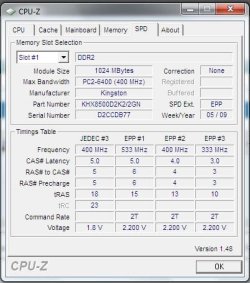
Your CPU has a speed rating of 2.0GHz. This, coupled with a multiplier of 10x yields a bus speed of 200Mhz. This FSB yields a DRAM frequency of 400MHz (see the memory tab in your earlier post). Referring to both the memory and SPD tabs, we can see that your memory is in fact running at one of its preconfigured ratings, namely JEDEC#3.

The only way of getting your RAM to run at 1066MHz is to increase your bus speed to 266MHz. If you can change your CPU multiplier, then set it to 7.5 which will result in your CPU running at its rated 2.0GHz. Alternatively, you can overclock your CPU so that its effective frequency is 2.66GHz. This can be risky, and you do this at your own risk. Another alternative is that you install a CPU that supports a 266MHz bus speed natively.
 

My Computer

Computer type
PC/Desktop
Computer Manufacturer/Model Number
Dwarf Dwf/11/2012 r09/2013
OS
Windows 8.1 Pro RTM x64
CPU
Intel Core-i5-3570K 4-core @ 3.4GHz (Ivy Bridge) (OC 4.4GHz)
Motherboard
ASRock Z77 Extreme4-M
Memory
4 x 4GB DDR3-1600 Corsair Vengeance CMZ8GX3M2A1600C9B (16GB)
Graphics Card(s)
MSI GeForce GTX770 Gaming OC 2GB
Sound Card
Realtek High Definition on board solution (ALC 898)
Monitor(s) Displays
ViewSonic VA1912w Widescreen (VGA)
Screen Resolution
1440x900
Hard Drives
OCZ Agility 3 SSD 120GB SATA III x2 (RAID 0)
Samsung HD501LJ 500GB SATA II x2
Hitachi HDS721010CLA332 1TB SATA II
Iomega 1.5TB Ext USB 2.0
WD 2.0TB Ext USB 3.0
PSU
XFX Pro Series 850W Semi-Modular
Case
Gigabyte IF233
Cooling
1 x 120mm Front Inlet 1 x 120mm Rear Exhaust
Keyboard
Microsoft Comfort Curve Keyboard 3000 (USB)
Mouse
Microsoft Comfort Mouse 3000 for Business (USB)
Internet Speed
NetGear DG834Gv3 ADSL Modem/Router (Ethernet) ~4.0 Mb/s (O2)
Antivirus
Avast! 8.0.1497
Browser
IE 11
Other Info
Optical Drive: HL-DT-ST BD-RE BH10LS30 SATA Bluray
Lexmark S305 Printer/Scanner/Copier (USB)
WEI Score: 8.1/8.1/8.5/8.5/8.25
Asus Eee PC 1011PX Netbook (Windows 7 x86 Starter)
hmm i've been looking at overclocking today would the stock heatsink do your first idea?
and the cpu i got was an emergency one as my old one wasnt compable with this board (the Cpu only cost me AU$59)
 

My Computer

Computer Manufacturer/Model Number
800D Black Hole
OS
Windows 7 Professional X64
CPU
Intel Core i7 950 @ 4GHz [watercooled]
Motherboard
EVGA X58 Classified 3 [watercooled]
Memory
12GB Corsair Dominator 1600 [Watercooled]
Graphics Card(s)
GTX470 3 way SLI [watercooled]
Monitor(s) Displays
3X Acer X233H 23"
Screen Resolution
5760X1080
Hard Drives
OCZ Vertex 2 60GB
PSU
Silverstone ST1500
Case
Corsair 800D
Cooling
2X 480 Rads|10X 120MM|3X 140mm + AE5
Keyboard
Das Ultimate
Mouse
Razer Mamba
OP - All you have to do is adjust the memory divider in the Bios to set your RAM to run at 1066. WHile you're in there, please ensure the voltage and timings are also properly set.
 

My Computer

Computer Manufacturer/Model Number
Home Built
OS
Windows 7 (x64)
CPU
Intel Core i7 960 @ 3.8GHz (3.2GHz stock)
Motherboard
EVGA E758 X-58
Memory
6GB OCZ DDR3 1600
Graphics Card(s)
Powercolor AX5870 (ATI 5870 w/improved cooling)
Sound Card
Omega Claro+
Monitor(s) Displays
1. Acer P243W (24") 2. Samsung T260 HD HDMI HDTV/Monitor
Screen Resolution
1920 x 1200 x 2
Hard Drives
(1) 128GB Kingston SNVP325-S2 SSD for OS/Games
(2) 500GB WD Caviar Black - Storage
PSU
Corsair CMPSU-850HX
Case
Lian Li PC-K60WB
Cooling
Thermalright Venemous-X
Keyboard
Microsoft Natural keyboard 4000
Mouse
Microsoft Sidewinder
Internet Speed
Cable
Other Info
165 bclk, 23 Multi
ok, and would i need a better heat ink to overclock to 2.66?? or would the stick cope fine?

thnx

-Braydon
 

My Computer

Computer Manufacturer/Model Number
800D Black Hole
OS
Windows 7 Professional X64
CPU
Intel Core i7 950 @ 4GHz [watercooled]
Motherboard
EVGA X58 Classified 3 [watercooled]
Memory
12GB Corsair Dominator 1600 [Watercooled]
Graphics Card(s)
GTX470 3 way SLI [watercooled]
Monitor(s) Displays
3X Acer X233H 23"
Screen Resolution
5760X1080
Hard Drives
OCZ Vertex 2 60GB
PSU
Silverstone ST1500
Case
Corsair 800D
Cooling
2X 480 Rads|10X 120MM|3X 140mm + AE5
Keyboard
Das Ultimate
Mouse
Razer Mamba
If you're going to overclock: Be advised that on your chipset the Front Side Buss speeds and Memory Divider are linked. So increasing the FSB - which you have to do to overclock your proccy - will also increase the speed your memory is running at.

So to decrease the likelihood of having to chase multiple issues at once, I therefore recommend leaving your memory alone until your overclock is sorted. Or even DOWNclocking your RAM to make sure it's not a stability problem. Once your processor clock is handled, then you can go back and set memory speeds.


Regarding the HSF: Your stock one is designed for stock speeds. If you're going to be overclocking, I recommend replacing it with a more efficient one.
 

My Computer

Computer Manufacturer/Model Number
Home Built
OS
Windows 7 (x64)
CPU
Intel Core i7 960 @ 3.8GHz (3.2GHz stock)
Motherboard
EVGA E758 X-58
Memory
6GB OCZ DDR3 1600
Graphics Card(s)
Powercolor AX5870 (ATI 5870 w/improved cooling)
Sound Card
Omega Claro+
Monitor(s) Displays
1. Acer P243W (24") 2. Samsung T260 HD HDMI HDTV/Monitor
Screen Resolution
1920 x 1200 x 2
Hard Drives
(1) 128GB Kingston SNVP325-S2 SSD for OS/Games
(2) 500GB WD Caviar Black - Storage
PSU
Corsair CMPSU-850HX
Case
Lian Li PC-K60WB
Cooling
Thermalright Venemous-X
Keyboard
Microsoft Natural keyboard 4000
Mouse
Microsoft Sidewinder
Internet Speed
Cable
Other Info
165 bclk, 23 Multi
hmmm.....kk ill have to look into over clocking my CPU and ram tonight :)
any recomendations on heatsinks?
 

My Computer

Computer Manufacturer/Model Number
800D Black Hole
OS
Windows 7 Professional X64
CPU
Intel Core i7 950 @ 4GHz [watercooled]
Motherboard
EVGA X58 Classified 3 [watercooled]
Memory
12GB Corsair Dominator 1600 [Watercooled]
Graphics Card(s)
GTX470 3 way SLI [watercooled]
Monitor(s) Displays
3X Acer X233H 23"
Screen Resolution
5760X1080
Hard Drives
OCZ Vertex 2 60GB
PSU
Silverstone ST1500
Case
Corsair 800D
Cooling
2X 480 Rads|10X 120MM|3X 140mm + AE5
Keyboard
Das Ultimate
Mouse
Razer Mamba
For all practical purposes you won't notice any difference by increasing just the ram speed.

Increasing the main clock a little which will boost the CPU, bus and memory all togeather will give you noticable gains. Going from 200 to 266 is probably too much unless you up the cooling considerable but even 200 to 233 will be a noticable bump in frame rates in games. Where as leaving it at 200 and upping the ram to 1066 will not be noticable at all I've found (And your ram will run really hot for no real gain)

Otherwise, I'd just leave it. I have 1066 ram and ended up leaving it at 800 myself...
 

My Computer

Computer Manufacturer/Model Number
Scratch built
OS
Windows 7 x64 Ultimate
CPU
i7 960
Motherboard
Asus P6X58D
Memory
12 Gig Corsair Dominator
Graphics Card(s)
Nvidia 480
Sound Card
Maudio Delta 44 + breakout box
Monitor(s) Displays
Dell UltraSharp U2410 24in and Samsung 21 dual monitors
Screen Resolution
1920x1200 and 1280x1024
Hard Drives
Primary: Intel X-25M G2 160G SSD
Secondary: Segate baracuda 1.0 TB
HDs in AHCI mode.
PSU
Corasair TX850
Case
Cooler Master HAF
Cooling
Corsair H50
Keyboard
Logitech G15 + N52 game pad
Mouse
Logitech MX518
Internet Speed
15kbs down 4.5kbps up
Other Info
WEI 7.6
CPU & RAM 7.6
Graphics 7.9
Hard disk 7.7
hmmm..l.well i just upped it to 2.2GHz and the BIOS still picks up the ram to be 800MHz so i might try 2.33Ghz any more than that and i'll have to save up for a new heatsink :)
BTW when i try up the Voltage to the 2.2 that the kingston site say teh number starts to hit the red in the bios.....should i goto 2.2?
 

My Computer

Computer Manufacturer/Model Number
800D Black Hole
OS
Windows 7 Professional X64
CPU
Intel Core i7 950 @ 4GHz [watercooled]
Motherboard
EVGA X58 Classified 3 [watercooled]
Memory
12GB Corsair Dominator 1600 [Watercooled]
Graphics Card(s)
GTX470 3 way SLI [watercooled]
Monitor(s) Displays
3X Acer X233H 23"
Screen Resolution
5760X1080
Hard Drives
OCZ Vertex 2 60GB
PSU
Silverstone ST1500
Case
Corsair 800D
Cooling
2X 480 Rads|10X 120MM|3X 140mm + AE5
Keyboard
Das Ultimate
Mouse
Razer Mamba
Well I certainly woudln't want to recommend pusing the V into the red.

Maybe able to get away with it ok if it's cold where you are. I actually OC a little in the winter but in the summer I turn it back down, the ambient air temp reaches 80 in the house and EVERYTHING intide the computer just heats up. I even got all my waste heat piped up into the ceiling to help with keeping the office temp down :D

A little gentle overclocking is ususaly ok but for longevity of the parts and stability I wouldn't push it.

As for the ram still being at 200, there is probably a setting that "links" or "locks" the ram bus frequency to the cpu clock frequency so that increasing the cpu clock also increases the ram clock and it may be "unlkinked" or "unlocked" currently.

Diifferen BIOSes allow or don't allow you to adjust certain things and have all different kinds of names for them :/
 

My Computer

Computer Manufacturer/Model Number
Scratch built
OS
Windows 7 x64 Ultimate
CPU
i7 960
Motherboard
Asus P6X58D
Memory
12 Gig Corsair Dominator
Graphics Card(s)
Nvidia 480
Sound Card
Maudio Delta 44 + breakout box
Monitor(s) Displays
Dell UltraSharp U2410 24in and Samsung 21 dual monitors
Screen Resolution
1920x1200 and 1280x1024
Hard Drives
Primary: Intel X-25M G2 160G SSD
Secondary: Segate baracuda 1.0 TB
HDs in AHCI mode.
PSU
Corasair TX850
Case
Cooler Master HAF
Cooling
Corsair H50
Keyboard
Logitech G15 + N52 game pad
Mouse
Logitech MX518
Internet Speed
15kbs down 4.5kbps up
Other Info
WEI 7.6
CPU & RAM 7.6
Graphics 7.9
Hard disk 7.7
hmmm.... well i got the CPU to 2.36 now and it still barely hits 44*C
the ram is still at 8010 in the POST i could put it to Automatic VOLTS for the RAM, i might go try that now, another thing i have noticed is that it has knocked my WEIS up a bit from 4.9 for the CPU up to 5.6 and up to 5.5 for the ram LOL
 

My Computer

Computer Manufacturer/Model Number
800D Black Hole
OS
Windows 7 Professional X64
CPU
Intel Core i7 950 @ 4GHz [watercooled]
Motherboard
EVGA X58 Classified 3 [watercooled]
Memory
12GB Corsair Dominator 1600 [Watercooled]
Graphics Card(s)
GTX470 3 way SLI [watercooled]
Monitor(s) Displays
3X Acer X233H 23"
Screen Resolution
5760X1080
Hard Drives
OCZ Vertex 2 60GB
PSU
Silverstone ST1500
Case
Corsair 800D
Cooling
2X 480 Rads|10X 120MM|3X 140mm + AE5
Keyboard
Das Ultimate
Mouse
Razer Mamba
By the way what would you recommend the maximum temperature?
 

My Computer

Computer Manufacturer/Model Number
800D Black Hole
OS
Windows 7 Professional X64
CPU
Intel Core i7 950 @ 4GHz [watercooled]
Motherboard
EVGA X58 Classified 3 [watercooled]
Memory
12GB Corsair Dominator 1600 [Watercooled]
Graphics Card(s)
GTX470 3 way SLI [watercooled]
Monitor(s) Displays
3X Acer X233H 23"
Screen Resolution
5760X1080
Hard Drives
OCZ Vertex 2 60GB
PSU
Silverstone ST1500
Case
Corsair 800D
Cooling
2X 480 Rads|10X 120MM|3X 140mm + AE5
Keyboard
Das Ultimate
Mouse
Razer Mamba
That depends on the CPU, Each line is different. Youcan go to Intel's site and look up your CPU mode and see what the max temp is then stay -10C below that if possible. I.e. if absolute max is 70, then 60 would be comfortable max during gaming or video processing.
 

My Computer

Computer Manufacturer/Model Number
Scratch built
OS
Windows 7 x64 Ultimate
CPU
i7 960
Motherboard
Asus P6X58D
Memory
12 Gig Corsair Dominator
Graphics Card(s)
Nvidia 480
Sound Card
Maudio Delta 44 + breakout box
Monitor(s) Displays
Dell UltraSharp U2410 24in and Samsung 21 dual monitors
Screen Resolution
1920x1200 and 1280x1024
Hard Drives
Primary: Intel X-25M G2 160G SSD
Secondary: Segate baracuda 1.0 TB
HDs in AHCI mode.
PSU
Corasair TX850
Case
Cooler Master HAF
Cooling
Corsair H50
Keyboard
Logitech G15 + N52 game pad
Mouse
Logitech MX518
Internet Speed
15kbs down 4.5kbps up
Other Info
WEI 7.6
CPU & RAM 7.6
Graphics 7.9
Hard disk 7.7
ok kool, their site says 73.3*C and mine is hitting 45*C max.
so, do u think i should try Oc a bit more? see if i can get that ram up right? LOL
it is currently 2.46GHz hmmmmm 2.6?
 

My Computer

Computer Manufacturer/Model Number
800D Black Hole
OS
Windows 7 Professional X64
CPU
Intel Core i7 950 @ 4GHz [watercooled]
Motherboard
EVGA X58 Classified 3 [watercooled]
Memory
12GB Corsair Dominator 1600 [Watercooled]
Graphics Card(s)
GTX470 3 way SLI [watercooled]
Monitor(s) Displays
3X Acer X233H 23"
Screen Resolution
5760X1080
Hard Drives
OCZ Vertex 2 60GB
PSU
Silverstone ST1500
Case
Corsair 800D
Cooling
2X 480 Rads|10X 120MM|3X 140mm + AE5
Keyboard
Das Ultimate
Mouse
Razer Mamba
Some CPUs are insanely overclockable, youmay have one, it could easily be your your chipset or ram that'll be the limit in your system. Be sure to look at the chip set temp too, in one of my machines that is peaking in to the red on temp long before the cpu does :(

But also, the difference in summer and winter house temp can raise or lower it a LOT.

Just be conservative. :)
 

My Computer

Computer Manufacturer/Model Number
Scratch built
OS
Windows 7 x64 Ultimate
CPU
i7 960
Motherboard
Asus P6X58D
Memory
12 Gig Corsair Dominator
Graphics Card(s)
Nvidia 480
Sound Card
Maudio Delta 44 + breakout box
Monitor(s) Displays
Dell UltraSharp U2410 24in and Samsung 21 dual monitors
Screen Resolution
1920x1200 and 1280x1024
Hard Drives
Primary: Intel X-25M G2 160G SSD
Secondary: Segate baracuda 1.0 TB
HDs in AHCI mode.
PSU
Corasair TX850
Case
Cooler Master HAF
Cooling
Corsair H50
Keyboard
Logitech G15 + N52 game pad
Mouse
Logitech MX518
Internet Speed
15kbs down 4.5kbps up
Other Info
WEI 7.6
CPU & RAM 7.6
Graphics 7.9
Hard disk 7.7
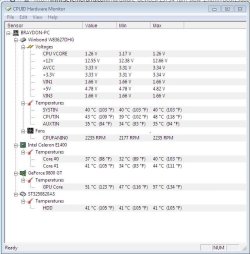
hmmm well my CPU is now at a stable 2.6Ghz and the hottest thing in my system ATM is the GC at 50

PS it is just winter Here.
 

Attachments

  • temp @ 2.66.JPG
    temp @ 2.66.JPG
    60.7 KB · Views: 7

My Computer

Computer Manufacturer/Model Number
800D Black Hole
OS
Windows 7 Professional X64
CPU
Intel Core i7 950 @ 4GHz [watercooled]
Motherboard
EVGA X58 Classified 3 [watercooled]
Memory
12GB Corsair Dominator 1600 [Watercooled]
Graphics Card(s)
GTX470 3 way SLI [watercooled]
Monitor(s) Displays
3X Acer X233H 23"
Screen Resolution
5760X1080
Hard Drives
OCZ Vertex 2 60GB
PSU
Silverstone ST1500
Case
Corsair 800D
Cooling
2X 480 Rads|10X 120MM|3X 140mm + AE5
Keyboard
Das Ultimate
Mouse
Razer Mamba
Hi brayway,

It looks like you're slowly getting there. One thing that you should note is that you should increase the FSB frequency slowly, even by as little as 10MHz at this stage, and should check for stability as you go. You might need to increase the CPU voltage slightly (don't exceed the rated maximum) in order for your system to run at the higher frequency. Check that your fan is working, and that it is free from dust, as an increased load is put on the cooling system when running above the nominal/normal rate (higher voltage + higher frequency = greater heat production).
 

My Computer

Computer type
PC/Desktop
Computer Manufacturer/Model Number
Dwarf Dwf/11/2012 r09/2013
OS
Windows 8.1 Pro RTM x64
CPU
Intel Core-i5-3570K 4-core @ 3.4GHz (Ivy Bridge) (OC 4.4GHz)
Motherboard
ASRock Z77 Extreme4-M
Memory
4 x 4GB DDR3-1600 Corsair Vengeance CMZ8GX3M2A1600C9B (16GB)
Graphics Card(s)
MSI GeForce GTX770 Gaming OC 2GB
Sound Card
Realtek High Definition on board solution (ALC 898)
Monitor(s) Displays
ViewSonic VA1912w Widescreen (VGA)
Screen Resolution
1440x900
Hard Drives
OCZ Agility 3 SSD 120GB SATA III x2 (RAID 0)
Samsung HD501LJ 500GB SATA II x2
Hitachi HDS721010CLA332 1TB SATA II
Iomega 1.5TB Ext USB 2.0
WD 2.0TB Ext USB 3.0
PSU
XFX Pro Series 850W Semi-Modular
Case
Gigabyte IF233
Cooling
1 x 120mm Front Inlet 1 x 120mm Rear Exhaust
Keyboard
Microsoft Comfort Curve Keyboard 3000 (USB)
Mouse
Microsoft Comfort Mouse 3000 for Business (USB)
Internet Speed
NetGear DG834Gv3 ADSL Modem/Router (Ethernet) ~4.0 Mb/s (O2)
Antivirus
Avast! 8.0.1497
Browser
IE 11
Other Info
Optical Drive: HL-DT-ST BD-RE BH10LS30 SATA Bluray
Lexmark S305 Printer/Scanner/Copier (USB)
WEI Score: 8.1/8.1/8.5/8.5/8.25
Asus Eee PC 1011PX Netbook (Windows 7 x86 Starter)
Hmm... It looks like you reached the target as I was writing my last post. I hope everything remains stable for you. Can you post images showing the same tabs in CPU-Z as before?
 

My Computer

Computer type
PC/Desktop
Computer Manufacturer/Model Number
Dwarf Dwf/11/2012 r09/2013
OS
Windows 8.1 Pro RTM x64
CPU
Intel Core-i5-3570K 4-core @ 3.4GHz (Ivy Bridge) (OC 4.4GHz)
Motherboard
ASRock Z77 Extreme4-M
Memory
4 x 4GB DDR3-1600 Corsair Vengeance CMZ8GX3M2A1600C9B (16GB)
Graphics Card(s)
MSI GeForce GTX770 Gaming OC 2GB
Sound Card
Realtek High Definition on board solution (ALC 898)
Monitor(s) Displays
ViewSonic VA1912w Widescreen (VGA)
Screen Resolution
1440x900
Hard Drives
OCZ Agility 3 SSD 120GB SATA III x2 (RAID 0)
Samsung HD501LJ 500GB SATA II x2
Hitachi HDS721010CLA332 1TB SATA II
Iomega 1.5TB Ext USB 2.0
WD 2.0TB Ext USB 3.0
PSU
XFX Pro Series 850W Semi-Modular
Case
Gigabyte IF233
Cooling
1 x 120mm Front Inlet 1 x 120mm Rear Exhaust
Keyboard
Microsoft Comfort Curve Keyboard 3000 (USB)
Mouse
Microsoft Comfort Mouse 3000 for Business (USB)
Internet Speed
NetGear DG834Gv3 ADSL Modem/Router (Ethernet) ~4.0 Mb/s (O2)
Antivirus
Avast! 8.0.1497
Browser
IE 11
Other Info
Optical Drive: HL-DT-ST BD-RE BH10LS30 SATA Bluray
Lexmark S305 Printer/Scanner/Copier (USB)
WEI Score: 8.1/8.1/8.5/8.5/8.25
Asus Eee PC 1011PX Netbook (Windows 7 x86 Starter)
Back
Top