RAM upgrade question

Wii Master 64

New member
Power User
VIP
Local time
10:09 PM
Messages
301
Hey everyone, I've been wanting to upgrade my RAM for my laptop from 2GB to 4GB because I edit HD movies and need that extra performance boost.

Since I'm upgrading to 4GB, would it be okay for me to just buy a 2GB stick and use it with my current stick (or sticks, I've never looked to see what I have) of RAM? Or should I buy a pack of 2x2GB and replace the stick(s) altogether?
 

My Computer

Computer Manufacturer/Model Number
Compaq Presario CQ60-215DX
OS
Windows 7 Home Premium
CPU
2 AMD Athlon 64 X2
Graphics Card(s)
NVIDIA GeForce 8200M G graphics
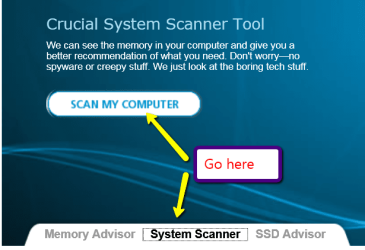
A lot of folks recommend using matched sticks to avoid compatibility issues. I've successfully used mixed sticks before but only after verifying all of the specs on the original stick. You can do that by using a free memory advisor tool from Crucial (or pretty much any of the well known memory companies like Kingston, G.Skill, etc.)

RAM Memory Upgrade: Dell, Mac, Apple, HP, Compaq. USB drives, SSD at Crucial.com

Or you could get a free tool like Speccy that will give you the same RAM info as well as a lot more system info.

Speccy - System Information - Free Download

Once you have your installed RAM specs you can shop around for the best prices. But make sure the specs match before spending your money.
 

My Computer

Computer type
Laptop
Computer Manufacturer/Model Number
Sony Vaio VPCEB47GM Laptop
OS
Win 7 Pro 64-bit
CPU
Intel i5 2.4 Ghz
Memory
8GB DDR3
Graphics Card(s)
Intel HD 3000
Sound Card
IDT High Definition
Monitor(s) Displays
15.6 WGXA Anti-Glare LED
Screen Resolution
1280x800
Hard Drives
640Gb 7200rpm
Antivirus
MSE
Browser
Opera (primary) with IE9 backup
Ok, thanks for the help! :)
 

My Computer

Computer Manufacturer/Model Number
Compaq Presario CQ60-215DX
OS
Windows 7 Home Premium
CPU
2 AMD Athlon 64 X2
Graphics Card(s)
NVIDIA GeForce 8200M G graphics
You're very welcome! :)
 

My Computer

Computer type
Laptop
Computer Manufacturer/Model Number
Sony Vaio VPCEB47GM Laptop
OS
Win 7 Pro 64-bit
CPU
Intel i5 2.4 Ghz
Memory
8GB DDR3
Graphics Card(s)
Intel HD 3000
Sound Card
IDT High Definition
Monitor(s) Displays
15.6 WGXA Anti-Glare LED
Screen Resolution
1280x800
Hard Drives
640Gb 7200rpm
Antivirus
MSE
Browser
Opera (primary) with IE9 backup
Hey everyone, I've been wanting to upgrade my RAM for my laptop from 2GB to 4GB because I edit HD movies and need that extra performance boost.

Since I'm upgrading to 4GB, would it be okay for me to just buy a 2GB stick and use it with my current stick (or sticks, I've never looked to see what I have) of RAM? Or should I buy a pack of 2x2GB and replace the stick(s) altogether?

According to www.crucial.com, your CQ60-215DX has only two memory slots. If both are filled, you can only go to 4 GB by replacing both DIMMs.

Even if you have a single 2GB DIMM now, it may be safer to replace it. It is possible to mix RAM from different manfcaturers, but I've had trouble with it. Notebooks tend to not offer the manual BIOS settings that would make it easier to force dissimilar memory sticks into co-operating.
 

My Computer

Computer Manufacturer/Model Number
homegrown
OS
Windows 7 Pro X64 SP1
CPU
Intel Core I7-3930k
Motherboard
Asus P9X79 Pro
Memory
16 GB Gskill DDR3-2133
Graphics Card(s)
eVGA GTX680
Sound Card
Creative X-Fi Titanium
Monitor(s) Displays
As PA246Q
Screen Resolution
1920 X 1200
Hard Drives
Corsair Force GT, 120 GB
WDC 1.5TB Caviar Black
PSU
PCP&C Silencer 750 Crossfire
Case
Silverstone FT02
Cooling
Noctua NH-D14
Keyboard
cheap Logitech USB
Mouse
Microsoft Intellimouse Explorer (old optical) USB
Internet Speed
6Mb cable
Other Info
Pioneer BDR-205
Samsung SH-203B
Monsoon 5.1 speakers
Pop open the cover for the RAM slots on the back of your lappy and see what you have in there now. With those correct reading of the stick itself you should be able to find exactly what you will need.
 

My Computer

Computer Manufacturer/Model Number
My Build
OS
win7 Ult 64
CPU
i7 3930K & 3960X
Motherboard
ASUS P9X79 Deluxe
Memory
16GB G-Skill 2133MHz
Graphics Card(s)
Sapphire HD 7970
Sound Card
On-board
Monitor(s) Displays
ASUS 27 inch
Screen Resolution
1920X1080
Hard Drives
Crucial M4 256GB, 1.5TB WD Black for Data/Images
PSU
Corsair AX1200
Case
NZXT 810
Cooling
Custom Loop, Swiftech HDBlock
Keyboard
Mionix
Mouse
Mionix
Internet Speed
Cable

Attachments

  • 2011-04-16_2009.png
    2011-04-16_2009.png
    43 KB · Views: 0

My Computer

Computer Manufacturer/Model Number
HP, Dell, Gateway, Toshiba - 4 laptops and 2 desktops
OS
Vista, Windows7, Mint Mate, Zorin, Windows 8
CPU
from 1.6GHz Duo to i7
Monitor(s) Displays
2x HP w2207
Hard Drives
5x HDD, 7x SSD, 12x Externals
Keyboard
with trackball - no mices
Mouse
Trackball mice
Internet Speed
DSL 6000
I've ran the Crucial scanner before, and it said that I had 2 1GB sticks in each slot. So, I'll probably wind up buying a 2x2 GB pack on eBay or something.
 

My Computer

Computer Manufacturer/Model Number
Compaq Presario CQ60-215DX
OS
Windows 7 Home Premium
CPU
2 AMD Athlon 64 X2
Graphics Card(s)
NVIDIA GeForce 8200M G graphics
I would buy from Newegg (frequent sales) or Crucial. eBay would not be one of my choices.
 

My Computer

Computer Manufacturer/Model Number
HP, Dell, Gateway, Toshiba - 4 laptops and 2 desktops
OS
Vista, Windows7, Mint Mate, Zorin, Windows 8
CPU
from 1.6GHz Duo to i7
Monitor(s) Displays
2x HP w2207
Hard Drives
5x HDD, 7x SSD, 12x Externals
Keyboard
with trackball - no mices
Mouse
Trackball mice
Internet Speed
DSL 6000
Back
Top