
Solved RAM upgrade questions; number of sticks and size.

Nitesco

New member
Member
Local time
2:28 AM
Messages
42
So I'm looking to upgrade my RAM from 8GB to 16GB, since it's been a long time coming (thanks Firefox).


taskmgr_2018-12-24_18-36-24.png


And before RAM prices get any higher than they already are. I'm looking at this Corsair Vengeance 16GB Kit (2x8GB), since it's compatible with my motherboard, and I can't go any higher than 16GB on Windows 7 Home Premium anyway. Given that I use my PC mostly for gaming in general use, would I even need more than 16GB in any situation?


But I was also looking at this Corsair Vengeance 8GB Kit (2x4GB), which is the same as the current RAM I have installed now (9-9-9-24 timing, 1.5V voltage, etc.), except in color (mine is Blue, this set is Black, which is the only color available). This also costs less.


The thing is, doing research shows that while I could mix the 8GB Kit with my current set, there's some potential issues. I asked Corsair tech support about this and was told that I could go for the 8GB Kit, but there's no solid guarantee that, despite the tech specs being the same, ALL of the RAM sticks will play nice together. Would that ever be worth the risk to just save some money?


Also, I'm seeing that there would be some performance differences between 2 sticks vs. 4 sticks, as well as putting more pressure on the memory controller. But how much lower would the performance of 4x4GB sticks be vs. 2x8GB sticks? I've seen some people say that it's negligible, but if it's a heavy hit, then I'll just go for the 16GB Kit. On top of that, my motherboard supports Dual-Channel memory, but not Quad-Channel.


Any help making a choice here would be appreciated.
 

My Computer My Computer

At a glance

Windows 7 Ultimate x64Intel Core i5-3570 CPU @ 3.40GHzCorsair Vengeance Low Profile 16GBSapphire NITRO+ Radeon RX 480 4GB
Computer type
PC/Desktop
Computer Manufacturer/Model Number
Custom
OS
Windows 7 Ultimate x64
CPU
Intel Core i5-3570 CPU @ 3.40GHz
Motherboard
ASRock Z75 Pro3
Memory
Corsair Vengeance Low Profile 16GB
Graphics Card(s)
Sapphire NITRO+ Radeon RX 480 4GB
Screen Resolution
1920x1080
Hard Drives
Crucial MX500 SSD (C:)
Western Digital 1TB (D:)
Western Digital 1TB (E:)
Western Digital 1TB (F:)
PSU
Corsair CX 550M (550W)
Case
Zalman Z9
Cooling
ARCTIC Freezer 34 eSports DUO Edition
Keyboard
Corsair K70 LUX RGB Rapidfire
Mouse
Logitech G502 Proteus Spectrum
Internet Speed
150/150
Antivirus
ESET NOD32 Antivirus
Browser
Mozilla Firefox Quantum 67.1 (64-bit)
All I know is that mixing RAM is not a good idea. It may or may not work as was told.
 

My Computer My Computer

At a glance

Windows 7 Ultimate x64
Computer type
PC/Desktop
OS
Windows 7 Ultimate x64
But I was also looking at this Corsair Vengeance 8GB Kit (2x4GB), which is the same as the current RAM I have installed now (9-9-9-24 timing, 1.5V voltage, etc.), except in color (mine is Blue, this set is Black, which is the only color available). This also costs less.

If the RAM is same brand and type and has the same chipsets being the only difference the color, I would say that there will be no issues.
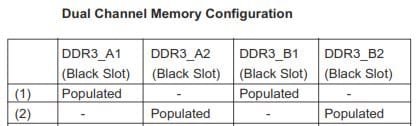
Just as a precaution, use the old and the new as a pair. In other words, fist 8G (channel 1 & 2) = Old sticks and remaining 8G (channel 1 & 2) = New sticks

DDR3 A1 & B1 = Old sticks
DDR3 A2 & B2 = New sticks
 

Attachments

  • memory.JPG
    memory.JPG
    17.2 KB · Views: 32

My Computers My Computers

  • At a glance

    Windows 7 HP 64i5 6600K - 800MHz to 4200MHz4+4G GSkill DDR4 3000IG - Intel 530
    Computer type
    PC/Desktop
    Computer Manufacturer/Model Number
    custom build
    OS
    Windows 7 HP 64
    CPU
    i5 6600K - 800MHz to 4200MHz
    Motherboard
    GA-Z170-HD3P
    Memory
    4+4G GSkill DDR4 3000
    Graphics Card(s)
    IG - Intel 530
    Monitor(s) Displays
    Samsung 226BW
    Screen Resolution
    1680x1050
    Hard Drives
    (1) -1 SM951 – 128GB M.2 AHCI PCIe SSD drive for Windows 7 and Lubuntu
    (2) -1 WD SATA 3 - 1T for Data
    (3) -1 WD SATA 3 - 1T for backup
    PSU
    Thermaltake 450W TR2 gold
    Keyboard
    Old and good Chicony mechanical keyboard
    Mouse
    Logitech mX performance - 9 buttons (had to disable some)
    Internet Speed
    500Mb/s
    Browser
    Firefox 64
    Other Info
    TinyWall firewall
  • At a glance

    Windows 7 Proi7-4500U 800MHz to 3.0GHz(4+4)G DDR3 1600IG intel 4400 + NVIDIA GeForce GT 745M
    Computer type
    Laptop
    System Manufacturer/Model Number
    Asus Q550LF
    OS
    Windows 7 Pro
    CPU
    i7-4500U 800MHz to 3.0GHz
    Motherboard
    Asus Q550LF
    Memory
    (4+4)G DDR3 1600
    Graphics Card(s)
    IG intel 4400 + NVIDIA GeForce GT 745M
    Sound Card
    Realtek
    Monitor(s) Displays
    LG Display LP156WF4-SPH1
    Screen Resolution
    1920 x 1080
    Hard Drives
    BX500 120G SSD for Windows and programs +
    1T HDD for data
    Internet Speed
    500 Mb/s
    Browser
    Firefox
    Other Info
    TinyWall firewall
If the RAM is same brand and type and has the same chipsets being the only difference the color, I would say that there will be no issues.
Just as a precaution, use the old and the new as a pair. In other words, fist 8G (channel 1 & 2) = Old sticks and remaining 8G (channel 1 & 2) = New sticks

DDR3 A1 & B1 = Old sticks
DDR3 A2 & B2 = New sticks


Yes, that would be the plan, placing the 4 RAM sticks into corresponding paired slots.


What about any possible performance hit from having the RAM arranged like this? How noticeable is it?
 

My Computer My Computer

At a glance

Windows 7 Ultimate x64Intel Core i5-3570 CPU @ 3.40GHzCorsair Vengeance Low Profile 16GBSapphire NITRO+ Radeon RX 480 4GB
Computer type
PC/Desktop
Computer Manufacturer/Model Number
Custom
OS
Windows 7 Ultimate x64
CPU
Intel Core i5-3570 CPU @ 3.40GHz
Motherboard
ASRock Z75 Pro3
Memory
Corsair Vengeance Low Profile 16GB
Graphics Card(s)
Sapphire NITRO+ Radeon RX 480 4GB
Screen Resolution
1920x1080
Hard Drives
Crucial MX500 SSD (C:)
Western Digital 1TB (D:)
Western Digital 1TB (E:)
Western Digital 1TB (F:)
PSU
Corsair CX 550M (550W)
Case
Zalman Z9
Cooling
ARCTIC Freezer 34 eSports DUO Edition
Keyboard
Corsair K70 LUX RGB Rapidfire
Mouse
Logitech G502 Proteus Spectrum
Internet Speed
150/150
Antivirus
ESET NOD32 Antivirus
Browser
Mozilla Firefox Quantum 67.1 (64-bit)
As a normal user, I don't think you will ever use more than 8G. I've seen that you're using 6G and you've probably have a LOT of programs running on the background.

On my computer I have 8G and right now I'm using 2.0G with 4.9G available. 1G is for internal graphics.

I use Autocad and Flight simulator and never needed more memory.

About any possible performance hit from having more RAM depends on the game you intent to run.

If you don't have any SSD on your desktop and you want to do a huge performance upgrade, you should buy a small SSD (128G) to install Windows and programs and use the HDD for data. It will cost you around US$25.
I have one of this. So far so good. PNY CS900 120GB 2.5" SATA III INTERNAL Solid State Drive (SSD) - SSD7CS900-120-RB - Newegg.com
 

My Computers My Computers

  • At a glance

    Windows 7 HP 64i5 6600K - 800MHz to 4200MHz4+4G GSkill DDR4 3000IG - Intel 530
    Computer type
    PC/Desktop
    Computer Manufacturer/Model Number
    custom build
    OS
    Windows 7 HP 64
    CPU
    i5 6600K - 800MHz to 4200MHz
    Motherboard
    GA-Z170-HD3P
    Memory
    4+4G GSkill DDR4 3000
    Graphics Card(s)
    IG - Intel 530
    Monitor(s) Displays
    Samsung 226BW
    Screen Resolution
    1680x1050
    Hard Drives
    (1) -1 SM951 – 128GB M.2 AHCI PCIe SSD drive for Windows 7 and Lubuntu
    (2) -1 WD SATA 3 - 1T for Data
    (3) -1 WD SATA 3 - 1T for backup
    PSU
    Thermaltake 450W TR2 gold
    Keyboard
    Old and good Chicony mechanical keyboard
    Mouse
    Logitech mX performance - 9 buttons (had to disable some)
    Internet Speed
    500Mb/s
    Browser
    Firefox 64
    Other Info
    TinyWall firewall
  • At a glance

    Windows 7 Proi7-4500U 800MHz to 3.0GHz(4+4)G DDR3 1600IG intel 4400 + NVIDIA GeForce GT 745M
    Computer type
    Laptop
    System Manufacturer/Model Number
    Asus Q550LF
    OS
    Windows 7 Pro
    CPU
    i7-4500U 800MHz to 3.0GHz
    Motherboard
    Asus Q550LF
    Memory
    (4+4)G DDR3 1600
    Graphics Card(s)
    IG intel 4400 + NVIDIA GeForce GT 745M
    Sound Card
    Realtek
    Monitor(s) Displays
    LG Display LP156WF4-SPH1
    Screen Resolution
    1920 x 1080
    Hard Drives
    BX500 120G SSD for Windows and programs +
    1T HDD for data
    Internet Speed
    500 Mb/s
    Browser
    Firefox
    Other Info
    TinyWall firewall
So I decided to get the 16GB RAM. I know you said that you don't think I'll ever use more than 8GB, but I find myself multitasking more than ever, so I want to make sure I've got enough for that.


As for the SSD, that's something I've been considering for a while. I have my own questions about where to go with that, but I'll save that for another thread.


Thanks for the answers, both you and F22.
 

My Computer My Computer

At a glance

Windows 7 Ultimate x64Intel Core i5-3570 CPU @ 3.40GHzCorsair Vengeance Low Profile 16GBSapphire NITRO+ Radeon RX 480 4GB
Computer type
PC/Desktop
Computer Manufacturer/Model Number
Custom
OS
Windows 7 Ultimate x64
CPU
Intel Core i5-3570 CPU @ 3.40GHz
Motherboard
ASRock Z75 Pro3
Memory
Corsair Vengeance Low Profile 16GB
Graphics Card(s)
Sapphire NITRO+ Radeon RX 480 4GB
Screen Resolution
1920x1080
Hard Drives
Crucial MX500 SSD (C:)
Western Digital 1TB (D:)
Western Digital 1TB (E:)
Western Digital 1TB (F:)
PSU
Corsair CX 550M (550W)
Case
Zalman Z9
Cooling
ARCTIC Freezer 34 eSports DUO Edition
Keyboard
Corsair K70 LUX RGB Rapidfire
Mouse
Logitech G502 Proteus Spectrum
Internet Speed
150/150
Antivirus
ESET NOD32 Antivirus
Browser
Mozilla Firefox Quantum 67.1 (64-bit)
Back
Top